


WP Beiträge anzeigen
This plugin is only receiving security updates at this time. Check out our GenerateBlocks plugin for a more modern solution.

Betrachten Sie eine Alternative
WP Show Posts shows warning signs in 2026 — compare the alternatives below before installing. It runs on 60K+ sites, is rated 4.7/5 and was last updated 3 years ago, and scores 36/100 on our health check.
- Bewährt im Maßstab auf 60k + aktiven Standorten
- Loved by users — 4.7/5 from 80 reviews
- Momentum — downloads up 87.5% vs the previous 30 days
- Kein Update in 2 Jahren
- Nur getestet bis WordPress 6.1 (letzt ist 7.1)
Wie stapelt es sich?
Side-by-side bei Installationen, Updates, Bewertungen und SupportTägliche Downloads
Download-Spitzen folgen normalerweise einer neuen Version - jede Website, die automatisch aktualisiert wird, gilt als Download.
Ranglisten
Where WP Show Posts stands todayWordPress.org Ranglisten suchen
Live-Position in der Plugin-Suche, Top 100| Stichwort | Position |
|---|---|
| display posts shortcode | >100 |
| Galerie | >100 |
| portfolio | >100 |
| post columns | >100 |
| show posts | >100 |
Versionsübernahme
Anteil aktiver Sites pro Release.
Bewertungsaufschlüsselung
★★★★★★★★★★ 4.7 from 80 reviews
About WP Show Posts
From the official readme · v1.1.6Beschreibung
Note
This plugin is only receiving security updates at this time. Check out our GenerateBlocks plugin for a more modern solution.
WP Show Posts allows you to display posts anywhere on your website using an easy to use shortcode.
You can pull posts from any post type like WooCommerce, Easy Digital Downloads etc..
This plugin works with any theme.
Here are the features in the free version:
Beiträge
- Post type
- Taxonomy
- Bedingungen
- Posts per page
- Pagination
Spalten
- Spalten
- Columns gutter
Bilder
- Show images
- Image width
- Image height
- Image alignment
- Image location
Inhalt
- Content type (excerpt or full post)
- Excerpt length
- Include title
- Read more text
- Read more button class
Meta
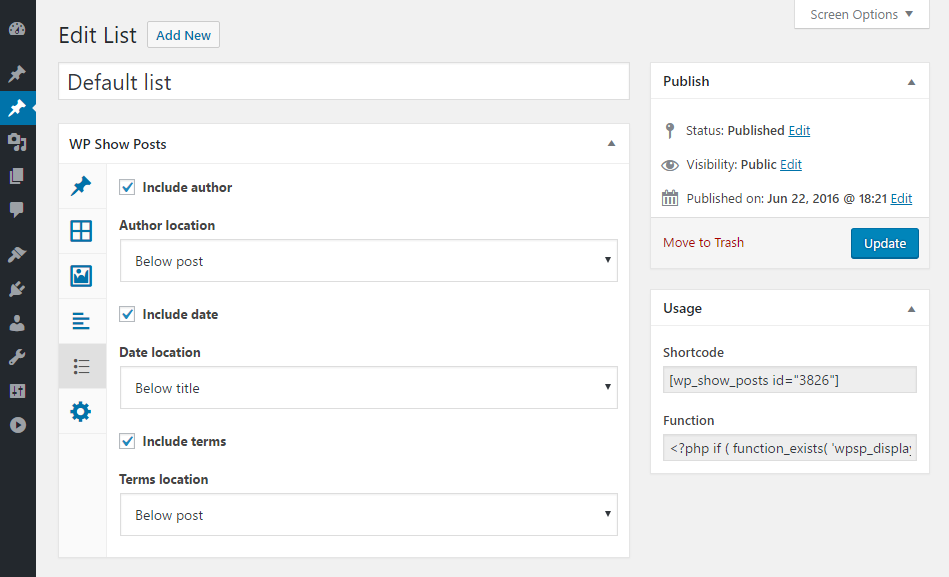
- Include author
- Author location
- Include date
- Date location
- Include terms
- Terms location
More settings
- Author ID
- Exclude current
- Post ID
- Exclude post ID
- Ignore sticky posts
- Offset
- Bestellen
- Order by
- Status
- Meta key
- Meta value
- Tax operator
- No results message
Our *Pro* version has these features
Beiträge
- AJAX pagination
Spalten
- Masonry
- Featured post
- Background color
- Background color hover
- Border color
- Border color hover
Bilder
- Image overlay color
- Image overlay icon
- Image hover effect
- Image lightbox
- Image lightbox gallery
Inhalt
- Read more style
- Read more color
- Content link color
- Content link color hover
- Content text color
- Title color
- Title color hover
Meta
- Meta color
- Meta color hover
Sozial-
- Twitter color + hover
- Facebook color + hover
- Google+
- Google+ color + hover
- Pinterest color + hover
- Love it
- Alignment
Check out GeneratePress, our awesome WordPress theme! (https://wordpress.org/themes/generatepress)
Installation
There’s two ways to install WP Show Posts.
- Go to “Plugins > Add New” in your Dashboard and search for: WP Show Posts
- Download the .zip from WordPress.org, and upload the folder to the
/wp-content/plugins/directory via FTP.
In most cases, #1 will work fine and is way easier.
Änderungsprotokoll
New: Button class option Fix: Duplicate post classes Fix: Post classes PHP notice in some themes Fix: PHP 7.2 PHP warning while editing lists Tweak: Pass $settings to wpsp_wrapper_atts filter Tweak: Remove font-size and line-height CSS (allow themes to handle it)
1.1.6
- Security: Add capability checks to AJAX functions
1.1.5
- Security: Add user capability check for post status
1.1.4
- Security: Improve escaping of settings that display HTML
- Tweak: Add wpsp_query_args filter
1.1.3
- New: Button class option
- Fix: Duplicate post classes
- Fix: Post classes PHP notice in some themes
- Fix: PHP 7.2 PHP warning while editing lists
- Tweak: Pass $settings to wpsp_wrapper_atts filter
- Tweak: Remove font-size and line-height CSS (allow themes to handle it)
1.1.2
- Fix: Performance issue dealing with lots of terms in list admin
- Fix: Post class clashes with GP Premium
- Tweak: Allow name in shortcode instead of ID
- Tweak: Use theme defined font size for title elements (removes the default 30px)
1.1.1
- Fix: Fix image hover effects in WPSP Pro
Screenshots
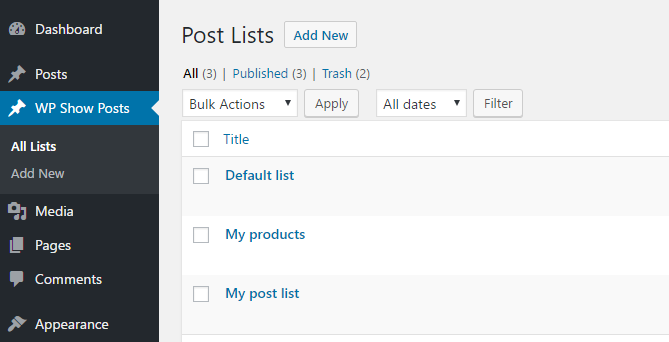



Für Entwickler
Ist das dein Plugin? Zeigen Sie die Zahlen.
Fügen Sie Ihrer Website, Docs oder GitHub Readme ein Live-Badge hinzu. Es wird von selbst aktualisiert - kein Konto erforderlich.
Best WP Show Posts alternatives
All display posts shortcode plugins →| Rang | Plugin | Aktive Installationen |
|---|---|---|
| 2 |
 Easy Timeline
Add a timeline to your website using a simple shortcode. |
<10 |
Fragen und Antworten
WP Show Posts: quick answers
Gerade Antworten, gezogen von Live WordPress.org Daten.
Quelle: WordPress.org
Is WP Show Posts free?
Yes. WP Show Posts is free to download and use from the official WordPress.org plugin directory.
Is WP Show Posts safe to use in 2026?
WP Show Posts shows warning signs in 2026 — compare the alternatives below before installing. It runs on 60K+ sites, is rated 4.7/5 and was last updated 3 years ago, and scores 36/100 on our health check.
How many websites use WP Show Posts?
WP Show Posts is active on 60K+ WordPress websites and has been downloaded 618,718 times since it launched in July 2016. It was downloaded 3,556 times in the last 30 days.
Does WP Show Posts work with WordPress 7.1?
WP Show Posts is officially tested up to WordPress 6.1.17, while the latest release is 7.1.5. It may still work, but try it on a staging site first.
When was WP Show Posts last updated?
The latest version, 1.1.6, was released on April 16, 2024 (3 years ago).
Who makes WP Show Posts?
WP Show Posts is developed and maintained by Tom.
What are the best alternatives to WP Show Posts?
The most popular alternatives to WP Show Posts are Easy Timeline (<10 installs).
Angetrieben von PageForge
Eine Vorlage und eine Tabelle. Eine echte Seite für jede Suche.
PageForge Verwandelt jede Zeile eines CSV in eine WordPress-Seite mit eigenem Titel, URL, SEO Felder und Schema entworfen. Kostenlos auf WordPress.org.
- CSV und XLSX, plus Google Sheets auf Beruf und Unternehmen
- seinen eigenen Titel, URL, SEO Felder und Schema für jede Seite
- Arbeitet mit dem Blockeditor, Elementor, Divi und Avada
- Kostenlos auf WordPress.org, keine Kreditkarte