


WP-Phanfare
This WordPress plugin integrates your Phanfare albums and images into your Posts and Pages on your WordPress blog.

Betrachten Sie eine Alternative
WP-Phanfare shows warning signs in 2026 — compare the alternatives below before installing. It runs on 10+ sites and was last updated 14 years ago, and scores 23/100 on our health check.
- Kleine Benutzerbasis (10+ aktive Installationen)
- Bisher sehr wenige Bewertungen
- No update in 14 years
- Only tested up to WordPress 3.4 (latest is 7.1)
Wie stapelt es sich?
Side-by-side bei Installationen, Updates, Bewertungen und Support



Tägliche Downloads
Download-Spitzen folgen normalerweise einer neuen Version - jede Website, die automatisch aktualisiert wird, gilt als Download.
Ranglisten
Where WP-Phanfare stands todayWordPress.org Ranglisten suchen
Live-Position in der Plugin-Suche, Top 100| Stichwort | Position |
|---|---|
| albums | >100 |
| galleries | >100 |
| Phanfare | #1 |
| photos | >100 |
Versionsübernahme
Anteil aktiver Sites pro Release.
About WP-Phanfare
From the official readme · v1.3.2Beschreibung
WP-Phanfare integrates your Phanfare albums and images into your Posts and Pages on your WordPress blog. Phanfare is a popular online Photo sharing website at http://www.Phanfare.com/.
Visit the WP-Phanfare homepage for more information on how to incorporate the plugin into your blog.
Installation
WP-Phanfare plugin depends on the following WordPress Plugins
- SimplePie Core (at least V1.1.1)
- jQuery LightBox (at least V0.9)
-
Download the plugin archive and expand it
-
Place the ‘wp-phanfare’ folder into your wp-content/plugins/ directory. Your folder structure should look like this:
- wp-content/plugins/wp-phanfare/wp-phanfare.php
- wp-content/plugins/wp-phanfare/wp-phanfare.js
- and the readme.txt and various screenshot-#.jpg images
- Go to the Plugins page in your WordPress Administration area and click ‘Activate’ for WP-Phanfare.
NOTE: If you have installed a previous version of WP-Phanfare in the wp-content/plugins/ directory, please delete it before installing this version of WP-Phanfare.
Verwendung
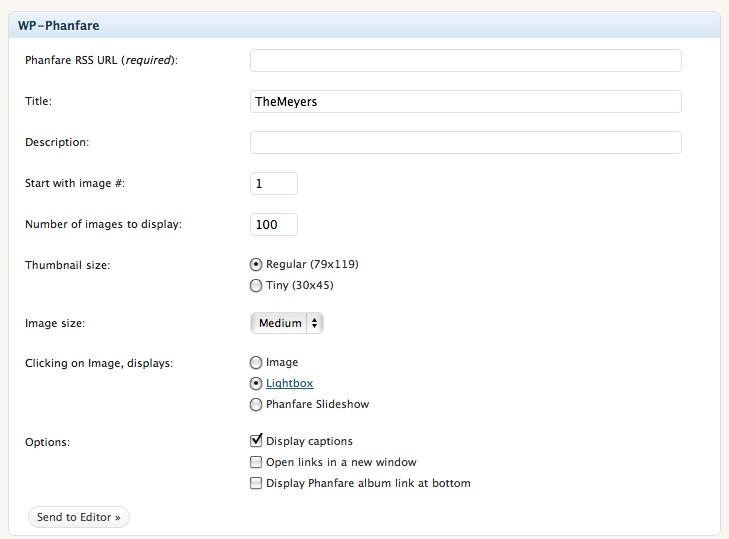
WP-Phanfare installs a new option in the Post and Page edit subpanel. Fill out the form with information about your Phanfare gallery:
-
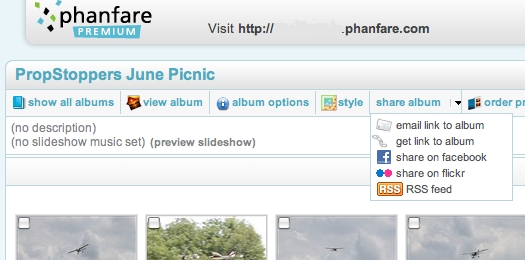
Phanfare RSS URL – the URL to your Phanfare album RSS feed.
When using the Phanfare Web Client, Edit the Album, and click on Share Album, then RSS Feed -
Title (optional) – a title to be displayed above the album thumbnails.
-
Description (optional) – a description of the album to be displayed below the title and above the album thumbnails.
-
Start at image #: the index from which your album will begin displaying thumbnails.
-
Number of images to display: the number of images to display from the album.
-
Thumbnail size: choose between the tiny 100×100 or regular 150×150 sized thumbnails.
-
Image size: the size of the image to display when the viewer clicks on a thumbnail.
-
Clicking on Image, Displays: where the browser will go when the viewer clicks on a thumbnail. Choices are:
* The Phanfare album page
* The image file itself
* Display your image using jQuery Lightbox
* Any page on your WordPress blog (not yet)
- Options: Configure additional options for your Phanfare album
Click on the Send to Editor button to insert the WP-Phanfare shortcode into your post.
Changing Defaults
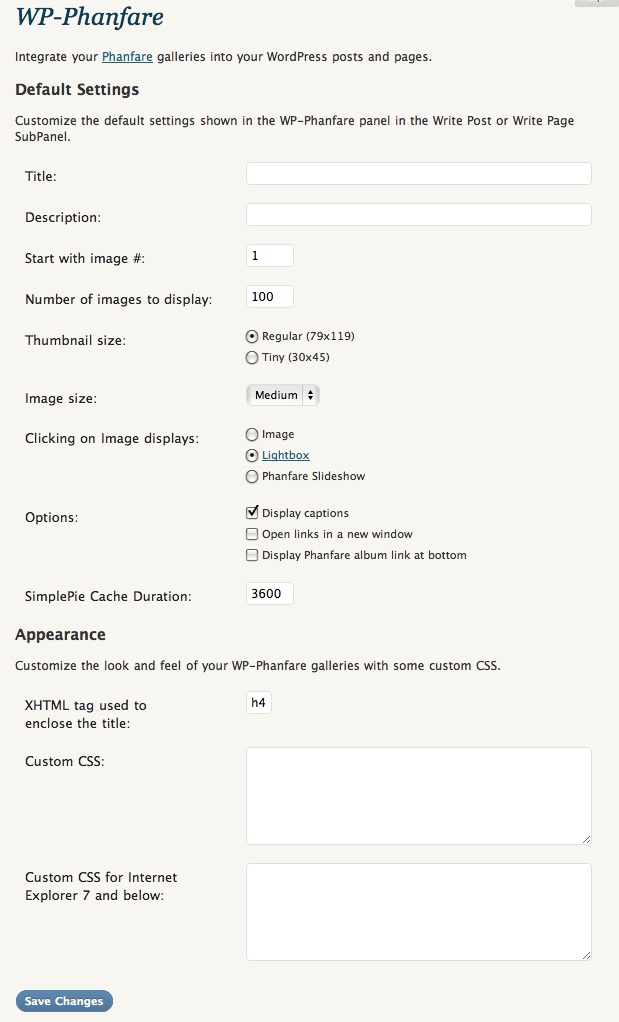
In the WordPress Administration area, click Settings->WP-Phanfare. On this page, you can adjust the default settings shown in the WP-Phanfare options panel when editing a Post or Page. You can also add your own custom CSS by entering CSS styles on this page.
Änderungsprotokoll
WP-Phanfare link wrong in readme, fixed.
future
- Expose the cache directory location in the Settings panel
- Allow for customization of optional text at bottom of thumbnail display
- (harder, but possible) Preload lightbox slideshow with all Feed images, even if the User only chooses to display a few thumbnails
- Allow for customization of thumbnail size…
1.3.2
- WP-Phanfare link wrong in readme, fixed.
1.3.1
- Make sure readme file is also updated
1.3.0
- Upgraded plugin for new WordPress Plugin support model.
1.2.18
- Wow, embarrassing, I am still learning the proper use of svn
1.2.17
- Undo, last change, fixup order in readme.txt, trying to get new version to showup on wordpress plugin site
Screenshots
Für Entwickler
Ist das dein Plugin? Zeigen Sie die Zahlen.
Fügen Sie Ihrer Website, Docs oder GitHub Readme ein Live-Badge hinzu. Es wird von selbst aktualisiert - kein Konto erforderlich.
Best WP-Phanfare alternatives
All albums plugins →




Fragen und Antworten
WP-Phanfare: quick answers
Gerade Antworten, gezogen von Live WordPress.org Daten.
Quelle: WordPress.org
Is WP-Phanfare free?
Yes. WP-Phanfare is free to download and use from the official WordPress.org plugin directory.
Is WP-Phanfare safe to use in 2026?
WP-Phanfare shows warning signs in 2026 — compare the alternatives below before installing. It runs on 10+ sites and was last updated 14 years ago, and scores 23/100 on our health check.
How many websites use WP-Phanfare?
WP-Phanfare is active on 10+ WordPress websites and has been downloaded 4,826 times since it launched in July 2009. It was downloaded 58 times in the last 30 days.
Does WP-Phanfare work with WordPress 7.1?
WP-Phanfare is officially tested up to WordPress 3.4.2, while the latest release is 7.1.5. It may still work, but try it on a staging site first.
When was WP-Phanfare last updated?
The latest version, 1.3.2, was released on October 17, 2012 (14 years ago).
Who makes WP-Phanfare?
WP-Phanfare is developed and maintained by meyercr.
What are the best alternatives to WP-Phanfare?
The most popular alternatives to WP-Phanfare are Envira Gallery (100K+ installs), RPS Image Gallery (700+ installs) and Gallery for Immich (100+ installs).
Angetrieben von PageForge
Eine Vorlage und eine Tabelle. Eine echte Seite für jede Suche.
PageForge Verwandelt jede Zeile eines CSV in eine WordPress-Seite mit eigenem Titel, URL, SEO Felder und Schema entworfen. Kostenlos auf WordPress.org.
- CSV und XLSX, plus Google Sheets auf Beruf und Unternehmen
- seinen eigenen Titel, URL, SEO Felder und Schema für jede Seite
- Arbeitet mit dem Blockeditor, Elementor, Divi und Avada
- Kostenlos auf WordPress.org, keine Kreditkarte