


WP Go Maps – Google Map, OpenStreetMap, Leaflet & Store Locator
The easiest to use WordPress map plugin! Create a custom map, map block, store locator or map widget with high quality markers.

Sichere Auswahl
Yes — WP Go Maps is a safe, well-maintained plugin to use in 2026. It runs on 300K+ sites, is rated 4.8/5 and was last updated 1 day ago, and scores 96/100 on our health check.
- Bewährt auf 300.000 aktiven Standorten
- Loved by users — 4.8/5 from 3,067 reviews
- Aktiv entwickelt - letztes Update vor 1 Tag
- Getestet mit dem neuesten WordPress (7.1)
- Momentum — downloads up 146.1% vs the previous 30 days
Wie stapelt es sich?
Side-by-side bei Installationen, Updates, Bewertungen und Support



Tägliche Downloads
Download-Spitzen folgen normalerweise einer neuen Version - jede Website, die automatisch aktualisiert wird, gilt als Download.
Ranglisten
Where WP Go Maps stands todayWordPress.org Ranglisten suchen
Live-Position in der Plugin-Suche, Top 100| Stichwort | Position |
|---|---|
| Google Maps | #2 |
| leaflet map | #4 |
| map | #2 |
| maps | #1 |
| Store locator | #3 |
Versionsübernahme
Anteil aktiver Sites pro Release.
Bewertungsaufschlüsselung
★★★★★★★★★★ 4.8 from 3,067 reviews
About WP Go Maps
From the official readme · v10.2.02Beschreibung
The easiest to use Google Maps, Leaflet and Open Layers Map Plugin (including a Map Block)!
Formerly WP Google Maps.
Add a customized Google map, map block or Store Locator to your WordPress posts and/or pages quickly and easily with the supplied shortcode. No fuss. No iFrames and super easy to use! Perfect for contact page maps, routes, maps showing delivery areas and any other use you can think of!
While the free version of WP Go Maps allows you to create a Google map with as many markers as you like, the Pro version allows you to do so much more!
Create Elementor Maps, map blocks and map widgets easily with our WP Go Maps Elementor map block integration, straight out the box!
Do you use the classic editor? We still support map widgets for classic WordPress installations. No need to compromise, the map widget includes the same functionality as our map blocks!
The WP Go Maps Pro Version version allows you create custom Google maps with high quality markers containing locations, descriptions, images, categories, links and directions.
Lite Version (Free)
- The most popular WordPress map plugin
- Choose between Google Maps, Leaflet, Azure Maps, Stadia Maps, Maptiler, LocationIQ, Zero Cost or Open Layers Maps
- Super easy to use, no coding required!
- Create as many map markers as you need by simply typing in the address
- Responsive maps
- Elementor Map block
- Edit your map markers with the click of a button
- 9 popular map themes to choose from
- Create or add your own map theme
- Drag map markers to an exact location
- Add a map block to your page
- Google Maps Streetview supported
- UTF-8 character support
- Map widget functionality
- Full screen map functionality
- Support for localization
- Choose from four Google maps types: roadmap, terrain, satellite and hybrid
- Define your own width, height and zoom level for your map
- Add animations to your map markers!
- Store locator functionality
- Restrict a store locator search by country
- Add Polygons to your Map
- Add Polylines / Routes to your map
- Create a map in less than a 30 seconds!
- Right click to add a marker to your map
- No advertising or links
- Google Maps Autocomplete
- Google Maps Transport Layer
- Set the max zoom level for your map
- Serve your map marker data via your database or an XML file
- Compatible with caching plugins
- Compatible with Cloudfare
- Latest Google Maps API
- Latest OpenLayers API
- Latest Leaflet API
Professional Edition
- Create multiple maps!
- Allow your visitors to get directions to your markers.
- Add descriptions, links and images to your map markers.
- Add categories to your map markers
- Filter markers by category
- Mashup multiple maps
- Advanced map blocks
- Store locator map block
- Directions map block
- Infowindow block
- Map block (filter)
- Add different marker icons, or your own icons to make your map really stand out!
- List your map markers in the four ways; basic list, basic table, carousel, advanced table
- Allow visitors to use their map location as the starting or ending point for the directions
- Choose between the Default Google Maps Infowindow and the new Modern Infowindow
- Export/Import your markers to a CSV file for quick editing.
- Link Fusion tables to your Google Maps
- Show your visitor’s location on the Map
- Import KML/KMZ files to your map
- More advanced options for the Store Locator
- Allow users to use their map location for the store locator
- Store locator search by category
- Hide all map markers until a store locator search is done
- Move your marker list inside the map window
- Multiple map widget functionality
- Add retina-ready map marker icons
- WordPress Network friendly
- Get the WP Go Maps Professional Edition
Übersetzungen
Get a free copy of the WP Go Maps Pro version in exchange for translating our plugin!
- English – default
- Russian (Alexandra Bondareva)
- Deutsch
- French (Arnaud Thomas)
- Polish (Michal Kotnowski)
- Finnish (Johanna Joutti)
- Dutch (Jan Wind)
- Hebrew (Gal Dotan)
- Danish (Patrick Jepsen)
- Italian (Tommaso Mori & Massimo Bregani)
- Croatian (Sven Kopun)
- Greek (Konstantinos Koukoulakis)
- Romanian (Cosmin Stroe)
- Spanish (Carmelo Villegas Cruz)
- Portuguese (Jose Antonio Ribeiro)
- Brazilian Portuguese (Roberto Costa)
- Turkish (Suha Karalar)
- Swedish (Martin Sleipner)
- Bulgarian (Lyubomir Kolev)
- Indonesian (Neno)
- Lithuanian
- Czechoslovakian^
^Language file needs to be updated
Demos
WP Go Maps Lite
- Basic Google Map with Markers
- Store Locator
- Polygons & Polyines/Routes
- Google Maps Transit Layer
- Google Maps Traffic Layer
- Google Maps Bicycle Layer
WP Go Maps Pro
- Google map with advanced markers
- Marker listings – Simple
- Marker listings – Advanced
- Google Maps Directions
- Responsive Map
- Marker Categories (Filtering)
- Advanced Store Locator
- WP Go Maps Editor (Back-end Screenshots)
- Visitor Generated Markers – (WP Go Maps VGM Add-on)
- Custom Map Styling (WP Go Maps Gold Add-on)
Dokumentation
- Installing WP Go Maps
- Creating your first map
- Adding a map block to your page or post
- Google Maps mashup (Pro)
- Exporting and importing map markers (Pro)
- Changing the Google Maps language
- Create a google map and marker using custom fields (Pro)
- View all documentation
Störungssuche
- My Google Map is not showing on my website
- My markers are not showing
- View all troubleshooting articles
Externe Dienste
Go Tiles by WP Go Maps
Go Tiles by WP Go Maps, our own map tile service, draws the map background for maps that use the Go Tiles engine (the default for new installs; you can switch engine at any time under Maps > Settings > Map Engine). When a page with a Go Tiles map loads, the visitor’s browser requests map images from https://tiles.wpgmaps.com, sending the visitor’s IP address, browser details and the address of the page showing the map, which is used to apply each site’s free monthly allowance. If a Go Tiles key is set under Maps > Settings (optional; WP Go Maps Pro fills it in once you claim the allowance included with your licence), the key is sent with each map image request to apply that allowance or pay-as-you-go usage. Nothing is sent from your web server. Go Tiles maps are built from OpenStreetMap data, © OpenStreetMap contributors.
- What data is sent, and how it is used and stored: https://www.wpgmaps.com/go-tiles/privacy/#data-sent
- Go Tiles terms of service: https://www.wpgmaps.com/go-tiles/terms/
- Go Tiles privacy policy: https://www.wpgmaps.com/go-tiles/privacy/
WP Go Maps setup and address suggestion service
Some admin-only features use a service run by WP Go Maps (wpgmaps.us-3.evennode.com). Nothing is sent unless an administrator uses one of these features:
- Create a Google Maps API key for me (setup wizard): sends the site name, site address, email address, postal address, postal code and region entered in the form, so a Google Maps API key can be created for the site.
- Temporary Google Maps API key (setup wizard): your web server sends the site address and a site identifier generated by the plugin, so a temporary key can be issued while you set up your own.
-
Address suggestions in the map editor: while you type an address, your browser sends the text typed, the site’s domain, the site identifier and, if one is set, the site’s Google Maps API key, to return address suggestions.
-
WP Go Maps terms and conditions: https://www.wpgmaps.com/terms-conditions/
- WP Go Maps privacy policy: https://www.wpgmaps.com/privacy-policy/
WP Go Maps store and Stripe (Upgrade to Pro)
The Atlas Major map editor has an Upgrade to Pro button, shown to administrators of sites without the Pro add-on. Nothing is sent unless an administrator clicks it.
- Showing the plans: when the button is clicked, the administrator’s browser asks the WP Go Maps store at www.wpgmaps.com for the current Pro plans and prices. The request includes the browser’s IP address, which the store uses to show the right currency and any regional discount.
- Starting checkout: when the administrator chooses a plan and continues, the browser sends the store the chosen plan, the site address, the address of the editor page (to return to), which interface build is in use (for example Atlas Major), which button opened the checkout, and the WP Go Maps version. The store then opens a Stripe Checkout page in a new browser tab. Payment details are entered on Stripe’s page and never pass through your site or ours.
-
Completing the order: while the checkout tab is open, the browser asks the store whether the order is paid, using the checkout session ID, so the licence key and download link can be shown in the editor. The licence key is then saved in your site’s own WP Go Maps settings (it is not sent anywhere else), so the Pro add-on can use it once installed.
-
WP Go Maps terms and conditions: https://www.wpgmaps.com/terms-conditions/
- WP Go Maps privacy policy: https://www.wpgmaps.com/privacy-policy/
- Stripe privacy policy: https://stripe.com/privacy
- Stripe legal terms: https://stripe.com/legal
Google Maps Platform
When the Google Maps engine is selected, the visitor’s browser loads the Google Maps JavaScript API from maps.googleapis.com to display the map, sending the site’s Google Maps API key along with the usual browser data (IP address, user agent and the address of the page). Address search fields send the text typed to the Google Places API (places.googleapis.com) for suggestions.
- Google Maps Platform terms: https://cloud.google.com/maps-platform/terms
- Google privacy policy: https://policies.google.com/privacy
OpenStreetMap Nominatim (address lookups)
When a map engine other than Google Maps is used, addresses typed into the map editor or into a store locator search are converted to map coordinates using Nominatim. The request is sent from your web server to nominatim.openstreetmap.org and includes the address text and the address of your site. Results are cached on your site to reduce repeat requests.
- Nominatim usage policy: https://operations.osmfoundation.org/policies/nominatim/
- OpenStreetMap Foundation privacy policy: https://osmfoundation.org/wiki/Privacy_Policy
Map tile providers
For every map engine except Google Maps, the visitor’s browser loads the map images (tiles) directly from the provider used by the selected engine and map style. Each request includes the visitor’s IP address, the browser’s user agent, the address of the page showing the map, the map area being viewed and, for providers that need one, the site’s API key.
- OpenStreetMap (default Leaflet and OpenLayers style): https://operations.osmfoundation.org/policies/tiles/ and https://osmfoundation.org/wiki/Privacy_Policy
- OpenFreeMap (Zero Cost Mapping engine): https://openfreemap.org/tos/ and https://openfreemap.org/privacy/
- Microsoft Azure Maps: https://azure.microsoft.com/en-us/support/legal/ and https://www.microsoft.com/en-us/privacy/privacystatement
- Stadia Maps: https://stadiamaps.com/terms-of-service/ and https://stadiamaps.com/privacy-policy/
- MapTiler: https://www.maptiler.com/terms/ and https://www.maptiler.com/privacy-policy/
- LocationIQ: https://locationiq.com/tos and https://locationiq.com/privacy
- MapIron: https://mapiron.com/terms and https://mapiron.com/privacy
Other optional map styles you can choose in the settings (for example Thunderforest or CARTO) are loaded from those providers’ servers in the same way, under their own terms.
Open source libraries loaded from public CDNs
To display Leaflet and OpenLayers maps, the visitor’s browser loads open source mapping libraries from public content delivery networks: unpkg.com (Leaflet, MapLibre GL, Leaflet.draw and ol-mapbox-style) and cdn.jsdelivr.net (OpenLayers). For some site languages, marker listing tables also load a translation file from cdn.datatables.net. These requests include the visitor’s IP address and user agent.
- unpkg: https://unpkg.com
- jsDelivr terms and privacy policy: https://www.jsdelivr.com/terms and https://www.jsdelivr.com/terms/privacy-policy-jsdelivr-net
- DataTables: https://datatables.net/
Installation
First time WP Go Maps user
Thank you for choosing WP Go Maps! In order to create your Google map, simply activate the plugin and click on “Maps” in your left navigation menu.
Once the WP Go Maps page loads, set the options for your map (height, width, map type, zoom level etc) and then use your mouse to drag your Google map to your desired location and press the “Save map” button.
Copy and paste the shortcode into your post or page and WP Go Maps will automatically create the map on your page using the settings you chose above.
Adding your first map marker
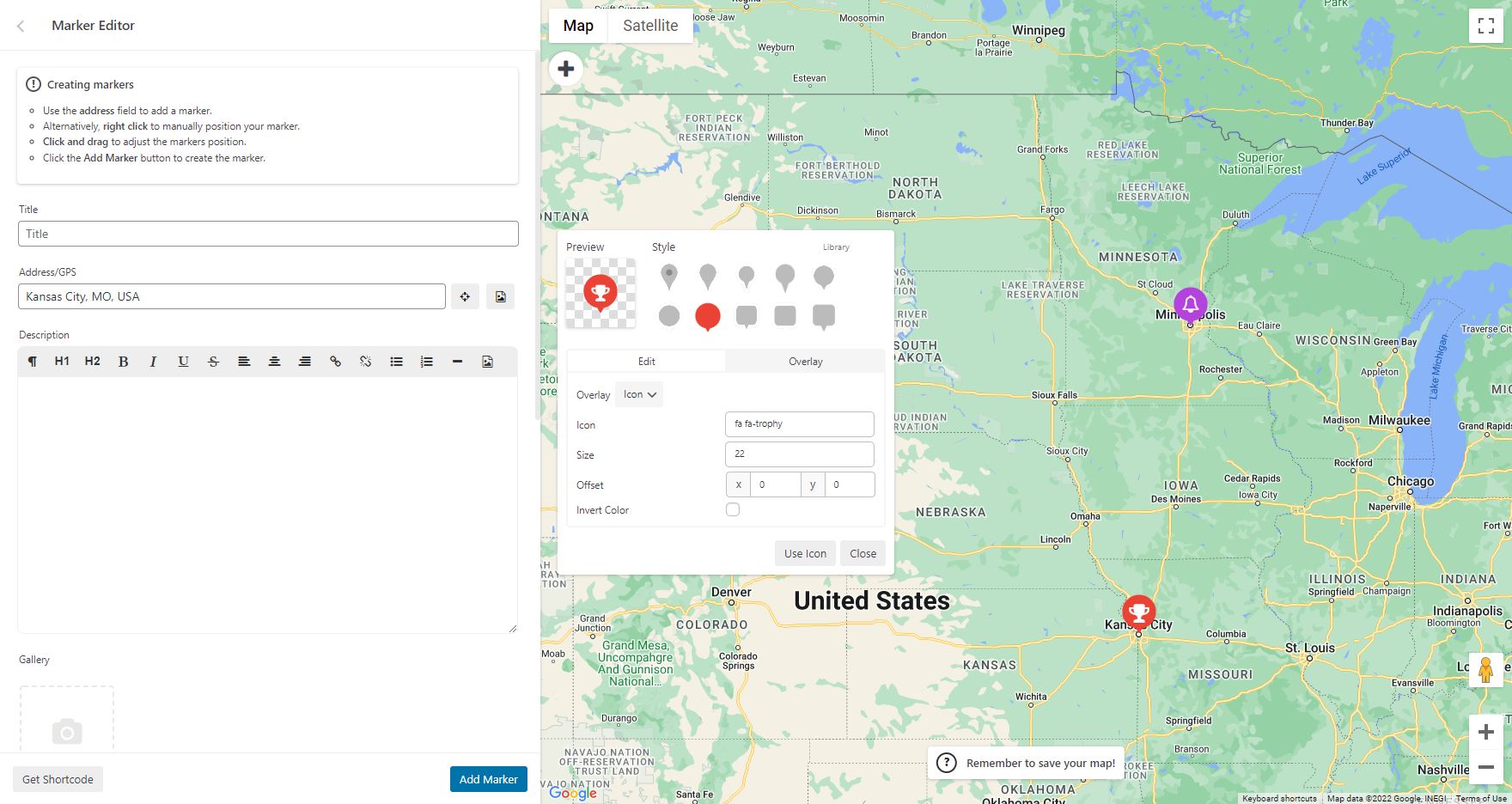
To add a marker to your Google map, scroll to below the map in your admin section and enter the address or GPS location in the Address input field. Click “Add Marker” and WP Go Maps will add your marker to the address you specified.
Setting up a Google Maps Store Locator
In order to make use of WP Go Maps Store Locator functionality, simply click on the “Store Locator” tab in the map creation page and select “Yes”
Änderungsprotokoll
Security update: please update to 10.2.02. Fixes a security issue in the REST API and a store locator listing issue.
10.2.02 – 2026-11-19
- Fixed issue where the Atlas Major marker list showed “&” in marker titles that contain “&”.
- Fixed issue where address suggestions showed the address’s formatting code (for example ) instead of plain text. This came from a 10.2.01 security change.
- Fixed issue where a Google map info window set to open on page load showed a blue focus outline.
- Fixed an issue where any visitor could make the site rebuild the plugin’s script files and readme from a link. Rebuilding now needs an administrator and a security token. Security issue, thanks to Christopher Miller.
- Fixed an issue where the developer mode cookie worked for any visitor, adding database queries to table responses and rebuilding scripts on map pages. It now only works for administrators. Security issue, thanks to Christopher Miller.
- Fixed an issue where a REST request that declared a different method (method override) could reach plugin actions through a public route. Every WP Go Maps route now refuses such requests, which also protects sites on older Pro versions. Security issue, thanks to Christopher Miller.
- Fixed issue where the first store locator search on a Google map did not update the marker listing, because the radius circle was drawn before the map was ready.
- Fixed issue where the Google Maps error handler stopped with an error when it was given an error object instead of a message.
- Fixed issue where custom image maps (Leaflet) opened at zoom level 3, with markers off screen, instead of at their saved start zoom.
- Fixed issue where closing a panel info window on an OpenLayers map logged an error in the browser console.
10.2.01 – 2026-11-18
- Added an optional Go Tiles key setting. A key adds the Go Tiles allowance included with WP Go Maps Pro, or pay-as-you-go tiles, once a site has used its free tiles for the month (Atlas Novus, Atlas Major).
- Added a pricing table below each map engine’s settings, showing the same details for every engine: free monthly usage, whether an API key is needed, commercial use, paid plans, cost per 1,000 map views and suitability for busy sites, with a link to the provider’s pricing page. Other engines also show a Switch to Go Tiles option (Atlas Novus, Atlas Major).
- Improved the Go Tiles monthly limit notice. It now says when the map resumes and offers to claim the Pro allowance, get more tiles, or choose a different map provider, and its text can be translated.
- Changed the Go Tiles free allowance to 15,000 map tiles a month on every site (about 750 map views), up from 10,000, and fixed the settings, which said 10,000 tiles was about 1,000 map views.
- Fixed issue where maps using Go Tiles or another Leaflet based engine showed nothing, instead of the GDPR consent notice, when consent is required before the map loads.
- Fixed an issue where a Pro licence key saved by the in-editor Pro checkout could be included in the settings sent to the browser before Pro was activated. Security issue, thanks to Christopher Miller.
- Fixed an issue where stored map settings and marker data could be turned into PHP objects when loaded (object injection). Security issue, thanks to Christopher Miller.
- Fixed an issue where anonymous requests could read unapproved markers through marker filters or feature routes. Security issue, thanks to Christopher Miller.
- Fixed an issue where anonymous requests or a map shortcode with a map ID of -1 could create empty maps. Security issue, thanks to Christopher Miller.
- Fixed an issue where anonymous visitors could list every map title through the admin map table. Security issue, thanks to Christopher Miller.
- Fixed an issue where address search results could be cached under a different address, and address suggestions showed search results as HTML. Address searches through the site are now also rate limited. Security issue, thanks to Christopher Miller.
- Fixed an issue where the remove duplicate markers tool and the create map page link could be triggered without a security token. Security issue, thanks to Christopher Miller.
- Fixed an issue where the map shortcode width and height accepted values other than CSS lengths. Security issue, thanks to Christopher Miller.
- Fixed an issue where address suggestions in the map editor and the Atlas Major marker list did not fully escape third-party data. Security issue, thanks to Christopher Miller.
- Fixed an issue where the in-editor Pro checkout could open a checkout address that was not https. Security issue, thanks to Christopher Miller.
10.2.00 – 2026-11-16
- Added Go Tiles by WP Go Maps, our own free map tile engine and now the first option in the map engine list. No API key needed: every site gets 10,000 free map tiles a month, in light and dark styles. Site admins are told inside the map if the monthly limit is reached.
- Changed new installs to use Go Tiles as the default map engine. Existing sites keep their current engine.
- Added an Upgrade to Pro button to the map editor, so Pro can be bought without leaving the plugin. Payment is taken on Stripe’s secure checkout page. Once paid, the editor shows the download link and saves the licence key on the site, so Pro is licensed as soon as it is activated (Atlas Major).
- Added an External services section to the readme describing each external service the plugin can use (Go Tiles, the WP Go Maps store and Stripe, Google Maps Platform, Nominatim, map tile providers, public CDNs and the WP Go Maps setup service), what data each receives and when.
- Fixed issue where the MapIron engine showed another product’s logo in the map engine settings.
- Improved the map editor’s missing API key notice so it offers to switch to Go Tiles instead of OpenLayers, and the engine switcher now suggests Go Tiles when the current engine has no key (Atlas Novus, Atlas Major).
- Fixed issue where the engine switcher, the missing API key notice and the Maps API error card overlapped each other in the map editor. They now stack one below the other (Atlas Novus, Atlas Major).
- Fixed issue where MapIron was missing from the map editor’s engine switcher (Atlas Novus, Atlas Major).
- Fixed issue where some Atlas Novus and Atlas Major layout rules for map controls, the map editor and the setup wizard did not apply to the MapIron engine.
- Fixed issue where the MapIron engine used the LocationIQ key and style settings in the map editor’s style panel, the tile preview and the engine switcher, instead of its own.
- Fixed issue where a LocationIQ key entered in the setup wizard was not saved.
- Fixed issue where a single marker with invalid coordinates (for example an address saved in the latitude field) stopped the remaining markers and the marker listing from loading. The marker is now skipped and a warning naming it is shown in the browser console.
- Fixed issue where clicking a marker on a Leaflet based map inside a scrolling area, such as the Atlas Major map editor’s live preview, scrolled the area instead of opening the marker, so the marker had to be clicked twice.
- Fixed issue where the Upgrade link on the Plugins page was labelled as Atlas Novus for sites using Atlas Major.
- Fixed an issue where the AJAX fallback for the REST API did not enforce each route’s allowed request methods, which could let a read-only route handle other requests. Security issue, thanks to Christopher Miller.
- Fixed an issue where a user with Contributor access could add markup to a post that ran a script in the browser of an administrator who previewed it. Security issue, thanks to Santh.
- Fixed issue where marker titles and descriptions could not be translated with WPML, so translated pages showed them in the default language. Translated values get the same sanitising as a saved marker. Thanks to the WPML compatibility team.
- Fixed issue where Leaflet info windows did not resize or move into view when content was added after opening, such as Pro galleries or Gold ratings.
- Fixed issue where opening a map last saved in Atlas Novus in the Atlas Major editor could reset its zoom limits to 0, so the map stayed fully zoomed out once saved (Atlas Major).
- Fixed issue where the legacy OpenLayers engine loaded a map style library built for the latest OpenLayers, which logged an error on every page. It now loads only with the latest OpenLayers engine.
- Fixed issue where the Google Maps logo in the map engine chooser did not load on some servers.
- Go Tiles is only offered when WP Go Maps Pro is 10.2.00 or later (or Pro is not installed), as older Pro versions cannot display it. Sites already set to Go Tiles with an older Pro see a notice asking to update Pro.
10.1.12 – 2026-11-13
- Fixed issue where Google maps could load without markers or listings when a consent plugin released the Google Maps API before the page had finished loading (regression in 10.1.11).
- Fixed issue where the Google Maps start-up script was cached under the WordPress version, so browsers could keep an outdated copy after a plugin update.
10.1.11 – 2026-11-12
- Fixed a stored cross-site scripting (XSS) issue where marker and shape title and link fields could store unsanitised HTML or script. Security issue.
- Fixed a stored cross-site scripting (XSS) issue where a Gutenberg block’s attributes could inject HTML or script into the page when the map or store locator block was rendered. Security issue, thanks to Khanh Nguyen (Patchstack).
- Fixed issue where approving a pending marker, or any partial marker save, could delete the marker’s image gallery.
- Fixed issue where polygon and point label text overlay labels could display in a serif font on some devices (such as iOS) because the generic sans-serif family was quoted. The label font now falls back correctly.
- Improved the Google Maps engine so maps start automatically once the Google Maps API becomes available after the page has loaded, for example when a consent plugin releases it, without requiring a page reload.
- Added MapIron as a built-in map engine preset for the Leaflet based engines, with the OpenStreetMap credit set automatically.
10.1.10 – 2026-09-28
- Fixed issue where the compressed marker ID buffer could be undersized for certain marker sets, causing the server to reject the request and marker searches to return no results. Thanks to Adamcengel
- Fixed issue where the compressed marker ID list could be corrupted when a large gap existed between filtered marker. Thanks to Mikael Føyen
- Fixed issue where event dispatcher may prevent event bubbling if an error occurs within the trigger call. Thanks to Mikael Føyen
- Updated built-in notices to disclose Pro V8 EOL to prevent confusion
Screenshots




Für Entwickler
Ist das dein Plugin? Zeigen Sie die Zahlen.
Fügen Sie Ihrer Website, Docs oder GitHub Readme ein Live-Badge hinzu. Es wird von selbst aktualisiert - kein Konto erforderlich.
Best WP Go Maps alternatives
All Google Maps plugins →



Fragen und Antworten
WP Go Maps: quick answers
Gerade Antworten, gezogen von Live WordPress.org Daten.
Quelle: WordPress.org
Is WP Go Maps free?
Yes. WP Go Maps is free to download and use from the official WordPress.org plugin directory.
Is WP Go Maps safe to use in 2026?
Yes — WP Go Maps is a safe, well-maintained plugin to use in 2026. It runs on 300K+ sites, is rated 4.8/5 and was last updated 1 day ago, and scores 96/100 on our health check.
How many websites use WP Go Maps?
WP Go Maps is active on 300K+ WordPress websites and has been downloaded 29,187,946 times since it launched in January 2012. It was downloaded 511,087 times in the last 30 days.
Does WP Go Maps work with WordPress 7.1?
Yes. The developer has tested WP Go Maps up to WordPress 7.1.5, the latest release. It requires WordPress 6.0 or newer.
What PHP version does WP Go Maps need?
WP Go Maps requires PHP 7.0 or higher. Most hosts run PHP 8.x today, so it works on any modern WordPress hosting.
When was WP Go Maps last updated?
The latest version, 10.2.02, was released on November 19, 2026 (1 day ago).
Who makes WP Go Maps?
WP Go Maps is developed and maintained by WPGMaps.
What are the best alternatives to WP Go Maps?
The most popular alternatives to WP Go Maps are iframe (60K+ installs), WP Maps (60K+ installs) and WP Store Locator (40K+ installs).
Angetrieben von PageForge
Eine Vorlage und eine Tabelle. Eine echte Seite für jede Suche.
PageForge Verwandelt jede Zeile eines CSV in eine WordPress-Seite mit eigenem Titel, URL, SEO Felder und Schema entworfen. Kostenlos auf WordPress.org.
- CSV und XLSX, plus Google Sheets auf Beruf und Unternehmen
- seinen eigenen Titel, URL, SEO Felder und Schema für jede Seite
- Arbeitet mit dem Blockeditor, Elementor, Divi und Avada
- Kostenlos auf WordPress.org, keine Kreditkarte