


WP-E-Mail-Vorlage
Applies a responsive, customizable, optimized HTML email template to every email sent from your WordPress site including plugin generated emails.

Solide Wahl
WP Email Template is a solid plugin choice in 2026, with a few things worth checking first. It runs on 2K+ sites, is rated 3.1/5 and was last updated 5 months ago, and scores 64/100 on our health check.
- Momentum — downloads up 41.2% vs the previous 30 days
- Mixed reviews — 3.1/5 from 35 ratings
Wie stapelt es sich?
Side-by-side bei Installationen, Updates, Bewertungen und Support



Tägliche Downloads
Download-Spitzen folgen normalerweise einer neuen Version - jede Website, die automatisch aktualisiert wird, gilt als Download.
Ranglisten
Where WP Email Template stands todayWordPress.org Ranglisten suchen
Live-Position in der Plugin-Suche, Top 100| Stichwort | Position |
|---|---|
| contact | >100 |
| #59 | |
| E-Mail-Vorlage | #8 |
| wordpress email | #40 |
| wordpress email template | #14 |
Versionsübernahme
Anteil aktiver Sites pro Release.
Bewertungsaufschlüsselung
★★★★★★★★★★ 3.1 from 35 reviews
About WP Email Template
From the official readme · v2.8.7Beschreibung
WP Email Template 2 things – beautifully
-
Applies a responsive, customizable, optimized HTML email template to every email sent from your WordPress site including plugin generated emails.
-
Gets your beautiful / professional emails delivered. Easily Configure advanced email sending providers with any of these supported providers
- SMTP via your server
- Gmail SMTP
- Mandrill (API or SMTP)
- SparkPost (HTTP API or SMTP API)
EMAIL TEMPLATE
The plugin applies a HTML template to email sent from your WordPress site. The Template is optimized to show your HTML emails perfectly in the10 most popular email browsers.
- Apple iOS-Geräte
- MS Outlook
- Hotmail
- Apple Mail
- Ja! Versenden
- Google Google Mail
- Android-Geräte
- Windows Live Desktop
- Mozilla Thunderbird
TEMPLATE EDIT OPTIONS
- Option to Turn the Template ON | OFF. OFF to just use the plugin use to set up wp email sender without using the template (see below).
- Dynamic Template Width – admin can edit the 600px default width of the Template.
- Template Background colour selector
- Background Pattern ON | OFF setting.
- Upload and position Email Template Header image
- Header Image container background, border, and padding settings.
- Footer – add email template custom footer content via the WordPress editor.
- Follow us on – add links to social media site where users can follow you.
- Many more dynamic style options available in the Pro version.
EMAIL SENDING OPTIONS
The biggest issue users have are:
- Email Spammers make successful email delivery a very complicated and specialized function.
- WordPress by default uses your web hosts local mail server to send all WordPress and plugin generated emails.
- Emails sent from a web host local mail server have poor delivery rates because they have very little or no reputation.
- Configuring any type of email delivery provider will improve email delivery rates.
Every different Email Provider requires another plugin to configure. For example here are just a few of the available choices.
- Send Email via SMTP – WP SMTP Mail, WP SMPT, Easy WP SMTP
- Send Email via Gmail SMTP – SendPress Lite and any SMTP plugin if you know what you are doing.
- Send Email via Mandrill – wpMandrill
- Send Email via SparkPost – SparkPost
- Send via WordPress default ‘local mail server’ if using GoDaddy Hosting – Auto Config WordPress default Email Sending – SendPress Lite
At a3rev we want users to be able to
- Create a Beautiful / Professional HTML Email template.
- Auto apply that template to all emails sent from WordPress and installed plugins.
- Easily configure a sending provider to get those emails delivered.
- Do it all with one plugin, quickly and easily.
That is why we have added the Email Sending Provider Configuration Options so you can do all of that with just one plugin – WP Email Template.
EMAIL FROM PLUGINS
WP Email Template will not work with any plugin that:
- Applies it’s own HTML Email Template (WP Email Template is still applied but the 2 together will look bad).
- Send it’s emails via the php() function. WP Email Template is applied to all mail that goes through wp_mail()
Some of the better known plugins of the 1,000’s of plugins that WP Email Template works beautifully with.
- Gravity Forms – see the screen shots – looks sensational with the default Gravity style.
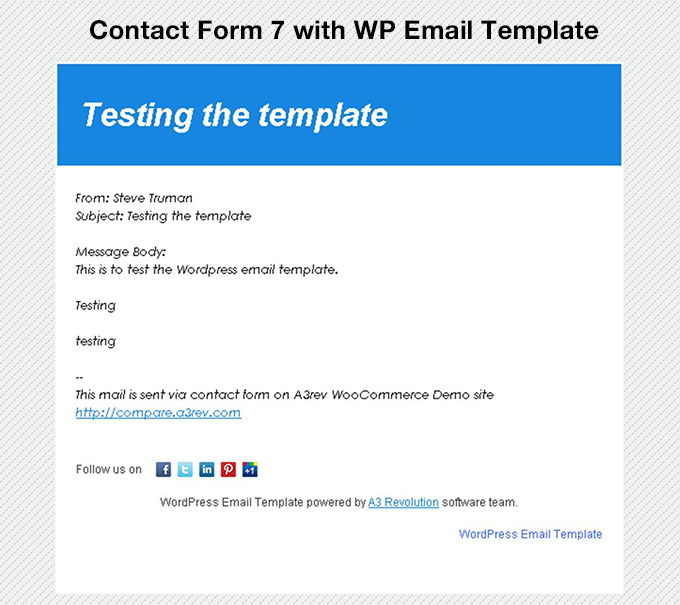
- Contact Form 7 – see the screenshots
- Formidable Forms – both Lite and Pro Versions of that plugin
- WooCommerce – Version 2.3.9 and backward compatible to version 2.1.0. By default the plugin ignores WooCommerce email output – but you can choose to apply your WordPress Email Template to all Woocomerce emails to give you consistent branding across your entire site.
- WP e-Commerce – applies the template to every store generated email to customers and admins
- WP Mail SMPT – WP Email Template does not interfere with the way any WordPress or any plugin handles email output – it just applies the template to any output content.
- BackupBuddy – I love it when even my admin emails are branded – see the screenshots
- Wordfence – Branded security emails – nice.
PREMIUM VERSION
For those who want more advanced features there is a Premium version. View addition features at WP EMAIL TEMPLATE PREMIUM
CONTRIBUTE
When you download WP Email Template, you join our the a3rev Software community. Regardless of if you are a WordPress beginner or experienced developer if you are interested in contributing to the future development of this plugin head over to the WP Email Template public GitHub Repository to find out how you can contribute.
Want to add a new language to WP Email Template! You can contribute via translate.wordpress.org
Verwendung
-
Installieren und aktivieren Sie das Plugin
-
Go to WP Email menu on your wp-admin dashboard.
-
Go to the Template sub menu and add your template styling
-
Go to the Send WP Mail sub menu and configure your preferred email sending provider.
-
Enjoy.
Installation
Mindestanforderungen
- PHP version 7.4 or greater is recommended
- MySQL version 5.6 or greater is recommended
Automatische Installation
Automatic installation is the easiest option as WordPress handles the file transfers itself and you don’t even need to leave your web browser. To do an automatic install of WP Email Template, log in to your WordPress admin panel, navigate to the Plugins menu and click Add New.
In the search field type “WP Email Template” and click Search Plugins. Once you have found our plugin you can install it by simply clicking Install Now. After clicking that link you will be asked if you are sure you want to install the plugin. Click yes and WordPress will automatically complete the installation.
Manuelle Installation
The manual installation method involves down loading our plugin and uploading it to your web server via your favorite FTP application.
- Laden Sie die Plugin-Datei auf Ihren Computer herunter und entpacken Sie sie
- Using an FTP program, or your hosting control panel, upload the unzipped plugin folder to your WordPress installations wp-content/plugins/ directory.
- Aktivieren Sie das Plugin aus dem Plugin-Menü im WordPress-Admin.
Änderungsprotokoll
This release includes security hardening for the plugin settings pages.
2.8.7 – 2026/07/02
- Security – Add nonce verification to the send-test-email settings action
- Security – Remove the SSL-verification bypass on outbound Google API requests
- Tweak – Escape uploader hidden-field values and email header output
2.8.6 – 2026/03/31
- This maintenance release has bug fixes and compatibility with WordPress 7.0
- Tweak – Tested for compatibility with WordPress 7.0
- Tweak – Tested for compatibility with WooCommerce 10.6
- Tweak – Improved plugin initialization sequence for better reliability
- Fix – Resolved PHP warnings on image size registration when settings are not yet saved
- Fix – Resolved admin interface loading issue on taxonomy edit pages
- Framework – Updated LESS compiler for compatibility with PHP 8.2 onwards
2.8.5 – 2025/12/02
- This release has compatibility with WordPress 6.9.0, WooCommerce 10.3.5 plus apply HTML API for email content.
- Tweak – Tested for compatibility with WordPress 6.9.0
- Tweak – Tested for compatibility with WooCommerce 10.3.5
- Tweak – Apply HTML API for email content.
2.8.4 – 2025/09/09
- This release has a security vulnerability patch, plus compatibility with WordPress 6.8.2 and WooCommerce 10.1.2.
- Tweak – Tested for compatibility with WordPress 6.8.2
- Tweak – Tested for compatibility with WooCommerce 10.1.2
- Security – Fixed a Cross-Site Request Forgery (CSRF) vulnerability in AJAX requests
2.8.3 – 2024/07/13
- This release has various tweaks for compatibility with WordPress 6.6 and WooCommerce 8.9.3.
- Tweak – Tested for compatibility with WordPress 6.6
- Tweak – Tested for compatibility with WooCommerce 8.9.3
2.8.2 – 2023/11/23
- This maintenance release has plugin framework updates for compatibility with PHP 8.1 onwards, plus compatibility with WordPress 6.4.1 and WooCommerce 8.2
- Tweak – Test for compatibility with WooCommerce 8.2.0
- Tweak – Test for compatibility with WordPress 6.4.1
- Framework – Set parameter number of preg_match function from null to 0 for compatibility with PHP 8.1 onwards
- Framework – Validate empty before call trim for option value
Screenshots




Für Entwickler
Ist das dein Plugin? Zeigen Sie die Zahlen.
Fügen Sie Ihrer Website, Docs oder GitHub Readme ein Live-Badge hinzu. Es wird von selbst aktualisiert - kein Konto erforderlich.
Best WP Email Template alternatives
All contact plugins →




Fragen und Antworten
WP Email Template: quick answers
Gerade Antworten, gezogen von Live WordPress.org Daten.
Quelle: WordPress.org
Is WP Email Template free?
Yes. WP Email Template is free to download and use from the official WordPress.org plugin directory.
Is WP Email Template safe to use in 2026?
WP Email Template is a solid plugin choice in 2026, with a few things worth checking first. It runs on 2K+ sites, is rated 3.1/5 and was last updated 5 months ago, and scores 64/100 on our health check.
How many websites use WP Email Template?
WP Email Template is active on 2K+ WordPress websites and has been downloaded 258,534 times since it launched in September 2012. It was downloaded 905 times in the last 30 days.
Does WP Email Template work with WordPress 7.1?
WP Email Template is officially tested up to WordPress 7.0.9, while the latest release is 7.1.5. It may still work, but try it on a staging site first.
When was WP Email Template last updated?
The latest version, 2.8.7, was released on July 9, 2026 (5 months ago).
Who makes WP Email Template?
WP Email Template is developed and maintained by Steve Truman.
What are the best alternatives to WP Email Template?
The most popular alternatives to WP Email Template are Flamingo (800K+ installs), Contact Form 7 add confirm (50K+ installs) and WPZOOM Forms (10K+ installs).
Angetrieben von PageForge
Eine Vorlage und eine Tabelle. Eine echte Seite für jede Suche.
PageForge Verwandelt jede Zeile eines CSV in eine WordPress-Seite mit eigenem Titel, URL, SEO Felder und Schema entworfen. Kostenlos auf WordPress.org.
- CSV und XLSX, plus Google Sheets auf Beruf und Unternehmen
- seinen eigenen Titel, URL, SEO Felder und Schema für jede Seite
- Arbeitet mit dem Blockeditor, Elementor, Divi und Avada
- Kostenlos auf WordPress.org, keine Kreditkarte