


Word Balloon
Support for Block editor(Gutenberg) & Classic Editor.You will easy to add speech balloon in your post.

Sichere Auswahl
Yes — Word Balloon is a safe, well-maintained plugin to use in 2026. It runs on 10K+ sites, is rated 5/5 and was last updated 3 weeks ago, and scores 89/100 on our health check.
- Bewährt im Maßstab auf 10k + aktiven Standorten
- Aktiv entwickelt – letztes Update vor 3 Wochen
- Getestet mit dem neuesten WordPress (7.1)
- Momentum — downloads up 384.5% vs the previous 30 days
Wie stapelt es sich?
Side-by-side bei Installationen, Updates, Bewertungen und SupportTägliche Downloads
Download-Spitzen folgen normalerweise einer neuen Version - jede Website, die automatisch aktualisiert wird, gilt als Download.
Ranglisten
Where Word Balloon stands todayWordPress.org Ranglisten suchen
Live-Position in der Plugin-Suche, Top 100| Stichwort | Position |
|---|---|
| balloon | #2 |
| bubble | #3 |
| chat | >100 |
| comic | #1 |
| speech | #9 |
Versionsübernahme
Anteil aktiver Sites pro Release.
Bewertungsaufschlüsselung
★★★★★★★★★★ 5 from 8 reviews
About Word Balloon
From the official readme · v4.23.3Beschreibung
Word Balloon will easy to add speech balloon in your post.
There’s a wide variety of speech balloon.
Other than this, there are function to add effect , filter, icon ,sound.
Support for Block editor(Gutenberg) & Classic Editor.
Translation ready and currently translated in Japanese(日本語).
Related links (English):
Related links (Japanese):
Installation
- Upload
word-balloonfolder into your/wp-content/plugins/directory - Aktivieren Sie das Plugin über das „Plugins“-Menü in WordPress
- “Word Balloon” button in your post page
Änderungsprotokoll
4.23.3
- Released: October 31, 2026
- fixed: Minor fix.
4.23.2
- Released: August 22, 2026
- Support WordPress7.1.
- fixed: Minor fix.
4.23.1
- Released: January 7, 2026
- fixed: Minor fix.
4.23.0
- Released: January 1, 2026
- Support WordPress6.9.
- Support Word Balloon PRO 4.23.x
4.22.5
- Released: July 5, 2025
- fixed: Minor fix.
4.22.4
- Released: June 7, 2025
- fixed: Minor fix.
Screenshots


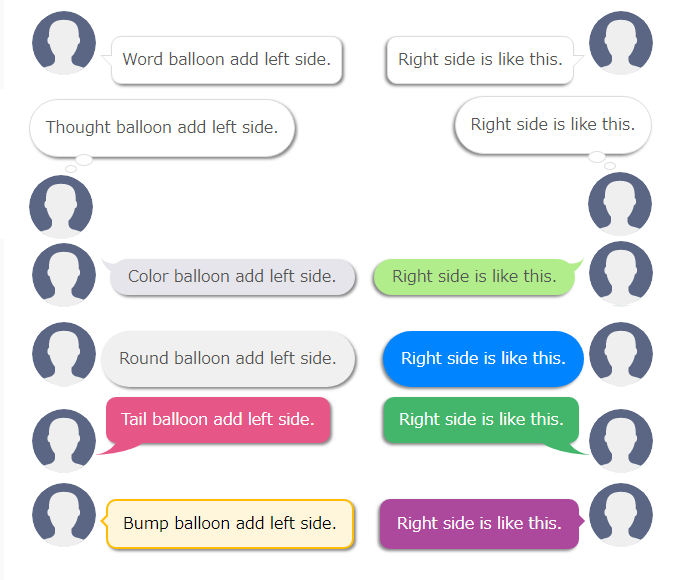
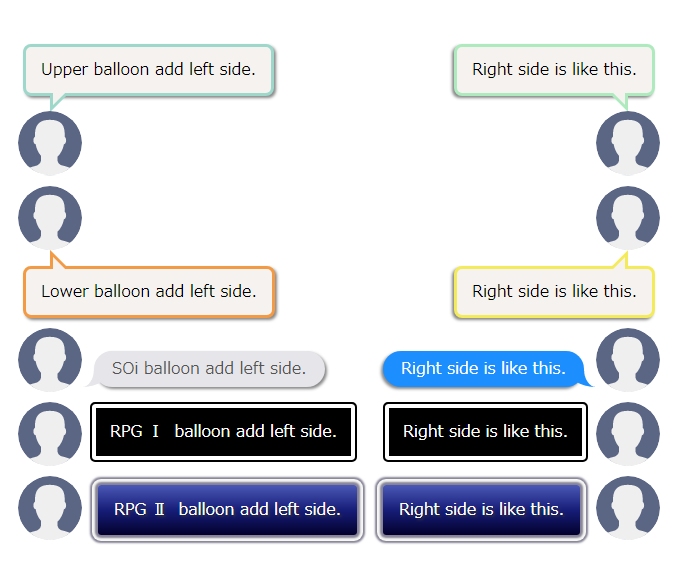


Für Entwickler
Ist das dein Plugin? Zeigen Sie die Zahlen.
Fügen Sie Ihrer Website, Docs oder GitHub Readme ein Live-Badge hinzu. Es wird von selbst aktualisiert - kein Konto erforderlich.
Best Word Balloon alternatives
All balloon plugins →| Rang | Plugin | Aktive Installationen |
|---|---|---|
| 2 |
 WP-Speech-Balloon
WordPress の記事内で簡単に吹き出し会話を使えるプラグインです。AMPページでも通常ページと同じように吹き出し会話を使えます。 This is a plugin that… |
400+ |
| 3 |
 Speech Balloon Maker (ふきだしメーカー)
You can make speech balloon as you like. |
100+ |
| 4 |
 Guten-bubble
Displays a speech bubble like a chat conversation. |
10+ |
Fragen und Antworten
Word Balloon: quick answers
Gerade Antworten, gezogen von Live WordPress.org Daten.
Quelle: WordPress.org
Is Word Balloon free?
Yes. Word Balloon is free to download and use from the official WordPress.org plugin directory.
Is Word Balloon safe to use in 2026?
Yes — Word Balloon is a safe, well-maintained plugin to use in 2026. It runs on 10K+ sites, is rated 5/5 and was last updated 3 weeks ago, and scores 89/100 on our health check.
How many websites use Word Balloon?
Word Balloon is active on 10K+ WordPress websites and has been downloaded 382,829 times since it launched in March 2018. It was downloaded 7,084 times in the last 30 days.
Does Word Balloon work with WordPress 7.1?
Yes. The developer has tested Word Balloon up to WordPress 7.1.5, the latest release. It requires WordPress 3.9.3 or newer.
What PHP version does Word Balloon need?
Word Balloon requires PHP 5.3 or higher. Most hosts run PHP 8.x today, so it works on any modern WordPress hosting.
When was Word Balloon last updated?
The latest version, 4.23.3, was released on October 31, 2026 (3 weeks ago).
Who makes Word Balloon?
Word Balloon is developed and maintained by YAHMAN.
What are the best alternatives to Word Balloon?
The most popular alternatives to Word Balloon are WP-Speech-Balloon (400+ installs), Speech Balloon Maker (ふきだしメ… (100+ installs) and Guten-bubble (10+ installs).
Angetrieben von PageForge
Eine Vorlage und eine Tabelle. Eine echte Seite für jede Suche.
PageForge Verwandelt jede Zeile eines CSV in eine WordPress-Seite mit eigenem Titel, URL, SEO Felder und Schema entworfen. Kostenlos auf WordPress.org.
- CSV und XLSX, plus Google Sheets auf Beruf und Unternehmen
- seinen eigenen Titel, URL, SEO Felder und Schema für jede Seite
- Arbeitet mit dem Blockeditor, Elementor, Divi und Avada
- Kostenlos auf WordPress.org, keine Kreditkarte