


WP All Import – Product Import for WooCommerce
“I’ve been doing eCommerce sites for almost a decade. The combination of WP All Import and WooCommerce is a game changer! I can now get clients into eCommerce sites that could never afford the time/energy or money it…

Sichere Auswahl
Yes — WP All Import is a safe, well-maintained plugin to use in 2026. It runs on 20K+ sites, is rated 4.7/5 and was last updated 1 month ago, and scores 85/100 on our health check.
- Bewährt auf 20.000 aktiven Standorten
- Loved by users — 4.7/5 from 276 reviews
- Getestet mit dem neuesten WordPress (7.1)
- Momentum — downloads up 450.3% vs the previous 30 days
Wie stapelt es sich?
Side-by-side bei Installationen, Updates, Bewertungen und Support


Tägliche Downloads
Download-Spitzen folgen normalerweise einer neuen Version - jede Website, die automatisch aktualisiert wird, gilt als Download.
Ranglisten
Where WP All Import stands todayWordPress.org Ranglisten suchen
Live-Position in der Plugin-Suche, Top 100| Stichwort | Position |
|---|---|
| CSV Import | #9 |
| import products | #5 |
| import woocommerce products | #5 |
| product import | #2 |
| woocommerce product import | #5 |
Versionsübernahme
Anteil aktiver Sites pro Release.
Bewertungsaufschlüsselung
★★★★★★★★★★ 4.7 from 276 reviews
About WP All Import
From the official readme · v1.5.6Beschreibung
“I’ve been doing eCommerce sites for almost a decade. The combination of WP All Import and WooCommerce is a game changer! I can now get clients into eCommerce sites that could never afford the time/energy or money it took to administrate a site. It has opened up a whole new client base for me.”
Mike Tidmore -Founder, Successful Online Stores
Whether you’re working with XML, CSV, Google Sheets, or Excel files, the WooCommerce add-on for WP All Import makes it easy to bulk import your products to WooCommerce in less than 10 minutes.
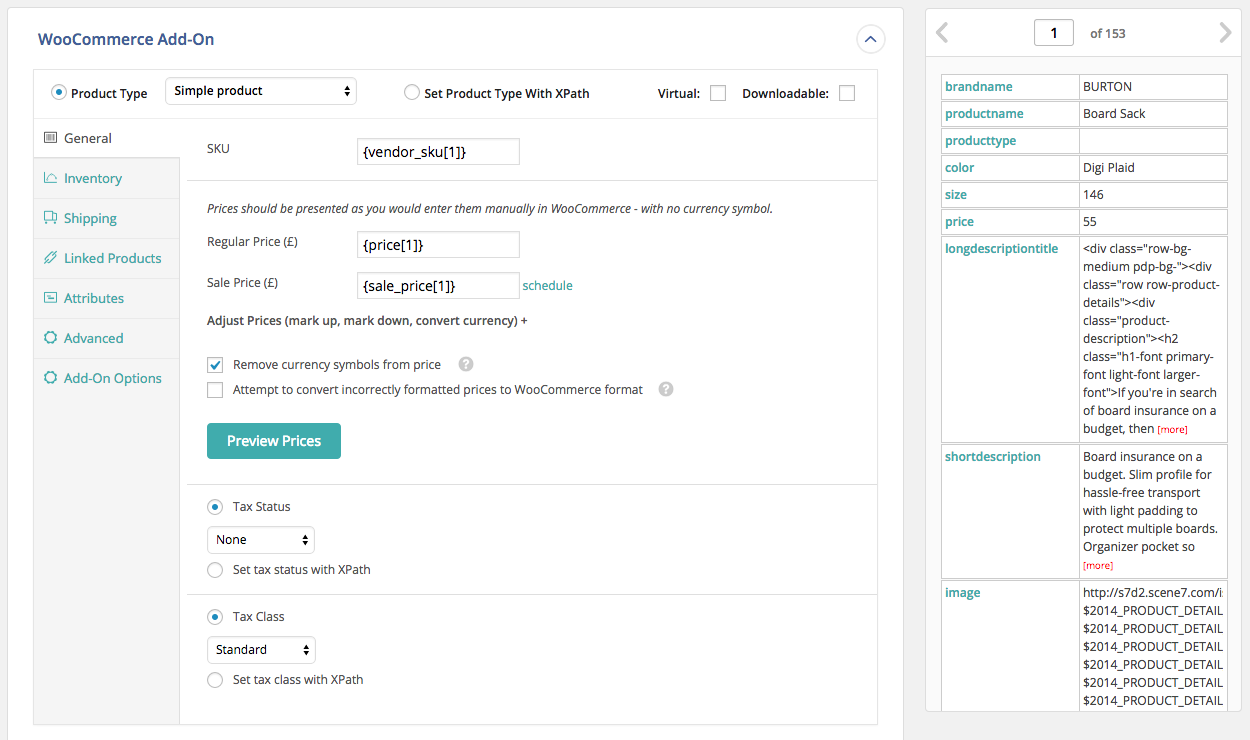
The left side of the plugin looks just like WooCommerce, and the right side displays product details in a table from your XML/CSV/ Excel file.
Drag & drop the data from your XML, CSV, or Excel into the WooCommerce fields to import it.
The importer is so intuitive it is almost like manually adding a product in WooCommerce.
WooCommerce CSV imports? WooCommerce XML imports? WooCommerce Excel Import? They are EASY with WP All Import.
Here’s why you should use the WooCommerce add-on for WP All Import:
- Supports files in any format and structure. There are no requirements that the data in your file be organized in a certain way. WooCommerce CSV imports are easy, no matter the structure of your file. WooCommerce XML imports are flexible and work with any XML file.
- Supports files of practically unlimited size by automatically splitting them into chunks. Import 200Mb+ product catalogs with ease, even on shared hosting.
WooCommerce Add-On Pro
The Pro edition of WP All Import + the WooCommerce add-on is a paid upgrade that includes premium support and adds the following features:
-
In-depth support for Variable products – example CSV and Excel files, ability to import variations from properly formatted XML, and much more.
-
Import External/Affiliate products
-
Import Grouped products
-
Import files from a URL – Download and import WooCommerce data from Google Sheets and external websites, even if they are password protected with HTTP authentication.
-
Cron Job/Recurring Imports – WP All Import Pro can periodically check a file for updates, and add, edit, delete, and update the stock status of the imported products accordingly.
-
Execution of Custom PHP Functions on data, i.e. use something like [my_function({xpath/to/a/field[1]})] in your template, to pass the value of {xpath/to/a/field[1]} to my_function and use whatever it returns.
-
Get access to our customer portal with documentation and tutorials, and e-mail technical support.
Upgrade to the Pro edition of WP All Import + the WooCommerce add-on now.
You need the WooCommerce add-on if you need to:
- Import XML to WooCommerce
- Import CSV/Excel to WooCommerce
- Import Google Sheets to WooCommerce
- Are frustrated with the limitations of the official WooThemes Product CSV Import Suite
WooCommerce CSV Imports
Of course, XML files can have complex structures, but for CSV files, you can easily edit them and change the column names.
When importing CSV files, you should use UTF-8 encoding (which is very standard) if you are having any trouble with CSV imports containing special characters. But other than that, there are no special requirements.
This importer is the best option for WooCommerce CSV import tasks – our importer is extremely flexible when doing CSV imports because you don’t need to edit your CSV files to import them to WooCommerce. WP All Import can import ANY CSV file to WooCommerce. You don’t need to layout your data in a specific way, and you don’t need your CSV to have specific column names. WP All Import’s drag & drop interface provides you with a visual way to map the columns in your CSV file to the appropriate fields in WooCommerce.
WooCommerce Excel Import / Google Sheets Import
Don’t want to convert your Excel or Google Sheets data to CSV? WP All Import also works as a Google Sheets and Excel importer for WooCommerce. Simply upload your Excel file as you would for CSV and WP All Import will automatically detect the columns in your file.
For Google Sheets, use the ‘Download a file’ option and paste your sheet’s public URL to import data to WooCommerce.
Related Plugins
Export any WordPress data to XML/CSV
Import any XML or CSV File to WordPress
Export Products to CSV/XML for WooCommerce
Custom Product Tabs for WooCommerce WP All Import Add-on
Export Orders to CSV/XML for WooCommerce
Export WordPress Users to CSV/XML
Related Tutorials
How to Import Product Types Including Simple, Grouped, Virtual, Downloadable, Bookable, Subscriptions, and Product Bundles
How to Sync WooCommerce Product Stock Levels
How to Import Product Customers
How to Import Product Image Galleries and Metadata
How to Import Product Categories, Tags, and Other Taxonomies
How to Schedule Product Imports
How to Migrate WooCommerce Products
Unterstützen
You can submit the support form on our website or email us at support@wpallimport.com. While we try to assist users of our free version, please note that support is not guaranteed and will depend on our capacity. For premium support, purchase WP All Import Pro.
Installation
First, install WP All Import.
Then install the WooCommerce add-on.
To install the WooCommerce add-on, either: –
- Upload the plugin from the Plugins page in WordPress
- Unzip woocommere-product-import-add-on-for-wp-all-import.zip and upload the contents to /wp-content/plugins/, and then activate the plugin from the Plugins page in WordPress
The WooCommerce add-on will appear in the Step 4 of WP All Import.
Änderungsprotokoll
1.5.6
- bug fix: products imported without a category get WooCommerce’s default product category instead of Uncategorized
- bug fix: PHP warning when a previously imported product was deleted outside the import
1.5.5
- improvement: UI updates
1.5.4
- improvement: add ‘GTIN, UPC, EAN or ISBN’ field
1.5.3
- bug fix: don’t block use of HPOS
1.5.2
- improvement: update upgrade links
1.5.1
- bugfix: some output not properly sanitized
- bugfix: update only these attributes option doesn’t work in some cases
- bugfix: import attributes with < and > characters doesn’t work properly
- bugfix: not possible to import “0” as an attribute value
Screenshots
Für Entwickler
Ist das dein Plugin? Zeigen Sie die Zahlen.
Fügen Sie Ihrer Website, Docs oder GitHub Readme ein Live-Badge hinzu. Es wird von selbst aktualisiert - kein Konto erforderlich.
Best WP All Import alternatives
All CSV Import plugins →





Fragen und Antworten
WP All Import: quick answers
Gerade Antworten, gezogen von Live WordPress.org Daten.
Quelle: WordPress.org
Is WP All Import free?
Yes. WP All Import is free to download and use from the official WordPress.org plugin directory.
Is WP All Import safe to use in 2026?
Yes — WP All Import is a safe, well-maintained plugin to use in 2026. It runs on 20K+ sites, is rated 4.7/5 and was last updated 1 month ago, and scores 85/100 on our health check.
How many websites use WP All Import?
WP All Import is active on 20K+ WordPress websites and has been downloaded 1,182,353 times since it launched in June 2013. It was downloaded 13,780 times in the last 30 days.
Does WP All Import work with WordPress 7.1?
Yes. The developer has tested WP All Import up to WordPress 7.1.5, the latest release. It requires WordPress 4.1 or newer.
What PHP version does WP All Import need?
WP All Import requires PHP 7.4 or higher. Most hosts run PHP 8.x today, so it works on any modern WordPress hosting.
When was WP All Import last updated?
The latest version, 1.5.6, was released on October 20, 2026 (1 month ago).
Who makes WP All Import?
WP All Import is developed and maintained by Soflyy.
What are the best alternatives to WP All Import?
The most popular alternatives to WP All Import are WP All Import (50K+ installs), Content Egg (10K+ installs) and WP All Import (6K+ installs).
Angetrieben von PageForge
Eine Vorlage und eine Tabelle. Eine echte Seite für jede Suche.
PageForge Verwandelt jede Zeile eines CSV in eine WordPress-Seite mit eigenem Titel, URL, SEO Felder und Schema entworfen. Kostenlos auf WordPress.org.
- CSV und XLSX, plus Google Sheets auf Beruf und Unternehmen
- seinen eigenen Titel, URL, SEO Felder und Schema für jede Seite
- Arbeitet mit dem Blockeditor, Elementor, Divi und Avada
- Kostenlos auf WordPress.org, keine Kreditkarte