


FOX – Currency Switcher Professional for WooCommerce
FOX - Currency Switcher Professional for WooCommerce (former name is WOOCS) is currency plugin for woocommerce and multi currency shop, switch & pay

Solide Wahl
FOX is a solid plugin choice in 2026, with a few things worth checking first. It runs on 50K+ sites, is rated 4.4/5 and was last updated 2 weeks ago, and scores 77/100 on our health check.
- Bewährt im Maßstab auf 50k + aktiven Standorten
- Aktiv entwickelt — letztes Update vor 2 Wochen
- Getestet mit dem neuesten WordPress (7.1)
- Momentum — downloads up 56.8% vs the previous 30 days
Wie stapelt es sich?
Side-by-side bei Installationen, Updates, Bewertungen und Support



Tägliche Downloads
Download-Spitzen folgen normalerweise einer neuen Version - jede Website, die automatisch aktualisiert wird, gilt als Download.
Ranglisten
Where FOX stands todayWordPress.org Ranglisten suchen
Live-Position in der Plugin-Suche, Top 100| Stichwort | Position |
|---|---|
| currency | #1 |
| currency converter | #3 |
| currency switcher | #1 |
| multi currency | #4 |
| WooCommerce | >100 |
Versionsübernahme
Anteil aktiver Sites pro Release.
Bewertungsaufschlüsselung
★★★★★★★★★★ 4.4 from 250 reviews
About FOX
From the official readme · v1.5.7Beschreibung
FOX – Currency Switcher Professional for WooCommerce (former name is WOOCS) is free WooCommerce multi currency switcher plugin for woocommerce, that allows your site visitors switch products prices currencies according to set currencies rates in the real time and pay in the selected currency (optionally). FOX is multi currency plugin that allows to add any currency to WooCommerce store. Ideal solution to make the serious WooCommerce store site in multiple currencies!
FOX is woo currency tool and available as shortcode [woocs] so as the widget.
List of supported currencies: 🗺 https://en.wikipedia.org/wiki/ISO_4217#Active_codes
Briefly this plugin has next features: 🛒 Checkout with selected currency, 🗺 different GeoIP rules, 📈 different Fixed prices rules and amounts rules, 👥 Prices based on User Role, 🌍 Prices based on Country, 🛂 Payments rules, 📚 API.
Latest PHP 8.x.x – COMPATIBLE!
FOX Currency Switcher Features:
🏞 Representation: Currency Switcher is available as a widget and works in any widgetized area, for flexibility the shortcode is also available [woocs]. You can insert shortcode [woocs] in any place of your site, even in the top menu.
Also the plugin has ajaxed shortcode/widget of currency converter and ajaxed shortcode/widget of currency rates
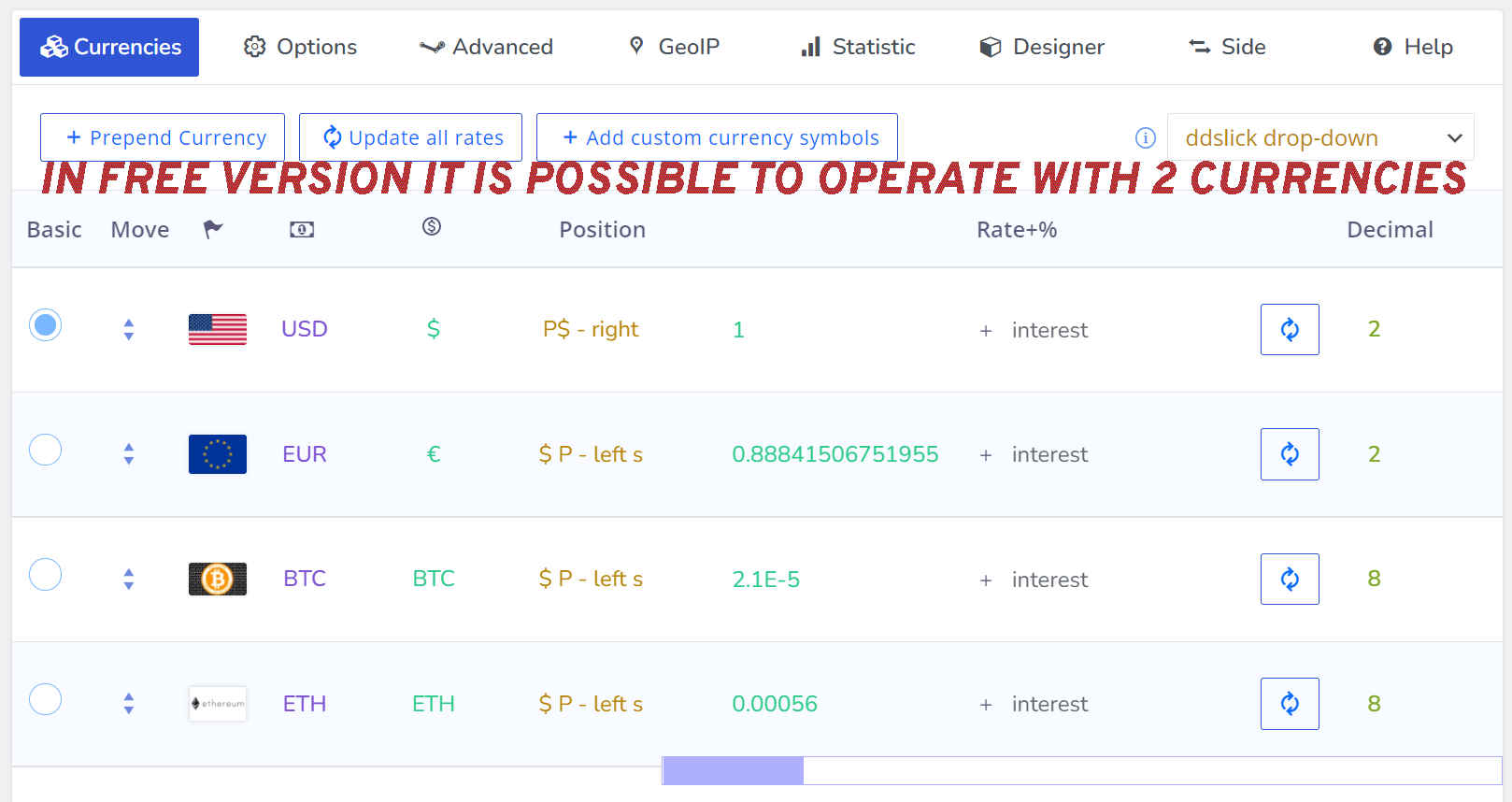
🎨 Design: graphically Currency Switcher can be represented in 3 different ways: drop-down, flags, side switcher. For each currency it is possible to set flag. Also it is possible using in-built Smart Designer to create your own customized currency drop-down!
🛒 Checkout: the customers are allowed to pay in their selected(preferred) currency. This feature has name ‘Is multiple allowed’ and should be enabled in the plugin settings.
🌍 Rates: More than 7 currencies aggregators for automatic rates changing. Also admin can set rates manually if it’s necessary! Optionally admin can be noticed about currency rates changes by email.
🔄 Rates auto update: update currency rates hourly, twice daily, daily, weekly, monthly, each 5 minutes, each 15 minutes, each 30 minutes, each 45 minutes. Or you can disable it and set your own currency rates by hands!
💵 Price: set price format which fit your needs – decimals count, usual money sign or custom sign, money sign position (4 variants). You can show or hide cents for each currency optionally. For each currency you can set its own count of decimals after comma, so BTC is not the problem for this plugin
💰 Custom money signs: create and use your own money symbols you need. It is possible even use currency which not exists in the reality!
💲 Custom price formats: each currency can has its own format where price and money sign can be set on the side you want
💹 Price thousand and decimal separator: Set price separators depending of the currency or any business logic (for example country) using hooks woocs_price_thousand_sep and woocs_price_decimal_sep
🚀 Smart Designer: Allows to create multi currency drop-down switcher using convenient dashboard. You can create unlimited count of drop-downs designs for different places of your site and even insert them directly into the site code.
📊 Statistic: collect currencies switching statistic for business purposes. No any private data of customers collects, only currency, country and time of switching. Also statistic for orders currencies is there.
🔒 Currencies visibility: possibility to set currencies as Public or as Private. In private mode currency not published in switchers and user cannot set it by link through ‘?currency=XXX’
🤖 You can ask help to chatGPT about the plugin using the plugin former name WOOCS, example: “How to use [[woocs]] shortcode?”
🛂 Payments rules: rules to hide/show payment gates on the checkout page depending on the current currency
🎁 Welcome currency: allows to set any price currency you want for your site visitors first visit. So if your shop currency is INR and you want let your customers on their first visit see prices converted to USD you just need to set ‘Welcome currency’ in FOX options.
👥 Individual prices based on User Role: gives ability to set different prices for each user role in basic currency. Very power feature for your shop customers with loyalty program
🌍 Individual GeoIP rules for each product: super feature which allows for different countries show different prices in different currencies! This functionality allows to realize WooCommerce Price Based on Country functionality
📈 Individual fixed prices rules for each product: feature which allows for each product set fixed price for each currency, in this case for the product will not be applied conversion by rate, watch video
🗺 GEO IP rules for visitors local currency detection: this feature is more targeted and allows to set currency of prices for the site visitors in their native currency when they visited the shop for the first time. Currency changes automatically according to the visitor IP, and even more – if to enable option ‘Checkout by GeoIP rules‘ your customers always will buy products in their local currency!
🚚 Fixed minimum amount for FREE delivery for each currency: allows to set minimum amount for FREE delivery as fixed value for each currency
📦 Fixed minimum amount for shipping for each currency: allows to set minimum amount for shipping as fixed value for each currency
🎫 Fixed amount for coupons for each currency: you can set different amounts in coupons of your shop for different currencies. In another way the system will calculate amounts according to the currencies rates and relatively to the basic currency
🔒 Fixed minimum and maximum coupon verification amount for each currency: for different currencies you can set different fixed verification amount instead of calculation by rates relatively to the basic currency
💸 Show approximate price: shows approximate price on the shop page and the single product page with currency of user defined by IP in the GeoIP rules tab if such rule exists. Works only with currencies rates data and NOT with fixed prices rules and geo rules. If system will define by GeoIP visitor country and visitor will switch currency – he/she always will see near the product price approximate price in his local currency.
🛒 Show approximate amount: shows approximate amount on the checkout page and on the cart page with currency of user defined by IP in the GeoIP rules tab if such rule exists. Works only with currencies rates data and NOT with fixed prices rules and geo rules.
⚙️ Compatibility with cache plugins: if your site uses any cache plugins enable option ‘I am using cache plugin on my site’, reset the site cache and from now your shop visitors can switch currencies without any problems!
📝 Orders keeps in currency of the deal: each order in your shop keeps in currency the customer paid, if option ‘Is multiple allowed’ is enabled!
ℹ️ Price info icon: show info icon near the price of the products which while its under mouse hover shows prices of products in all other currencies
🔤 Shortcode [woocs_price]: allows to insert a product price (switchable) directly into shop promotion articles
💴 Prices without cents: recounts prices without cents for such currencies like JPY or TWD which by its nature have not cents. Test it for checkout after setup!
🛠️ Ability to set currency for new order which created through admin panel by hands
🧮 Ability to recount order from any currency to the basic currency in multi currency mode of the plugin
🔄 Possible to change currency according to the language: if you you using WPML or Polylang plugins in your shop and by business logic you want to set currency according to the current language it is possible with FOX API
🔗 FOX understand currency in the site link as demo.currency-switcher.com/?currency=EUR
🚫 No GET data in the link: switches currency without GET properties (?currency=USD) in the link (optionally)
🎨 Smart Designer: Interactive customization of currency drop-down. Description, Demo page.
💾 Selected currency storage: For the site admin FOX provides set of mechanisms to storage user selected currency on different hosting architectures: Session, Transient, Memcached, Redis
🖥️ Wide API: For site developer – advanced API functionality set which allows to manipulate with prices and their rates on the fly using conditional logic
👍 Easy to use for administrators and shop customers: install, set settings for couple of minutes and let your shop make more money!
🤖 FOX is chatGPT friendly plugin you can ask help to chat gpt about the plugin features using the plugin former name WOOCS, example: “How to use [woocs] shortcode?”
🔌 REST API
🌐 Compatible with WPML
🔎 Compatible with WooCommerce Products Filter
📈 Compatible with CTX Feed – WooCommerce Product Feed Generator
📅 Compatible with RnB – WooCommerce Booking & Rental Plugin
📅 Compatible with WebToffee Product Feed for WooCommerce plugin
📅 Compatible with Points and Rewards for WooCommerce by WP Swings
🔄 95% compatibility with different payment gates in multi currency mode, just try it!
🧪 We do compatibility with our special program FOX LABS
🛠️ Strong technical support which each day works with tones of code!
PREMIUM FEATURES
- All features above
- Unlimited count of currencies (in the free version 2 currencies available)
Get Premium version of the plugin: on the plugin site
Make your site more profitable with next powerful scripts:
✅ HUSKY – Products Filter for WooCommerce: is an extendable, flexible and robust plugin for WooCommerce that allows your site customers filter products by products categories, attributes, tags, custom taxonomies and price. Supports latest version of the WooCommerce plugin. A must have plugin for your WooCommerce powered online store! Maximum flexibility!
✅ BEAR – Bulk Editor for WooCommerce (MCP Server): WordPress plugin for managing and bulk edit WooCommerce Products data in robust and flexible way! Be professionals with managing data of your woocommerce e-shop!
✅ WooCommerce Active Products Tables: is WooCommerce plugin for displaying shop products in table format. Tables makes focus for your buyers on the things they want to get, nothing superfluous, just what the client wants, and full attention to what is offered!
✅ WOLF – WordPress Posts Bulk Editor Professional: is WordPress plugin for managing and bulk edit WordPress posts, pages and custom post types data in robust and flexible way! Be professionals with managing data of your site!
✅ TABLEON – WordPress Post Tables Filterable: WordPress plugin for displaying site posts and their custom post types in table format. Tables makes focus for your customers on the things they want to get, nothing superfluous, just what the client wants, and full attention to what is offered!
✅ WPCS – WordPress Currency Switcher: is a WordPress plugin that allows to switch currencies and get their rates converted in the real time on your site!
✅ MDTF – Meta Data Filter & Taxonomies Filter: the plugin for filtering and searching WordPress content in posts and their custom types by taxonomies and meta data fields. The plugin has very high flexibility thanks to its rich filter elements and in-built meta fields constructor!
Lizenz
This plugin is copyright pluginus.net © 2012-2027 with GNU General Public License by realmag777.
This program is free software; you can redistribute it and/or modify it under the terms of the GNU General Public License as published by the Free Software Foundation; either version 2 of the License, or (at your option) any later version.
This program is distributed in the hope that it will be useful, but WITHOUT ANY WARRANTY. See the GNU General Public License for more details.
Installation
- Download to your plugin directory or simply install via WordPress admin interface.
- Aktivieren.
- Use.
Änderungsprotokoll
1.5.7 – 05 November, 2026
- Security fix, thanks to nizar yart (D3dC0d) from patchstack.com
- Fixed: changing the currency of an order placed through the block checkout no longer corrupts its amounts; the order exchange rate is now saved for block checkout orders too
- Fixed: a fixed per-currency sale price now shows the regular price crossed out even when the product has no sale price in the base currency
- Fixed: the visitor country is no longer detected on every page view when no FOX feature uses it (GeoIP rules, per-country prices, statistics), and an unchanged value is no longer written to the database on every page view; this removes needless external geolocation requests and database writes on busy sites
- Compatibility: declared support for the WooCommerce Cart and Checkout blocks
1.5.6 – 24 October, 2026
- Fix: WooCommerce REST API responses (wc/v1, wc/v2, wc/v3) now always use the shop base currency, on nginx servers and with ?rest_route= links too. Before, on nginx the API could return prices converted to the currency of another visitor, which broke syncing with POS and ERP systems
- Fix: WooCommerce webhook payloads (product.updated and others) are now always built in the shop base currency, for both background and immediate delivery. Before, a webhook could carry prices in the currency selected by a visitor who was on the site at that moment
- Fix: with “I am using cache plugin on my site” and the prices preloader on, prices that appear on the page after it loads (Composite Products options, quick views, AJAX fragments) no longer keep the loading spinner forever and are shown in the visitor currency
- Fix: Composite Products on a cached page now shows component prices and the composite total in the visitor currency, the same amount as in the cart
- Fix: prices in WooCommerce AJAX and REST responses no longer get the loading spinner
- Fix: prices of published products hidden from the catalog (typical Composite Products and Product Bundles options) are now converted on cached pages too
- New: the currency code from the FOX price format (CODE) is now shown in Composite Products drop-down option labels and in the composite total
1.5.5 – 09 October, 2026
- Security fix. Thanks to Je22y for the responsible disclosure and to Patchstack for coordinating it
- Accessibility: the ddslick drop-down no longer renders an empty image when flags are turned off, and flag images get an empty alt attribute because the currency text is shown next to them
- Accessibility: the ddslick drop-down uses span elements instead of labels without a form control for the currency text
- Accessibility: every currency switcher on the page gets its own unique id (before, all ddslick switchers had the same id “undefined”), and the currency select gets an aria-label
- Fix: the wSelect drop-down no longer shows an empty icon when flags are turned off
- New: filter woocs_skip_conversion for developers, returning true leaves a price as it is without currency conversion
- New: Pulse Verity rate aggregator for crypto currencies, works with USD as the store base currency and requires a free API key, fiat currency rates are left unchanged
1.5.4 – 18 September, 2026
- Fixed: fatal error “Call to undefined function wc_get_page_screen_id()” in background
cron tasks on sites where a third party plugin makes is_admin() return true inside wp-cron,
while the WooCommerce admin functions are not loaded. The screen id helper now returns
an empty string instead of calling admin only functions
1.5.3 – 04 September, 2026
- Fixed: automatic rate updates never ran on shops with regular REST API
traffic. The rate update scheduler was hooked to rest_api_init without
limiting the number of accepted arguments, so WordPress passed the
WP_REST_Server instance into the method’s $reset parameter. Every REST
request therefore restarted the schedule from the current time and cleared
the last run marker, which pushed the next run permanently into the future.
Rates stayed frozen at the values stored before the upgrade. Sites with
block based cart and checkout, the Store API, page builders or headless
front ends were affected the most, sites with little or no REST traffic were
not affected. Reported by Performize.it.
1.5.2 – 03 September, 2026
- Fixed: currency switching was unreliable when “Currency storage” was set to
Transient and the option “I am using cache plugin on my site” was enabled.
In that combination the selected currency could be applied to the prices but
not to the cart, the checkout totals or the currency switcher itself, so
different parts of one page could show different currencies. - Fixed: the selected currency is now applied to requests made by WooCommerce
Blocks and the Store API, so the block based mini cart, cart and checkout
render in the visitor’s currency. - Fixed: prices were shown in the shop base currency inside content loaded by
page builders through the REST API, for example the Bricks side cart and
Bricks popups. - Fixed: fee lines (for example custom regional tax or surcharge fees) were not converted
when an order was recalculated into another currency in wp-admin — the currency label
changed while the fee amount stayed as it was. - Added: order recalculation on manual currency change can now be customized.
If a function named woocs_order_recalculated_custom exists on the site,
the plugin calls it right after an order has been recalculated to another currency
and before the order is saved, passing the order object, the new currency,
the previous currency and the exchange rate the order was stored with.
This makes it possible to override amounts of individual order items,
for example flat fees that must keep a fixed value in each currency instead
of being converted by rate. Works with both HPOS and legacy order storage.
If the function is not declared, behaviour is unchanged.
Screenshots


Für Entwickler
Ist das dein Plugin? Zeigen Sie die Zahlen.
Fügen Sie Ihrer Website, Docs oder GitHub Readme ein Live-Badge hinzu. Es wird von selbst aktualisiert - kein Konto erforderlich.
Best FOX alternatives
All currency plugins →





Fragen und Antworten
FOX: quick answers
Gerade Antworten, gezogen von Live WordPress.org Daten.
Quelle: WordPress.org
Is FOX free?
Yes. FOX is free to download and use from the official WordPress.org plugin directory.
Is FOX safe to use in 2026?
FOX is a solid plugin choice in 2026, with a few things worth checking first. It runs on 50K+ sites, is rated 4.4/5 and was last updated 2 weeks ago, and scores 77/100 on our health check.
How many websites use FOX?
FOX is active on 50K+ WordPress websites and has been downloaded 2,339,772 times since it launched in September 2014. It was downloaded 42,067 times in the last 30 days.
Does FOX work with WordPress 7.1?
Yes. The developer has tested FOX up to WordPress 7.1.5, the latest release. It requires WordPress 6.0 or newer.
What PHP version does FOX need?
FOX requires PHP 7.4 or higher. Most hosts run PHP 8.x today, so it works on any modern WordPress hosting.
When was FOX last updated?
The latest version, 1.5.7, was released on November 6, 2026 (2 weeks ago).
Who makes FOX?
FOX is developed and maintained by RealMag777.
What are the best alternatives to FOX?
The most popular alternatives to FOX are Currency Switcher for WooCo… (10K+ installs), YayCurrency (7K+ installs) and Custom Currency for WooComm… (2K+ installs).
Angetrieben von PageForge
Eine Vorlage und eine Tabelle. Eine echte Seite für jede Suche.
PageForge Verwandelt jede Zeile eines CSV in eine WordPress-Seite mit eigenem Titel, URL, SEO Felder und Schema entworfen. Kostenlos auf WordPress.org.
- CSV und XLSX, plus Google Sheets auf Beruf und Unternehmen
- seinen eigenen Titel, URL, SEO Felder und Schema für jede Seite
- Arbeitet mit dem Blockeditor, Elementor, Divi und Avada
- Kostenlos auf WordPress.org, keine Kreditkarte