


XT Floating Cart for WooCommerce
A modern Floating Cart / Side Cart for WooCommerce that will improve customer buying experience and increase conversions.

Sichere Auswahl
Yes — XT Floating Cart for WooCommerce is a safe, well-maintained plugin to use in 2026. It runs on 4K+ sites, is rated 4.6/5 and was last updated 1 week ago, and scores 87/100 on our health check.
- Loved by users — 4.6/5 from 149 reviews
- Aktiv entwickelt — letztes Update vor 1 Woche
- Getestet mit dem neuesten WordPress (7.1)
- Momentum — downloads up 333.6% vs the previous 30 days
Wie stapelt es sich?
Side-by-side bei Installationen, Updates, Bewertungen und Support



Tägliche Downloads
Download-Spitzen folgen normalerweise einer neuen Version - jede Website, die automatisch aktualisiert wird, gilt als Download.
Ranglisten
Where XT Floating Cart for WooCom… stands todayWordPress.org Ranglisten suchen
Live-Position in der Plugin-Suche, Top 100| Stichwort | Position |
|---|---|
| ajax add to cart | #17 |
| floating cart | #2 |
| mini cart | #12 |
| upsell | #68 |
| woocommerce side cart | #16 |
Versionsübernahme
Anteil aktiver Sites pro Release.
Bewertungsaufschlüsselung
★★★★★★★★★★ 4.6 from 149 reviews
About XT Floating Cart for WooCommerce
From the official readme · v2.8.16Beschreibung
A modern Floating Cart / Side Cart for WooCommerce that will improve customer buying experience and increase conversions.
What Would More Sales and Higher Conversions be Worth to You?
Have you ever found yourself in a situation where site visitors add products to their cart, but then leave your store without finalizing their purchase?
I present to you Floating Cart for WooCommerce, the perfect solution that will improve customer buying experience and encourage them to click the “checkout” button.
Your site will look more attractive, a cart icon with item count will always be visible on all pages, and a sliding cart will be visible when the customer clicks it.
Video Overview
Video Demo
Demo
https://demos.xplodedthemes.com/woo-floating-cart/
Free Version
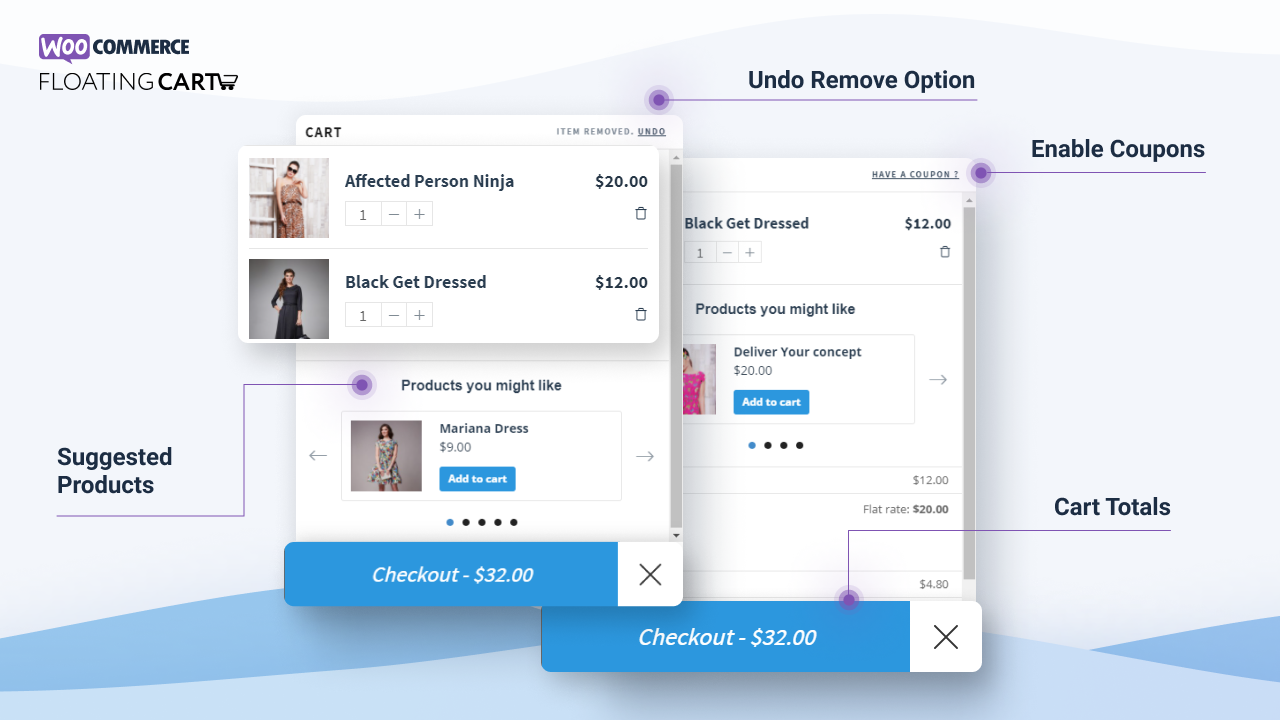
- Unobstructive Floating Cart
- Fast add to cart
- Update quantities
- Remove product from cart
- Undo product removal
- Show max quantity reached msg
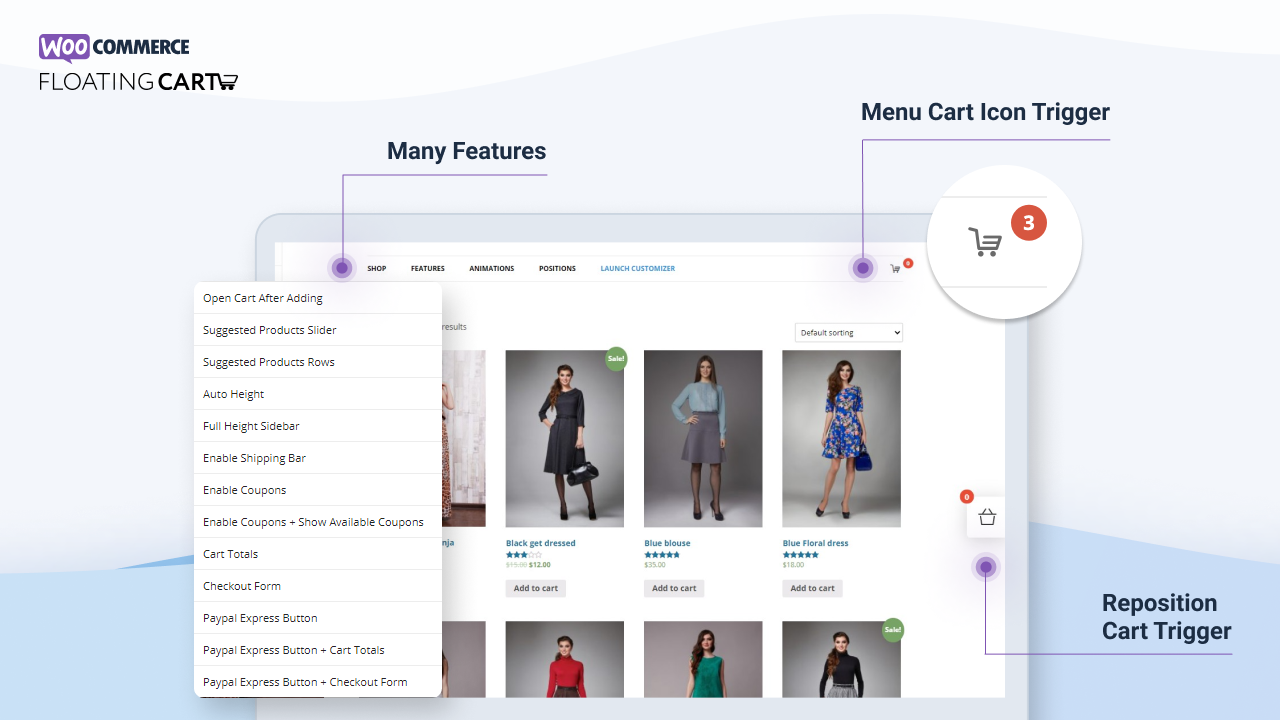
- Change Cart / Counter Position
- Responsive / Mobile Support
Premium-Funktionen
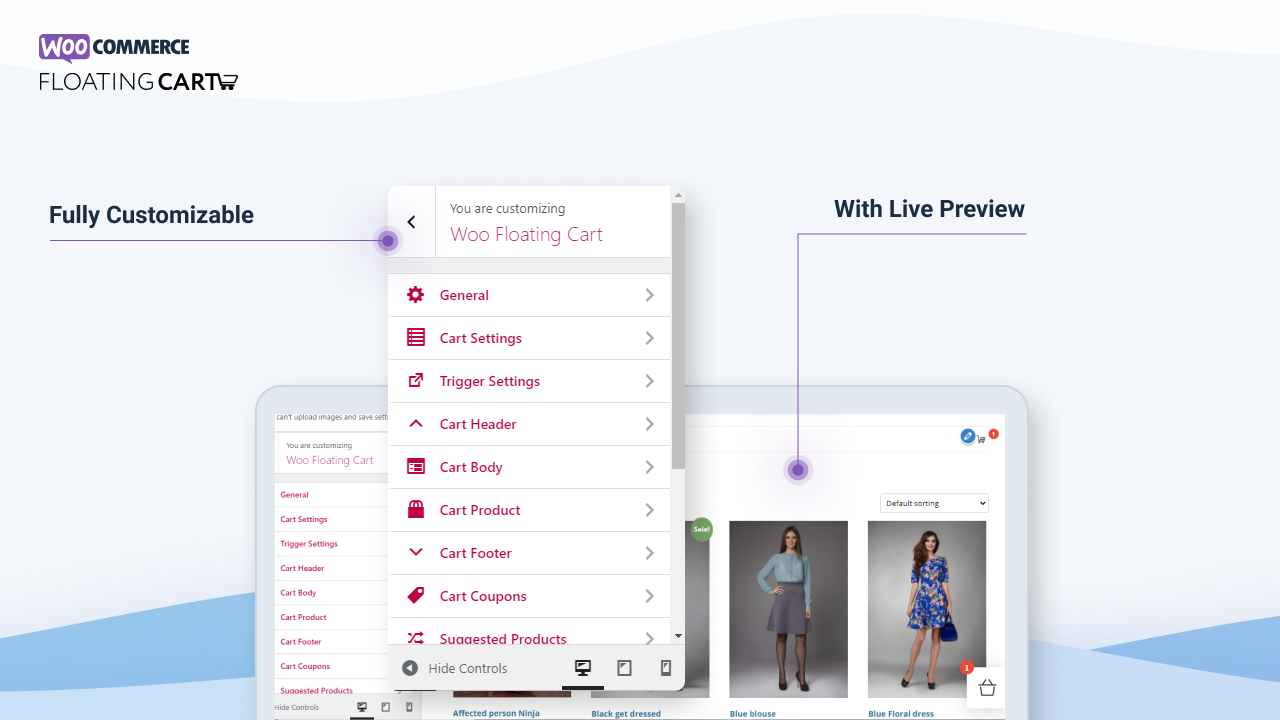
Fully customizable right from WordPress Customizer with Live Preview.
- All Free Features
- Live Preview Customizer
- Enable Fly To Cart animation
- Enable Coupons
- Enable Cart Totals
- Enable Total Savings
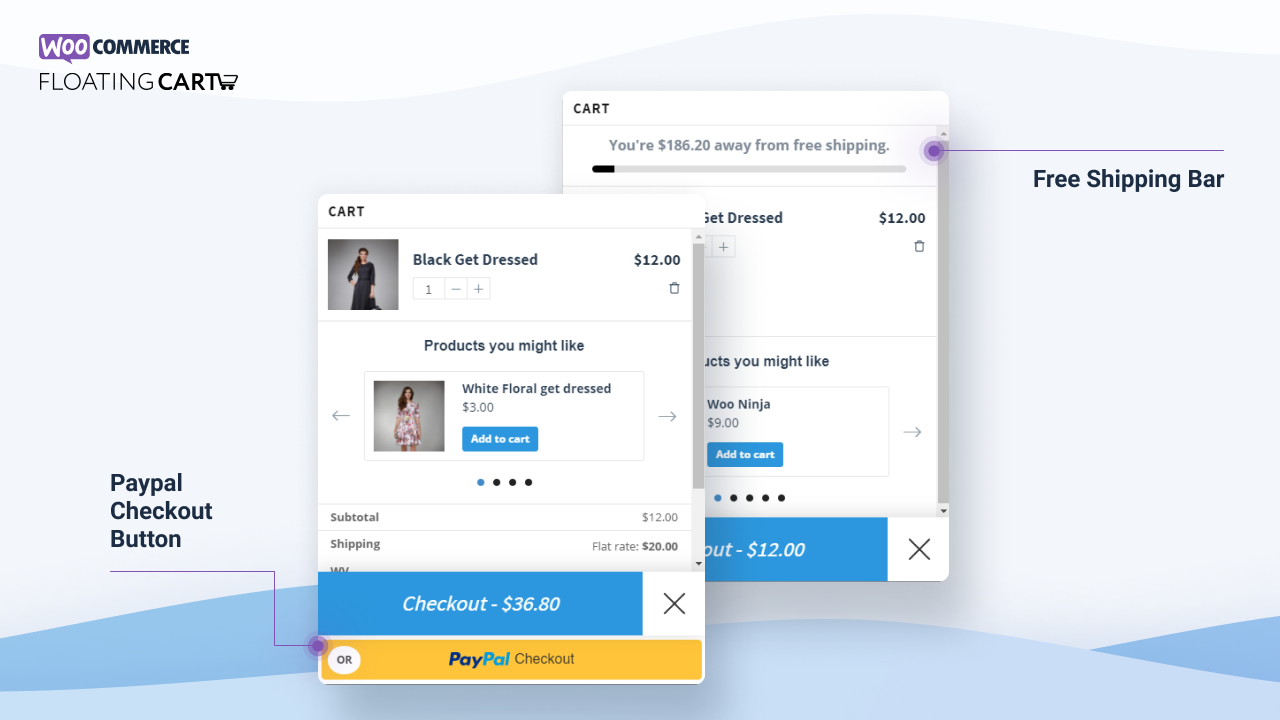
- Enable Express Checkout Form
- Enable Cart Menu Item
- Enable Auto Height
- Enable Suggested Products (Related / Cross-Sell / Upsell)
- Enable Free Shipping Bar
- Select Between Morph Slide Animation
- Support variations, bundles & composites
- Clear / Restore entire cart in 1 click.
- Display product attributes within the cart
- Change Cart Width / Height
- Apply Google Fonts
- Custom Colors / Backgrounds
- Custom Icons (SVG / Image / Font Icons)
- Select from 11 loading spinner animations
- Exclude pages from displaying the cart
- Device Visibility options
- Ajax add to cart on Single Product pages
- Ajax add to cart within Quick View Modals
- Select between Checkout Or View Cart button
- Option to trigger the cart on Mouse Over
- Display Subtotal or Total
- RTL Support
- Automated Updates & Security Patches
- Priority Email & Help Center Support
Compatible With XT Quick View
Compatible With XT Variation Swatches
Compatible With Woo Variations As Singles
Übersetzungen
- English – default
Note: All our plugins are localized / translatable by default. This is very important for all users worldwide. So please contribute your language to the plugin to make it even more useful.
Installation
Installing “Floating Cart for WooCommerce” can be done by following these steps:
- Download the plugin from the customer area at “XplodedThemes.com”
- Upload the plugin ZIP file through the ‘Plugins > Add New > Upload’ screen in your WordPress dashboard
- Aktivieren Sie das Plugin über das „Plugins“-Menü in WordPress
Änderungsprotokoll
V.2.8.16 – 2026-11-08
- update: Faster page loads: the body scroll lock and the suggested products slider scripts now load in the footer instead of blocking the page head. The cart looks and behaves exactly as before
V.2.8.15 – 2026-11-07
- new: The cart now updates right away on stores using WooCommerce blocks. Products added with the block Add to cart buttons or removed from the Mini Cart block show in the floating cart without a page reload
- update: XT Framework 2.6.0: a cart bridge for WooCommerce blocks, jQuery is no longer loaded in the page head for touch detection, and the add to cart scripts load in the footer. Includes 2.5.18 to 2.5.20: output escaping and safe redirects, framework classes renamed with the XTFW_ prefix (the old names still work), System Status no longer contacts external services, the bundled Freemius SDK updated to 2.13.5, and ajax add to cart no longer blocked by conditionally hidden required add-on fields
V.2.8.14 – 2026-10-21
- update: XT Framework 2.5.17, making the System Status IP and TLS lookups opt-in, updating Select2 to 4.1.0, SelectWoo to 1.0.10 and the alpha color picker to 3.0.4, removing the unused Xirki telemetry module, and hardening settings preview requests and saved settings values
- update: Tested with WordPress 7.1 and WooCommerce 11.2
V.2.8.13 – 2026-10-21
- update: XT Framework 2.5.16, fixing the pricing page showing “/ year” for monthly plans, correcting the annual “Normally” price, adding annual and lifetime savings badges inside the billing cycle switcher, keeping the switcher on one row at any screen width, and limiting pricing page requests to the site’s own admin-ajax endpoint
V.2.8.12 – 2026-09-16
- update: XT Framework 2.5.15, preventing the “Follow Us” widget from being injected twice in XT admin pages, restoring the Browse Plugins grid layout on modern WordPress, keeping the grid at three columns on very large screens, and updating the bundled Freemius SDK to v2.13.4
V.2.8.11 – 2026-07-16
- update: XT Framework 2.5.14, preventing first-request fatal errors and repeated upgrade redirects while switching to a newer embedded framework
Screenshots
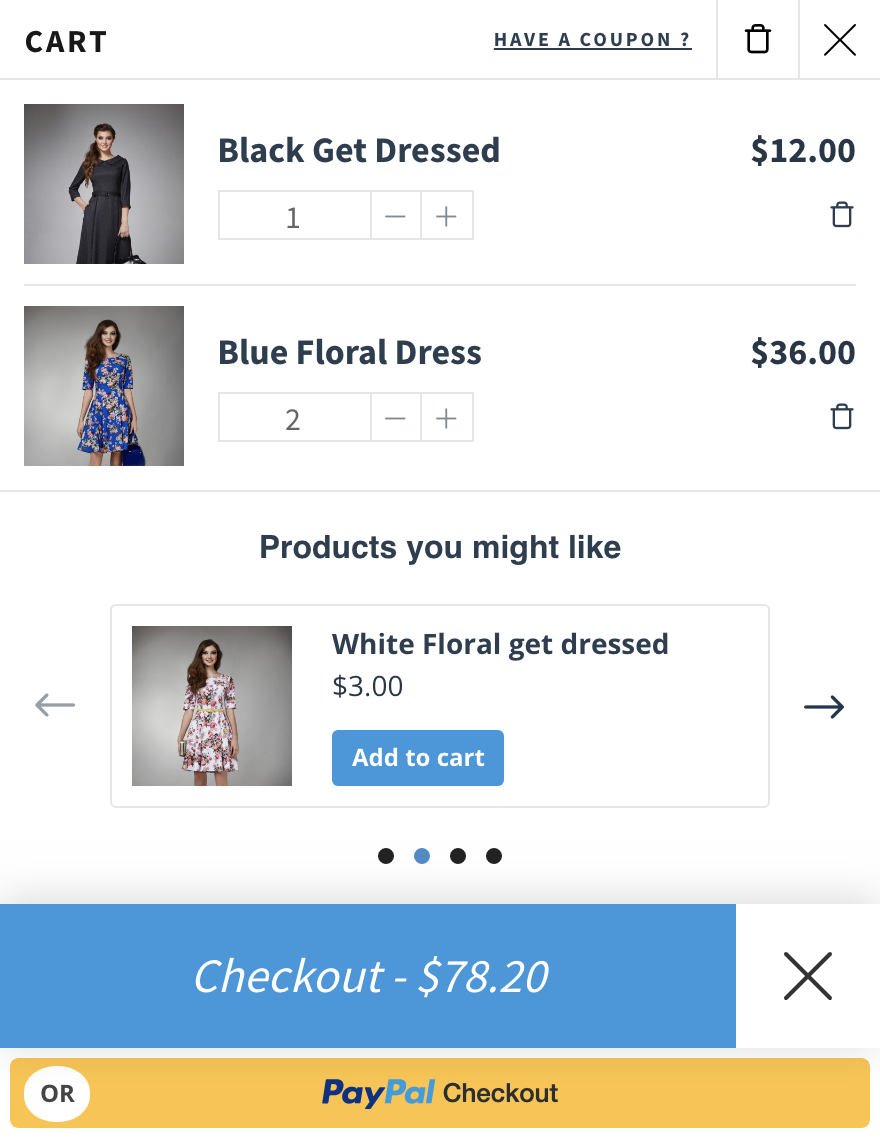
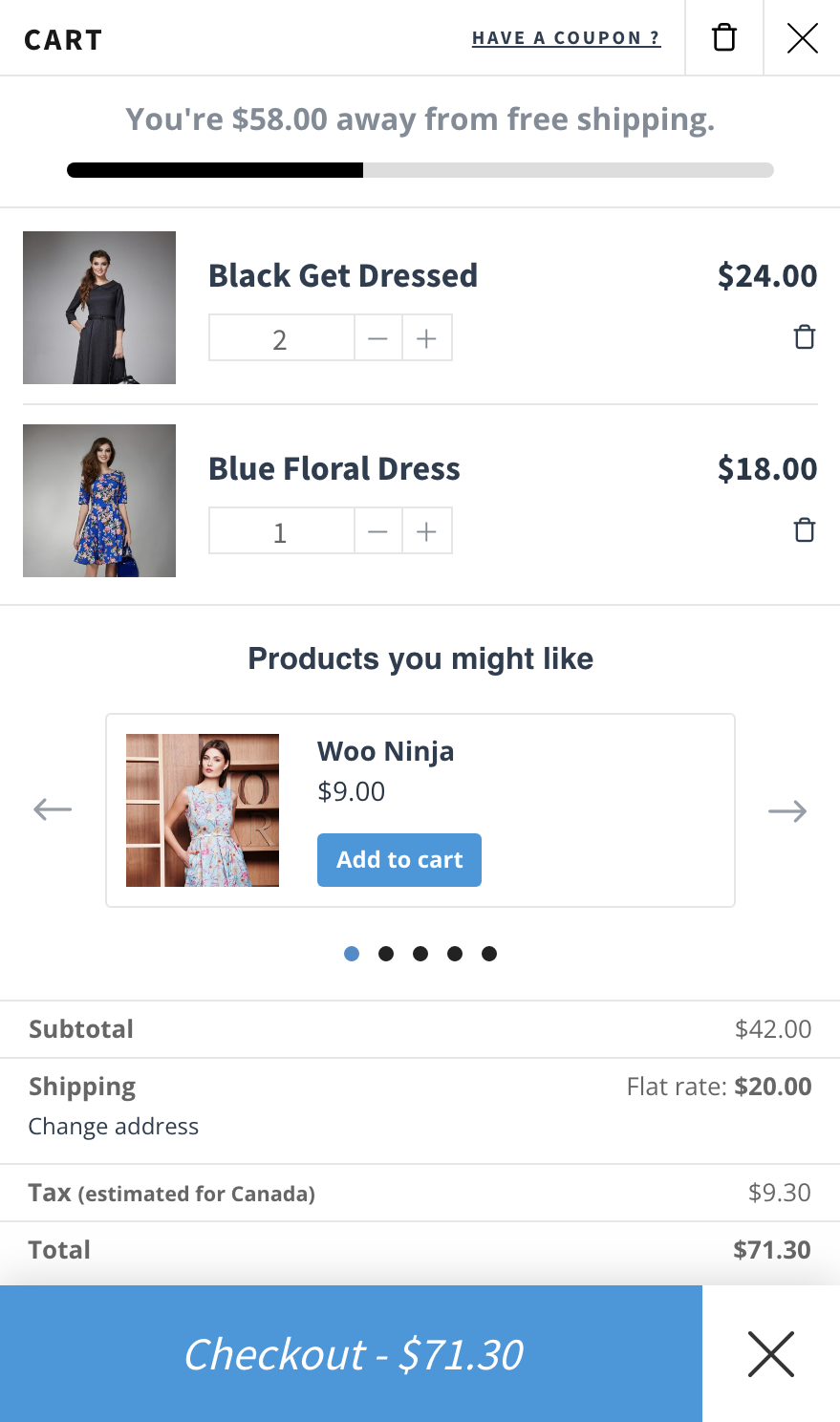
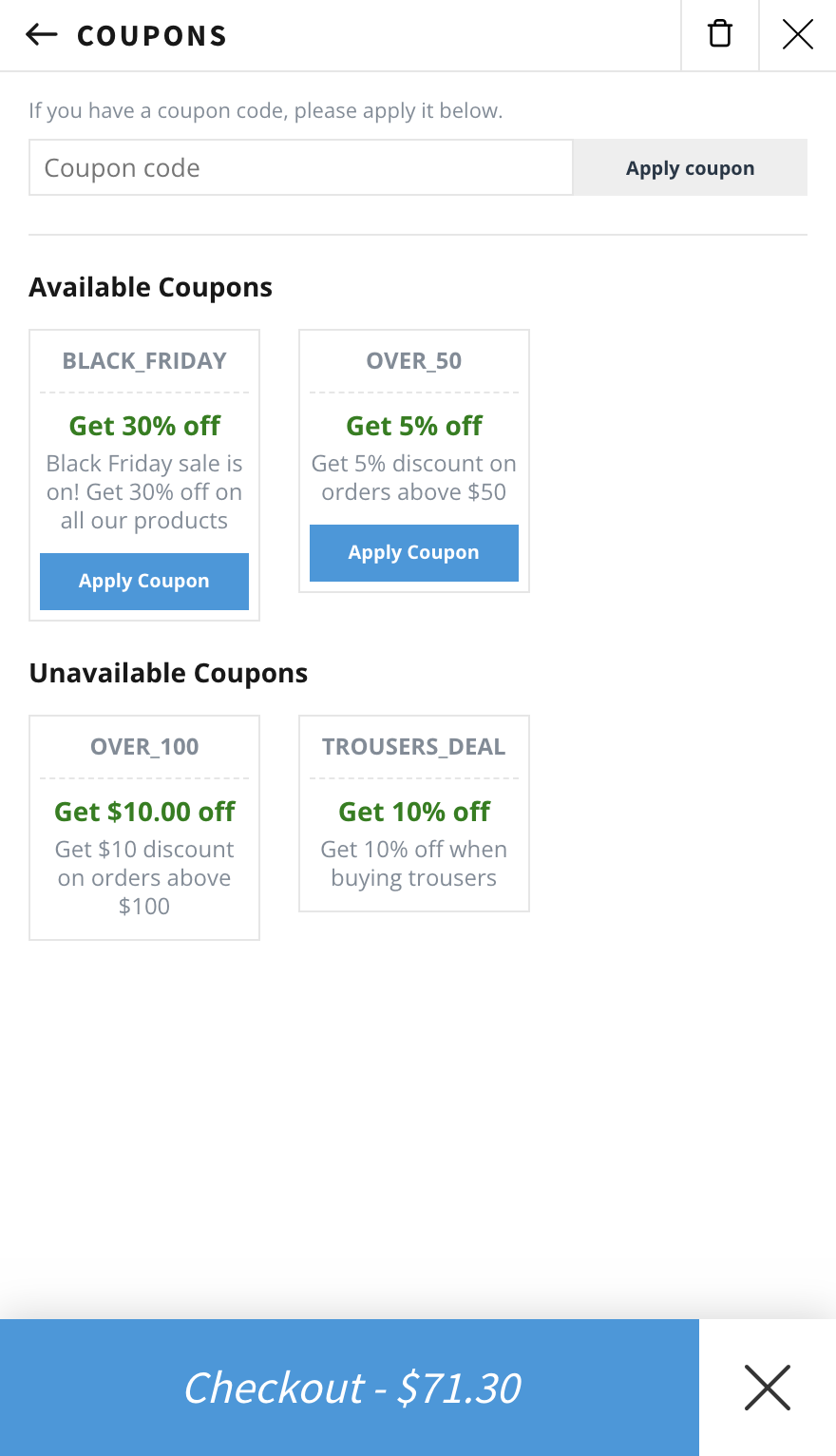
Für Entwickler
Ist das dein Plugin? Zeigen Sie die Zahlen.
Fügen Sie Ihrer Website, Docs oder GitHub Readme ein Live-Badge hinzu. Es wird von selbst aktualisiert - kein Konto erforderlich.
Best XT Floating Cart for WooComme… alternatives
All ajax add to cart plugins →



Fragen und Antworten
XT Floating Cart for WooCommerce: quick answers
Gerade Antworten, gezogen von Live WordPress.org Daten.
Quelle: WordPress.org
Is XT Floating Cart for WooCommerce free?
Yes. XT Floating Cart for WooCommerce is free to download and use from the official WordPress.org plugin directory.
Is XT Floating Cart for WooCommerce safe to use in 2026?
Yes — XT Floating Cart for WooCommerce is a safe, well-maintained plugin to use in 2026. It runs on 4K+ sites, is rated 4.6/5 and was last updated 1 week ago, and scores 87/100 on our health check.
How many websites use XT Floating Cart for WooCommerce?
XT Floating Cart for WooCommerce is active on 4K+ WordPress websites and has been downloaded 459,230 times since it launched in December 2016. It was downloaded 7,211 times in the last 30 days.
Does XT Floating Cart for WooCommerce work with WordPress 7.1?
Yes. The developer has tested XT Floating Cart for WooCommerce up to WordPress 7.1.5, the latest release. It requires WordPress 4.6 or newer.
What PHP version does XT Floating Cart for WooCommerce need?
XT Floating Cart for WooCommerce requires PHP 5.4 or higher. Most hosts run PHP 8.x today, so it works on any modern WordPress hosting.
When was XT Floating Cart for WooCommerce last updated?
The latest version, 2.8.16, was released on November 8, 2026 (1 week ago).
Who makes XT Floating Cart for WooCommerce?
XT Floating Cart for WooCommerce is developed and maintained by XplodedThemes.
What are the best alternatives to XT Floating Cart for WooCommerce?
The most popular alternatives to XT Floating Cart for WooCommerce are Cart Popup for WooCommerce (9K+ installs), XT Ajax Add To Cart for Woo… (1K+ installs) and Enhanced AJAX Add to Cart f… (600+ installs).
Angetrieben von PageForge
Eine Vorlage und eine Tabelle. Eine echte Seite für jede Suche.
PageForge Verwandelt jede Zeile eines CSV in eine WordPress-Seite mit eigenem Titel, URL, SEO Felder und Schema entworfen. Kostenlos auf WordPress.org.
- CSV und XLSX, plus Google Sheets auf Beruf und Unternehmen
- seinen eigenen Titel, URL, SEO Felder und Schema für jede Seite
- Arbeitet mit dem Blockeditor, Elementor, Divi und Avada
- Kostenlos auf WordPress.org, keine Kreditkarte