


VigIA – AI Visibility, Analytics & Control
Monitor 60+ AI crawlers, control access via robots.txt, and boost your AI visibility with llms.txt, JSON-LD, Markdown for Agents & Visibility Score.

Sichere Auswahl
Yes — VigIA is a safe, well-maintained plugin to use in 2026. It runs on 2K+ sites, is rated 5/5 and was last updated 2 days ago, and scores 87/100 on our health check.
- Aktiv entwickelt — Letztes Update vor 2 Tagen
- Getestet mit dem neuesten WordPress (7.1)
- Momentum — downloads up 44.9% vs the previous 30 days
Wie stapelt es sich?
Side-by-side bei Installationen, Updates, Bewertungen und Support


Tägliche Downloads
Download-Spitzen folgen normalerweise einer neuen Version - jede Website, die automatisch aktualisiert wird, gilt als Download.
Ranglisten
Where VigIA stands todayWordPress.org Ranglisten suchen
Live-Position in der Plugin-Suche, Top 100| Stichwort | Position |
|---|---|
| Ai | #74 |
| analytics | #36 |
| Claude | #34 |
| gpt | #5 |
| llms | #10 |
Versionsübernahme
Anteil aktiver Sites pro Release.
Bewertungsaufschlüsselung
★★★★★★★★★★ 5 from 19 reviews
About VigIA
From the official readme · v2.8.6Beschreibung
VigIA (Spanish for “lookout” or “watchman”, incorporating “IA” – Spanish for “AI”) is a complete AI visibility toolkit for WordPress. Monitor 60+ AI crawlers, control access to your content, and optimize how AI systems discover and understand your site.
What does VigIA do?
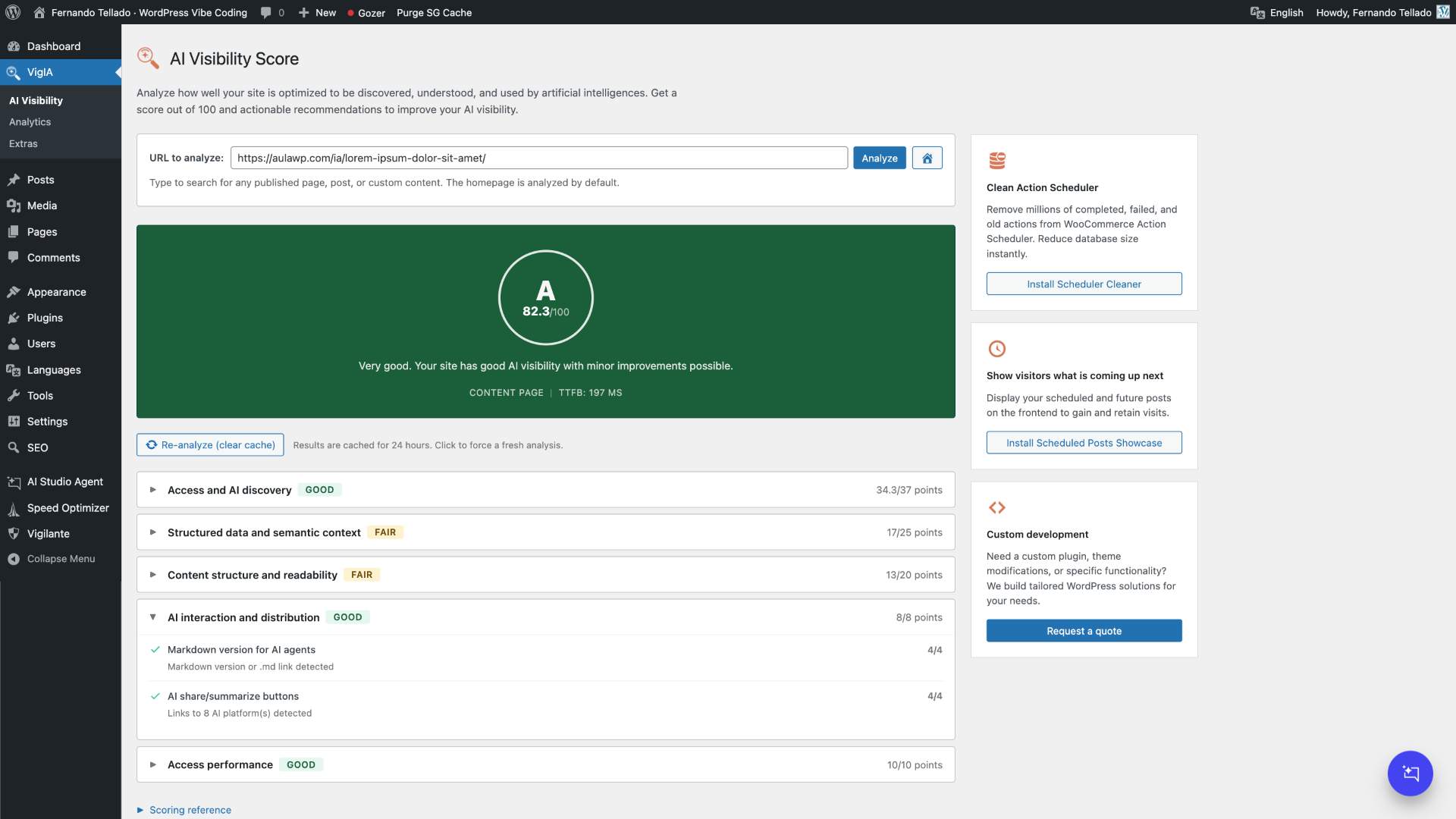
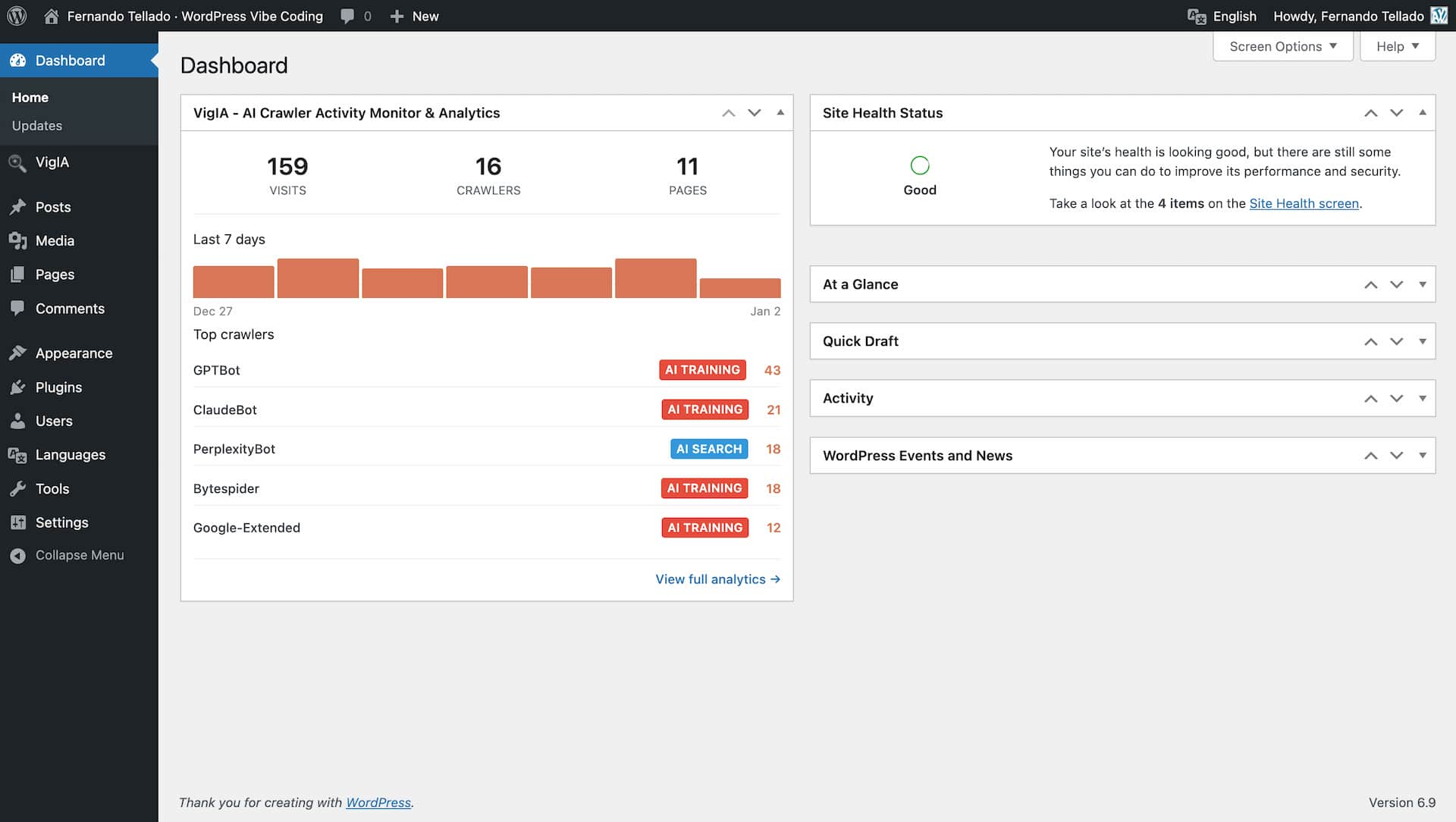
- Scores your AI visibility with a 100-point analyzer covering 20 checks across 5 categories
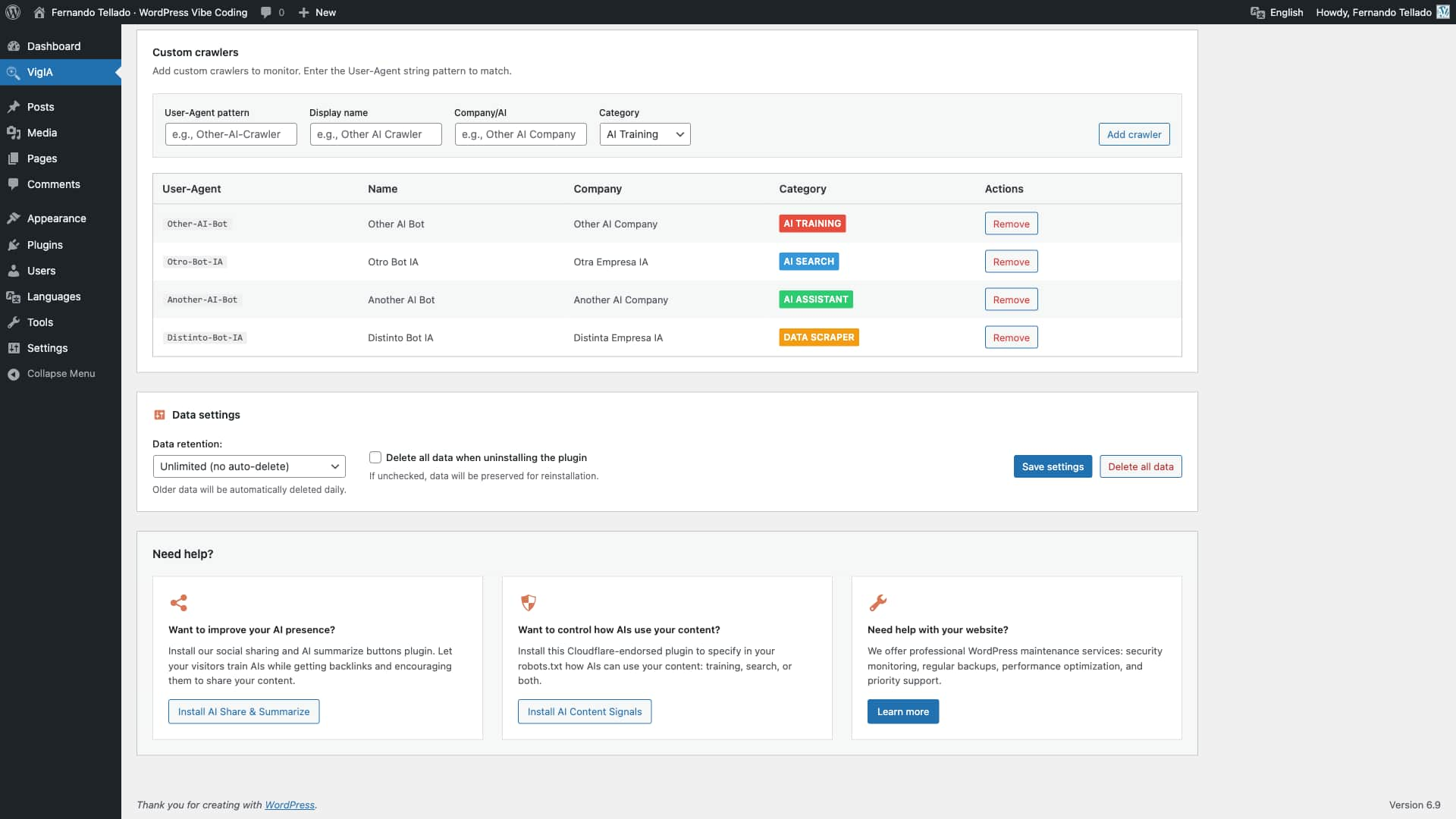
- Tracks AI crawlers visiting your site (GPTBot, ClaudeBot, PerplexityBot, and 60+ others)
- Provides detailed analytics with advanced filters, server-side pagination, and exportable reports with metadata banner
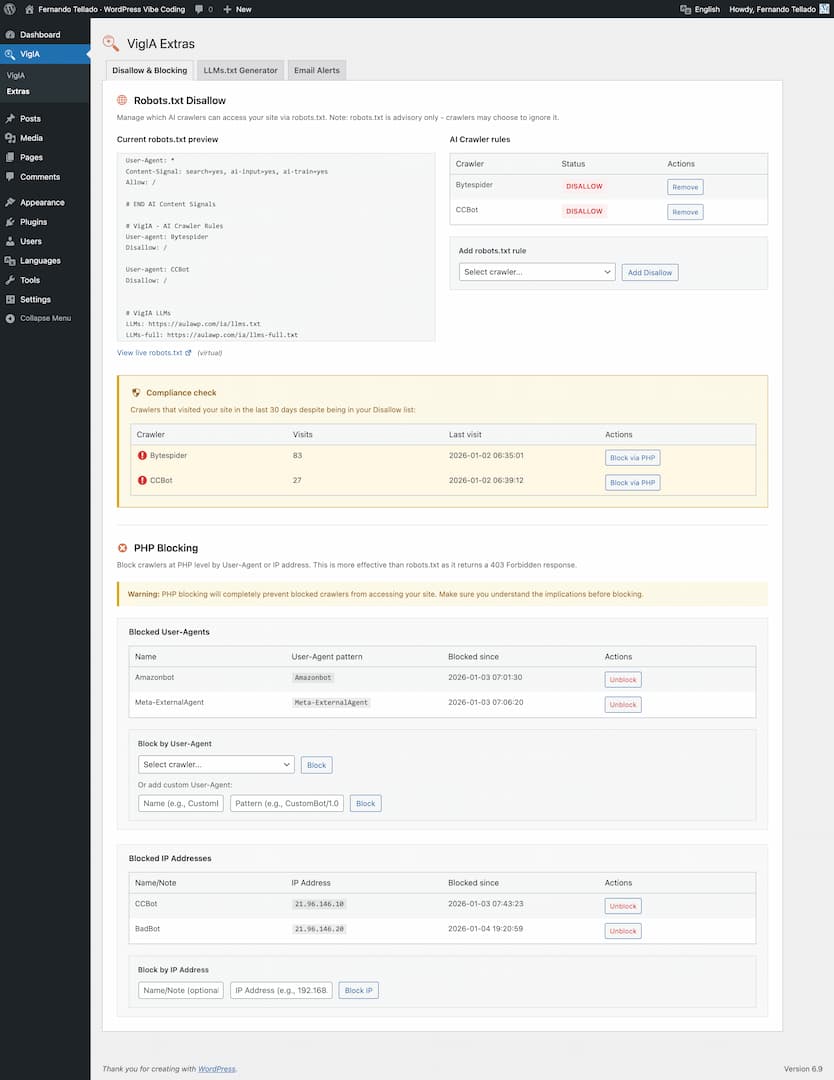
- Blocks unwanted crawlers via PHP (403 response)
- Manages robots.txt rules for AI crawlers with compliance monitoring
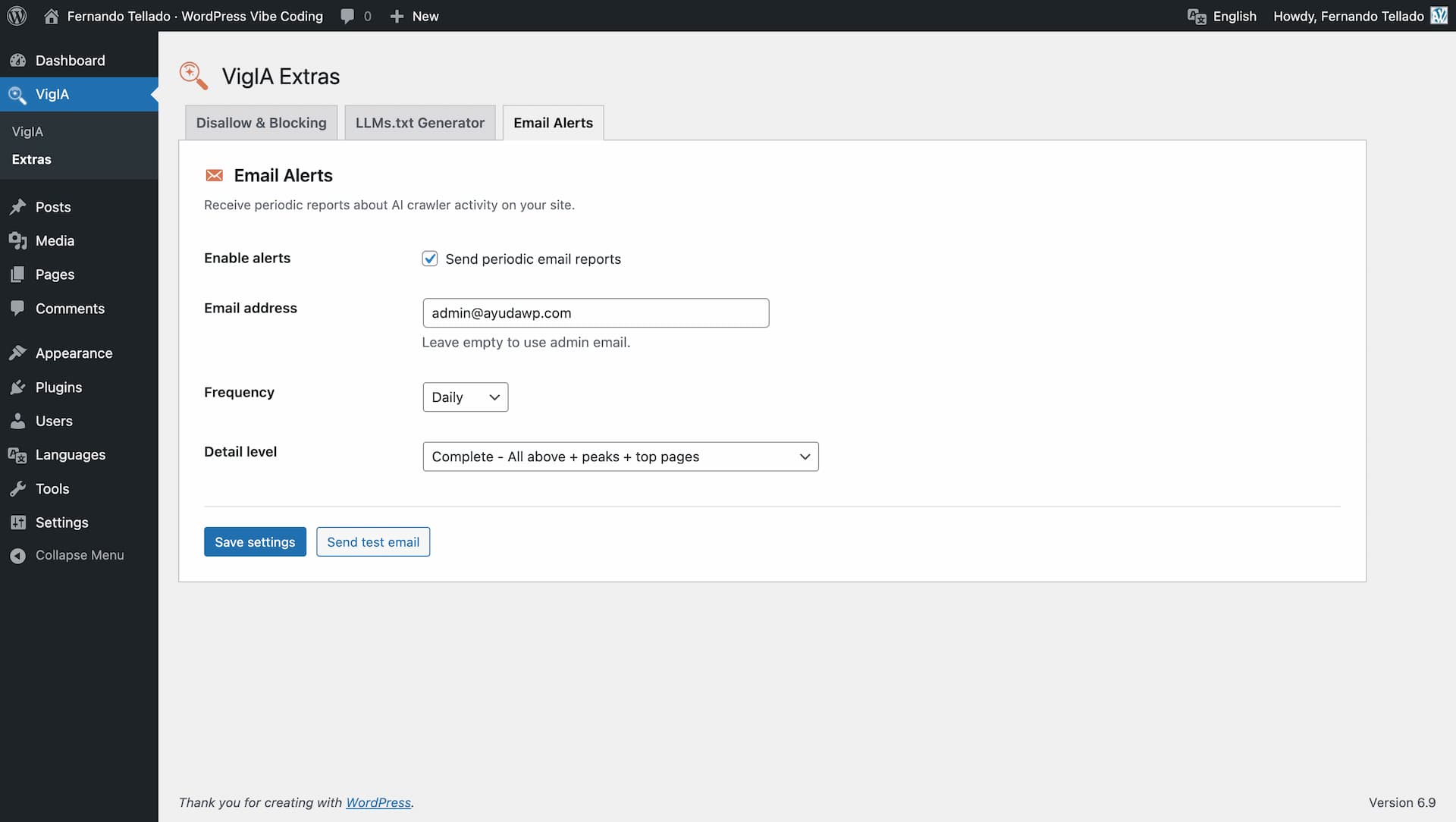
- Sends email alerts about crawler activity (daily, weekly, or monthly)
- Generates llms.txt files to help AI systems understand your site
- Serves markdown endpoints for posts, pages, taxonomy archives (categories, tags, WooCommerce product categories, custom taxonomies) and WooCommerce products with schema-like data
- Generates JSON-LD structured data with Site Identity and AI Discovery signals
- Exposes abilities for AI agents and automation tools (WordPress 6.9+)
Hauptmerkmale
AI Visibility Analyzer
* 100-point scoring system with letter grades (A+ to F)
* 20 individual checks across 5 categories
* Access & AI Discovery (37 pts): robots.txt, AI bot directives, Content Signals, llms.txt, sitemap, RSS feed
* Structured Data & Semantic Context (25 pts): JSON-LD schemas, Open Graph, Twitter Cards, meta description, canonical URL
* Content Structure & Readability (20 pts): heading hierarchy, semantic HTML5, image alt text, content/HTML ratio
* AI Interaction & Distribution (8 pts): markdown delivery, AI share buttons
* Access Performance (10 pts): TTFB measurement
* Smart recommendations with direct links to VigIA features and plugin suggestions
* Analyze any page on your site with URL autocomplete selector
* Results cached for 24 hours with manual re-analyze option
Analytics Dashboard
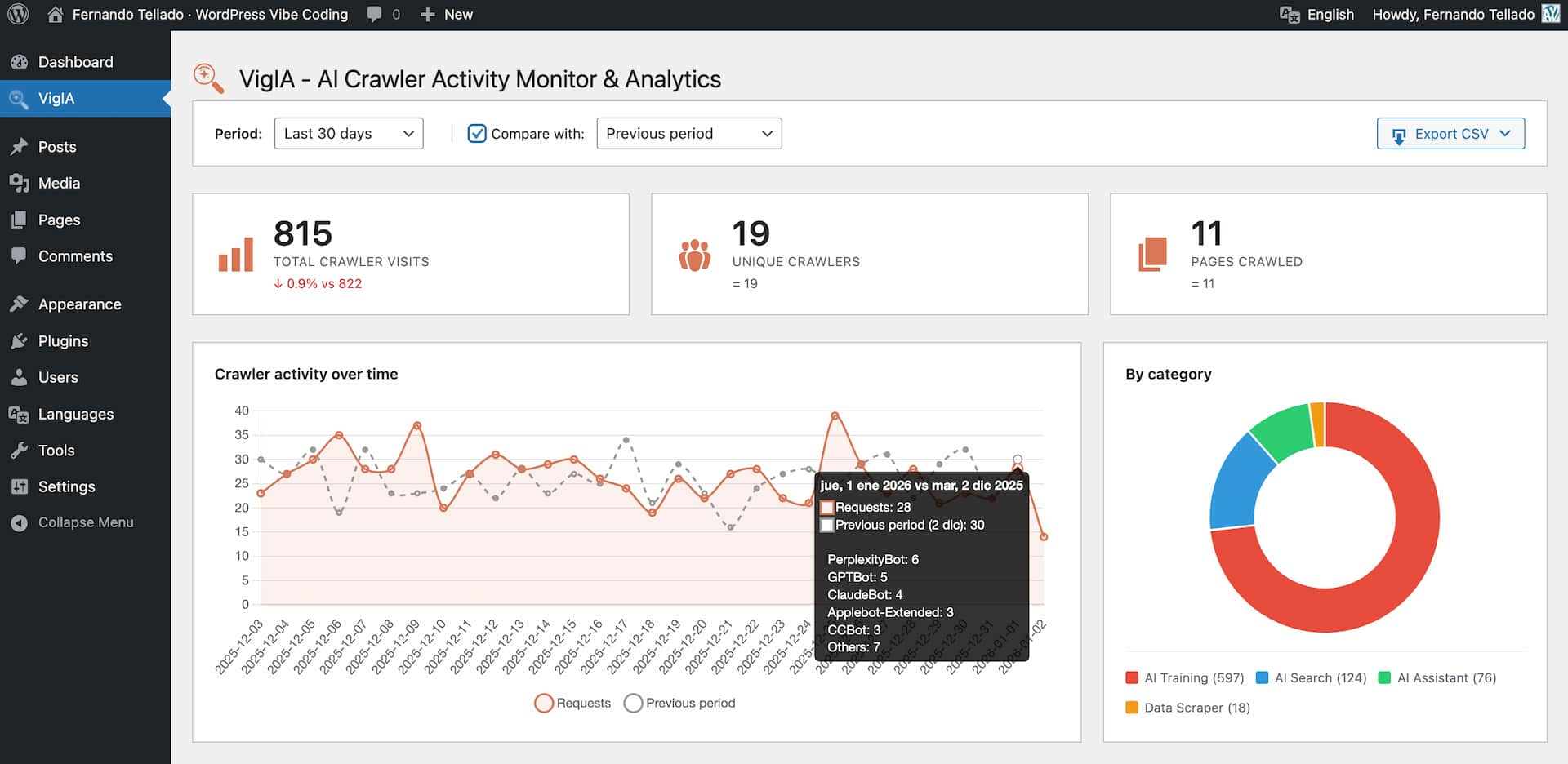
* Total visits, unique crawlers, and pages crawled statistics
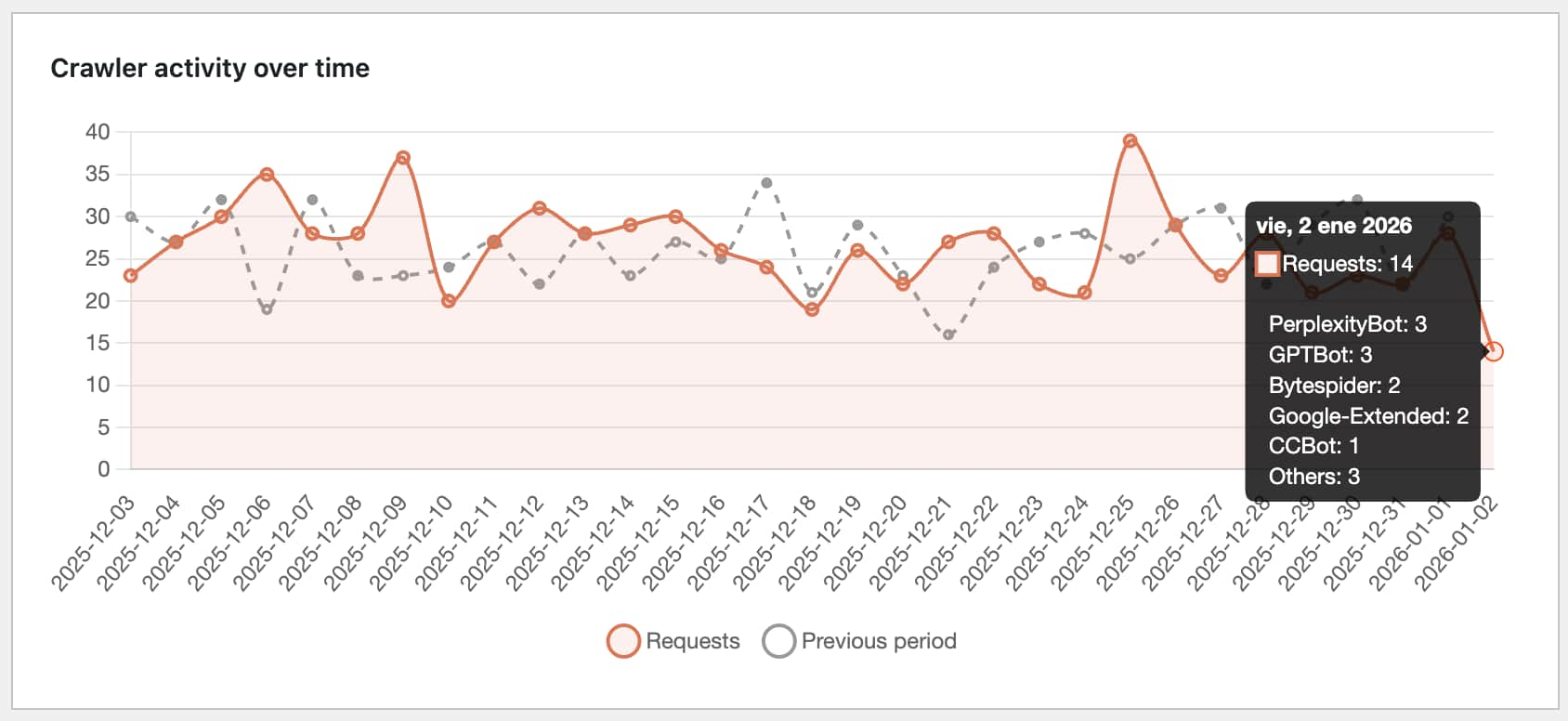
* Timeline chart with daily breakdown
* Category distribution (AI Training, AI Search, AI Assistant, Data Scraper)
* Top crawlers and most crawled pages tables with paginated navigation
* Share Buttons & AI-powered Summaries integration: see share button clicks per page
* Recent activity log with content type and HTTP status columns (color coded by status family)
* Advanced filters: multi-select crawler picker, content type, HTTP status code, and configurable date range
* Server-side pagination with four-button pager (first, previous, next, last) — operates over the full database, not just the latest 500 rows
* Period comparison functionality
* CSV export with a metadata banner (site name, site URL, export type, date range, export timestamp, applied filters)
* “Export filtered CSV” button that downloads exactly what the active filters return, with vigia-filtered-YYYY-MM-DD.csv filename
* Content type detection distinguishes Home, Post, Page, Product, custom CPTs, Category archive, Tag archive, Date/Author archive, Feed, Sitemap, REST API, File, Admin / login attempts (/wp-admin, /wp-login.php), WordPress system (admin-ajax, xmlrpc, wp-cron, wp-comments-post), 404 Not found, and Other
Crawler Blocking
* Block crawlers via PHP with 403 Forbidden response
* Quick block dropdown in analytics dashboard
* Manage blocks from Extras page
* Works on any server (Apache, Nginx, LiteSpeed, etc.)
Robots.txt Management
* Add Disallow rules for AI crawlers
* Visual preview of your robots.txt
* Compliance monitoring: see which crawlers ignore your rules
* One-click blocking for non-compliant crawlers
* Works with both physical and virtual robots.txt
Email Alerts
* Daily, weekly, or monthly reports
* Three detail levels: Minimal, Normal, Complete
* Non-compliant crawler warnings
* Activity comparison with previous period
Markdown for Agents
* Serve posts, pages and any public post type as optimized markdown for AI agents
* Serve taxonomy archive pages (categories, tags, WooCommerce product categories, custom taxonomies) as markdown — disabled by default, opt in per taxonomy
* Dedicated .md URL endpoints (e.g., /your-post.md, /category/news.md, /product-category/electronics.md)
* Accept: text/markdown content negotiation on posts and taxonomy archive pages
* Discoverability via Link HTTP headers and <link rel="alternate" type="text/markdown"> HTML tags
* YAML frontmatter for posts: title, date, modified, author, image, categories, tags, post type, lang
* YAML frontmatter for taxonomy terms: title, description, url, type, taxonomy, parent, count, image (term meta), lang
* WooCommerce product frontmatter adds schema-like fields: sku, product_type, price, regular_price, sale_price, currency, availability, stock_quantity, rating, rating_count, review_count
* Taxonomy term body includes the term description (rendered through the_content), the list of direct child terms in hierarchical taxonomies, and an excerpt of the latest posts/products assigned to the term
* Product listings inside product_cat archives include an inline summary with formatted price, “was X” on sale items, star rating and out-of-stock flag
* Respects blocking rules (blocked crawlers get 403) and LLMs.txt exclusion filters
* Per-term noindex detection from Yoast SEO, Rank Math, All in One SEO and SEOPress
* Analytics integration: tracks markdown requests per crawler
* X-Markdown-Tokens response header
* Filters: vigia_markdown_post_eligible, vigia_markdown_term_eligible, vigia_markdown_term_posts_limit
* Follows the Cloudflare Markdown for Agents standard
LLMs.txt Generator
* Select content by post type with one click
* Filter by taxonomies (categories, tags, custom)
* Manual include/exclude with AJAX search
* Exclude by URL patterns (wildcards supported)
* SEO plugin integration (auto-exclude noindex content)
* Auto-regeneration (daily, weekly, monthly)
* Robots.txt integration (add llms.txt and llms-full.txt references)
* Generate llms.txt and llms-full.txt files
* Physical files at the site root, or served by WordPress when the root is not writable
* On multisite, every site gets its own files, mapped domains included
* Full content or excerpt mode
* Compatible with Yoast SEO, Rank Math, All in One SEO, SEOPress, The SEO Framework, and Native SEO NoIndexer
JSON-LD Structured Data
* Generate WebSite and Organization/Person schema for site identity
* AI Discovery: ReadAction pointers to llms.txt, llms-full.txt, and Markdown for Agents endpoints
* Social profiles and sameAs links for brand identity across the web
* SearchAction for Google sitelinks search box
* Media library integration for logo selection
* SEO plugin conflict detection (Yoast, Rank Math, AIOSEO, SEOPress, The SEO Framework)
* Choose output page (front page or any published page)
* Live JSON-LD preview with real-time updates
* Smart integration with LLMs.txt and Markdown for Agents features
Supported AI Crawlers
VigIA monitors 60+ AI crawlers including:
- OpenAI: GPTBot, OAI-SearchBot, OAI-AdsBot, ChatGPT-User
- Anthropic: ClaudeBot, Claude-SearchBot, Claude-User, Claude-Code
- Google: Google-Extended, GoogleOther, Gemini-Deep-Research, Google-NotebookLM
- Perplexity: PerplexityBot, Perplexity-User
- Meta: Meta-ExternalAgent, FacebookBot, Meta-WebIndexer
- Amazon: Amazonbot, Amzn-SearchBot, bedrockbot
- Mistral: MistralAI-User, MistralAI-Index
- Microsoft: BingBot
- ByteDance: Bytespider
- Apple: Applebot-Extended
- And many more…
Privacy Focused
VigIA stores visitor data locally in your WordPress database. No data is sent to external servers.
Abilities API
VigIA is one of the first WordPress plugins to implement the Abilities API introduced in WordPress 6.9. This API allows AI agents, automation tools, and external systems to discover and interact with VigIA’s functionality in a standardized, secure way.
What are Abilities?
Abilities are self-contained units of functionality that VigIA exposes through WordPress’s central registry. Each ability has defined inputs, outputs, and permissions, making it easy for automation tools to understand and use them.
Available Abilities
VigIA registers the following abilities:
Analytik
vigia/get-crawler-stats– Get statistics about AI crawler visits (total visits, unique crawlers, pages crawled)vigia/get-top-crawlers– Get a ranked list of most active AI crawlersvigia/get-top-pages– Get the most crawled pages on your site
Blocking
vigia/get-blocked-items– List all blocked crawlers and IP addressesvigia/block-crawler– Block a crawler by User-Agent patternvigia/unblock-crawler– Remove an existing block
Robots.txt
vigia/get-robots-rules– Get current AI crawler rules in robots.txtvigia/add-robots-disallow– Add a Disallow directive for a crawlervigia/remove-robots-rule– Remove a robots.txt rule
Anwendungsfälle
- Automated monitoring: AI agents can query crawler statistics and alert you to anomalies
- Reactive blocking: Automation tools can block crawlers that repeatedly ignore robots.txt
- External dashboards: Aggregate data from multiple WordPress sites with VigIA installed
- WP-CLI integration: Future command-line access through the Abilities API
- n8n / Make workflows: Build custom automation flows using VigIA’s abilities
Bedarf
The Abilities API ships with WordPress 6.9 and later. On older WordPress versions, VigIA works normally but abilities and MCP are not available.
MCP Server (Model Context Protocol)
VigIA exposes its 9 abilities as native MCP tools to any MCP-compatible client (Claude Code, Cursor, Claude Desktop, Codex CLI, Antigravity, Continue, Cline, Zed and similar) through the official MCP Adapter plugin. The server is off by default: turn it on in VigIA > Extras > MCP, where VigIA also offers to install MCP Adapter if the site does not have it.
Bedarf
- WordPress 6.9 or later (provides the Abilities API)
- The free MCP Adapter plugin. A site where another plugin already runs the adapter works too, and the MCP tab says which copy is in use
Quick connect (recommended)
Open VigIA > Extras > MCP, enable the MCP server and click “Generate password and connection commands”. The plugin creates a dedicated Application Password named VigIA MCP and renders ready-to-paste commands for Claude Code, Cursor, Claude Desktop and a generic block (URL + Authorization header) for any other MCP client.
The plain password is shown only once. If you lose it, revoke the entry from the same panel and generate a new one.
Endpoint
https://your-site.example/wp-json/vigia/v1/mcp
The endpoint uses HTTP Basic auth with the WordPress Application Password. The user must have the manage_options capability.
Connecting Claude Code
Quick Connect builds the full command for you. The shape is:
claude mcp add --transport http vigia-your-site-example https://your-site.example/wp-json/vigia/v1/mcp --header "Authorization: Basic BASE64_OF_USER_AND_APP_PASSWORD"
Quick Connect names the server after the site (vigia-your-site-example), so the same client can hold several sites with VigIA.
Claude Code merges the new entry into its config file automatically — no risk of breaking other servers.
Connecting Cursor
Save the JSON block from Quick Connect as ~/.cursor/mcp.json. You can also reach this file from inside Cursor at Settings → Cursor Settings → MCP.
If the file already exists with other content, see the FAQ.
Claude Desktop and other clients
Claude Desktop does not speak HTTP MCP, so it needs a small bridge and a config file of its own. Any other client (Codex CLI, Continue, Cline, Antigravity, Zed, or your own) takes the two raw values Quick Connect exposes: the server URL and the Authorization header. Both cases are covered in the FAQ, together with how to merge VigIA into a config file that already exists without losing what is in it.
Read-only mode
If you only want your AI to consult VigIA (not change anything), enable “Read-only mode” in the MCP tab. While on, write actions (block, unblock, robots changes) return a permission denied error. Read actions (statistics, top crawlers, blocked items, robots rules) keep working.
The toggle stores a vigia_mcp_read_only option that hooks into the vigia_can_write_via_abilities filter. Developers can still force read-only from a mu-plugin:
add_filter( 'vigia_can_write_via_abilities', '__return_false' );
The mu-plugin filter at the default priority takes precedence over the toggle.
Who can reach the endpoint
The endpoint requires the capability to manage options, the same one every tool behind it already asked for. The vigia_mcp_transport_capability filter can lower that bar; each tool keeps its own permission check.
After connecting
Restart your MCP client after adding the server so it picks up the new tools. Then try a few prompts to confirm everything is wired up:
- “Show me VigIA crawler stats for the last 7 days.”
- “List the top 5 most crawled pages on this site.”
- “Add a robots.txt Disallow rule for TestBot and then list the current AI crawler rules.”
The third example exercises a read + write + read round-trip, which is the most complete sanity check.
Unterstützen
Need private support or custom development?
Do you need one-on-one help, priority troubleshooting, or a custom feature, integration, or tweak built specifically for your site? I offer private support and custom development. Just contact me and tell me what you need.
Need help or have suggestions?
Love the plugin? Please leave us a 5-star review and help spread the word!
About AyudaWP
We are specialists in WordPress security, SEO, AI and performance optimization plugins. We create tools that solve real problems for WordPress site owners while maintaining the highest coding standards and accessibility requirements.
Installation
- Upload the plugin files to
/wp-content/plugins/vigia/or install through the WordPress plugins screen - Aktivieren Sie das Plugin über den Bildschirm „Plugins“ in WordPress
- Navigate to VigIA > AI Score to check your AI Visibility Score
- View crawler analytics in VigIA > Analytics
- Configure blocking rules, llms.txt, markdown, and JSON-LD in VigIA > Extras
Änderungsprotokoll
Polish, Cyrillic, Arabic, Japanese and emoji characters stay whole in the llms.txt descriptions and in the Markdown version of a page.
2.8.6
Polish, Cyrillic, Arabic, Japanese and emoji characters stay whole in the llms.txt descriptions and in the Markdown version of a page.
- Fix: Characters whose UTF-8 encoding ends in the byte 0x85 (Polish ą, Cyrillic х, Arabic م, many Japanese characters, emoji such as ✅) were split in the llms.txt descriptions, in the description of the Markdown pages and in their inline code, which then were not valid UTF-8.
2.8.5
With Visibility 3.2.4 or later, the home page carries a single WebSite node, the one Visibility prints with its site name, and the AI Discovery pointers of VigIA go into it.
- Improved: The AI Discovery pointers (llms.txt, llms-full.txt and Markdown for agents) now go into the WebSite node that Visibility prints, without repeating the ones Visibility already announces for what it serves itself. That includes a site where Visibility prints its own Site Identity: until now VigIA stepped back with all of its JSON-LD there, and the pointers were lost.
- Fix: With Visibility 3.2.4 or later, which prints a WebSite node on the home page with a site name of its own, earlier versions of VigIA printed a second one with the same identifier and the site title as its name. On the home page Visibility then left its own out, so the site name set there never reached it, and with the JSON-LD output page set to another page the same node had two names. VigIA now leaves the WebSite to Visibility whenever Visibility prints it, and Site Identity prints only the Organization or Person, which that WebSite names as its publisher. The JSON-LD tab says so, and its preview leaves the WebSite out. Behaviour change: to keep the WebSite of VigIA, turn the WebSite off in Visibility, or return false from the
vigia_defer_emission_to_visibilityfilter for the newwebsitesignal.
2.8.4
Keeps caches in front of the site that follow Cache-Control from showing people the Markdown version of a page when an AI agent asked for it first, or from passing on cookies set by other plugins. Purge that cache after updating.
- Fix: A page asked for with an Accept: text/markdown header, which is how some AI agents ask for the Markdown version, now gets that Markdown as private, so caches in front of the site that follow Cache-Control no longer store it. Some hosting caches keep one copy per address and ignore the Vary: Accept that VigIA sends, and when an agent was the first to visit a page they served the Markdown to people too. Copies they already stored stay until they expire, so purge that cache after updating. The agent may still reuse its copy for an hour. The .md addresses only ever answer Markdown and stay cacheable, and with crawler blocks configured both stay private, as before. Behaviour change: this Markdown is no longer served from a shared cache, so more of these requests reach the site. A cache that also ignores Cache-Control needs a rule of its own.
- Fix: When another plugin had already given the response a cookie, as a store or a consent banner does when it opens its session, the .md addresses and the llms.txt and llms-full.txt files served by WordPress still went out as public for an hour, so a cache in front of the site could keep that cookie and hand it to the next visitor. In that case they now go out as private, still reusable by the browser for an hour, and the cookie is left as it was. On a site where a plugin sets a cookie on every visit, caches that follow Cache-Control no longer keep these files.
2.8.3
Fixes the visitor address behind proxies that add a port, keeps the network root files for network administrators, warns when the server sends llms.txt without UTF-8, closes an MCP window left by updates from 2.7, and fixes formatting in llms-full.txt.
- Improved: The Delivery section of llms.txt warns when the web server sends the physical files without saying they are UTF-8. Browsers and some AI tools then show accented letters as odd symbols, although the file is correct. VigIA asks the server each time the files are generated from the admin, proposes Served by WordPress, which sends them as UTF-8, and says so when it could not ask.
- Fix: On hosts whose proxy writes the port next to the visitor address in X-Forwarded-For or X-Real-IP (Azure App Service does, as 203.0.113.7:51234 or [2001:db8::1]:443), the block list and the visit log saw the address of the proxy, so a visitor blocked by IP was never matched there. VigIA now drops that port before reading the address. Reported by kta1kri.
- Fix: A site updated from 2.7.x or earlier counted the MCP switch as on until somebody opened wp-admin, and since 2.8.1 that also let the abilities answer on the core REST route during that time. The switch is now decided on its first read, wherever it happens: on only where a client had been connected (the VigIA MCP application password), off everywhere else.
- Fix: On a multisite network, an administrator of the main site who is not a network administrator could change the robots.txt, llms.txt and llms-full.txt at the network root, which every site of the network serves. Those changes now need a network administrator: the AI crawler rules when there is a physical robots.txt at the root, and the llms settings when the files are at the root or would be. Each site keeps its own rules and its own files served by WordPress, and blocking crawlers is unaffected.
- Fix: In llms-full.txt, a line break no longer starts a bold run and an image no longer starts an italic one, a line break without a new line after it no longer glues two lines together, and a heading written right after other text now goes on a line of its own.
- Fix: Code cleanup. The robots.txt compliance query is now prepared as a single statement, and the remaining database suppressions say why on their own line. What the query returns does not change.
2.8.2
Blocking by IP can no longer be bypassed with a forged proxy header, and the visit log no longer takes the visitor address from headers that anybody can send.
- Improved: New
vigia_trusted_proxiesfilter, to declare the addresses or ranges of a load balancer, or of a CDN other than Cloudflare, that sits in front of the site, so VigIA reads the visitor from its X-Forwarded-For header. Declaring a proxy stops VigIA from trusting the site’s own network on its own, so list every proxy in front of PHP, a local one included. Add the filter from a plugin or a must-use plugin: the block list runs before the theme is loaded. - Fix: A visitor blocked by IP got the page back by sending an X-Forwarded-For, CF-Connecting-IP or X-Real-IP header with any other address, and any visitor could write the address they wanted into the visit log. VigIA now uses the address of the connection. It believes CF-Connecting-IP only from Cloudflare’s published ranges, and X-Forwarded-For or X-Real-IP only from a proxy on the site’s own network or a declared one, reading the visitor from the end of the header, which is the part that proxy writes. Reported by kta1kri.
- Fix: Behaviour change that comes with the previous fix: behind a CDN other than Cloudflare, a load balancer with a public address, or a proxy with a public address between Cloudflare and the site, the visit log and the block list now see the address of that proxy until it is declared with the new filter. Visits already logged keep the address they were saved with.
- Fix: A blocked IPv6 address written differently from the way the server reports it (upper case, leading zeros) never matched, and neither did an IPv4 address that reached the site written as IPv6.
2.8.1
The MCP switch now governs the VigIA abilities on every channel, not only the endpoint of this plugin, the nine abilities are now listed in the WordPress abilities directory, and two of them no longer fail when a client sends no parameters.
- Improved: The MCP switch now governs the nine VigIA abilities on every channel. With the server off they reject every call, whichever way it arrives. Behaviour change: until now the switch closed only the endpoint of this plugin, and an ability stayed callable through an MCP server that another plugin runs.
- Improved: New
vigia_abilities_require_mcp_switchfilter, to untie the abilities from the switch on a site that reaches them through the core REST route and wants nothing to do with MCP. Capability checks are not affected by it. - Improved: The nine abilities declare the
publicmeta flag, so they show up in the WordPress abilities directory at/wp-abilities/v1/abilities, which WordPress 7.1 turns into the canonical way for an agent to find them. Listing is not calling: a call still needsmanage_options, and the four write abilities still go throughvigia_can_write_via_abilities. Note that the directory answers any logged-in user, so a subscriber can read the list and the input schemas. The flag is also what the MCP Adapter falls back on when an ability says nothing about MCP, so the nine are now served by the adapter’s own default server with nothing to tick anywhere, and that server does not apply thevigia_mcp_transport_capabilityfilter, which only covers the server VigIA registers itself. - Fix: Two abilities,
vigia/get-blocked-itemsandvigia/get-robots-rules, refused a call that carried an empty object of arguments, which is what an MCP client sends for a tool that takes no parameters. They declared an empty input schema, and WordPress answersability_missing_input_schemawhen the schema is empty and the input is not null (measured on WordPress 7.1.4). They now declare an object schema with no properties.
Screenshots


Für Entwickler
Ist das dein Plugin? Zeigen Sie die Zahlen.
Fügen Sie Ihrer Website, Docs oder GitHub Readme ein Live-Badge hinzu. Es wird von selbst aktualisiert - kein Konto erforderlich.
Best VigIA alternatives
Alle AI-Plugins →





Fragen und Antworten
VigIA: quick answers
Gerade Antworten, gezogen von Live WordPress.org Daten.
Quelle: WordPress.org
Is VigIA free?
Yes. VigIA is free to download and use from the official WordPress.org plugin directory.
Is VigIA safe to use in 2026?
Yes — VigIA is a safe, well-maintained plugin to use in 2026. It runs on 2K+ sites, is rated 5/5 and was last updated 2 days ago, and scores 87/100 on our health check.
How many websites use VigIA?
VigIA is active on 2K+ WordPress websites and has been downloaded 45,625 times since it launched in January 2026. It was downloaded 8,616 times in the last 30 days.
Does VigIA work with WordPress 7.1?
Yes. The developer has tested VigIA up to WordPress 7.1.5, the latest release. It requires WordPress 6.9 or newer.
What PHP version does VigIA need?
VigIA requires PHP 7.4 or higher. Most hosts run PHP 8.x today, so it works on any modern WordPress hosting.
When was VigIA last updated?
The latest version, 2.8.6, was released on November 17, 2026 (2 days ago).
Who makes VigIA?
VigIA is developed and maintained by Fernando Tellado.
What are the best alternatives to VigIA?
The most popular alternatives to VigIA are Elementor Agent Ready Websi… (10M+ installs), Jetpack (3M+ installs) and All in One SEO (2M+ installs).
Angetrieben von PageForge
Eine Vorlage und eine Tabelle. Eine echte Seite für jede Suche.
PageForge Verwandelt jede Zeile eines CSV in eine WordPress-Seite mit eigenem Titel, URL, SEO Felder und Schema entworfen. Kostenlos auf WordPress.org.
- CSV und XLSX, plus Google Sheets auf Beruf und Unternehmen
- seinen eigenen Titel, URL, SEO Felder und Schema für jede Seite
- Arbeitet mit dem Blockeditor, Elementor, Divi und Avada
- Kostenlos auf WordPress.org, keine Kreditkarte