


Views for WPForms – Display & Edit WPForms Entries on your site frontend
Display and Edit WPForms Entries Directly on Your Website with No Coding Knowledge Needed.

Safe pick
Yes — Views for WPForms is a safe, well-maintained plugin to use in 2026. It runs on 1K+ sites, is rated 5/5 and was last updated 2 weeks ago, and scores 87/100 on our health check.
- Loved by users — 5/5 from 24 reviews
- Actively developed — last update 2 weeks ago
- Tested with the latest WordPress (7.1)
- Momentum — downloads up 142.3% vs the previous 30 days
How does it stack up?
Side-by-side on installs, updates, ratings & support



Daily downloads
Download spikes usually follow a new release — each site that auto-updates counts as a download.
Rankings
Where Views for WPForms stands todayWordPress.org search rankings
Live position in the plugin search, top 100| Keyword | Position |
|---|---|
| database | >100 |
| display entries | #1 |
| table | >100 |
| WPForms | #9 |
Version adoption
Share of active sites per release.
Rating breakdown
★★★★★★★★★★ 5 from 24 reviews
About Views for WPForms
From the official readme · v3.4.9.1Description
If you’re using the WPForms plugin to create forms on your WordPress site, then we have some great news for you.
With the Views for WPForms plugin, you can now display and edit form entries on the front end of your site. That’s right, no more logging into the backend to manage your form entries.
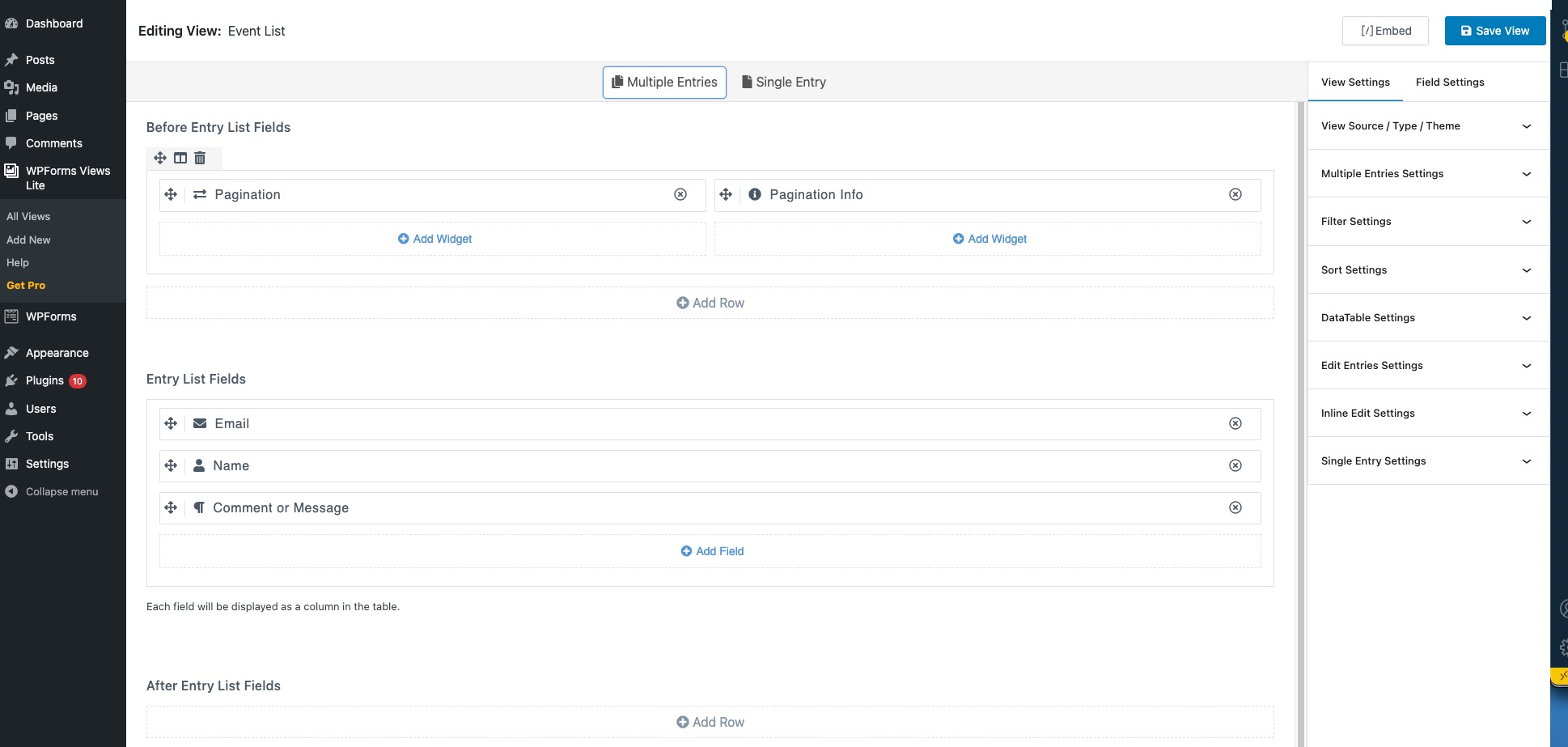
With our drag & drop view builder, you can easily create table or list views of entries, allow users to edit entries and approve or disapprove entries from the frontend of your site.
Our plugin is also compatible with all WPForms Forms Add-Ons, so you can add even more features and functionality to your forms.
NOTE: YOU NEED AT LEAST WPFORMS BASIC LICENSE TO USE VIEWS FOR WPFORMS AS WPFORMS LITE VERSION DOESN’T STORE ENTRIES
Here is step by step guide to display WPForms Entries anywhere on your site
Views for WPForms lets you display WPForms Entries in your site frontend using drag & drop View builder.
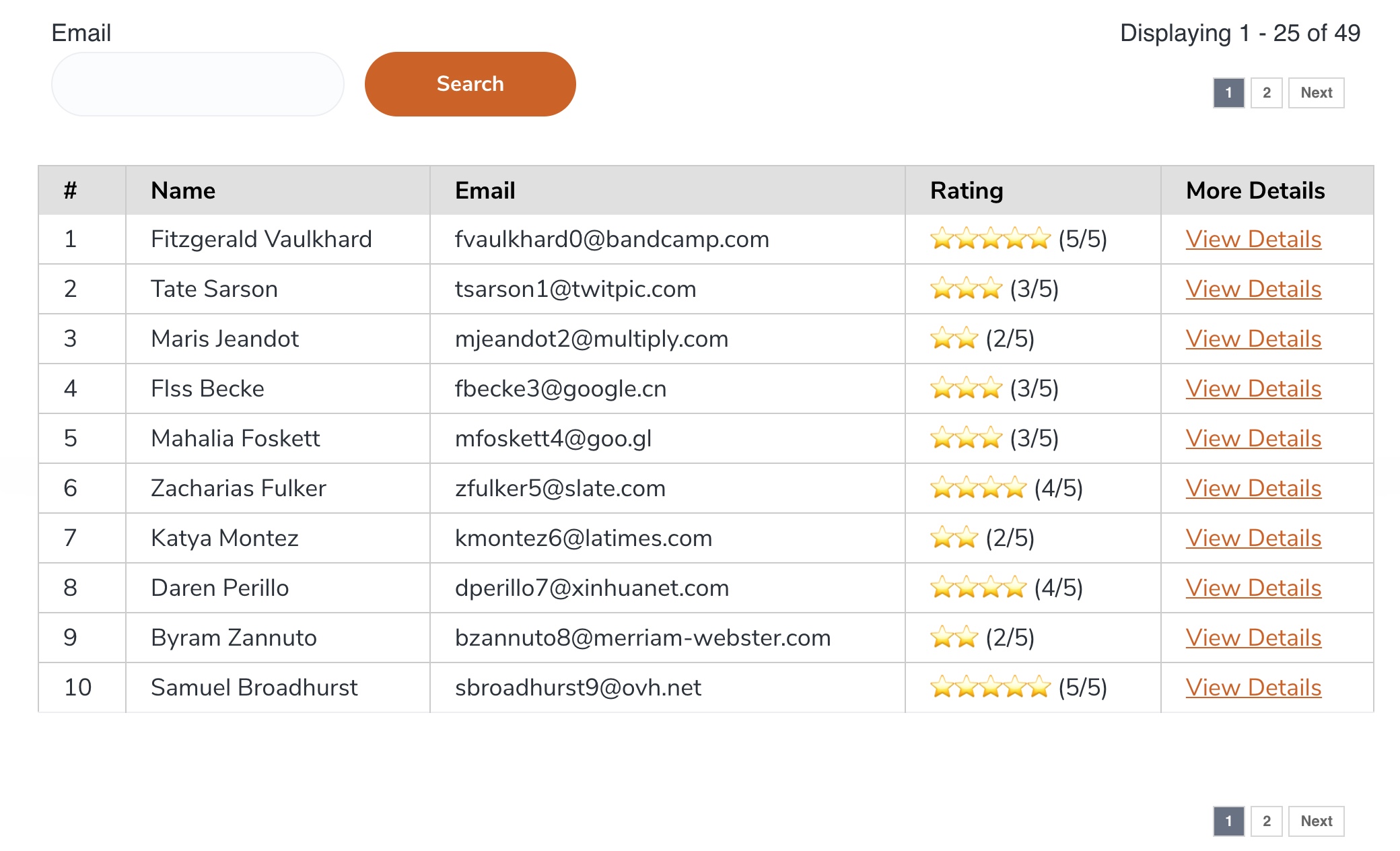
You can create a table view, list view, or datatable (Pro feature).
The plugin also allows you to add custom content before and after each View, and control the number of entries displayed per page.
Demo
Table View
List View
DataTable View
Edit Entry Demo
Top Free Features
- Intuitive user interface!
- Easy to use – drag and drop view builder!
- Set any number of form fields to show in View.
- Set custom labels for table headings.
- Set table column width.
- Set total number of entries to show on the page.
- Add pagination links before or after the table.
- Display Pagination Information.
- Display using Shortcode on any page, post or custom post type.
- Compatible with Elementor. Add Views to any page using Elementor Widgets.
- Compatible with the new Gutenberg block editor. Add View to your page using the WPForms Views block.
- Fully supported and regular updates.
Get more features in Pro version
* List View Format
* DataTable View Format
* Edit Entries from frontend
* 25+ Premade Themes and Styler
* Delete Entries from frontend
* Display only approved Entries
* Display only User submitted Entries
* Add Search Form above or at View bottom to filter/search entries by field values
* Display Entry details on Single Page
* Add Custom HTML field & use WPForms Smart Tags inside View
* Filter entries by field values or use Merge Tags
* Sort WPForms Entries via field values
* Display Only starred entries
* Display Only viewed entries
Get WPForms Views PRO!
Pro Features
= List & DataTable View Format =
Display WPForms Entries in a multicolumn layout on your site frontend. Want more features than a regular table? We have you covered. Display data using dataTables including features like responsive layout, print, pdf, CSV download entries options.
Edit WPForms Entries
Allow logged-in users to edit their entries from the site frontend using the same form that they used to create an entry. Edit Entry works by prefilling Form fields with entry data. After the user submits Form entry is updated. Administrators can edit all entries. Send a custom notification/email when entry is edited from frontend
Inline Edit WPForms Entries
Inline Edit Entries without page refresh. The user will never leave the page & can update one field at a time. Best for quick updating of fields displayed in a View.
Delete WPForms Entries
Allow users to delete their submitted entries from the site frontend. Logged-in users can delete their entries and administrators can delete any entry.
Premade themes & Custom Designs
Apply premade Table and List View themes with single click. Select from 25+ premade design templates or create your own custom designs without any css Knowledge.
Search WPForms Entries
Display Search Form in your View to allow users to filter view data by any field value. Options also include searching by Entry Submission Date or Date Range e.g. Display entries submitted between two dates.
Advanced Filters
Set Filters to Filter Entries before displaying on the site frontend by using any Form field value, logged-in user meta, custom dates, etc.
E.g. Display all entries where the user selected Male as Gender field value while submitting the form.
Advance Sorting
Sort by any Field value in Ascending or Descending order. Allows you to add multiple sort conditions.
Entries Approval
Display only those entries that are approved by admin from the backend. Approve or Unapprove Entries from site frontend.
Calculations
Display calculations like sum or average of field values in the table footer.
Display Conditions
Show field in view only if set conditions are matched.
Duplicate Entries
Duplicate Entries from your view.
Customize Field Value
Add any content before or field value inside view using Field Value Template.
Google Maps Add-on
Display data on Google Maps above or at bottom of View.
Custom HTML
Add custom HTML within View data. Support WPForms Smart Tags so you can display data by combining multiple field values.
WPForms User Registration Addon Integration
Works perfectly with User Registration Addon. Register new users on site, display their profile data on the frontend using WPForms Views & then allow them to update it using the Inline Edit addon.
WPForms Post Submissions Addon Integration
Update associated posts whenever you update entries from WPForms Views. Allow users to update their posts from the site frontend.
WPForms Save and Resume
Show or hide partial entries within View. Display the Entry Resume link to allow the user to complete partial WPForms entries.
WPForms Geolocation Add-on
Show Google Maps on the page where you have added View. Create a custom infobox with the data from the WPForms fields.
Other WPForms Add-ons
= WPForms Import Entries =
Import Entries to WPForms CSV file
WPForms Charts
Installation
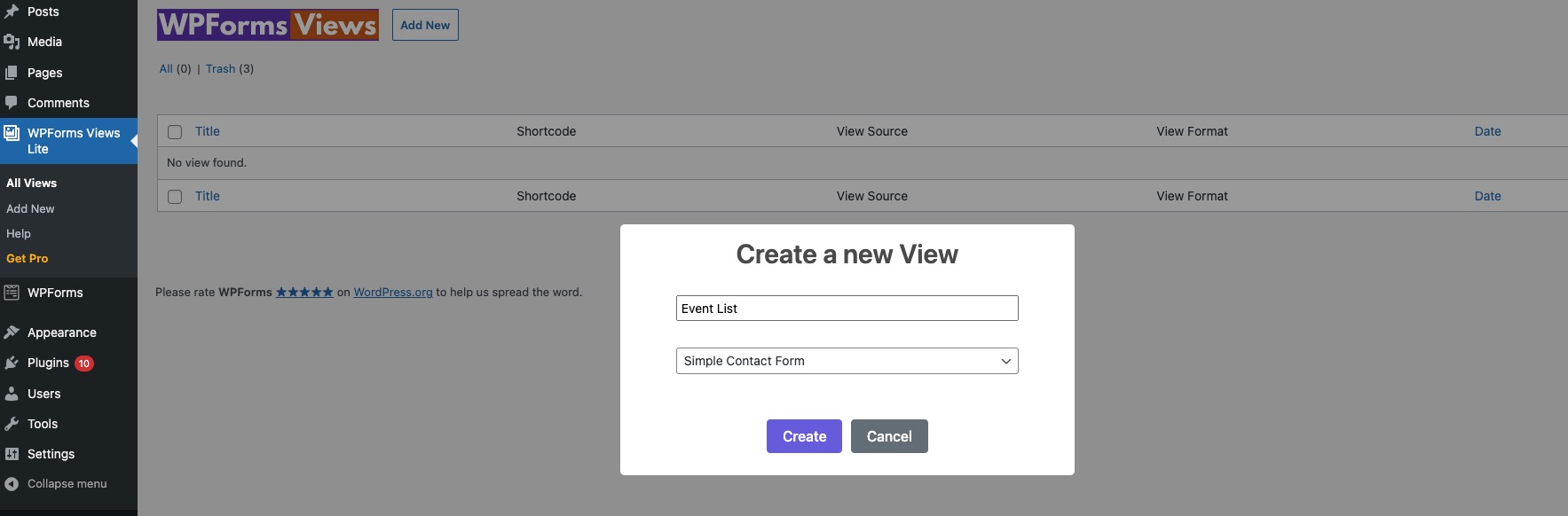
To install Views for WPForms, follow these steps:
- Download and unzip the plugin
- Upload the entire views-for-wpforms-lite/ directory to the /wp-content/plugins/ directory
- Activate the plugin through the Plugins menu in WordPress
Changelog
1.0 Initial launch
3.4.9.1 (2 November 2026)
Enhancement: Added new logo.
3.4.9 (22 August 2026)
Fix: Fixed the embed icon overflowing outside the button container.
3.4.7 (8th May 2026)
Security: tightened WPForms Views Lite permissions so only admins can create/manage view posts, and sanitized frontend view sorting to prevent authenticated SQL injection.
3.4.6 (11th March 2026)
New: Added information about design themes
3.4.5 (9th Feb 2026)
Fix: Removed global styles from grid css library
3.4.4 (30th Jan 2026)
Fix: Fixed php warning on undefined variable
New: Added icons to the setting sidebar
3.4.3 (8th Jan 2026)
Fix: Resolved issue with displaying Radio field values in View.
3.4.2.1 (6th Dec 2025)
Added: Compatibility with WordPress 6.9
3.4.2 (28th Nov 2025)
Fixed an issue where the custom “No records found” message was not displaying as configured in the View settings.
3.4.1 (3rd November 2025)
Minor optimizations
3.4 (7th August 2025)
Added info about new WPForms services we provide.
3.3.9 (28th June 2025)
Added info about customizing field value output template available in pro version.
3.3.8 (2nd May 2025)
Fix: Resolved an issue where column widths were not being applied correctly in tables.
Fix: Image width setting was not applying correctly.
Fix: Uploaded files can be now displayed as clickable links.
3.3.7 (28th April 2025)
Fix: Resolved an issue where sorting by form fields was not working.
3.3.6 (8th April 2025)
Fix: Resolved an issue where selecting a View in one View Block would update all View Blocks on the page in the Gutenberg editor.
3.3.5 (6th Jan 2025)
New: Added Edit Form and View Entries in the View Settings
Fix: Fixed View styling if no Form is selected.
3.3.4 (23rd Nov 2024)
New: Entry Date field is now available in free version.
3.3.3 (20th Nov 2024)
Fix: Fixed an issue when deleting a Field from View can cause white screen if Field settings are opened.
3.3.2 (22nd Oct 2024)
Fix: Resolved an issue where the View Settings tab became unclickable after selecting a field in the Editing view.
Update: Upgraded WordPress scripts and React libraries to the latest versions.
3.3.1 (9th Aug 2024)
Fix: Fixed Help menu not working.
Tweak: Added notice if WPForms Pro is not installed.
3.3 (24th July 2024)
New: Added support to WPForms Repeater field. Repeater fields are displayed in nicely formatted blocks in View.
3.2.7 (8th June 2024)
New: Changing the View Source will keep the Before and After Entry List Fields in View.
Fix: If there are notices in dashboard View Editor was pushed down making it hard to add fields.
3.2.7 (18th May 2024)
Tweak: Bug Fixes.
3.2.6 (23rd April 2024)
New: Added a new setting to set table column width.
Tweak: Changed pagination widget css class from “pagination” to “views-pagination” to remove possible theme css conflicts.
3.2.5 (4th April 2024)
Fix: Fixed error when using single or double quotes in View Title.
3.2.4 (12th Feb 2024)
New: Added information about new plugin WPForms Import Entries. Allows you to import WPForms entries from CSV file.
3.2.3 (11th January 2024)
Fix: Added authorization checks on creating new views.
Fix: Added authorization checks on saving views.
3.2.2 (20th December 2023)
Fix: Fixed formatting for copy shortcode popup.
Fix: Fixed php deprecated warning.
3.2.1 (7th December 2023)
New: Added “No records found” message if there are no records available in view.
3.2 (16th October 2023)
New: Added Clear All fields button.
New: Added option to add new fields after any field within view.
New: UI/UX optimizations.
3.1.2 (23rd September 2023)
New: Added WPForms Views Gutenberg Block.
Fix: Removed Add New option from the side menu.
3.1.1 (12th July 2023)
Fix: Fixed PHP warning in Elementor.
3.1 (12th June 2023)
New: Added WPForms Views Elementor Widget.
3.0 (8th May 2023)
New: New better and fast View Builder!!!.
2.8.6 (17th April 2023)
Fix: Fix css issue on admin pages.
New: Added Google Maps & Delete Entries Addon information to upgrade page list.
2.8.5 (22nd March 2023)
Fix: Php warning on admin pages.
2.8.4 (21st Feb 2023)
Fix: Compatibility fixes for WPForms v1.8+.
2.8.3 (18th Jan 2023)
New: Added Help page.
2.8.2 (24th Dec 2022)
Fix: Updated upgrade links.
2.8.1 (30th Nov 2022)
New: Updated Field settings modal UI.
2.8 (14th Nov 2022)
New: Partial Entries created by WPForms Save and Resume addon will not be shown in view.
Fix: Multiple files uploaded from the WPForms Upload field will display correctly.
2.7.4 (12th Oct 2022)
Tweak: Field Setting model cleaned up.
2.7.3.1 (22nd Aug 2022)
Fix: Code Improvements.
2.7.3 (28th May 2022)
Fix: PHP warning for missing field labels.
2.7.2 (16th May 2022)
Tweak: Updated WordPress compatible version.
Fix: Made pagination text translatable.
2.7.1 (6th April 2022)
Fix: Sanitized pagination variable in query string.
2.7 (24th Jan 2022)
Tweaks: Added more info on features available in the pro license.
2.6.9 (8th Dec 2021)
Tweaks: UI/UX improvements on Add new field modal & View layout in admin.
2.6.8 (30th Nov 2021)
Fix: WPForms Checkbox & Select fields will display values separated by comma in views.
2.6.7 (18th Nov 2021)
Fix: Fixed PHP warning in view if field is deleted from WPForms Form.
2.6.6 (7th Nov 2021)
New: Moved Settings icon to the left side after label.
New: Custom Label input box will only display if Use Custom label checkbox is checked.
2.6.5 (1st Nov 2021)
New: Rows can now be reordered in view builder.
2.6.4 (17th Sep 2021)
New: Updated information about pro features.
2.6.3 (29th Aug 2021)
Fix: Textarea field not displaying new text lines.
2.6.2 (29th July 2021)
Fix: Views columns displaying on other post types.
2.6.1 (2nd July 2021)
Fix: Sequence number not working correctly if there are multiple views on the page.
2.6 (28th May 2021)
Fix: UI/UX improvements.
2.5 (14th May 2021)
New: Added Sequence Number field.
Fix: Pagination info was incorrectly displaying 0 on the first page.
Fix: Entry ID field was not displaying in the field list when View Source was changed.
2.4.2 (19th April 2021)
New: Added Entry ID field.
2.4.1 (6th April 2021)
Fix: Add Field Popup will now have to scroll if there are too many fields in the form.
2.4 (13th March 2021)
Fix: Updated field selection model to display field types.
2.3 (25th Feb 2021)
Fix: PHP Warnings in View.
2.2 (28th Jan 2021)
Fix: UI Tweaks to View settings design.
2.1 (23rd Jan 2021)
Fix: Error when selecting new View Source.
2.0 (7th Jan 2021)
Fix: When adding Rows you will be asked for row layout selection first.
Fix: Minor design fixes
1.7 (4 Dec 2020)
Fix: Fields Popup in View is not scrollable if there are too many fields in the WPForms Form.
1.6 (10 Nov 2020)
Fix: Uploaded files from WPForms Form will display as links in View if files are not images.
1.5 (26th Oct 2020)
Fixed: Table will be scrollable if there are too many columns in the WPForms View
1.4 (16 Oct 2020)
Fix: Fixed issue with pagination
1.3 (23 Sep 2020)
Fix: Minor design fixes
1.2 (14 Sep 2020)
Fix: Uploaded file links will now display correctly
1.1 (4th Sep 2020)
New: Added filter wpforms-views-field-value to filter saved WPForms field value before displaying in the view
1.0 (25th Aug 2020)
Initial launch
Screenshots
For developers
Is this your plugin? Show off the numbers.
Add a live badge to your site, docs or GitHub README. It updates on its own — no account needed.
Best Views for WPForms alternatives
All database plugins →





FAQ
Views for WPForms: quick answers
Straight answers, pulled from live WordPress.org data.
Source: WordPress.org
Is Views for WPForms free?
Yes. Views for WPForms is free to download and use from the official WordPress.org plugin directory.
Is Views for WPForms safe to use in 2026?
Yes — Views for WPForms is a safe, well-maintained plugin to use in 2026. It runs on 1K+ sites, is rated 5/5 and was last updated 2 weeks ago, and scores 87/100 on our health check.
How many websites use Views for WPForms?
Views for WPForms is active on 1K+ WordPress websites and has been downloaded 100,785 times since it launched in August 2020. It was downloaded 2,089 times in the last 30 days.
Does Views for WPForms work with WordPress 7.1?
Yes. The developer has tested Views for WPForms up to WordPress 7.1.4, the latest release. It requires WordPress 5.0 or newer.
What PHP version does Views for WPForms need?
Views for WPForms requires PHP 7.4 or higher. Most hosts run PHP 8.x today, so it works on any modern WordPress hosting.
When was Views for WPForms last updated?
The latest version, 3.4.9.1, was released on November 5, 2026 (2 weeks ago).
Who makes Views for WPForms?
Views for WPForms is developed and maintained by Aman.
What are the best alternatives to Views for WPForms?
The most popular alternatives to Views for WPForms are Search Regex (100K+ installs), WP-Sweep (100K+ installs) and Advanced Database Cleaner (100K+ installs).
Powered by PageForge
One template and a spreadsheet. A real page for every search.
PageForge turns each row of a CSV into a WordPress page with its own title, URL, SEO fields and schema, built on the layout you already designed. Free on WordPress.org.
- CSV and XLSX, plus Google Sheets on Professional and Enterprise
- Its own title, URL, SEO fields and schema for every page
- Works with the block editor, Elementor, Divi and Avada
- Free on WordPress.org, no credit card