


Big File Uploads – Increase Maximum File Upload Size
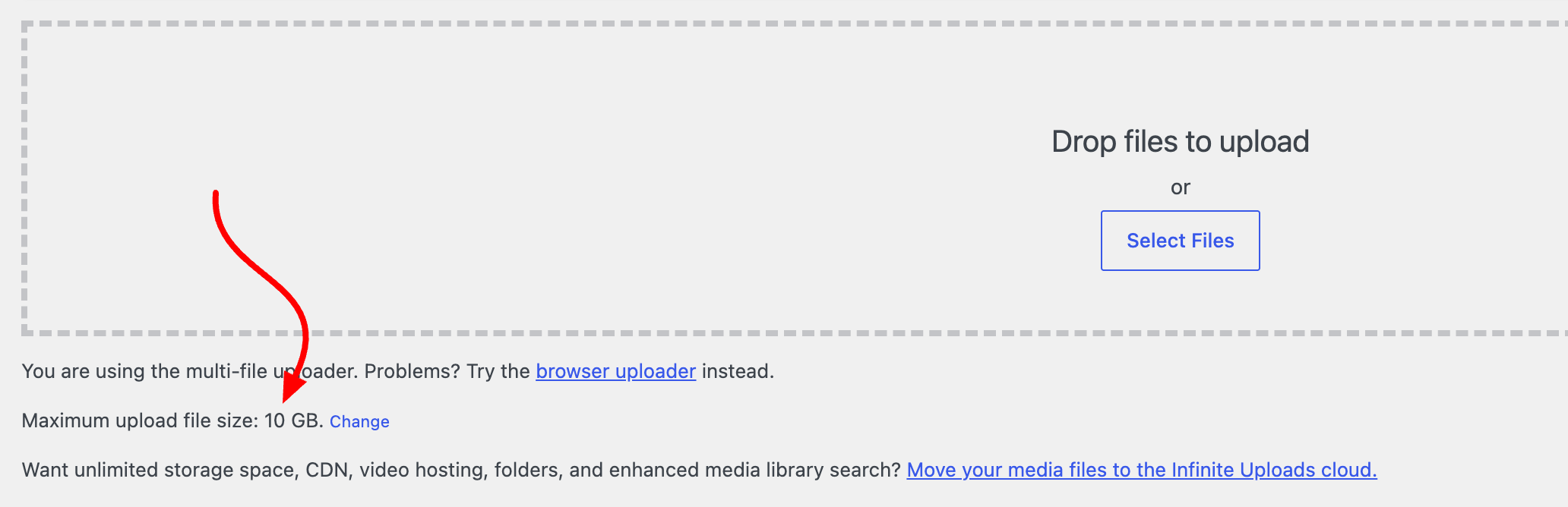
Big File Uploads lets you upload large media files directly to the media library with the WordPress media uploader. Increase your maximum upload size to any value – as large as your available disk space allows – and add…

Sichere Auswahl
Yes — Big File Uploads is a safe, well-maintained plugin to use in 2026. It runs on 100K+ sites, is rated 4.9/5 and was last updated 1 month ago, and scores 88/100 on our health check.
- Bewährt im Maßstab auf 100k+ aktiven Standorten
- Loved by users — 4.9/5 from 405 reviews
- Getestet mit dem neuesten WordPress (7.1)
Wie stapelt es sich?
Side-by-side bei Installationen, Updates, Bewertungen und Support



Tägliche Downloads
Download-Spitzen folgen normalerweise einer neuen Version - jede Website, die automatisch aktualisiert wird, gilt als Download.
Ranglisten
Where Big File Uploads stands todayWordPress.org Ranglisten suchen
Live-Position in der Plugin-Suche, Top 100| Stichwort | Position |
|---|---|
| increase file size limit | #2 |
| increase upload limit | #2 |
| max upload file size | #2 |
| post max size | #2 |
| upload limit | #2 |
Versionsübernahme
Anteil aktiver Sites pro Release.
Bewertungsaufschlüsselung
★★★★★★★★★★ 4.9 from 405 reviews
About Big File Uploads
Aus der offiziellen Readme · V2.2.2Beschreibung
Big File Uploads lets you upload large media files directly to the media library with the WordPress media uploader. Increase your maximum upload size to any value – as large as your available disk space allows – and add file chunking to avoid server timeout errors.
Bypass the upload limits on your server, set by your hosting provider, that prevent you from uploading large files to your media library.
Big File Uploads automatically detects upload limits set by your server or hosting provider, allows you to increase the maximum upload size, and prevents timeout errors by uploading files in chunks.
No messing with Apache/PHP initialization files or settings. Just activate the plugin, set the upload size as large as you like, and use the media uploader as you normally would.
Big File Uploads Plugin Features
- Set maximum file upload file size as large as your hosts available storage
- Upload large files to your media without FTP or SFTP
- Built-in file chunking (upload large files in small pieces preventing timeout errors)
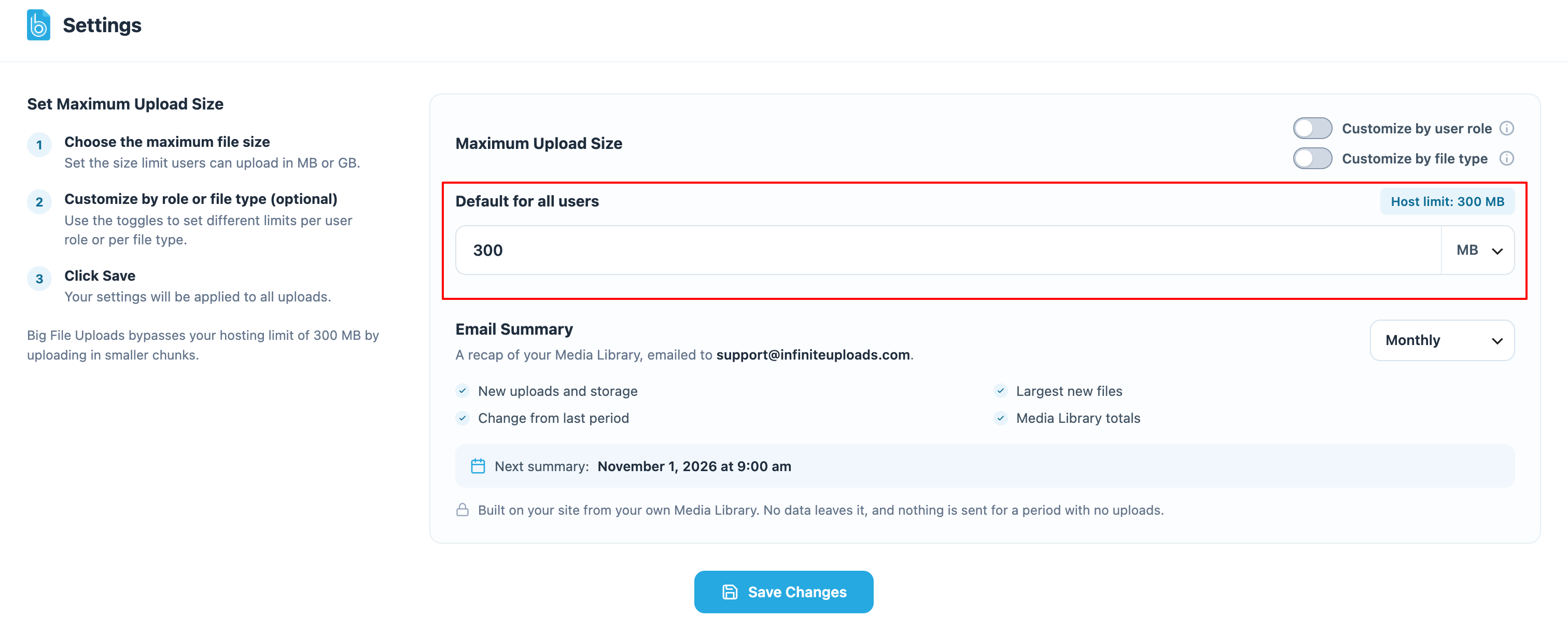
- Control maximum upload size limit
- Get smart recommendations based on available space in your temporary uploads directory
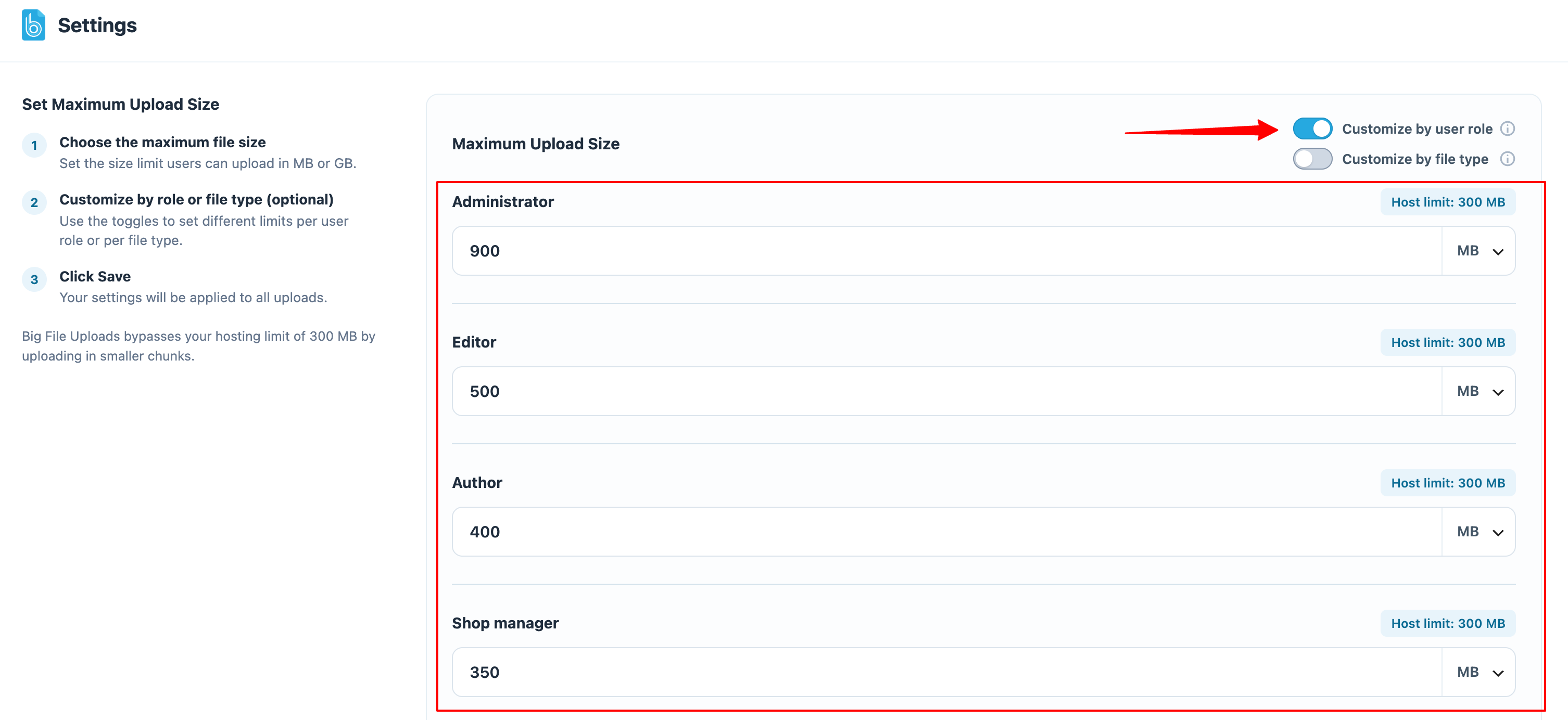
- Set maximum file size for each user role with upload capabilities (Administrator, Editor, Author)
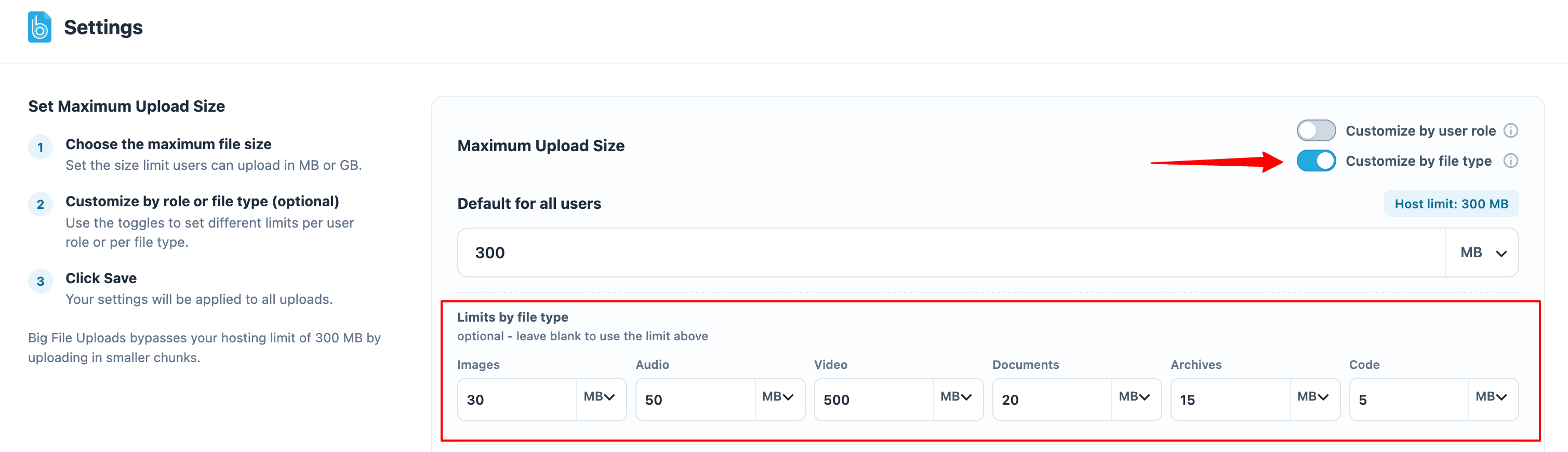
- Set a separate maximum file size by file type – images, audio, video, documents, and archives
- Get a heads up when you upload video, which is better streamed from the cloud than served off your host
- Set the max file size in Megabytes (MB) or Gigabytes (GB)
- Works with any server or hosting provider
- Upload any size file directly to a connected Infinite Uploads cloud account
- Super simple configuration and small plugin footprint that doesn’t bog down WordPress
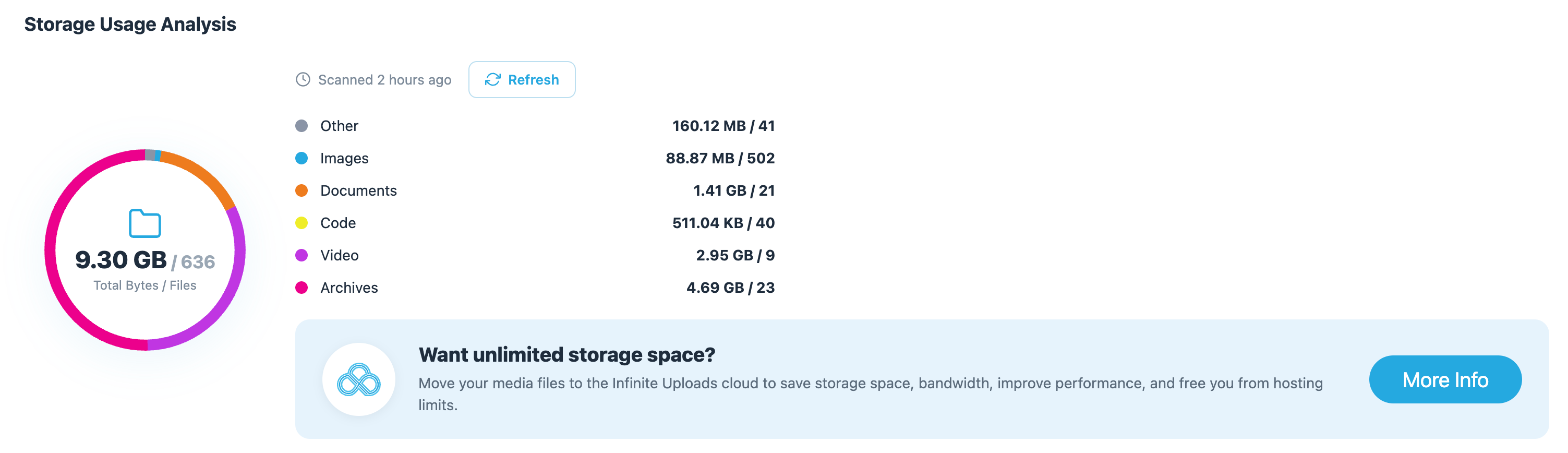
- Uploads directory disk utility for quickly analyzing storage usage in your media library
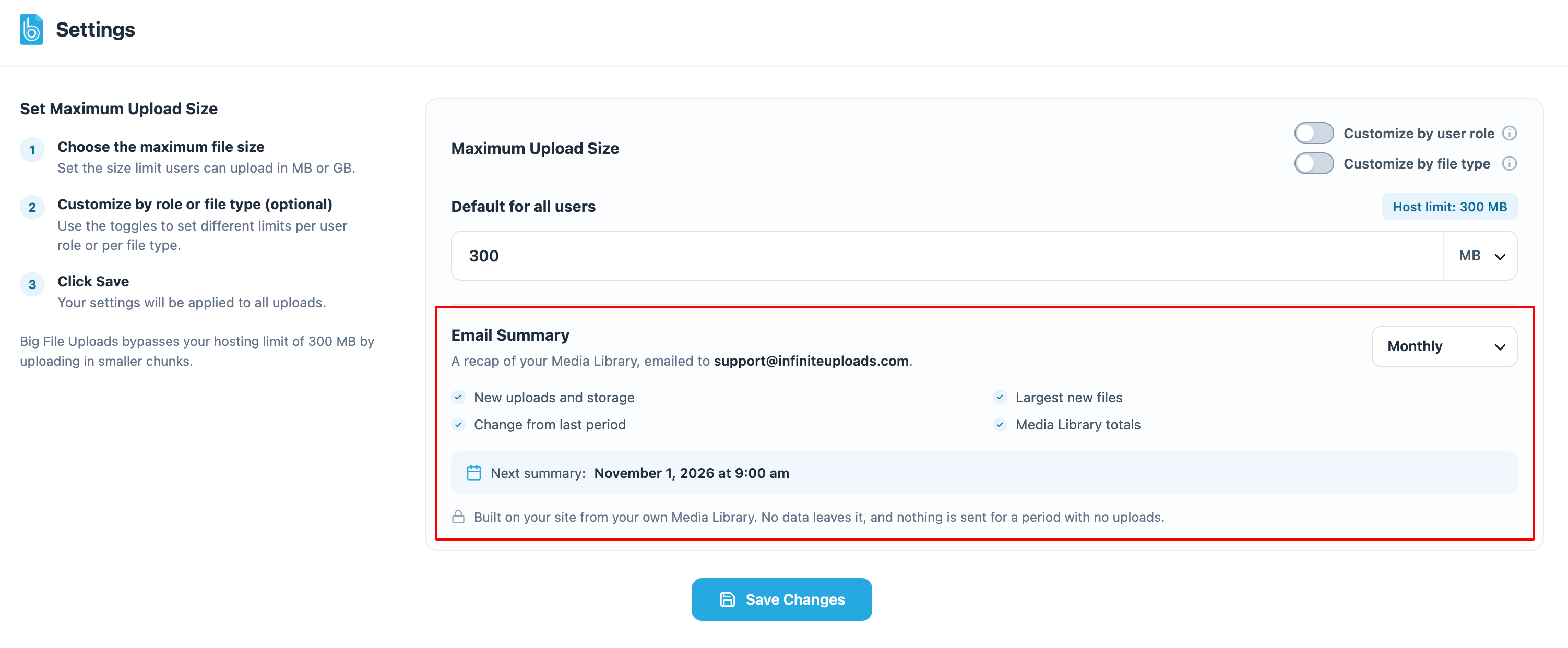
- Email summary of new uploads, sent from your site to the admin email monthly, weekly, or daily (or turned off)
★★★★★
“This is just perfect, EXACTLY what I needed to bypass the Cloudflare upload limit. Thank you very much!!” – shamank
★★★★★
“Excellent plugin for changing the upload size for the Media Library uploads. Even though my host allowed me a bigger upload limit (from 64MB to 200MB) I could’nt make it work. This plugin solved my problem, fast and easy. Right after the installation, I changed the size, and I was able to upload my big file. Works like a charm, thanks guys.” – ynskalad
Easily Increase Maximum File Uploads
Fix “The Uploaded File Exceeds the upload_max_filesize” error that is so common when you are trying to upload big files to your WordPress media library. Set a new max file size in Big File Uploads to bypass limitations set by the server or your host.
Set Upload Size Based on User Role
Big File Uploads lets you set a new maximum upload size limit for all uploads or customize the maximum file upload size for each of your user roles with upload capabilities. Set custom upload limits for Administrators, Editors, Authors, or even custom roles.
Set Upload Size by File Type
Not every file needs the same limit. Turn on “Customize by file type” to give images, audio, video, documents, and archives their own maximum upload size, plus code files on sites that allow them. Fill in only the types you want to treat differently – cap images at 10 MB while still allowing 5 GB video. Any type you leave blank keeps your main upload limit. Per-type limits work alongside per-role limits – set them once for all users, or separately for each role.
Uploads Disk Utility
The Big File Uploads plugin includes a media library disk utility that shows a breakdown of the files in your uploads directory by type and size. See how many images, videos, archives, documents, code, and other files (like audio) there are and how much space they’re taking up.
Upload Email Summary
Big File Uploads can email you a short summary of what was added to your media library. Each summary covers the last month, week, or day and shows how many files were uploaded and how much storage they added, compared with the period before, along with a breakdown by file type, the largest upload, and the totals from your last storage scan.
The summary is built and sent by your own site using the standard WordPress mail function, so by default it goes only to your site’s admin email address. Nothing is sent for a period with no uploads. Choose Monthly (the default), Weekly, Daily, or Off under Settings -> Big File Uploads -> Email Summary.
FTP/SFTP Client-free File Uploading
Upload files right to the WordPress media library without additional credentials and settings. Skip the protocol settings, server names, port numbers, usernames, long passwords, and private keys. Manage upload size and simplify your workflow for yourself or your clients.
Widely Compatible
Other plugins simply rewrite the .htaccess or php.ini files in an attempt to adjust the server configuration which does not work with many hosts or causes timeouts. Big File Uploads changes how files are processed and uploads files in chunks (separate smaller pieces) before handing it off to WordPress making it universally compatible with most major hosting services.
Wanna make your media library infinitely scalable? Move your big files and uploads directory to the cloud.
Big File Uploads is built to work with Infinite Uploads to make your site’s upload directory infinitely scalable. A large WordPress media library can slow down your server and run up the cost of bandwidth and storage with your hosting provider. Move your uploads directory to the Infinite Uploads cloud to save on storage and bandwidth and improve site performance and security. Learn more about Infinite Uploads cloud storage and content delivery network.
Extend Big File Uploads to your forms!
Big File Form Uploads is a paid add-on that extends the functionality of increasing the maximum WordPress file upload size to your favorite form plugins for WordPress, including Contact Form 7, Gravity Forms, and Forminator! Set the limit in Big File Uploads, and that carries over to your file uploads in your forms to let your users upload big files! Learn more about Big File Form Uploads!
Privatsphäre
This plugin does not collect or share any data. Site admins can optionally subscribe to email updates which is subject to our Privacy Policy.
About Us
Infinite Uploads builds WordPress plugins and is a premium cloud storage provider and content delivery network (CDN) for all your WordPress media files. Learn more here:
infiniteuploads.com
Learn how to manage large files on our blog:
Infinite Uploads Blog, Tips, Tricks, How-tos, and News
Contribute to the plugin’s development on Github!
Enjoy!
Contact and Credits
Maintained by the cloud architects and WordPress engineers at Infinite Uploads.
Big File Uploads was originally “Tuxedo Big File Uploads” created by Trevor Anderson (@andtrev on WordPress.org), 2015-2021. Find Trevor on GitHub.
Änderungsprotokoll
2.2.2 [2026-10-07]
- New: Email summary of your uploads. Big File Uploads can email the site admin a summary of the last month, week, or day: files uploaded and storage added compared with the previous period, a breakdown by file type, the largest upload, and the totals from your last storage scan. Nothing is sent for a period with no uploads.
- New: Email Summary setting under Settings -> Big File Uploads to choose Monthly (default), Weekly, Daily, or Off, showing the recipient and when the next summary will be sent.
- New: bfu_email_digest_recipients filter for developers to change who receives the summary.
- Translation updates.
2.2.1 [2026-09-28]
- New: Running a free scan now starts with three quick questions (what best describes you, and whether you use a media folders or image optimization plugin) so we can tailor the tips we send.
- Translation updates.
2.2.0 [2026-08-26]
- New: Set a separate maximum upload size per file type – images, audio, video, documents, archives, and code – for all users or for each role. Leave a field blank to use the main limit.
- New: bfu_upload_limit filter for developers to adjust the resolved limit per file.
- New: Queueing a video in the media uploader now shows a short note that video is better streamed from Infinite Uploads Video Hosting than stored in WordPress. Hidden when Infinite Uploads is active, and switchable with the bfu_promote_video_hosting filter.
- New: Redesigned settings screen with a step-by-step guide and per-role sections.
- Fix: The upload size limit is now enforced on the very first chunk, so a single-chunk upload can no longer exceed it.
- Fix: Review notice strings are now translatable; removed a stale duplicate translation template.
- Update: The size field now labels the hosting limit as “Host limit” so a saved value is not mistaken for a reverted one.
- Update: Refreshed the Infinite Uploads recommendation copy.
- Translation updates.
2.1.10 [2026-08-24]
- Update: WordPress 7.1 compatibility check.
2.1.9 [2026-07-21]
- New: Redesigned storage usage scanner with a cleaner results view.
2.1.8 [2026-05-20]
- Update: WordPress 7.0 compatibility check.
- Translation updates.
2.1.7 [2025-09-02]
- Update: WordPress 6.8.2 compatibility check
2.1.6 [2025-01-07]
- 2025 update
2.1.5 [2025-01-07]
- Copyright update
2.1.4 [2025-01-06]
- FAQ update for security bug reporting
2.1.3 [2024-09-06]
- Fix for Authenticated (Author+) Full Path Disclosure vulnerability in error messages. Props @netc4t
2.1.2 [2023-10-25]
- Minor security improvement for dismissing the review notice (CSRF).
2.1.1 [2022-08-17]
- Compatibility with Easy Digital Downloads plugin.
- Protect the temp directory from direct access.
2.1 [2022-08-14]
- Can now handle files of any size, limited only by your disk space, not system temp directory size.
2.0.3 [2022-07-03]
- Security fix: Prevent OS command injection in rare hosting configurations. props Marco Nappi.
2.0.2 [2022-02-03]
- Fix: Conflicts with some theme builders like Themify.
- Fix: Fail with error message instead of showing success with partially uploaded big files missing chunks.
- Optimize default chunk size to limit requests.
- Add a review on wordpress.org timed notice
- Smoother Gutenberg editor support with a custom error message directing to use the media library uploader.
2.0.1 [2021-06-30]
- Bug fix: Sometimes the upgrade notice showed in wrong places in the admin area. props Nick H.
2.0 – [2021-06-20]
- Development and support now managed by Infinite Uploads
- Adds the ability to set maximum upload size by user role
- Adds Disk Utility module for analyzing storage usage
- Moves setting into new Big File Uploads tab under the WordPress Settings menu
- Updated UX design
- Replaces the confusing maximum retries and chunk size options with sane defaults that can be overridden via define
- Install Infinite Uploads and upload large files directly to your cloud account
- Improve notifications
1.2 – [2016-09-04]
- Added maximum upload size limit setting.
- Stronger security: uploads now go through admin-ajax and check_admin_referer is called before any chunks are touched.
1.1 – [2016-01-12]
- WordPress Multisite support (subdir, subdomain, and pre-WP3.5 networks)
1.0.1 – [2016-01-09]
- Added fallback if the file info extension is missing
1.0 – [2015-12-20]
- Erste Freigabe
Screenshots
Für Entwickler
Ist das dein Plugin? Zeigen Sie die Zahlen.
Fügen Sie Ihrer Website, Docs oder GitHub Readme ein Live-Badge hinzu. Es wird von selbst aktualisiert - kein Konto erforderlich.
Best Big File Uploads alternatives
All increase file size limit plugins →
Fragen und Antworten
Big File Uploads: quick answers
Gerade Antworten, gezogen von Live WordPress.org Daten.
Quelle: WordPress.org
Is Big File Uploads free?
Yes. Big File Uploads is free to download and use from the official WordPress.org plugin directory.
Is Big File Uploads safe to use in 2026?
Yes — Big File Uploads is a safe, well-maintained plugin to use in 2026. It runs on 100K+ sites, is rated 4.9/5 and was last updated 1 month ago, and scores 88/100 on our health check.
How many websites use Big File Uploads?
Big File Uploads is active on 100K+ WordPress websites and has been downloaded 1,654,706 times since it launched in January 2016. It was downloaded 31,743 times in the last 30 days.
Does Big File Uploads work with WordPress 7.1?
Yes. The developer has tested Big File Uploads up to WordPress 7.1.5, the latest release. It requires WordPress 5.6 or newer.
What PHP version does Big File Uploads need?
Big File Uploads requires PHP 5.6 or higher. Most hosts run PHP 8.x today, so it works on any modern WordPress hosting.
When was Big File Uploads last updated?
The latest version, 2.2.2, was released on October 7, 2026 (1 month ago).
Who makes Big File Uploads?
Big File Uploads is developed and maintained by Infinite Uploads.
What are the best alternatives to Big File Uploads?
The most popular alternatives to Big File Uploads are EasyMedia (70K+ installs), Increase Maximum Upload Fil… (30K+ installs) and Themx Maximum Upload File S… (1K+ installs).
Angetrieben von PageForge
Eine Vorlage und eine Tabelle. Eine echte Seite für jede Suche.
PageForge Verwandelt jede Zeile eines CSV in eine WordPress-Seite mit eigenem Titel, URL, SEO Felder und Schema entworfen. Kostenlos auf WordPress.org.
- CSV und XLSX, plus Google Sheets auf Beruf und Unternehmen
- seinen eigenen Titel, URL, SEO Felder und Schema für jede Seite
- Arbeitet mit dem Blockeditor, Elementor, Divi und Avada
- Kostenlos auf WordPress.org, keine Kreditkarte