


TrueMetriks Analytics
Complete analytics for WordPress and WooCommerce: customer journeys, funnel reports, true ROAS, plus server-side tracking for Facebook, Google & GA4.

Mit Vorsicht verwenden
TrueMetriks Analytics works, but test it on a staging site before relying on it in 2026. Was last updated 1 month ago, and scores 60/100 on our health check.
- Getestet mit dem neuesten WordPress (7.1)
- Kleine Benutzerbasis (<10 aktive Installationen)
- Bisher sehr wenige Bewertungen
Wie stapelt es sich?
Side-by-side bei Installationen, Updates, Bewertungen und Support



Tägliche Downloads
Download-Spitzen folgen normalerweise einer neuen Version - jede Website, die automatisch aktualisiert wird, gilt als Download.
Ranglisten
Where TrueMetriks Analytics stands todayWordPress.org Ranglisten suchen
Live-Position in der Plugin-Suche, Top 100| Stichwort | Position |
|---|---|
| analytics | >100 |
| attribution | >100 |
| Conversion API | >100 |
| Server Side Tracking | >100 |
| WooCommerce | >100 |
About TrueMetriks Analytics
From the official readme · v1.0.32Beschreibung
Your WooCommerce store is more than a list of orders – and so is your marketing. TrueMetriks Analytics gives you the complete picture.
It is a full marketing-analytics platform for WooCommerce. You see the entire customer journey, funnel reporting, and your true ROAS – real profit measured against real ad spend.
Not running WooCommerce? The plugin still works. You do not need a store. On any WordPress site – a blog, a portfolio, a lead-generation site, a course or membership site – install it, connect it once, and it starts tracking page views and visitor journeys, with the same first-party tracking and ad attribution behind them. WooCommerce is not required, and never has to be installed. It simply adds the ecommerce layer on top: product views, add to cart, checkout, and server-side purchase tracking. Everything else described below works either way.
It also tracks every order on your store server-side, sending Facebook, Google, GA4, and TikTok (coming soon) the numbers your browser pixel never could. Everything happening on your store, in one place, with the real numbers behind it.
The problem it solves
Browser pixels lose sales. When a pixel gets blocked by iOS, Safari, or an ad blocker, that purchase disappears from your Facebook, Google, and TikTok reporting. The money hit your bank, but your ad platforms never counted it.
So you make decisions on numbers that are wrong. You kill winning ads that look unprofitable and keep funding losers that look fine. You are not bad at this – you are optimizing on broken data.
The fix is moving your tracking off the browser and onto the server, then putting all of it in one dashboard you can read.
TrueMetriks connects your WooCommerce store and sends events straight from your server through your own first-party domain. They cannot be blocked by a browser setting, and they do not vanish when a shopper clears their cookies.
Install the plugin, sign in to TrueMetriks once, and your real numbers start flowing.
What you can see
- The full customer journey. Every touch from the first ad click to the purchase, stitched across sessions and devices, so you can see the path that actually drove the sale.
- Funnel reporting. Where visitors enter, where they drop off, and which step is leaking revenue across your checkout and upsell flows.
- Your true ROAS. Real ad spend measured against real profit – not the inflated or deflated numbers each ad platform reports about itself.
- Which ads, funnels, and products make money. Attribution down to the campaign, creative, funnel step, and product, so you know exactly where your budget should go.
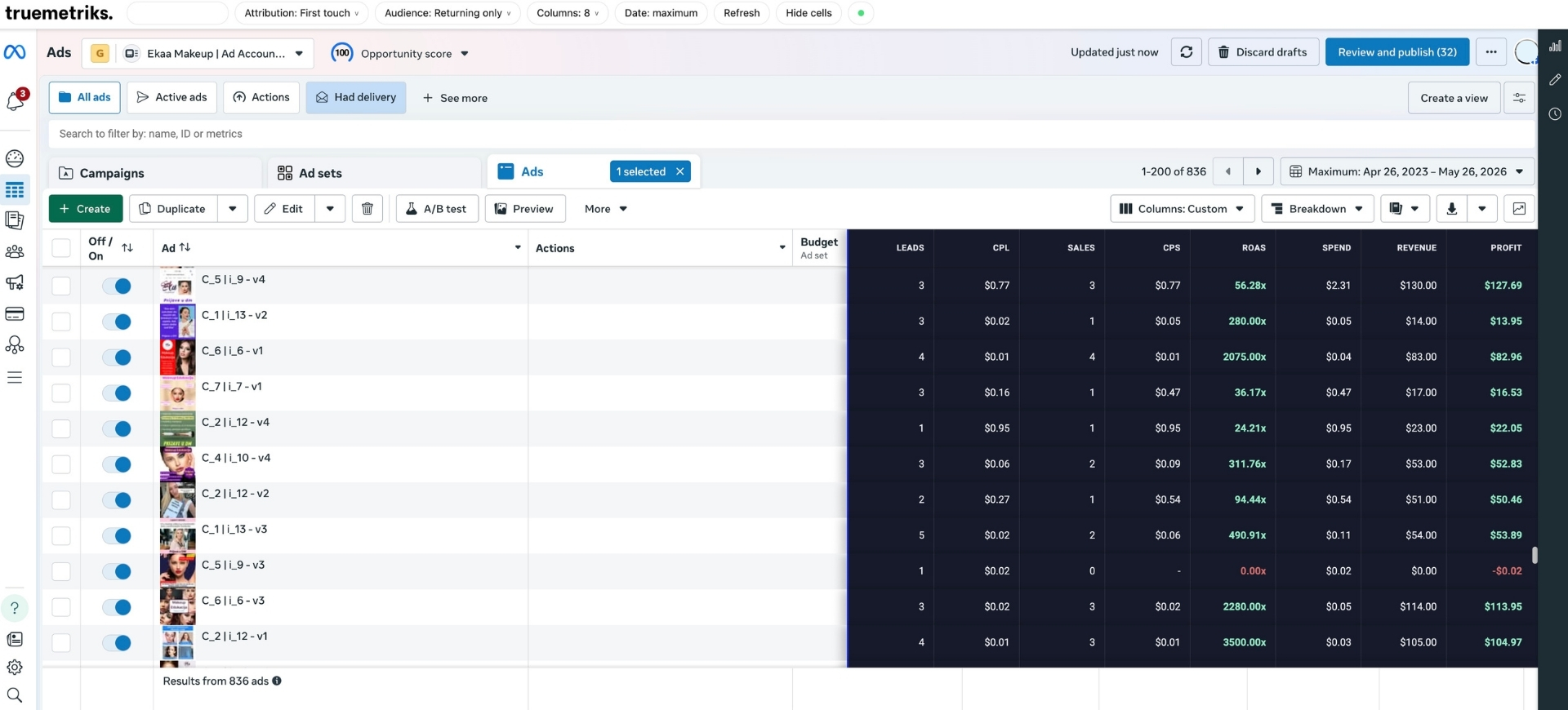
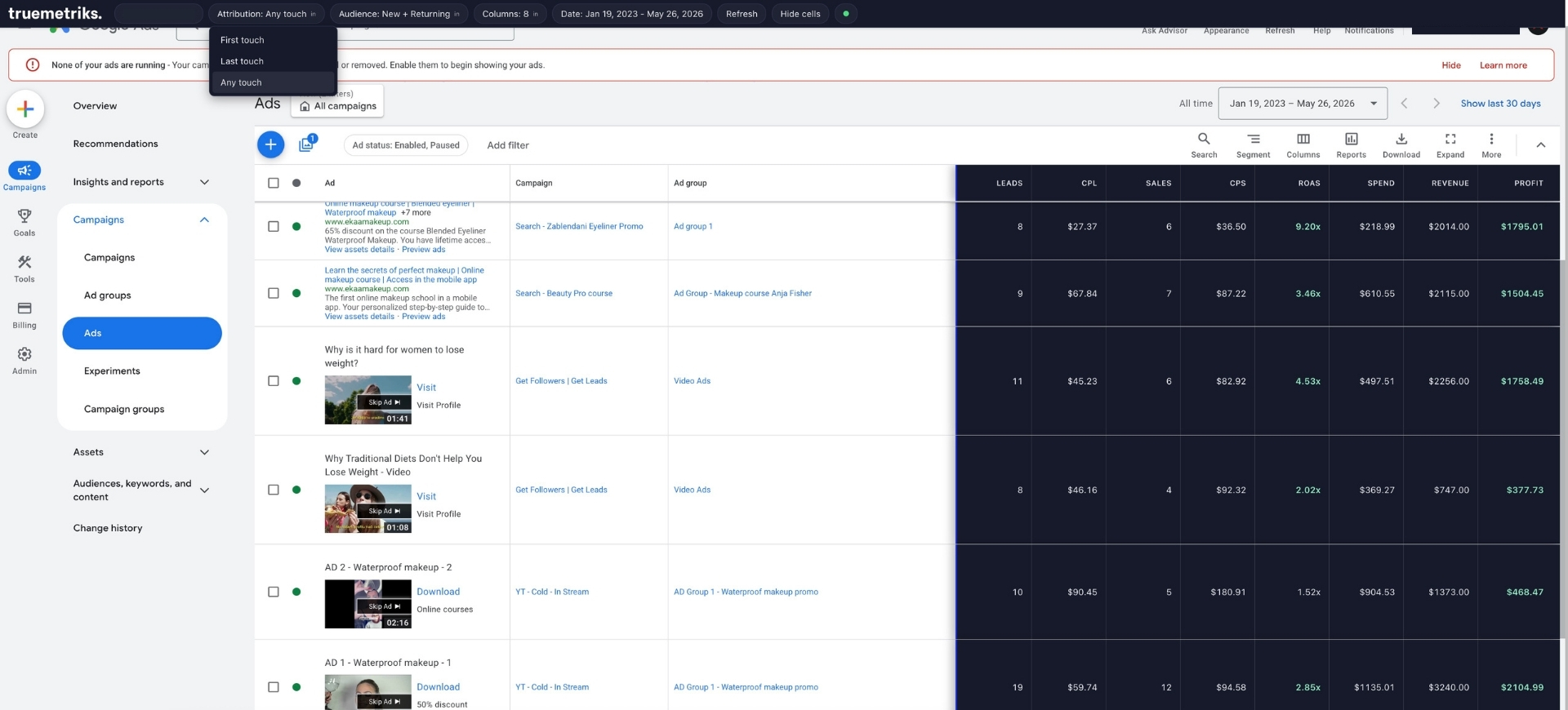
- Your real numbers inside the ad platforms, too. The free TrueMetriks Ad Overlay Chrome extension drops your true ROAS, cost per lead, and cost per sale straight onto Facebook Ads Manager and Google Ads, so you read the real metric next to each campaign without leaving the platform you optimize in.
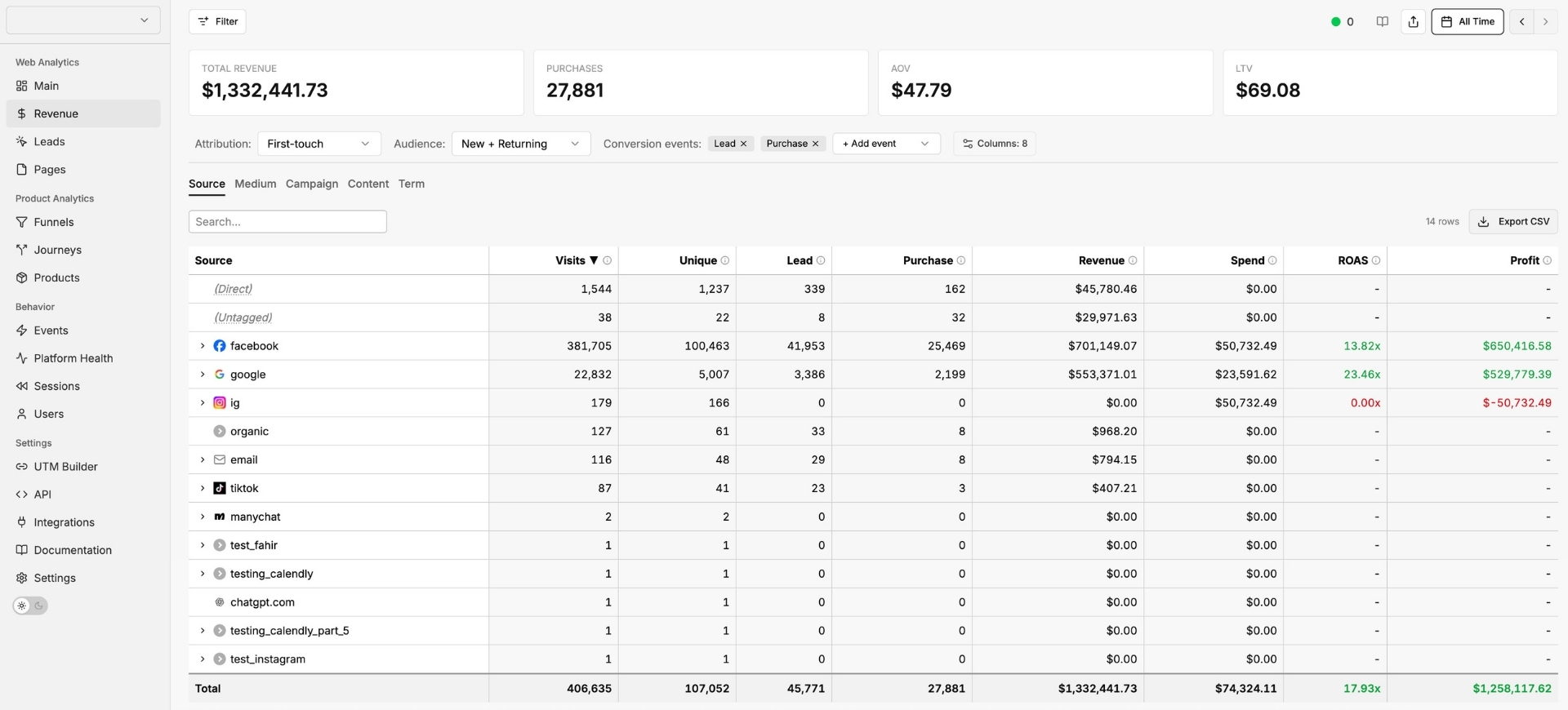
Here is your revenue page. See total revenue drilled down to the exact source, campaign, ad, or email that produced it – each with its own real ROAS, spend, and profit.
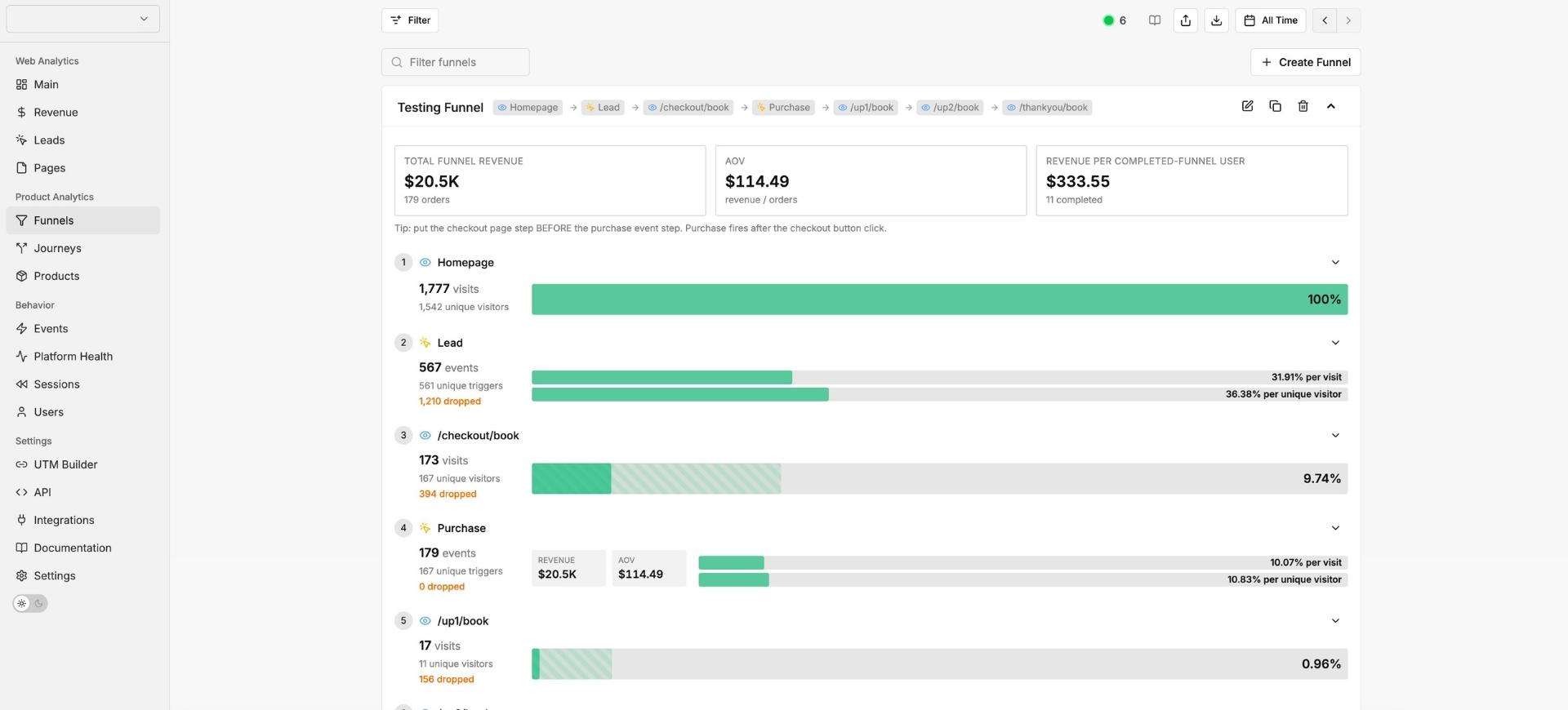
Here is funnel reporting. Build any funnel and drill into how it performs step by step, so you see exactly where visitors convert and where they drop off.
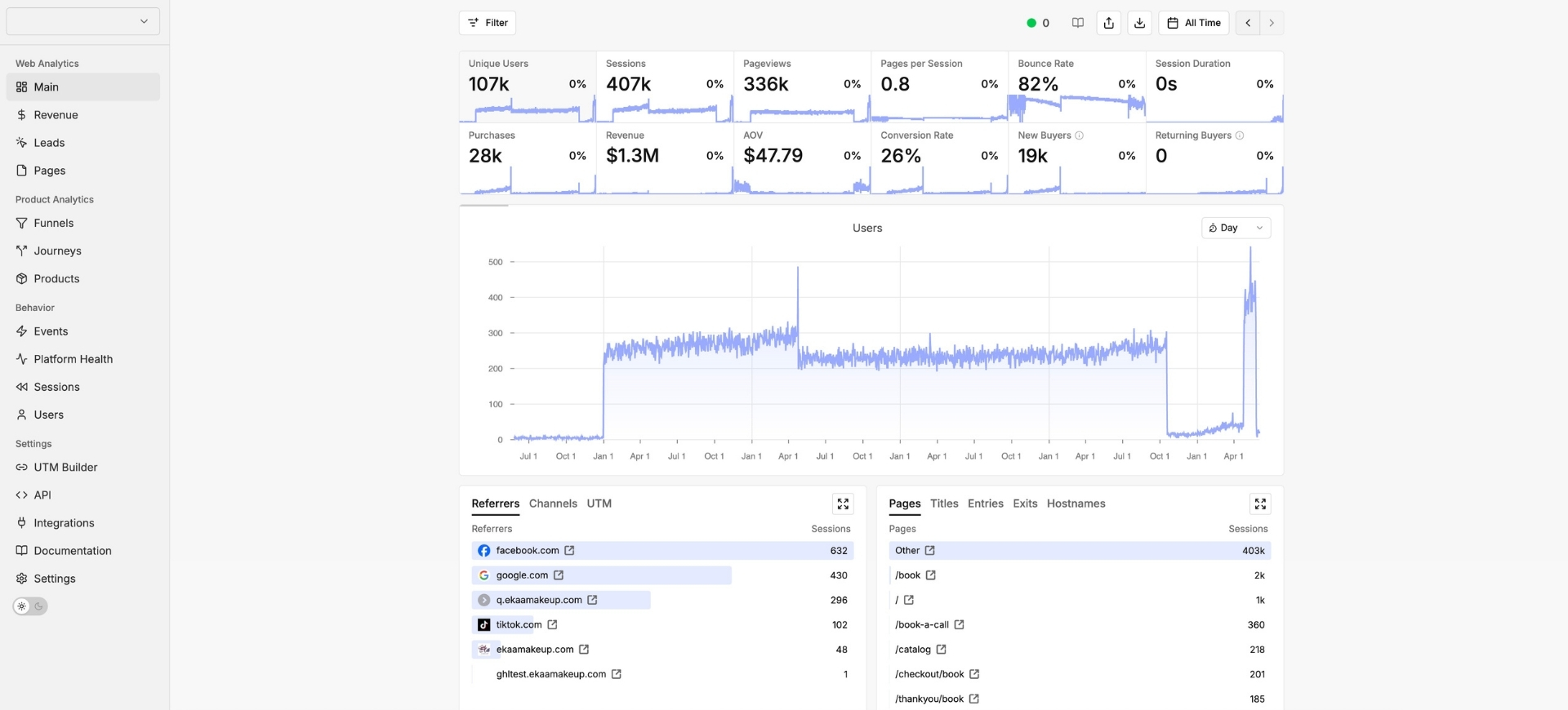
Here is your main overview. Your complete store performance in one place – traffic, revenue, conversion rate, and new versus returning buyers.
Here is the TrueMetriks Chrome extension. It puts your true ROAS, cost per lead, cost per sale, and profit directly inside your Facebook Ads Manager and Google Ads dashboards.
The tracking that feeds it
- Every order is captured. The plugin hooks WooCommerce at the order level, so anything that creates an order fires a conversion – including one-click upsells and custom checkout flows. No more invisible revenue.
- Conversions are recovered after cookies clear. A shopper clicks your Facebook ad on Tuesday and buys on Friday with their cookies wiped – the plugin saved the original click at checkout and replays it on the server-side sale, so Facebook still gets the credit.
- Your ad platforms see real attribution. Click IDs and UTMs are matched to each purchase and sent server-side to Facebook Conversions API, Google Ads, GA4, and TikTok (coming soon), with full customer identity for stronger matching.
- No duplicate events. TrueMetriks sends conversions server-side only, so you can remove the Facebook Pixel and stop double-counting.
- Your catalog syncs to Facebook automatically. Connect a Facebook Product Catalog and every WooCommerce product you create, update, or delete pushes through on its own, ready for Advantage+ and Dynamic Product Ads.
- One plugin instead of four. It replaces the usual stack of a Pixel plugin, a Google Analytics plugin, a Google Ads conversion plugin, and a catalog plugin – and it does not break every time WooCommerce updates.
See what our customers did
Stores and media buyers running their tracking and analytics on TrueMetriks have tripled store revenue, scaled past $100k a month, and cut cost per lead from $70 to $12. Read and watch their stories at https://truemetriks.com/testimonials/
Part of the TrueMetriks platform
This plugin is the WooCommerce on-ramp to TrueMetriks – a complete analytics, server-side tracking, and conversion-attribution platform for performance marketers. The plugin sends the clean events; the TrueMetriks dashboard and Chrome extension are where you finally see your true numbers – real ROAS, real cost per lead, full customer journeys, and which ads, funnels, and products actually make you money.
Requires a TrueMetriks account
TrueMetriks Analytics connects your store to your TrueMetriks account. New to TrueMetriks? Start a 14-day free trial at https://app.truemetriks.com/signup – no credit card required. Then click “Sign in with TrueMetriks” inside the plugin to connect.
Externe Dienste
This plugin connects your site to TrueMetriks so it can track your store and send your analytics and conversion data to the ad platforms you choose.
- TrueMetriks (app.truemetriks.com) – when you click “Sign in with TrueMetriks”, the plugin links your site to your TrueMetriks account. The Privacy card in the plugin settings also reads and saves your privacy mode here. No analytics events are sent to this address. Terms: https://truemetriks.com/terms – Privacy: https://truemetriks.com/privacy
- Your TrueMetriks tracker – your store’s page views and WooCommerce events are sent to TrueMetriks through your own first-party tracking address, then on to the platforms you connect, such as Facebook, Google, GA4, and TikTok (coming soon). Terms: https://truemetriks.com/terms – Privacy: https://truemetriks.com/privacy
Privacy policy: https://truemetriks.com/privacy
Installation
- Install and activate TrueMetriks Analytics. WooCommerce is optional – install it only if you run a store and want purchase, cart and product events.
- Go to TrueMetriks in your WordPress admin sidebar.
- Click “Sign in with TrueMetriks”, sign in to your TrueMetriks account, pick your site, and Allow. You will be redirected back automatically.
- Confirm the connection card shows your email, site, tracker hostname, and a Reachable badge.
- Pick which events to track (they default to all on). Done – your events start flowing. Without WooCommerce the Events card shows Page View only, which is always on.
Änderungsprotokoll
1.0.32
- New: WooCommerce refunds. When you refund an order in WooCommerce, in full or in part, the plugin tells TrueMetriks, and the refunded amount is taken off that sale in your TrueMetriks revenue, ROAS and profit. The sale keeps its date and the ad that won it. Refunds are never sent to your ad platforms. Each refunded order gets a note saying whether the refund reached TrueMetriks.
1.0.31
- New: WooCommerce Subscriptions support. Each subscription payment now tells TrueMetriks whether it is the first payment or a renewal. Your TrueMetriks dashboard shows renewals apart from new sales, and you choose what your ad platforms receive for a renewal (a custom event, a Purchase, or nothing) in your TrueMetriks dashboard. Nothing changes for stores without WooCommerce Subscriptions.
- Fixed: a renewal order no longer copies the original checkout’s tracking details (visitor id, IP address, order markers) from WooCommerce Subscriptions. A renewal order now carries only the buyer’s own details, so TrueMetriks matches it to the buyer by their email rather than to the original checkout’s visitor id.
- New: if WooCommerce Subscriptions gives the plugin an error, or a sale still fails to reach TrueMetriks after every retry, the plugin now tells TrueMetriks within the hour so our team can look into it. No buyer details are sent, only the order number and what went wrong.
- New: each sale now tells TrueMetriks when the order was placed. A sale reaches TrueMetriks when the order first becomes Processing or Completed, which can be days after it was placed, so TrueMetriks can now tell an old order apart from a new one.
1.0.30
- New: a Privacy card in the plugin settings. Pick Full tracking, Consent banner (GDPR) or HIPAA (cookieless) without leaving WordPress; it is the same setting as Privacy & Security in your TrueMetriks dashboard. Consent banner mode shows visitors a banner with equal Accept and Reject buttons, at the bottom left, center or right, with a link to your privacy policy (pre-filled from your WordPress privacy page) and, if you like, your own banner text, or follows your existing consent tool when you tick “I already use a consent tool”. HIPAA mode sends nothing to ad platforms. WooCommerce orders now carry the buyer’s answer as it was when they placed the order, so in consent banner mode an order is passed on to your ad platforms only when the buyer clicked Accept. Nothing changes for sites that stay on Full tracking.
1.0.29
- New: the plugin now checks that the tracker is really on your live pages. Cache plugins keep showing visitors the copies of your pages they saved before you connected TrueMetriks, and those copies have no tracker, so no visits were tracked even though the plugin said “Connected”. When you connect, the plugin now asks your cache plugin to clear its cache (LiteSpeed Cache, WP Rocket, W3 Total Cache, WP Super Cache, WP Fastest Cache, SiteGround Speed Optimizer, Breeze, Cache Enabler, Hummingbird, WP-Optimize, Comet Cache, Nginx Helper and WP Engine are supported). It then loads your homepage the way a visitor sees it. If the tracker is missing, a warning appears in wp-admin with a “Clear cache now” button and the exact place to clear it by hand, and the same warning shows in your TrueMetriks dashboard. The check repeats in the background and the warning clears itself once the tracker is found. It never runs while a visitor is loading a page.
- New: the Connection card now explains what to do if a cache or speed plugin still minifies, combines, defers or delays the TrueMetriks script: add your tracker hostname to its JavaScript exclude lists, then clear the cache once.
1.0.28
- Fixed: add to cart was not tracked, and could interrupt the shop’s own cart code, when a theme, plugin or custom code re-triggered WooCommerce’s “added to cart” event without the clicked button. The plugin now accepts the event with or without the button and falls back to the product being viewed. The plugin’s WordPress and WooCommerce hooks also now accept fewer arguments than WooCommerce normally sends, so another plugin calling them differently can no longer cause a PHP error.
1.0.27
- New: WooCommerce is no longer required. The plugin now installs and activates on any WordPress site – a blog, a portfolio, a lead-generation site, a course or membership site – and starts tracking page views and visitor journeys as soon as you connect it. Previously it refused to activate without a store. If WooCommerce is not active, the settings page shows Page View on its own and hides the store-only options (purchase, cart, product events, excluded emails and Facebook Catalog), because there is nothing for them to track. Nothing changes for existing stores: with WooCommerce active every event, setting and card behaves exactly as before.
Screenshots
Für Entwickler
Ist das dein Plugin? Zeigen Sie die Zahlen.
Fügen Sie Ihrer Website, Docs oder GitHub Readme ein Live-Badge hinzu. Es wird von selbst aktualisiert - kein Konto erforderlich.
Best TrueMetriks Analytics alternatives
All analytics plugins →





Fragen und Antworten
TrueMetriks Analytics: quick answers
Gerade Antworten, gezogen von Live WordPress.org Daten.
Quelle: WordPress.org
Is TrueMetriks Analytics free?
Yes. TrueMetriks Analytics is free to download and use from the official WordPress.org plugin directory.
Is TrueMetriks Analytics safe to use in 2026?
TrueMetriks Analytics works, but test it on a staging site before relying on it in 2026. Was last updated 1 month ago, and scores 60/100 on our health check.
How many websites use TrueMetriks Analytics?
TrueMetriks Analytics is active on <10 WordPress websites and has been downloaded 924 times since it launched in July 2026. It was downloaded 144 times in the last 30 days.
Does TrueMetriks Analytics work with WordPress 7.1?
Yes. The developer has tested TrueMetriks Analytics up to WordPress 7.1.5, the latest release. It requires WordPress 6.3 or newer.
What PHP version does TrueMetriks Analytics need?
TrueMetriks Analytics requires PHP 7.4 or higher. Most hosts run PHP 8.x today, so it works on any modern WordPress hosting.
When was TrueMetriks Analytics last updated?
The latest version, 1.0.32, was released on October 23, 2026 (1 month ago).
Who makes TrueMetriks Analytics?
TrueMetriks Analytics is developed and maintained by TrueMetriks.
What are the best alternatives to TrueMetriks Analytics?
The most popular alternatives to TrueMetriks Analytics are Site Kit by Google (5M+ installs), MonsterInsights (2M+ installs) and WP Statistics (500K+ installs).
Angetrieben von PageForge
Eine Vorlage und eine Tabelle. Eine echte Seite für jede Suche.
PageForge Verwandelt jede Zeile eines CSV in eine WordPress-Seite mit eigenem Titel, URL, SEO Felder und Schema entworfen. Kostenlos auf WordPress.org.
- CSV und XLSX, plus Google Sheets auf Beruf und Unternehmen
- seinen eigenen Titel, URL, SEO Felder und Schema für jede Seite
- Arbeitet mit dem Blockeditor, Elementor, Divi und Avada
- Kostenlos auf WordPress.org, keine Kreditkarte