


Truebe Lite – The AI Compliance Layer With Your Approval
AI that only answers with the facts you give it. It reads your documents, builds question-and-answer pairs, and never makes anything up.

Mit Vorsicht verwenden
Truebe Lite works, but test it on a staging site before relying on it in 2026. Was last updated 2 months ago, and scores 60/100 on our health check.
- Getestet mit dem neuesten WordPress (7.1)
- Kleine Benutzerbasis (<10 aktive Installationen)
- Bisher sehr wenige Bewertungen
Wie stapelt es sich?
Side-by-side bei Installationen, Updates, Bewertungen und Support



Tägliche Downloads
Download-Spitzen folgen normalerweise einer neuen Version - jede Website, die automatisch aktualisiert wird, gilt als Download.
Ranglisten
Where Truebe Lite stands todayWordPress.org Ranglisten suchen
Live-Position in der Plugin-Suche, Top 100| Stichwort | Position |
|---|---|
| AI Chatbot | >100 |
| audit trail | >100 |
| chatbot | >100 |
| compliance | >100 |
| hallucination | #14 |
About Truebe Lite
Aus der offiziellen Readme · V1.0.1Beschreibung
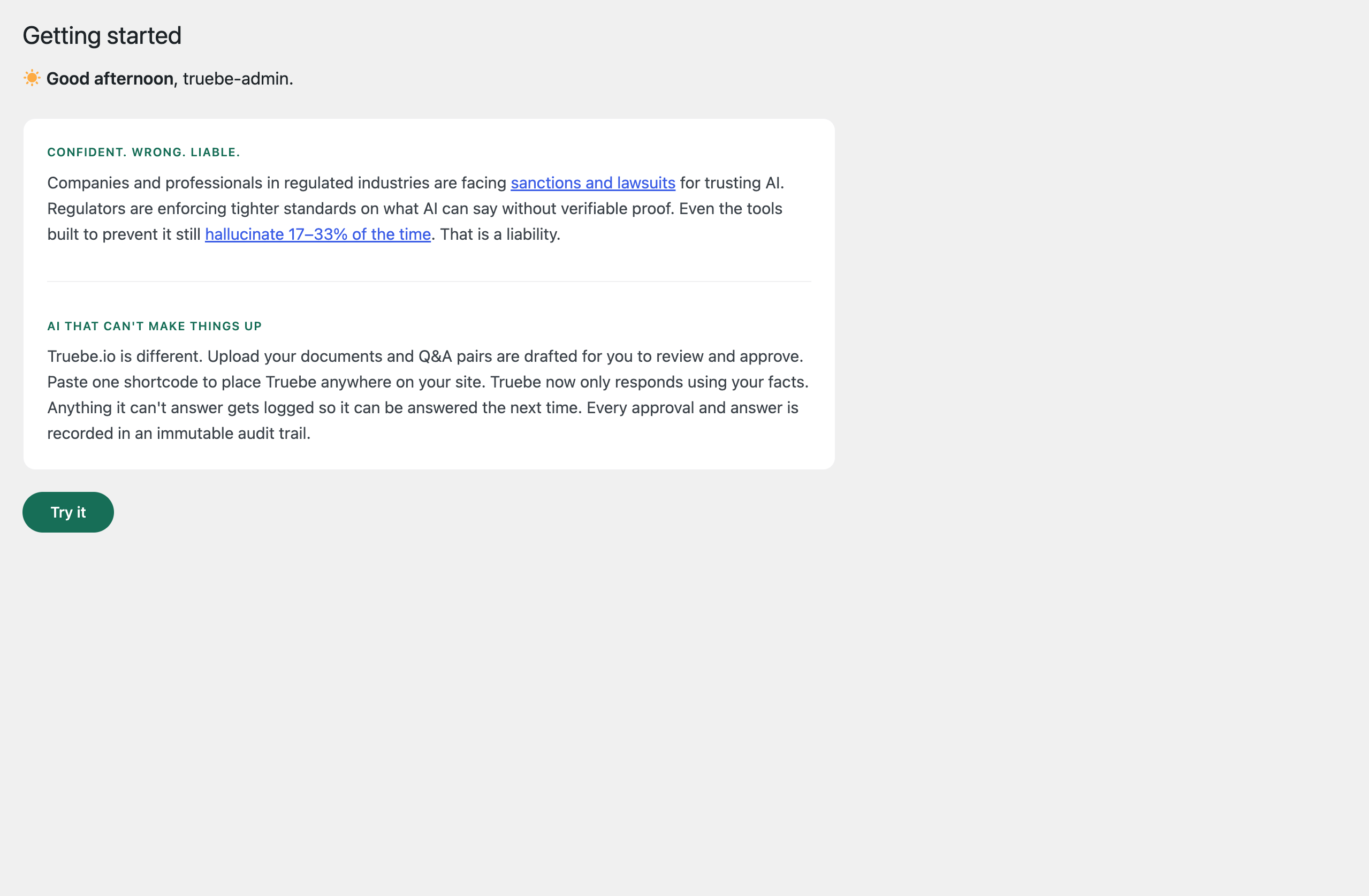
A knowledge base your AI can’t stray from. Human in the loop, every time.
Most AI generates a fresh answer every time someone asks a question. That’s where hallucination comes from: the AI invents a plausible-sounding reply that may be wrong. Truebe works differently. You upload your documents, Truebe builds them into an approved knowledge base, and a visitor only ever sees an answer someone on your team has already reviewed. There’s no live AI generation at question time, so nothing can be invented.
Wie es funktioniert
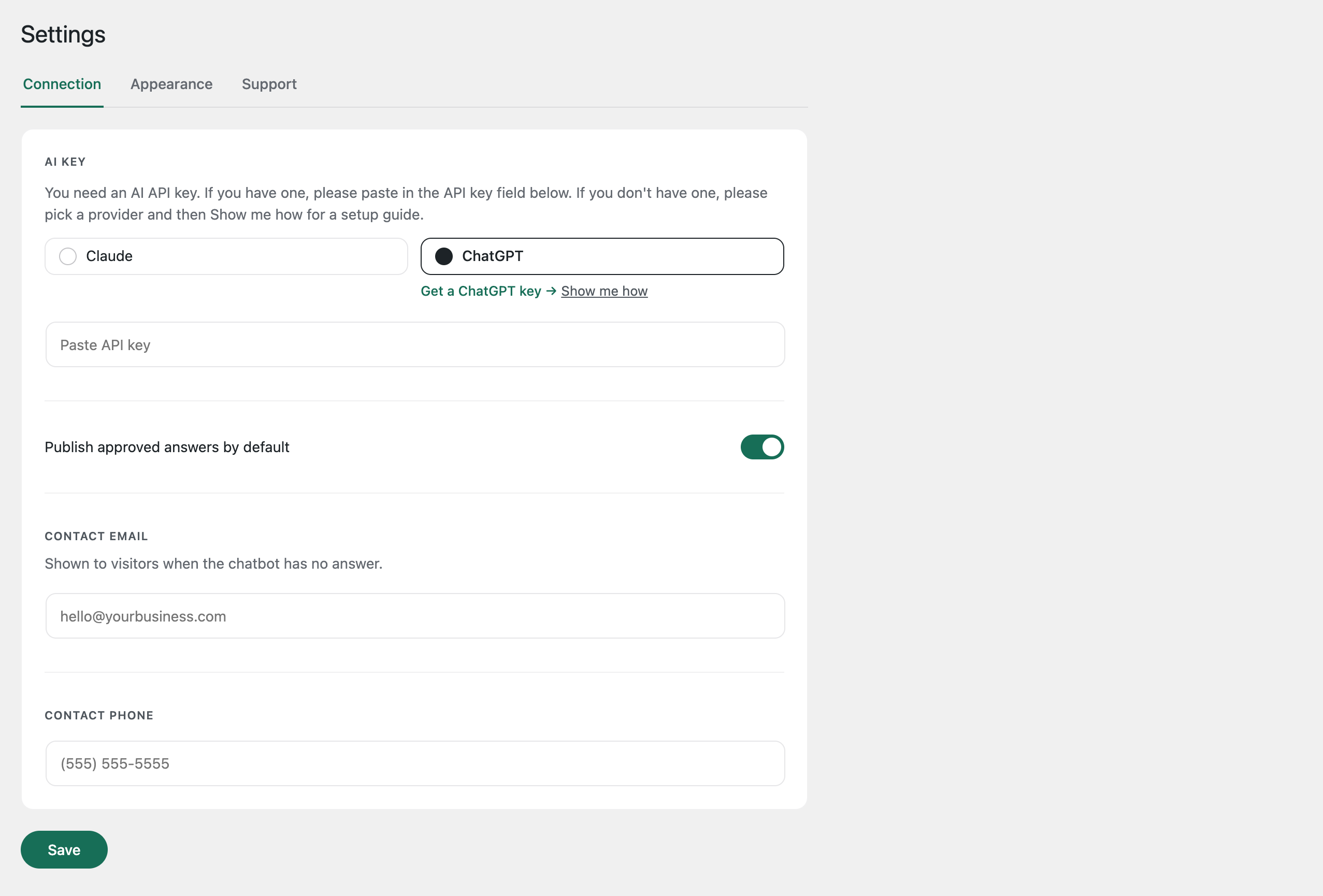
- Connect your AI key (see “What you need” below).
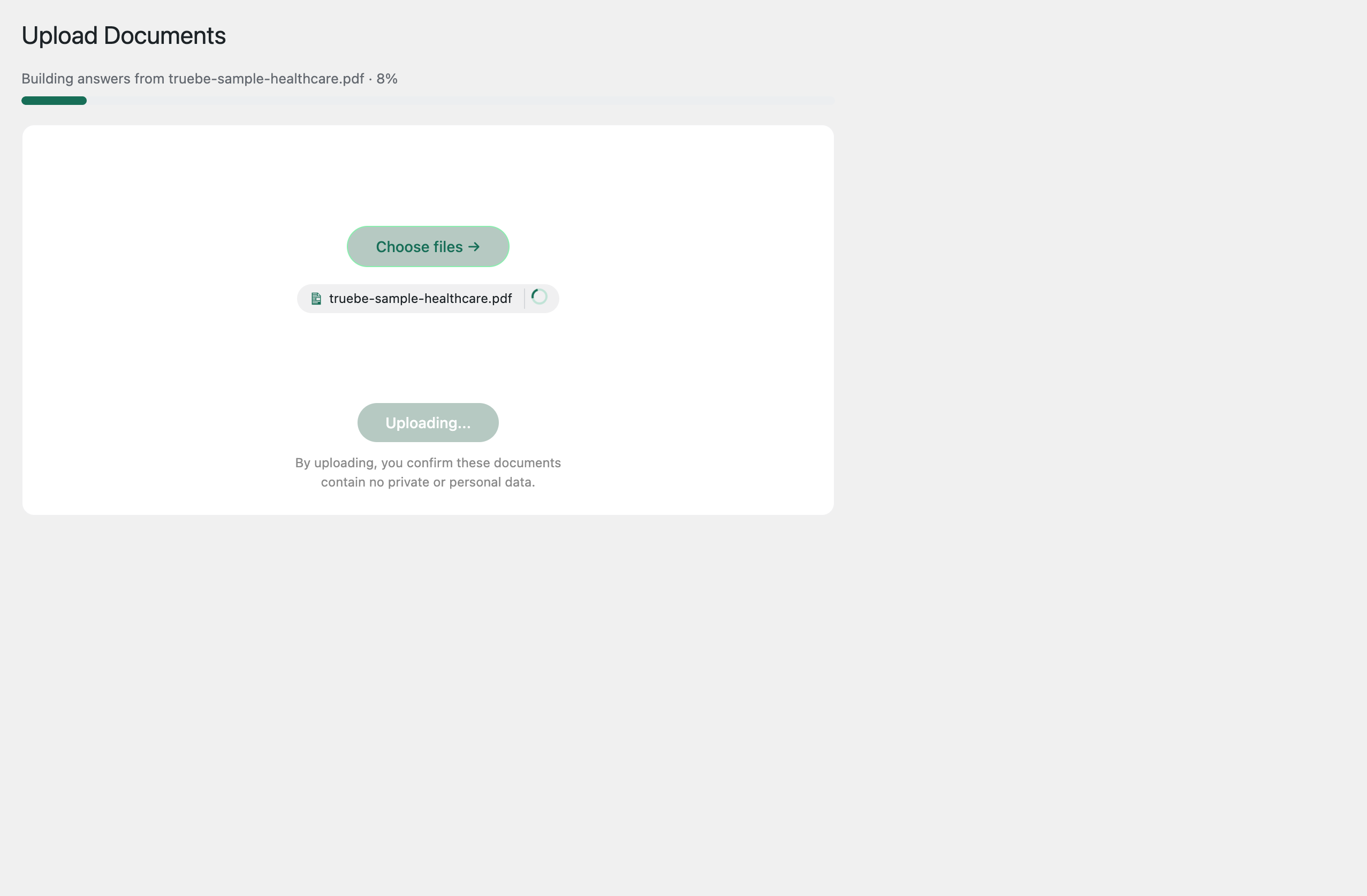
- Upload a PDF or Word (.docx) document, or point Truebe at a live webpage. Truebe reads it and drafts question-and-answer pairs.
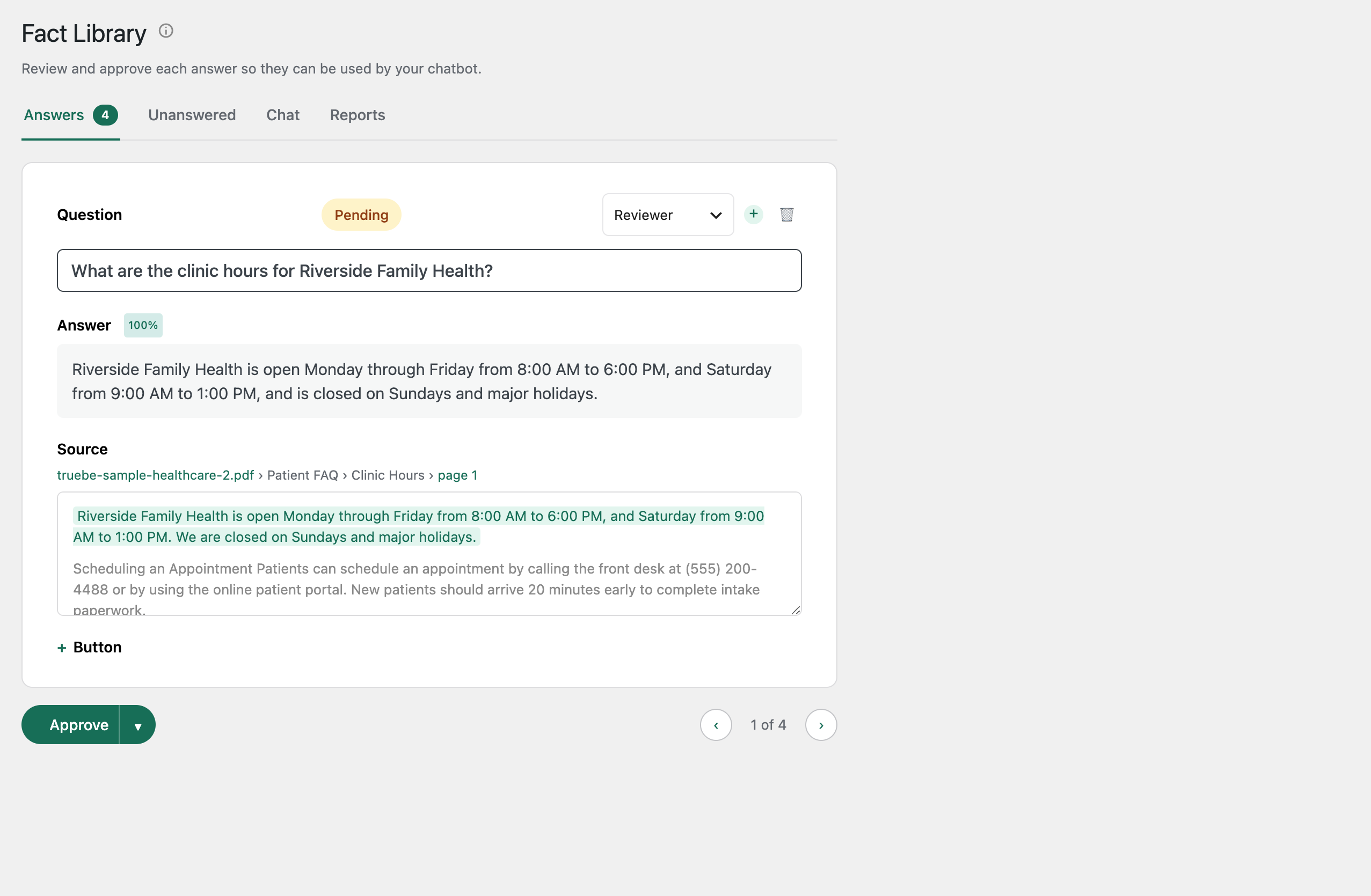
- Review each pair in your Fact Library and approve the ones you want live. Each pair shows a confidence score and its source citation before you approve it, and a near-duplicate check stops conflicting answers from both going live.
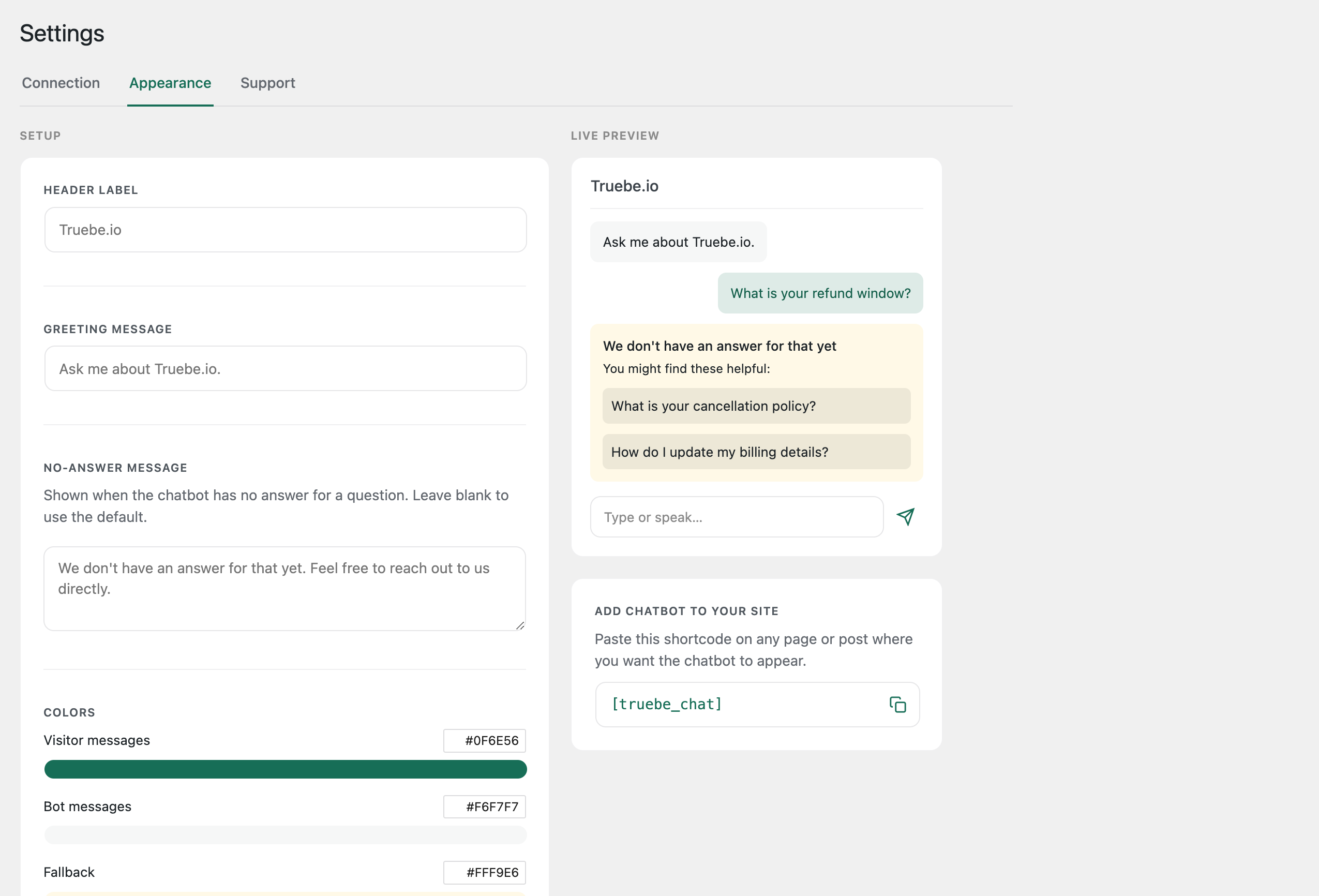
- Add the chatbot to any page with the [truebe_chat] shortcode.
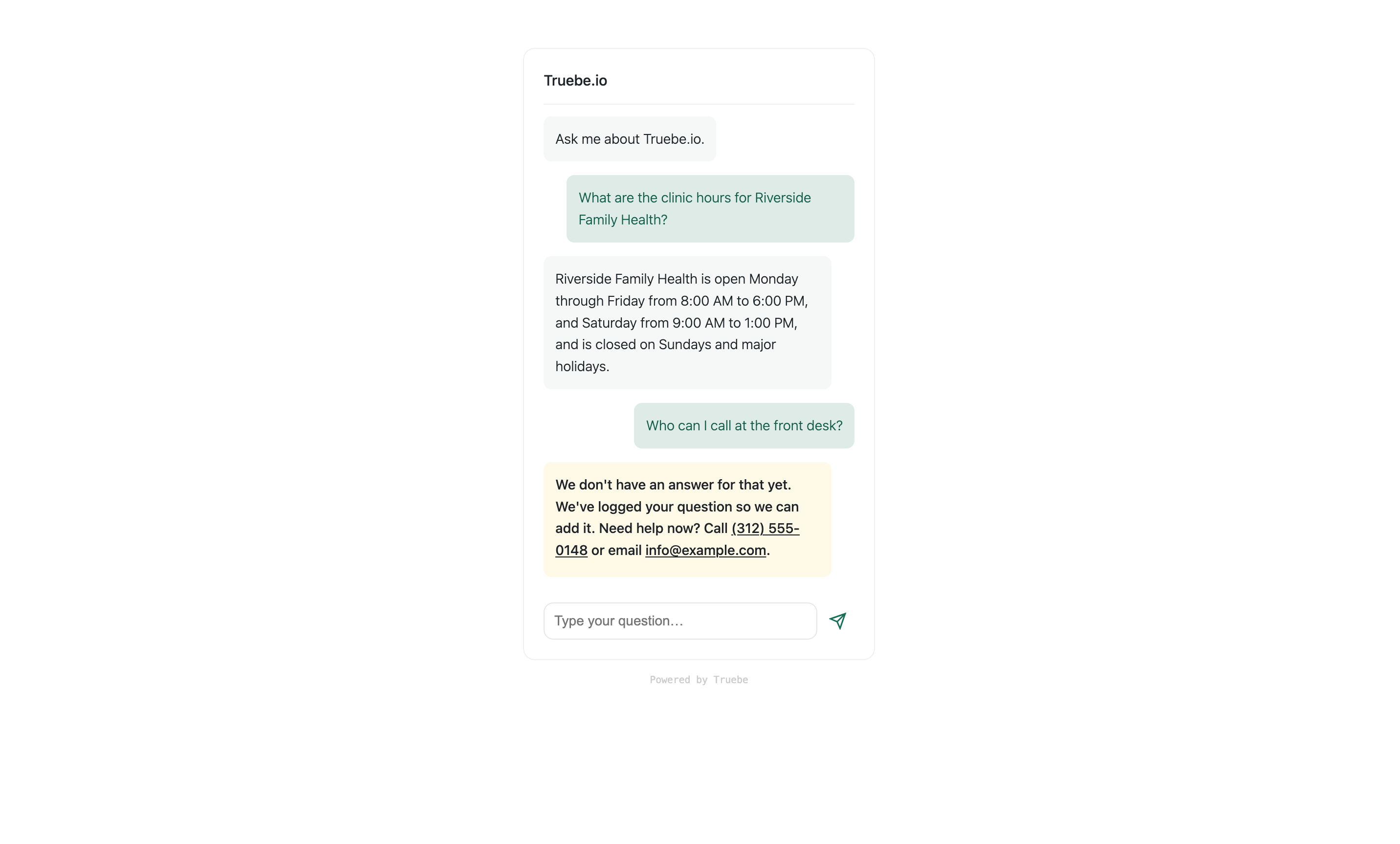
When a visitor asks something, Truebe matches their question to your approved answers and shows the closest one. If a question isn’t answered, it’s logged so it can be anwered the next time.
Why this matters now
Regulators are moving on AI-generated communication with customers and clients. An approved answer with a timestamped audit trail, tracing to the document and person who approved it, is always tracked.
Do more, with a voice people already trust
Once your knowledge base is built, Truebe can carry out real front-line work: answering the same questions customers are always asking, routing appointments, catching intake before it reaches a human. It’s not a bot improvising a personality. It’s your own approved answers, in your own words, available around the clock.
Every answer shows its source
For each answer built from a document, Truebe records exactly where it came from: the file, the section, and the page. You can open the source document straight to the cited page while you review.
Every approval is logged
Every answer you approve is timestamped and recorded in an audit log, with who approved it and when. You can export this log any time for compliance review, insurance, or an audit.
It gets smarter every day
When a visitor asks something your chatbot cannot answer, Truebe logs the question instead of losing it. Near-identical questions are grouped, so you see “11 people asked something like this” rather than eleven separate lines. Each unanswered question becomes a one-click item on your Unanswered list: answer it once, approve it, and the next visitor who asks gets a real answer.
Beyond the chat widget
When nothing matches, a visitor can be routed to a human, straight to your booking page, phone line, or login, instead of hitting a dead end. Voice input lets visitors ask by speaking instead of typing, and returning visitors pick up their conversation where they left off. Emails and phone numbers in an answer become clickable automatically.
Was du brauchst
Truebe uses your own AI account to read your documents and draft answers. You provide an API key from either OpenAI (ChatGPT) or Anthropic (Claude), or, on WordPress 7.0 and later, Truebe can use a provider you’ve already connected through WordPress’s own AI Connectors settings. The plugin includes a step-by-step guide that walks you through creating an account, adding credits, and copying your key. It takes about five minutes. The AI provider charges you directly per use (usually pennies).
Your key is used only to read your uploaded documents and draft answers. There is no live AI call when a visitor asks a question.
Free plan
Every core feature works with no payment required and no limits: document processing, answer approval, editing, source citations, the audit log and its export, the unanswered questions list, the chatbot, and all customization.
Truebe.io is an optional account service for plan upgrades and support. Connecting it is never required to use the core plugin’s features.
Where your data lives
Your approved questions and answers are stored in your own WordPress database, on your own server. When you upload a document, it is read once by your chosen AI provider to draft answers, then deleted. Truebe does not keep your documents or your answers.
You are responsible for the content you upload and approve. Please do not upload documents containing private or personal data.
Customize the chatbot
Set the header label, greeting, and colors for visitor messages, bot messages, and the fallback card. Choose a width, turn voice input on or off, and decide whether to suggest related questions when there is no exact match. A live preview shows your changes as you make them.
Externe Dienste
This plugin connects to external services. Here is what is sent, when, and why.
Your AI provider (OpenAI or Anthropic)
You choose one provider and supply your own API key, or use one already connected via WordPress 7.0+ AI Connectors. When you upload a document, its text is sent to that provider to draft question-and-answer pairs. This happens only during document processing. No data is sent to the AI provider when a visitor asks a question. The provider bills your account directly.
OpenAI: Terms of Use https://openai.com/policies/terms-of-use — Privacy Policy https://openai.com/policies/privacy-policy
Anthropic: Commercial Terms https://www.anthropic.com/legal/commercial-terms — Privacy Policy https://www.anthropic.com/legal/privacy
Truebe.io
Truebe.io is the account service that manages your Truebe subscription and sets your document allowance. The plugin is fully usable without connecting an account.
The plugin contacts truebe.io in these cases:
- When you activate the plugin, it sends your site URL to truebe.io once, so we know the plugin is in use.
- When you click “Start your subscription,” you are redirected to truebe.io to sign in. Your site URL is included so you can be returned to your dashboard.
- After connecting, the plugin exchanges a one-time token with truebe.io. Your site URL is sent to complete the connection.
- Once per day, if connected, the plugin checks in with truebe.io. It sends your permission token, your site URL, and the plugin version.
- If you send a message from the Support tab, your message, your site URL, and the plugin version are sent to truebe.io. Your email address is included only if you choose to provide one.
No document text, questions, answers, or visitor data is ever sent to truebe.io.
Truebe.io Terms of Service: https://truebe.io/terms
Truebe.io Privacy Policy: https://truebe.io/privacy
Installation
- Installieren und aktivieren Sie das Plugin.
- Go to Truebe and open Settings.
- Choose your AI provider (Claude or ChatGPT) and enter your API key, or connect one through WordPress’s own AI Connectors if you’re on WordPress 7.0+.
- Open Upload Document and upload a PDF or Word (.docx) document, or crawl a URL.
- Open the Fact Library, review the drafted answers and their confidence scores, and approve the ones you want live.
- Add [truebe_chat] to any page or post to display the chatbot.
Änderungsprotokoll
1.0.1
- Updated plugin name and description.
1.0.0
- Erste Freigabe.
Screenshots
Für Entwickler
Ist das dein Plugin? Zeigen Sie die Zahlen.
Fügen Sie Ihrer Website, Docs oder GitHub Readme ein Live-Badge hinzu. Es wird von selbst aktualisiert - kein Konto erforderlich.
Best Truebe Lite alternatives
Alle AI-Chatbot-Plugins →





Fragen und Antworten
Truebe Lite: quick answers
Gerade Antworten, gezogen von Live WordPress.org Daten.
Quelle: WordPress.org
Is Truebe Lite free?
Yes. Truebe Lite is free to download and use from the official WordPress.org plugin directory.
Is Truebe Lite safe to use in 2026?
Truebe Lite works, but test it on a staging site before relying on it in 2026. Was last updated 2 months ago, and scores 60/100 on our health check.
How many websites use Truebe Lite?
Truebe Lite is active on <10 WordPress websites and has been downloaded 479 times since it launched in August 2026. It was downloaded 139 times in the last 30 days.
Does Truebe Lite work with WordPress 7.1?
Yes. The developer has tested Truebe Lite up to WordPress 7.1.5, the latest release. It requires WordPress 6.0 or newer.
What PHP version does Truebe Lite need?
Truebe Lite requires PHP 7.4 or higher. Most hosts run PHP 8.x today, so it works on any modern WordPress hosting.
When was Truebe Lite last updated?
The latest version, 1.0.1, was released on September 12, 2026 (2 months ago).
Who makes Truebe Lite?
Truebe Lite is developed and maintained by bmohr.
What are the best alternatives to Truebe Lite?
The most popular alternatives to Truebe Lite are Lead Generation Contact Wid… (10K+ installs), Hyve Lite (7K+ installs) and Geeky Bot (6K+ installs).
Angetrieben von PageForge
Eine Vorlage und eine Tabelle. Eine echte Seite für jede Suche.
PageForge Verwandelt jede Zeile eines CSV in eine WordPress-Seite mit eigenem Titel, URL, SEO Felder und Schema entworfen. Kostenlos auf WordPress.org.
- CSV und XLSX, plus Google Sheets auf Beruf und Unternehmen
- seinen eigenen Titel, URL, SEO Felder und Schema für jede Seite
- Arbeitet mit dem Blockeditor, Elementor, Divi und Avada
- Kostenlos auf WordPress.org, keine Kreditkarte