


ThinkTwit
ThinkTwit is a highly customisable plugin that can output tweets from multiple users (something that very few other plugins can do successfully), #hashtag or keyword. It uses the Twitter Search JSON API v1.1 to access…

Betrachten Sie eine Alternative
ThinkTwit shows warning signs in 2026 — compare the alternatives below before installing. It runs on 10+ sites, is rated 4.5/5 and was last updated 5 years ago, and scores 29/100 on our health check.
- Kleine Benutzerbasis (10+ aktive Installationen)
- Bisher sehr wenige Bewertungen
- Kein Update in 5 Jahren
- Nur getestet bis WordPress 5.8 (letzter IS 7.1)
Wie stapelt es sich?
Side-by-side bei Installationen, Updates, Bewertungen und Support



Tägliche Downloads
Download-Spitzen folgen normalerweise einer neuen Version - jede Website, die automatisch aktualisiert wird, gilt als Download.
Ranglisten
Where ThinkTwit stands todayWordPress.org Ranglisten suchen
Live-Position in der Plugin-Suche, Top 100| Stichwort | Position |
|---|---|
| hashtag | >100 |
| multiple | >100 |
| thinktwit | #1 |
| tweet | >100 |
| >100 |
Versionsübernahme
Anteil aktiver Sites pro Release.
Bewertungsaufschlüsselung
★★★★★★★★★★ 4.5 from 4 reviews
About ThinkTwit
From the official readme · v1.7.1Beschreibung
ThinkTwit is a highly customisable plugin that can output tweets from multiple users (something that very few other plugins can do successfully), #hashtag or keyword. It uses the Twitter Search JSON API v1.1 to access tweets which can be cached. It is very simple, yet flexible and easily customised. It can be placed on your WordPress page simply through drag and drop on the Widgets interface or through the use of Shortcode or Output Anywhere (PHP function call). Supports i18n!
Support: http://www.thepicketts.org/thinktwit/ or on Twitter @stephenpickett
Eigenschaften:
- Can be configured from Widgets settings (if displayed in sidebar)
- Can be implemented using shortcode or Output Anywhere (PHP function call)
- Contains default slimline CSS for integrated look and feel (can be turned off)
- Easy to configure and customise (through settings and CSS)
- Multiple instances can be deployed (like other widgets/plugins)
- JavaScript is not required (unless no-caching is activated)
- Can specify multiple usernames
- Tweets can be filtered by #hashtag or keyword
- You can select to filter between an AND or OR filter to either show tweets only containing specified usernames and hashtags or any of them
- Can specify maximum number of tweets to display
- Can specify maximum number of days back to display
- Supports no-caching, to prevent caching of tweets by caching engines such as WP Super Cache
- Supports cURL as a fallback method, if necessary
- Supports optional caching of tweets and avatars
- Cache can be manually cleared and will automatically update if the cache is empty
- Can display the avatar of the Twitter user
- Output can be filtered (using apply_filters)
- Can optionally output “Follow @username” links
- Automated cleanup process that runs periodically according to user setting
- Internationalised using i18n meaning that if it isn’t in your language it’s easy to translate! See Other Notes for more details
- Gracefully deals with Twitter errors and adds them to the PHP error log
- Supports live updates of tweets when using no-caching (AJAX)
Requirements/Restrictions:
- Works with WordPress 3.2 to 5.7.2, not tested with other versions nor re-tested on older versions than most current
- Can be installed using the widgets sidebar
- Can also be used via shortcode or Output Anywhere (PHP function call)
- Uses Twitter REST API v1.1 Application-only authentication and therefore requires an application key (see installation)
I am looking for more people to translate ThinkTwit in to other languages, if you are interested please see “Internationalisation (i18n)”
under “Other Notes”.
Uninstall
To uninstall simply deactivate and then delete through the Plugins admin interface. All options and files will be automatically removed.
Internationalisation (i18n)
Currently the following languages are supported:
- es_ES – Spanish in Spain (many thanks to Maria Ramos for contributing)
- en_GB – English in Great Britain (default)
- sr_RS – Serbian in Serbia (many thanks to [Ogi Djuraskovic] (http://firstsiteguide.com/) for contributing)
If your language is not listed and you would like to translate in to your language please do the following:
- Navigate to thinktwit/languages and take a copy of thinktwit.pot.
- Open in the language editor of your choice e.g. POedit.
- Translate each line until you’ve done them all.
- Save as thinktwit-lang_COUNTRY.po e.g. thinktwit-en_GB.po – see List of all Locales for more.
- Go to Contact and fill in the form appropriately.
- I will get in touch and ask that you respond with the translated file and a link to your site (if desired).
Installation
Obtaining a Twitter authentication key
-
Go to https://dev.twitter.com/apps/new
-
Login using your standard Twitter credentials
-
Complete the form:
- Name: ThinkTwit – [site name]
- Description: ThinkTwit plugin
- Website: [url of your website]
- Callback URL: [url of your website]
- Make a note of your “Consumer key” and “Consumer secret”
Installing plugin
-
Unpack the zip file and upload the
thinktwitfolder to the/wp-content/plugins/directory, or download through thePluginsmenu
in WordPress -
Activate the plugin through the
Pluginsmenu in WordPress -
Navigate to Settings->ThinkTwit from the WordPress Dashboard
-
Enter the “Consumer key” and “Consumer secret” obtained earlier and save your settings
Updates are automatic. Click on Upgrade Automatically if prompted from the admin menu. If you ever have to manually
upgrade, simply replace the files with those from the new version.
Configuring widget
-
Go to
Appearanceand thenWidgetsand dragThinkTwitto your sidebar -
Fill in the options as required and then save
Configuring shortcode
ThinkTwit can be used in any page or post, or anywhere else configured to use shortcodes, using the following syntax:
[thinktwit
  widget_id=0
  usernames="stephenpickett"
  hashtags="thinktwit"
  hashtag_filter=0
  username_suffix=" said: "
  limit=5
  max_days=7
  update_frequency=-1
  show_username="username"
  show_avatar=1
  show_published=1
  show_follow=1
  links_new_window=1
  no_cache=0
  live_update_freq=0
  debug=0
  time_this_happened="This happened "
  time_less_min="less than a minute ago"
  time_min="about a minute ago"
  time_more_mins=" minutes ago"
  time_1_hour="about an hour ago"
  time_2_hours="a couple of hours ago"
  time_precise_hours="about =x= hours ago"
  time_1_day="a day ago"
  time_2_days="almost 2 days ago"
  time_many_days=" days ago"
  time_no_recent="There have been no recent tweets"
 ]
Configuring Output Anywhere
ThinkTwit can be called within templates and other areas where you can use PHP using the following syntax:
<?php $args = array(
    'widget_id'          => 0,
    'usernames'          => "stephenpickett",
    'hashtags'           => "thinktwit",
    'hashtag_filter'     => 0,
    'username_suffix'    => " said: ",
    'limit'              => 5,
    'max_days'           => 7,
    'update_frequency'   => 0,
    'show_username'      => "name",
    'show_avatar'        => 1,
    'show_published'     => 1,
    'show_follow'        => 1,
    'links_new_window'   => 1,
    'no_cache'           => 0,
    'live_update_freq'   => 0,
    'debug'              => 0,
    'time_this_happened' => "This happened ",
    'time_less_min'      => "less than a minute ago",
    'time_min'           => "about a minute ago",
    'time_more_mins'     => " minutes ago",
    'time_1_hour'        => "about an hour ago",
    'time_2_hours'       => "a couple of hours ago",
    'time_precise_hours' => "about =x= hours ago",
    'time_1_day'         => "a day ago",
    'time_2_days'        => "almost 2 days ago",
    'time_many_days'     => " days ago",
    'time_no_recent'     => "There have been no recent tweets");

    echo ThinkTwit::output_anywhere($args); ?>
Shortcode/Output Anywhere Parameters
widget_id: integer – You should give this a unique id for caching or styling.
usernames: string – The list of Twitter usernames to output tweets for.
hashtags: string – The list of hashtags to output tweets for.
hashtag_filter: string – 1 indicates that usernames AND hashtags must both exist in a tweet, 0 indicates that either can exist.
username_suffix: string – The text that should appear after a username e.g. ” said: “.
limit: int – The maximum number of tweets to display.
max_days: int – The maximum age in days of the tweets to be displayed.
update_frequency: int – Minus 1 indicates live (uncached), minus 2 indicates paused, 0 indicates live (cached), and anything else
indicates the number of hours between getting updates from Twitter.
show_username: string – None indicates no username should be shown, name indicates the user’s full name should be shown and
username indicates the user’s username should be shown.
show_avatar: boolean – Indicates whether the Twitter user’s avatar should be displayed – 1 for true and 0 for false.
show_published: boolean – Indicates whether the time the tweet was made should be displayed e.g. “This happened a day ago” – 1 for true and 0 for false.
show_follow: boolean – Indicates whether or not to show a “Follow @username” link for each username.
links_new_window: boolean – Indicates whether links should be opened in a new window – 1 for true and 0 for false.
no_cache: boolean – Indicates whether or not to use no-caching – 1 for true and 0 for false.
live_update_freq: int – The frequency of live updates (zero for off).
debug: boolean – Indicates whether to turn on debugging mode – 1 for true and 0 for false.
time_this_happened: string – Time prefix (default: “This happened”).
time_less_min: string – Time less than 1 minute (default: “less than a minute ago”).
time_min: string – Time approximately 1 minute ago (default: “about a minute ago”).
time_more_mins: string – Time more than 1 minute ago (default: ” minutes ago”).
time_1_hour: string – Time approximately 1 hour ago (default: “about an hour ago”).
time_2_hours: string – Time approximately 2 hours ago (default: “a couple of hours ago”).
time_precise_hours: string – Time more than 2 hours ago (default: “about =x= hours ago”). NOTE: =x= should be used to insert the number of hours.
time_1_day: string – Time approximately 1 day ago (default: “a day ago”).
time_2_days: string – Time approximately 2 days ago (default: “almost 2 days ago”).
time_many_days: string – Time more than 2 days ago (default: ” days ago”).
time_no_recent: string – Output when there are no tweets to display (default: “There have been no recent tweets”).
NOTE: You can leave out any parameter to use the default, but be aware to change the unique id if you are using Output Anywhere in more than one place.
Änderungsprotokoll
Security update: removed risk of potential cross site script security issues should bad actors who have admin access wish to hide threats in your sites - highly recommend upgrading!
1.7.1
- (17 Aug 2021) Sanitised multiple inputs and escape output to remove further risk of cross site script security or injection issues and fixed an issue
where CSS was shifting images to the left instead of just avatars – added a class “avatar” to images
1.7.0
- (03 Jul 2021) Modified logo and banner to remove risk of copyright issue, sanitised multiple inputs and outputs to remove risk of cross site script
security or injection issues, replaced file-access and cURL with wp_remote_get(), made an improvement to calling default CSS file and now stores avatars
in the uploads directory instead of within the plugin directory
1.6.6
- (15 Dec 2018) Confirmed compatibility with WordPress 5.0.1, fixed an error when saving settings for the first time and updated upgrade code to
ensure that it triggers for all version older than 1.6.0
1.6.5
- (10 Dec 2015) Fixed an incompatibility with WordPress 4.4 by renaming the Error class to ThinkTwitError
1.6.4
- (16 Aug 2015) Removed support for PHP 4 style class constructors, fixed “Reset Settings” function in the widget, added automatic live update
functionality when using no-caching (AJAX) and fixed an issue within no-caching where the admin-ajax page was not found
1.6.3
- (07 Mar 2015) Added support for the Serbian language – many thanks to Ogi Djuraskovic of http://firstsiteguide.com for this!
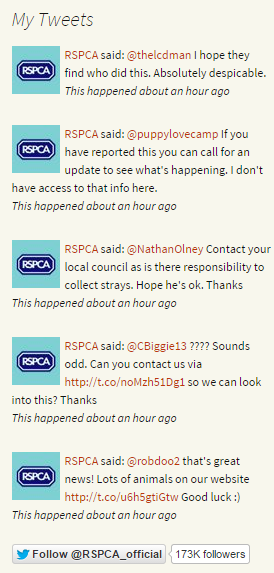
Screenshots


Für Entwickler
Ist das dein Plugin? Zeigen Sie die Zahlen.
Fügen Sie Ihrer Website, Docs oder GitHub Readme ein Live-Badge hinzu. Es wird von selbst aktualisiert - kein Konto erforderlich.
Best ThinkTwit alternatives
All hashtag plugins →



Fragen und Antworten
ThinkTwit: quick answers
Gerade Antworten, gezogen von Live WordPress.org Daten.
Quelle: WordPress.org
Is ThinkTwit free?
Yes. ThinkTwit is free to download and use from the official WordPress.org plugin directory.
Is ThinkTwit safe to use in 2026?
ThinkTwit shows warning signs in 2026 — compare the alternatives below before installing. It runs on 10+ sites, is rated 4.5/5 and was last updated 5 years ago, and scores 29/100 on our health check.
How many websites use ThinkTwit?
ThinkTwit is active on 10+ WordPress websites and has been downloaded 15,474 times since it launched in January 2010. It was downloaded 105 times in the last 30 days.
Does ThinkTwit work with WordPress 7.1?
ThinkTwit is officially tested up to WordPress 5.8.20, while the latest release is 7.1.5. It may still work, but try it on a staging site first.
When was ThinkTwit last updated?
The latest version, 1.7.1, was released on August 17, 2021 (5 years ago).
Who makes ThinkTwit?
ThinkTwit is developed and maintained by Stephen Pickett.
What are the best alternatives to ThinkTwit?
The most popular alternatives to ThinkTwit are Hashtag (200+ installs), BuddyPress Activity Stream… (10+ installs) and Custom Social Embed (10+ installs).
Angetrieben von PageForge
Eine Vorlage und eine Tabelle. Eine echte Seite für jede Suche.
PageForge Verwandelt jede Zeile eines CSV in eine WordPress-Seite mit eigenem Titel, URL, SEO Felder und Schema entworfen. Kostenlos auf WordPress.org.
- CSV und XLSX, plus Google Sheets auf Beruf und Unternehmen
- seinen eigenen Titel, URL, SEO Felder und Schema für jede Seite
- Arbeitet mit dem Blockeditor, Elementor, Divi und Avada
- Kostenlos auf WordPress.org, keine Kreditkarte