


ThemePlus – Modern Theme Options Framework by FrontTheme
A modern, React-powered WordPress theme options framework. 30 field types, white-label support, conditional logic — free forever.

Solide Wahl
ThemePlus is a solid plugin choice in 2026, with a few things worth checking first. Was last updated 1 week ago, and scores 64/100 on our health check.
- Aktiv entwickelt — letztes Update vor 1 Woche
- Getestet mit dem neuesten WordPress (7.1)
- Kleine Benutzerbasis (<10 aktive Installationen)
- Bisher sehr wenige Bewertungen
- Benötigt PHP 8.2 oder neuer
Wie stapelt es sich?
Side-by-side bei Installationen, Updates, Bewertungen und Support



Tägliche Downloads
Download-Spitzen folgen normalerweise einer neuen Version - jede Website, die automatisch aktualisiert wird, gilt als Download.
Ranglisten
Where ThemePlus stands todayWordPress.org Ranglisten suchen
Live-Position in der Plugin-Suche, Top 100| Stichwort | Position |
|---|---|
| admin panel | >100 |
| framework | >100 |
| options panel | >100 |
| theme options | >100 |
| theme-settings | >100 |
About ThemePlus
Aus der offiziellen Readme · V1.1.0Beschreibung
ThemePlus is a free, open-source WordPress theme options framework built for developers who want a modern, lightweight React-powered options panel — no legacy dependencies, no upsells, no license keys.
Built from scratch with React, Vite, and modern PHP 8, ThemePlus delivers a polished admin interface, 30 field types, full white-label support, Google Fonts integration, custom font uploads, Import/Export, conditional logic, a REST API, and a Developer Panel — all free, with no license keys and no upsells.
30 Field Types
Every input a theme could need, organized into clean categories:
- Text — Text, Textarea
- Number — Number / Spinner, Slider
- Choice — Select, Button Set, Radio, Checkbox, Select Image
- Toggle — Toggle / Switch
- Color — Color Picker, Gradient Picker
- Media — Image, Gallery, Icon (FontAwesome 7)
- Layout — Typography, Dimensions, Spacing, Border
- Special — Info, Section, Raw, Shortcode
- Date — Date Picker (date only or date + time)
- Social — Social Media Links (20 platforms)
- Code — Code Editor (CSS, JavaScript, HTML)
- Advanced — Repeater, Background, Link, Group
Every field has a verified, documented value shape. For example:
imagereturns{ id, url, width, height, alt, title }— empty array when no image selectedgalleryreturns an array of{ id, url, alt }rowsborderreturns{ width, style, color, radius }select,radioandbutton_setreturn the chosen key as a string — numeric keys such as post IDs come back as'7435'social_mediareturns an array of{ platform, url }rowsrepeaterreturns an array of row arrays keyed by sub-field idgradient_pickerreturns a complete CSSlinear-gradient()string
White-Label Support
Configure themeplus_framework_config() with your theme’s name, menu title, page title, slug, option key, and menu icon — the admin menu, browser title and saved options belong to your theme. The panel itself keeps the ThemePlus brand.
Convention: section and subsection icon takes a FontAwesome name only ('pen'). The Icon field default takes the full FontAwesome class ('fa-solid fa-star'). The plugin translates its own fallback strings; your theme translates its config strings in your own text domain.
Google Fonts + Custom Fonts
The Typography field includes a searchable browser of 1,899 Google Fonts with live preview, weight and style selection, subset support, and automatic font enqueueing on the frontend. Skip Google Fonts entirely and upload self-hosted fonts (WOFF2, WOFF) via the built-in Custom Fonts module — magic-byte verified, capability-gated, and output into @font-face rules automatically.
Note: Custom fonts are stored as Media Library attachments and are not affected by Reset All or Reset Section — use the per-font Delete button to remove uploaded files.
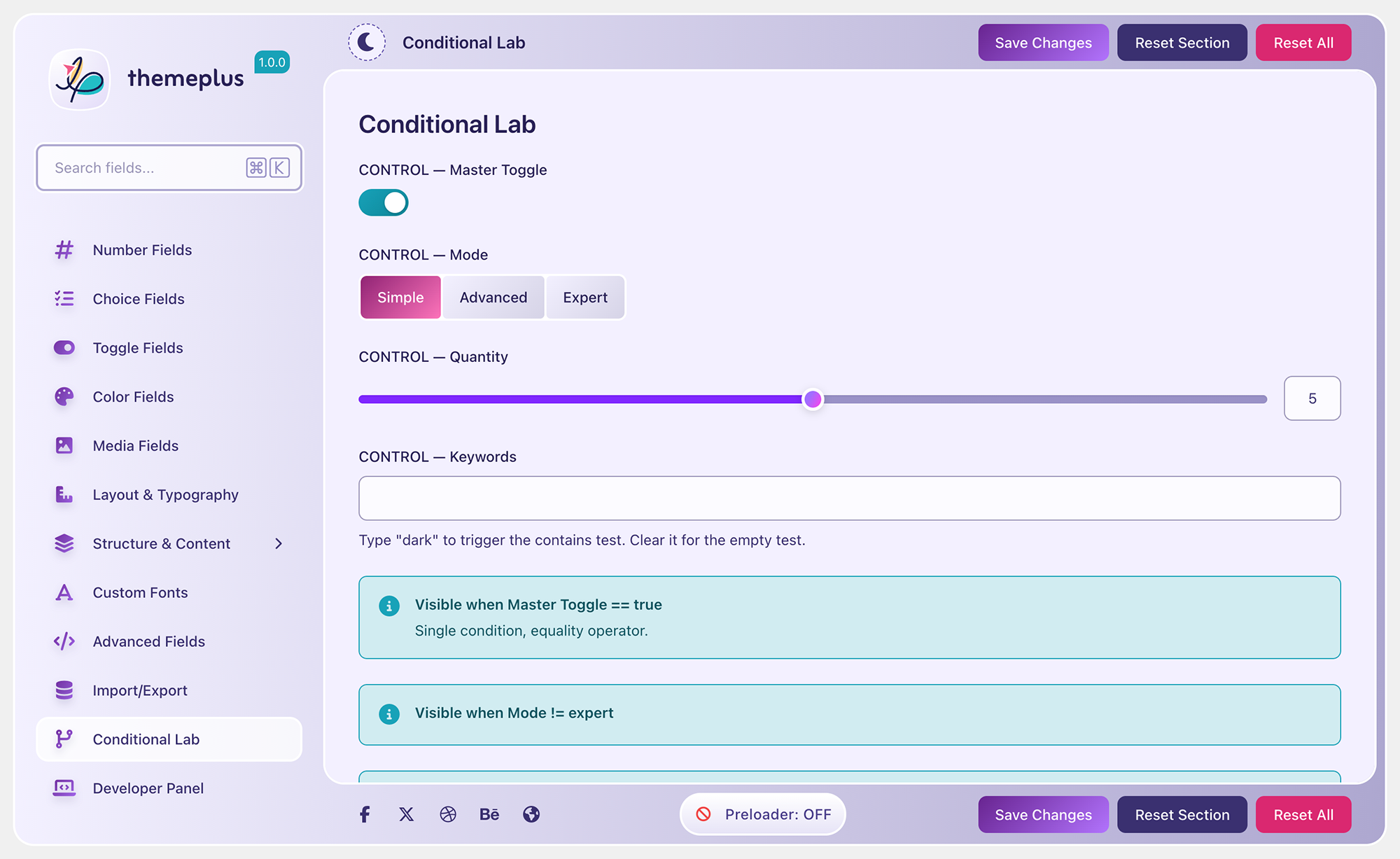
Conditional Logic
Show or hide any field based on the value of another. Supports 10 operators and three relation formats:
Operators: ==, !=, >, <, >=, <=, contains, !contains, empty, !empty
Single condition:
‘required’ => [‘sidebar_position’, ‘==’, ‘left’]
Multiple AND conditions:
‘required’ => [[‘enable_header’, ‘==’, true], [‘header_style’, ‘!=’, ‘minimal’]]
Multiple OR conditions:
‘required’ => [‘relation’ => ‘OR’, ‘conditions’ => [[‘mode’, ‘==’, ‘simple’], [‘mode’, ‘==’, ‘expert’]]]
Array value (matches any):
‘required’ => [‘header_elements’, ‘contains’, ‘search’]
Dot-notation sub-key:
‘required’ => [‘body_typography.font-family’, ‘==’, ‘Inter’]
empty / !empty note: false and 0 are NOT considered empty — only truly absent values, empty strings, empty arrays, and null.
Sections and Subsections
Organize theme options into a hierarchical sidebar. Add sections with themeplus_add_section(), nest subsections inline via the subsections key, or attach subsections from a separate hook with themeplus_add_subsection() — the pattern for child themes and extension plugins.
Import / Export
Backup and restore all theme settings with one click. Import/Export handles JSON serialization and restores defaults cleanly.
REST API
Full REST API under the themeplus/v1 namespace — get options, save options, reset all, reset section, get configuration. All endpoints require the configured capability (default edit_theme_options) with nonce verification. Options are sanitized per field type before storage.
Developer Panel
Enable dev mode (define('THEMEPLUS_DEV', true)) to access a Developer Panel showing every registered field with its current value, PHP data type, and copy-ready code snippets for all three access patterns. Includes field statistics by type and section.
Sicherheit
- All saved options pass through a per-field-type sanitizer (
ThemePlus_Sanitizer) — unknown keys are dropped, values are validated against registered field configuration - REST endpoints are capability-gated with nonce verification
- Font uploads are MIME-type and magic-byte verified
- Output is escaped at every render point
GPL Licensed — Free Forever
ThemePlus is GPL-2.0-or-later — the same license as WordPress itself. Use it in personal projects, client work, and commercial ThemeForest themes without restriction.
Externe Dienste
This plugin can optionally connect to Google Fonts (fonts.googleapis.com) when a Typography field is configured to use a Google Font. The selected font family name is sent to Google’s servers to load the font stylesheet.
- Google Fonts is only requested when a typography field value contains a Google Font name — it is never loaded by default
- No personal data is sent — only font family names and subset preferences
- Google Privacy Policy: https://policies.google.com/privacy
- Google Fonts Terms: https://developers.google.com/fonts/terms
To avoid any Google Fonts requests entirely, use only system fonts or upload self-hosted fonts via the Custom Fonts module.
Installation
Von WordPress.org
- Go to Plugins → Add New
- Search for ThemePlus
- Click Install Now then Activate
Upload ZIP
- Download
themeplus.zipfrom GitHub Releases - Go to Plugins → Add New → Upload Plugin
- Upload the ZIP and activate
After Activation
ThemePlus does nothing on its own — it is a framework for theme developers. To add a settings panel to your theme:
- Copy
includes/config/sample-config.phpfrom the plugin into your theme (renamemy_theme_prefixes to your own) - Include it in
functions.php:require_once get_template_directory() . '/inc/themeplus-config.php'; - Configure
themeplus_framework_config()with your theme’s details - Add sections and fields using
themeplus_add_section() - Retrieve values with
themeplus_get_option('field_id')
Änderungsprotokoll
Fixes saving choice fields that use numeric keys. Requires PHP 8.2 or higher.
1.1.0
- Fix: Select, Radio, Button Set and Select Image fields now save options with numeric keys, such as post IDs.
- Fix: Options with numeric keys keep the order they are defined in.
- Fix: Numeric defaults show as selected before the first save.
- Fix: The ‘relation’ => ‘OR’, ‘conditions’ => […] format of required now evaluates its conditions.
- Fix: Checkbox fields keep numeric option keys in order.
- Fix: Date picker buttons use the ThemePlus primary colour for their focus outline.
- Fix: Developer Panel shows only when THEMEPLUS_DEV is true or the theme config sets ‘dev_mode’ => true.
- Change: Requires PHP 8.2 or higher.
- Dev: Build tools updated to Vite 8 and Sass 1.98.
- Dev: Sass code moved to the sass:color, sass:map and sass:math modules
1.0.0
- Erste Freigabe
- 30 field types: Text, Textarea, Number, Spinner, Slider, Select, Button Set, Radio, Checkbox, Select Image, Toggle, Switch, Color Picker, Gradient Picker, Image, Gallery, Icon, Typography, Dimensions, Spacing, Border, Info, Section, Raw, Shortcode, Date Picker, Social Media, Code Editor, Repeater, Background, Link, Group
- React 18 + WordPress components admin UI
- White-label support via themeplus_framework_config()
- Sections and subsections with priority ordering and themeplus_add_subsection() API
- Conditional logic: 10 operators, AND/OR relations, array values, dot-notation sub-keys
- Google Fonts integration: 1,899 fonts, live preview, subset selection, auto-enqueue
- Custom Fonts module: WOFF2/WOFF upload, magic-byte verification, @font-face generation
- Per-field-type sanitization on all saved options via ThemePlus_Sanitizer
- REST API: themeplus/v1 — get, save, reset-all, reset-section, config
- Developer Panel with field metadata and code snippets (dev mode only)
- Live field search across titles, subtitles, descriptions, and IDs
- Import/Export settings as JSON
- Unsaved changes detection with navigation warning
- Dark and light mode
- Helper functions: themeplus_get_option(), themeplus_update_option(), themeplus_add_section(), themeplus_add_subsection()
- Full i18n/l10n support with .pot file
Screenshots




Für Entwickler
Ist das dein Plugin? Zeigen Sie die Zahlen.
Fügen Sie Ihrer Website, Docs oder GitHub Readme ein Live-Badge hinzu. Es wird von selbst aktualisiert - kein Konto erforderlich.
Best ThemePlus alternatives
All admin panel plugins →



Fragen und Antworten
ThemePlus: quick answers
Gerade Antworten, gezogen von Live WordPress.org Daten.
Quelle: WordPress.org
Is ThemePlus free?
Yes. ThemePlus is free to download and use from the official WordPress.org plugin directory.
Is ThemePlus safe to use in 2026?
ThemePlus is a solid plugin choice in 2026, with a few things worth checking first. Was last updated 1 week ago, and scores 64/100 on our health check.
How many websites use ThemePlus?
ThemePlus is active on <10 WordPress websites and has been downloaded 409 times since it launched in June 2026. It was downloaded 143 times in the last 30 days.
Does ThemePlus work with WordPress 7.1?
Yes. The developer has tested ThemePlus up to WordPress 7.1.5, the latest release. It requires WordPress 6.8 or newer.
What PHP version does ThemePlus need?
ThemePlus requires PHP 8.2 or higher. Most hosts run PHP 8.x today, so it works on any modern WordPress hosting.
When was ThemePlus last updated?
The latest version, 1.1.0, was released on November 12, 2026 (1 week ago).
Who makes ThemePlus?
ThemePlus is developed and maintained by Faruk Ahmed.
What are the best alternatives to ThemePlus?
The most popular alternatives to ThemePlus are Latin Now! (400+ installs), Dashboard Editor (200+ installs) and Qwerty Admin Panel Theme (50+ installs).
Angetrieben von PageForge
Eine Vorlage und eine Tabelle. Eine echte Seite für jede Suche.
PageForge Verwandelt jede Zeile eines CSV in eine WordPress-Seite mit eigenem Titel, URL, SEO Felder und Schema entworfen. Kostenlos auf WordPress.org.
- CSV und XLSX, plus Google Sheets auf Beruf und Unternehmen
- seinen eigenen Titel, URL, SEO Felder und Schema für jede Seite
- Arbeitet mit dem Blockeditor, Elementor, Divi und Avada
- Kostenlos auf WordPress.org, keine Kreditkarte