

Address Book & Multiple Shipping for WooCommerce
One best way to let your customers add multiple shipping and billing addresses to their My Account page.

Sichere Auswahl
Yes — Address Book & Multiple Shippin… is a safe, well-maintained plugin to use in 2026. It runs on 1K+ sites, is rated 4.8/5 and was last updated 2 months ago, and scores 86/100 on our health check.
- Loved by users — 4.8/5 from 20 reviews
- Getestet mit dem neuesten WordPress (7.1)
Wie stapelt es sich?
Side-by-side bei Installationen, Updates, Bewertungen und Support



Tägliche Downloads
Download-Spitzen folgen normalerweise einer neuen Version - jede Website, die automatisch aktualisiert wird, gilt als Download.
Ranglisten
Where Address Book & Multiple Shi… stands todayWordPress.org Ranglisten suchen
Live-Position in der Plugin-Suche, Top 100| Stichwort | Position |
|---|---|
| address book | #2 |
| addresses | #4 |
| multiple addresses | #1 |
| Multiple billing addresses | #1 |
| multiple shipping addresses | #1 |
Versionsübernahme
Anteil aktiver Sites pro Release.
Bewertungsaufschlüsselung
★★★★★★★★★★ 4.8 from 20 reviews
About Address Book & Multiple Shipping for Wo…
From the official readme · v2.3.2Beschreibung
🔥 #1 Plugin to Ship WooCommerce Orders to Multiple Addresses
With default WooCommerce functionality, shoppers can only ship to a single address per order. This not only affects the customer experience but also adds complexity for store owners managing multiple delivery requests.
That’s precisely why we built Address Book & Multiple Shipping for WooCommerce by ThemeHigh. As the name suggests, this plugin empowers your customers to ship items from a single order to multiple addresses quickly and effortlessly.
Using Multiple Shipping Addresses for WooCommerce you can:
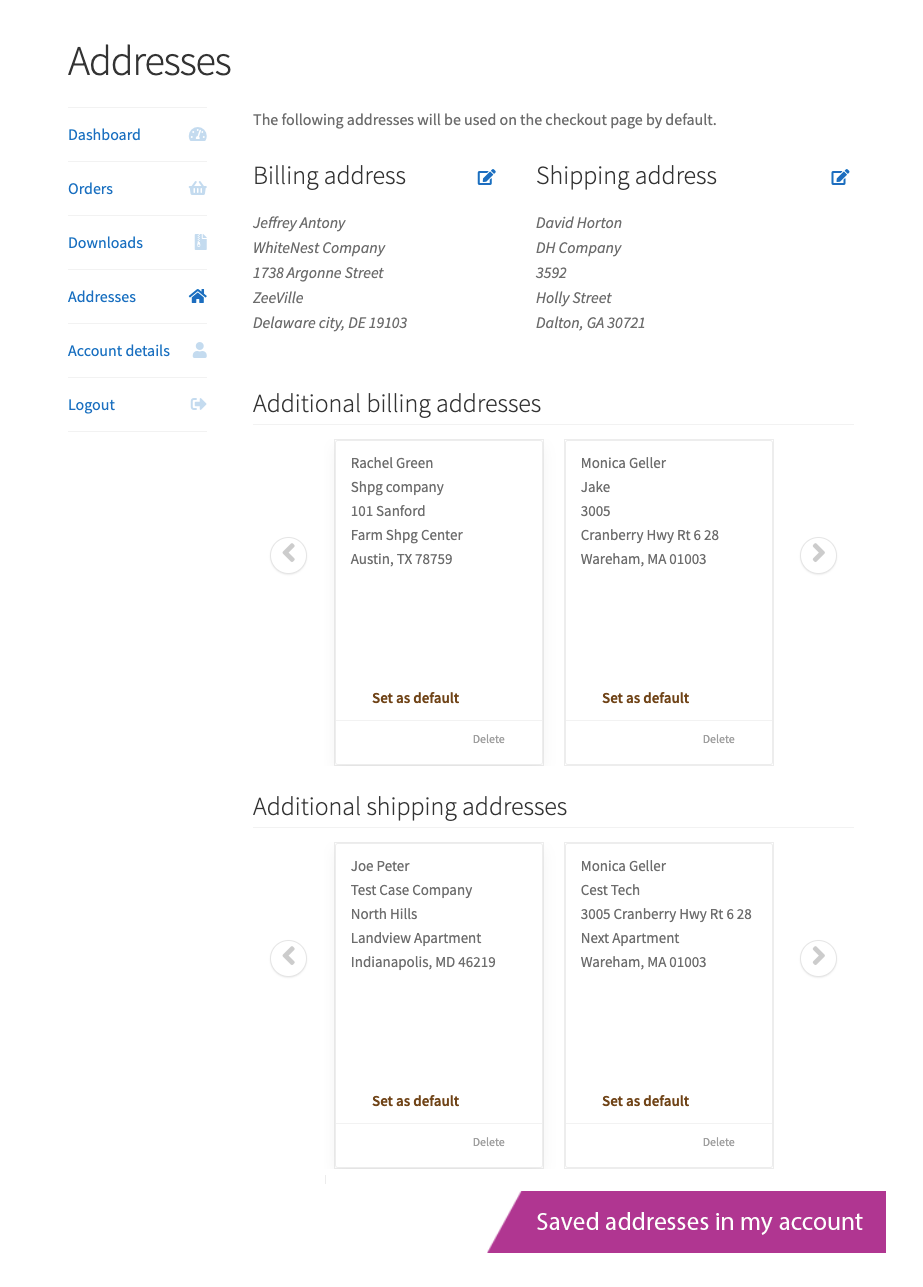
✳️ Save multiple billing and shipping addresses to their Address book
✳️ Ship different products to multiple addresses in a single purchase
This plugin works smoothly with other popular ThemeHigh checkout plugins allowing you to build a powerful, user-friendly checkout experience.
🚀 How to Get Started:
Install and activate the plugin, and proceed to:
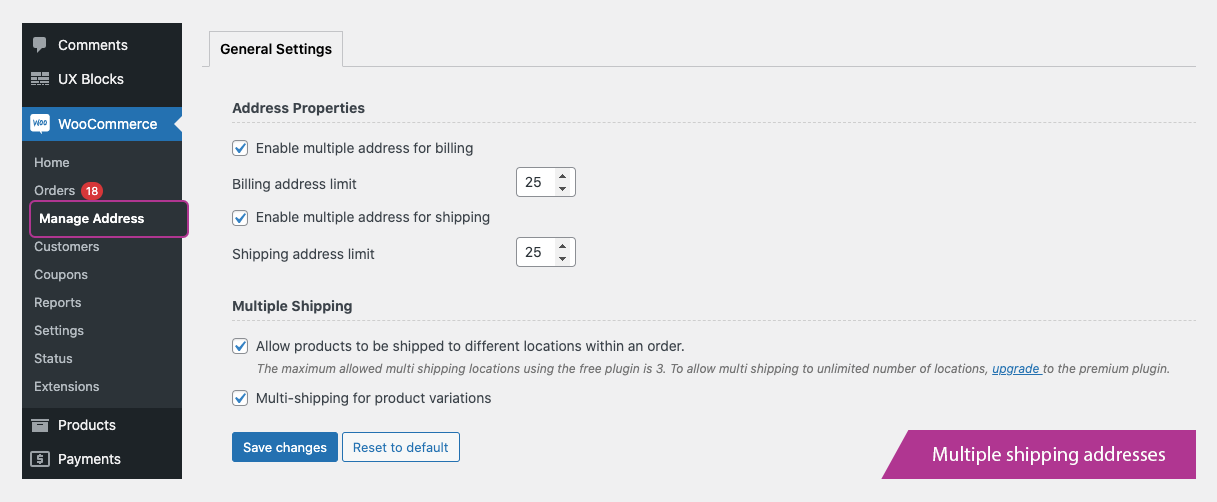
Dashboard ⟶ WooCommerce ⟶ Manage Address
From there, you can:
✅ ENABLE MULTIPLE BILLING ADDRESSES
✅ ENABLE MULTIPLE SHIPPING ADDRESSES
👉 Note: The free version allows up to 2 shipping locations per order.
To enable unlimited shipping addresses and unlock more features upgrade to the premium version now!
Try Demo | Documentation | Get Pro
🔥 EXPLORE WHAT OUR FREE VERSION OFFERS
✳️ ADDRESS PROPERTIES
- Multiple Billing Addresses: Allow customers to save and manage more than one billing address by enabling the “Enable multiple address for billing” option.
-
Flexible Display types for billing: Choose how the multiple billing address selection appears at checkout
- Set display type: Pop up / Drop down
- Set display style: Button / Link
-
Multiple Shipping Addresses: Just like billing, you can let users add and manage different shipping addresses for future purchases by enabling the “Enable multiple address for shipping” option
-
Flexible Display type for shipping: Choose how the multiple shipping address selection appears at checkout
- Set display type: Pop up / Drop down
- Set display style: Button / Link
-
Manage Addresses at Checkout or My Account: Customers can choose or delete their saved addresses directly from the checkout pop-up or from the My Account page.
- The checkout page: comes with an option to enable/disable shipping orders to different addresses.
- New addresses (Billing/Shipping) can be added from the checkout page and will display as a dropdown menu for users to choose from.
✳️ MULTIPLE SHIPPING ADDRESS
With Address Book & Multiple Shipping for WooCommerce, customers can ship different products to multiple locations in a single order without placing separate orders
- Ship Items to different addresses: Enable the “Allow products to be shipped to different locations” within an order option so customers can assign individual products to different addresses within the same order.
- Support for Variable Products: By default, only simple products can be shipped to multiple addresses. To allow variable products to be shipped separately, activate the “Multi-shipping for variable product” option.
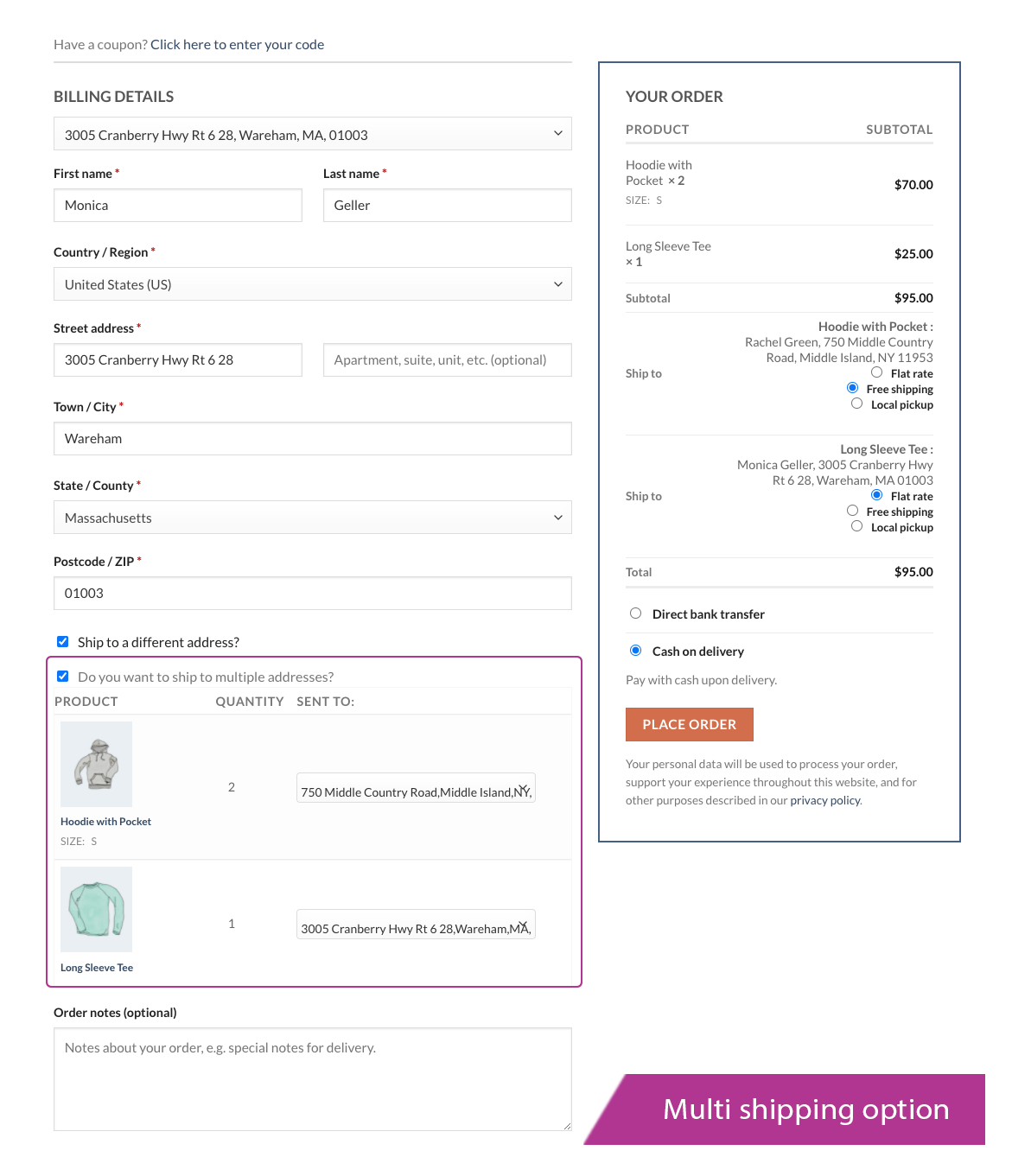
👉 Note: The Multiple Address Checkout feature can be triggered directly from the checkout page, allowing customers to assign different products to multiple addresses within a single order
✳️ MULTIPLE ADDRESSES CHECKOUT
- Enable Multiple Shipping at Checkout: Customers can choose to ship items to multiple addresses by selecting the “Do you want to ship to multiple addresses?” option on the checkout page.
- Easily Add & Select Addresses: New billing and shipping addresses can be added directly from checkout and will appear in a dropdown menu for quick selection.
- Manage Shipping Methods: Customers can set different shipping methods for each address, ensuring flexibility and a seamless checkout experience.
👉 Note: The admin can restrict the number of (Billing / Shipping) addresses a user can save in their account. The free plugin allows for a maximum of two shipping locations.
Upgrade to the pro version to enable multi-shipping to an endless number of locations.
🔥 EXPLORE WHAT OUR PREMIUM VERSION OFFERS
Try Demo | Documentation | Get Pro
The Premium version of Address Book & Multiple Shipping for WooCommerce comes packed with smart, time saving features that make running your store smoother and shopping easier for your customers.
In addition to all the features available in the free version, the Pro plugin introduces two powerful settings groups:
👉 General Settings & Advanced Settings
Manage how addresses are handled, displayed and styled with more control and customization options than ever before.
But with the pro version you get even more flexibility and control!
- Set display position: Choose whether the address selector appears above or below the form at checkout
- Customize default text: Personalize the label shown for address selection
- Set address limits: Define how many addresses a user can save
Under the General settings tab we have options like:
✳️ BILLING & SHIPPING OPTIONS
-
Billing Address Properties
-
Enable Multiple Billing Addresses: Allow customers to save and manage more than one billing address by enabling the “Enable multiple address for billing” option.
-
Advanced Display Controls: Just like the free version, the Pro edition lets you choose how customers interact with saved addresses pop-up or dropdown and display them as a button or link.
But with the Pro version, you get even more flexibility and control like:
- Set display position: Choose whether the address selector appears above or below the form at checkout
- Customize default text: Personalize the label shown for address selection
- Set address limits: Define how many addresses a user can save
-
✳️ SHIPPING ADDRESSES PROPERTIES
- Shipping Addresses properties: Like billing, you can let customers save and manage multiple shipping addresses for future use by “enabling the Multiple Shipping Addresses” option.
The Pro version offers all the display controls from the free version: pop-up or dropdown, shown as a button or link, plus extra flexibility including:
- Set where the selector appears (above/below form)
- Customize the default label text
- Limit how many shipping addresses users can save
✳️ BUTTON STYLES PROPERTIES
Make your address selection buttons blend seamlessly with your store’s design.
With the Pro version, you can:
- Set custom background and text colors
- Adjust padding for better spacing
✳️ MULTIPLE SHIPPING OPTION
The Pro version makes it easy to manage complex orders with advanced multi-shipping options
- Any products can be shipped to as many addresses as the user desires
- Restrict multiple shipping for specific products or categories
- Enable multi-shipping for product variations
- Add the same product multiple times to the cart, each with a different shipping address
✳️ GUEST USERS OPTION
- Enable multi-shipping for guest users: Allow guest users to have multi-shipping privileges. Admin can restrict the time limit as per minute/hour/day.
✳️ MANAGE TEXT OPTION
- Display Text Settings: Say it your way, with these options, you can personalize the text your customers see during checkout
- Add label for multiple address picking URL
- Label for add shipping address URL
- Label for multiple shipping Checkbox
Under the Advanced settings tab the following are available:
- Address Autofill: This option allows you to enable the billing address autofill with the help of a Google Maps API Key. A checkbox is provided to enable or disable autofill anytime.
- Address Format Override: With the address format overrides option, you can customise the WooCommerce default address formats.
👉Note: You can add the custom fields created by the WooCommerce Checkout Field Editor Pro to the custom format for overriding according to your comfort.
- Custom CSS styling: Easily apply your own styles with additional CSS
- Backup & Import Settings: This option allows you to save time by copying your current settings and importing them into a different WordPress installation.
Why ThemeHigh
At themehigh, we specialize in providing thoughtful solutions to help you create your store in the easiest and simplest way possible, providing you with a smooth and enjoyable customization experience.
🏆 2 Million+ Customers
🏆 Quickest Turn-around Support
🏆 Most Lightweight Plugins
🔥 Explore More
If you like the Address Book & Multiple Shipping for WooCommerce, then consider checking out our other WordPress Plugins:
👉 Checkout Field Editor (Checkout Manager) for WooCommerce:
This Checkout Plugin from Themehigh lets you add 20 different types of custom checkout fields.
👉Extra Product Options For WooCommerce:
This Custom Product addons plugin lets you quickly add additional fields (19 custom field types) and sections to your WooCommerce Product page.
👉 Variation Swatches For WooCommerce:
Using the WooCommerce Variation Swatches Plugin, you can easily convert default WooCommerce product attribute drop-downs into customizable swatches and display customized product variations.
👉 Email Customizer for WooCommerce | Drag and Drop Email Templates Builder:
Email Customizer is a plugin that helps you effortlessly customise your WooCommerce transactional emails using its intuitive drag-and-drop builder
Happy Users of Address Book & Multiple Shipping for WooCommerce Plugin
achillon (@achillon)⭐⭐⭐⭐
It worked perfectly the first time I tried it, easy to use and set up. Just what I needed.stefangociu (@stefangociu)⭐⭐⭐⭐⭐
Great plugin and customer service.polforns(@polforns )⭐⭐⭐⭐
The plugin works very well and is very simple to use. I had a problem with the configuration of my website and the plugin and their customer service helped me perfectly. Very good experience.cbaser(@cbaser) ⭐⭐⭐⭐⭐
They came back to me in no time with a code fix, they even installed it for me!
OTHER USEFUL LINKS
👉 VIEW ALL FEATURES
👉 GET DOCUMENTATION
👉 GET THEMEHIGH SUPPORT
👉 JOIN COMMUNITY
👉 FOLLOW US ON Facebook, LinkedIn, Twitter & YouTube.
Reddit
Installation
Mindestanforderungen
- WooCommerce 3.0 or greater
- WordPress 5.2 or higher
Automatische Installation
- Melden Sie sich in Ihrem WordPress-Dashboard an.
- Navigate to the Plugins menu, and click “Add New”.
- Search and locate ‘Woocommerce Multiple Addresses’ plugin.
- Click ‘Install Now’, and WordPress will take it from there.
- The Multiple Addresses for WooCommerce premium plugin homepage.
- The Knowledge base.
- Other WordPress Plugins by the ThemeHigh team.
- Follow ThemeHigh on Facebook, LinkedIn, Twitter & YouTube.
Manuelle Installation
Manual installation method requires downloading the ‘Woocommerce Multiple Addresses’ plugin and uploading it to your web server via your FTP application. The WordPress codex contains instructions on how to do this here.
Änderungsprotokoll
2.3.2
- Added WooCommerce 11.0 compatibility.
- Added WordPress 7.1 compatibility.
2.3.1
- Added WooCommerce 10.8 compatibility.
- Added WordPress 7.0 compatibility.
- Improved plugin stability and security.
2.3.0
- Added WooCommerce 10.2 compatibility.
- Improved compatibility with Checkout Field Editor for WooCommerce.
2.2.9
- Added WooCommerce 9.8 compatibility.
- Added WordPress 6.8 compatibility.
2.2.8
- Added WooCommerce 9.4 compatibility.
- Added WordPress 6.7 compatibility.
2.2.7
- Added WooCommerce 9.2 compatibility.
- Added WordPress 6.6 compatibility.
Screenshots

Für Entwickler
Ist das dein Plugin? Zeigen Sie die Zahlen.
Fügen Sie Ihrer Website, Docs oder GitHub Readme ein Live-Badge hinzu. Es wird von selbst aktualisiert - kein Konto erforderlich.
Best Address Book & Multiple Shipp… alternatives
All address book plugins →





Fragen und Antworten
Address Book & Multiple Shipping fo…: quick answers
Gerade Antworten, gezogen von Live WordPress.org Daten.
Quelle: WordPress.org
Is Address Book & Multiple Shippin… free?
Yes. Address Book & Multiple Shippin… is free to download and use from the official WordPress.org plugin directory. The developer also sells premium add-ons or a Pro version with extra features.
Is Address Book & Multiple Shippin… safe to use in 2026?
Yes — Address Book & Multiple Shippin… is a safe, well-maintained plugin to use in 2026. It runs on 1K+ sites, is rated 4.8/5 and was last updated 2 months ago, and scores 86/100 on our health check.
How many websites use Address Book & Multiple Shippin…?
Address Book & Multiple Shippin… is active on 1K+ WordPress websites and has been downloaded 53,099 times since it launched in August 2020. It was downloaded 865 times in the last 30 days.
Does Address Book & Multiple Shippin… work with WordPress 7.1?
Yes. The developer has tested Address Book & Multiple Shippin… up to WordPress 7.1.5, the latest release. It requires WordPress 5.2 or newer.
What PHP version does Address Book & Multiple Shippin… need?
Address Book & Multiple Shippin… requires PHP 7.0.0 or higher. Most hosts run PHP 8.x today, so it works on any modern WordPress hosting.
When was Address Book & Multiple Shippin… last updated?
The latest version, 2.3.2, was released on September 14, 2026 (2 months ago).
Who makes Address Book & Multiple Shippin…?
Address Book & Multiple Shippin… is developed and maintained by ThemeHigh.
What are the best alternatives to Address Book & Multiple Shippin…?
The most popular alternatives to Address Book & Multiple Shippin… are Disable Flamingo Addressbook (4K+ installs), Address Book for WooCommerce (3K+ installs) and Contact List (1K+ installs).
Angetrieben von PageForge
Eine Vorlage und eine Tabelle. Eine echte Seite für jede Suche.
PageForge Verwandelt jede Zeile eines CSV in eine WordPress-Seite mit eigenem Titel, URL, SEO Felder und Schema entworfen. Kostenlos auf WordPress.org.
- CSV und XLSX, plus Google Sheets auf Beruf und Unternehmen
- seinen eigenen Titel, URL, SEO Felder und Schema für jede Seite
- Arbeitet mit dem Blockeditor, Elementor, Divi und Avada
- Kostenlos auf WordPress.org, keine Kreditkarte