


Team Builder Member Showcase
Build a beautiful Team Builder Member Showcase with simple shortcodes, responsive grids, and clean bios.

Mit Vorsicht verwenden
Team Builder Member Showcase works, but test it on a staging site before relying on it in 2026. It runs on 1K+ sites, is rated 3.8/5 and was last updated 3 months ago, and scores 52/100 on our health check.
- Getestet mit dem neuesten WordPress (7.1)
- Momentum — downloads up 46.4% vs the previous 30 days
- Bisher sehr wenige Bewertungen
Wie stapelt es sich?
Side-by-side bei Installationen, Updates, Bewertungen und Support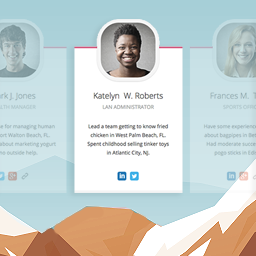



Tägliche Downloads
Download-Spitzen folgen normalerweise einer neuen Version - jede Website, die automatisch aktualisiert wird, gilt als Download.
Ranglisten
Where Team Builder Member Showcase stands todayWordPress.org Ranglisten suchen
Live-Position in der Plugin-Suche, Top 100| Stichwort | Position |
|---|---|
| meet the team | #9 |
| our team | #16 |
| staff directory | #23 |
| Team Member | #13 |
| team showcase | #9 |
Versionsübernahme
Anteil aktiver Sites pro Release.
Bewertungsaufschlüsselung
★★★★★★★★★★ 3.8 from 4 reviews
About Team Builder Member Showcase
From the official readme · v0.2.0Beschreibung
Build a beautiful Team Builder Member Showcase with simple shortcodes, responsive grids, and clean bios.
Team Builder Member Showcase Description
Want to show your staff on your website?
The Team Builder Member Showcase helps you create a professional page.
You can share team details in just a few minutes.
This team member showcase is fully responsive.
It works perfectly on mobile phones, tablets, and computers.
Sharing the faces of your team builds trust with clients.
With this builder, you can add names and photos.
You can also add jobs, short bios, and social links.
Everything displays in a clean and organized grid layout.
Free Version Demo: Team Builder Member Showcase Free
Premium Version Demo: Team Builder Member Showcase Premium
Where To Buy: Premium Version Detail Page
Why use a builder showcase?
* It introduces your staff to website visitors.
* It helps build credibility and trust.
* It gives your business a human touch.
* It keeps visitors engaged on your site.
How to create your showcase:
* Add staff members inside the admin panel.
* Pick one of the beautiful templates.
* Paste the shortcode on any page.
Team Builder Member Showcase Features
Free Features:
* Clean responsive layout for all modern screens.
* 5 ready-to-use template designs.
* Simple shortcode builder to display your team.
* Grid system with 1 to 4 columns.
* Unlimited team member entries.
* Fields for photos, names, titles, and bios.
* Social media links for each staff member.
* Works with all popular web browsers.
* Simple bootstrap administrative panel.
Premium Features:
* 22 professionally designed templates.
* Owl Carousel slider for your team showcase.
* Autoplay settings with custom speed controls.
* Pause carousel on mouse hover.
* Navigation dots and next/prev buttons.
* Custom background colors for member cards.
* Custom text and description color choices.
* Advanced column options for responsiveness.
* Customizable social media icons.
* Link targets like new tabs or self.
* Priority customer support desk.
Anwendungsfälle
- Company about us pages.
- Professional agency staff showcases.
- Startup founder profile lists.
- Restaurant chef and staff cards.
- Medical doctor and clinic directories.
- Law firm lawyer biographies.
- Real estate agent grids.
- School teacher and faculty tables.
- Church leader profiles.
Team Builder Member Showcase Frequently Asked Questions
How do I add a team member in this showcase?
Go to TBMS > Add Team in your dashboard.
Create a new staff list and add details.
Copy the shortcode and paste it on any page.
Can I build multiple showcases on one page?
Yes, you can build as many showcases as you like.
Each shortcode will display different team member lists.
Is there a limit to the showcase builder?
No, there is no limit.
You can add as many staff profiles as you need.
Will this team showcase work with my theme?
Yes, it works with all properly coded themes.
The templates adapt to your page width automatically.
Can I turn my team member grid into a slider?
The free version uses a grid layout.
The premium version adds a responsive slider with autoplay options.
How do I link social profiles to each team member?
Edit a member and paste their profile URLs.
You can add links for Facebook, Twitter, and LinkedIn.
Can I change colors of the showcase cards?
The free templates use clean default colors.
The premium version offers a color picker for cards and text.
Does this builder work with Elementor?
Yes, you can use the shortcode with any page builder.
It works with Elementor, Divi, and the block editor.
Is this team member plugin translation ready?
Yes, you can translate all text into your language easily.
Installation
- Download the zip file from WordPress.org.
- Upload it via Plugins > Add New in dashboard.
- Aktivieren Sie das Plugin.
- Go to TBMS > Add Team in your admin menu.
- Set a title for your staff showcase.
- Choose a layout template.
- Add your staff photos and details.
- Copy the shortcode and paste it anywhere.
Änderungsprotokoll
Important security hardening, 50% smaller footprint optimization, and new administrative submenu pages. Highly recommended update for all users.
0.2.0
- 2026/05/9
- Security: Hardened AJAX callbacks with proper capability and nonce checks
- Optimization: Removed heavy Font Awesome asset files for a 50% lighter package
- Integration: Migrated administrative icons to native WordPress Dashicons
- Feature: Added interactive Upgrade to Pro, Our Themes, and Our Plugins submenus
0.1.16
- Fehlerbehebung
- Tested with WordPress 6.9
0.1.15
- Fehlerbehebung
- Tested with WordPress 6.8.3
0.1.14
- Fehlerbehebung
- Tested with WordPress 6.8.1
0.1.13
- Fehlerbehebung
- Tested with WordPress 6.7.2
0.1.12
- Fehlerbehebung
- Tested with WordPress 6.7.1
Screenshots




Für Entwickler
Ist das dein Plugin? Zeigen Sie die Zahlen.
Fügen Sie Ihrer Website, Docs oder GitHub Readme ein Live-Badge hinzu. Es wird von selbst aktualisiert - kein Konto erforderlich.
Best Team Builder Member Showcase alternatives
All meet the team plugins →



Fragen und Antworten
Team Builder Member Showcase: quick answers
Gerade Antworten, gezogen von Live WordPress.org Daten.
Quelle: WordPress.org
Is Team Builder Member Showcase free?
Yes. Team Builder Member Showcase is free to download and use from the official WordPress.org plugin directory. The developer also sells premium add-ons or a Pro version with extra features.
Is Team Builder Member Showcase safe to use in 2026?
Team Builder Member Showcase works, but test it on a staging site before relying on it in 2026. It runs on 1K+ sites, is rated 3.8/5 and was last updated 3 months ago, and scores 52/100 on our health check.
How many websites use Team Builder Member Showcase?
Team Builder Member Showcase is active on 1K+ WordPress websites and has been downloaded 77,713 times since it launched in January 2020. It was downloaded 663 times in the last 30 days.
Does Team Builder Member Showcase work with WordPress 7.1?
Yes. The developer has tested Team Builder Member Showcase up to WordPress 7.1.5, the latest release. It requires WordPress 5.4 or newer.
What PHP version does Team Builder Member Showcase need?
Team Builder Member Showcase requires PHP 7.2 or higher. Most hosts run PHP 8.x today, so it works on any modern WordPress hosting.
When was Team Builder Member Showcase last updated?
The latest version, 0.2.0, was released on August 20, 2026 (3 months ago).
Who makes Team Builder Member Showcase?
Team Builder Member Showcase is developed and maintained by A WP Life.
What are the best alternatives to Team Builder Member Showcase?
The most popular alternatives to Team Builder Member Showcase are Team Members (20K+ installs), RWC Team Members (10+ installs) and Showcase Your Team (10+ installs).
Angetrieben von PageForge
Eine Vorlage und eine Tabelle. Eine echte Seite für jede Suche.
PageForge Verwandelt jede Zeile eines CSV in eine WordPress-Seite mit eigenem Titel, URL, SEO Felder und Schema entworfen. Kostenlos auf WordPress.org.
- CSV und XLSX, plus Google Sheets auf Beruf und Unternehmen
- seinen eigenen Titel, URL, SEO Felder und Schema für jede Seite
- Arbeitet mit dem Blockeditor, Elementor, Divi und Avada
- Kostenlos auf WordPress.org, keine Kreditkarte