


PublishPress Tag Groups: Stylish Displays For Your Tags and Categories
PublishPress Tag Groups allows you to organize your WordPress taxonomy terms and show them in clouds, tabs, accordions, tables, lists and much more.

Sichere Auswahl
Yes — PublishPress Tag Groups: Stylis… is a safe, well-maintained plugin to use in 2026. It runs on 3K+ sites, is rated 4.8/5 and was last updated 3 days ago, and scores 91/100 on our health check.
- Von Benutzern geliebt — 4,8/5 aus 58 Bewertungen
- Aktiv entwickelt – letztes Update vor 3 Tagen
- Getestet mit dem neuesten WordPress (7.1)
- Momentum — downloads up 90.1% vs the previous 30 days
- Benötigt PHP 8.2 oder neuer
Wie stapelt es sich?
Side-by-side bei Installationen, Updates, Bewertungen und Support



Tägliche Downloads
Download-Spitzen folgen normalerweise einer neuen Version - jede Website, die automatisch aktualisiert wird, gilt als Download.
Ranglisten
Where PublishPress Tag Groups: St… stands todayWordPress.org Ranglisten suchen
Live-Position in der Plugin-Suche, Top 100| Stichwort | Position |
|---|---|
| Accordion | #56 |
| tag cloud | #3 |
| tags | #14 |
| taxonomy | #96 |
Versionsübernahme
Anteil aktiver Sites pro Release.
Bewertungsaufschlüsselung
★★★★★★★★★★ 4.8 from 58 reviews
About PublishPress Tag Groups: Stylish Displa…
From the official readme · v3.0.3Beschreibung
The PublishPress Tag Groups plugin allows you to organize your WordPress taxonomy terms and show them in clouds, tabs, accordions, tables, lists and much more. You can customize your term displays with a huge number of options and use them in posts, pages, blocks, or shortcodes.
All the Features in PublishPress Tag Groups
The Free version of the PublishPress Tag Groups plugin comes with the following features. All of these features are available as both shortcodes and also Gutenberg blocks.
- Tag List: Tags appear in columns, sorted into groups. View demos.
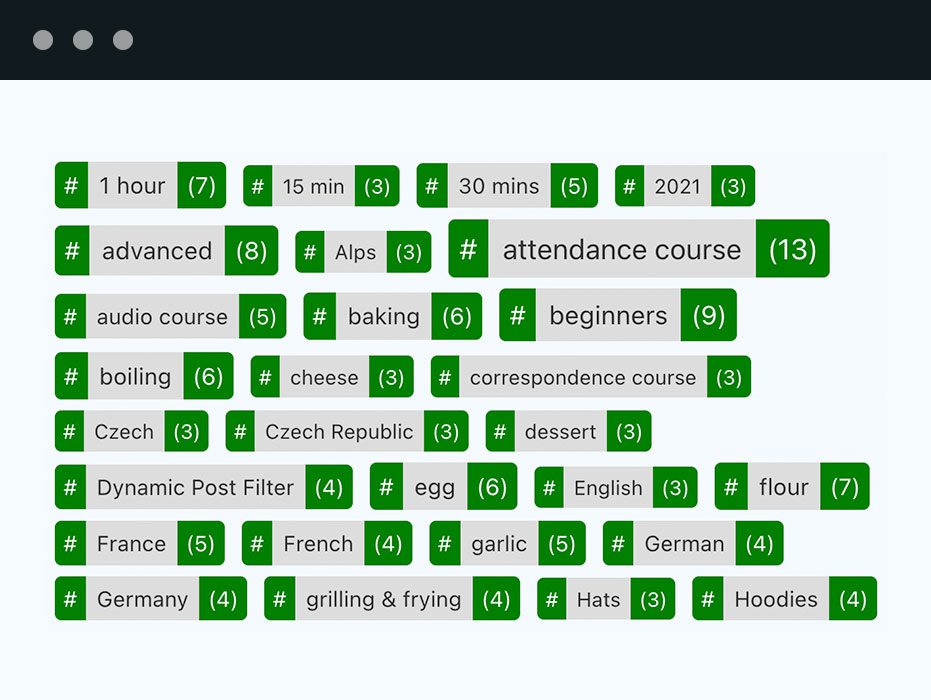
- Tabbed Tag Cloud: A tag cloud where tags are sorted into groups that appear in tabs. View demos.
- Accordion Tag Cloud: A tag cloud where tags are sorted into vertically stacked accordion groups. View demos.
- Alphabetical Tag Cloud: Tags are sorted alphabetically by first letter under tabs. View demos.
- Alphabetical Tag Index: Tags appear in columns, sorted alphabetically by first letter. View demos.
- Post List: Display posts with a specific tag or in a particular tag group. View demos.
The Pro version of the PublishPress Tag Groups plugin also has these extra features:
- Tag Cloud: This is an advanced version of a traditional Tag Cloud, with many customization options. View demos.
- Table Tag Cloud: This feature organizes tags in a table, with groups as headers. View demos.
- Shuffle Box: This is a tag cloud that allows you to filter the tags by their names or by their tag groups. View demos.
- Tag Cloud Search: Add a search box to any of our static tag displays: Cloud, Tabs, Accordion, or Table. View demos.
- Toggle Post Filter: This allows users to dynamically search for posts that have tags they choose. View demos.
- Dynamic Post Filter: This allows users to dynamically search for posts via a dropdown menu showing tags. View demos.
PublishPress Tag Groups Pro
Upgrade to PublishPress Tag Groups Pro
This plugin is the free version of PublishPress Tag Groups. The Pro version has extra features and expert support. Click here to organize your terms with PublishPress Tag Groups Pro now!
Why Organize Terms Into Groups?
Most WordPress sites mix up terms into one big messy group. In most cases, terms should actually be separated by topics: places, people, features, years and more.
Your terms, however, will become much more useful if you organize them in groups. Imagine a tag cloud where all places appear in a “Places” group, all names under “Names” and all years under “Years”. The PublishPress Tag Groups plugin lets you do exactly that.
The plugin gives you many term displays. You can also customize them, append or prepend something to each tag. You can add separators, choose the link target, set the smallest and the largest font size, display the post count and much more.
Does PublishPress Tag Groups Only Work With Tags?
No. PublishPress Tag Groups also works great with most other (flat) taxonomies, such as WooCommerce product tags.
The plugin does not support hierarchical taxonomies like categories.
Does PublishPress Tag Groups Work with Multilingual Websites?
Yes, this plugin is officially compatible with WPML, the WordPress Multilingual plugin. This means you can use a different tag group name for each language.
PublishPress Tag Groups Pro
Upgrade to PublishPress Tag Groups Pro
This plugin is the free version of PublishPress Tag Groups. The Pro version has extra features and expert support. Click here to organize your terms with PublishPress Tag Groups Pro now!
PublishPress taxonomy plugins
PublishPress Tag Groups is developed by the same team that supports the popular PublishPress Taxonomies plugin. Together, PublishPress Tag Groups and PublishPress Taxonomies are an excellent solution for organizing and displaying your site’s content.
PublishPress Tag Groups Bug Reports
Bug reports for PublishPress Tag Groups are welcome in our repository on GitHub. Please note that GitHub is not a support forum, but a place to report bugs that can be replicated outside of a single site.
About the PublishPress team
Learn more about PublishPress, the team behind PublishPress Tag Groups.
Installation
-
Find the plugin in the list at the backend and click to install it. Or, upload the ZIP file through the admin backend. Or, upload the unzipped tag-groups folder to the /wp-content/plugins/ directory.
-
Aktivieren Sie das Plugin über das „Plugins“-Menü in WordPress.
The plugin will create a new menu “PublishPress Tag Groups” and a submenu “Tag Group Admin” in the Post section (depending on the chosen taxonomy) where you find the tag groups. After you have created some groups, you can edit your tags (or other terms) and assign them to one of these groups. A filter and a bulk action menu are available on the Tags page and you also find a filter on the Posts pages.
The tabbed tag cloud (or an accordion containing the tags) can be inserted with a shortcode or a Gutenberg block. Options are listed under the “PublishPress Tag Groups” main menu.
Änderungsprotokoll
none
[3.0.3] – 16 November, 2026
- Fixed: Tag group widget is invisible in 3.0.2, #393
[3.0.2] – 12 November, 2026
- Added: Private AI actions for Tag Groups settings, group management and permission-checked memberships.
- Added: Add Image Cards tag style with a tag image field, #359
- Added: Add Count Pills tag style for Tabbed Tag Cloud and Accordion, #358
- Added: Add tag icons (Font Awesome Free, inline SVG), #357
- Added: Add Letter Strip option for Alphabetical Tabs, #356
- Added: Add Search Panel option for Tabbed Tag Cloud and Accordion, #355
- Added: Add Heat Cloud tag style for Tabbed Tag Cloud and Accordion, #354
- Added: Add Label Maker tag style for Tabbed Tag Cloud and Accordion, #353
- Added: Add optional Groups feature toggle, #310
- Update: Join the CHANGELOG.md introduction onto one line, #361
- Update: Require PHP 8.2, #391
- Fixed: Accessibility fixes for VPAT 2.5 (WCAG 2.2 AA), #365
[3.0.1] – 09 November, 2026
- Fixed: escape column gap shortcode attributes, #370
- Fixed: escape shortcode separators centrally after decoding to prevent stored XSS, #369
[3.0.0] – 05 October, 2026
- Rebrand: Move Tag Groups to PublishPress
[2.2.2] – 17 August, 2026
- Fixed: Gutenberg block is broken, #313
- Fixed: Gutenberg settings have broken formatting, #308
[2.2.1] – 22 July, 2026
- Fixed: Missing Gutenberg build assets cause editor 404s, #291
- Fixed: Stored Shortcode Attribute at include/shortcodes/class.shortcode_info, #289
- Fixed: Missing Nonce State Change in class.admin, #287
The full changelog can be found on GitHub.
Screenshots


Für Entwickler
Ist das dein Plugin? Zeigen Sie die Zahlen.
Fügen Sie Ihrer Website, Docs oder GitHub Readme ein Live-Badge hinzu. Es wird von selbst aktualisiert - kein Konto erforderlich.
Best PublishPress Tag Groups: Styl… alternatives
All Accordion plugins →





Fragen und Antworten
PublishPress Tag Groups: Stylish Di…: quick answers
Gerade Antworten, gezogen von Live WordPress.org Daten.
Quelle: WordPress.org
Is PublishPress Tag Groups: Stylis… free?
Yes. PublishPress Tag Groups: Stylis… is free to download and use from the official WordPress.org plugin directory.
Is PublishPress Tag Groups: Stylis… safe to use in 2026?
Yes — PublishPress Tag Groups: Stylis… is a safe, well-maintained plugin to use in 2026. It runs on 3K+ sites, is rated 4.8/5 and was last updated 3 days ago, and scores 91/100 on our health check.
How many websites use PublishPress Tag Groups: Stylis…?
PublishPress Tag Groups: Stylis… is active on 3K+ WordPress websites and has been downloaded 321,452 times since it launched in June 2012. It was downloaded 7,172 times in the last 30 days.
Does PublishPress Tag Groups: Stylis… work with WordPress 7.1?
Yes. The developer has tested PublishPress Tag Groups: Stylis… up to WordPress 7.1.5, the latest release. It requires WordPress 5.5 or newer.
What PHP version does PublishPress Tag Groups: Stylis… need?
PublishPress Tag Groups: Stylis… requires PHP 8.2 or higher. Most hosts run PHP 8.x today, so it works on any modern WordPress hosting.
When was PublishPress Tag Groups: Stylis… last updated?
The latest version, 3.0.3, was released on November 17, 2026 (3 days ago).
Who makes PublishPress Tag Groups: Stylis…?
PublishPress Tag Groups: Stylis… is developed and maintained by PublishPress.
What are the best alternatives to PublishPress Tag Groups: Stylis…?
The most popular alternatives to PublishPress Tag Groups: Stylis… are Accordion FAQ (30K+ installs), Ultimate FAQ Accordion Plug… (30K+ installs) and Read More Without Refresh (20K+ installs).
Angetrieben von PageForge
Eine Vorlage und eine Tabelle. Eine echte Seite für jede Suche.
PageForge Verwandelt jede Zeile eines CSV in eine WordPress-Seite mit eigenem Titel, URL, SEO Felder und Schema entworfen. Kostenlos auf WordPress.org.
- CSV und XLSX, plus Google Sheets auf Beruf und Unternehmen
- seinen eigenen Titel, URL, SEO Felder und Schema für jede Seite
- Arbeitet mit dem Blockeditor, Elementor, Divi und Avada
- Kostenlos auf WordPress.org, keine Kreditkarte