


Superb Table (SEO Optimized Tables With Schema)
Responsive & SEO Optimized tables. Get your Google Featured Snippets. Different table designs, table shortcodes & lightweight code.

Mit Vorsicht verwenden
Superb Table (SEO Optimized Tab… works, but test it on a staging site before relying on it in 2026. It runs on 2K+ sites, is rated 3.6/5 and was last updated 1 year ago, and scores 43/100 on our health check.
- Momentum — downloads up 32.9% vs the previous 30 days
- Kein Update in über einem Jahr
- Nur getestet bis WordPress 6.9 (letzt ist 7.1)
Tägliche Downloads
Download-Spitzen folgen normalerweise einer neuen Version - jede Website, die automatisch aktualisiert wird, gilt als Download.
Ranglisten
Where Superb Table (SEO Optimized… stands todayWordPress.org Ranglisten suchen
Live-Position in der Plugin-Suche, Top 100| Stichwort | Position |
|---|---|
| content tables | #28 |
| responsive tables | #17 |
| Tabelle | #95 |
| tables | #26 |
Versionsübernahme
Anteil aktiver Sites pro Release.
Bewertungsaufschlüsselung
★★★★★★★★★★ 3.6 from 5 reviews
About Superb Table (SEO Optimized Tables With…
Aus der offiziellen Readme · V1.2.0Beschreibung
Responsive & SEO Optimized tables. Get your Google Featured Snippets. Different table designs, table shortcodes & lightweight code.
Merkmale
- Table Shortcodes
- Multiple Color Schemes
- Use Themes Own Table Design
- Schema Markup (Micro Data)
- Create Unlimited Tables
- Create Unlimited Rows
- Create unlimited Columns
- SEO-friendly Tables With Schema markup
- Purple Color Scheme
- Black/White Color Scheme
- Swap around on columns & rows with drag n’ drop
- Delete Tables & Remove Them From Your Database
- Gives you a better chance to get Google Featured Snippets
- Friendly User Support
- GDPR Compliant
- W3C Valid Code
- WYSIWYG Functionality Editor
Configuring the plugin
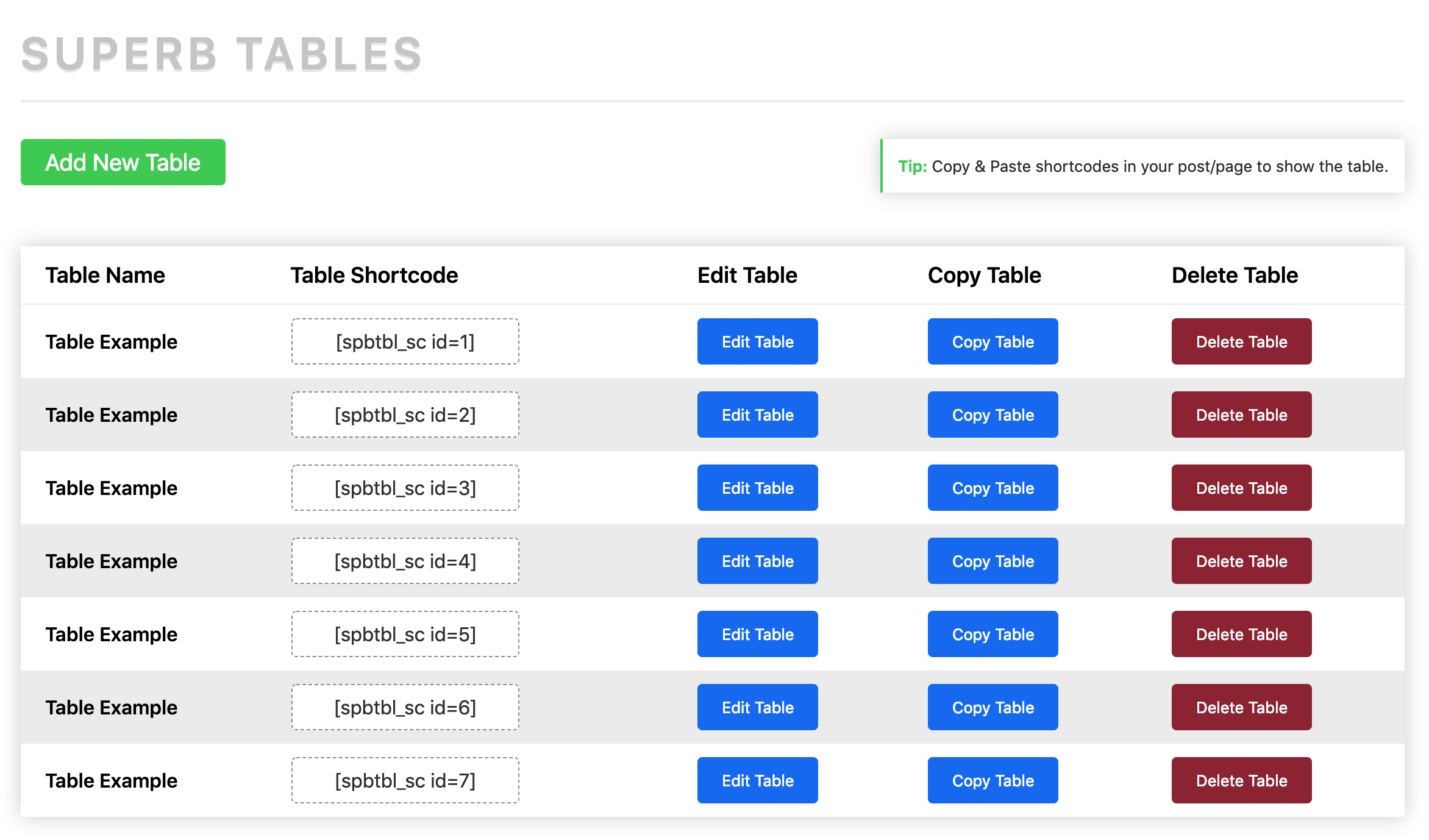
Once you’ve installed the plugin, check the left sidebar, and you will notice the Superb Table section. Click on it, and you can now create your first table. Just click on the Add New Table button.
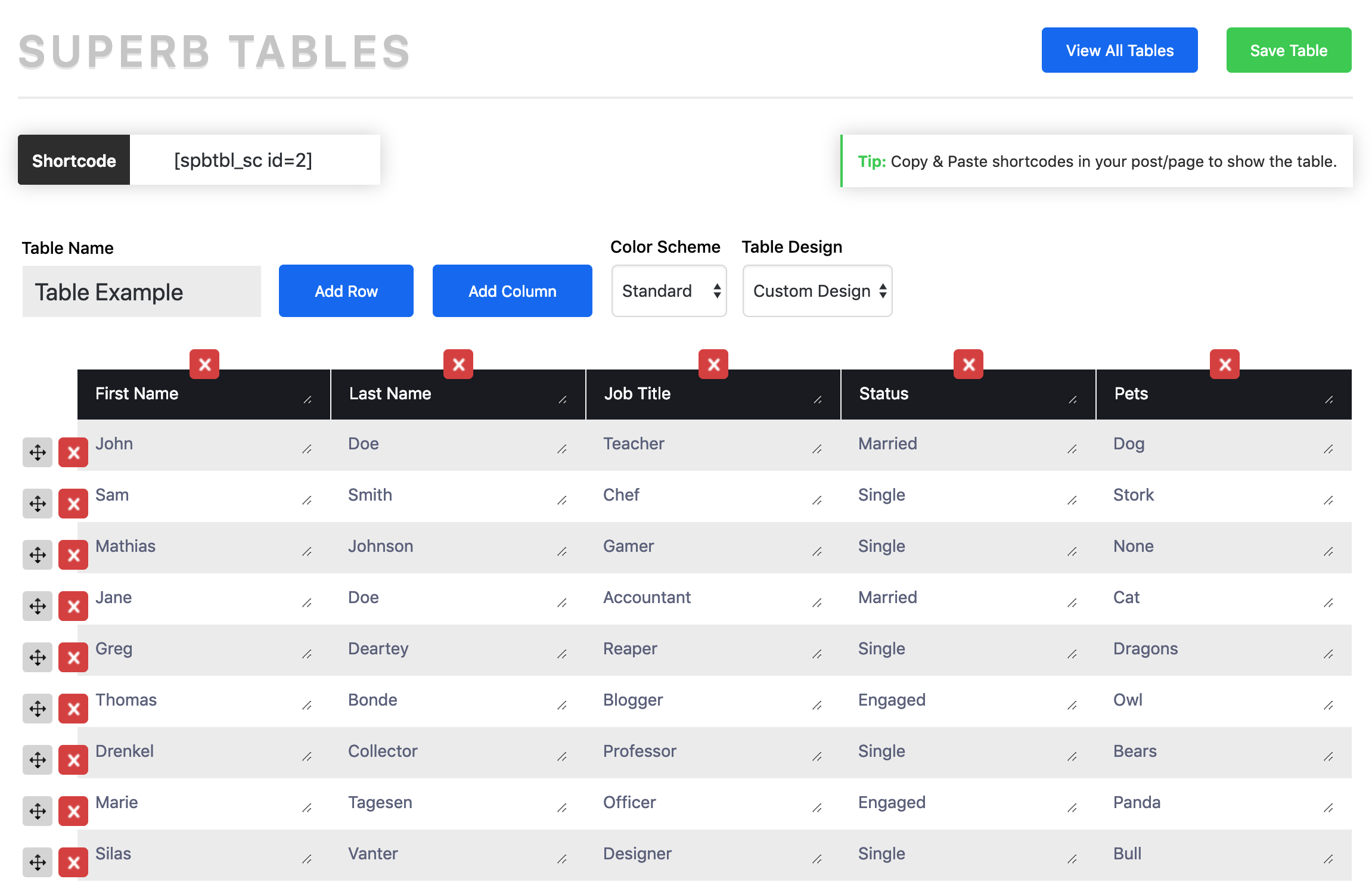
Feel free to add as many columns and rows as you want—inserting rows and columns is extremely easy.
You have a few options to make your table stand apart. First, choose one of the three color schemes: standard, purple, or black. Second, choose your table design: default or custom. Block, left, and inline-block are the floating modes for your table. Finally, enable or disable the full width of the table.
Once you finish your table, name it and save it. All you have to do now is to copy the shortcode and paste wherever you want, you can for example embed it in the Gutenberg Shortcode Block! (It works in the classic WordPress editor too)
Consider purchasing our premium version for $11 to unlock more features!
Why use a HTML table
Displaying data within a comparison table is beneficial for not only readers but also content creators. A table does a better job than long paragraphs of text, underlined phrases, and bulleted lists. It shows a lot of information side by side in a concise format. Bloggers and content creators should create tables and insert the data. There’s no need to search for breathtaking expressions, cool descriptions, or digestible lists of items. It’s just pure data, and everyone is happy with this situation. You can read our full guide on How to Add a Table to Your WordPress Website with Superb Tables.
Responsive Tables
We developed Superb Tables mobile friendly by taking responsiveness into account, and as a result, you can make a WordPress table responsive by using our plugin. The tables are fully responsive regardless of the number of rows and columns. The plugin works on all mobile devices and tablets (iPhone, Android etc.). The plugin works with AMP.
SEO Friendly WordPress Tables With Schema Markup
“Schema markup“ and “featured snippets“ are two interconnected terms that are being used by more and more bloggers, SEO practitioners, and developers. Have you noticed that Google now provides complex answers in the form of lists, tables, paragraphs, or videos directly on the results page? Those are featured snippets.
Moz claims that 23% of all search results include a featured snippet—a descriptive box displayed on the search results page providing information for your query. It may include paragraphs, lists, videos, or tables. You have to consider featured snippets when choosing a table plugin—can it help Google generate a featured snippet from the data within your table?
We developed Superb Tables with featured snippets in mind, and you can use the plugin worry-free. We used schema markup, which is the code that helps search engine bots generate snippets from your content, including tables. It’s a great way for affiliate websites and blogs to promote their content.
You must use WordPress tables with schema markup to get featured snippets on search engines, and Superb Tables is a reliable solution in this respect.
Add Tables everywhere & use them for Any Purpose
You can insert the SEO optimised tables with microdata everywhere through the shortcode. For example in a popup, widgets, Gutenberg blocks, email newsletter sent from your WordPress website. You can also insert it on any post or page, even category pages, blog feed, search page and your 404 page! The plugin is made for affiliates marketers and affiliate websites, having a good SERP rank in Google and Bing is critical. When you’re looking to improve your ranking then all of your plugins must be SEO optimized, otherwise it’s gonna be hard to create monetization through ads programs such as AdSense and Amazon Associates Program.
We know that business is important for any modern blog or affiliate marketing website that’s looking to make a revenue from it. Remember to use HTTPS (SSL) on your website, a CDN and lightweight stats tracking tools such as Google Analytics to better your SEO as well.
Guide to creating your Superb Tables
- In the wordpress admin panel, go to the sidebar and click ‘Superb Tables’.
- Click the green ‘Add new table’ in the top left corner
- Fill in your table data, click ‘Save’
- Click ‘Superb Tables’ in the left sidebar and copy paste the ‘Table Shortcode’
- Insert the Table Shortcode (For example [spbtbl_sc id=1] ) in a post, page, widget or in HTML.
You’re done!
Resources & Inspiration
- Auto-Expand: https://codepen.io/vsync/pen/frudD
- Data Table: https://codepen.io/alassetter/pen/cyrfB
- Table DnD: https://github.com/isocra/TableDnD/
- Table icon: https://www.iconfinder.com/icons/1608863/table_icon#size=256
- Custom confirm: https://codepen.io/Ana_Champion/pen/JRbZEL
- Table design inspiration: https://codepen.io/lukepeters/pen/bfFur
- Table design inspiration: https://codepen.io/alassetter/pen/cyrfB
- Table design inspiration: https://uicookies.com/wp-content/uploads/2018/05/table-responsive-v2-1000×750.jpg
- Table design inspiration: https://uicookies.com/wp-content/uploads/2018/05/table-responsive-v1.jpg
Änderungsprotokoll
1.2.0
Various improvements and fixes.
1.1.5
Minor fixes.
1.1.4
Fixed issue that could occur when saving large number of tables.
1.1.2
GDPR compliance update.
1.1.1
Fixed rare incompatibility issue.
1.1.0
Optimizations.
Screenshots


Für Entwickler
Ist das dein Plugin? Zeigen Sie die Zahlen.
Fügen Sie Ihrer Website, Docs oder GitHub Readme ein Live-Badge hinzu. Es wird von selbst aktualisiert - kein Konto erforderlich.
Fragen und Antworten
Superb Table (SEO Optimized Tables…: quick answers
Gerade Antworten, gezogen von Live WordPress.org Daten.
Quelle: WordPress.org
Is Superb Table (SEO Optimized Tab… free?
Yes. Superb Table (SEO Optimized Tab… is free to download and use from the official WordPress.org plugin directory.
Is Superb Table (SEO Optimized Tab… safe to use in 2026?
Superb Table (SEO Optimized Tab… works, but test it on a staging site before relying on it in 2026. It runs on 2K+ sites, is rated 3.6/5 and was last updated 1 year ago, and scores 43/100 on our health check.
How many websites use Superb Table (SEO Optimized Tab…?
Superb Table (SEO Optimized Tab… is active on 2K+ WordPress websites and has been downloaded 101,045 times since it launched in March 2019. It was downloaded 743 times in the last 30 days.
Does Superb Table (SEO Optimized Tab… work with WordPress 7.1?
Superb Table (SEO Optimized Tab… is officially tested up to WordPress 6.9.12, while the latest release is 7.1.5. It may still work, but try it on a staging site first.
What PHP version does Superb Table (SEO Optimized Tab… need?
Superb Table (SEO Optimized Tab… requires PHP 5.2.4 or higher. Most hosts run PHP 8.x today, so it works on any modern WordPress hosting.
When was Superb Table (SEO Optimized Tab… last updated?
The latest version, 1.2.0, was released on November 26, 2025 (1 year ago).
Who makes Superb Table (SEO Optimized Tab…?
Superb Table (SEO Optimized Tab… is developed and maintained by Suplugins.
Angetrieben von PageForge
Eine Vorlage und eine Tabelle. Eine echte Seite für jede Suche.
PageForge Verwandelt jede Zeile eines CSV in eine WordPress-Seite mit eigenem Titel, URL, SEO Felder und Schema entworfen. Kostenlos auf WordPress.org.
- CSV und XLSX, plus Google Sheets auf Beruf und Unternehmen
- seinen eigenen Titel, URL, SEO Felder und Schema für jede Seite
- Arbeitet mit dem Blockeditor, Elementor, Divi und Avada
- Kostenlos auf WordPress.org, keine Kreditkarte