


Super Web Share – Native Social Sharing Button
Super Web Share helps you easily add a native share prompt to your website, allowing you to share a page or post in less than a minute.

Sichere Auswahl
Yes — Super Web Share is a safe, well-maintained plugin to use in 2026. It runs on 2K+ sites, is rated 4.9/5 and was last updated 3 months ago, and scores 88/100 on our health check.
- Loved by users — 4.9/5 from 29 reviews
- Getestet mit dem neuesten WordPress (7.1)
Wie stapelt es sich?
Side-by-side bei Installationen, Updates, Bewertungen und Support



Tägliche Downloads
Download-Spitzen folgen normalerweise einer neuen Version - jede Website, die automatisch aktualisiert wird, gilt als Download.
Ranglisten
Where Super Web Share stands todayWordPress.org Ranglisten suchen
Live-Position in der Plugin-Suche, Top 100| Stichwort | Position |
|---|---|
| share | #4 |
| Share API | #2 |
| share button | #11 |
| social share | #12 |
| web share | #1 |
Versionsübernahme
Anteil aktiver Sites pro Release.
Bewertungsaufschlüsselung
★★★★★★★★★★ 4.9 from 29 reviews
About Super Web Share
Aus der offiziellen Readme · V2.5.2Beschreibung
Super Web Share is a WordPress-based native share plugin that prompts the native share action and helps users easily share a page or post with others.
We developed from the ground up with simplicity and performance in mind to increase your shares. As SuperWebShare only shows the apps installed within the device upon the share prompt, the rate of sharing of posts/pages will be higher than showing all the social share icons on a page. Due to this key reason, website developers can skip the usage of other social media icons on their website and make the share more prominent.
The Super Web Share plugin for WordPress helps increase your traffic and engagement with a single quick click to share the website with your friends and social media. Super Web Share works on all supported browsers like Chrome for Android, Edge for Android, Brave for Android, and Opera for Android. It will show the native apps installed on the device once you share the article with others; due to that, users can easily share the page/post with others super easily in just a click. Upon the native share, which prompts up like a native iOS or Android share sheet, users can easily copy the website page link if they want that option.
It takes less than a minute to set up Super Web Share, and we provide a clean uninstall by removing the entire data entry it creates. We also won’t save any settings to your database until you manually save the settings. We also provide a fallback native popup if the Native Web Share is not supported within the browser.
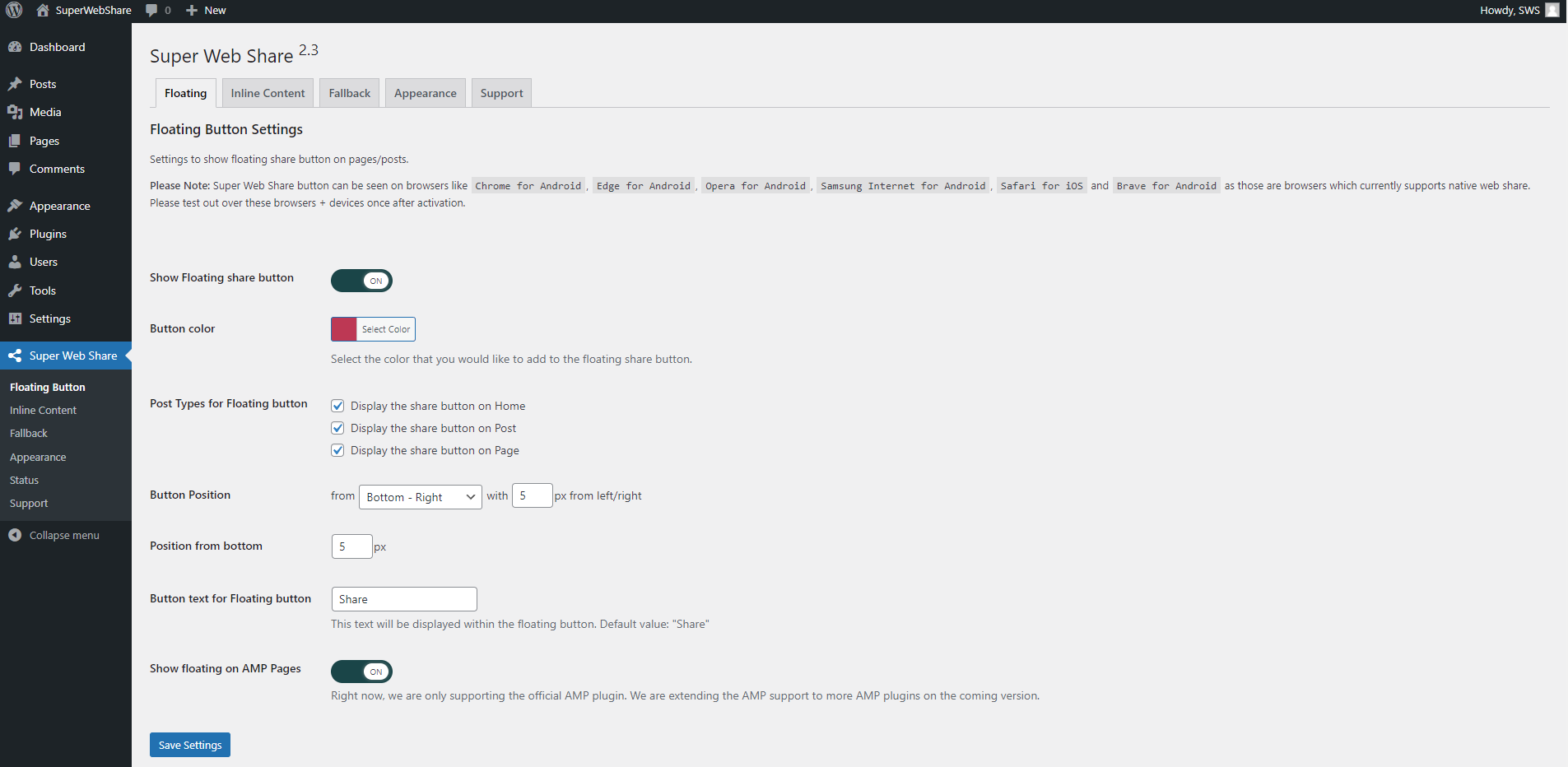
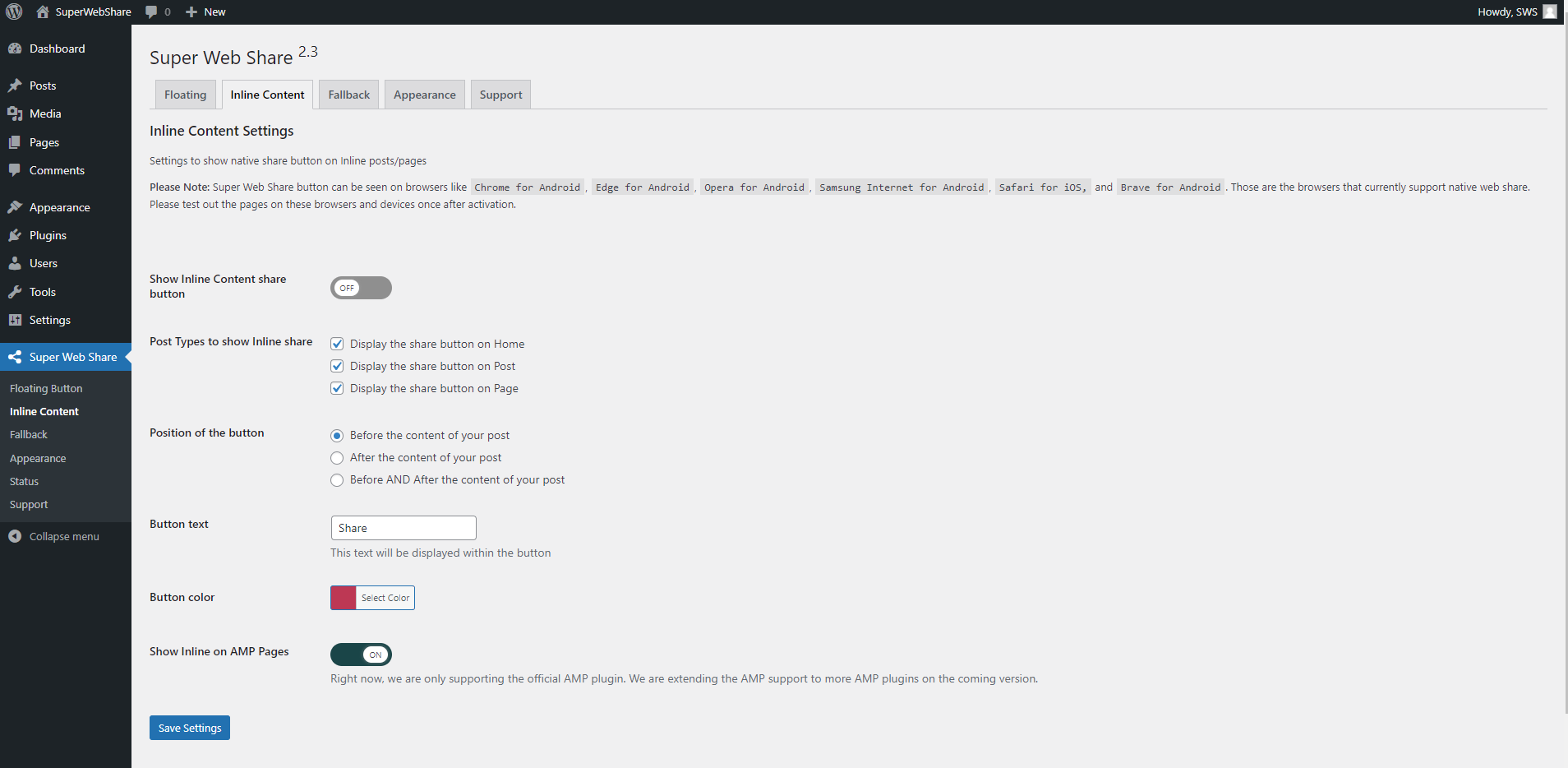
Currently, the Super Web Share plugin provides a social share button before and after the post/page content and a floating share button where you can set the color, the text of the share buttons, and the position of the floating button; it can also set the pages or posts which you would like to show the share buttons via our Settings page, to easily add the share feature to your websites. As a plugin that focuses on simplicity, we are fully compatible with the AMP plugin, which means you can add the native share to your AMP pages provided by the AMP plugin.
Social Platforms supported
1) On Web Sharing API supported devices:
You will notice the social share prompt (also called as sharesheet) where you can share the page via all applications installed on your device that accept the sharing (mobile – Android and iOS devices, tab, desktop – for Microsoft Edge browser). This means all the social sharing platforms on your website visitor’s devices can be selected from the list to share the page in a simple click!
2) If the device or browser won’t support the native share:
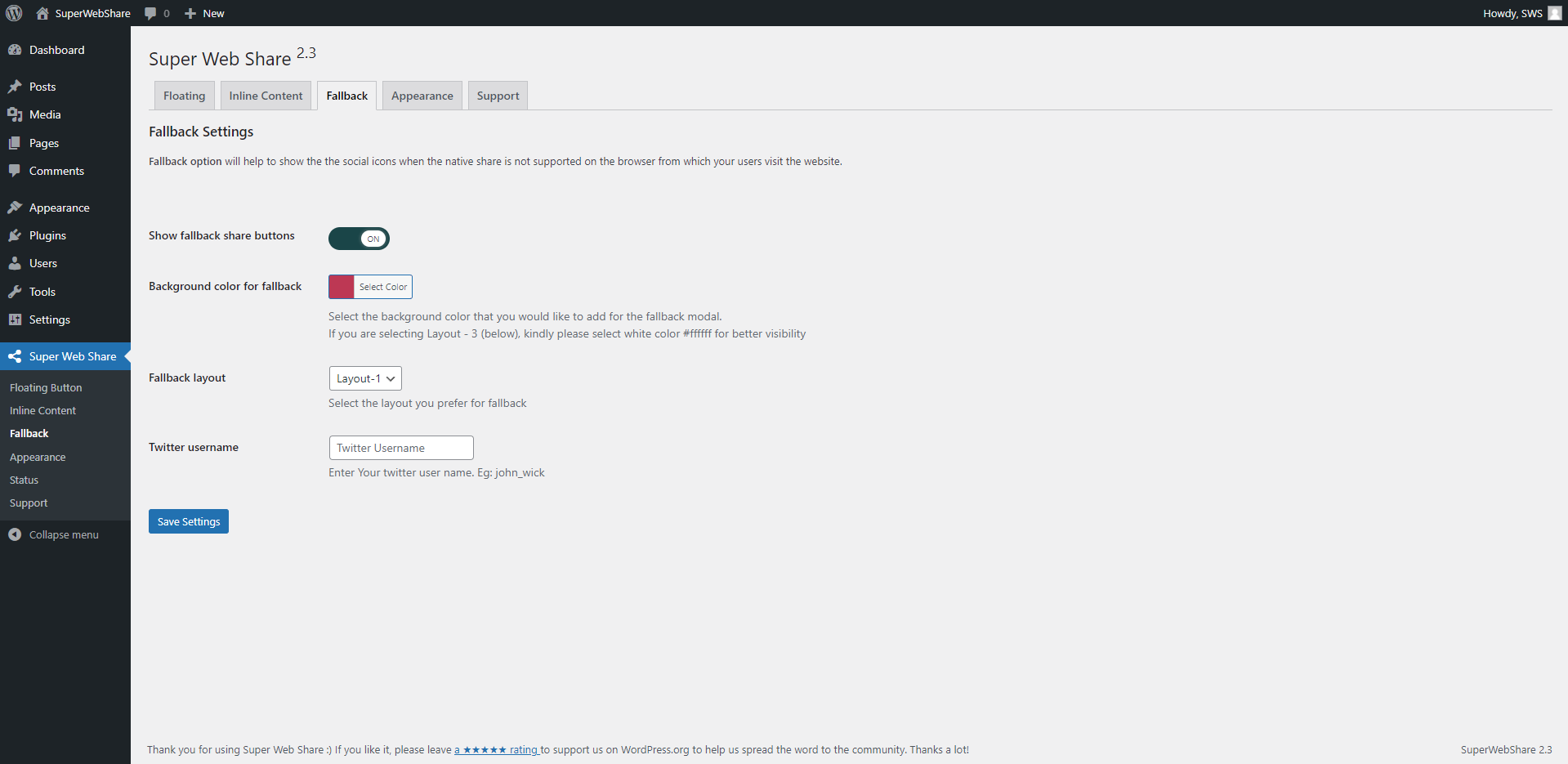
If the website is viewed from a browser or device that won’t support native sharing, our fallback modal works. Within the fallback modal, you can select the social platforms you want to show for your website via our settings page (SuperWebShare > Fallback). The social share platforms that are interested to show on the WordPress website can be selected. Right now, we are providing social media like Facebook, X (Twitter), LinkedIn, Pinterest, Mastodon, Telegram, Pinterest, and Email. We’re expanding with more social platforms.
Advantages of using Super Web Share
- Fast and lightweight social sharing plugin for your WordPress that won’t slow down your site
- Increase the rate of sharing of pages and posts by users
- Developers / Bloggers can easily skip the number of social icons to be used on the page or post
- Fully AMP supported native share plugin
- Support on all content types like Posts, Pages
- Fully compatible with WooCommerce Product pages
- You can hide or show the sharing button based on each post/page and all via the content types
Want to test to know how SuperWebShare works on a website?
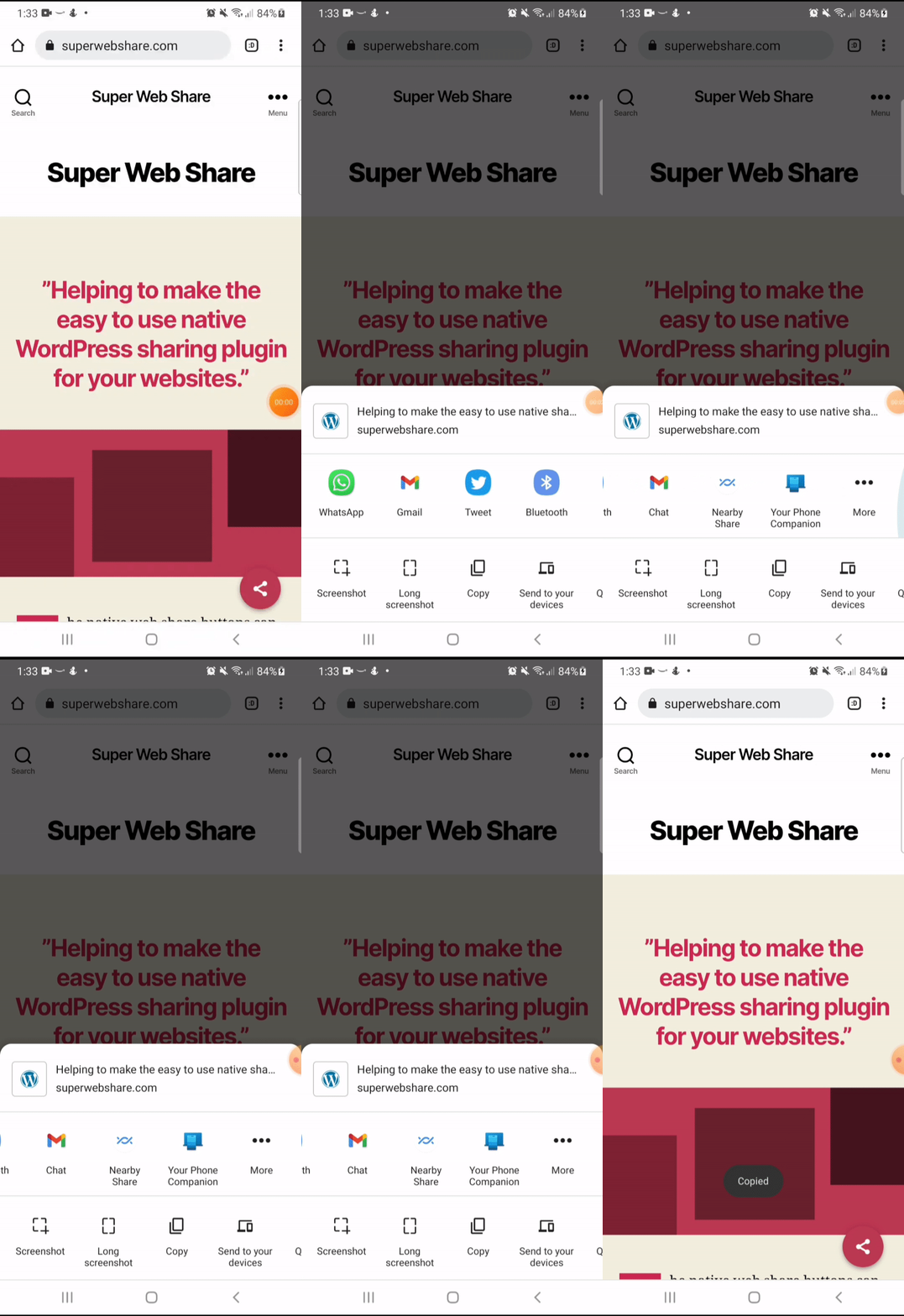
- Open SuperWebShare.com in a supported device. See FAQ to know the supported browsers
- You can see a floating button at the bottom right corner
- Tap on it; instantly, you can see the native Web Share prompt with the applications, which you can share on the page.
- Tap on the icon of the application from the prompt and send.
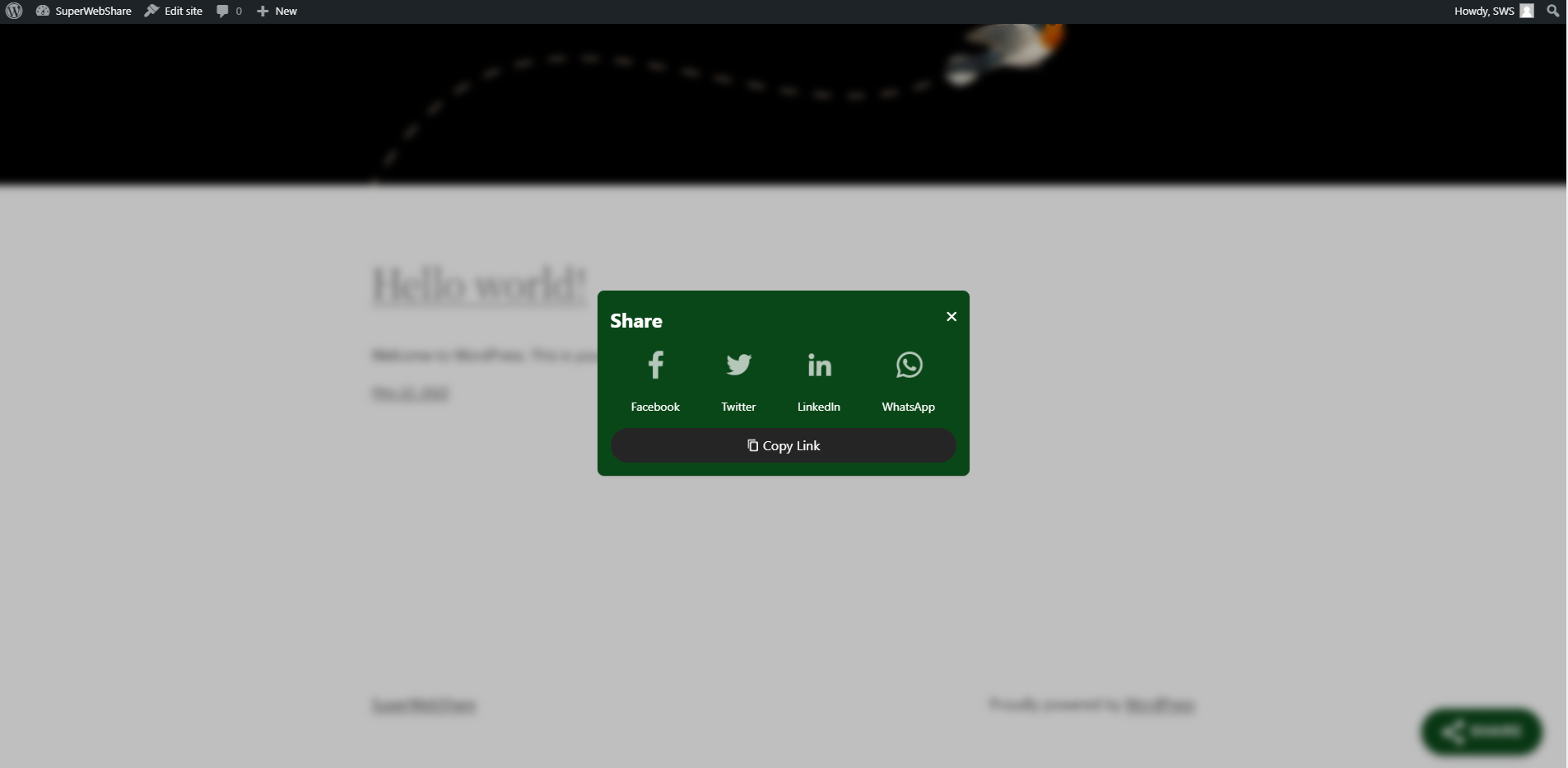
- If the website does not support the Native Share option, you will notice the fallback popup where you can add the social media platforms via our Fallback settings, which we created to make an intuitive share plugin with a copy link option for your website.
Requirments for working SuperWebShare?
- The Website should be fully served via a secured origin, i.e., the green padlock should be on the address for a working Super Web Share.
- Otherwise, by default, our fallback popup will show on browsers where users can share via major social sharing platforms like WhatsApp, Facebook, LinkedIn, and Twitter. It also comes with the Copy link option (on https sites).
How to contribute?
You can easily contribute to the plugin by translating it into your language. Click on the link below, choose your language, and translate the strings into Development (trunk).
- Translate plugin to your language
- Do you know coding? Then you can also contribute to this plugin via our GitHub repository to make this the best one.
Customize Super Web Share
You can easily customize the color, position, and pages on which you would like to show the button before and after the page or post content, the floating share button, and the fallback color via our plugin. To customize, go to Super Web Share from the WordPress admin dashboard.
Installation
- Visit WordPress Admin Dashboard > Plugins > Add New
- Search for ‘Super Web Share.’
- Click “Install now” and then “Activate” Super Web Share
Install manually:
1. Upload super-web-share.zip zip file to the /wp-content/plugins/ directory
2. Go to WordPress admin > Plugins
2. Activate the Super Web Share plugin from the Plugins list
Änderungsprotokoll
2.5.2
Tested with WordPress 7.1
2.5.1
Release Date: June 8th, 2024
Bugfix:
- Fixed an error on the AMP page when the legacy AMP version is used. Thanks to mfonabel for reporting this issue.
2.5
Release Date: May 31st, 2024
Gutenberg block, more customizations, and new features to make a Super Share button for your website. Read our release post
New Features:
* Added option to select the fallback social icons to be shown
* Added fallback icons like Mastodon, Telegram, Pinterest, and Email
* Added option to change the order of fallback social icons
* Added Gutenberg block for floating button
* Added Elementor widget for floating button
* Option to add a custom URL, title, and description for shortcodes
* Tested the code using Plugin Checker and PHPCS
Enhancement:
* Add “noopener” to the fallback social links
* String “Link copied!” can now be translated
* AMP settings will now only show when the supported AMP plugins are installed on the website
* Changed Twitter logo to X
Bugfix:
* Fixed the settings changing to ‘disable’ for posts when the post status is changed using the Overview
2.4
Release Date: February 12th, 2023
Sharing with the super power of lightweight and speed! This release is for people who keep optimizing their pages to load more faster. Read our release post
New Features:
* Compatible with WordPress 6.1
* Fixes the accessibility issues. (props to @Samot80 and @sudarshankotian for reporting this)
* Minified the CSS and JS files for performance
* Added ‘defer’ for page performance improvements
* Option to change the Fallback popup’s title (props to @aqhvcd11 for suggesting this feature)
* Option to disable native share on desktop
* Option to change the color of text and icon for the fallback
* Option to change the color of text and icon for the share buttons
* WhatsApp now adds the page title when sharing
Enhancement:
* Changed the position of the settings for “Floating position from the button”
* Improved the auto-selection rules of the title from the description when sharing
* Minor CSS optimizations
Bug Fix:
* Fixed the fallback layout 3 not outputing the LinkedIn and WhatsApp icons correctly (props to @dan-nita)
* Appearance preview button color change fixed (props to @arunbasillal)
2.3.1
Fixed: Accessibility issues
Screenshots

Für Entwickler
Ist das dein Plugin? Zeigen Sie die Zahlen.
Fügen Sie Ihrer Website, Docs oder GitHub Readme ein Live-Badge hinzu. Es wird von selbst aktualisiert - kein Konto erforderlich.
Best Super Web Share alternatives
All share plugins →





Fragen und Antworten
Super Web Share: quick answers
Gerade Antworten, gezogen von Live WordPress.org Daten.
Quelle: WordPress.org
Is Super Web Share free?
Yes. Super Web Share is free to download and use from the official WordPress.org plugin directory.
Is Super Web Share safe to use in 2026?
Yes — Super Web Share is a safe, well-maintained plugin to use in 2026. It runs on 2K+ sites, is rated 4.9/5 and was last updated 3 months ago, and scores 88/100 on our health check.
How many websites use Super Web Share?
Super Web Share is active on 2K+ WordPress websites and has been downloaded 38,242 times since it launched in October 2018. It was downloaded 1,034 times in the last 30 days.
Does Super Web Share work with WordPress 7.1?
Yes. The developer has tested Super Web Share up to WordPress 7.1.5, the latest release. It requires WordPress 3.0.1 or newer.
What PHP version does Super Web Share need?
Super Web Share requires PHP 7.0 or higher. Most hosts run PHP 8.x today, so it works on any modern WordPress hosting.
When was Super Web Share last updated?
The latest version, 2.5.2, was released on August 24, 2026 (3 months ago).
Who makes Super Web Share?
Super Web Share is developed and maintained by Jose Varghese.
What are the best alternatives to Super Web Share?
The most popular alternatives to Super Web Share are AddToAny Share Buttons (300K+ installs), Social Media Share Buttons… (100K+ installs) and Ocean Social Sharing (60K+ installs).
Angetrieben von PageForge
Eine Vorlage und eine Tabelle. Eine echte Seite für jede Suche.
PageForge Verwandelt jede Zeile eines CSV in eine WordPress-Seite mit eigenem Titel, URL, SEO Felder und Schema entworfen. Kostenlos auf WordPress.org.
- CSV und XLSX, plus Google Sheets auf Beruf und Unternehmen
- seinen eigenen Titel, URL, SEO Felder und Schema für jede Seite
- Arbeitet mit dem Blockeditor, Elementor, Divi und Avada
- Kostenlos auf WordPress.org, keine Kreditkarte