


Stringwatch – Untranslated Text Finder for TranslatePress
Finds text that was never translated on your TranslatePress site — for any language combination.

Solide Wahl
Stringwatch is a solid plugin choice in 2026, with a few things worth checking first. Was last updated 4 weeks ago, and scores 64/100 on our health check.
- Aktiv entwickelt — letztes Update vor 4 Wochen
- Getestet mit dem neuesten WordPress (7.1)
- Kleine Benutzerbasis (<10 aktive Installationen)
- Bisher sehr wenige Bewertungen
Wie stapelt es sich?
Side-by-side bei Installationen, Updates, Bewertungen und Support



Tägliche Downloads
Download-Spitzen folgen normalerweise einer neuen Version - jede Website, die automatisch aktualisiert wird, gilt als Download.
Ranglisten
Where Stringwatch stands todayWordPress.org Ranglisten suchen
Live-Position in der Plugin-Suche, Top 100| Stichwort | Position |
|---|---|
| multilingual | >100 |
| quality | >100 |
| TranslatePress | >100 |
| translation | >100 |
| untranslated | #15 |
About Stringwatch
From the official readme · v0.4.2Beschreibung
If you translate your site by hand to keep its quality and tone consistent, it is easy to miss a string — a button label, an image alt text, a line somewhere. And every time you change the design, new strings appear that you might forget to translate. TranslatePress shows you one page at a time, so there is no quick way to see what is still missing across the whole site.
Stringwatch adds a Stringwatch tab to the TranslatePress settings. It compares every public page with each of its translations, as a logged-out visitor sees them, and lists every piece of text that is still identical. TranslatePress’ own string tables then tell you why:
- Not translated — TranslatePress knows the text but has no translation.
- Translated, not shown — a translation exists, but the page still shows the original, usually because of a spelling difference such as curly quotes, dashes or HTML entities.
- Not in TranslatePress — the text comes from somewhere TranslatePress does not see, such as JavaScript or another plugin.
Text you deliberately translated to the same words (brand names, “FAQ”) is recognised and hidden automatically.
Merkmale
- Works with any language combination.
- Checks visible text, image alt texts, titles, placeholders, aria-labels, the page title and the meta description.
- Scans only when you open the tab or click Refresh — nothing runs in the background, nothing on the front end changes.
- Results appear while the scan runs.
- Every finding links to the translated page and straight into the TranslatePress editor.
- Re-check a single page after fixing it, without a full scan.
- Header, footer and popup strings are grouped once under “Sitewide”.
- Skip false positives, keep an allowlist of brand names, ignore whole components by CSS selector, or leave pages out of the scan — all reversible.
- Several translation languages in one scan.
Installation
- Install and activate TranslatePress.
- Install and activate Stringwatch.
- Open Settings → TranslatePress → Stringwatch. The first scan starts automatically.
Änderungsprotokoll
0.4.2
- First release on WordPress.org.
0.4.1
- Author: Blue River Growth (bluerivergrowth.com).
0.4.0
- Renamed to Stringwatch – Untranslated Text Finder for TranslatePress (slug and text domain: stringwatch). Settings and scan results are kept.
0.3.9
- “Ignore page” moved to the right, next to “Open in translator”.
- Prepared for the WordPress.org plugin directory.
0.3.8
- “Ignore page” on each page card, with Undo under “Ignored pages”.
- Page-builder template libraries (e.g. Elementor popups and headers) are no longer scanned.
0.3.7
- Fix: “Check again” on Dashboard → Updates finds new releases immediately.
- Fix: updates to the screen’s look and behaviour take effect without a hard reload.
Screenshots

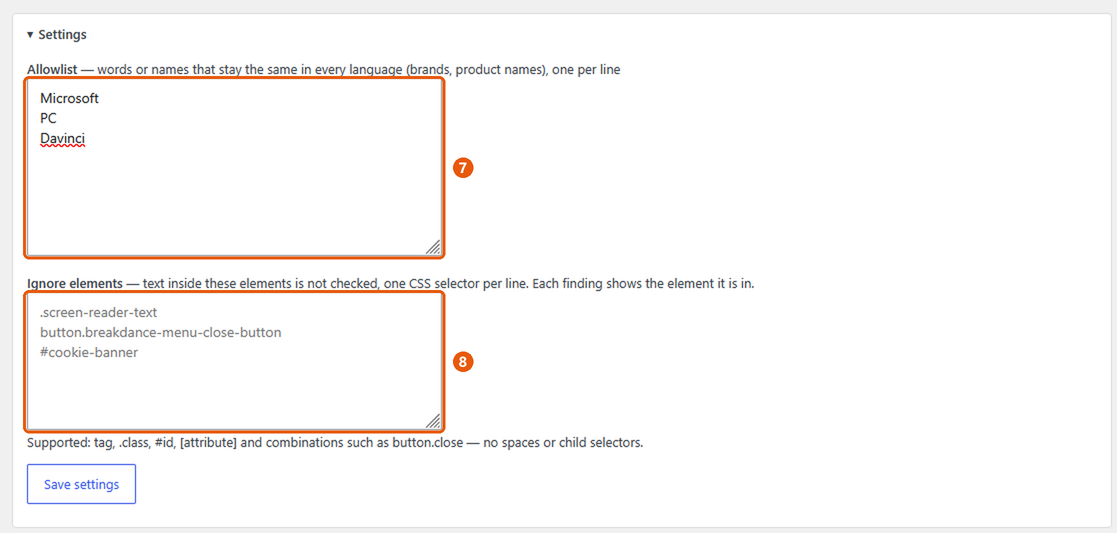
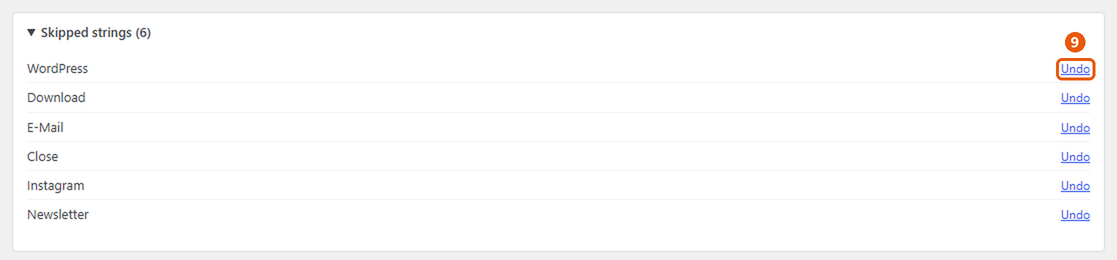
Für Entwickler
Ist das dein Plugin? Zeigen Sie die Zahlen.
Fügen Sie Ihrer Website, Docs oder GitHub Readme ein Live-Badge hinzu. Es wird von selbst aktualisiert - kein Konto erforderlich.
Best Stringwatch alternatives
All multilingual plugins →




Fragen und Antworten
Stringwatch: quick answers
Gerade Antworten, gezogen von Live WordPress.org Daten.
Quelle: WordPress.org
Is Stringwatch free?
Yes. Stringwatch is free to download and use from the official WordPress.org plugin directory.
Is Stringwatch safe to use in 2026?
Stringwatch is a solid plugin choice in 2026, with a few things worth checking first. Was last updated 4 weeks ago, and scores 64/100 on our health check.
How many websites use Stringwatch?
Stringwatch is active on <10 WordPress websites and has been downloaded 412 times since it launched in November 2026. It was downloaded 419 times in the last 30 days.
Does Stringwatch work with WordPress 7.1?
Yes. The developer has tested Stringwatch up to WordPress 7.1.5, the latest release. It requires WordPress 6.5 or newer.
What PHP version does Stringwatch need?
Stringwatch requires PHP 8.0 or higher. Most hosts run PHP 8.x today, so it works on any modern WordPress hosting.
When was Stringwatch last updated?
The latest version, 0.4.2, was released on November 3, 2026 (4 weeks ago).
Who makes Stringwatch?
Stringwatch is developed and maintained by Blue River Growth.
What are the best alternatives to Stringwatch?
The most popular alternatives to Stringwatch are Loco Translate (1M+ installs), Polylang (900K+ installs) and Translate WordPress with GT… (900K+ installs).
Angetrieben von PageForge
Eine Vorlage und eine Tabelle. Eine echte Seite für jede Suche.
PageForge Verwandelt jede Zeile eines CSV in eine WordPress-Seite mit eigenem Titel, URL, SEO Felder und Schema entworfen. Kostenlos auf WordPress.org.
- CSV und XLSX, plus Google Sheets auf Beruf und Unternehmen
- seinen eigenen Titel, URL, SEO Felder und Schema für jede Seite
- Arbeitet mit dem Blockeditor, Elementor, Divi und Avada
- Kostenlos auf WordPress.org, keine Kreditkarte