


StarLine XML Feed Importer – RSS, Atom & Custom XML to Post Auto Importer
Import blog posts from ANY XML feed into WordPress with full control over mapping, scheduling, and duplicate handling.

Mit Vorsicht verwenden
StarLine XML Feed Importer works, but test it on a staging site before relying on it in 2026. Was last updated 3 months ago, and scores 55/100 on our health check.
- Kleine Benutzerbasis (<10 aktive Installationen)
- Bisher sehr wenige Bewertungen
Wie stapelt es sich?
Side-by-side bei Installationen, Updates, Bewertungen und Support



Tägliche Downloads
Download-Spitzen folgen normalerweise einer neuen Version - jede Website, die automatisch aktualisiert wird, gilt als Download.
Ranglisten
Where StarLine XML Feed Importer stands todayWordPress.org Ranglisten suchen
Live-Position in der Plugin-Suche, Top 100| Stichwort | Position |
|---|---|
| auto blog | >100 |
| feed to post | >100 |
| rss aggregator | #29 |
| rss feed | >100 |
| XML Import | >100 |
About StarLine XML Feed Importer
Aus der offiziellen Readme · V1.0.1Beschreibung
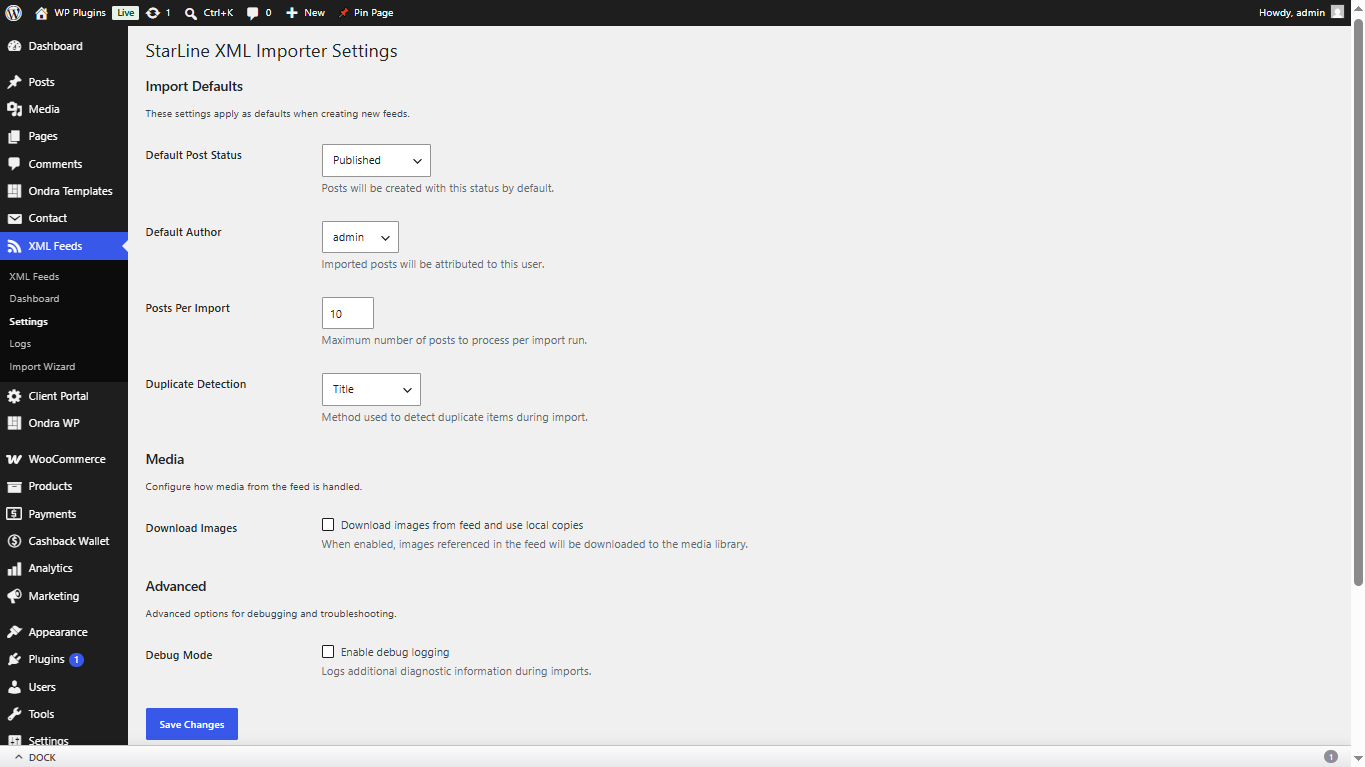
StarLine XML Feed Importer lets you import blog posts from any RSS, Atom, or custom XML feed into your WordPress site. It includes a visual 4-step import wizard, per-feed scheduling, field mapping, duplicate detection, image downloading, and a premium admin dashboard.
Hauptmerkmale
- Import Wizard – 4-step visual wizard to configure feeds in minutes
- RSS, Atom & Custom XML – Supports all major feed formats plus custom XML structures
- Field Mapping – Map any XML field to WordPress post fields, custom fields, ACF, MetaBox, Pods, or JetEngine
- Duplicate Detection – 4-level detection: Original Link, GUID, Hash, and Title
- Per-Feed Scheduling – 11 built-in intervals (5 min to monthly) plus custom cron expressions
- Image Downloading – Automatically download and attach remote images to the media library
- Large Feed Support – Stream processing for feeds of any size with background queue for 5000+ items
- WP-CLI Support – Import, list, and manage feeds from the command line
- Import Logs – Detailed logging with keyset pagination and CSV export
- Performance Optimized – Dual-layer caching, batch operations, and memory management
- Responsive Dashboard – Premium dark-mode admin dashboard with real-time progress
- Accessibility – ARIA live regions, keyboard navigation, and screen reader support
Wie es funktioniert
- Go to XML Feeds > Import Wizard
- Enter your feed URL and let the wizard validate and detect the format
- Preview the feed data with auto-detected fields highlighted
- Map XML fields to WordPress fields with drag-and-drop
- Save and run your import
WP-CLI Usage
wp slxwb import <feed_id> - Import a specific feed
wp slxwb list - List all configured feeds
wp slxwb status - Show import status
Externe Dienste
This plugin communicates with external servers to fetch XML feed content that you explicitly configure. No data is sent to any third party.
Feed Fetching
- What data is sent: An HTTP GET request is made to the feed URL you provide. No user-identifiable information, WordPress credentials, or personal data is included in the request.
- Service provider: The server hosting the XML feed URL you configure (varies per user).
- When it occurs: When you click Validate in the Import Wizard, when you run a manual import, or when a scheduled cron import fires.
- Privacy Policy: No privacy policy is required from third-party services since no user data is transmitted.
Image Downloading
- What data is sent: An HTTP GET request is made to the image URLs found in your configured XML feed. No user-identifiable information is included.
- Service provider: The server hosting the images referenced in your XML feed.
- When it occurs: Only when the “Download Images” option is enabled for a feed and an import is running.
1.0.1
- SEO Updates
1.0.0
- Erste Freigabe
- Import wizard with 4 steps
- RSS, Atom, and custom XML support
- Per-feed scheduling with 11 intervals + custom cron
- 4-level duplicate detection
- Image downloading with gallery support
- WP-CLI commands
- Performance optimization with caching and batch operations
- Premium admin dashboard with dark mode
- Accessibility features
Installation
- Upload the
starline-xml-feed-importerfolder to/wp-content/plugins/ - Aktivieren Sie das Plugin über das „Plugins“-Menü in WordPress
- Navigate to XML Feeds > Dashboard to get started
- Use the Import Wizard to configure your first feed
Screenshots


Für Entwickler
Ist das dein Plugin? Zeigen Sie die Zahlen.
Fügen Sie Ihrer Website, Docs oder GitHub Readme ein Live-Badge hinzu. Es wird von selbst aktualisiert - kein Konto erforderlich.
Best StarLine XML Feed Importer alternatives
All auto blog plugins →





Fragen und Antworten
StarLine XML Feed Importer: quick answers
Gerade Antworten, gezogen von Live WordPress.org Daten.
Quelle: WordPress.org
Is StarLine XML Feed Importer free?
Yes. StarLine XML Feed Importer is free to download and use from the official WordPress.org plugin directory.
Is StarLine XML Feed Importer safe to use in 2026?
StarLine XML Feed Importer works, but test it on a staging site before relying on it in 2026. Was last updated 3 months ago, and scores 55/100 on our health check.
How many websites use StarLine XML Feed Importer?
StarLine XML Feed Importer is active on <10 WordPress websites and has been downloaded 353 times since it launched in July 2026. It was downloaded 67 times in the last 30 days.
Does StarLine XML Feed Importer work with WordPress 7.1?
StarLine XML Feed Importer is officially tested up to WordPress 7.0.9, while the latest release is 7.1.5. It may still work, but try it on a staging site first.
What PHP version does StarLine XML Feed Importer need?
StarLine XML Feed Importer requires PHP 7.4 or higher. Most hosts run PHP 8.x today, so it works on any modern WordPress hosting.
When was StarLine XML Feed Importer last updated?
The latest version, 1.0.1, was released on August 24, 2026 (3 months ago).
Who makes StarLine XML Feed Importer?
StarLine XML Feed Importer is developed and maintained by starlinewebsolu.
What are the best alternatives to StarLine XML Feed Importer?
The most popular alternatives to StarLine XML Feed Importer are Trendly AI Post (60+ installs), UrlifyWriter (10+ installs) and AutoArticle Content Generat… (10+ installs).
Angetrieben von PageForge
Eine Vorlage und eine Tabelle. Eine echte Seite für jede Suche.
PageForge Verwandelt jede Zeile eines CSV in eine WordPress-Seite mit eigenem Titel, URL, SEO Felder und Schema entworfen. Kostenlos auf WordPress.org.
- CSV und XLSX, plus Google Sheets auf Beruf und Unternehmen
- seinen eigenen Titel, URL, SEO Felder und Schema für jede Seite
- Arbeitet mit dem Blockeditor, Elementor, Divi und Avada
- Kostenlos auf WordPress.org, keine Kreditkarte