


Sonic Play – MP3 Audio Shortcode Player
Easily embed a beautiful, responsive MP3 audio player with a simple shortcode. The easiest way to add modern HTML5 audio to your posts and pages.

Betrachten Sie eine Alternative
Sonic Play shows warning signs in 2026 — compare the alternatives below before installing. It runs on 10+ sites and was last updated 1 year ago, and scores 32/100 on our health check.
- Kleine Benutzerbasis (10+ aktive Installationen)
- Bisher sehr wenige Bewertungen
- Kein Update in über einem Jahr
- Nur getestet bis WordPress 6.8 (letzt ist 7.1)
Wie stapelt es sich?
Side-by-side bei Installationen, Updates, Bewertungen und SupportTägliche Downloads
Download-Spitzen folgen normalerweise einer neuen Version - jede Website, die automatisch aktualisiert wird, gilt als Download.
Ranglisten
Where Sonic Play stands todayWordPress.org Ranglisten suchen
Live-Position in der Plugin-Suche, Top 100| Stichwort | Position |
|---|---|
| html5 audio player | >100 |
| mp3 player | #66 |
| music player | >100 |
| Shortcode | >100 |
Versionsübernahme
Anteil aktiver Sites pro Release.
About Sonic Play – MP3 Audio Shortcode Player
Aus der offiziellen Readme · V2.2Beschreibung
Are you looking for an easy and elegant way to add audio to your WordPress site? Sonic Play is the perfect solution for podcasters, musicians, and course creators who need a simple, reliable MP3 audio player.
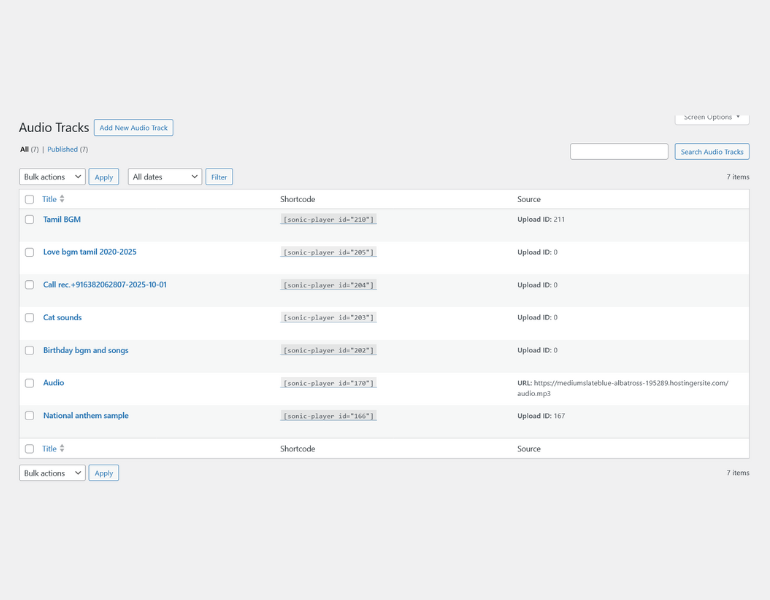
Forget complicated settings and clunky interfaces. With Sonic Play, you can upload your MP3 files directly to the WordPress media library or link to an external MP3 URL, and then embed a beautiful HTML5 audio player using a simple, click-to-copy shortcode. Our intuitive interface makes managing your audio tracks a breeze.
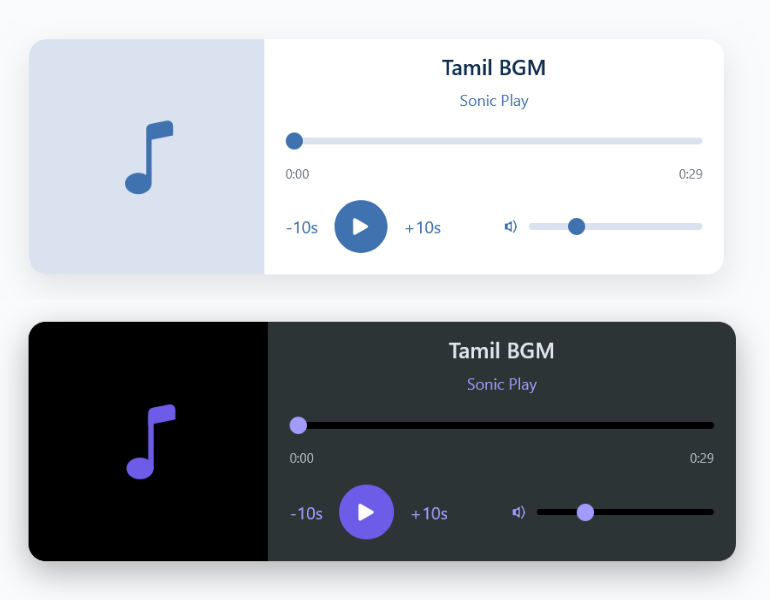
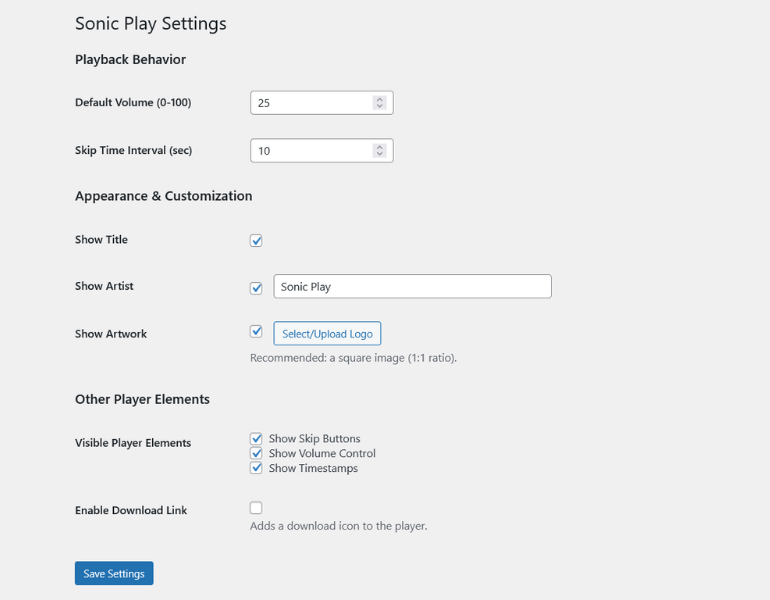
The player is designed to be modern, responsive, and fit seamlessly into any theme. Whether your audience is on a desktop or a mobile device, they will have a flawless listening experience. Customize the player’s appearance from a clean settings panel—toggle elements like the track title, artist name, custom artwork, skip buttons, and more to match your site’s style perfectly.
Hauptmerkmale:
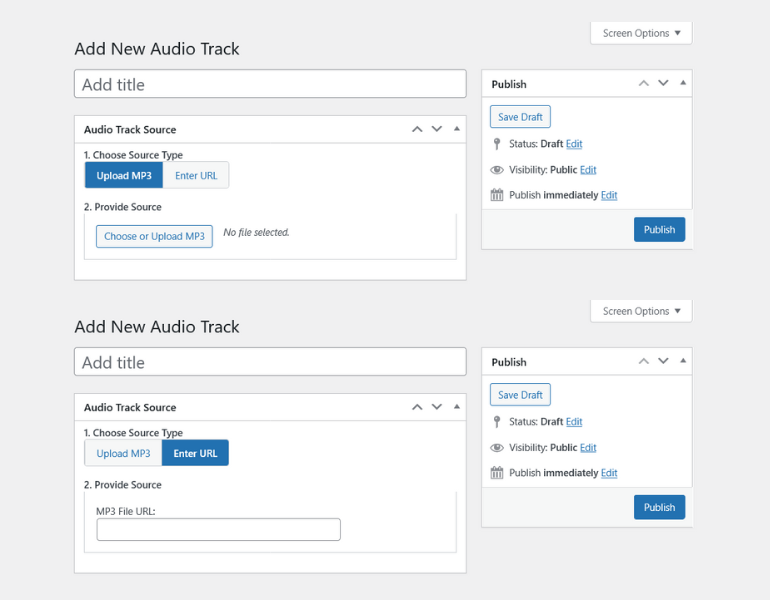
- Easy MP3 Upload & Management: Add audio tracks by either uploading them to the WordPress Media Library or by simply pasting an external MP3 file URL.
- Simple Shortcode Embedding: After adding a track, just copy the
[sonic-player id="..."]shortcode and paste it into any post, page, or widget. - Modern & Responsive Player: A clean, stylish HTML5 audio player that looks great and works perfectly on all devices, from desktops to smartphones.
- Full Customization: Control which player elements are visible. Show or hide the track title, artist name, custom artwork, skip buttons, volume control, and time stamps.
- Custom Artwork: Replace the default icon with your own custom logo or album art for a branded look. Just select an image from your media library.
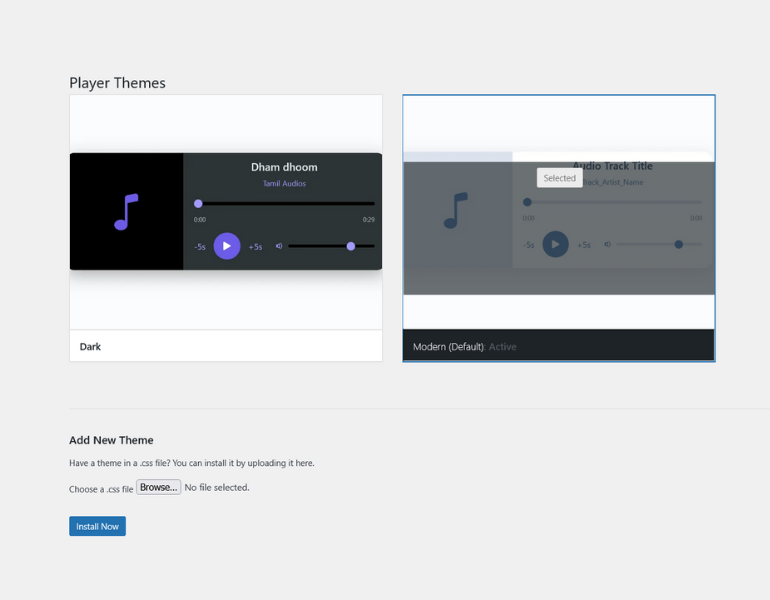
- Light & Dark Themes: Comes with beautiful “Modern” (light) and “Dark” themes to match your website’s design.
- Lightweight & Fast: Built for performance, Sonic Play won’t slow down your website.
Sonic Play is the ultimate audio shortcode player for anyone who wants to share their sound with the world without the hassle.
Installation
Installing Sonic Play is simple. Follow these steps:
From your WordPress Dashboard (easiest method):
- Navigate to Plugins > Add New in your WordPress dashboard.
- In the search box, type “Sonic Play” and press Enter.
- Find the “Sonic Play – MP3 Audio Shortcode Player” plugin and click Install Now.
- After the installation is complete, click Activate.
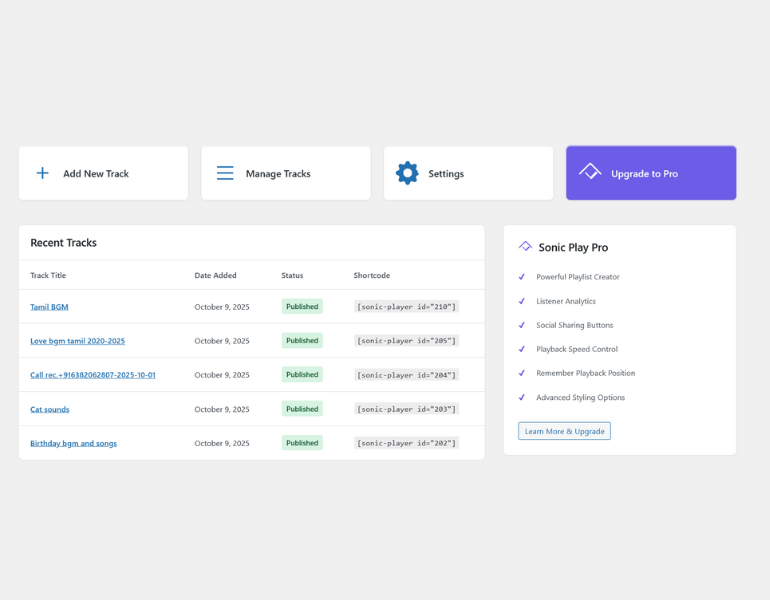
- You will now see a “Sonic Play” menu in your dashboard. You can start adding tracks!
Manual Installation (FTP):
- Download the plugin zip file from the WordPress.org repository.
- Unzip the file. You will get a folder named
sonic-play. - Upload the
sonic-playfolder to the/wp-content/plugins/directory on your server. - Go to the Plugins page in your WordPress dashboard.
- Find the “Sonic Play” plugin in the list and click Activate.
Once activated, you can navigate to Sonic Play > Add New Track to get started.
Änderungsprotokoll
This version reorganizes the plugin's main files for better maintenance. The update is seamless and requires no action on your part.
2.2
- Refactor: Separated shortcode logic into its own file (
shortcode.php) for better organization. - Tweak: Set new default settings on the settings page as per user feedback.
2.1
- Feature: Added new settings to show/hide title, artist, and custom artwork.
- Feature: Added a media uploader to the settings page for custom artwork.
- Tweak: Re-organized the settings page for better usability.
2.0
- Major Refactor: Simplified the plugin’s file structure by removing the
includesfolder and organizing all admin files into a singleadmindirectory. - Tweak: Integrated view files directly into PHP classes to reduce file clutter and prevent activation errors.
- Fix: Ensured the
get_file_datafunction is available on the themes page to prevent fatal errors.
1.1.1
- Initial Release.
Screenshots
Für Entwickler
Ist das dein Plugin? Zeigen Sie die Zahlen.
Fügen Sie Ihrer Website, Docs oder GitHub Readme ein Live-Badge hinzu. Es wird von selbst aktualisiert - kein Konto erforderlich.
Best Sonic Play alternatives
All html5 audio player plugins →| Rang | Plugin | Aktive Installationen |
|---|---|---|
| 1 |
 HTML5 jQuery Audio Player
Finally, a trendy looking audio player plugin. Works on all modern browsers including… |
1K+ |
| 2 |
 Karma Music Player by Kadar
Karma is a responsive music player plugin for WordPress with which you could insert… |
600+ |
Fragen und Antworten
Sonic Play: quick answers
Gerade Antworten, gezogen von Live WordPress.org Daten.
Quelle: WordPress.org
Is Sonic Play free?
Yes. Sonic Play is free to download and use from the official WordPress.org plugin directory.
Is Sonic Play safe to use in 2026?
Sonic Play shows warning signs in 2026 — compare the alternatives below before installing. It runs on 10+ sites and was last updated 1 year ago, and scores 32/100 on our health check.
How many websites use Sonic Play?
Sonic Play is active on 10+ WordPress websites and has been downloaded 579 times since it launched in November 2025. It was downloaded 55 times in the last 30 days.
Does Sonic Play work with WordPress 7.1?
Sonic Play is officially tested up to WordPress 6.8.13, while the latest release is 7.1.5. It may still work, but try it on a staging site first.
What PHP version does Sonic Play need?
Sonic Play requires PHP 7.0 or higher. Most hosts run PHP 8.x today, so it works on any modern WordPress hosting.
When was Sonic Play last updated?
The latest version, 2.2, was released on November 2, 2025 (1 year ago).
Who makes Sonic Play?
Sonic Play is developed and maintained by DIZE TECH IT SOLUTIONS.
What are the best alternatives to Sonic Play?
The most popular alternatives to Sonic Play are HTML5 jQuery Audio Player (1K+ installs) and Karma Music Player by Kadar (600+ installs).
Angetrieben von PageForge
Eine Vorlage und eine Tabelle. Eine echte Seite für jede Suche.
PageForge Verwandelt jede Zeile eines CSV in eine WordPress-Seite mit eigenem Titel, URL, SEO Felder und Schema entworfen. Kostenlos auf WordPress.org.
- CSV und XLSX, plus Google Sheets auf Beruf und Unternehmen
- seinen eigenen Titel, URL, SEO Felder und Schema für jede Seite
- Arbeitet mit dem Blockeditor, Elementor, Divi und Avada
- Kostenlos auf WordPress.org, keine Kreditkarte