


SmartLink Chatbox
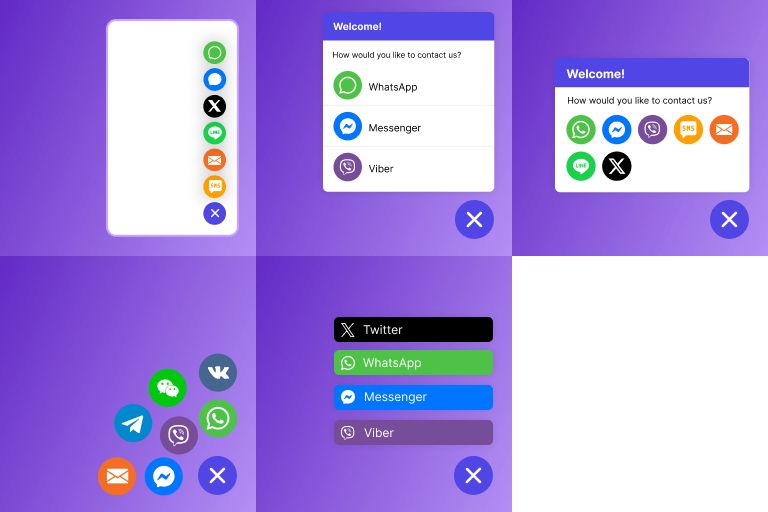
SmartLink Chatbox is a lightweight and responsive WordPress plugin that lets you add floating contact and chat buttons to your website.

Mit Vorsicht verwenden
SmartLink Chatbox works, but test it on a staging site before relying on it in 2026. It runs on 10+ sites and was last updated 3 months ago, and scores 44/100 on our health check.
- Kleine Benutzerbasis (10+ aktive Installationen)
- Bisher sehr wenige Bewertungen
- Nur getestet bis WordPress 6.8 (letzt ist 7.1)
Wie stapelt es sich?
Side-by-side bei Installationen, Updates, Bewertungen und Support


Tägliche Downloads
Download-Spitzen folgen normalerweise einer neuen Version - jede Website, die automatisch aktualisiert wird, gilt als Download.
Ranglisten
Where SmartLink Chatbox stands todayWordPress.org Ranglisten suchen
Live-Position in der Plugin-Suche, Top 100| Stichwort | Position |
|---|---|
| chat button | >100 |
| floating button | >100 |
| phone button | >100 |
| telegram | >100 |
| >100 |
Versionsübernahme
Anteil aktiver Sites pro Release.
About SmartLink Chatbox
From the official readme · v2.2.1Beschreibung
SmartLink Chatbox is a lightweight and responsive WordPress plugin that lets you add floating contact and chat buttons to your website.
Create floating buttons for WhatsApp, Telegram, Phone Call, and custom URLs. Each button can be customized from the WordPress admin panel, including its text, image, background color, text color, position, and content order.
The plugin is designed to be simple, fast, and easy to use without requiring external libraries or dependencies.
You can also prevent the buttons from appearing on selected pages using the built-in Excluded Pages feature.
Hauptmerkmale
- Floating buttons for WhatsApp, Telegram, Phone Call, and Custom URL.
- Fully customizable button text.
- Custom image URL support for each button.
- Built-in default images for all supported buttons.
- Custom background and text colors.
- Choose the button position: left, right, or center.
- Choose content order: image-text or text-image.
- Phone Call button using the
tel:protocol. - Custom URL button for internal or external links.
- Reset all plugin settings to their default values.
- Excluded Pages feature to hide buttons on selected pages.
- Two exclusion modes: Exact and Contains.
- Responsive design for desktop, tablet, and mobile devices.
- Lightweight implementation with no external JavaScript libraries.
- Secure admin settings using WordPress nonce validation and capability checks.
- Compatible with modern PHP versions, including PHP 8.4.
- Clean and minimal front-end output.
WhatsApp Button
Add a floating WhatsApp button that allows visitors to contact you directly through WhatsApp.
You can customize:
- WhatsApp URL
- Button text
- Button image
- Background color
- Text color
- Image and text order
Telegram Button
Add a floating Telegram button for direct communication with your Telegram account, channel, group, or another supported Telegram URL.
You can customize:
- Telegram URL
- Button text
- Button image
- Background color
- Text color
- Image and text order
Phone Call Button
Add a floating Phone Call button that allows visitors to call a phone number directly from supported devices.
The phone button uses the standard tel: protocol.
You can customize:
- Phone number
- Button text
- Button image
- Background color
- Text color
- Image and text order
On mobile devices, supported browsers and operating systems can open the phone application when the visitor clicks the button.
Custom URL Button
Add a floating button that links to any URL you choose.
The Custom URL button can be used for:
- Internal pages
- External websites
- Contact pages
- Booking pages
- Social media profiles
- Support pages
- Any other valid URL
You can customize the button text, image, colors, and content order.
Default Images
SmartLink Chatbox includes built-in default images for all supported button types.
If you do not provide a custom image, the plugin can use its built-in default image.
Default images are stored inside the plugin and do not require an external image service.
Content Order
You can choose how the image and text are displayed inside the floating button.
Available options:
- Image – Text
- Text – Image
This allows you to easily adjust the appearance of the buttons to match your website design.
Button Position
SmartLink Chatbox allows you to choose the general position of the floating buttons.
Available positions:
- Left
- Right
- Center
The responsive layout adapts to different screen sizes.
Excluded Pages
SmartLink Chatbox includes an Excluded Pages feature that allows you to prevent floating chat buttons from appearing on specific pages.
This can be useful when you want to hide the buttons from pages such as:
- Contact pages
- About pages
- Checkout pages
- Landing pages
- Specific product pages
- Blog archives
- Login or registration pages
- Booking pages
- Any other selected page
To configure excluded pages:
- Go to Settings > SmartLink Chatbox.
- Find the Excluded Pages section.
- Enter one URL or path per line.
- Select the desired exclusion mode.
- Save the settings.
Exclusion Modes
SmartLink Chatbox provides two exclusion modes.
Exact
The Exact mode checks for an exact URL/path match.
Zum Beispiel:
/about
can be used to exclude the About page.
Contains
The Contains mode excludes pages when the specified text is found in the current URL/path.
Zum Beispiel:
/product
can exclude URLs such as:
/product/123
and other URLs containing the specified text.
Use Exact when you want a more specific exclusion and Contains when you want to exclude a group of related URLs.
Reset to Defaults
The plugin includes a Reset to Defaults option in the settings panel.
Use this option to remove your saved SmartLink Chatbox settings and restore the original default configuration.
Use the reset option carefully because previously saved customization settings may be removed.
Lightweight and Responsive
SmartLink Chatbox is designed to have a minimal impact on your website.
The plugin does not require external JavaScript libraries or external services to display the floating buttons.
The interface is responsive and designed to work across:
- Desktop computers
- Tablets
- Mobile phones
Installation
- Upload the
smartlink-chatboxplugin folder to the/wp-content/plugins/directory. - Aktivieren Sie das Plugin über das Menü Plugins in WordPress.
- Go to Settings > SmartLink Chatbox.
- Configure the WhatsApp, Telegram, Phone Call, and Custom URL buttons.
- Customize the colors, images, text, position, and content order.
- Configure Excluded Pages if you want to hide the buttons on selected pages.
- Klicken Sie auf Einstellungen speichern.
Änderungsprotokoll
Bugfix release with improved Excluded Pages handling, safer validation, and better PHP 8.4 compatibility. Updating is recommended.
2.2.1
- Fixed: Fatal error when saving Excluded Pages settings.
- Fixed: Compatibility issue when Excluded Pages is submitted as an array.
- Improved: Safer sanitization and validation of excluded page values.
- Improved: Better handling of empty and invalid exclusion values.
- Improved: Compatibility with PHP 8.4.
- Improved: More robust handling of exclusion settings.
2.2.0
- New Feature: Excluded Pages – Specify URLs or paths where chat buttons should not appear.
- New: Two exclusion modes: Exact and Contains.
- New: Excluded Pages section in the admin settings.
- Improved: Better security with nonce validation and capability checks.
- Improved: Full English interface for all settings.
- Updated: Documentation and readme.
2.1.1
- Fixed: Corrected image folder path from
imgaestoimages. - Improved: Default images now load properly on fresh installations.
2.1
- Added: Phone Call button with customizable number, text, image, and colors.
- Added: Default images for WhatsApp, Telegram, Link, and Phone buttons.
- Added: Reset to Defaults button in the admin panel.
- Improved: Cleaner settings layout.
- Improved: All buttons support default values without requiring manual input.
2.0
- Added: Strict validation for WhatsApp and Telegram buttons.
- Improved: WhatsApp and Telegram buttons are displayed only when the required URL and image settings are valid.
- Improved: Image and text ordering logic.
- Fixed: Issue causing buttons to display without images.
- Improved: Code structure for easier maintenance and future development.
1.0
- Erste Freigabe.
- Added WhatsApp, Telegram, and Custom Link support.
- Added button positioning options.
- Added content order options.
- Added admin settings page.
Für Entwickler
Ist das dein Plugin? Zeigen Sie die Zahlen.
Fügen Sie Ihrer Website, Docs oder GitHub Readme ein Live-Badge hinzu. Es wird von selbst aktualisiert - kein Konto erforderlich.
Best SmartLink Chatbox alternatives
All chat button plugins →




Fragen und Antworten
SmartLink Chatbox: quick answers
Gerade Antworten, gezogen von Live WordPress.org Daten.
Quelle: WordPress.org
Is SmartLink Chatbox free?
Yes. SmartLink Chatbox is free to download and use from the official WordPress.org plugin directory.
Is SmartLink Chatbox safe to use in 2026?
SmartLink Chatbox works, but test it on a staging site before relying on it in 2026. It runs on 10+ sites and was last updated 3 months ago, and scores 44/100 on our health check.
How many websites use SmartLink Chatbox?
SmartLink Chatbox is active on 10+ WordPress websites and has been downloaded 919 times since it launched in August 2025. It was downloaded 82 times in the last 30 days.
Does SmartLink Chatbox work with WordPress 7.1?
SmartLink Chatbox is officially tested up to WordPress 6.8.13, while the latest release is 7.1.5. It may still work, but try it on a staging site first.
What PHP version does SmartLink Chatbox need?
SmartLink Chatbox requires PHP 7.4 or higher. Most hosts run PHP 8.x today, so it works on any modern WordPress hosting.
When was SmartLink Chatbox last updated?
The latest version, 2.2.1, was released on August 28, 2026 (3 months ago).
Who makes SmartLink Chatbox?
SmartLink Chatbox is developed and maintained by fxgadgets.
What are the best alternatives to SmartLink Chatbox?
The most popular alternatives to SmartLink Chatbox are Floating Chat Widget: Conta… (300K+ installs), Chat Button & Custom ChatGP… (20K+ installs) and Lead Generation Contact Wid… (10K+ installs).
Angetrieben von PageForge
Eine Vorlage und eine Tabelle. Eine echte Seite für jede Suche.
PageForge Verwandelt jede Zeile eines CSV in eine WordPress-Seite mit eigenem Titel, URL, SEO Felder und Schema entworfen. Kostenlos auf WordPress.org.
- CSV und XLSX, plus Google Sheets auf Beruf und Unternehmen
- seinen eigenen Titel, URL, SEO Felder und Schema für jede Seite
- Arbeitet mit dem Blockeditor, Elementor, Divi und Avada
- Kostenlos auf WordPress.org, keine Kreditkarte