


GutSlider – All in One Slider and Carousel Blocks for Gutenberg
Build responsive sliders and carousels in the block editor - image, video, post, testimonial, logo and before-after slider blocks.

Solide Wahl
GutSlider is a solid plugin choice in 2026, with a few things worth checking first. It runs on 6K+ sites, is rated 4.9/5 and was last updated 13 minutes ago, and scores 73/100 on our health check.
- Actively developed — last update 13 minutes ago
- Getestet mit dem neuesten WordPress (7.1)
- Momentum — downloads up 190.3% vs the previous 30 days
Wie stapelt es sich?
Side-by-side bei Installationen, Updates, Bewertungen und Support



Tägliche Downloads
Download-Spitzen folgen normalerweise einer neuen Version - jede Website, die automatisch aktualisiert wird, gilt als Download.
Ranglisten
Where GutSlider stands todayWordPress.org Ranglisten suchen
Live-Position in der Plugin-Suche, Top 100| Stichwort | Position |
|---|---|
| carousel | #37 |
| gutenberg slider | #7 |
| image slider | #36 |
| slider | #30 |
| slider block | #15 |
Versionsübernahme
Anteil aktiver Sites pro Release.
Bewertungsaufschlüsselung
★★★★★★★★★★ 4.9 from 14 reviews
About GutSlider
From the official readme · v3.5.0Beschreibung
GutSlider is an all-in-one slider and carousel plugin for the WordPress block editor. Build hero sliders, post carousels, video galleries, testimonial sliders, logo strips, before-after comparisons and scrolling marquees right on the page. No shortcodes, no page builder, no code.
Pick a ready-made design, drop in your content, and see the result live in the editor. Every block is built with native Gutenberg components, so it feels like part of WordPress.
Fast by design. Scripts and styles load only on pages that use a slider. Each page gets one minified CSS file instead of inline styles, and there is no jQuery. Swiper JS handles smooth, hardware-accelerated sliding.
👉 See every block live in the demos · Compare Free and Pro
✨ Why Choose GutSlider
- Design picker in every block – start from a polished, ready-made design and adjust it in the sidebar.
- Slide any content – images, video, headings, buttons or any other block.
- Interactive motion – slides that react to the mouse with depth, 3D tilt and spotlight effects, plus magnetic buttons.
- Lightweight – conditional asset loading, one CSS file per page, no jQuery.
- Fully responsive – separate Desktop, Tablet and Mobile values for spacing, columns, typography and more.
- Complete slider controls – autoplay, loop, speed, effects, centered mode, free mode and columns.
- Custom navigation and pagination – styles, positions, sizes, colours and gaps.
- Accessible – keyboard support, pause buttons and respect for the reduced-motion setting.
- Google Fonts and typography – a full typography panel on every text element.
- Block patterns library – ready-made slider layouts you can insert and edit.
- Enable or disable blocks – switch off the blocks you don’t use from the GutSlider dashboard.
- Translation ready – fully internationalised and RTL friendly.
🆓 Free Slider and Carousel Blocks
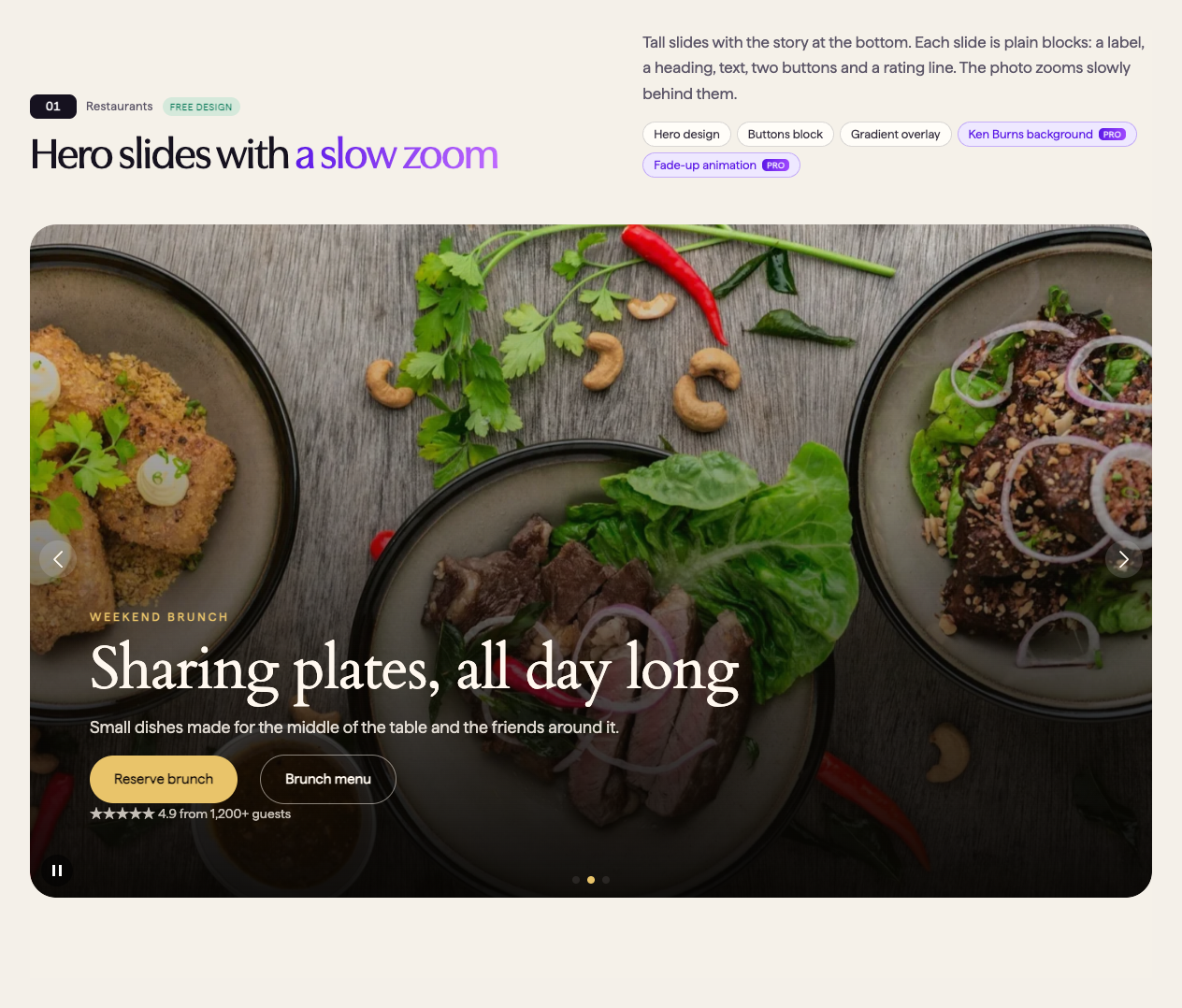
- Static Slider – a hero slider with image, heading, text and buttons, entrance animations for each element, pointer effects (depth, 3D tilt, spotlight) and magnetic buttons.
- Flexible Slider – slide any block content, with Hero and Cards designs and full background controls.
- Testimonial Slider – reviews with photo, rating, name and designation.
- Photo Carousel – image carousel with lightbox and a 3D Coverflow design.
- Logo Carousel – client and brand logo carousel.
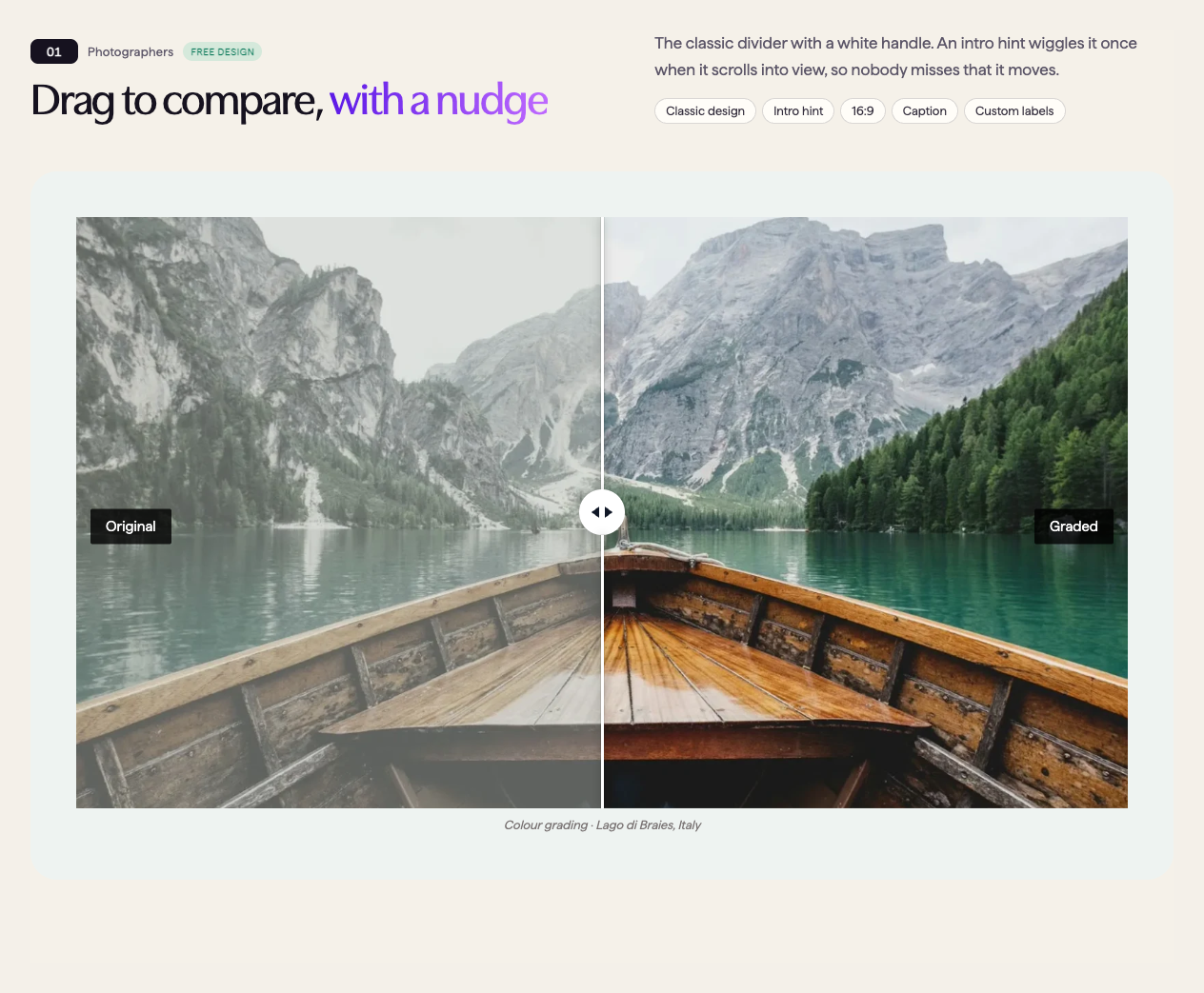
- Before After Slider – drag, fade or toggle between two images, with labels and several designs.
- Video Carousel – YouTube and Vimeo videos. Add many links at once, and titles and thumbnails fill in by themselves.
- Blog Post Slider – dynamic post slider with query controls, related posts and Magazine Hero and Card Carousel designs.
- Backdrop Slider – one fixed background (colour, gradient or image, with an overlay) while slides of any blocks change over it. Ideal for hero sections.
- Content Marquee – an endlessly scrolling strip for logos, text or images, with Logo Strip, Text Ticker and Announcement Bar designs, a steady pixel speed, separators, fade edges, slow down or stop on hover, and a live motion preview in the editor.
🚀 GutSlider Pro: Make Every Slider Stand Out
The free blocks cover the essentials. GutSlider Pro adds premium blocks, premium designs and features for sliders that get noticed, rank better and convert.
15 extra premium blocks
- Shader Slider – WebGL shader transitions between slides.
- Shutters Slider – slides open and close like window shutters.
- Slicer Slider – images slice apart as they change.
- Fashion Slider – bold, editorial slider for fashion and lifestyle brands.
- Triple Slider – three images moving together.
- Card Slider – stacked, swipeable cards.
- Hover Slider – hover a title to reveal its image.
- Tinder Slider – swipe cards left and right.
- Spring Carousel – springy, physics-style motion.
- Panorama Carousel – a curved, panoramic view.
- 3D Carousel – a rotating 3D ring of slides.
- Material Carousel – Material-style expanding slides.
- Marquee Carousel – a continuous image marquee.
- WooCommerce Product Carousel – sell more with product sliders.
- WooCommerce Product Categories Carousel – guide shoppers to your categories.
Premium designs for the free blocks
- Static Slider – Split Hero, Glass Card and Card Carousel.
- Flexible Slider – Split, Fullscreen, Stacked Cards and Ticker.
- Testimonial Slider – Center Cards, Avatar Switcher, Marquee Wall, Swipe Deck, 3D Coverflow and Glow Cards.
- Photo Carousel – Showcase, Polaroid Stack, Film Ticker and Expanding Panels.
- Before After – Glass Handle, Rounded Card, Split Labels and Dark Studio.
- Video Carousel – Cinema, Playlist and Video Cards.
- Blog Post Slider – Overlay Grid, Featured + List and Minimal Timeline.
- Content Marquee – Testimonials, Image Strip and Tag Cloud.
Premium-Funktionen
- SEO schema markup – video rich results (VideoObject) for the Video Carousel and ItemList markup for the Blog Post Slider.
- Before-after video comparisons – compare two videos playing in sync, not just images.
- Multiple comparisons in one block – switch between before-after pairs with thumbnails.
- Auto-play and fullscreen for before-after comparisons.
- Video extras – play in a lightbox, preview on hover, silent looping backgrounds, custom thumbnails and custom end times.
- Content reveal for the Static Slider – subtitle, title, description and buttons play in one cinematic sequence. Choose words rise, letters flip, blur in or mask reveal, and a slow, normal or fast pace. It replays on every slide and waits until the slider is on screen.
- Content animations and background effects for the Flexible Slider.
- Dynamic Backdrop Slider – fill the slides from posts, pages or any post type. Design one post template and it repeats for each post over the shared background.
- Video backgrounds for the Backdrop Slider.
- Marquee motion – up to three rows moving in opposite directions, marquees that move with page scroll, drag or swipe to move, and reverse or speed up on scroll.
- Slide names as tabs – turn any Flexible Slider into a tabbed showcase.
- Per-device slide visibility and responsive background images.
- Wrapper links – make a whole slide clickable.
- Remote navigation – control a slider from buttons anywhere on the page.
- Detached content and thumbnail gallery navigation for the Static and Blog Post sliders.
- Priority support from the team that builds GutSlider.
👉 Upgrade to GutSlider Pro. Your existing free sliders keep working as they are, and the Pro options unlock in the same sidebar.
🔗 Useful Links
Externe Dienste
Google Fonts – When you select a Google Font in a block’s typography settings, the font stylesheet is requested from https://fonts.googleapis.com and the font files from https://fonts.gstatic.com on the pages where that block appears. Visitors’ IP address and browser user agent are sent to Google as part of that request. No request is made if you only use system or theme fonts.
Google Terms of Service: https://policies.google.com/terms – Google Privacy Policy: https://policies.google.com/privacy
YouTube and Vimeo – The Video Carousel block embeds videos from YouTube (https://www.youtube.com, https://www.youtube-nocookie.com) and Vimeo (https://player.vimeo.com) on the pages where it is used, and loads their thumbnails from https://i.ytimg.com and https://i.vimeocdn.com. In the editor, the “Get title and thumbnail” option asks your own site’s oEmbed proxy, which contacts YouTube or Vimeo. Visitors’ IP address and browser user agent are sent to these services when a video or thumbnail loads. The GutSlider dashboard also shows a GutSlider video from https://www.youtube-nocookie.com; nothing is loaded from YouTube until you press play.
YouTube Terms of Service: https://www.youtube.com/t/terms – Google Privacy Policy: https://policies.google.com/privacy – Vimeo Terms: https://vimeo.com/terms – Vimeo Privacy Policy: https://vimeo.com/privacy
Third Party Libraries
- Swiper JS (MIT) – slider and carousel engine.
- fslightbox – image lightbox for the Photo Carousel block.
Installation
Aus Ihrem WordPress-Dashboard
- Go to Plugins > Add New and search for GutSlider.
- Klicken Sie auf Jetzt installieren und dann Aktivieren.
Manuelle Installation
- Laden Sie den Ordner
slider-blocksin das/wp-content/plugins/-Verzeichnis hoch. - Aktivieren Sie das Plugin über den Bildschirm Plugins in WordPress.
Loslegen
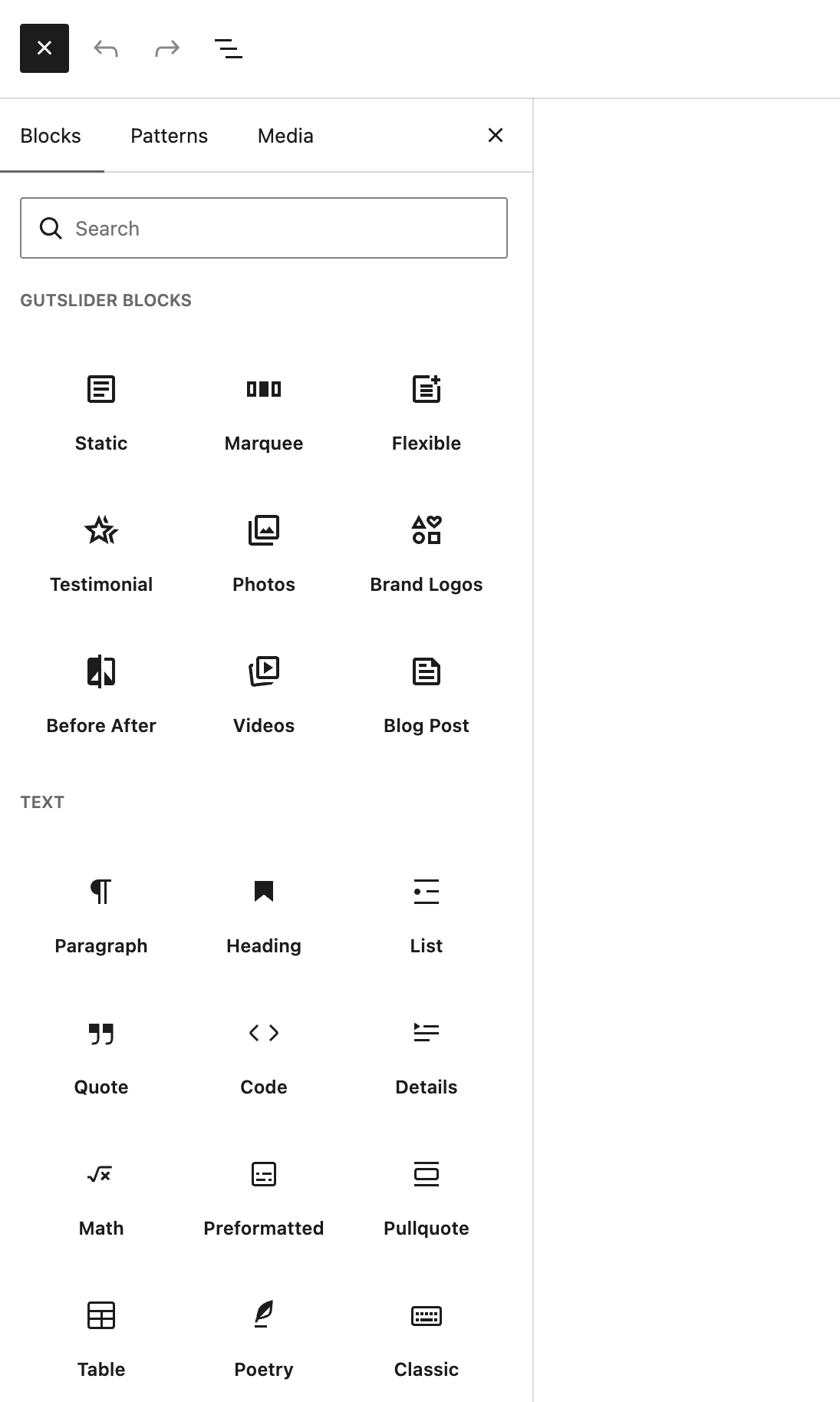
- Edit any post or page, click the block inserter (+) and open the GutSlider Blocks category.
- Add the slider or carousel block you need and configure it from the sidebar.
- Visit GutSlider in the admin menu to enable or disable individual blocks.
Änderungsprotokoll
New slide radius, picked post order, logo colour and caption options, and many layout fixes for phones. Existing sliders keep working without block recovery.
3.5.0
- Added: Playback panel on every slider – play/pause button, slide counter, progress line, scrollbar, deep links (#anchor-2 opens slide 2), full-screen height and transition easing (Smooth, Snappy, Gentle, Bounce, Linear)
- Added: Slide Duration – keep one slide on show longer or shorter than the others (Flexible slides, and the slides of the Pro sliders)
- Added: Cube and Cards effects for the Static, Flexible, Post and Testimonial sliders
- Improved: Autoplay waits until a slider is in view and pauses while it is scrolled out of view
- Improved: Videos – YouTube and Vimeo players load only when a visitor clicks play, with the video’s own thumbnail until then
- Improved: Slider images get their width, height and responsive sizes, so the page doesn’t jump as they load and further-down images load lazily
- Improved: In block themes, a slider whose slides all use an H1 title keeps one H1; the other titles become H2s that look the same
- Improved: Accessibility – a clear focus ring on slider controls, arrows reachable by keyboard on every slider, and autoplay starts paused for visitors who ask for reduced motion
- Changed: The “Important links to get started” panel is gone from the block settings
3.4.2
- Changed: New outline icons for every free block, in the same style as the GutSlider Pro blocks
- Changed: The free Marquee block is now called Content Marquee, so it is easy to tell apart from the Pro Marquee Carousel
3.4.1
- Changed: The seasonal GutSlider Pro offer notice now reflects the early Black Friday sale (live until 1 December)
3.4.0
- Added: Backdrop Slider block – one fixed background (colour, gradient or image, with an overlay) with slides of any blocks changing over it
- Added: Backdrop Slider – Slide, Fade and Rise effects, content position, responsive height, width and padding, arrow and pagination styling, and a pause button for autoplay
- Added: Backdrop Slider – choose Static or Dynamic content when you set the block up, as in the Pro blocks
- Added (Pro): Dynamic Backdrop Slider – slides from posts, pages or any post type, built from one editable post template, with post type, taxonomy, order and offset settings
- Added (Pro): Video backgrounds for the Backdrop Slider
- Changed: Overlay Opacity in the background settings now has the same reset button as the other range controls
3.3.1
- Added: A one-time, dismissible request for a WordPress.org review, shown a week after install on sites that use GutSlider blocks
- Added: Dismissible notices for seasonal GutSlider Pro offers, shown only to admins on the Dashboard, Plugins and GutSlider screens
3.3.0
- Added: Slide Radius in the Flexible, Blog Post and Testimonial sliders
- Added: Blog Post Slider – “Picked order” for hand-picked posts, with drag and arrow reordering, and Story List colours for the Featured + List design
- Added: Testimonial – headline for Presets 1 and 2, and a “Top” photo direction for Preset 2
- Added: Photo Carousel – Top Center and Bottom Center caption positions
- Added: Brand Logos – Logo Colour: original, grey until hovered, or white for dark backgrounds
- Added: Progress bar size now works in the Logo and Photo carousels
- Fixed: Fade effect showing the text of two slides at once
- Fixed: Static Slider – content margin cancelled the left/right content alignment
- Fixed: Flexible Slider – content and slide padding overflowing on phones, Hero design ignoring Content Padding, and slides collapsing with more than one grid row
- Fixed: Testimonial – content cut off on phones, star colour ignored by the modern designs, and pagination dots covering Preset 2 cards
- Fixed: Blog Post Slider – category filter ignoring term ids, and an unused copy of the posts saved in the block
- Fixed: Video Carousel – poster covering silent-loop videos, and Cards pagination outside the panel
- Fixed: Navigation and pagination not working on newly inserted Logo, Photo, Blog Post, Testimonial and Video sliders until another setting was changed
- Fixed: Line height of 1.15 printed as 1.15px, and settings saved without a value printing invalid CSS
- Fixed: Mouse wheel control holding the page; the page now scrolls on at the first and last slide
- Fixed: Linked padding or border width of 0 set from code being ignored
Screenshots




Für Entwickler
Ist das dein Plugin? Zeigen Sie die Zahlen.
Fügen Sie Ihrer Website, Docs oder GitHub Readme ein Live-Badge hinzu. Es wird von selbst aktualisiert - kein Konto erforderlich.
Best GutSlider alternatives
All carousel plugins →





Fragen und Antworten
GutSlider: quick answers
Gerade Antworten, gezogen von Live WordPress.org Daten.
Quelle: WordPress.org
Is GutSlider free?
Yes. GutSlider is free to download and use from the official WordPress.org plugin directory.
Is GutSlider safe to use in 2026?
GutSlider is a solid plugin choice in 2026, with a few things worth checking first. It runs on 6K+ sites, is rated 4.9/5 and was last updated 13 minutes ago, and scores 73/100 on our health check.
How many websites use GutSlider?
GutSlider is active on 6K+ WordPress websites and has been downloaded 145,265 times since it launched in August 2023. It was downloaded 16,415 times in the last 30 days.
Does GutSlider work with WordPress 7.1?
Yes. The developer has tested GutSlider up to WordPress 7.1.5, the latest release. It requires WordPress 6.5 or newer.
What PHP version does GutSlider need?
GutSlider requires PHP 7.4 or higher. Most hosts run PHP 8.x today, so it works on any modern WordPress hosting.
When was GutSlider last updated?
The latest version, 3.5.0, was released on November 23, 2026 (13 minutes ago).
Who makes GutSlider?
GutSlider is developed and maintained by Binsaifullah.
What are the best alternatives to GutSlider?
The most popular alternatives to GutSlider are Shortcodes Ultimate (400K+ installs), AI-Powered Carousel, Slider… (60K+ installs) and Carousel Slider Block for G… (50K+ installs).
Angetrieben von PageForge
Eine Vorlage und eine Tabelle. Eine echte Seite für jede Suche.
PageForge Verwandelt jede Zeile eines CSV in eine WordPress-Seite mit eigenem Titel, URL, SEO Felder und Schema entworfen. Kostenlos auf WordPress.org.
- CSV und XLSX, plus Google Sheets auf Beruf und Unternehmen
- seinen eigenen Titel, URL, SEO Felder und Schema für jede Seite
- Arbeitet mit dem Blockeditor, Elementor, Divi und Avada
- Kostenlos auf WordPress.org, keine Kreditkarte