


Simple Image Sizes
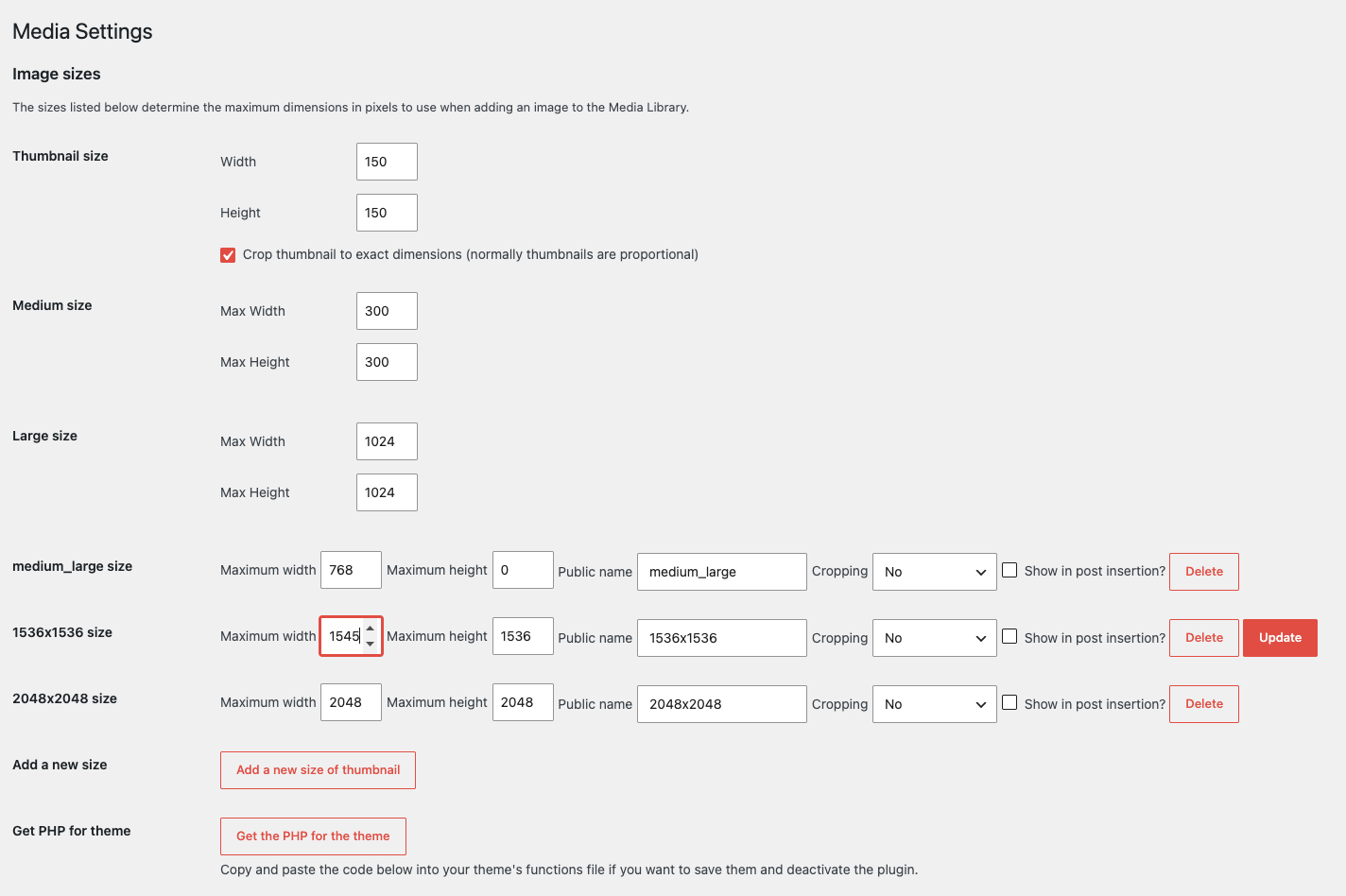
This plugin lets you create custom image sizes for your site. Override your theme sizes directly on the Media settings page, regenerate thumbnails, and copy add_image_size PHP for your theme.

Solide Wahl
Simple Image Sizes is a solid plugin choice in 2026, with a few things worth checking first. It runs on 60K+ sites, is rated 4.6/5 and was last updated 3 months ago, and scores 68/100 on our health check.
- Bewährt im Maßstab auf 60k + aktiven Standorten
- Loved by users — 4.6/5 from 91 reviews
- Getestet mit dem neuesten WordPress (7.1)
Wie stapelt es sich?
Side-by-side bei Installationen, Updates, Bewertungen und SupportTägliche Downloads
Download-Spitzen folgen normalerweise einer neuen Version - jede Website, die automatisch aktualisiert wird, gilt als Download.
Ranglisten
Where Simple Image Sizes stands todayWordPress.org Ranglisten suchen
Live-Position in der Plugin-Suche, Top 100| Stichwort | Position |
|---|---|
| custom images | #23 |
| custom sizes | #1 |
| image | #21 |
| images | #63 |
| thumbnail regenerate | #9 |
Versionsübernahme
Anteil aktiver Sites pro Release.
Bewertungsaufschlüsselung
★★★★★★★★★★ 4.6 from 91 reviews
About Simple Image Sizes
From the official readme · v3.2.6Beschreibung
This plugin lets you create custom image sizes for your site. Override your theme sizes directly on the Media settings page, regenerate thumbnails, and copy add_image_size PHP for your theme.
ℹ️ Simple Image Sizes, a Mediapapa product
Simple Image Sizes will always remain free. It is actively maintained by me (Nicolas Juen). I’m also building Mediapapa, a complementary plugin focused on understanding and organizing your media library. More on these changes
Merkmale
- Insert images in posts at the right size using your custom sizes.
- Control whether each size appears in the “Insert media” size dropdown.
- Regenerate thumbnails in bulk from Settings → Media, and pick which sizes to rebuild.
- Copy generated
add_image_sizePHP for your theme when you want to keep sizes and deactivate the plugin. - Regenerate from the Media library: one file at a time or with list bulk actions.
- Regenerate from a single attachment’s edit screen.
- Approximate end time and clearer feedback while bulk regeneration runs.
Installation
PHP 8 required.
- Download, unzip and upload to your WordPress plugins directory
- Activate the plugin within your WordPress Administration Backend
- Go to Settings → Media
- Configure your new image sizes and regenerate the thumbnails!
Änderungsprotokoll
- 3.2.6
- Limit Mediapapa promotion to a dismissible notice shown once per plugin version on the Plugins screen, plus a link below Settings > Media
- Register notice dismissal as private user metadata, excluded from the REST API
- Preserve attachment-level metadata, including WordPress 7.1 companion files, during thumbnail regeneration
- Require manage_options when loading the media list for bulk regeneration
- 3.2.5
- Add optional dismissible admin notice on Media library and Settings > Media about Mediapapa (not shown when Mediapapa is already active)
- Remember notice dismissal per user until the next release or a new plugin activation
- Add short maintenance line with link below thumbnail regeneration on Settings > Media
- Add filters and constants for Mediapapa CTA and blog URLs
- Tighten capability checks on media AJAX actions that were missing them
- Sanitize post types in regeneration queries and fix empty check after filtering post types
- Align single-image and featured-image regeneration with attachment and post edit permissions; show regenerate controls only when allowed
- Media settings: limit SIS list-table styling to the regeneration block so the core settings table layout stays intact
- Media settings: drop the WordPress “fixed” list-table class on regeneration tables so all columns stay visible on smaller widths
- Admin: reduce flash of “Update” / “Get PHP” controls before JavaScript hides them (CSS aligned with script behavior)
- 3.2.4
- Security fix on image size name displayed into media page. Props Ibuki Sato of Nippon Engineering College of Hachioji.
- 3.2.3
- Update minimum php version to 8.0
- Fix vendor error with composer, case sensitive problems
- 3.2.2
- Update minimum version
- Add CI/CD for releases
- Add wp-scripts for the compilation
- 3.2.1
- Remove the .git file
- Add phpcs file
- 3.2.0
- Compatibility to 4.9.X
- Reformat and clean some code and improve maintenability
- 3.1.1
- Make translatable the link on admin featured image metabox
- Add filter to allow to remove the button : filter SIS/Admin/Post/Display_Thumbnail_Regenerate
- 3.1.0
- Regenerate images from the featured image
- Use wp_send_json since the minimum WordPress version is 3.5
- 3.0.10
- Remove text-domain on the header for language pack
- 3.0.9
- Reuse the after_setup_theme for image size registering
- Code formatting and cleaning
- Check compatibility wth 4.3
- 3.0.8
- Fix potential bug on error ajax
- Stop using init hook and use after_setup_theme for image size registering
- Update underscore cdn version for WP install without it
- Remove useless timer_start
- 3.0.7
- Fix bug on single image regeneration upload page
- Fix bug https://github.com/Rahe/Simple-image-sizes/issues/30
- 3.0.6
- Fix bug for the image adding
- 3.0.5
- Fix bug on condition
- 3.0.4
- Fix global add_image_size
- 3.0.3
- Add Hebrew translations thanks to Atar4U
- 3.0.2
- Fix version check for the image crop positions
- 3.0.1
- Change the template render method for non apache webservers : https://wordpress.org/support/topic/fatal-error-1190?replies=6
- Remove ambigious ids for the css bugging WooCommerce : https://wordpress.org/support/topic/bad-css-style-administration and
- Right code for counting the elements on backoffice : https://github.com/Rahe/Simple-image-sizes/issues/20
- Fix bug on regenation and _e instead of __ : https://plugins.trac.wordpress.org/ticket/2259
- 3.0
- Revamping all the code, change classes and structure
- Use grunt for compiling files
- Handle the 3.9 new cropping position
- Remove aristo css
- Use UI from WordPress
- 2.4.3
- Remove some php notices
- Remove notice when wrong image size
- 2.4.2
- Selective regeneration fix by g100g on https://wordpress.org/support/topic/regenerating-fix
- 2.4.1
- Remove function not working on admin file
- 2.4
- Made for 3.5 and up
- Refactoring PHP/Javascript code
- Javascript improvements
- Remove useless UI
- UI improvements
- Global PHP performance improvements
- 2.3.1
- Add Ajax bulk actions on medias list
- Add ajax thumbnail rebuild on single media
- 2.3
- Add the custom size name in the attachment insertion
- Exclude post_type wich do not support the post-thumbnail feature
- 2.2.5
- Debug the regeneration buggy!
- Complete the french translation
- Security update for single regeneration, include the nonce this time 🙂
- 2.2.4
- Add security nonces for every actions
- Put the messages at the begining of the log
- Add a select all checkbox Thank to cocola
- Add the german translation thanks to glueckpress
- Remove notice tnahks to christianwach
- Remove useless and buggy for my scripting pointers
- 2.2.3
- Do not force network usage
- 2.2.2
- Debug js for the buttons
- Remove console.log calls
- 2.2.1
- Use buttonset for the checkboxes
- Add Pointer for WordPress 3.3
- Fix translation in French
- Some medias queries for small windows ( change size of buttons and alignment )
- 2.2
- Add new version of css aristo
- Add some icons
- Display button for saving changes only when changes detected
- Display message when a size is modified but not saved and wanted to regenerate
- Debug functionnality when regenerating only some sizes, metas not crushed
- Add solo regenerating
- Remove displaying for theme/not theme sizes
- Use WordPress class for small inputs
- 2.1
- Add javascript timer
- Improve javascript and more IE friendly
- You can now choose if you want to display the image sizes in image insertion or not
- Handle errors and messages
- Remove some css useless rules
- Fix bad translation for french
- Remove accents in image sizes
- Do not update size properties if there is an ajax query for an another size name
- 2.0.3
- Resolve issue with theme sizes witch by default are displayed as not cropped. Thanks to momo360modena for the bug signalment.
- 2.0.2
- Remove debug on php for javascript
- Resolve issue with the different versions on jquery ( like in WP3.2 ) with attr return for checked components
- 2.0.1
- Resolve javascript issue when clicking on delete button
- Resolve issue of never unchecking crop button
- 2.0
- Code refactoring
- Übersetzungen aktualisieren
- Ajaxification of the process
- Deleting by Ajax
- Updating by Ajax
- Adding by Ajax
- Change UI
- Change theme
- Handle ajax errors
- Handle not modified sizes, cropped
- Handle same names
- Sanitize the names
- Customize jQuery ui
- Customize jQuery ui theme
- HTML5 Elements
- CSS3 Animations
- 1.0.6
- Minify javascript names
- Change progressbar style
- Add animations on progressbar
- 1.0.5
- Only add css and js script in the media page to avoid any javascript error in other pages
- Rectify css
- Add function to get the code for the function.php file of the theme
- Don’t redefine the WordPress basic size names
- 1.0.4
- Fix the add_image_size issue ( height and width reversed )
- 1.0.3
- Fix the plugin language
- Add some translations
- Externalise some css
- Add sizes in the image adding to an article
- Add setting link in the plugins list
- Use admin_url instead of home_url
- Add legend for colors
- Some code refactoring
- 1.0.2
- Fix the plugin license
- 1.0.1
- Add POT file
- Add french translation
- 1.0
- First release
- Thumbnail regenerate
- Image size generation
Screenshots


Für Entwickler
Ist das dein Plugin? Zeigen Sie die Zahlen.
Fügen Sie Ihrer Website, Docs oder GitHub Readme ein Live-Badge hinzu. Es wird von selbst aktualisiert - kein Konto erforderlich.
Best Simple Image Sizes alternatives
All custom images plugins →| Rang | Plugin | Aktive Installationen |
|---|---|---|
| 2 |
 WP Header Images
A great WordPress plugin which helps you to choose a unique image for each menu page. |
4K+ |
| 3 |
 BF Advanced Images
Create images on demand |
70+ |
| 4 |
 custom blogger images
Custom blogger images adds extra image sizes & golden ratio proportions to your Wordpress… |
10+ |
Fragen und Antworten
Simple Image Sizes: quick answers
Gerade Antworten, gezogen von Live WordPress.org Daten.
Quelle: WordPress.org
Is Simple Image Sizes free?
Yes. Simple Image Sizes is free to download and use from the official WordPress.org plugin directory.
Is Simple Image Sizes safe to use in 2026?
Simple Image Sizes is a solid plugin choice in 2026, with a few things worth checking first. It runs on 60K+ sites, is rated 4.6/5 and was last updated 3 months ago, and scores 68/100 on our health check.
How many websites use Simple Image Sizes?
Simple Image Sizes is active on 60K+ WordPress websites and has been downloaded 1,070,256 times since it launched in March 2011. It was downloaded 7,580 times in the last 30 days.
Does Simple Image Sizes work with WordPress 7.1?
Yes. The developer has tested Simple Image Sizes up to WordPress 7.1.5, the latest release. It requires WordPress 3.5 or newer.
What PHP version does Simple Image Sizes need?
Simple Image Sizes requires PHP 8.0 or higher. Most hosts run PHP 8.x today, so it works on any modern WordPress hosting.
When was Simple Image Sizes last updated?
The latest version, 3.2.6, was released on August 17, 2026 (3 months ago).
Who makes Simple Image Sizes?
Simple Image Sizes is developed and maintained by Nicolas Juen.
What are the best alternatives to Simple Image Sizes?
The most popular alternatives to Simple Image Sizes are WP Header Images (4K+ installs), BF Advanced Images (70+ installs) and custom blogger images (10+ installs).
Angetrieben von PageForge
Eine Vorlage und eine Tabelle. Eine echte Seite für jede Suche.
PageForge Verwandelt jede Zeile eines CSV in eine WordPress-Seite mit eigenem Titel, URL, SEO Felder und Schema entworfen. Kostenlos auf WordPress.org.
- CSV und XLSX, plus Google Sheets auf Beruf und Unternehmen
- seinen eigenen Titel, URL, SEO Felder und Schema für jede Seite
- Arbeitet mit dem Blockeditor, Elementor, Divi und Avada
- Kostenlos auf WordPress.org, keine Kreditkarte