


Einfache Blog-Statistiken
Displays a wealth of useful statistics about your site. Display total number of posts, pages, categories, tags, and much more.

Sichere Auswahl
Yes — Simple Blog Stats is a safe, well-maintained plugin to use in 2026. It runs on 4K+ sites, is rated 4.9/5 and was last updated 2 weeks ago, and scores 89/100 on our health check.
- Loved by users — 4.9/5 from 38 reviews
- Aktiv entwickelt — letztes Update vor 2 Wochen
- Getestet mit dem neuesten WordPress (7.1)
- Momentum — downloads up 290.1% vs the previous 30 days
Wie stapelt es sich?
Side-by-side bei Installationen, Updates, Bewertungen und Support



Tägliche Downloads
Download-Spitzen folgen normalerweise einer neuen Version - jede Website, die automatisch aktualisiert wird, gilt als Download.
Ranglisten
Where Simple Blog Stats stands todayWordPress.org Ranglisten suchen
Live-Position in der Plugin-Suche, Top 100| Stichwort | Position |
|---|---|
| analytics | >100 |
| blog | #5 |
| numbers | #24 |
| Statistiken | #70 |
| Statistiken | #5 |
Versionsübernahme
Anteil aktiver Sites pro Release.
Bewertungsaufschlüsselung
★★★★★★★★★★ 4.9 from 38 reviews
About Simple Blog Stats
From the official readme · v20261104Beschreibung
Simple Blog Stats (SBS) provides shortcodes and tags to display site statistics in posts, pages, and anywhere in your theme.
Displays a wealth of useful statistics about your site. Display total number of posts, pages, categories, tags, and much more.
Display Statistics
- Total number of posts
- Total number of pages
- Total number of drafts
- Total number of comments
- Total number of media files (any types)
- Number of comments in moderation
- Number of approved comments
- Number of registered users
- Number of categories
- Number of tags
- Number of words for any post
- Number of words for all posts
- Display all blog stats in a list
- Display number of posts for any Custom Post Type
- Display list of counts for all Custom Post Types
- Display current number of logged-in users
- Display number of logged-in users via Dashboard widget
- Display number of words in any custom field
Plugin-Funktionen
- Uses caching for better performance
- Provides shortcodes to display stats in Posts and Pages
- Provides template tags to display stats anywhere in your theme
- Configure text/markup to appear before/after each shortcode
- Built with the WP API for optimal performance and security
- Provides slick settings screen with toggling panels
- Provides option to restore default plugin settings
- Displays your stats with clean, valid markup
- Funktioniert mit oder ohne Gutenberg Blockeditor
- Plugin is regularly updated and “future proof”
- Display list of stats via Dashboard widget
More Statistics
- Display date of most recent site update
- Display list of recent posts (configurable)
- Display list of recent comments (configurable)
- Display number of users per role (configurable)
- Display all blog stats in a nicely formatted list
- Configure all shortcodes via the plugin settings
Privatsphäre
This plugin does not collect or store any user data. It does not set any cookies, and it does not connect to any third-party locations. Thus, this plugin does not affect user privacy in any way.
Simple Blog Stats is developed and maintained by Jeff Starr, 15-year WordPress developer and book author.
Entwicklung unterstützen
Ich entwickle und pflege dieses kostenlose Plugin mit Liebe für die WordPress-Community. Um Unterstützung zu zeigen, können Sie Spenden oder eines meiner Bücher kaufen:
- Das Tao von WordPress
- In WordPress graben
- .htaccess leicht gemacht
- WordPress Themen in der Tiefe
- SQL-Rezepte des Assistenten für WordPress
Und / oder eines meiner Premium-Plugins WordPress kaufen:
- BBQ Pro – Blitzschnell WordPress Firewall
- Blackhole Pro – blockiert automatisch schlechte Bots
- Banhammer Pro – Verkehr überwachen und die Bösen verbieten
- GA Google Analytics Pro – Verbinden WordPress zu Google Analytics
- Head Meta Pro – Ultimative Meta-Tags für WordPress
- REST Pro Tools – Tolle Tools für die Verwaltung der WP-Ruhe API
- Einfacher Ajax-Chat-Pro – Unbegrenzte Chat-Räume
- USP Pro – unbegrenzte Frontend-Formulare
Links, Tweets und Likes werden ebenfalls geschätzt. Danke! 🙂
Installation
How to install
- Laden Sie das Plugin in Ihr Blog hoch und aktivieren Sie
- Visit the settings to configure your options
Weitere Informationen zur Installation von WP-Plugins
Wie man benutzt
Visit the plugin settings page to configure your shortcodes. Then copy/paste the shortcodes in any Post, Page, or Widget to display your stats. To display your stats anywhere in your theme template, visit the “Template Tags” section of the settings page.
Meet the shortcodes
Visit the plugin settings page for a complete list of shortcodes. There you may customize the output of each shortcode. Here is a list of all SBS shortcodes:
[sbs_posts]                = number of posts *
[sbs_posts_alt]            = number of posts *
[sbs_pages]                = number of pages
[sbs_drafts]               = number of drafts
[sbs_comments]             = number of comments *
[sbs_moderated]            = moderated comments
[sbs_approved]             = approved comments *
[sbs_users]                = number of users
[sbs_cats]                 = number of categories
[sbs_tags]                 = number of tags *
[sbs_tax tax="tax_name"]   = number of taxonomy terms
[sbs_tax_posts ...]        = number of posts for tax term(s) *
[sbs_word_count]           = number of words in post *
[sbs_word_count_all]       = number of words in all posts (all post types) *
[sbs_word_count_custom]    = number of words in custom field *
[sbs_updated]              = site last updated *
[sbs_latest_posts]         = displays recent posts
[sbs_latest_comments]      = displays recent comments
[sbs_roles]                = number of users per role *
[sbs_cpts_count]           = list of CPT counts
[sbs_cpt_count cpt="post"] = number of any post type
[sbs_blog_stats]           = displays list of blog stats
[sbs_logged_users]         = number of logged-in users *
[sbs_media_count]          = number of media files *
[sbs_reading_time]         = estimated reading time

* See notes below.
[sbs_posts]
The [sbs_posts] shortcode accepts several attributes that can be used to customize your post stats:
cat           - limit by category    (default: empty = all cats)
tag           - limit by tag         (default: empty = all tags)
type          - limit by post type   (default: empty = post)
status        - limit by post status (default: empty = publish)
exclude       - exclude post IDs     (comma separated list of post IDs)
exclude_cat   - exclude categories   (comma separated list of category IDs)
number_format - thousands separator  (default: comma, like 1,234)
So by default, [sbs_posts] with no attributes will display the total number of published posts in any category or tag.
Here is an example that makes use of the attributes:
[sbs_posts cat="sci-fi" tag="sequel" type="movie" status="draft"]
That will display all drafts of the custom post type “movie” that are in the “sci-fi” category and tagged as “sequel”.
To display post count for multiple categories, separate category slugs with commas, like [sbs_posts cat="cat-1,cat-2,cat-3"].
More information about the possible values for these attributes:
[sbs_posts_alt]
The [sbs_posts_alt] shortcode is for sites with LOTS of posts (like 10,000+). It is not as flexible as [sbs_posts], but does provide several attributes:
[sbs_posts_alt type="page" status="draft" number_format=","]
You can change the type and status of the posts that should be counted. The number_format attribute determines the separator for large numbers. Again, this shortcode should be used only for sites with extreme numbers of posts.
[sbs_updated]
The [sbs_updated] shortcode outputs the date and time of the latest post. It accepts two attributes, format_date and format_time, that enable you to customize the format of the output date and time, respectively. Here are some examples to show how it works:
[sbs_updated format_date="Y/m/d"] = custom format for date, default format for time
[sbs_updated format_time="H:i:s"] = custom format for time, default format for date

[sbs_updated format_date="Y/m/d" format_time="disable"] = custom format for date, disable time output
[sbs_updated format_date="Y/m/d" format_time="H:i:s"]   = custom format for both date and time
For the attribute values, you can use any valid PHP date/time format. Check the PHP docs for a complete list of available formats.
[sbs_comments]
By default, the [sbs_comments] shortcode displays the total number of comments for all posts on your site. To display the number of comments only for a specific category, add the cat attribute, like so:
[sbs_comments cat="1"]
You can change the category ID to display number of comments for any category.
[sbs_approved]
By default, the [sbs_approved] shortcode displays the total number of comments that have been approved/published. This shortcode provides an optional attribute to specify the number format:
[sbs_approved number_format=","]
You can change the number format to whatever makes sense for your site.
[sbs_tags]
By default, the [sbs_tags] shortcode displays the total number of tags that have been created. This shortcode provides an optional attribute to specify the number format:
[sbs_tags number_format=","]
You can change the number format to whatever makes sense for your site.
[sbs_tax_posts]
The [sbs_tax_posts] shortcode displays the number of posts that belong to a specific post type and taxonomy term(s). Here is an example:
[sbs_tax_posts tax="taxonomy" terms="term-1, term-2, term-3" type="custom-post-type"]
Then change the attribute values to match your taxonomy, terms, and post type, respectively.
[sbs_word_count]
The [sbs_word_count] shortcode displays the number of words in post content. By default it displays number of words in the current post. Or you can specify any post ID:
[sbs_word_count]                   // displays word count of current post
[sbs_word_count id="1"]            // displays word count of post with ID = 1
[sbs_word_count number_format=","] // displays word count with comma separator
To display the word count for all posts (any post type), use the shortcode [sbs_word_count_all]. Check the FAQs to customize the post type for this shortcode.
[sbs_word_count_custom]
The [sbs_word_count_custom] shortcode displays the number of words in any custom field. It requires a post ID and name of a custom field. Here is an example:
[sbs_word_count_custom post_id="12" key="author-bio"]
So if post ID = 12 has a custom field named “author-bio”, this shortcode will return the number of words contained in the custom field (not the post).
[sbs_roles]
The [sbs_roles] shortcode displays a list of all user roles and corresponding number of users. To display the number of users for a specific role, add the role attribute. Examples:
[sbs_roles]                // displays list of roles and number of users
[sbs_roles role="author"]  // displays number of users for specified role
[sbs_roles role="all"]     // displays list of roles and number of users
The role attribute accepts a value of all or any valid user role.
[sbs_cpt_count]
The [sbs_cpt_count] shortcode displays the number of posts for the specified post type. For example, if you want to display the number of posts for a post type called food, would like this:
[sbs_cpt_count cpt="food"]
The default post type for this shortcode is post. The [sbs_cpt_count] shortcode accepts three attributes that can be used to customize:
cpt           - specifies the post type
txt           - specifies custom label/name
number_format - thousands separator  (default: comma, like 1,234)
By default, [sbs_cpt_count] with no attributes will display the total number of published posts.
[sbs_logged_users]
The [sbs_logged_users] shortcode can be used to display the number of currently logged-in users. This shortcode does not have any attributes, but does provide a widget that displays the current logged-in user count on the WP Dashboard.
[sbs_media_count]
The [sbs_media_count] shortcode can display stats for any media type(s). Here are some examples:
[sbs_media_count type="all"]          = displays number of all media files
[sbs_media_count type="image"]        = displays number of image files
[sbs_media_count type="video"]        = displays number of video files
[sbs_media_count type="pdf,doc,docx"] = displays number of PDF, DOC, and DOCX files
[sbs_media_count type="mp3"]          = displays number of MP3 files
[sbs_media_count]                     = displays number of all media files
Customize output
Most of the shortcodes display only a number. To customize the number with your own text, visit the plugin settings. There you can add any text or markup that should be displayed before/after each shortcode.
There are three shortcodes that output some default text along with the stats number:
[sbs_roles]
[sbs_cpt_count]
[sbs_media_count]
So to customize the text for these shortcodes, you can add a txt attribute and set the value to whatever you want, for example:
[sbs_roles txt="Whatever you want"]
[sbs_cpt_count txt="Whatever you want"]
[sbs_media_count txt="Whatever you want"]
Or if you want to just disable the extra text and display only the number, set the txt attribute to null, like so:
[sbs_roles txt="null"]
[sbs_cpt_count txt="null"]
[sbs_media_count txt="null"]
That way only the number will be displayed without any other text.
Wie das Plugin?
If you like Simple Blog Stats, please take a moment to give a 5-star rating. It helps to keep development and support going strong. Thank you!
Standardoptionen wiederherstellen
To restore default plugin options, either uninstall/reinstall the plugin, or visit the plugin settings > Restore Default Options.
Deinstallieren
This plugin cleans up after itself. All plugin settings will be removed from the WordPress database when the plugin is deleted via the WP Plugins screen. Note: any shortcodes that you have added to your posts and pages will not be removed. Likewise any template tags that have been added to your theme template will not be removed.
Änderungsprotokoll
Besuchen Sie den Bildschirm WordPress Plugins, suchen Sie das Plugin und klicken Sie auf "Aktualisieren" :)
If you like Simple Blog Stats, please take a moment to give a 5-star rating. It helps to keep development and support going strong. Thank you!
20261104
- Überprüft Plugin mit Plugin-Check
- Verbessert die Sicherheit der Plugin-Einstellungen
- Verbessert die Sicherheit von internen Weiterleitungen
- Verbessert die Sicherheit von Plugin-Dateien
- Updates plugin settings page
- Tests zu WordPress 7.2
Full changelog @ https://plugin-planet.com/wp/changelog/simple-blog-stats.txt
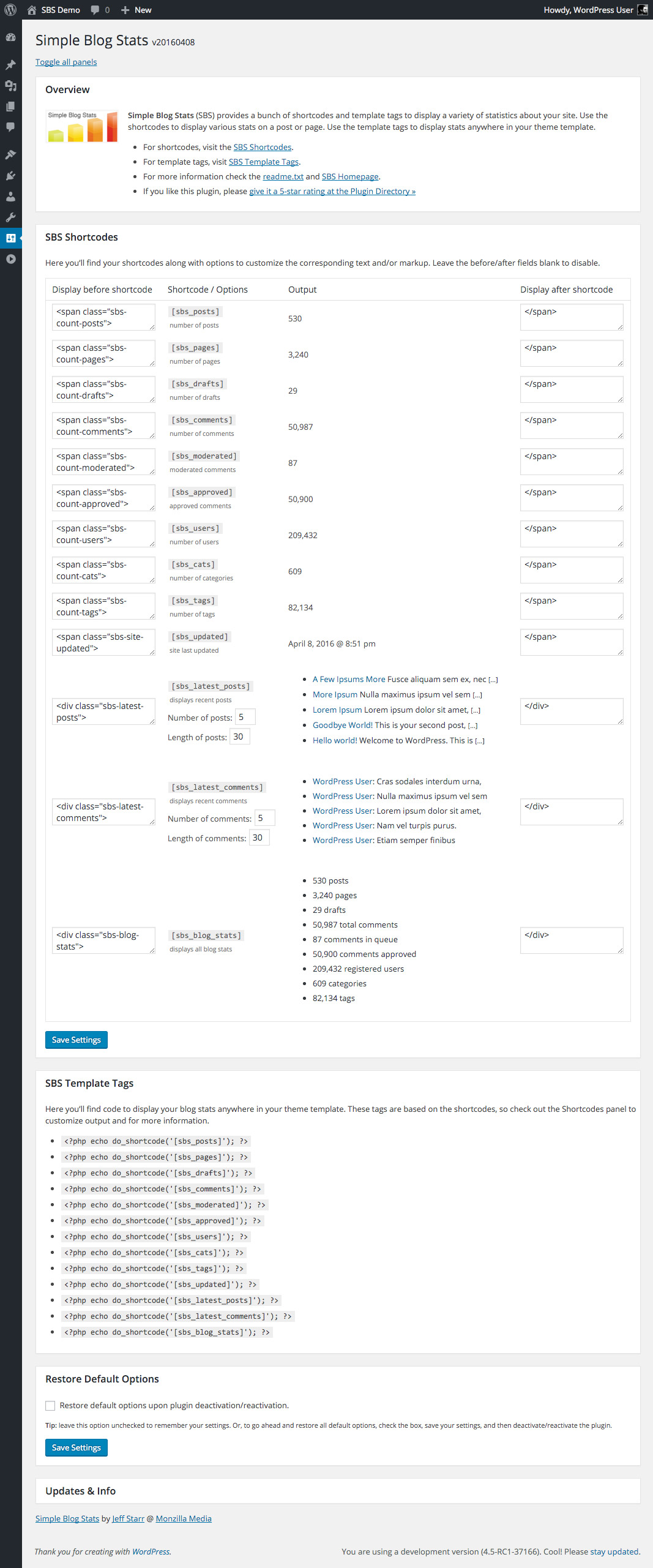
Screenshots
Für Entwickler
Ist das dein Plugin? Zeigen Sie die Zahlen.
Fügen Sie Ihrer Website, Docs oder GitHub Readme ein Live-Badge hinzu. Es wird von selbst aktualisiert - kein Konto erforderlich.
Best Simple Blog Stats alternatives
All analytics plugins →





Fragen und Antworten
Simple Blog Stats: quick answers
Gerade Antworten, gezogen von Live WordPress.org Daten.
Quelle: WordPress.org
Is Simple Blog Stats free?
Yes. Simple Blog Stats is free to download and use from the official WordPress.org plugin directory.
Is Simple Blog Stats safe to use in 2026?
Yes — Simple Blog Stats is a safe, well-maintained plugin to use in 2026. It runs on 4K+ sites, is rated 4.9/5 and was last updated 2 weeks ago, and scores 89/100 on our health check.
How many websites use Simple Blog Stats?
Simple Blog Stats is active on 4K+ WordPress websites and has been downloaded 174,596 times since it launched in November 2012. It was downloaded 3,737 times in the last 30 days.
Does Simple Blog Stats work with WordPress 7.1?
Yes. The developer has tested Simple Blog Stats up to WordPress 7.2, the latest release. It requires WordPress 4.7 or newer.
What PHP version does Simple Blog Stats need?
Simple Blog Stats requires PHP 5.6.20 or higher. Most hosts run PHP 8.x today, so it works on any modern WordPress hosting.
When was Simple Blog Stats last updated?
The latest version, 20261104, was released on November 4, 2026 (2 weeks ago).
Who makes Simple Blog Stats?
Simple Blog Stats is developed and maintained by Jeff Starr.
What are the best alternatives to Simple Blog Stats?
The most popular alternatives to Simple Blog Stats are Site Kit by Google (5M+ installs), MonsterInsights (2M+ installs) and WP Statistics (500K+ installs).
Angetrieben von PageForge
Eine Vorlage und eine Tabelle. Eine echte Seite für jede Suche.
PageForge Verwandelt jede Zeile eines CSV in eine WordPress-Seite mit eigenem Titel, URL, SEO Felder und Schema entworfen. Kostenlos auf WordPress.org.
- CSV und XLSX, plus Google Sheets auf Beruf und Unternehmen
- seinen eigenen Titel, URL, SEO Felder und Schema für jede Seite
- Arbeitet mit dem Blockeditor, Elementor, Divi und Avada
- Kostenlos auf WordPress.org, keine Kreditkarte