


Lightweight Sidebar Manager
Create new sidebar areas and display them conditionally on certain pages. Works with all themes.

Solide Wahl
Lightweight Sidebar Manager is a solid plugin choice in 2026, with a few things worth checking first. It runs on 70K+ sites, is rated 4.2/5 and was last updated 3 months ago, and scores 77/100 on our health check.
- Bewährt auf 70.000 aktiven Standorten
- Getestet mit dem neuesten WordPress (7.1)
Tägliche Downloads
Download-Spitzen folgen normalerweise einer neuen Version - jede Website, die automatisch aktualisiert wird, gilt als Download.
Ranglisten
Where Lightweight Sidebar Manager stands todayWordPress.org Ranglisten suchen
Live-Position in der Plugin-Suche, Top 100| Stichwort | Position |
|---|---|
| conditional sidebar | #1 |
| custom sidebar | #4 |
| custom widget areas | #24 |
| sidebar manager | #1 |
| Widgets | >100 |
Versionsübernahme
Anteil aktiver Sites pro Release.
Bewertungsaufschlüsselung
★★★★★★★★★★ 4.2 from 21 reviews
About Lightweight Sidebar Manager
Aus der offiziellen Readme · V2.0.0Beschreibung
Normally you have a sidebar that appears throughout the website. However, sometimes it is necessary to display a relevant, different sidebar on certain pages on the website. For an example: on WooCommerce pages, a sidebar with related or top seller products would be more relevant than the latest comments, blog posts right?
This plugin helps you solve that problem as it allows you to create new sidebars and display them conditionally on certain locations of the website easily. Once the sidebar is created and displayed on pages you like, you can add relevant widgets in it.
Try it out on a free dummy site
Some of the Features:
- Create unlimited sidebars
- Place them any location your theme has defined (Footer Widgets / Left or Right Sidebar)
- Works with any theme
- Conditionally display sidebars on specific posts, pages, taxonomies or custom post types
- Display sidebars based on user roles
Installation
- Laden Sie die Plugin-Dateien in das
/wp-content/plugins/plugin-name-Verzeichnis hoch oder installieren Sie das Plugin über den WordPress-Plugin-Bildschirm direkt. - Aktivieren Sie das Plugin über den Bildschirm „Plugins“ in WordPress
- Go to Appearance->Sidebars to create new sidebars
- In Appearance->Widgets, you can add widgets in the newly added sidebar area.
Änderungsprotokoll
2.0.0
- Fix: Fixed security issue from astra-notice library.
1.1.8
- Fix: Sidebar rendering issue where specifying “All Singulars from {{category}}” resulted in incorrect display of “{{category}} – Category” after saving.
1.1.7
- Fix: Added compatibility with WordPress v5.7 for jQuery migration warnings on admin page.
1.1.6
- Improvement: Hardened the security of plugin.
1.1.5
- Fix: Security hardening.
1.1.4
- Fix: Fixed compatibility with other plugins with respect to the admin notice.
Screenshots


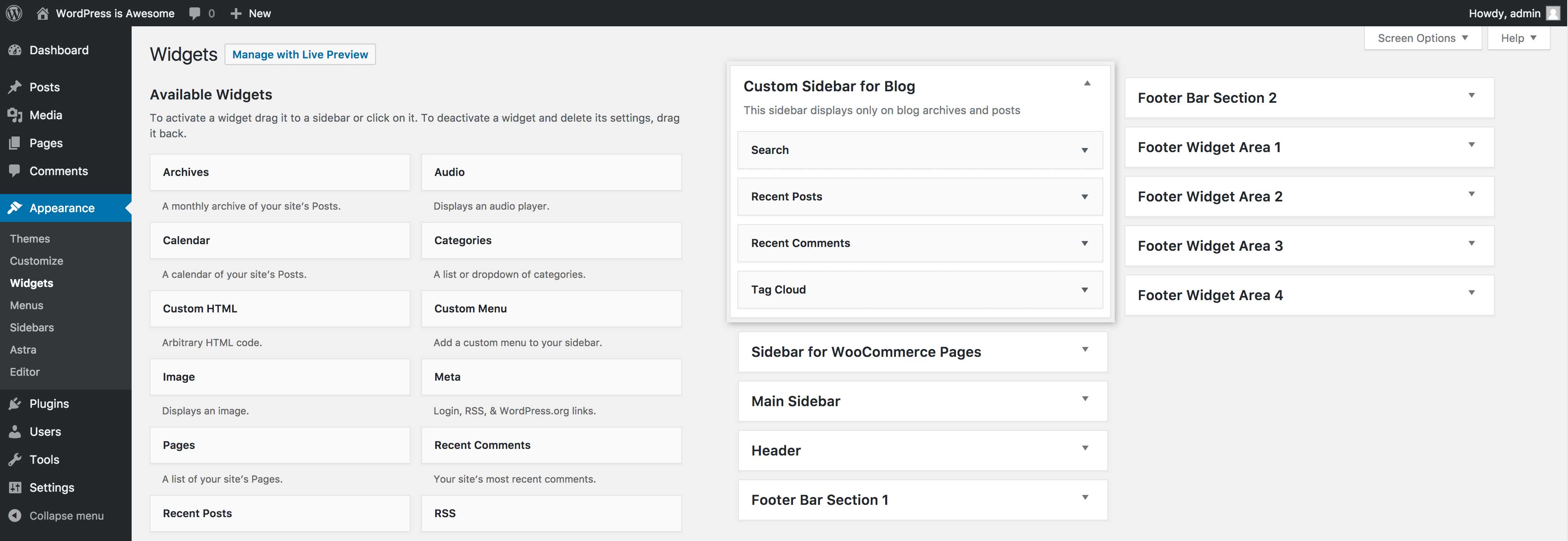
Für Entwickler
Ist das dein Plugin? Zeigen Sie die Zahlen.
Fügen Sie Ihrer Website, Docs oder GitHub Readme ein Live-Badge hinzu. Es wird von selbst aktualisiert - kein Konto erforderlich.
Fragen und Antworten
Lightweight Sidebar Manager: quick answers
Gerade Antworten, gezogen von Live WordPress.org Daten.
Quelle: WordPress.org
Is Lightweight Sidebar Manager free?
Yes. Lightweight Sidebar Manager is free to download and use from the official WordPress.org plugin directory.
Is Lightweight Sidebar Manager safe to use in 2026?
Lightweight Sidebar Manager is a solid plugin choice in 2026, with a few things worth checking first. It runs on 70K+ sites, is rated 4.2/5 and was last updated 3 months ago, and scores 77/100 on our health check.
How many websites use Lightweight Sidebar Manager?
Lightweight Sidebar Manager is active on 70K+ WordPress websites and has been downloaded 1,117,249 times since it launched in August 2017. It was downloaded 3,209 times in the last 30 days.
Does Lightweight Sidebar Manager work with WordPress 7.1?
Yes. The developer has tested Lightweight Sidebar Manager up to WordPress 7.1.5, the latest release. It requires WordPress 4.0 or newer.
When was Lightweight Sidebar Manager last updated?
The latest version, 2.0.0, was released on August 24, 2026 (3 months ago).
Who makes Lightweight Sidebar Manager?
Lightweight Sidebar Manager is developed and maintained by Brainstorm Force.
Angetrieben von PageForge
Eine Vorlage und eine Tabelle. Eine echte Seite für jede Suche.
PageForge Verwandelt jede Zeile eines CSV in eine WordPress-Seite mit eigenem Titel, URL, SEO Felder und Schema entworfen. Kostenlos auf WordPress.org.
- CSV und XLSX, plus Google Sheets auf Beruf und Unternehmen
- seinen eigenen Titel, URL, SEO Felder und Schema für jede Seite
- Arbeitet mit dem Blockeditor, Elementor, Divi und Avada
- Kostenlos auf WordPress.org, keine Kreditkarte