


ShieldUp – Bad Bots, Scrapers, Attackers
ShieldUp helps you to tackle bad bots, scrapers, hackers, enhancing website security and optimizing performance for a seamless user experience.

Betrachten Sie eine Alternative
ShieldUp shows warning signs in 2026 — compare the alternatives below before installing. It runs on 70+ sites, is rated 5/5 and was last updated 2 years ago, and scores 32/100 on our health check.
- Small user base (70+ active installs)
- Bisher sehr wenige Bewertungen
- Kein Update in 2 Jahren
- Nur getestet bis WordPress 6.7 (letzt ist 7.1)
Wie stapelt es sich?
Side-by-side bei Installationen, Updates, Bewertungen und Support



Tägliche Downloads
Download-Spitzen folgen normalerweise einer neuen Version - jede Website, die automatisch aktualisiert wird, gilt als Download.
Ranglisten
Where ShieldUp stands todayWordPress.org Ranglisten suchen
Live-Position in der Plugin-Suche, Top 100| Stichwort | Position |
|---|---|
| Activity Log | >100 |
| bad bots | #56 |
| Performance | >100 |
| protection | >100 |
| Sicherheit | >100 |
Versionsübernahme
Anteil aktiver Sites pro Release.
Bewertungsaufschlüsselung
★★★★★★★★★★ 5 from 3 reviews
About ShieldUp – Bad Bots, Scrapers, Attackers
Aus der offiziellen Readme · V1.0.1Beschreibung
Tired of bad bots, scrapers, attackers and sluggish website performance?
By providing real-time monitoring of accessing IPs, HTTP codes, URLs, and user agents, organized analytics, customizable timeline and visualizations, ShieldUp will help you indentify and combat threats like bad bots, scrapers, malicous attackers.
Which will improve website security and performance by reducing the load on your server resources for a snappy website and great user experience.
Hauptmerkmale
🛡️ Advanced Security: ShieldUp protects your site from malicious bots, scrapers, attackers and hackers, shielding your website from potential threats.
🚀 Optimized Performance: Improve website speed and user experience by eliminating unnecessary requests from scrapers, bad bots and brute force attackers
🗃️ Comprehensive Data Collection: ShieldUp logs and archive accessing IPs, HTTP response codes, URLs, user agents, timestamps, etc.
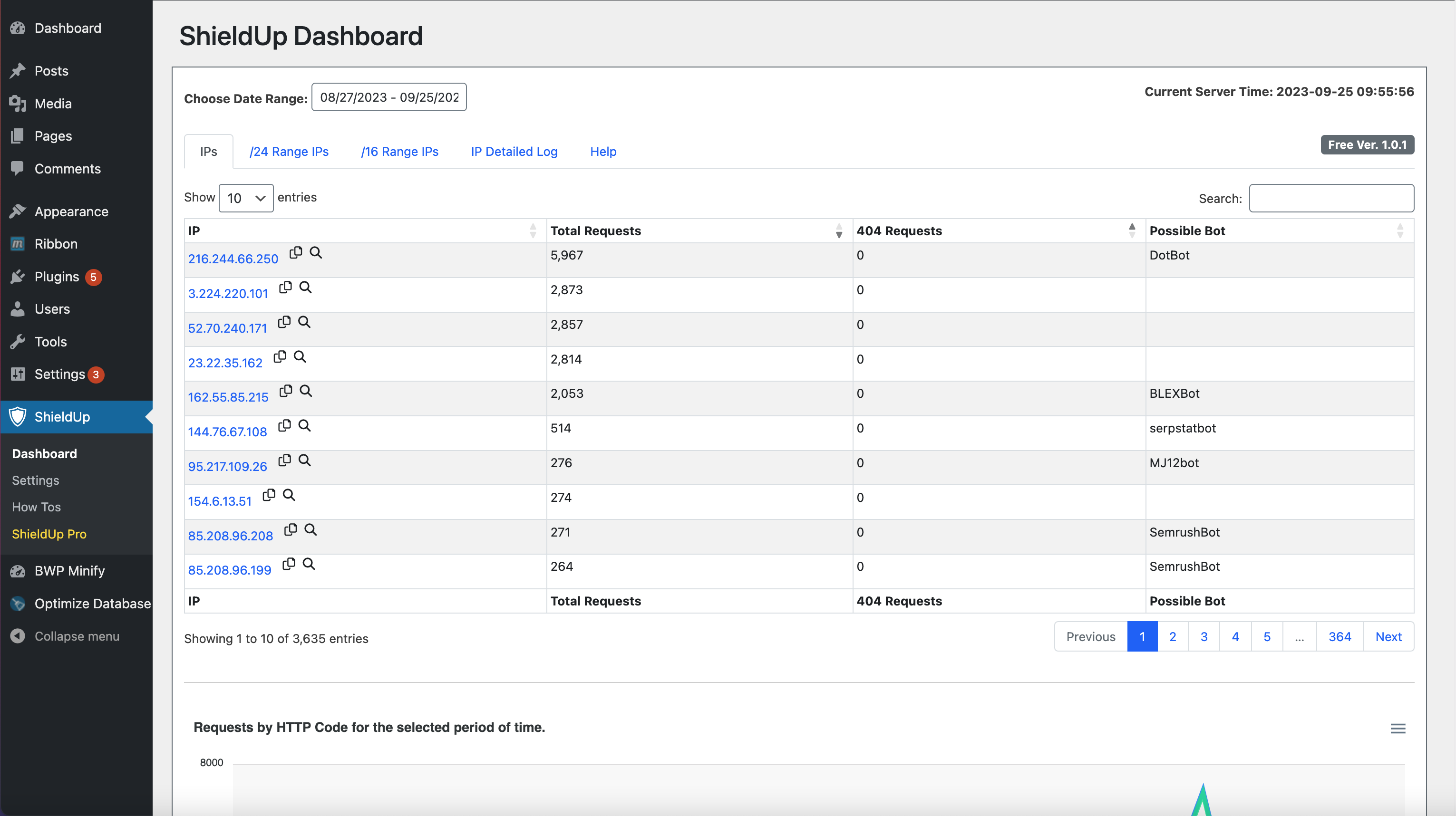
📊 Detailed Data Insights: ShieldUp will analyze, organize and displays IP data based on IP ranges, request counts, details, offering a comprehensive view of your traffic within user-friendly tables.
📅 Custom Time Period: Select specific time ranges through an intuitive calendar feature for in-depth data analysis.
📈 Visualize Data: Easily visualize traffic trends and patterns with our user-friendly graphs.
🛠️ IP Tools: Helps you with actions like retrieving detailed IP information from DB or third-party tools.
🌐 Cloudflare Integration (Pro): Seamlessly connect your website to Cloudflare, enhancing security and performance even further by leverage Cloudflare’s powerful features.
⚙️ Advanced IP Management (Pro): Take control with a click. Manage IPs and IP ranges effortlessly, with actions like blocking, JavaScript challenges, whitelisting, or remove rules using Cloudflare’s firewall through the plugin.
💼 Centralized IP Database (Pro): Keep all IPs controlled by your WP plugin and Cloudflare in a centralized database for efficient management and tracking.
📝 User Activity Logging (Pro): Maintain detailed logs of all IP controls by users, ensuring accountability and providing a historical record of security actions.
🏆 Priority Support (Pro): Pro members get priority support, so you can expect quick help with any questions or issues.
Please Note: Yes, the Pro version is undeniably impressive. However, the free version is really what you need and will get the job done.
Wie es funktioniert
1. Installation and Activation
Start by downloading and installing the ShieldUp plugin. Once activated, it seamlessly integrates with your WordPress, ready to work its magic.
2. Data Collection
ShieldUp starts by collecting crucial data about the traffic to your website. It keeps a record of accessing IPs, including HTTP response codes, URLs, user agents, and timestamps. This data is organized into user-friendly tables and presented through interactive graphs, allowing you to gain valuable insights into your website’s traffic patterns.
3. Select, Organize and Display Data
You can choose a specific time frame, making it easy to identify which IPs are accessing your site the most. It also groups IPs into /16 and /24 ranges and along with graphical representation helps you visualize trends, spot unusual activity and potential security threats.
4. Cloudflare Integration (Pro)
ShieldUp seamlessly integrates with Cloudflare in PRO version, enhancing your website’s security even further. Using the Cloudflare API, you can manage IPs and IP ranges right from your WordPress dashboard. Implement blocks, JavaScript challenges, whitelist entries, or remove rules with just a few clicks.
5. IP Tools & IP Management
Each IP listed in the user-friendly interface comes with action buttons, enabling you to ban IPs in your website’s firewall or CloudFlare, retrieve detailed IP information from third-party tools, and perform other custom actions.
6. Enhanced Security
ShieldUp employs advanced security measures to protect your website from a wide range of threats. It identifies and blocks malicious bots, scrapers, attackers, and hackers, ensuring that your website remains secure.
7. Optimized Website Performance
In addition to security, ShieldUp optimizes your website’s performance. It achieves this by filtering out unnecessary requests from bad bots, scrapers and other unwanted traffic. This optimization reduces the load on your server resources, resulting in a snappy and responsive website and great user experience.
Firewalls, What we recommend?
One of the best options would be a hardware-type firewall, but we wouldn’t be in this situation if we had one.
The next best option for managing HTTP and HTTPS traffic is a cloud-based firewall, such as CloudFlare, especially when it is available for free and offers a wide range of excellent features. In addition to that, we also use CSF for other security solutions and to manage traffic and ports related to services like mail and SSH.
So, why do we think CloudFlare is a better solution for HTTP and HTTPS trafic, than “Traditional” Server/Software-Based Firewall (CSF) especially Plugin-Like Firewalls (WordPress Plugins)?
Traditional firewalls, while valuable, have limitations when compared to Cloudflare’s robust security and performance capabilities. These firewalls primarily protect your server or website by consuming server resources, leaving them vulnerable to large-scale attacks, among other things. In contrast, Cloudflare operates a global network that defends against threats at the network edge, providing superior DDoS protection and accelerated content delivery. By choosing Cloudflare, you gain a comprehensive, cloud-based solution that strengthens your website’s resilience and speed, effectively surpassing the capabilities of traditional local firewalls when it comes to HTTP and HTTPS trafic.
Here are some of the main features of CloudFlare:
-
Global Network Security: Cloudflare operates a vast global network that acts as a protective shield for your website, filtering out malicious traffic and threats before they even reach your server. This distributed approach ensures that attacks are mitigated at the network edge, preserving your server resources.
-
Content Caching: Cloudflare’s caching infrastructure stores copies of your website’s content at data centers around the world. This means visitors experience faster load times as they access cached content from a server nearest to them, reducing server load and improving website responsiveness.
-
Web Application Firewall (WAF): Cloudflare offers a comprehensive Web Application Firewall that can be finely tuned to your specific needs. It provides a robust defense against common web application attacks, such as SQL injection and cross-site scripting (XSS), without the need for additional on-site firewall plugins.
-
IP Control and Access Management: Cloudflare’s firewall allows you to control and manage IP access with precision. You can easily set rules to block or allow specific IPs, IP ranges, or countries, giving you granular control over who can access your website.
-
DDoS Protection: Cloudflare’s network is designed to withstand large-scale DDoS attacks, providing a shield against volumetric threats that would overwhelm on-site firewalls. This ensures uninterrupted website availability.
-
Performance Optimization: Cloudflare’s content delivery network (CDN) optimizes the delivery of your website’s assets, including images, scripts, and stylesheets, resulting in reduced latency and faster load times for your visitors.
-
Scalability and Reliability: Cloudflare’s infrastructure is highly scalable and redundant, ensuring that your website remains available even during traffic spikes or server failures.
By integrating Cloudflare with your WordPress site, you not only enhance security but also optimize performance, reduce server load, and simplify IP access control, all while benefiting from Cloudflare’s global network and advanced security features. It’s a comprehensive solution that takes your website’s protection and performance to the next level.
This is why we use it on all our websites, including the Pro version of this plugin as well. Therefore, we strongly recommend that you use it for your website if you haven’t already, whether you intend to use this plugin or not.
Please note that we still use and recommend that you use a ‘Traditional’ server/software-based firewall like CSF, in conjunction with CloudFlare, to cover various security aspects such as traffic/ports for mail, FTP, SSH, etc.
Installation
Just activate it and wait until it collects some data for you so you can see what is going on with your website traffic.
Änderungsprotokoll
1.0.1 – 2024/01/22
- Erste Freigabe
Screenshots


Für Entwickler
Ist das dein Plugin? Zeigen Sie die Zahlen.
Fügen Sie Ihrer Website, Docs oder GitHub Readme ein Live-Badge hinzu. Es wird von selbst aktualisiert - kein Konto erforderlich.
Best ShieldUp alternatives
All Activity Log plugins →





Fragen und Antworten
ShieldUp: quick answers
Gerade Antworten, gezogen von Live WordPress.org Daten.
Quelle: WordPress.org
Is ShieldUp free?
Yes. ShieldUp is free to download and use from the official WordPress.org plugin directory.
Is ShieldUp safe to use in 2026?
ShieldUp shows warning signs in 2026 — compare the alternatives below before installing. It runs on 70+ sites, is rated 5/5 and was last updated 2 years ago, and scores 32/100 on our health check.
How many websites use ShieldUp?
ShieldUp is active on 70+ WordPress websites and has been downloaded 2,359 times since it launched in January 2024. It was downloaded 142 times in the last 30 days.
Does ShieldUp work with WordPress 7.1?
ShieldUp is officially tested up to WordPress 6.7.12, while the latest release is 7.1.5. It may still work, but try it on a staging site first.
What PHP version does ShieldUp need?
ShieldUp requires PHP 7.2.1 or higher. Most hosts run PHP 8.x today, so it works on any modern WordPress hosting.
When was ShieldUp last updated?
The latest version, 1.0.1, was released on November 17, 2024 (2 years ago).
Who makes ShieldUp?
ShieldUp is developed and maintained by shieldup.
What are the best alternatives to ShieldUp?
The most popular alternatives to ShieldUp are WP Activity Log (300K+ installs), Activity Log (200K+ installs) and Stream (70K+ installs).
Angetrieben von PageForge
Eine Vorlage und eine Tabelle. Eine echte Seite für jede Suche.
PageForge Verwandelt jede Zeile eines CSV in eine WordPress-Seite mit eigenem Titel, URL, SEO Felder und Schema entworfen. Kostenlos auf WordPress.org.
- CSV und XLSX, plus Google Sheets auf Beruf und Unternehmen
- seinen eigenen Titel, URL, SEO Felder und Schema für jede Seite
- Arbeitet mit dem Blockeditor, Elementor, Divi und Avada
- Kostenlos auf WordPress.org, keine Kreditkarte