


SendApp – Message Notifications for WooCommerce & more
Connect your store to SendApp in one click: WhatsApp order updates, abandoned cart recovery and an AI assistant that knows your products and orders.

Solide Wahl
SendApp is a solid plugin choice in 2026, with a few things worth checking first. Was last updated 4 days ago, and scores 64/100 on our health check.
- Actively developed — last update 4 days ago
- Getestet mit dem neuesten WordPress (7.1)
- Kleine Benutzerbasis (<10 aktive Installationen)
- Bisher sehr wenige Bewertungen
Wie stapelt es sich?
Side-by-side bei Installationen, Updates, Bewertungen und Support



Tägliche Downloads
Download-Spitzen folgen normalerweise einer neuen Version - jede Website, die automatisch aktualisiert wird, gilt als Download.
Ranglisten
Where SendApp stands todayWordPress.org Ranglisten suchen
Live-Position in der Plugin-Suche, Top 100| Stichwort | Position |
|---|---|
| abandoned cart | >100 |
| ai assistant | >100 |
| chat | >100 |
| Notifications | >100 |
| WooCommerce | >100 |
About SendApp
From the official readme · v3.1.0Beschreibung
SendApp brings your WooCommerce store to WhatsApp. Click “Connect to SendApp”, log in to your SendApp account, pick your WhatsApp number and you are done: no API key to copy.
- Order notifications — order confirmation, shipping update with the tracking link, cancellation and any other status, sent with your WhatsApp templates approved by Meta. Choose the template and what fills each variable from a menu, and see a live WhatsApp preview.
- Abandoned cart recovery — a WhatsApp reminder after the time you choose, with a link that restores the cart. By default only customers who ticked the marketing consent checkbox at checkout (classic and blocks checkout) are reminded.
- AI assistant — the SendApp assistant searches your products in real time and answers about your customers’ order status, recognising them by their WhatsApp number. SendApp does not copy or modify your catalog: every answer is read from your store at that moment, through signed requests.
- Chat on your site — the SendApp chat widget (AI + WhatsApp) or a simple WhatsApp button.
- Customers in SendApp contacts — customers and the buyers of every order become SendApp contacts with a tag of your choice and the WhatsApp consent recorded by your store; import your existing customers in one click. Customers can withdraw the WhatsApp consent from My account.
- Shop notifications — get a WhatsApp on your own phone for new orders or anything else.
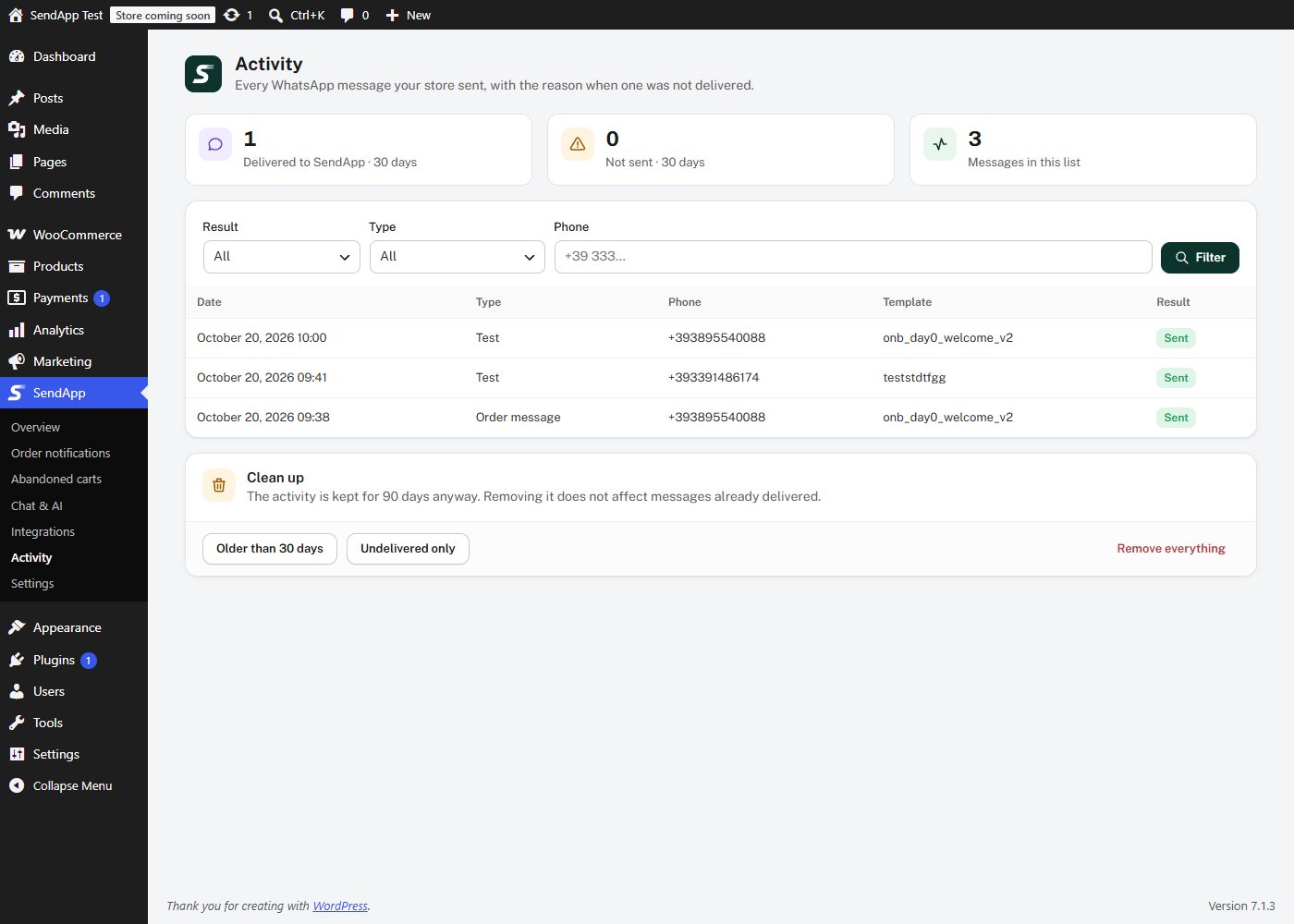
- Results — messages sent, carts reminded and recovered, and the recovered value over the last 30 days, plus a full activity log.
- Integrations — WhatsApp messages from WPForms and Elementor Pro forms, and from 25+ plugins: subscriptions, bookings, memberships, courses, marketplaces, shipping tracking (WooCommerce Shipment Tracking, AST, AfterShip and more).
Two ways to send:
- Manage from SendApp (recommended) — orders and abandoned carts are sent to your SendApp account through a signed webhook, and messages, templates and timing are set in SendApp → Automations.
- Send from WordPress — the plugin sends the templates you configure on the Order notifications page.
SendApp is an official Meta Business Partner: the connection runs on Meta’s own WhatsApp Business Platform.
Already a SendApp Official customer? You can keep using your SendApp Official (official.sendapp.cloud) API key: choose “Do you use SendApp Official? Connect with your API key” on the Overview page.
Built for performance and privacy: messages are sent in the background (Action Scheduler) and never slow down the checkout; HPOS and the blocks checkout are supported; connection keys are stored encrypted and never shown in pages or logs.
Externe Dienste
This plugin connects to services provided by SendApp (EVERYSOFT SRLS). It sends data only after you connect your store, and only for the features you turn on.
SendApp (app.sendapp.ai) — the SendApp platform.
https://app.sendapp.ai/connect/store— opened in your browser when you click “Connect to SendApp”, with your site address, the return address in your admin and a one-time security code.https://app.sendapp.ai/api/store-connect/tokenandhttps://app.sendapp.ai/api/store-connect/disconnect— to complete the connection (exchange of a one-time code for the store keys) and to revoke the key when you disconnect or uninstall.https://app.sendapp.ai/api/whatsapp-meta/get_templatesandhttps://app.sendapp.ai/api/whatsapp-meta/send— to list your approved WhatsApp templates and to send a template message: the recipient’s phone number and the values of the template variables (for example customer name, order number, total, products, tracking link, cart recovery link).https://app.sendapp.ai/api/ecommerce/woocommerce/webhook/…— order data when an order is created, paid or completed (customer name, email, phone, address, products, totals, status, marketing consent), so SendApp can record the order, the contact and the revenue; with “Send from WordPress” these events are marked so that SendApp does not message the customer again. When SendApp manages the messages, also abandoned carts (customer name, email, phone, products, total, consent, recovery link).https://app.sendapp.ai/api/contacts,https://app.sendapp.ai/api/contacts/bulkandhttps://app.sendapp.ai/api/contacts/{id}/opt-out— only when “Add customers to SendApp contacts” is on (SendApp → Customers) or when you press “Import existing customers”: the customer’s first and last name, phone number, email, the tag you chose, and in the contact’s metadata the store’s address, the customer id (empty for guests) and the WhatsApp consent recorded by the store. Sent in the background when a customer is created or changes their details, when an order is placed, and in batches of 500 during the import. When a customer withdraws the WhatsApp consent in My account, the opt-out is sent to SendApp (also with the sync off, then only for a contact that already exists there:GET https://app.sendapp.ai/api/contacts?search=…finds it by phone or email).https://app.sendapp.ai/apps/widget/script/…— the SendApp chat widget script, loaded on your site’s pages only when you turn the widget on.- Incoming requests: SendApp calls
/wp-json/sendapp/v1/products/searchand/wp-json/sendapp/v1/orderson your site to answer customers. Every request is signed; product answers contain public catalog data, order answers only number, date, status, total, products, tracking and the customer’s own phone.
Terms: https://sendapp.live/en/terms/ — Privacy policy: https://sendapp.live/en/privacy/
SendApp Official (official.sendapp.cloud) — only if you connect with a SendApp Official API key: https://official.sendapp.cloud/api/verify, /api/templates and /api/send/template, with the recipient’s phone number and the template variable values. Same terms and privacy policy.
Meta (business.facebook.com) — the “Meta Business Partners” badge is an image shipped with the plugin; it links to Meta’s partner directory (https://business.facebook.com/messaging/partner-showcase/?search=sendapp), opened in a new tab only if you click it. Meta privacy policy: https://www.facebook.com/privacy/policy/
YouTube (youtube-nocookie.com) — the official setup video on the Overview page is loaded from https://www.youtube-nocookie.com/embed/… only when you press play; nothing is requested from YouTube before that. Google privacy policy: https://policies.google.com/privacy
WhatsApp (wa.me) — the simple WhatsApp button links to https://wa.me/<your number>; nothing is sent until a visitor clicks it. WhatsApp terms: https://www.whatsapp.com/legal/
Privatsphäre
When connected, the plugin sends to SendApp the data listed under External services, to deliver WhatsApp messages about orders, abandoned cart reminders (only with consent by default) and the answers of the AI assistant, and — when you turn it on — to keep your customers in your SendApp contacts. Registered customers can withdraw the WhatsApp marketing consent in My account → Account details; the withdrawal is recorded on the customer and sent to SendApp. On your site it keeps a log of sent messages and the abandoned carts for up to 90 days. Both are included in WordPress’ personal data export and erasure tools (Tools → Export / Erase Personal Data), and a suggested text is added to your privacy policy guide. Connection keys are stored encrypted with your site’s salts. Uninstalling the plugin revokes the key and deletes its data.
Installation
- Install and activate this plugin (WooCommerce is needed for the store features; forms and the other integrations work without it).
- Go to SendApp → Overview and click Connect to SendApp. Log in (or create a free account) on app.sendapp.ai, choose your WhatsApp number and confirm: you come back to WordPress connected.
- In Order notifications choose who sends the messages and the template for each order event.
- In Abandoned carts turn on the reminders and the consent checkbox.
- In Chat & AI choose the chat shown on your site and try the AI search.
Your site must use https, and pretty permalinks must be enabled (Settings → Permalinks, any option except “Plain”) for the AI assistant.
Änderungsprotokoll
Your customers can now become SendApp contacts: it stays off on stores already connected until you turn it on in SendApp → Customers. Adds "Change account".
3.1.0
- New: Customers → SendApp contacts. Customers created or updated and the buyers of every new order (guests included) become contacts in the connected SendApp account, with a tag of your choice (default “woocommerce”) and the WhatsApp consent recorded by the store, in the background. On for stores connected from this version; stores already connected keep it off until they turn it on.
- New: “Import existing customers” — registered customers, then guest buyers, in batches of 500 with visible progress; resumes where it stopped and stops at the contact limit of the SendApp plan. A notice says when new customers are not added because the limit is reached.
- New: customers can withdraw the WhatsApp marketing consent in My account → Account details; SendApp then opts the contact out, with the reason, which SendApp keeps in the contact’s consent history (order updates still arrive).
- New: “Change account” in Settings connects the store to another SendApp account or AI account without disconnecting first; the old key is revoked.
- New: a notice and a setup step when the connected SendApp account has no WhatsApp number yet, with the link to connect one.
- New: Meta Business Partners badge on the connection screen and the Overview.
- Improved: the “key revoked” message also explains that each SendApp AI account reads one store (a Shopify store connected to it takes over).
- Fixed: a key revoked in SendApp is now recognised on every page (the order and integration pages showed “The apikey field is required.”) and the store asks to reconnect.
- Improved: disconnecting or uninstalling stops the customers sync and the import; nothing is deleted in SendApp.
3.0.1
- Changed: “Disconnect” and uninstall send the key in the request body, as the SendApp store-connect contract defines.
- Improved: the SendApp answer to a disconnect is written to the debug log (status and message only, never the key).
- New: Brazilian Portuguese translation.
- New: official setup video (loaded only on click, privacy-enhanced mode) and step-by-step guide on the Overview page, in the admin’s language.
- New: plan notes for the AI assistant, the chat widget and the free trial.
3.0.0
- New: “Connect to SendApp” — one-click connection to app.sendapp.ai (OAuth with PKCE), no API key to copy; keys stored encrypted. SendApp Official API keys still supported.
- New: completely redesigned admin — Overview, Order notifications, Abandoned carts, Chat & AI, Integrations, Activity, Settings — with a live WhatsApp preview and variables chosen from a menu.
- New: AI assistant support — signed REST routes for live product search and order status; the catalog is never copied.
- New: orders and abandoned carts sent to SendApp through a signed webhook (“Manage from SendApp”), or sent from WordPress as before.
- New: abandoned carts with recovery link, marketing consent checkbox (classic and blocks checkout), consent-only reminders, configurable delay and recovered-sales statistics.
- New: SendApp chat widget toggle with “seen on the site” check.
- New: privacy exporter and eraser; uninstall revokes the key.
- Improved: every send runs in the background (Action Scheduler); all active messages for a status are sent; “Enable notifications” is respected.
- Improved: HPOS and blocks checkout compatibility; phone numbers completed with the customer’s country code.
- Fixed: API keys and phone numbers no longer written to logs; MySQL 8 database upgrade; abandoned cart messages filled with the cart data; carousel templates; duplicate chat widget; country codes list.
2.2.2
- A successful save now clears the “entry was not saved” warning, which could otherwise still be shown after an earlier failed attempt had been corrected.
2.2.1
- Removed dead code from the admin script that raised “$(…).tooltip is not a function” on every SendApp admin page. It initialised a colour picker, a business-hours toggle and jQuery UI tooltips for elements the plugin no longer has, and jQuery UI Tooltip is not loaded.
- The admin script now declares jQuery as a dependency, so the per-page scripts attached to it can never be printed before jQuery is available.
2.2.0
- Adding a trigger or a notification no longer fails silently when the WhatsApp templates cannot be loaded. The editor used to redirect back and throw the submission away without a word, so an expired API key looked exactly like the Save button doing nothing; the plugin now states that the entry was not saved and shows the reason returned by the API.
- The API notice reports the actual error, so an expired or revoked key is no longer indistinguishable from a key that was never entered.
Screenshots
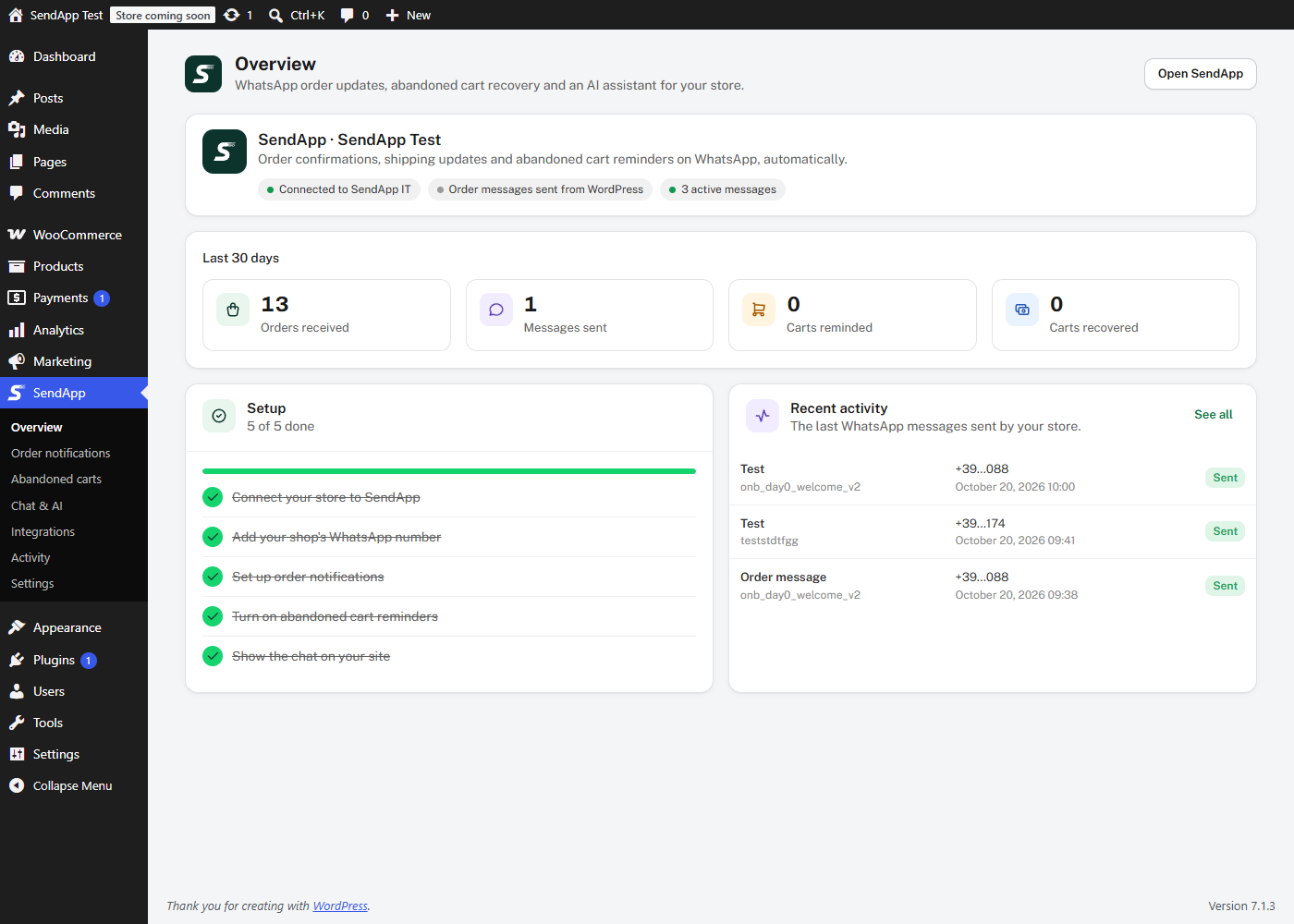
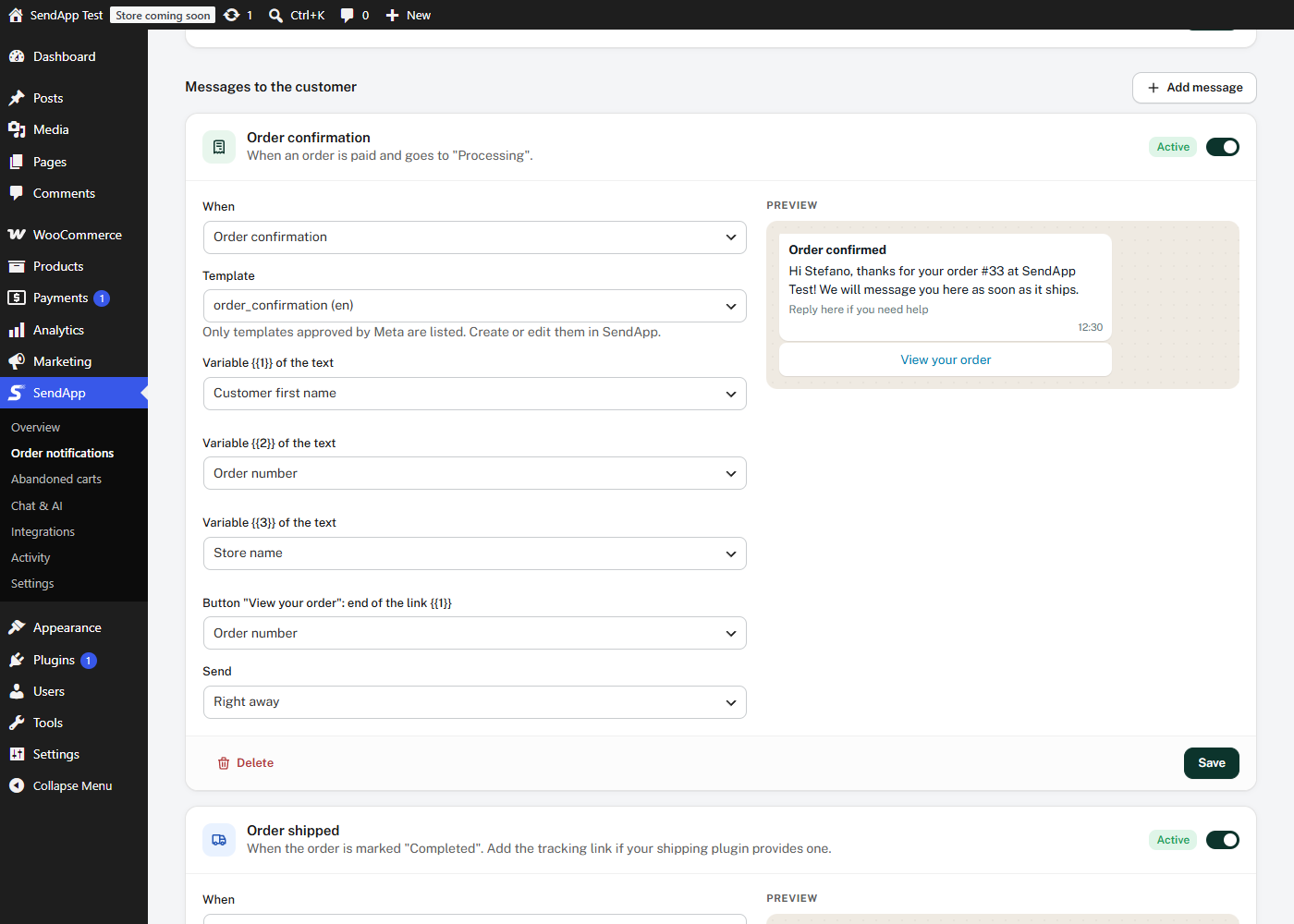
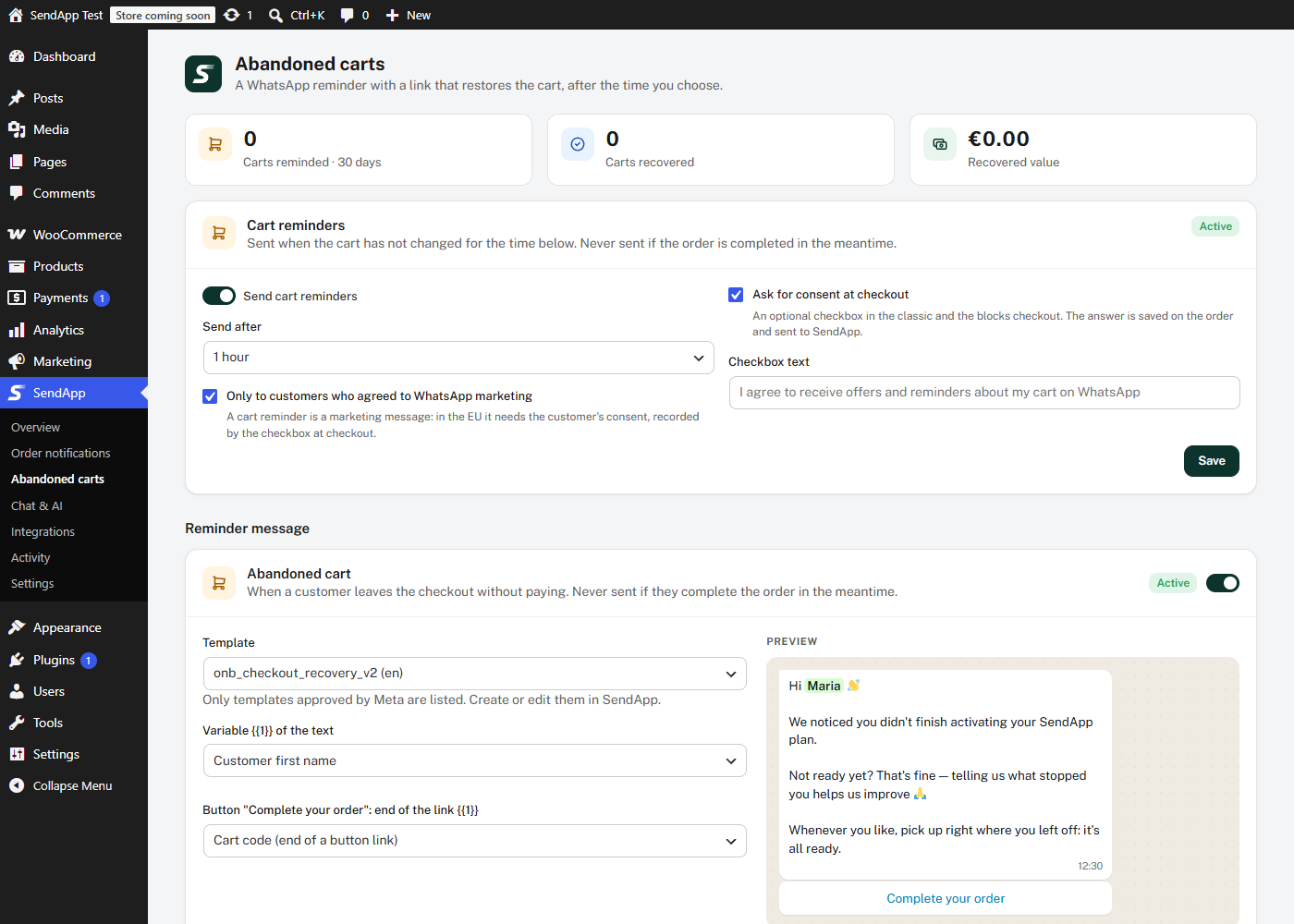
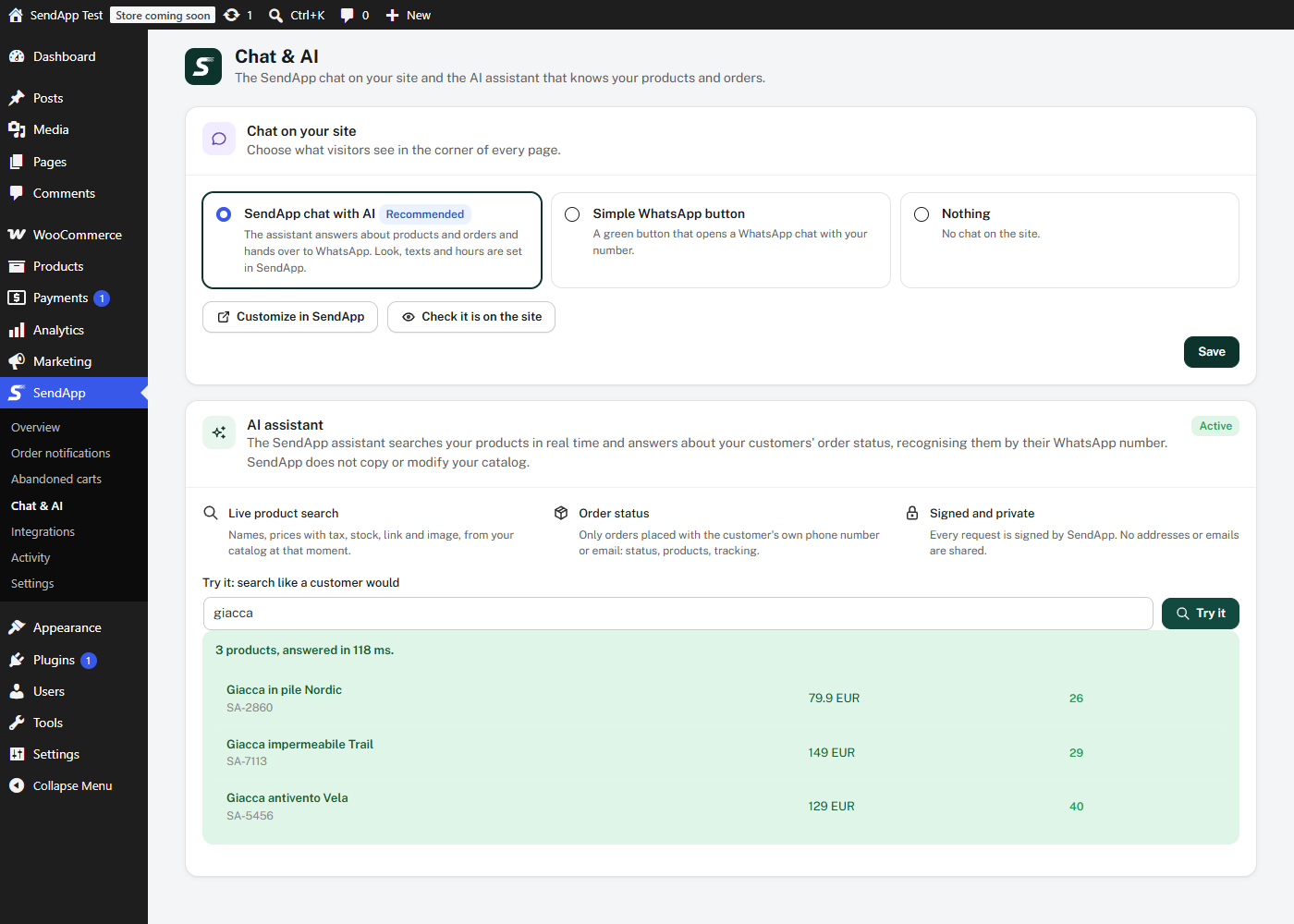

Für Entwickler
Ist das dein Plugin? Zeigen Sie die Zahlen.
Fügen Sie Ihrer Website, Docs oder GitHub Readme ein Live-Badge hinzu. Es wird von selbst aktualisiert - kein Konto erforderlich.
Best SendApp alternatives
All abandoned cart plugins →





Fragen und Antworten
SendApp: quick answers
Gerade Antworten, gezogen von Live WordPress.org Daten.
Quelle: WordPress.org
Is SendApp free?
Yes. SendApp is free to download and use from the official WordPress.org plugin directory.
Is SendApp safe to use in 2026?
SendApp is a solid plugin choice in 2026, with a few things worth checking first. Was last updated 4 days ago, and scores 64/100 on our health check.
How many websites use SendApp?
SendApp is active on <10 WordPress websites and has been downloaded 730 times since it launched in July 2026. It was downloaded 147 times in the last 30 days.
Does SendApp work with WordPress 7.1?
Yes. The developer has tested SendApp up to WordPress 7.1.5, the latest release. It requires WordPress 6.3 or newer.
What PHP version does SendApp need?
SendApp requires PHP 7.4 or higher. Most hosts run PHP 8.x today, so it works on any modern WordPress hosting.
When was SendApp last updated?
The latest version, 3.1.0, was released on November 25, 2026 (4 days ago).
Who makes SendApp?
SendApp is developed and maintained by SendApp.
What are the best alternatives to SendApp?
The most popular alternatives to SendApp are Booster for WooCommerce (30K+ installs), MWB HubSpot for WooCommerce (6K+ installs) and ActiveCampaign for WooComme… (5K+ installs).
Angetrieben von PageForge
Eine Vorlage und eine Tabelle. Eine echte Seite für jede Suche.
PageForge Verwandelt jede Zeile eines CSV in eine WordPress-Seite mit eigenem Titel, URL, SEO Felder und Schema entworfen. Kostenlos auf WordPress.org.
- CSV und XLSX, plus Google Sheets auf Beruf und Unternehmen
- seinen eigenen Titel, URL, SEO Felder und Schema für jede Seite
- Arbeitet mit dem Blockeditor, Elementor, Divi und Avada
- Kostenlos auf WordPress.org, keine Kreditkarte