


Self Destructing Posts
Mark a post as ephemeral: after it has been read, it self-destructs according to the rules you set on that post.

Mit Vorsicht verwenden
Self Destructing Posts works, but test it on a staging site before relying on it in 2026. Was last updated 3 months ago, and scores 54/100 on our health check.
- Getestet mit dem neuesten WordPress (7.1)
- Kleine Benutzerbasis (<10 aktive Installationen)
- Bisher sehr wenige Bewertungen
- Benötigt PHP 8.2 oder neuer
Tägliche Downloads
Download-Spitzen folgen normalerweise einer neuen Version - jede Website, die automatisch aktualisiert wird, gilt als Download.
Ranglisten
Where Self Destructing Posts stands todayWordPress.org Ranglisten suchen
Live-Position in der Plugin-Suche, Top 100| Stichwort | Position |
|---|---|
| content-lifecycle | >100 |
| ephemeral | #7 |
| expire | >100 |
| Privatsphäre | >100 |
| self-destruct | #1 |
About Self Destructing Posts
Aus der offiziellen Readme · V1.0.1Beschreibung
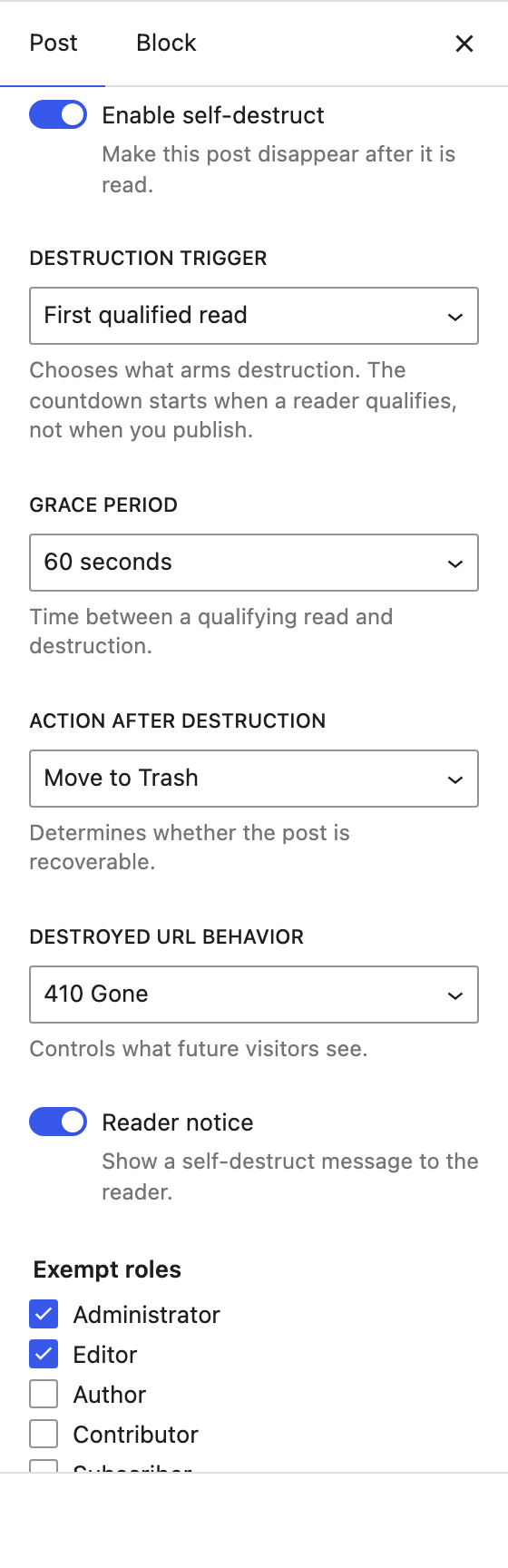
Self Destructing Posts lets an editor mark a post as ephemeral. Turn on Enable self-destruct, choose how and when the post should disappear, and publish. The first qualified reader opens it, and the post self-destructs after your chosen grace period.
This is a content-lifecycle tool, not a security or secrecy product. It cannot prevent screenshots, copying, browser cache, search-engine indexing, or a recipient sharing the URL. Treat it as “this post is meant to be temporary,” not “this post is secret.”
Was es tut
- A Self-Destruct panel in the block editor (and a classic-editor meta box) to enable and configure per post.
- First qualified read trigger — a real reading event, not a crawler or link preview.
- A configurable grace period between the qualifying read and destruction.
- Destructive actions: Move to Trash, Draft, Private, Replace with a message, or Permanently delete.
- Destroyed-URL responses: 410 Gone (default), 404, redirect, or a custom message — served even if the post was permanently deleted.
- Atomic arming so exactly one reader arms a post under concurrent traffic.
- No-store cache headers and noindex/nofollow/noarchive on self-destruct posts.
- Exempts administrators/editors, and filters known bots, previews, prefetch, HEAD, REST and feed requests to reduce accidental destruction.
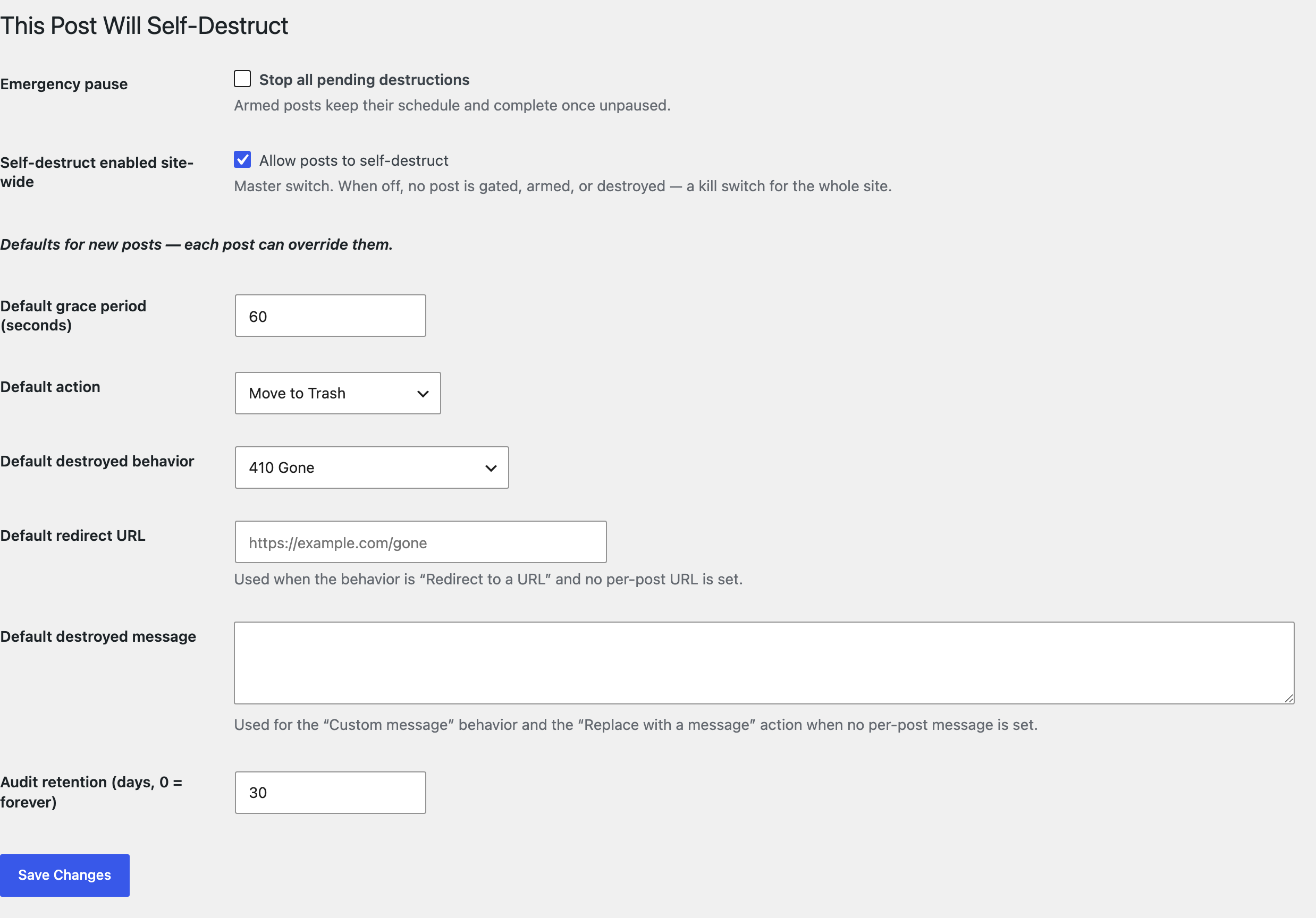
- A repair tool that completes destructions if WP-cron ran late, and an emergency pause that halts all pending destructions.
- A minimal audit log of state transitions that never stores the destroyed post’s content.
What it deliberately does NOT do
- Guarantee secrecy or DRM.
- Prevent screenshots, copy/paste, saved pages, reader mode, or browser history.
- Remove content already cached or indexed by search engines, CDNs, social networks, or browsers.
- Track the identity of individual readers.
An already-cached page cannot be reliably “unread.” Caching is the single biggest practical risk — the plugin sends no-store headers and integrates with common cache plugins on a best-effort basis, but it cannot promise universal cache bypass.
Installation
- Upload the
self-destructing-postsfolder to/wp-content/plugins/, or install through the Plugins screen. - Aktivieren Sie das Plugin.
- Open a post, expand the Self-Destruct panel in the editor sidebar, and switch on Enable self-destruct.
- Choose your trigger, grace period, action, and destroyed-URL behavior, then publish.
- Review site-wide defaults and the emergency pause under Settings → Self-Destruct.
For reliable timing on low-traffic sites, configure a real server cron to run wp-cron.php.
Änderungsprotokoll
Important fix for sites using plain permalinks, where destroying a post could make the homepage return 410. Also restores the per-post "Exempt roles" setting.
1.0.1
- Fixed: on a site using plain permalinks (?p=123), destroying a post recorded the site homepage as the destroyed URL, so the front page began returning “410 Gone” — which also asks search engines to remove it. Plain permalinks now keep the post identifier, and the homepage can never be treated as destroyed content.
- Fixed: the per-post “Exempt roles” setting was silently discarded — the field failed to register, so choices made in the editor were never saved. Site-wide exempt roles were unaffected.
- Tested up to WordPress 7.1.
1.0.0
- First public release on WordPress.org. The plugin code is unchanged from 0.1.2 — the version marks readiness for general use, not new features. Earlier 0.1.x versions were development releases and were never published here.
0.1.2
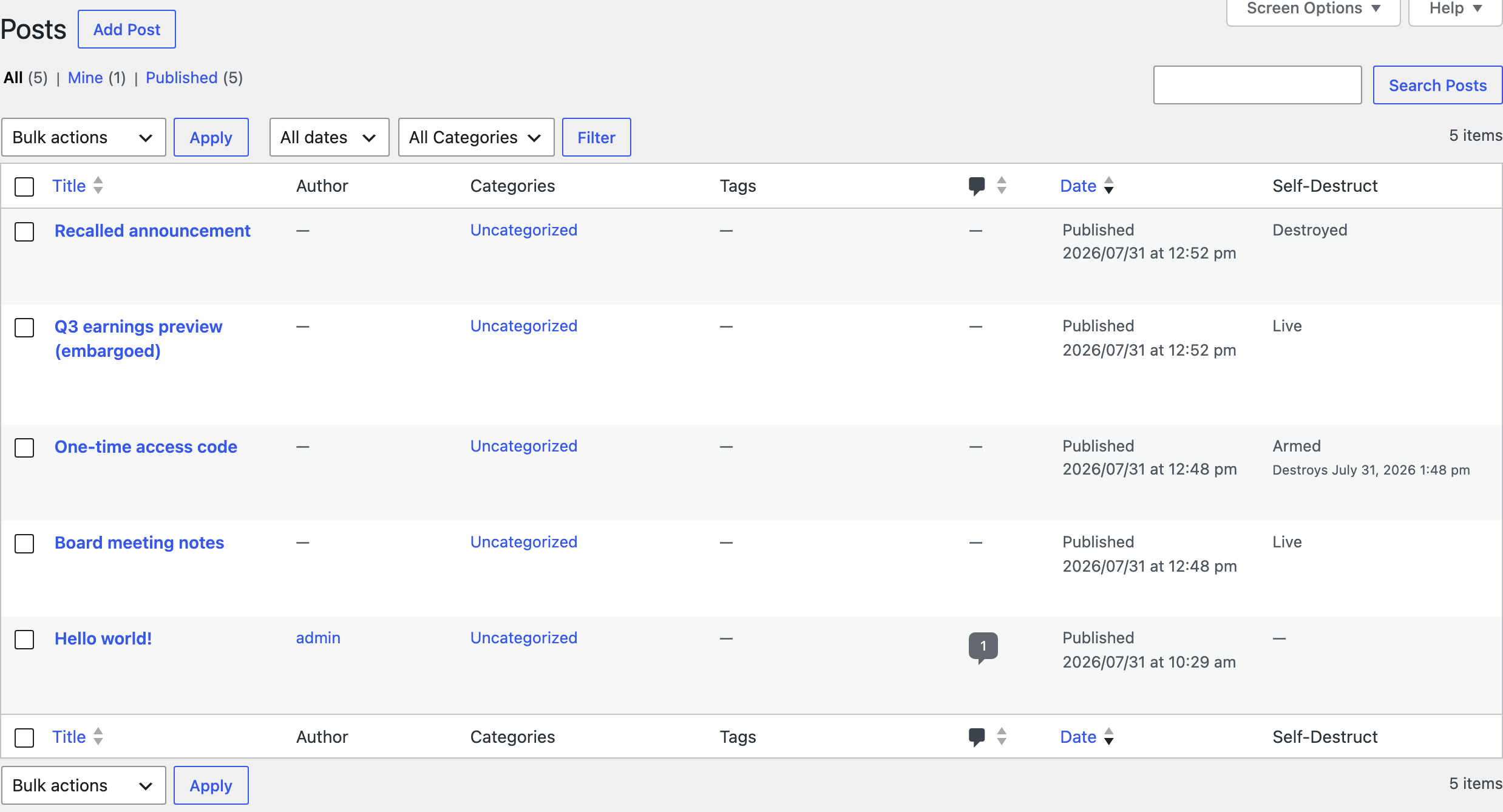
- Fixed the internal codename showing in two labels — the classic-editor checkbox and the posts-list bulk actions now read “Enable/Disable self-destruct”. No behavior change.
0.1.1
- Raised minimum requirements to WordPress 6.6 and PHP 8.2.
- Renamed the main plugin file to match the directory slug.
- Removed unused internal code (an unwired state-transition validator) and tidied module exports. No behavior change.
0.1.0
- Initial development release: editor panel, first-qualified-read arming, grace period, Trash/Draft/410 actions, no-cache/noindex headers, atomic arming, scheduled-destruction repair, minimal audit log.
Screenshots
Für Entwickler
Ist das dein Plugin? Zeigen Sie die Zahlen.
Fügen Sie Ihrer Website, Docs oder GitHub Readme ein Live-Badge hinzu. Es wird von selbst aktualisiert - kein Konto erforderlich.
Fragen und Antworten
Self Destructing Posts: quick answers
Gerade Antworten, gezogen von Live WordPress.org Daten.
Quelle: WordPress.org
Is Self Destructing Posts free?
Yes. Self Destructing Posts is free to download and use from the official WordPress.org plugin directory.
Is Self Destructing Posts safe to use in 2026?
Self Destructing Posts works, but test it on a staging site before relying on it in 2026. Was last updated 3 months ago, and scores 54/100 on our health check.
How many websites use Self Destructing Posts?
Self Destructing Posts is active on <10 WordPress websites and has been downloaded 301 times since it launched in August 2026. It was downloaded 60 times in the last 30 days.
Does Self Destructing Posts work with WordPress 7.1?
Yes. The developer has tested Self Destructing Posts up to WordPress 7.1.5, the latest release. It requires WordPress 6.6 or newer.
What PHP version does Self Destructing Posts need?
Self Destructing Posts requires PHP 8.2 or higher. Most hosts run PHP 8.x today, so it works on any modern WordPress hosting.
When was Self Destructing Posts last updated?
The latest version, 1.0.1, was released on August 22, 2026 (3 months ago).
Who makes Self Destructing Posts?
Self Destructing Posts is developed and maintained by Gary Kovar.
Angetrieben von PageForge
Eine Vorlage und eine Tabelle. Eine echte Seite für jede Suche.
PageForge Verwandelt jede Zeile eines CSV in eine WordPress-Seite mit eigenem Titel, URL, SEO Felder und Schema entworfen. Kostenlos auf WordPress.org.
- CSV und XLSX, plus Google Sheets auf Beruf und Unternehmen
- seinen eigenen Titel, URL, SEO Felder und Schema für jede Seite
- Arbeitet mit dem Blockeditor, Elementor, Divi und Avada
- Kostenlos auf WordPress.org, keine Kreditkarte