


Sermon Library
A searchable sermon library with video, audio, transcripts, Scripture, series, speakers, articles, studies and completeness scores.

Solide Wahl
Sermon Library is a solid plugin choice in 2026, with a few things worth checking first. It runs on 10+ sites and was last updated 2 days ago, and scores 66/100 on our health check.
- Aktiv entwickelt — Letztes Update vor 2 Tagen
- Getestet mit dem neuesten WordPress (7.1)
- Kleine Benutzerbasis (10+ aktive Installationen)
- Bisher sehr wenige Bewertungen
Wie stapelt es sich?
Side-by-side bei Installationen, Updates, Bewertungen und Support



Tägliche Downloads
Download-Spitzen folgen normalerweise einer neuen Version - jede Website, die automatisch aktualisiert wird, gilt als Download.
Ranglisten
Where Sermon Library stands todayWordPress.org Ranglisten suchen
Live-Position in der Plugin-Suche, Top 100| Stichwort | Position |
|---|---|
| audio | >100 |
| bible | #41 |
| church | #51 |
| preaching | #2 |
| sermons | #8 |
Versionsübernahme
Anteil aktiver Sites pro Release.
About Sermon Library
From the official readme · v2.78.0Beschreibung
Turn every sermon into a resource people can find, explore and use
Your church puts hours of preparation into every sermon. But once Sunday is over, that teaching often ends up as a video in an archive where very few people ever find it again.
Seedcast Sermon Library turns your weekly preaching into a permanent, searchable teaching library.
Every sermon gets its own page where people can watch the video, listen to the audio, read the transcript, explore an article, work through a Bible study, download resources and see the Scriptures connected to the message.
Visitors can explore your teaching by Scripture, series, speaker and topic. Someone studying Ephesians can find sermons your church has preached from Ephesians. Someone exploring prayer or marriage can browse messages on that subject. Someone considering a visit can read what your pastors actually teach instead of judging the church from a homepage and a few video thumbnails.
Written sermon content is also available to search engines and AI assistants, helping the teaching your church already produces become discoverable beyond Sunday morning.
Everything below is included in the free plugin. Sermon Library AI is an optional paid add-on described at the end.
One sermon becomes many ways to engage
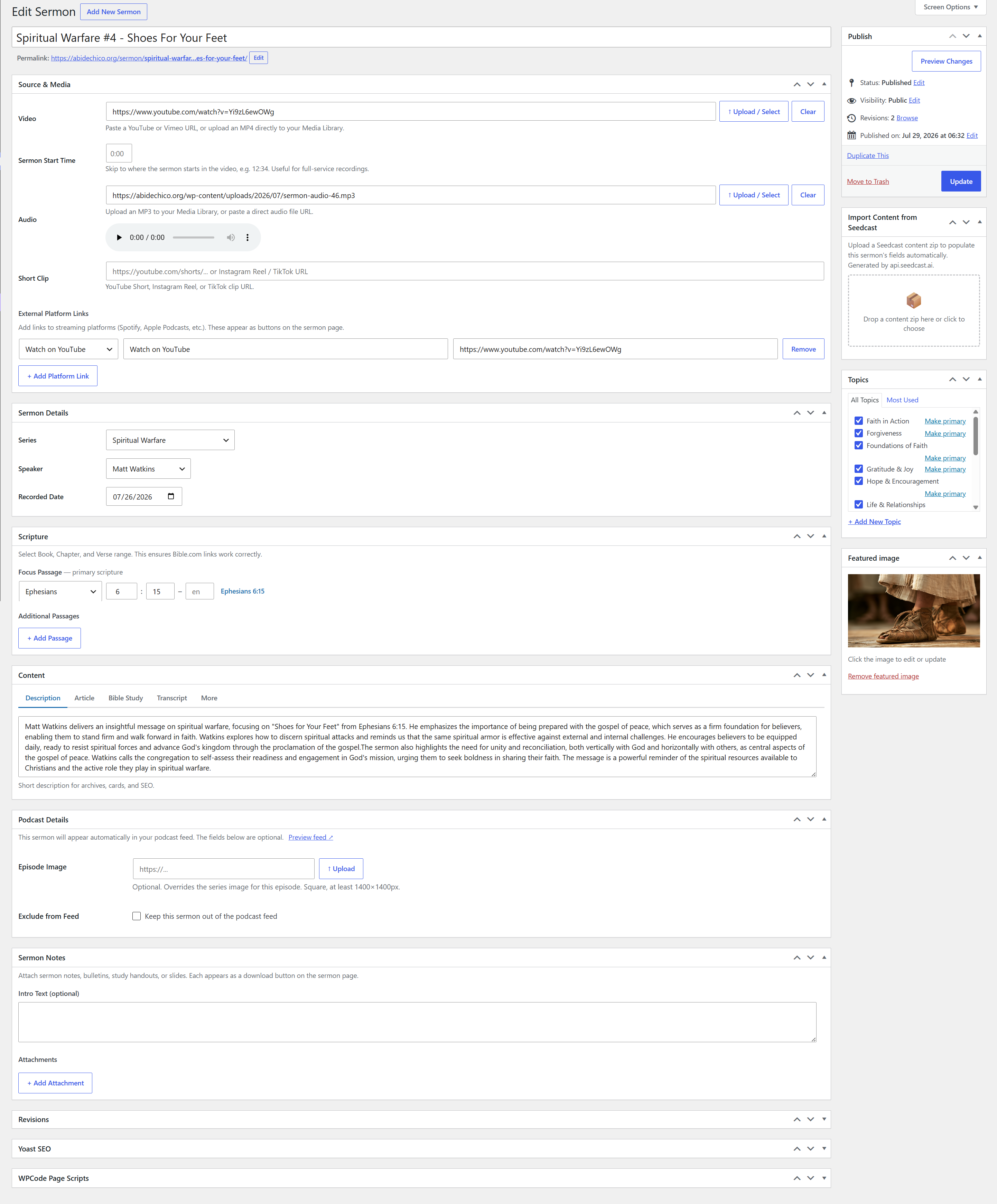
A sermon can include video, audio, transcript, article, Bible study, sermon notes, the questions it answers, Scripture references, speaker and series information, and downloadable PDFs.
Everything stays connected to the original sermon instead of being scattered across separate posts and pages.
A visitor may read instead of watching a 45-minute video. A member who missed Sunday may listen later. Someone studying a passage may find the sermon through Scripture. Someone who arrived with a question may find it answered near the top of the page. A small group may use the Bible study during the week.
Build a real library, not just a video archive
Scripture. Every book, chapter and passage gets its own page. Overlapping passages are understood intelligently, so a sermon on Ephesians 6:10-20 can be found by someone looking at Ephesians 6:15.
Topics. Organize teaching around subjects people actually want to explore, with a limit of three per sermon so a topic page stays a real way in rather than a list of everything.
Series. Give every series its own artwork, description, date range and archive.
Speakers. Create speaker profiles with a photo, biography, links and every sermon they have preached.
Together, these turn years of Sunday messages into an interconnected body of teaching rather than a long list of recordings.
Every passage becomes a page worth landing on
A verse page listing a single sermon is a dead end for whoever found it.
Sermon Library builds each passage page out. The sermons on that passage come first, then the articles written from them, then the rest of your teaching in that book. Someone who arrives looking for Ephesians 6:15 finds the message on that verse and a way into everything else your church has preached from Ephesians.
Books and chapters are real pages too. One address gathers every sermon you have preached from Romans, and another gathers Romans 8, so the connections between years of Sunday messages are something a visitor can follow rather than something only you can see.
Each sermon in the list also shows which passages in that book it actually touches, so a reader can tell at a glance which message is about the verse they came for.
Passages in books your church has barely preached are kept out of search results on their own, and come back on their own once there is enough teaching to make the page worth reading. Nothing to configure, and nothing to remember to undo later.
Every subject becomes a page too
A topic page gathers every sermon your church has preached on a subject, with the articles written from them and the subjects it is taught alongside.
Your topics are your own list. A sermon is filed under them from its own screen, and the Topic Coverage screen shows how much of your library is filed and what is not: libraries built over years tend to carry topics on some sermons and none on others, which is the difference between a subject page worth landing on and an empty one.
Topic pages with too little on them stay out of search results until the subject has been preached again.
Help people discover what your church actually teaches
Many sermon archives give search engines little more than a title and embedded video.
Sermon Library makes the underlying teaching available as indexable written content and adds structured information about sermons, speakers, audio, video and Scripture. That gives Google, other search engines and AI assistants more context for understanding what your church teaches.
Someone may discover your church while searching for a Bible passage, theological question, topic or sermon article. They did not have to be searching for your church to find something your church taught.
Keep useful sermon content alive
Use [scsl_content] to display sermon articles and Bible studies anywhere on your site as a list, grid or slider. Each item opens the original sermon directly to that content, so nothing is duplicated at a second URL.
A message preached two years ago can continue helping someone today.
See how complete every sermon and your entire library are
Sermon libraries develop gaps. One sermon is missing a transcript. Another has no Scripture reference. Another is missing artwork, notes or written content.
Every sermon receives a completeness score, showing how fully its page has been built out and exactly what could be improved.
Sermon Library also calculates an overall completeness score for your entire library, so you can see how consistently your church is building useful sermon records across everything you have published.
The Completeness Report shows:
- A score for every sermon
- An overall library score
- Which sermons need attention
- Exactly what is missing from each sermon
- What is missing most often across the library
- Separate sermon-detail and written-content scores
- A week-by-week completeness record
The score uses only the content your church has chosen to publish. If you do not use Bible studies, missing Bible studies will not lower your score.
Instead of wondering where your sermon library needs work, you can see where it stands and what to improve next.
See which sermons people actually read
Every sermon page, topic page and passage page is counted, and the sermon list carries a Views column you can sort by.
Counting survives page caching, which is where most view counters quietly stop working, and crawlers are not counted as readers. Nothing is shown to visitors: it is there to tell you which messages people come back to.
Already using another sermon plugin?
Sermon Library imports from Sermon Manager, Sermon Works, Mattytap Sermons and Series Engine.
For supported WordPress plugins, the importer reads sermon data already on your site, shows you what it found and lets you review it before anything is written. Original plugin data is left untouched. It can also identify duplicate speaker names and help you consolidate them during migration.
Series Engine imports from CSV with a review and mapping step before anything is created.
Audio Feed is built in
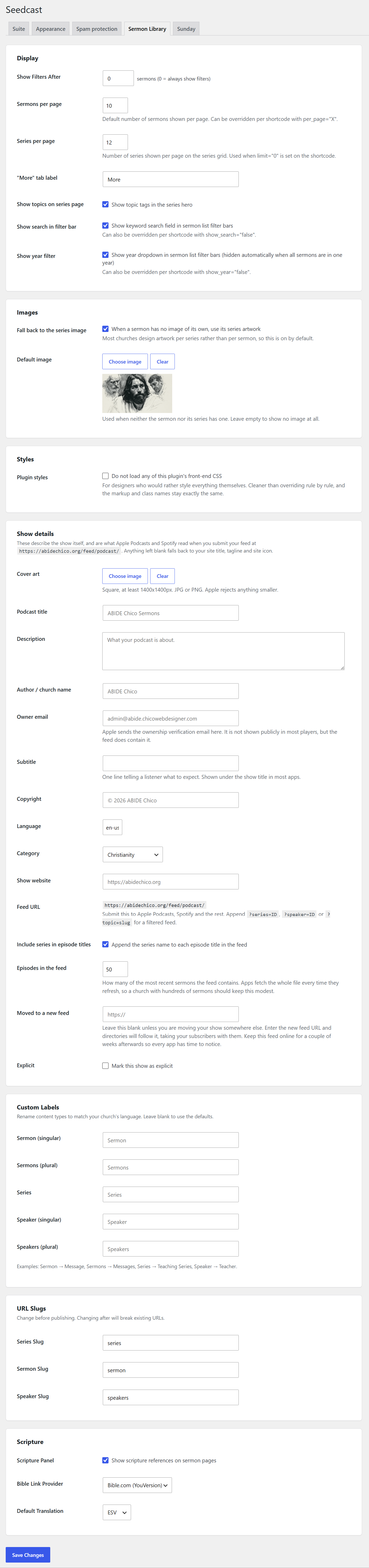
Sermon Library creates an iTunes-compatible RSS feed for Apple, Spotify and other podcast platforms. Create a feed for the whole church or filtered feeds for a series, speaker or topic.
Designed to work with your church website
- Works with any theme and inherits site fonts and colors
- Tested with Elementor and Divi
- Theme-overridable templates
- Optional plugin CSS
- Four appearance presets
- Visual shortcode generator
- Shared church details for service times and contact information
- Starts the week’s service bulletin from a new sermon, with Bulletin Library installed
Shortcodes
[scsl_sermon_list]sermons with filters[scsl_series_grid]series[scsl_speaker_grid]speakers[scsl_latest]latest sermon[scsl_content]articles or studies[scsl_topic_list]topics[scsl_scripture_list]Scripture index[scsl_sermon_index]all sermons by year[seedcast_church_details]shared church information
See it in action
And the core Sermon Library is free
Everything above is included in the free Sermon Library plugin.
Turn the recording into content automatically with Sermon Library AI
Sermon Library gives every sermon a place for a transcript, article, Bible study and the questions it answers. Sermon Library AI creates this content for you.
Upload the sermon recording you already made, and Seedcast processes what was actually preached and prepares the transcript, article, Bible study and questions inside the sermon.
Sermon Library AI can also write the short summary that sits at the top of a book, chapter or topic page, describing what that group of sermons covers as a body of teaching rather than repeating any one of them.
It fills the gaps in your topics as well: every sermon carrying none can be filed in one run, from your own list of topics, so the subject pages your library should have stop being empty.
With the AI Engine installed, visitors can ask your library a question in their own words and get an answer drawn from what your church has actually preached, with links to the sermons it came from. Questions asked about a subject appear on that topic’s page, and an answer worth keeping can be published onto a sermon or under a topic.
Where Bulletin Library is running, the opening paragraph of a service bulletin is written from that Sunday’s sermon, as the emphasis of the morning rather than a second copy of the sermon page.
Nothing publishes automatically. Generated content is staged for review so your church stays in control.
Instead of spending hours transcribing, summarizing and writing after every Sunday, your team can begin with the recording you already made, review the generated content and build a more complete sermon record.
Details and pricing: seedcast.ai
Your church is already creating the teaching. Seedcast helps make sure people can actually find, understand and use it.
Externe Dienste
The plugin itself does not call any external service to work. These are the only cases where a request leaves your site or a visitor’s browser, and each one happens because somebody chose it:
- Spam checking on submitted forms. If you turn on Google reCAPTCHA, hCaptcha or Cloudflare Turnstile in Settings, each submitted form sends that provider the token their widget produced, along with your site’s IP address, so the provider can confirm the sender is not a bot. Nothing is sent when no provider is configured, which is the default. Google: terms, privacy. hCaptcha: terms, privacy. Cloudflare: terms, privacy.
- Embedded video and audio. A sermon given a YouTube or Vimeo address embeds that player, so a visitor’s browser loads it from YouTube (through youtube-nocookie.com) or Vimeo when they open the sermon. No video is embedded unless you give a sermon one. YouTube: terms, privacy. Vimeo: terms, privacy.
- Copying your audio back from Seedcast. Churches whose sermon audio is hosted on media.seedcast.ai can copy those files into their own media library from Sermon Library > Reclaim Audio. Your site downloads its own files when you press the button; nothing is sent, and nothing happens unless you use that screen. Terms, privacy.
- Questions visitors ask, when the AI Engine’s assistant is on. The parts of your published sermons found for a question are passed to Seedcast AI Engine, which sends them to api.seedcast.ai to be answered. Nothing is sent where the engine is not installed or the assistant is off. Terms, privacy.
- Links out to a Bible. The “Read it” links beside a passage open Bible.com or BibleGateway in a new tab. These are ordinary links: your site sends them nothing, and nothing loads until a visitor clicks.
Sermon Library AI, the optional paid add-on, is a separate plugin with its own readme, and it is the only part that sends your sermon recordings anywhere.
Installation
- Upload the
seedcast-sermon-libraryfolder to/wp-content/plugins/ - Activate it through Plugins
- Go to Sermon Library in the admin menu
Moving from another plugin? Use Sermon Library > Import / Export before deactivating the old plugin so you can compare the two.
Änderungsprotokoll
Each passage has one page again: duplicate passage pages are merged into the original, and their old addresses redirect to it.
2.78.0
- A passage is filed once. Saving a sermon could create a second copy of a passage that already sat under its chapter, so one verse could end up with a dozen pages, each holding a sermon or two.
- Copies already made are merged back into the original shortly after updating, and their old addresses redirect to it.
2.77.0
- The first step of a breadcrumb can point at a page of your own. Churches that build their own sermons page should send people back to that page rather than to the series archive, which stays the default.
- Sermon Library > Sermons Page builds that page for you: pick the sections, give it a heading and an opening line, and it writes a draft with the shortcodes in it. It is ordinary page content, so your page builder or the block editor takes it from there, and the plugin never touches it again.
- The page’s address is yours to set while it is being built, rather than taken from the title and numbered if that address is taken.
- On a site built with Elementor, each section arrives as its own container with the shortcode in a shortcode widget, ready to drag and style. Everywhere else it arrives as blocks, a heading and a shortcode at a time.
- Passage pages can be switched off, and every reference then links straight to your Bible site. Your sermons keep their passages, the old addresses answer as gone rather than drifting to the front page, and switching them back on puts the pages back.
2.76.0
- Ready for Ask, the AI Engine’s assistant: visitors’ questions are answered from your sermons and the questions they answer, your speakers, series, topics and passages, with links to each. The assistant itself, its box, page and AI Assistant screen, comes with Seedcast AI Engine.
- An answer written on the AI Assistant screen can be published onto a sermon’s questions, where it counts toward completeness, or under your topics.
- Topic pages show the questions filed under them, under “Questions people have asked”.
- A Topic Coverage screen shows how much of your library carries topics, and can file every unfiled sermon in one run with Seedcast AI Engine.
- Sermon views are counted. They never were: the counter never reached the page. Topic and passage pages are counted too, a cached page still counts, and crawlers do not.
- A service bulletin’s opening paragraph is written from its sermon, as the emphasis of the morning, where Seedcast AI Engine is connected.
- A new sermon can start its service bulletin for you. Tick “Create service bulletin automatically” while writing it, and publishing the sermon starts a bulletin for the week it was preached. Needs Bulletin Library.
- A topic page names the subjects it is taught alongside beside its title, under a Related topics heading, with a setting of its own.
- Filtering the sermon list by “Needs work” returns the sermons that need work, and agrees with the Completeness screen.
- The Content column tells the truth about Questions, and the sermon list no longer writes a warning to the error log for each sermon with an empty list.
Complete historical changelog: see changelog.txt.
Screenshots



Für Entwickler
Ist das dein Plugin? Zeigen Sie die Zahlen.
Fügen Sie Ihrer Website, Docs oder GitHub Readme ein Live-Badge hinzu. Es wird von selbst aktualisiert - kein Konto erforderlich.
Best Sermon Library alternatives
All audio plugins →





Fragen und Antworten
Sermon Library: quick answers
Gerade Antworten, gezogen von Live WordPress.org Daten.
Quelle: WordPress.org
Is Sermon Library free?
Yes. Sermon Library is free to download and use from the official WordPress.org plugin directory.
Is Sermon Library safe to use in 2026?
Sermon Library is a solid plugin choice in 2026, with a few things worth checking first. It runs on 10+ sites and was last updated 2 days ago, and scores 66/100 on our health check.
How many websites use Sermon Library?
Sermon Library is active on 10+ WordPress websites and has been downloaded 1,086 times since it launched in July 2026. It was downloaded 318 times in the last 30 days.
Does Sermon Library work with WordPress 7.1?
Yes. The developer has tested Sermon Library up to WordPress 7.1.5, the latest release. It requires WordPress 6.2 or newer.
What PHP version does Sermon Library need?
Sermon Library requires PHP 7.4 or higher. Most hosts run PHP 8.x today, so it works on any modern WordPress hosting.
When was Sermon Library last updated?
The latest version, 2.78.0, was released on November 24, 2026 (2 days ago).
Who makes Sermon Library?
Sermon Library is developed and maintained by Seedcast.ai.
What are the best alternatives to Sermon Library?
The most popular alternatives to Sermon Library are Presto Player (100K+ installs), Seriously Simple Podcasting (20K+ installs) and Compact WP Audio Player (20K+ installs).
Angetrieben von PageForge
Eine Vorlage und eine Tabelle. Eine echte Seite für jede Suche.
PageForge Verwandelt jede Zeile eines CSV in eine WordPress-Seite mit eigenem Titel, URL, SEO Felder und Schema entworfen. Kostenlos auf WordPress.org.
- CSV und XLSX, plus Google Sheets auf Beruf und Unternehmen
- seinen eigenen Titel, URL, SEO Felder und Schema für jede Seite
- Arbeitet mit dem Blockeditor, Elementor, Divi und Avada
- Kostenlos auf WordPress.org, keine Kreditkarte