


saidweekly
Plans an editorial calendar for your business, then writes researched articles and delivers them to WordPress on the days you choose.

Solide Wahl
saidweekly is a solid plugin choice in 2026, with a few things worth checking first. Is rated 5/5 and was last updated 3 weeks ago, and scores 71/100 on our health check.
- Aktiv entwickelt – letztes Update vor 3 Wochen
- Getestet mit dem neuesten WordPress (7.1)
- Kleine Benutzerbasis (<10 aktive Installationen)
- Bisher sehr wenige Bewertungen
Wie stapelt es sich?
Side-by-side bei Installationen, Updates, Bewertungen und Support



Tägliche Downloads
Download-Spitzen folgen normalerweise einer neuen Version - jede Website, die automatisch aktualisiert wird, gilt als Download.
Ranglisten
Where saidweekly stands todayWordPress.org Ranglisten suchen
Live-Position in der Plugin-Suche, Top 100| Stichwort | Position |
|---|---|
| Bloggen | >100 |
| Inhalt | >100 |
| drafts | >100 |
| editorial calendar | #55 |
| writing | >100 |
Bewertungsaufschlüsselung
★★★★★★★★★★ 5 from 1 reviews
About saidweekly
Aus der offiziellen Readme · V1.2.0Beschreibung
saidweekly plans an editorial calendar for your business and turns it into finished articles, delivered to your WordPress site on the days you choose.
The calendar lives inside WordPress. Add and edit topics, lock the ones you want kept, import and export spreadsheets, and decide whether articles arrive as drafts or publish on their own. The research, planning, writing and featured images come from the saidweekly service.
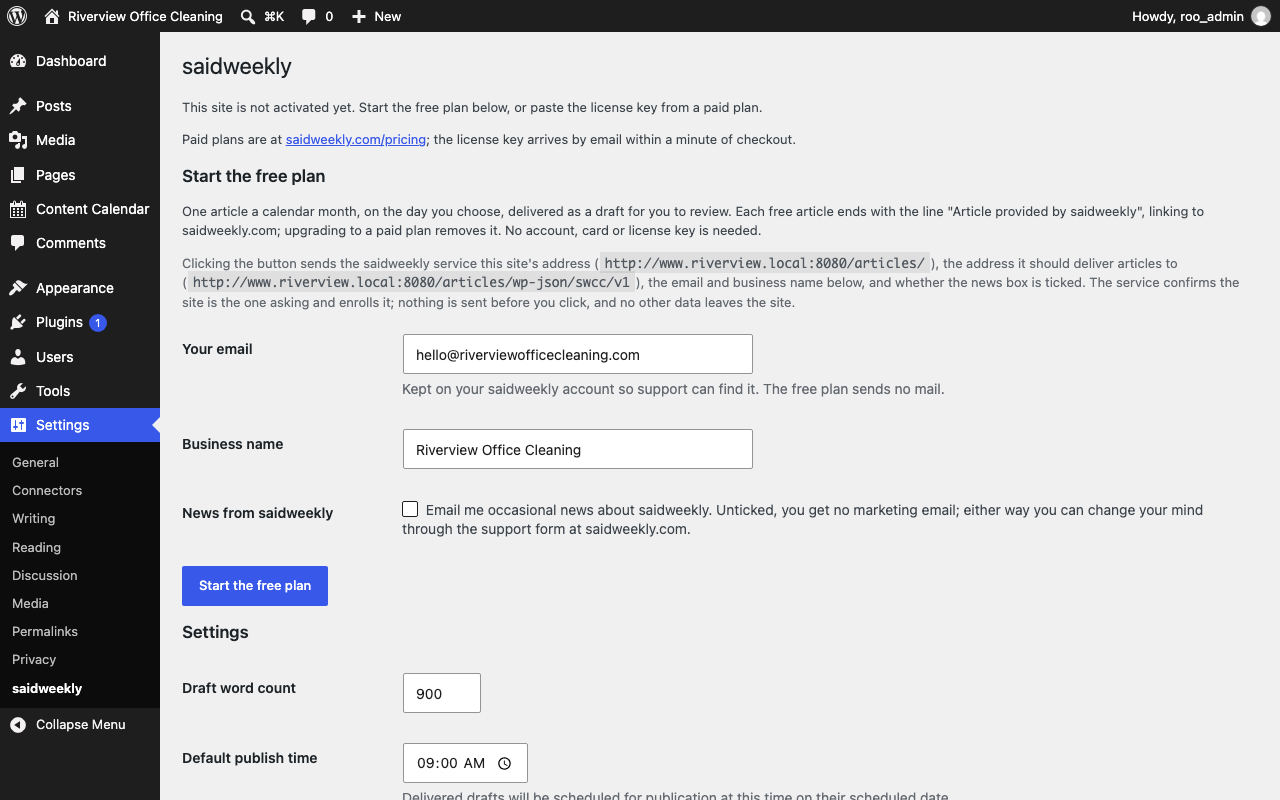
The free plan needs no account, card or license key. Open Settings → saidweekly, click Start the free plan, and the site is enrolled. The free plan writes one article a calendar month. Each article ends with the line “Article provided by saidweekly”, linking to saidweekly.com; a button under Settings → saidweekly removes it.
Paid plans (https://saidweekly.com/pricing) are annual, cover one website, and write one article a week, three a week, or one every day. Paste the license key into the same settings screen to activate.
How the calendar is planned
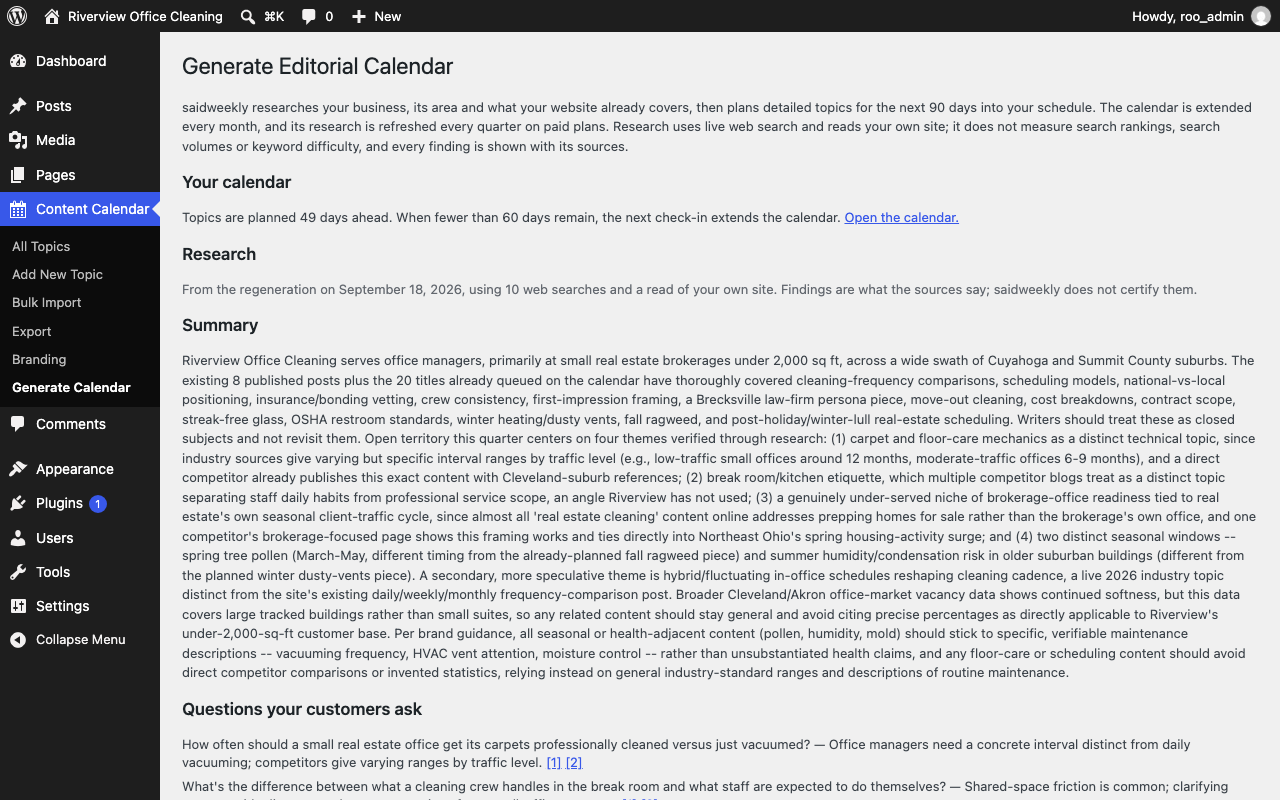
saidweekly researches your business, your area and what your site already covers, using live web search and a read of your own pages. It then proposes a topic for each open date in the next 90 days, each with its reasoning and sources. The calendar is extended every month. On paid plans the research is refreshed every quarter and the whole calendar can be regenerated twice a year; the free plan can regenerate once a year.
The calendar is yours to change. Edit or lock any topic, add your own, or import a list from a spreadsheet. Nothing you wrote, edited or locked is ever changed by the plugin.
How articles arrive
Pick the days your articles fall on. Seven days before each date, the saidweekly service writes the article, chooses a featured image and delivers it to your site as a draft. Each draft includes:
- The article body, written for your business from the details you enter under Branding
- An SEO title and meta description (the description also becomes the post excerpt)
- A featured image with a filename and alt text, stored as WebP unless you turn that off
- Your category and a short list of post tags
- A call to action linking wherever you choose
- The scheduled date from its topic, so clicking Publish schedules the post instead of publishing it immediately
Was du kontrollierst
- Publishing. Articles arrive as drafts. Automatic publishing stays off until you switch it on and confirm. It applies only to articles written after that, and never publishes anything past its date.
- Topics. Titles, keywords, categories and dates are yours to set, and any topic can be locked.
- Pausing. Pause the whole site at any time. An article whose topic changed after it was written is held for your review.
- Status. The calendar shows where every topic stands: Planned, Queued, Drafted, Scheduled, Published or Private.
- Warnings. If the calendar runs low, the site administrator is emailed.
What leaves your site
Nothing is sent anywhere until you start the free plan or activate a paid plan under Settings → saidweekly. After that, the plugin talks only to the saidweekly service and downloads featured images from Pexels. Exactly what is sent, and when, is listed under External services below.
The service writes with Anthropic’s Claude models, researches with Anthropic’s web search, and chooses images from Pexels. Your site never holds a key for any of these providers and never calls them directly. The service is operated by Martin Miller Software Consulting LLC under its terms of service (https://saidweekly.com/terms) and privacy policy (https://saidweekly.com/privacy).
Bedarf
- PHP 8.0 oder später
- A site reachable over HTTPS, so the saidweekly service can confirm it and deliver articles to it
- For a paid plan, a license key from saidweekly.com
Externe Dienste
This plugin is the WordPress half of a hosted service. On its own it provides the editorial calendar; everything else comes from the two external services described here. Neither is contacted until you start the free plan or activate a paid plan under Settings → saidweekly.
The saidweekly service
Operated by Martin Miller Software Consulting LLC, doing business as saidweekly. Terms of service: https://saidweekly.com/terms. Privacy policy: https://saidweekly.com/privacy.
The service researches your business, plans the editorial calendar, writes the articles and chooses the featured images. Data is sent at these times, and only these:
- When you start the free plan: this site’s address, the address articles should be delivered to, and the email address and business name shown on that screen. If you tick the box asking for occasional news about saidweekly (unticked by default), that answer is sent too. It controls marketing email only, never service notices.
- When you activate a paid plan: your license key, the site address and the delivery address. The key is used once and never stored on your site.
- Twice a day: the service checks in and your site replies with the identifiers of the jobs that are due. Nothing else.
- When an article is written: the topic (title, keyword, notes, word count), your Branding details, the identifiers of recently used photographs, the stored research summary and your recent article titles. The service holds these in memory while it writes and keeps none of it afterwards.
- When a calendar is planned: your Branding details and the public addresses of your own pages, which the service reads. What it finds is stored on your site, with every source.
- When the Settings page opens: a request for your plan and credit balance.
- Billing buttons on the Settings page open the service’s payment provider, Stripe, in your browser.
The service uses Anthropic’s Claude models and web search to write and research, and the Pexels API to choose photographs. Your site never holds a key for these providers and never calls them directly. The service’s privacy policy covers what it shares with them.
Pexels
Terms of service: https://www.pexels.com/terms-of-service/. Privacy policy: https://www.pexels.com/privacy-policy/. License: https://www.pexels.com/license/.
When the service delivers an article, it names a photograph on images.pexels.com that it has already chosen. Your site downloads that one file, once, into your media library as the featured image, the same way WordPress’s own media sideloading works, and serves it from your site from then on. Nothing is hot-linked, and no page on your site loads anything from Pexels. The request carries no data about you or your site beyond an ordinary HTTP request for the file. If the download fails, the article still arrives, without a featured image.
Installation
- Install the plugin from the WordPress plugin directory under Plugins → Add New, or upload the zip from saidweekly.com under Plugins → Add New → Upload Plugin. Activate it.
- Open Settings → saidweekly and click Start the free plan. Check the email address and business name shown, and the site is enrolled. No account, card or license key is needed. For a paid plan, choose one at https://saidweekly.com/pricing, paste the license key from your confirmation email into the same screen, and save. A site on the free plan upgrades the same way.
- Open Content Calendar → Branding and fill it in. This is what makes the writing sound like your business; generation will not produce useful copy without it.
- Fill the calendar: generate one under Content Calendar → Generate Calendar, add topics under Content Calendar → Add New, or import a list under Content Calendar → Bulk Import.
- Under Settings → saidweekly, pick the days your articles fall on and whether they arrive as drafts or publish automatically. Your first article is written as soon as setup is complete.
A paid plan’s license key is used only to activate the site. It is never stored in the database, so the field is empty afterwards; that is expected. The free plan has no key: if you reinstall the plugin, click Start the free plan again and the site picks up where it left off.
Änderungsprotokoll
Declined topics are held with the reason shown, and the free plan screen links to the terms. No action needed after upgrading.
1.2.0
- A topic the service declines to write, because it asks for something the terms do not allow, is now held with the reason shown beside it, and is written once the topic is changed. No credit is used for a declined topic.
- The Start the free plan screen states what saidweekly may not be used for and links to the terms of service.
- A topic’s failure note explains a declined topic and a paused account in plain words.
1.1.2
- The Start the free plan screen has an unticked box for occasional news about saidweekly. Your answer is recorded with your account and controls marketing email only.
1.1.1
- Removing the “Article provided by saidweekly” line from delivered articles is now a button under Settings → saidweekly, available on any plan, rather than something that happened only when the service reported a paid plan.
- The “Hide this notice” link on the start notice hides it for good.
- Every script the plugin uses is enqueued; no screen prints a script tag or an inline event handler.
- The readme documents the two external services the plugin connects to, with terms and privacy links.
Screenshots


Für Entwickler
Ist das dein Plugin? Zeigen Sie die Zahlen.
Fügen Sie Ihrer Website, Docs oder GitHub Readme ein Live-Badge hinzu. Es wird von selbst aktualisiert - kein Konto erforderlich.
Best saidweekly alternatives
All blogging plugins →





Fragen und Antworten
saidweekly: quick answers
Gerade Antworten, gezogen von Live WordPress.org Daten.
Quelle: WordPress.org
Is saidweekly free?
Yes. saidweekly is free to download and use from the official WordPress.org plugin directory.
Is saidweekly safe to use in 2026?
saidweekly is a solid plugin choice in 2026, with a few things worth checking first. Is rated 5/5 and was last updated 3 weeks ago, and scores 71/100 on our health check.
How many websites use saidweekly?
saidweekly is active on <10 WordPress websites and has been downloaded 250 times since it launched in October 2026. It was downloaded 171 times in the last 30 days.
Does saidweekly work with WordPress 7.1?
Yes. The developer has tested saidweekly up to WordPress 7.1.5, the latest release. It requires WordPress 6.4 or newer.
What PHP version does saidweekly need?
saidweekly requires PHP 8.0 or higher. Most hosts run PHP 8.x today, so it works on any modern WordPress hosting.
When was saidweekly last updated?
The latest version, 1.2.0, was released on November 11, 2026 (3 weeks ago).
Who makes saidweekly?
saidweekly is developed and maintained by Brent Miller.
What are the best alternatives to saidweekly?
The most popular alternatives to saidweekly are Easy Footnotes (8K+ installs), Clariti (1K+ installs) and Ghost (500+ installs).
Angetrieben von PageForge
Eine Vorlage und eine Tabelle. Eine echte Seite für jede Suche.
PageForge Verwandelt jede Zeile eines CSV in eine WordPress-Seite mit eigenem Titel, URL, SEO Felder und Schema entworfen. Kostenlos auf WordPress.org.
- CSV und XLSX, plus Google Sheets auf Beruf und Unternehmen
- seinen eigenen Titel, URL, SEO Felder und Schema für jede Seite
- Arbeitet mit dem Blockeditor, Elementor, Divi und Avada
- Kostenlos auf WordPress.org, keine Kreditkarte