


Royal MCP – Secure AI Connector for Claude, ChatGPT & any LLM via MCP
Connect Claude, ChatGPT or any AI app to WordPress. Drafts only mode, access levels per app and a 72-hour undo. 400+ tools, self-hosted.

Sichere Auswahl
Yes — Royal MCP is a safe, well-maintained plugin to use in 2026. It runs on 10K+ sites, is rated 5/5 and was last updated 1 day ago, and scores 89/100 on our health check.
- Bewährt im Maßstab auf 10k + aktiven Standorten
- Aktiv entwickelt - letztes Update vor 1 Tag
- Getestet mit dem neuesten WordPress (7.1)
- Responsive Support – 100 % der letzten Threads wurden behoben
- Momentum — downloads up 23% vs the previous 30 days
Wie stapelt es sich?
Side-by-side bei Installationen, Updates, Bewertungen und Support


Tägliche Downloads
Download-Spitzen folgen normalerweise einer neuen Version - jede Website, die automatisch aktualisiert wird, gilt als Download.
Ranglisten
Where Royal MCP stands todayWordPress.org Ranglisten suchen
Live-Position in der Plugin-Suche, Top 100| Stichwort | Position |
|---|---|
| Ai | #39 |
| ChatGPT | #6 |
| Claude | #6 |
| elementor | >100 |
| MCP | #5 |
Versionsübernahme
Anteil aktiver Sites pro Release.
Bewertungsaufschlüsselung
★★★★★★★★★★ 5 from 7 reviews
About Royal MCP
Aus der offiziellen Readme · V2.0.0Beschreibung
Let Claude, ChatGPT or any AI Agent work on your WordPress site, while you decide what it may touch. Free and 100% self-hosted. 400+ MCP tools.
Royal MCP is a free WordPress MCP plugin. It turns your site into an MCP server, so the AI app you already use can write and edit posts, update products, fill in SEO fields and edit Elementor or Divi pages when you ask it to. You choose how far each app can go, you can see what it changed, and tracked changes can be undone for 72 hours.
You stay in control
- Start in Drafts only – the AI can write and edit drafts, while publishing, live pages and site settings are refused until you allow them.
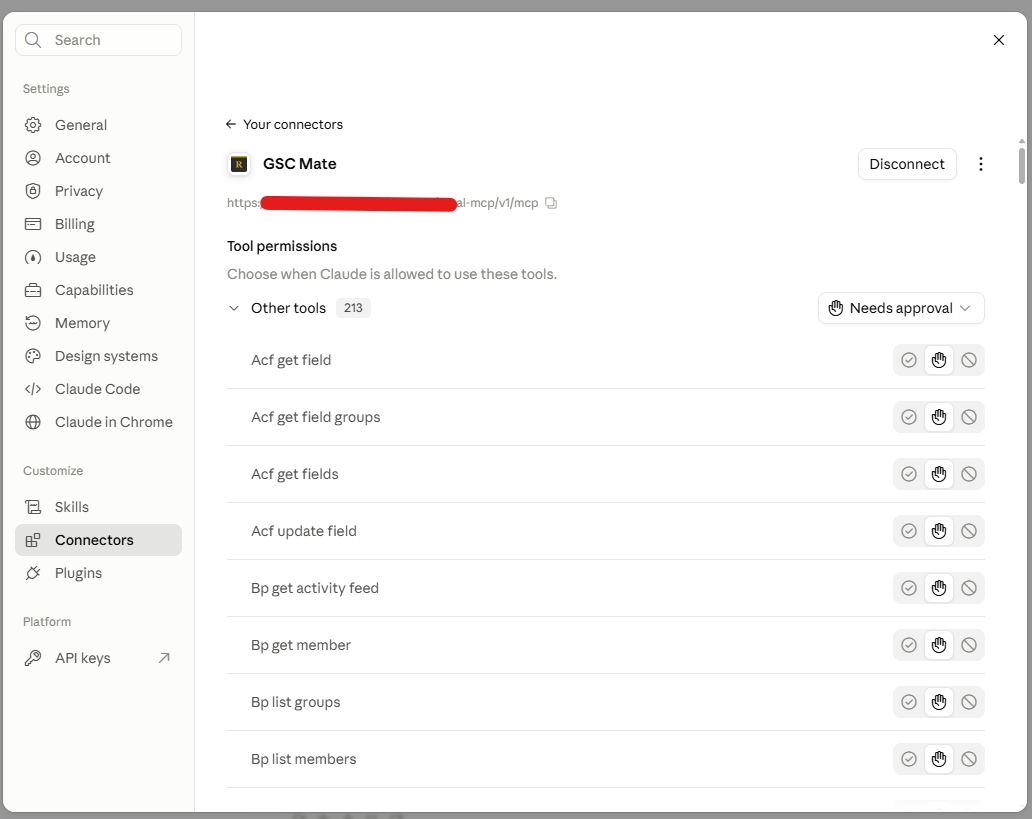
- Set access for each app – apps sign in with OAuth 2.1. Give each one Full, Read-only or Drafts only access, and make new apps wait for your approval before they can connect.
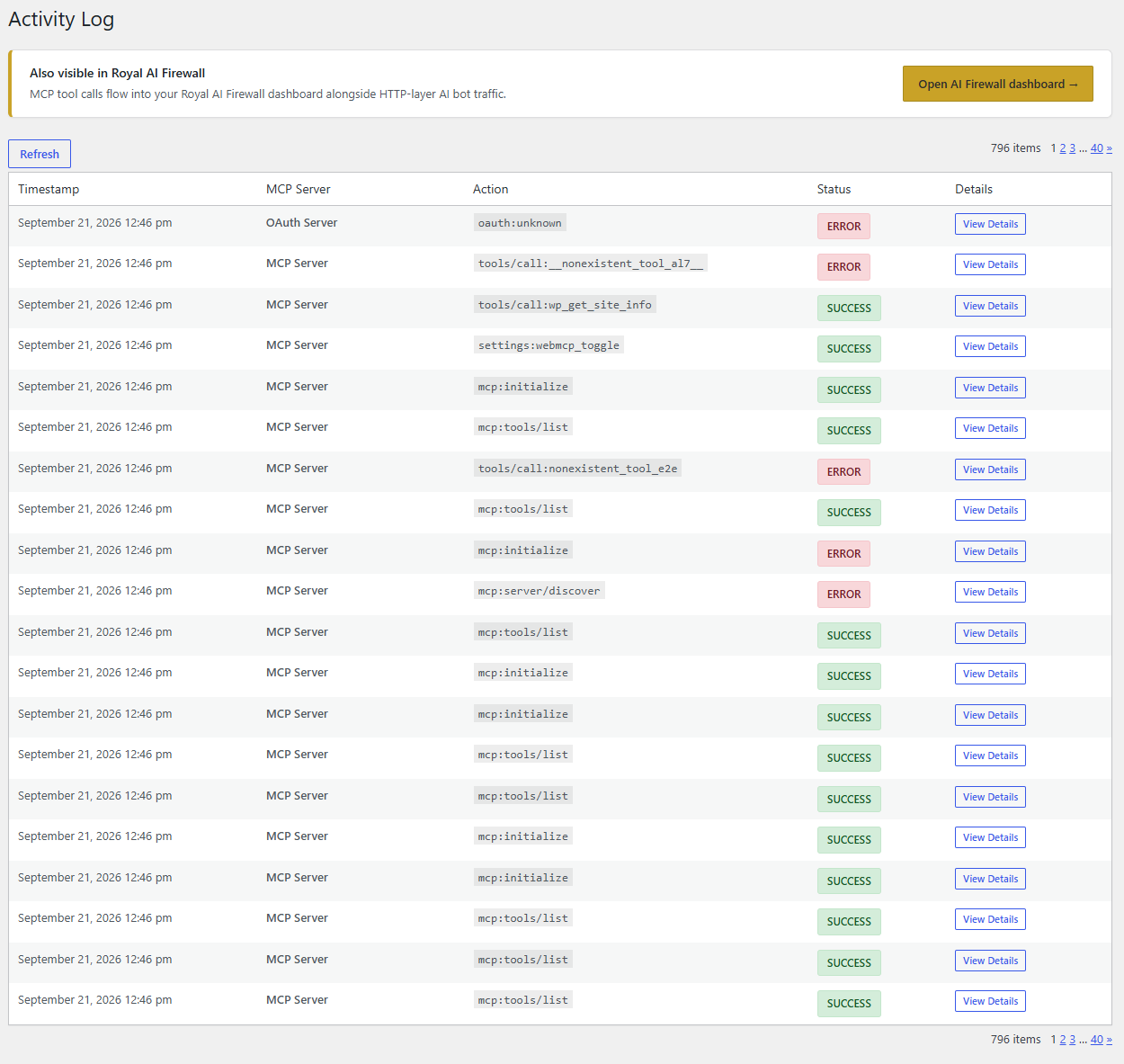
- See what changed – Recent Changes lists each AI edit with the value before and after, and the Activity Log records every tool call.
- Undo it – tracked changes to content, settings, menus, WooCommerce, Elementor and Divi can be reversed for 72 hours, and undo will not write over edits made after the AI’s change unless you tell it to.
- No middleman – no relay server, no account, no telemetry and no license check. Your AI app talks to your site directly.
New in 2.0
- Dashboard – your MCP address with connect steps, what is connected, what AI clients changed lately and which Royal plugins are on the site.
- Context – write down what your site is for, its tone and what to leave alone. Every connected AI client gets it when it connects.
- Skills – switch on a playbook for Elementor, Divi, WooCommerce or SiteVault and connected AI clients read it before that kind of work. Nothing to download.
- A shorter tool list – tools for plugins that are not active on your site are left out, so the AI sees only what it can use.
- 100 more tools – plugin and theme management, launch and maintenance reports, page checks, theme colours and fonts, and new integrations for Akismet, Jetpack, WP Mail SMTP, WP-Optimize, Really Simple Security and image optimisers.
- Safer setting changes – an AI client can change one part of a plugin setting without sending the whole thing back, a change that would overwrite a value Royal MCP keeps hidden from AI clients is refused, and you choose which settings an AI may read in full under Return as stored.
- Clearer tools – every tool has a plain title, long lists come in pages, and dates include their time zone.
What you can ask for
- “Turn these notes into a blog post and save it as a draft for me to review.”
- “Which of my products have no description? Write one for each.”
- “Put every product in the Hoodies category on sale at 20% off and list the old prices.”
- “Find the posts that are missing a meta description and fill them in.”
- “Change the phone number on every Elementor page that shows the old one.”
- “Why did the site throw a PHP error this morning?”
- “Show me what you changed today, then undo the last one.”
Royal MCP has 400+ MCP tools: 147 for WordPress itself and 258 across 46 plugins, including WooCommerce, Elementor, Divi, Advanced Custom Fields and Yoast SEO. The full list is further down this page.
Connect Claude to WordPress
- Install Royal MCP and turn it on under Royal MCP → Connections.
- Copy the MCP Server URL from that screen.
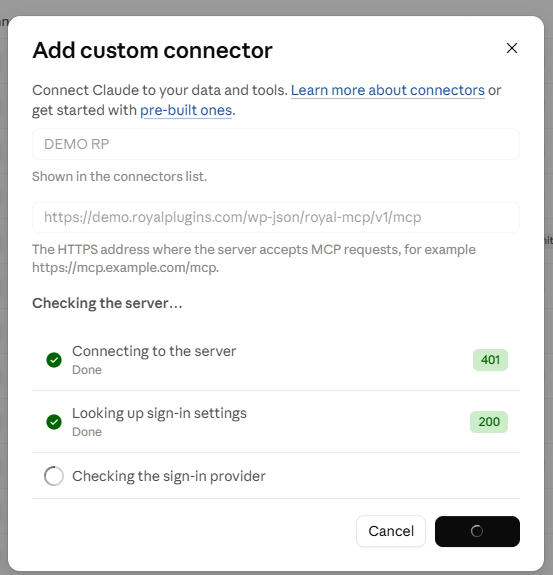
- In Claude, add a custom connector, paste the URL and click Connect.
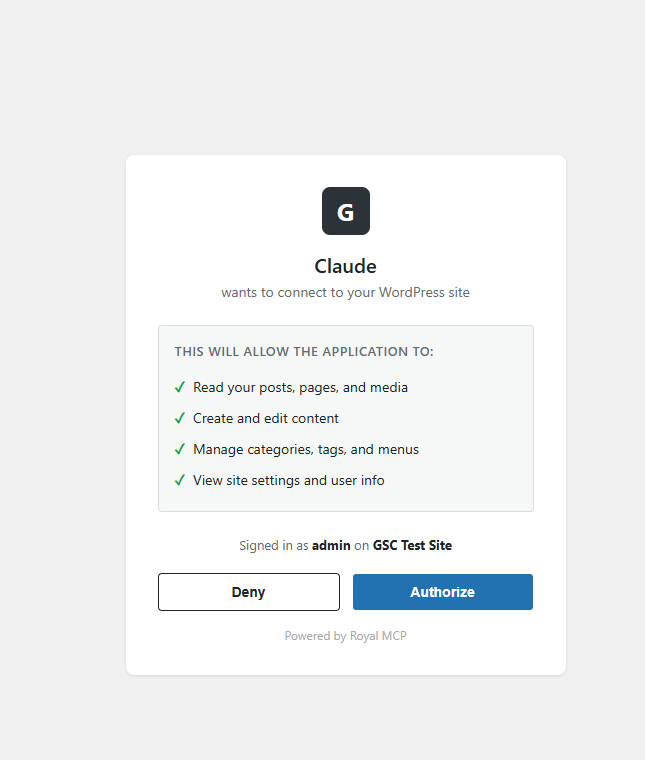
- Sign in to your site when asked and approve the connection.
Works with Claude on the web, Claude Desktop and Claude Code. Setup takes a few minutes.
Edit Elementor with Claude
Step-by-step guide: Connect Claude to WordPress
Connect ChatGPT to WordPress
- Install Royal MCP and turn it on under Royal MCP → Connections.
- Copy the MCP Server URL from that screen.
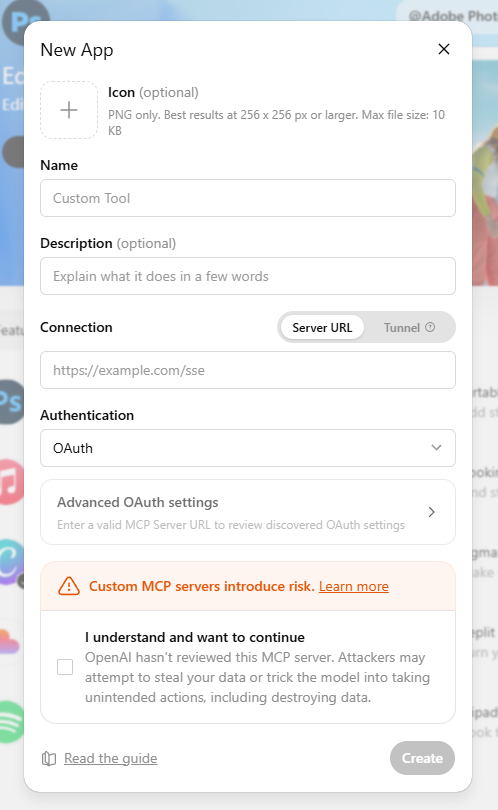
- In ChatGPT, add Royal MCP as a custom app (Developer Mode) and paste the URL.
- Sign in to your site when asked and approve the connection.
ChatGPT can then read your posts, write drafts, update product prices, moderate comments and check SEO across your site, in an ordinary conversation.
Step-by-step guide: Connect ChatGPT to WordPress
Plugins with dedicated MCP tools
46 plugins have their own tools. Each one is listed below with what your AI can do in it.
Not seeing yours? MCP still works. WordPress core operations (posts, pages, media, users, taxonomies, custom fields, menus, options) cover most day-to-day AI workflows for any plugin — read/write ACF via wp_get_post_meta even without ACF-specific tools, edit posts on any custom post type, moderate any plugin’s comments. Shared SEO meta tools automatically work with Rank Math, AIOSEO, SEOPress, and SEObolt. A dedicated integration layers specialized tools on top when that plugin exposes its own data model, request features/plugins support here on the wp.org support forum.
Use it from any AI app
Connect once, then work on your site from whichever AI app you prefer, and switch apps without redoing the connection:
- Chat apps – Claude (web, desktop and Claude Code) and ChatGPT, signing in with OAuth.
- Code editors and terminals – Cursor, VS Code, Codex, Gemini CLI and other MCP-capable editors, with OAuth or an API key.
- Local models – LM Studio and other local MCP clients, so prompts and site data can stay on your own machine.
- Scripts and agent frameworks – any MCP-compatible framework, or plain HTTP with
Authorization: Bearer <key>.
Built to work alongside other MCP tools
Royal MCP is designed to run next to the MCP tools other plugins ship, so your AI can reach for the best tool for each part of a job. When Elementor’s own MCP is switched on, Royal MCP detects it and tells your AI that Elementor’s builder is there for designing new layouts, while Royal MCP’s Elementor tools keep handling edits to the pages you already have: text and image swaps, widgets, cloning and templates. WooCommerce’s own MCP abilities keep working too, and Royal MCP adds the rest of the store: coupons, variations, attributes, customers and store stats. Royal MCP answers on its own endpoint and never switches off another plugin’s tools, so together they cover more of your site than any one of them alone.
See what AI agents do to your site
The free Royal AI Firewall companion shows every AI agent hitting your site at the HTTP layer (training crawlers, retrieval bots, AI search engines), not just the ones connected through Royal MCP. Install both for a unified view across MCP tool calls and HTTP-layer bot hits.
147 Core Tools + 258 Integration Tools
WordPress Core (147 tools):
- Posts – create, read, update, delete, search, count, clone as a draft, sort by publish or last-modified date and find posts edited since a given date (any registered public post type, featured images supported)
- Pages – full CRUD with parent page support
- Blocks – read a post’s block tree; insert, replace, move and delete blocks by path; replace text inside blocks; change attributes of server-rendered blocks; check markup before writing. Works with core blocks and plugin blocks such as GenerateBlocks, Stackable, Spectra and GreenShift, keeps them valid in the editor, and every write has a revision and an undo token
- Patterns and Site Editor – list, read, create and update synced patterns; read global styles and block templates
- Post Types – discover all registered public post types on the site
- Post Revisions – list revision history and roll a post back to any prior version
- Media – browse; upload images, PDFs and any other file type the site allows from a URL, base64 or a file handed over by ChatGPT; convert, resize and compress images on upload; find files already in the library by source URL or SHA-256 and reuse them instead of uploading twice; update alt text/caption/title/description, set as featured image, delete
- Comments – create, read, delete; full moderation suite (list pending, approve, mark spam, trash)
- Users – display names and roles (emails and usernames are not exposed)
- Categories, Tags & Custom Taxonomies – full CRUD, read a single term, assign, count, discover registered taxonomies
- Term Meta – read/update/delete (most useful for term-level SEO fields on categories and tags)
- Menus – create menus, list, read a single menu item, and full CRUD + reorder on menu items
- Publish and Promote – publish a draft and insert into a menu in one call
- Preview Links – generate a shareable draft-preview URL without a WP login
- Post Meta – read/update/delete custom fields (works with ACF, MetaBox, JetEngine, Pods, CPT UI)
- SEO Meta – read/write Yoast, Rank Math, AIOSEO, or SEObolt title/description/focus keyword/robots/OG (auto-detects active plugin)
- SEO Audit – fetch a post’s rendered HTML and report title, meta description, canonical, viewport, OG, Twitter Card
- Widgets – list, list sidebars, read a single widget, update content (writes gated by theme-appearance admin toggle)
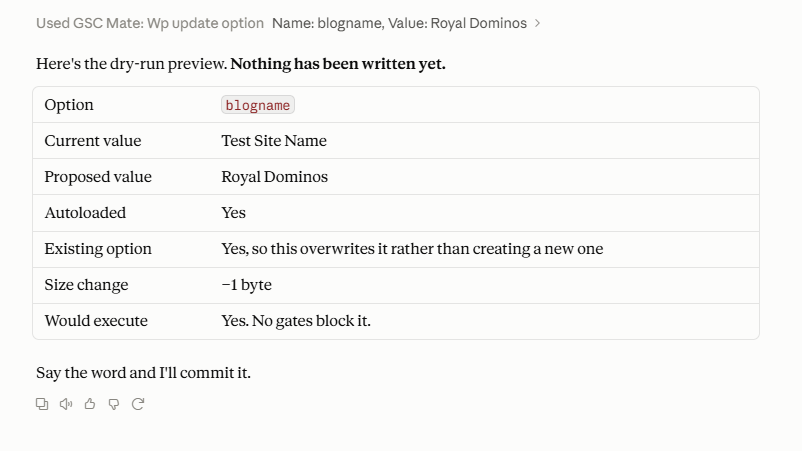
- Find and Replace – literal replace with dry-run preview, expected-count safety, read-after-write verification
- Undo and Recent Changes – reverse a tracked change within 72 hours via mcp_undo_last_operation; list recent changes and see each one’s value before, the value written and the value now, in the tools and in WP Admin
- Site Info + Site Status – name, WP/PHP versions, active theme + plugins, cron activity — for AI-driven pre-write validation
- Error Log + Cron Schedule – read recent PHP errors, a record of PHP fatal errors kept by Royal MCP (credentials hidden), and scheduled WP cron events
- Connection Health – MCP session diagnostic (route, auth method, session ID, plugin version)
- Plugins & Themes – list installed with active status; install from WordPress.org, activate, deactivate, update, delete, switch theme and set auto-updates, with a check that the site still loads afterwards (refused in Read-only and Drafts only)
- Launch and Maintenance – publish and launch a page, check a site before launch, an SEO pass before launch, a monthly maintenance report, move theme assets to a new theme
- Page Checks – validate a page’s schema markup; purge one URL from the cache and check what is served; audit SEO fields across many posts
- Skills – give the AI the site owner’s chosen playbook for Elementor, Divi, WooCommerce or SiteVault work, one part at a time
- Theme Appearance – get theme, read one or all theme mods, write theme mods (gated), read/write Custom CSS; read and change colours and fonts in Astra, GeneratePress, Kadence and Blocksy, with undo
- Search + Permalink Structure – full-text content search; read/write permalinks (gated)
- Options – read allowlisted core options, read plugin settings (sensitive keys redacted), write to allowlisted options when enabled
Third-Party Plugin Integrations (auto-detected)
If the plugin is active on your WordPress site, its tools register automatically, with nothing more to set up.
- WooCommerce (29 tools) — full store CRUD: products (simple + variable), variations, global attributes (
pa_*), coupons with bulk-trash purge, orders + notes, customers, and store statistics - Elementor (15 tools, free + Pro) — clone a page with fresh element IDs, bulk text/image replacement across 12+ widget types, add widgets, compact page outlines, widget-level settings reads, widget schema and dynamic-tag discovery, template library import/insert,
post_contentrestoration on damaged pages (72-hour undo per write) - Divi (9 tools, Divi 4 + Divi 5) — format detection, page outlines, layout validation, library reads, dry-run find-and-replace with active-editor-session detection, page cloning (D5
clientIdsregenerated), image swaps, library-to-page apply in merge or replace mode (72-hour undo per write) - Advanced Custom Fields (17 tools, free + Pro) — create, clone, update, delete, import and export field groups and their fields (with undo); type-aware field reads (each field’s Return Format respected: hydrated post objects, parsed repeater rows, image arrays), bulk-read all fields on a post, type-aware writes, field-group enumeration
- Yoast SEO (5 tools) — read/write Yoast meta (raw + resolved), capture the JSON-LD schema graph, list indexed internal links, list Yoast Premium redirects
- UpdraftPlus (4 tools) — list backups, read status, trigger async backups with per-entity filtering (DB, plugins, themes, uploads), read the backup schedule
- WPForms (4 tools, free + Pro) — list forms, read a form’s field schema; submission access (list + read) requires WPForms Pro
- Solid Security (4 tools) — read the security dashboard, list currently locked-out IPs, read the security event log, add an IP to the ban list (also detects iThemes Security and Kadence Security Basic)
- Wordfence (8 tools) — read the security status, firewall mode and scan findings, list blocked IPs, block or unblock an IP, read failed logins and blocked requests, start a scan
- Contact Form 7 (3 tools) — list forms, read a single form’s parsed field schema; submission access requires the Flamingo companion plugin, with personal details hidden by default
- MonsterInsights (4 tools) — read the analytics overview, top pages, traffic sources, and top Search Console queries
- W3 Total Cache (3 tools) — read cache config across every module, purge (all / by URL / by post), read cache usage stats
- LiteSpeed Cache (4 tools) — read cache status and the settings that shape caching, purge everything, purge specific pages by URL or post
- Duplicator (3 tools) — list migration packages, read per-package status, get the installer URL for any completed package
- BuddyPress (4 tools) — list community members, read a single member profile, list groups, read the activity feed
- Redirection (5 tools) — list/create/update 301/302/307 redirects (with regex + group + status), list redirect groups, export all redirects
- TablePress (6 tools) — list and read tables, create a table from rows, change cells (dry run + undo), copy a table, export as CSV, JSON or HTML
- Code Snippets (5 tools) — list and read snippets (credential values hidden in returned code), see recently deactivated snippets, deactivate a snippet that breaks the site, change a snippet’s name, description or tags; never creates, edits, activates or runs code
- Complianz (7 tools) — consent setup status, cookies, services, cookie banner texts and legal documents; change banner texts and cookie descriptions, with undo
- WPCode (3 tools, Lite + Pro) — list snippets, read one snippet’s settings and code (credential values hidden), read its status and last recorded error; read only
- MailPoet (12 tools) — lists, subscribers, newsletter drafts, test sends and stats; schedule a send confirmed with the exact recipient count
- …
Installation
- In WordPress, go to Plugins → Add New, search for Royal MCP and click Install Now (or upload the
royal-mcpfolder to/wp-content/plugins/) - Aktivieren Sie das Plugin über das „Plugins“-Menü in WordPress
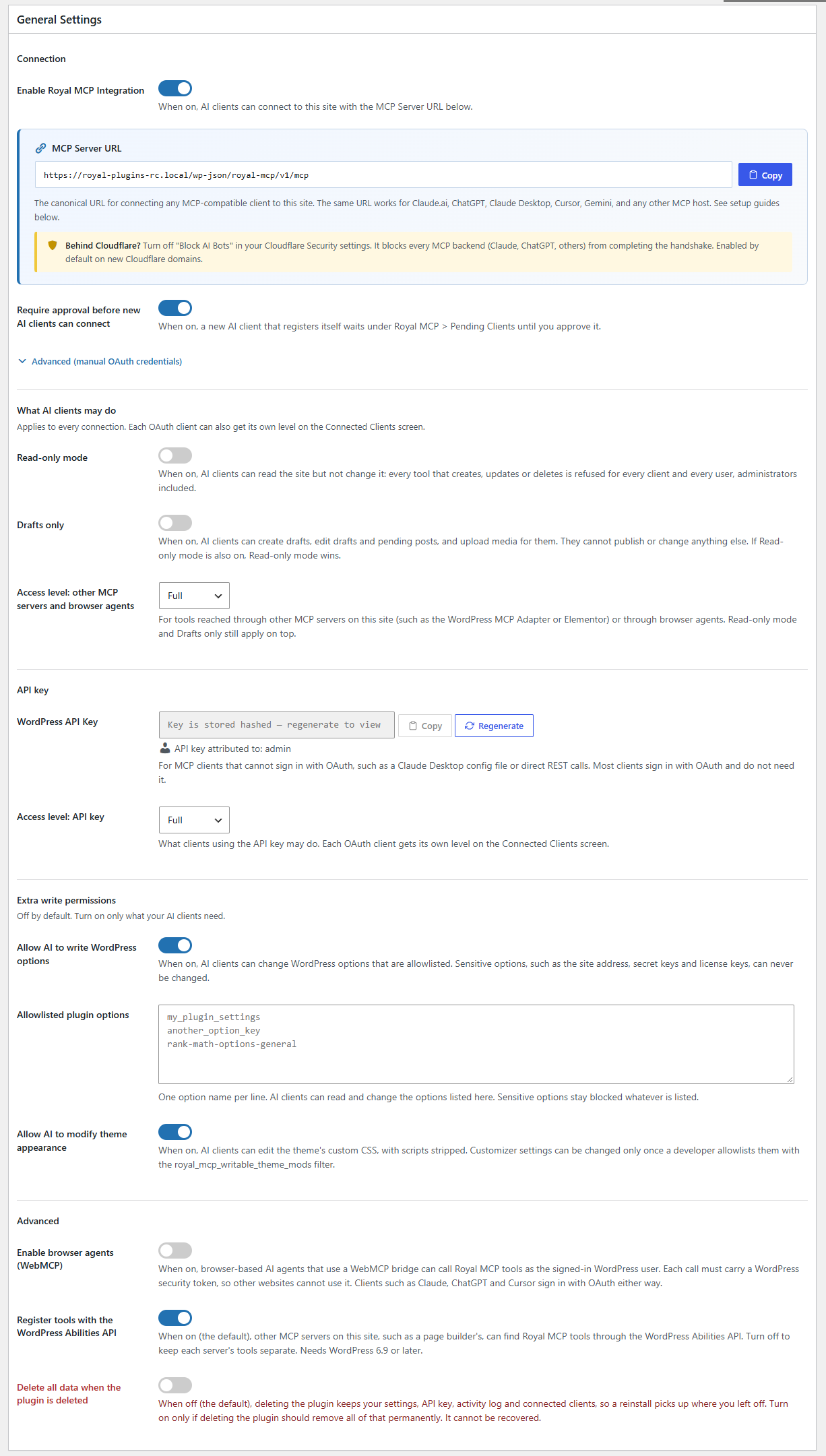
- Go to Royal MCP → Connections and turn on Enable Royal MCP Integration
- Copy the MCP Server URL from the same page
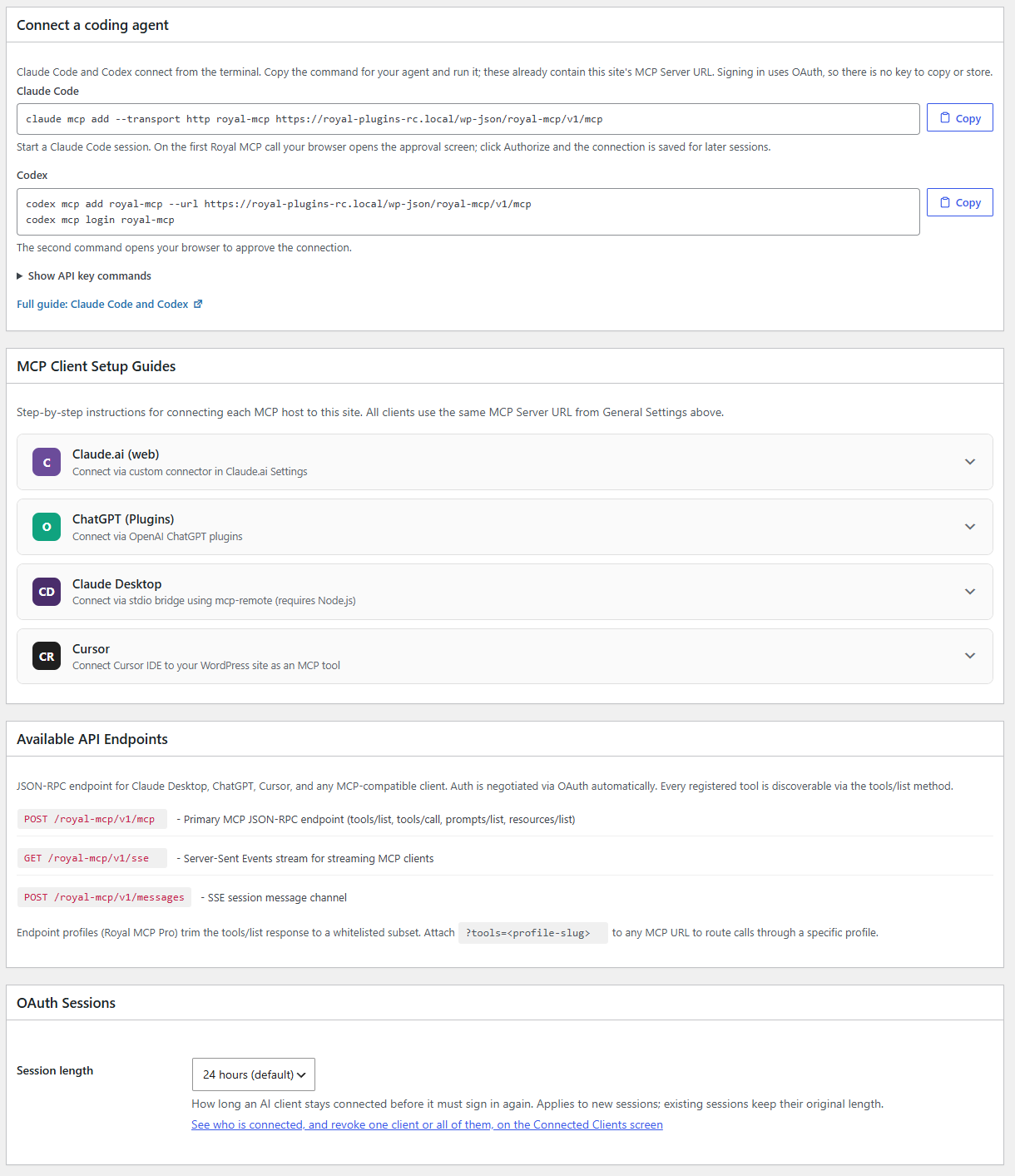
- Add that URL in your AI client. Claude and ChatGPT sign in with OAuth, so there is no key to copy; Claude Code and Codex have copy-ready commands on the settings page; clients without OAuth use the WordPress API Key shown there
- New to MCP? Follow the step-by-step connection walkthrough (with videos) at royalplugins.com/support/royal-mcp/connecting-to-claude/
Full setup guides for each AI client are available at royalplugins.com/support/royal-mcp/.
Änderungsprotokoll
Major release: new Dashboard, Context and Skills screens and 100 more tools. Settings are now on two screens, Connections and Safety.
2.0.0
- New: A dashboard, a Context page, built-in skills, 100 more tools including plugin and theme management, and safer setting changes.
1.5.17
- Security: Sign-in, undo and integration safeguards are stricter, and the Activity Log now keeps entries for 90 days and can be cleared.
1.5.16
- Security: Protected meta keys are enforced more strictly; admins can now allow specific keys under Settings, and page tools accept a template.
1.5.15
- New: MailPoet tools manage lists, subscribers and newsletter drafts, send tests, read stats, and schedule a send confirmed with the exact recipient count.
- New: Relevanssi tools search with its ranking, show index status and search totals, reindex a post, and change synonyms and stopwords with undo.
- New: Ninja Forms and Fluent Forms tools list and read forms and their entries.
- New: wp_get_posts and wp_get_pages return each item’s last-modified date and accept orderby, order and modified_after.
- New: wp_get_term, wp_get_menu_item, wp_get_theme_mod and wp_get_widget read a single item.
- New: wp_get_php_errors lists recent PHP fatal errors with credentials hidden, recorded while “Record PHP fatal errors” is on in Settings.
- New: Connected Clients lists Application Password sign-ins, with Block, Allow again and Delete.
- New: any tool that changes the site can be switched off for browser-agent connections in Settings.
- New: raif_set_bot_policies sets Royal AI Firewall policies for many bots at once, with a preview and one undo.
- New: wc_update_order_status accepts send_emails: false to change an order’s status without sending WooCommerce emails.
- Enhancement: undo leaves later edits alone for WooCommerce, comments, widgets, theme mods, custom CSS, permalinks, redirects and custom fields unless forced.
- Enhancement: redirection_create_redirect and redirection_update_redirect accept dry_run and return an undo token.
- Enhancement: Elementor undo clears the page cache and does not run while the page is open in the Elementor editor.
- Enhancement: ACF field writes and Elementor edits update the post’s last-modified date.
- Enhancement: the Activity Log shows which user and AI client made each call.
- Enhancement: the sign-in page explains why an AI app’s details could not be loaded.
- Enhancement: the settings self-check shows when more than one copy of the MCP Adapter is installed.
- Enhancement: elementor_apply_template_to_page applies only published or private templates unless include_unpublished is set.
- Enhancement: wp_get_pages without a sort or parent lists every page, child pages included, in one list by title A to Z.
- Fix: acf_update_field reports success when a group or repeater field saves.
- Fix: redirection_update_redirect applies every change, including switching a redirect off, and redirection_list_groups lists every group.
- Fix: updraftplus_get_backup_status shows a backup that is still starting as in progress.
- Fix: undo of a newly added custom field removes it, and undo of a menu item title change keeps the item’s position.
- Fix: Yoast SEO undo removes fields the change added and restores noindex settings exactly.
- Fix: large numbers in tool replies keep their exact value.
- Fix: cf7_list_submissions returns an error for a form ID that does not exist.
- Security: Contact Form 7, Ninja Forms and Fluent Forms entries hide names, emails, phone numbers, addresses and other personal details by default.
- Security: Redirection tools refuse redirects that would send your admin or sign-in pages elsewhere.
- Security: wp_upload_media_from_url follows at most 3 redirects and only over https after the first request.
- Security: changing or clearing the fixed OAuth client ID signs out the AI apps that used the old one.
1.5.14
- New: Royal MCP recognises other MCP plugins on the site, including ones with their own sign-in, and keeps answering at its own addresses beside them.
- New: the API key can be turned off on the Settings screen.
- Enhancement: AI clients that were connected earlier also sign in at Royal MCP’s own address.
- Enhancement: wp_get_plugins and wp_get_themes show which updates are available.
- Enhancement: wp_delete_page and wp_delete_post_meta can be undone, and every new API key is recorded in the Activity Log.
- Enhancement: undo leaves later edits alone on Elementor pages, Divi image and template changes and deleted post meta.
- Enhancement: replace text, replace image and the page outline work with Elementor 4 widgets.
- Fix: saving the settings screen never changes the API key, and the Enabled switch changes only when you tick or untick it.
- Fix: Elementor page data and other JSON saved with wp_update_post_meta is stored exactly as sent.
- Fix: wp_replace_text_in_blocks changes text and attribute values only, never tag or attribute names.
- Fix: gp_get_blocked_ips lists every GuardPress block, including permanent and range blocks.
- Security: changing or resetting a password signs that user out of every connected AI app.
- Security: the OAuth Client Secret is stored only as a hash, and a fixed OAuth client signs in only to the addresses listed in OAuth Redirect URIs.
- Security: an AI app you reject stays rejected, and the public server card no longer lists the plugins your site runs.
- Security: the X-Royal-MCP-API-Key header no longer signs in; send the key as Authorization: Bearer instead.
1.5.13
- New: site owners can keep chosen plugin options out of plugin settings replies.
- Enhancement: UpdraftPlus backups are identified by backup_id instead of the backup nonce.
- Enhancement: wp_update_widget accepts classic widget settings in the form wp_get_widgets returns them.
- Fix: saving settings never changes the API key, and every new key is recorded in the activity log.
- Fix: a tool that a site removes from the tool list can no longer be called by name.
- Security: keys, tokens and passwords that other plugins store are hidden in every tool response.
- Security: the post editing tools no longer change code snippets or pending Customizer changes.
- Security: an AI client that registers again keeps the access level it had.
Screenshots
Für Entwickler
Ist das dein Plugin? Zeigen Sie die Zahlen.
Fügen Sie Ihrer Website, Docs oder GitHub Readme ein Live-Badge hinzu. Es wird von selbst aktualisiert - kein Konto erforderlich.
Best Royal MCP alternatives
Alle AI-Plugins →





Fragen und Antworten
Royal MCP: quick answers
Gerade Antworten, gezogen von Live WordPress.org Daten.
Quelle: WordPress.org
Is Royal MCP free?
Yes. Royal MCP is free to download and use from the official WordPress.org plugin directory.
Is Royal MCP safe to use in 2026?
Yes — Royal MCP is a safe, well-maintained plugin to use in 2026. It runs on 10K+ sites, is rated 5/5 and was last updated 1 day ago, and scores 89/100 on our health check.
How many websites use Royal MCP?
Royal MCP is active on 10K+ WordPress websites and has been downloaded 220,007 times since it launched in January 2026. It was downloaded 55,781 times in the last 30 days.
Does Royal MCP work with WordPress 7.1?
Yes. The developer has tested Royal MCP up to WordPress 7.1.5, the latest release. It requires WordPress 5.8 or newer.
What PHP version does Royal MCP need?
Royal MCP requires PHP 7.4 or higher. Most hosts run PHP 8.x today, so it works on any modern WordPress hosting.
When was Royal MCP last updated?
The latest version, 2.0.0, was released on November 17, 2026 (1 day ago).
Who makes Royal MCP?
Royal MCP is developed and maintained by Royal Plugins.
What are the best alternatives to Royal MCP?
The most popular alternatives to Royal MCP are Elementor Agent Ready Websi… (10M+ installs), Jetpack (3M+ installs) and All in One SEO (2M+ installs).
Angetrieben von PageForge
Eine Vorlage und eine Tabelle. Eine echte Seite für jede Suche.
PageForge Verwandelt jede Zeile eines CSV in eine WordPress-Seite mit eigenem Titel, URL, SEO Felder und Schema entworfen. Kostenlos auf WordPress.org.
- CSV und XLSX, plus Google Sheets auf Beruf und Unternehmen
- seinen eigenen Titel, URL, SEO Felder und Schema für jede Seite
- Arbeitet mit dem Blockeditor, Elementor, Divi und Avada
- Kostenlos auf WordPress.org, keine Kreditkarte