


Rollbar
Official Rollbar full-stack error tracking for WordPress supported by Rollbar, Inc.

Solide Wahl
Rollbar is a solid plugin choice in 2026, with a few things worth checking first. It runs on 400+ sites, is rated 4/5 and was last updated 2 months ago, and scores 70/100 on our health check.
- Getestet mit dem neuesten WordPress (7.1)
- Kleine Benutzerbasis (400+ aktive Installationen)
- Bisher sehr wenige Bewertungen
- Benötigt PHP 8.2 oder neuer
Wie stapelt es sich?
Side-by-side bei Installationen, Updates, Bewertungen und Support



Tägliche Downloads
Download-Spitzen folgen normalerweise einer neuen Version - jede Website, die automatisch aktualisiert wird, gilt als Download.
Ranglisten
Where Rollbar stands todayWordPress.org Ranglisten suchen
Live-Position in der Plugin-Suche, Top 100| Stichwort | Position |
|---|---|
| error | >100 |
| error tracking | #38 |
| full stack | #1 |
| rollbar | #1 |
| tracking | >100 |
Versionsübernahme
Anteil aktiver Sites pro Release.
Bewertungsaufschlüsselung
★★★★★★★★★★ 4 from 3 reviews
About Rollbar
From the official readme · v3.3.1Beschreibung
Rollbar collects errors that happen in your application, notifies you, and analyzes them so you can debug and fix them.
This plugin integrates Rollbar into your WordPress installation.
Merkmale
- PHP & JavaScript error logging.
- Define an environment for each single WordPress installation or Multisite blog.
- Specify your desired logging level.
- Regular updates and improvements!
Please note:
In order to use this plugin, a Rollbar account is required.
Unterstützen
- Browse issue tracker on GitHub and report new issues.
- If you run into any issues, please email us at support@rollbar.com.
- For bug reports, please open an issue on GitHub.
You like it?
You can at least support the plugin development and rate it up!
Disclaimer
This plugin is a community-driven contribution. All rights reserved to Rollbar.
Installation
The installation and configuration of the plugin are as simple as it can be.
Through WordPress Plugin directory
The easiest way to install the plugin is from the WordPress Plugin directory. If you have an existing WordPress
installation, and you want to add Rollbar:
- In your WordPress administration panel go to
Plugins→Add New. - Search for “Rollbar” and find
Rollbarby Rollbar in the search results. - Click
Install Nownext to theRollbarplugin. - In
Plugins→Installed pluginsfindRollbarand clickActivateunderneath.
Warning: This installation method might not be suitable for complex WordPress projects. The plugin installed this
way will be self-contained and include all of the required dependencies for itself and the rollbar/rollbar-php
library. In complex projects, this might lead to version conflicts between dependencies and other plugins/packages. If
this is an issue in your project, we recommend the “Packagist” installation method.
Through Packagist
Note: this only works if your WordPress project is managed with Composer.
Read Using Composer with WordPress for more details.
This is a recommended way to install the Rollbar plugin for advanced projects. This way ensures the plugin and all of
its dependencies are managed by Composer.
You can install the plugin by running the following command in the root directory of your WordPress project:
composer require rollbar/rollbar-php-wordpress:^3.0
Through WPackagist
Note: if your WordPress project is managed with Composer, we strongly recommend installing the plugin through
Packagist instead.
Installing the plugin from wpackagist.org instead of packagist.org will result in the plugin being managed by
Composer. However, the downside is that it’s dependencies will not be managed by composer. Instead they will be packaged
in the plugin’s vendor directory not in your project’s vendor directory. This has the potential to cause name
collisions if other plugins or your project use different versions of the same dependencies.
To install the plugin from wpackagist.org run the following steps command in the root directory of your WordPress
project:
composer require wpackagist-plugin/rollbar
Konfiguration
The plugin can be configured in the WordPress Admin or programmatically.
WordPress Admin
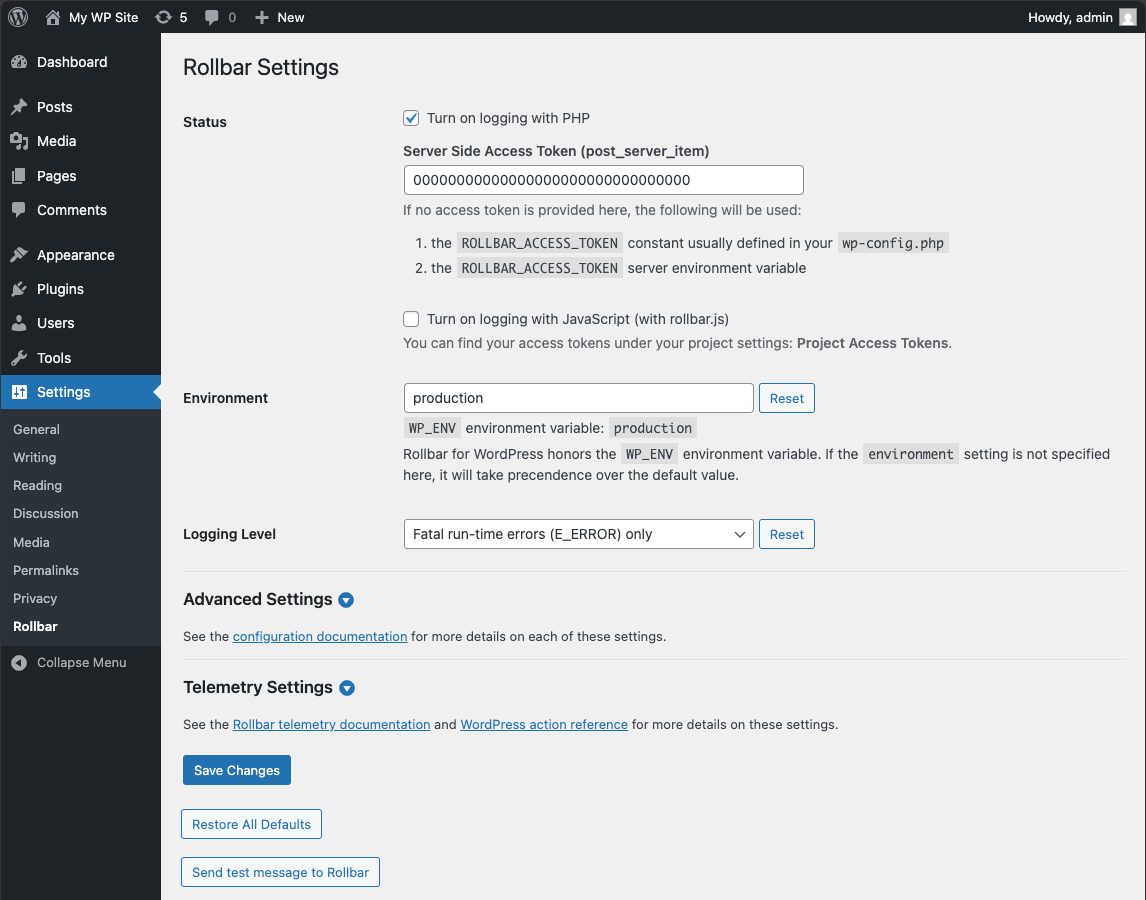
The plugin provides a settings page in the WordPress Admin that allows you to configure the plugin. This settings page
can be disabled by setting the ROLLBAR_DISABLE_ADMIN constant to true in your wp-config.php file.
- In
Plugins→Installed pluginsfindRollbarand clickActivateunderneath. - Log into your Rollbar account dashboard:
- Go to
Settings→Project Access Tokens. - Copy the token value under
post_client_itemandpost_server_item.
- Go to
- In WordPress, navigate to
Settings→Rollbar:- Enable
PHP error loggingand/orJavascript error loggingdepending on your needs. - Paste the tokens you copied in step 7 in
Access Tokensection. - Provide the name of your environment in
Environment. By default, the environment will be taken fromWP_ENV
environment variable if it’s set otherwise it’s blank. We recommend to fill this out either withdevelopmentor
production. - Pick a minimum logging level. Only errors at that or higher level will be reported. For
reference: PHP Manual: Predefined Error Constants. - Click
Save Changes.
- Enable
Programmatic Configuration
The plugin can also be configured programmatically. This is useful if you want to configure the plugin in a more
advanced way or if you want to disable the admin settings page.
// wp-config.php

// Configure the plugin.
define( 'ROLLBAR_SETTINGS', [
    'php_logging_enabled' => true,
    'server_side_access_token' => '<your token>',
    'js_logging_enabled' => true,
    'client_side_access_token' => '<your client token>',
    'environment' => 'development',
    'included_errno' => E_ERROR,
    'enable_person_reporting' => true,
] );

// Optional: disable the admin settings page so the plugin is configured only programmatically.
define( 'ROLLBAR_DISABLE_ADMIN', true );
Änderungsprotokoll
Fix issue that could lead to fatal error with some settings
Version 3.3.1 (Oct 9th 2026)
- Updated Rollbar JS to v4.0.0.
- Updated other dependencies.
Version 3.3.0 (Sep 18th 2026)
- Added support for WordPress 7.1.
- Removed support for WordPress 6.6.
- Updated MU plugin name to be less verbose.
- Fixed missing MU plugin ABSPATH security check.
- Fixed MU plugin path incorrect.
- Maintenance: Fixed WP env using project directory name for plugin name.
Version 3.2.0 (June 26th 2026)
- Added support for WordPress 7.0.
- Removed support for PHP 8.1.
- Removed support for WordPress 6.6.
- Updated other dependencies.
Version 3.1.3 (April 3rd 2026)
- Updated Rollbar JS snippet to v3.1.0.
- Updated Rollbar PHP core SDK to v4.2.1.
- Updated other dependencies.
Version 3.1.2 (March 6th 2026)
- Fixed namespace strings not prefixed by PHPScoper.
- Added NamespaceTokenFixer to fix unscoped namespace strings.
Version 3.1.1 (December 22nd 2025)
- Fixed composer autoload ClassLoader namespace not replaced by PHPScoper in v3.1.0.
Screenshots
Für Entwickler
Ist das dein Plugin? Zeigen Sie die Zahlen.
Fügen Sie Ihrer Website, Docs oder GitHub Readme ein Live-Badge hinzu. Es wird von selbst aktualisiert - kein Konto erforderlich.
Best Rollbar alternatives
All error plugins →





Fragen und Antworten
Rollbar: quick answers
Gerade Antworten, gezogen von Live WordPress.org Daten.
Quelle: WordPress.org
Is Rollbar free?
Yes. Rollbar is free to download and use from the official WordPress.org plugin directory.
Is Rollbar safe to use in 2026?
Rollbar is a solid plugin choice in 2026, with a few things worth checking first. It runs on 400+ sites, is rated 4/5 and was last updated 2 months ago, and scores 70/100 on our health check.
How many websites use Rollbar?
Rollbar is active on 400+ WordPress websites and has been downloaded 95,504 times since it launched in November 2015. It was downloaded 1,201 times in the last 30 days.
Does Rollbar work with WordPress 7.1?
Yes. The developer has tested Rollbar up to WordPress 7.1.5, the latest release. It requires WordPress 6.7 or newer.
What PHP version does Rollbar need?
Rollbar requires PHP 8.2 or higher. Most hosts run PHP 8.x today, so it works on any modern WordPress hosting.
When was Rollbar last updated?
The latest version, 3.3.1, was released on October 9, 2026 (2 months ago).
Who makes Rollbar?
Rollbar is developed and maintained by rollbar.
What are the best alternatives to Rollbar?
The most popular alternatives to Rollbar are WP Maximum Execution Time E… (20K+ installs), Link Juice Keeper (10K+ installs) and WPS Bidouille (9K+ installs).
Angetrieben von PageForge
Eine Vorlage und eine Tabelle. Eine echte Seite für jede Suche.
PageForge Verwandelt jede Zeile eines CSV in eine WordPress-Seite mit eigenem Titel, URL, SEO Felder und Schema entworfen. Kostenlos auf WordPress.org.
- CSV und XLSX, plus Google Sheets auf Beruf und Unternehmen
- seinen eigenen Titel, URL, SEO Felder und Schema für jede Seite
- Arbeitet mit dem Blockeditor, Elementor, Divi und Avada
- Kostenlos auf WordPress.org, keine Kreditkarte