


RockHeron
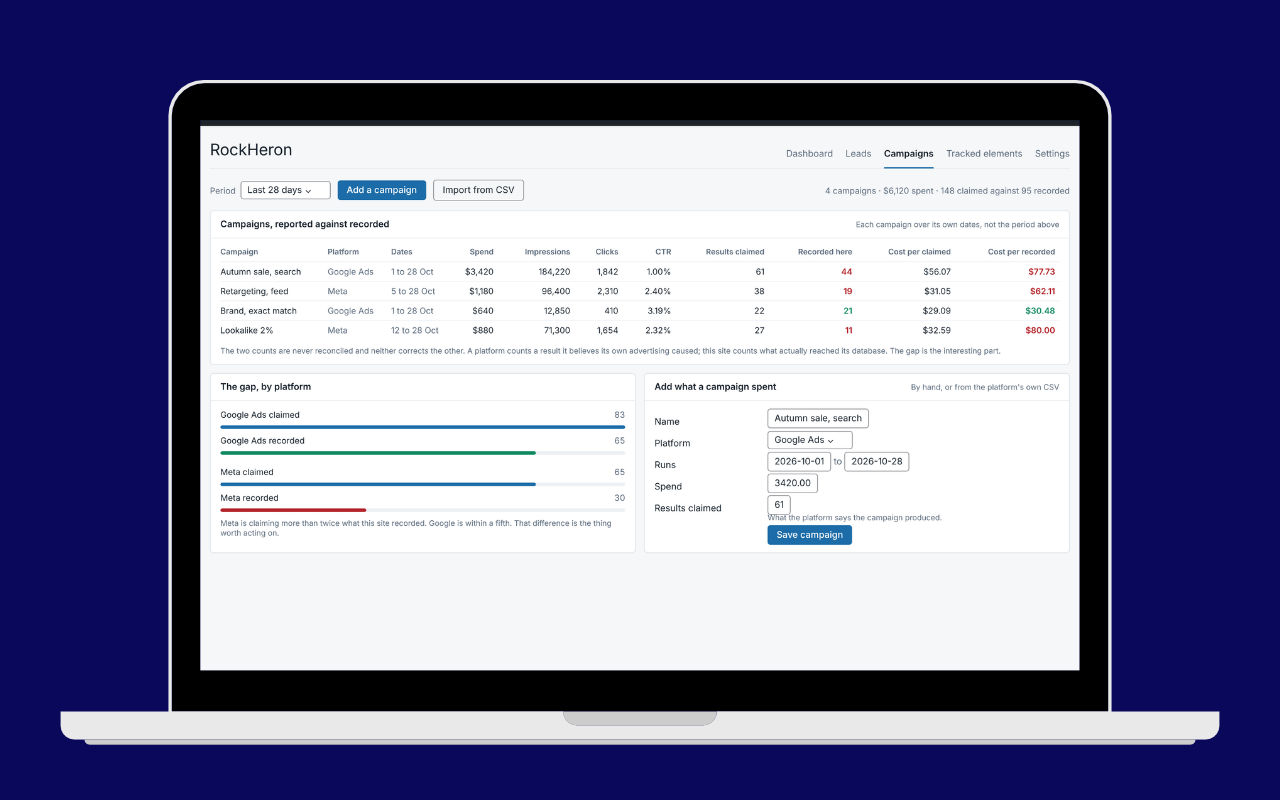
See where your leads actually came from, and whether the ad platform's numbers match what your site recorded.

Solide Wahl
RockHeron is a solid plugin choice in 2026, with a few things worth checking first. Was last updated 3 weeks ago, and scores 64/100 on our health check.
- Aktiv entwickelt – letztes Update vor 3 Wochen
- Getestet mit dem neuesten WordPress (7.1)
- Kleine Benutzerbasis (<10 aktive Installationen)
- Bisher sehr wenige Bewertungen
Wie stapelt es sich?
Side-by-side bei Installationen, Updates, Bewertungen und Support



Tägliche Downloads
Download-Spitzen folgen normalerweise einer neuen Version - jede Website, die automatisch aktualisiert wird, gilt als Download.
Ranglisten
Where RockHeron stands todayWordPress.org Ranglisten suchen
Live-Position in der Plugin-Suche, Top 100| Stichwort | Position |
|---|---|
| attribution | >100 |
| campaign tracking | >100 |
| Conversion-Tracking | >100 |
| lead source | >100 |
| utm tracking | >100 |
About RockHeron
From the official readme · v1.1.2Beschreibung
Your ad platform counts its own results. RockHeron counts them on your site and
puts the two numbers next to each other.
It records which campaign introduced every form submission and every WooCommerce
order, in your own database on your own hosting, then shows what the platform
claimed beside what your site actually recorded, so you can see the gap rather
than take a dashboard’s word for it.
Lead source attribution
- First touch attribution: the campaign that introduced a visitor is remembered for thirty days, and the first one keeps the credit
- Source, medium, campaign, term and content, plus which parameter identified them
- Six form plugins: Contact Form 7, WPForms, Gravity Forms, Elementor Forms, Fluent Forms and WooCommerce
- WooCommerce orders, read from WooCommerce’s own order attribution rather than collected twice
- A leads table of every submission with the campaign behind it, broken down by source, medium and campaign
What else it records on your site
- Visits, visitors and page views, with the previous period next to every number
- Goals: calls, emails, WhatsApp clicks, form sends, add to cart, or any element you name
- Clicks on any element you name by CSS selector, site wide or on chosen pages
- Elements seen on screen, video plays, scroll depth, outbound clicks, downloads, site searches
- Where visits come from: search, AI assistants, social, referral, campaigns, direct
- Devices, browsers, operating systems, countries, landing pages, top pages
- A live count of visitors in the last thirty minutes
Google data next to it
- Google Site Kit is used automatically when installed, so you do not connect Google twice
- Without it, connect Analytics 4 directly using your own Google Cloud OAuth client
- Search Console clicks, impressions, CTR and average position when Site Kit is present
- Import past months from Google Analytics so the dashboard is not empty on day one
- Import sixteen months of Search Console history, by button with Site Kit or from the export file without
- Export any period as a CSV or an Excel file, with every card the site can produce and the results themselves in it, not just the cards left switched on
- The Leads screen has its own export, carrying that screen and nothing else
- Open a printable report the browser saves as a PDF, with the caveats carried into the file
Privatsphäre
- No analytics cookies, and no IP address is ever stored
- The one cookie it does set is first party and holds campaign details only: no name, no email address, no telephone number, nothing typed into your form, no advertising click identifier
- Visitors are counted with a one way hash that changes daily
- Do Not Track and Global Privacy Control are respected
- Works with CookiePile, the WP Consent API, or any consent cookie you name
- Raw events are cleared on your own retention schedule while daily totals keep the history
Sprachen
Fully translated into Hebrew, with a right to left layout. The translation is
delivered by WordPress.org as a language pack rather than bundled in this zip,
which is why languages/ holds only the POT file: a bundled catalog would
shadow the pack and stop you receiving corrections. Any other language can be
added from that POT file, or contributed at
https://translate.wordpress.org/projects/wp-plugins/rockheron/
Externe Dienste
RockHeron contacts nothing on its own. Every connection below happens only
because you connected an account or switched a setting on.
Google OAuth, Analytics 4 and Google Ads (optional, off until you connect them)
If you choose to connect Google directly, with your own Google Cloud OAuth
client, the plugin talks to Google from your server to read your own reports:
accounts.google.com– where your browser goes to approve the connection. Nothing is sent there by the plugin; you sign in to Google yourself.oauth2.googleapis.com– exchanges the approval for an access token and refreshes it later. Sends your own OAuth client ID, client secret and the token.analyticsdata.googleapis.comandanalyticsadmin.googleapis.com– reads your Analytics 4 reports and property list. Sends the access token, the property ID and the date range and dimensions being requested.googleads.googleapis.com– reads campaign spend and clicks, and only when you have entered a Google Ads customer ID and a Google approved developer token. Sends the access token, the developer token and the customer ID.
These four read your figures in. Nothing recorded about your visitors or your
leads goes out through them: no visit, no lead, no form entry, no email
address, no name, no IP address. That covers these four connections only, not
the Google tag below, which does send visitor data to Google.
With Google Site Kit, RockHeron reads through Site Kit on your own site and
makes no connection of its own.
Google tag (optional, off by default, and it does send visitor data to Google)
This runs in your visitors’ browsers, not on your server, and it is the
ordinary Google tag. Switch on “Inject the Google tag”, enter a measurement ID,
and every page your visitors load fetches
https://www.googletagmanager.com/gtag/js and reports to Google on their
behalf.
Google receives what the Google tag always receives: the page and its title,
the referring page, the visitor’s IP address, their device, browser, operating
system and screen size, their approximate location from that IP address, and
whatever Google’s own cookies on that browser already identify. RockHeron does
not choose or limit any of it. It places the tag and Google does the rest.
Because of that:
- It is off by default and nothing is requested from Google until you turn it on.
- It is skipped entirely when Site Kit or another plugin is already tagging the same property, so nobody is double counted.
- It is not loaded until the visitor has allowed it. Consent and Do Not Track are evaluated in the visitor’s own browser, so a cached page cannot serve one visitor’s answer to the next. With a consent mode set, no request reaches Google before that visitor consents, and if they consent later on the same page the tag loads then.
- Turning it on is a decision about your visitors’ data, not just your own reporting, and your privacy policy should say so.
These are Google services, governed by the Google Privacy Policy
(https://policies.google.com/privacy), the Google APIs Terms of Service
(https://developers.google.com/terms) and, for Analytics data, the Google
Analytics terms
(https://marketingplatform.google.com/about/analytics/terms/us/).
Nothing else
RockHeron contacts no service of ours, phones no home, and loads no script or
stylesheet from a CDN. Everything it ships runs from your own server, including
the bundled charting library below.
Third party credits
Chart.js 4.6.1, MIT licensed, bundled at assets/vendor/chartjs/. The
dashboard and report charts are drawn with it. Its license is in
assets/vendor/chartjs/LICENSE.md and the source is at
https://github.com/chartjs/Chart.js/tree/v4.6.1
Nothing else is bundled.
Installation
- Upload the plugin folder to
/wp-content/plugins/, or install the zip from Plugins, Add New. - Activate it.
- Open RockHeron. Visits start appearing within a minute.
- Optional: open Settings to connect Google, or install Site Kit and it is picked up on its own.
Änderungsprotokoll
Fixes a privacy gap: a visitor who withdrew consent, or who has Do Not Track on, could still have a campaign attached to a form submission, because the cookie written while consent stood was still being read. Take this one. Also adds Excel export, puts your results into every export, and gives the Leads screen its own.
1.1.2
A fix for paid sites running PHP 7.4, where the PDF could not be produced at
all. Nothing else changed.
- On PHP 7.4, making a PDF failed outright. The PDF renderer bundled since
1.1.0 brought a set of supporting libraries with it, and two of them, psr/log
and myclabs/deep-copy, were the releases that require PHP 8.0. They use a
kind of type declaration PHP 7.4 cannot read at all, so on a 7.4 server the
attempt stopped before it began. Both are now the versions that support 7.4,
which is the version this plugin has always said it needs. Downloading a
report, downloading the leads, and the scheduled report attachment all work
on 7.4 again. - Sites on PHP 8.0 or newer were never affected, and nothing about the
documents themselves has changed. - The build now refuses to package a bundled library whose own requirements
exclude the PHP version this plugin declares, or whose code uses a signature
that version cannot read, and it checks the plugin header and the readme
still agree about which version that is.
1.1.1
Documentation only. No code changed, so there is nothing here that can alter
what your site records or reports.
- The bundled credits now cover the PDF renderer. The paid editions have
carried mPDF, FPDI, six supporting packages and four DejaVu font faces since
1.1.0, and the credits still said nothing else was bundled. Every one of them
is now named with its version, its license and where it sits in the plugin,
and the DejaVu license notice, which until now existed only inside the font
files themselves, is written out beside them as a file you can read. - The PDF is documented. Where a PDF comes from, what your server needs to
make one, what is capped and why, and exactly what happens when a PDF cannot
be produced on your server, which is that you are told so and the printable
page is still there.
1.1.0
- Exports now carry everything the site knows, not the part that happened to be on screen. The file used to be built from the cards you had switched on, so a card you had hidden could not be exported at all even though the figures were sitting in the same table. Hiding a card is a decision about a screen, not about what the site knows.
- Your results are in the export. The plugin is called lead source attribution and the one thing you could not get out of it was the leads. Every result in the period is now in the file, with its campaign, its channel, where it landed, what it was worth and what the source was worked out from.
- An Excel export, next to the CSV. Figures arrive as figures, so you can sort and total them, and a campaign named
=1+1arrives as text rather than as something your spreadsheet tries to calculate. - The Leads screen has its own CSV and Excel, separate from the dashboard’s. It carries that screen and nothing else: the headline figures, the four ways of cutting them, and the results themselves. The file is named after the screen it came from, so the two do not land in your downloads folder as copies of each other.
- All three formats are built from one description of the report, so a figure you read on screen, a figure in the spreadsheet and a figure in the PDF cannot come to disagree.
- Every string the new screens and files use is translatable, and the Hebrew is included.
- Paid builds now produce a real PDF rather than a printable page. It is laid out for the page: a running footer with page numbers, a table heading that repeats when a table runs over a break and says what it is, the results on a landscape page of their own, and the day by day figures drawn as a line. Scheduled reports arrive with that PDF attached instead of a file to open and print. Hebrew sites get a right to left report, with page paths, campaign tags and search terms printed the way round they were recorded.
- The PDF shows the newest 500 results and the 100 largest rows of each breakdown, and says so under each table. It is a document to read and hand over, and a report of several thousand rows is hundreds of pages that most servers will not finish building. The CSV and the Excel file are not limited and carry everything.
- A campaign could still be attached to a form submission after the visitor had withdrawn consent. The browser stops measuring the moment consent is withdrawn, which was working, but the cookie it had already written keeps being sent with every later request, and the plugin was still reading it when a form was submitted. So somebody who accepted your banner, was tagged by a campaign, then changed their mind, still had that campaign copied onto their next inquiry. Do Not Track and Global Privacy Control had the same gap from the other side: they stopped the cookie being written and never stopped an existing one being read. The same was true of the source WooCommerce records for an order, which is a separate route to the same information.
- Consent and Do Not Track are now checked before any campaign detail is read, on every route a visitor’s own request can take. The submission is still recorded, with no campaign on it, and appears as Not known, so your totals still match your form plugin’s. Importing past orders from the Settings screen is unaffected: that is you asking, over orders WooCommerce already attributed, and it is not a visitor request.
Earlier releases
1.0.0 was the first public release. 0.1.0 through 0.9.9 were development
releases: the plugin was not published anywhere while they were being written,
so no site ever ran that code. The release history from 0.6.0, with the
reasoning behind each decision, is at https://rockheron.com/changelog/
Screenshots




Für Entwickler
Ist das dein Plugin? Zeigen Sie die Zahlen.
Fügen Sie Ihrer Website, Docs oder GitHub Readme ein Live-Badge hinzu. Es wird von selbst aktualisiert - kein Konto erforderlich.
Best RockHeron alternatives
All attribution plugins →





Fragen und Antworten
RockHeron: quick answers
Gerade Antworten, gezogen von Live WordPress.org Daten.
Quelle: WordPress.org
Is RockHeron free?
Yes. RockHeron is free to download and use from the official WordPress.org plugin directory.
Is RockHeron safe to use in 2026?
RockHeron is a solid plugin choice in 2026, with a few things worth checking first. Was last updated 3 weeks ago, and scores 64/100 on our health check.
How many websites use RockHeron?
RockHeron is active on <10 WordPress websites and has been downloaded 491 times since it launched in November 2026. It was downloaded 492 times in the last 30 days.
Does RockHeron work with WordPress 7.1?
Yes. The developer has tested RockHeron up to WordPress 7.1.5, the latest release. It requires WordPress 6.0 or newer.
What PHP version does RockHeron need?
RockHeron requires PHP 7.4 or higher. Most hosts run PHP 8.x today, so it works on any modern WordPress hosting.
When was RockHeron last updated?
The latest version, 1.1.2, was released on November 7, 2026 (3 weeks ago).
Who makes RockHeron?
RockHeron is developed and maintained by miotix.
What are the best alternatives to RockHeron?
The most popular alternatives to RockHeron are Easy UTM tracking with cont… (2K+ installs), Molongui Post Contributors:… (400+ installs) and Opinly (300+ installs).
Angetrieben von PageForge
Eine Vorlage und eine Tabelle. Eine echte Seite für jede Suche.
PageForge Verwandelt jede Zeile eines CSV in eine WordPress-Seite mit eigenem Titel, URL, SEO Felder und Schema entworfen. Kostenlos auf WordPress.org.
- CSV und XLSX, plus Google Sheets auf Beruf und Unternehmen
- seinen eigenen Titel, URL, SEO Felder und Schema für jede Seite
- Arbeitet mit dem Blockeditor, Elementor, Divi und Avada
- Kostenlos auf WordPress.org, keine Kreditkarte