


Reqad Cache Purger for Nginx
Purges the Nginx FastCGI cache when content changes - automatically on publish, update and delete, or site-wide from the admin bar.

Mit Vorsicht verwenden
Reqad Cache Purger for Nginx works, but test it on a staging site before relying on it in 2026. It runs on 10+ sites and was last updated 7 days ago, and scores 61/100 on our health check.
- Aktiv entwickelt – letztes Update vor 7 Tagen
- Kleine Benutzerbasis (10+ aktive Installationen)
- Bisher sehr wenige Bewertungen
Wie stapelt es sich?
Side-by-side bei Installationen, Updates, Bewertungen und Support



Tägliche Downloads
Download-Spitzen folgen normalerweise einer neuen Version - jede Website, die automatisch aktualisiert wird, gilt als Download.
Ranglisten
Where Reqad Cache Purger for Nginx stands todayWordPress.org Ranglisten suchen
Live-Position in der Plugin-Suche, Top 100| Stichwort | Position |
|---|---|
| Zwischenspeicher | >100 |
| fastcgi | #18 |
| nginx | #75 |
| Purge | >100 |
| WooCommerce | >100 |
Versionsübernahme
Anteil aktiver Sites pro Release.
About Reqad Cache Purger for Nginx
From the official readme · v1.1.2Beschreibung
Reqad Cache Purger keeps an Nginx FastCGI page cache in step with WordPress. It
adds a “Purge Nginx Cache” button to the admin bar for clearing the whole site,
and purges the affected pages by itself whenever content changes.
It works with nothing configured: the plugin sends an HTTP request to a /purge
location that Nginx handles, and the caching policy itself lives entirely in
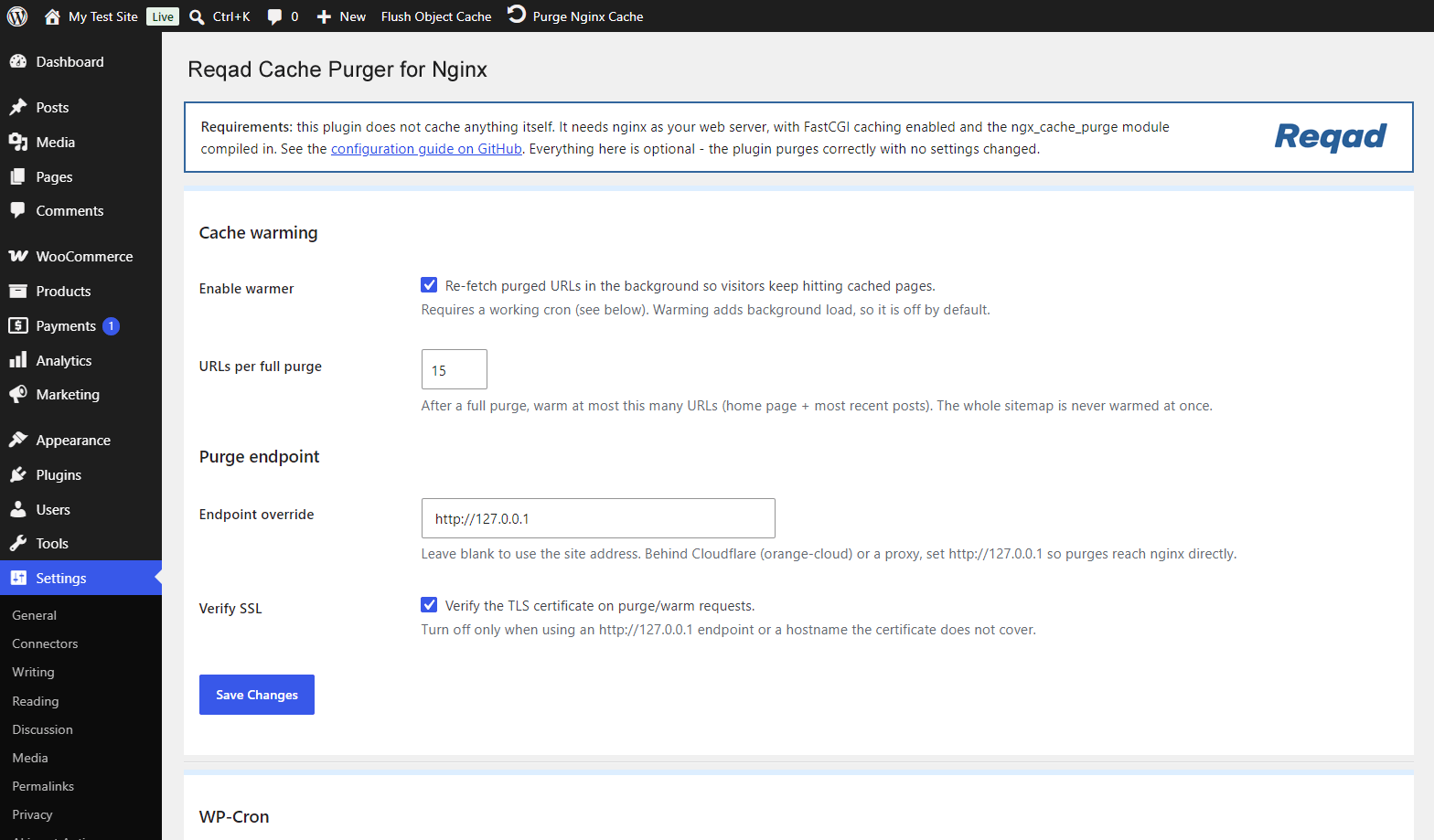
your Nginx configuration. A Settings page exists for the optional extras – a
background cache warmer, a purge-endpoint override for sites behind a proxy, and
a cache self-test – but you can ignore all of it.
What it purges
- Admin-bar button – the entire cache, in a single wildcard request.
- A post or page published, updated, unpublished or trashed – its permalink, the
home page and its public taxonomy archives. - A WooCommerce product – the above, plus the shop page.
- A term created, edited or deleted in any public taxonomy – its archive and the
home page.
Post types with no front-end URL (menu items, revisions, WooCommerce orders and
similar) are skipped, because they were never cached in the first place.
Bedarf
This plugin does not cache anything itself – Nginx does. It requires Nginx built
with the ngx_cache_purge module from https://github.com/nginx-modules/ngx_cache_purge
– the actively maintained continuation of Piotr Sikora’s original module, which
passed through torden’s fork around 2017. If you have seen it called “the Torden
fork”, that is the same lineage.
The abandoned FRiCKLE repository will not work: the admin-bar button clears the
site with a single wildcard request, and wildcard purging landed after FRiCKLE
development stopped around 2015.
Check yours with:
nginx -V 2>&1 | tr ' ' '\n' | grep cache_purge
Full Nginx configuration, including a tested FastCGI cache setup with
WooCommerce-safe bypass rules, is in README.md in the plugin folder.
Installation
1. Nginx
You need a working FastCGI cache and a purge location. Minimal version – see
README.md for the complete configuration:
In the http context (the top of your site’s file in conf.d/ is fine):
fastcgi_cache_path /var/cache/nginx/wpcache levels=1:2 keys_zone=wpcache:100m
                   inactive=12h max_size=512m;
In server { }:
location ~ ^/purge(/.*) {
    allow 127.0.0.1;
    allow ::1;
    allow 203.0.113.10;   # this server's own public IP
    deny  all;

    cache_purge_response_type json;
    fastcgi_cache_purge wpcache "$scheme$host$1";
}
In the PHP location:
open_file_cache          off;
fastcgi_cache            wpcache;
fastcgi_cache_key        "$scheme$host$request_uri";
fastcgi_cache_methods    GET;
fastcgi_cache_valid      200 301 302 12h;
fastcgi_ignore_headers   Cache-Control Expires;
Three things that catch people out:
- Use
$request_uri, not$uri, in the cache key. WordPress routes everything
throughtry_files ... /index.php, so$uribecomes/index.phpand the
whole site collapses onto one cache entry. - Leave
$request_methodout of the key, and setfastcgi_cache_methods GET.
Otherwise GET and HEAD are stored separately and the HEAD copies can never be
purged. - If you set a global
open_file_cache, turn it off in the cached location.
Nginx caches the descriptors of cache files too, so purges appear to do
nothing for up toopen_file_cache_validseconds.
The key expression in the purge location must match fastcgi_cache_key exactly,
with $1 in place of the path. If they differ, every purge returns 412.
Dann:
nginx -t && systemctl reload nginx
2. The plugin
- Upload the
reqad-cache-purgerfolder towp-content/plugins/, or install
the zip through Plugins > Add New > Upload Plugin. - Activate it through the Plugins menu.
There is nothing to configure. The purge URL is derived from your site address.
3. Check it
curl -sI https://example.com/ | grep -i x-fastcgi-cache   # MISS
curl -sI https://example.com/ | grep -i x-fastcgi-cache   # HIT
curl -s  https://example.com/purge/                       # {"Status": "purged"}
curl -s  "https://example.com/purge/*"                    # 200 = correct module
Add add_header X-FastCGI-Cache $upstream_cache_status always; while testing.
Änderungsprotokoll
Fixes the Site Health "Page cache is not detected" warning and adds a conflict warning when another page cache plugin is active.
1.1.2
- The cache self-test now says why a page is never cached: it names the cookies
the page sets for visitors who are not logged in (and the plugin that sets
them, when known – CleanTalk, WooCommerce, Polylang, WPML, cookie banners…),
since Nginx never caches a page that sets a cookie. - It also warns about “Vary: Cookie”, which makes Nginx keep a copy per set of
cookies, so real visitors almost never get a cached page. - When the vhost’s cache rules let a page through but no cache status comes
back, it says the PHP location serving the page has no cache directives
(common with a second WordPress in a folder). - The self-test names the page cache plugin that answered when the page came
from a PHP-level cache (WP-Optimize, LiteSpeed Cache, Cache Enabler). - The WP-Cron setup line uses the PHP version the site runs and logs to
~/logs/-cron.log.
1.1.1
- New: the Settings page warns when another full-page cache plugin is active
(WP Rocket, W3 Total Cache, WP Super Cache, LiteSpeed Cache and others), or
when an unidentified advanced-cache.php drop-in is loaded. Two page caches
stacked on each other cause stale pages that a purge cannot fix. - New: also warns, less loudly, about other Nginx purgers.
- Fixed: WordPress Site Health reported “Page cache is not detected” on properly
configured sites, because core does not know the X-FastCGI-Cache header. The
plugin now registers it. - The cache self-test and warmer accept X-Cache-Status and X-Proxy-Cache as well
as X-FastCGI-Cache. - Settings page polish: a requirements note, the conflict warning shown as a red
WARNING box, a WP-Cron panel that confirms (and hides its setup steps) once the
worker has run in the last 3 minutes, and footer links to the setup guide and a
GitHub star.
1.1.0
- New: optional background cache warmer. When enabled, purged URLs are re-fetched
on a cron tick so visitors keep hitting cached pages. A full purge warms a
bounded set (home page + recent posts), never the whole sitemap at once. - New: Settings page (Settings -> Nginx Cache Purger) – toggle the warmer, set a
purge-endpoint / SSL-verify override, a WP-Cron panel that can add
DISABLE_WP_CRON to wp-config.php and shows the last worker run, and a one-click
cache self-test built on the X-FastCGI-Cache header. - The purge endpoint and SSL-verify can now be set from the Settings page as well
as the filters; a code filter still wins. - New: Settings link on the plugin’s row in the Plugins list.
- All optional – with nothing configured the plugin behaves exactly as before.
1.0.2
- New purge triggers: a new or edited comment (and approve/unapprove/spam/trash)
now purges the post it belongs to. - Theme switch, nav-menu changes, widget changes and Customizer saves now purge
the whole cache, since they affect every page. - Multiple site-wide triggers firing in one request collapse into a single
wildcard purge.
1.0.1
- Security: the purge URL is built from the site address instead of the
client-supplied Host header, which could be spoofed into making the site issue
an outbound request to an attacker-chosen host. - Security: SSL verification on the purge request is enabled by default, with
thengxcp_purge_sslverifyfilter for setups that need it off. - Purging a post now also clears the home page, its taxonomy archives and, for
products, the shop page – previously only its own permalink. - Unpublishing, trashing and permanently deleting a post now purge. Previously
only transitions topublishdid, so content pulled offline stayed cached. - Deleting a term now purges; the old handler always bailed out because
delete_term fires after the term is already gone. - Term purging covers every public taxonomy, not only
product_cat. - Post types that are not publicly viewable no longer trigger purge requests.
- A 412 response (key not in cache) counts as success instead of an error.
- The admin-bar button reports through a WordPress notice instead of a
JavaScript alert, with a working spinner. - Fixed the front-end admin-bar button, whose script only loaded in wp-admin.
- Added the
ngxcp_purge_endpoint,ngxcp_purge_sslverifyandngxcp_paths_for_post
filters.
1.0.0
- Initial release: admin-bar purge button, automatic purging on post save, and
WooCommerce product and product-category purging.
Screenshots
Für Entwickler
Ist das dein Plugin? Zeigen Sie die Zahlen.
Fügen Sie Ihrer Website, Docs oder GitHub Readme ein Live-Badge hinzu. Es wird von selbst aktualisiert - kein Konto erforderlich.
Best Reqad Cache Purger for Nginx alternatives
Alle Cache-Plugins →



Fragen und Antworten
Reqad Cache Purger for Nginx: quick answers
Gerade Antworten, gezogen von Live WordPress.org Daten.
Quelle: WordPress.org
Is Reqad Cache Purger for Nginx free?
Yes. Reqad Cache Purger for Nginx is free to download and use from the official WordPress.org plugin directory.
Is Reqad Cache Purger for Nginx safe to use in 2026?
Reqad Cache Purger for Nginx works, but test it on a staging site before relying on it in 2026. It runs on 10+ sites and was last updated 7 days ago, and scores 61/100 on our health check.
How many websites use Reqad Cache Purger for Nginx?
Reqad Cache Purger for Nginx is active on 10+ WordPress websites and has been downloaded 366 times since it launched in August 2026. It was downloaded 140 times in the last 30 days.
Does Reqad Cache Purger for Nginx work with WordPress 7.1?
Reqad Cache Purger for Nginx is officially tested up to WordPress 7.0.9, while the latest release is 7.1.5. It may still work, but try it on a staging site first.
What PHP version does Reqad Cache Purger for Nginx need?
Reqad Cache Purger for Nginx requires PHP 7.4 or higher. Most hosts run PHP 8.x today, so it works on any modern WordPress hosting.
When was Reqad Cache Purger for Nginx last updated?
The latest version, 1.1.2, was released on November 15, 2026 (7 days ago).
Who makes Reqad Cache Purger for Nginx?
Reqad Cache Purger for Nginx is developed and maintained by Webdev.
What are the best alternatives to Reqad Cache Purger for Nginx?
The most popular alternatives to Reqad Cache Purger for Nginx are WP Super Cache (1M+ installs), WP Fastest Cache (1M+ installs) and WP-Optimize (1M+ installs).
Angetrieben von PageForge
Eine Vorlage und eine Tabelle. Eine echte Seite für jede Suche.
PageForge Verwandelt jede Zeile eines CSV in eine WordPress-Seite mit eigenem Titel, URL, SEO Felder und Schema entworfen. Kostenlos auf WordPress.org.
- CSV und XLSX, plus Google Sheets auf Beruf und Unternehmen
- seinen eigenen Titel, URL, SEO Felder und Schema für jede Seite
- Arbeitet mit dem Blockeditor, Elementor, Divi und Avada
- Kostenlos auf WordPress.org, keine Kreditkarte