


Prime SEO – AI SEO, LLMs.txt Generator, AI Bots Manager & AI Crawler Stats
AI SEO plugin: llms.txt generator, AI bots manager (GPTBot, ClaudeBot, PerplexityBot), AI crawler stats. Pro writes titles and descriptions.

Mit Vorsicht verwenden
Prime SEO works, but test it on a staging site before relying on it in 2026. It runs on 100+ sites, is rated 5/5 and was last updated 1 month ago, and scores 60/100 on our health check.
- Getestet mit dem neuesten WordPress (7.1)
- Kleine Benutzerbasis (100+ aktive Installationen)
- Bisher sehr wenige Bewertungen
Wie stapelt es sich?
Side-by-side bei Installationen, Updates, Bewertungen und Support



Tägliche Downloads
Download-Spitzen folgen normalerweise einer neuen Version - jede Website, die automatisch aktualisiert wird, gilt als Download.
Ranglisten
Where Prime SEO stands todayWordPress.org Ranglisten suchen
Live-Position in der Plugin-Suche, Top 100| Stichwort | Position |
|---|---|
| AI Crawlers | #33 |
| ai seo | #62 |
| gptbot | #10 |
| indexnow | #30 |
| llms.txt | #24 |
Versionsübernahme
Anteil aktiver Sites pro Release.
Bewertungsaufschlüsselung
★★★★★★★★★★ 5 from 2 reviews
About Prime SEO
From the official readme · v1.2.3Beschreibung
Prime SEO — SEO for the AI Era
Prime SEO is an AI SEO plugin for WordPress. Decide which AI crawlers may read your site (GPTBot, ClaudeBot, PerplexityBot and 12 more), publish an llms.txt and llms-full.txt file for the ones you welcome, and see which AI bots actually visit. Classic SEO lives in the same plugin: meta tags, XML sitemap, schema markup, redirects and a 404 monitor.
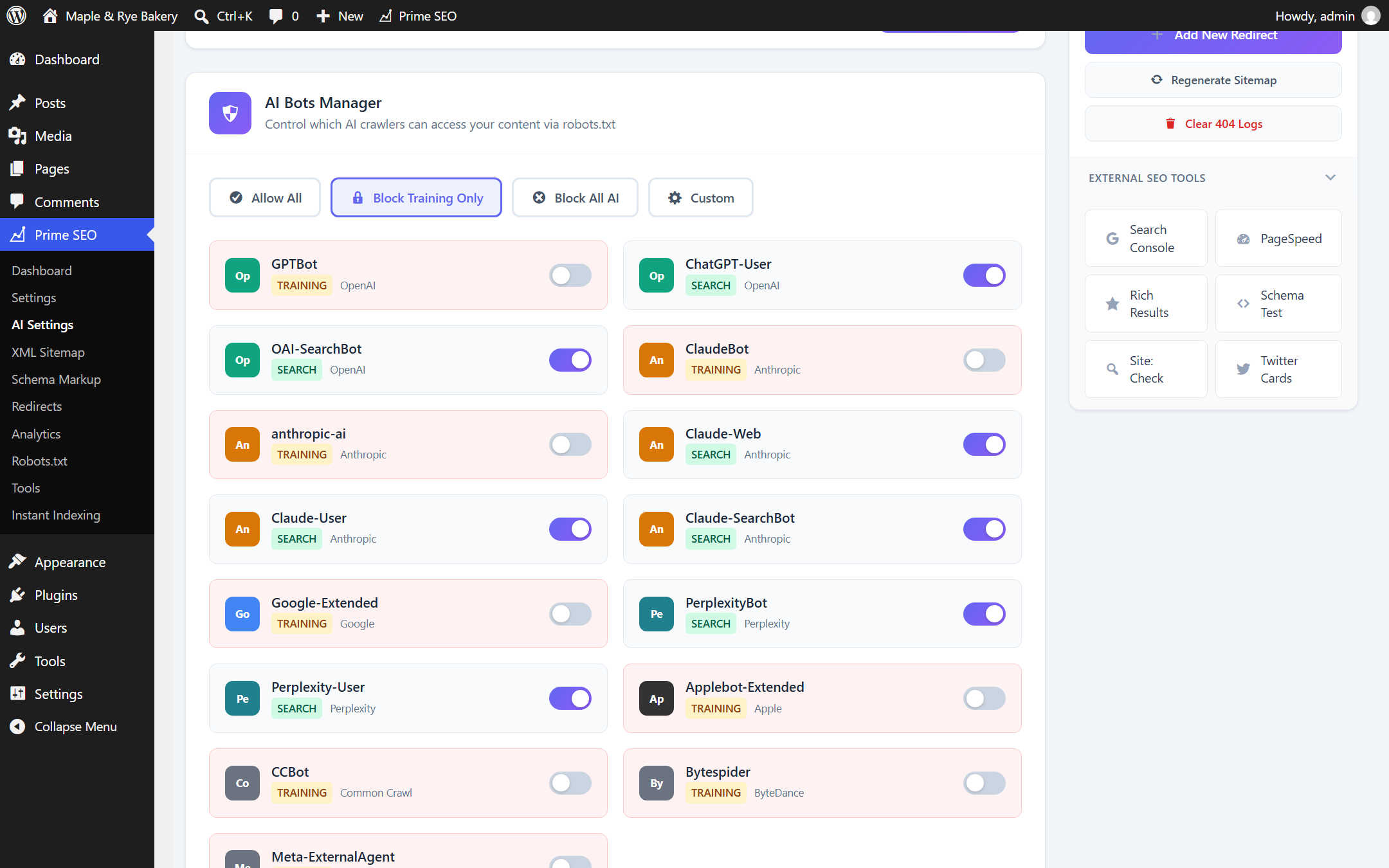
The AI crawler switches work in the free version. Pick a preset (allow all, block training bots only, block all) or set each of the 15 bots by hand in the AI Bots Manager. The robots.txt rules are written for you, and AI Crawler Stats show which AI bots came and which page they opened.
Pro: the meta written for you. “Generate All with AI” fills the SEO title, meta description, Open Graph and Twitter fields and the focus keywords of a post in one click; the AI Bulk Generator does the same for every post that still has none. 500 generations a month are included with the license, no OpenAI account needed, or use your own key without a limit. 14-day trial, no card.
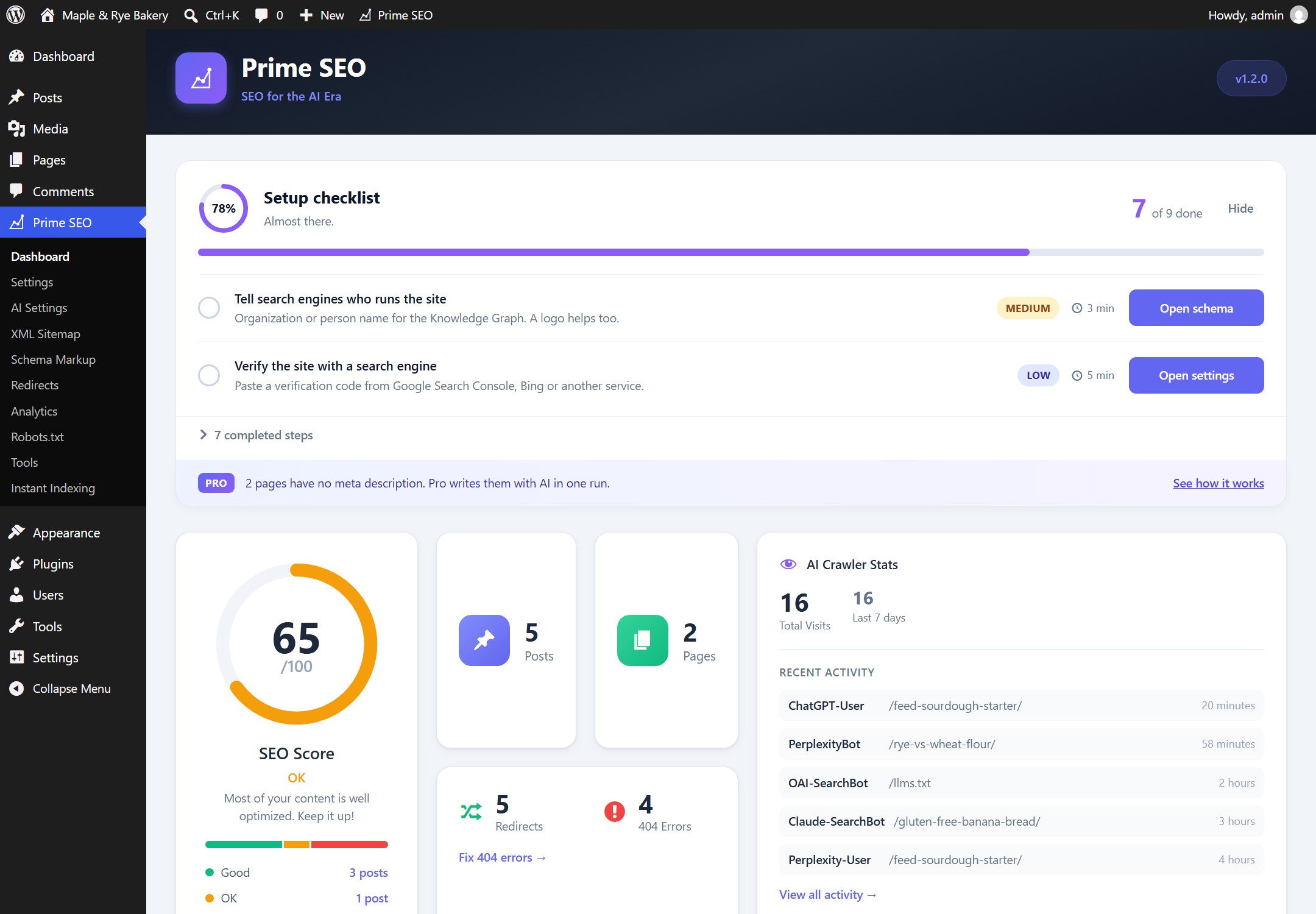
You always know the next step. A setup checklist on the Dashboard shows what is done and what is left, ticks steps off by itself as you configure the plugin, and links to the right screen. One SEO score, the same number in the editor, the posts list and the Dashboard, points to the posts that need work.
Moving from another SEO plugin? Titles, descriptions and redirects are imported from Yoast SEO, Rank Math, All in One SEO and SEOPress, with a backup made first.
Documentation | Support | Pro
AI Search Optimization — Be Found by ChatGPT & Perplexity
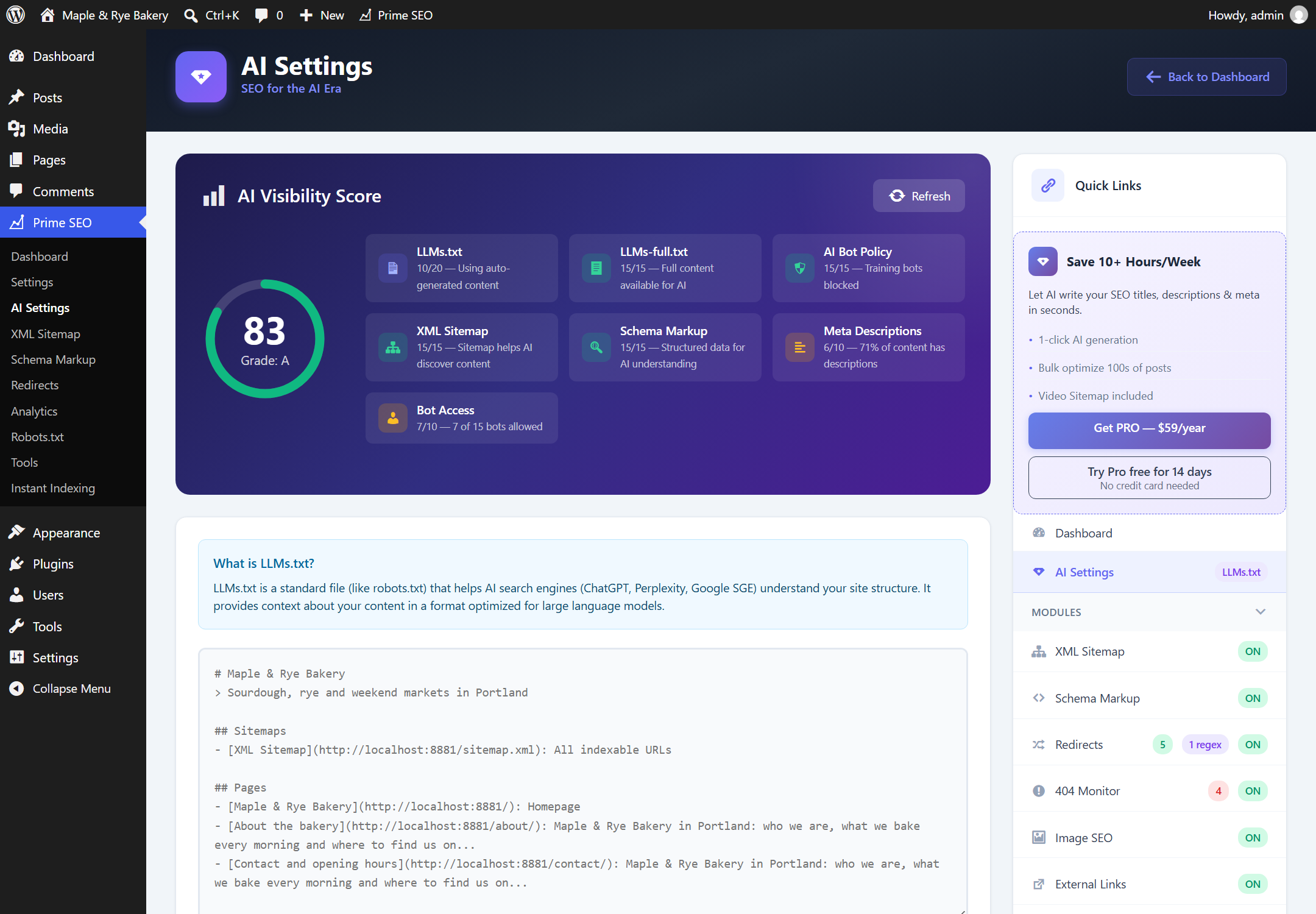
ChatGPT, Perplexity, Claude and Gemini read websites with their own crawlers. Prime SEO shows you which of them visit and lets you decide what each one may read.
- LLMs.txt Generator — Create an llms.txt file automatically and tell AI crawlers what your site is about
- LLMs-full.txt — Provide full content for deeper AI indexing
- AI Bots Manager — Allow or block 15 AI crawlers with robots.txt rules added for you: GPTBot, ChatGPT-User and OAI-SearchBot (OpenAI), ClaudeBot, Claude-User, Claude-SearchBot, Claude-Web and anthropic-ai (Anthropic), PerplexityBot and Perplexity-User (Perplexity), Google-Extended (Gemini training), Applebot-Extended (Apple), CCBot (Common Crawl), Bytespider (ByteDance) and Meta-ExternalAgent (Meta)
- Quick Presets — Allow All, Block Training, Block All, or Custom rules
- AI Crawler Stats — See which AI bots visit your site, how often, and which pages they read. Visits are logged for 15 crawler user agents, including cohere-ai and Amazonbot
- AI Visibility Score — See your AI search readiness at a glance
- AI Content Score — Detailed analysis of how AI engines view your content (Pro)
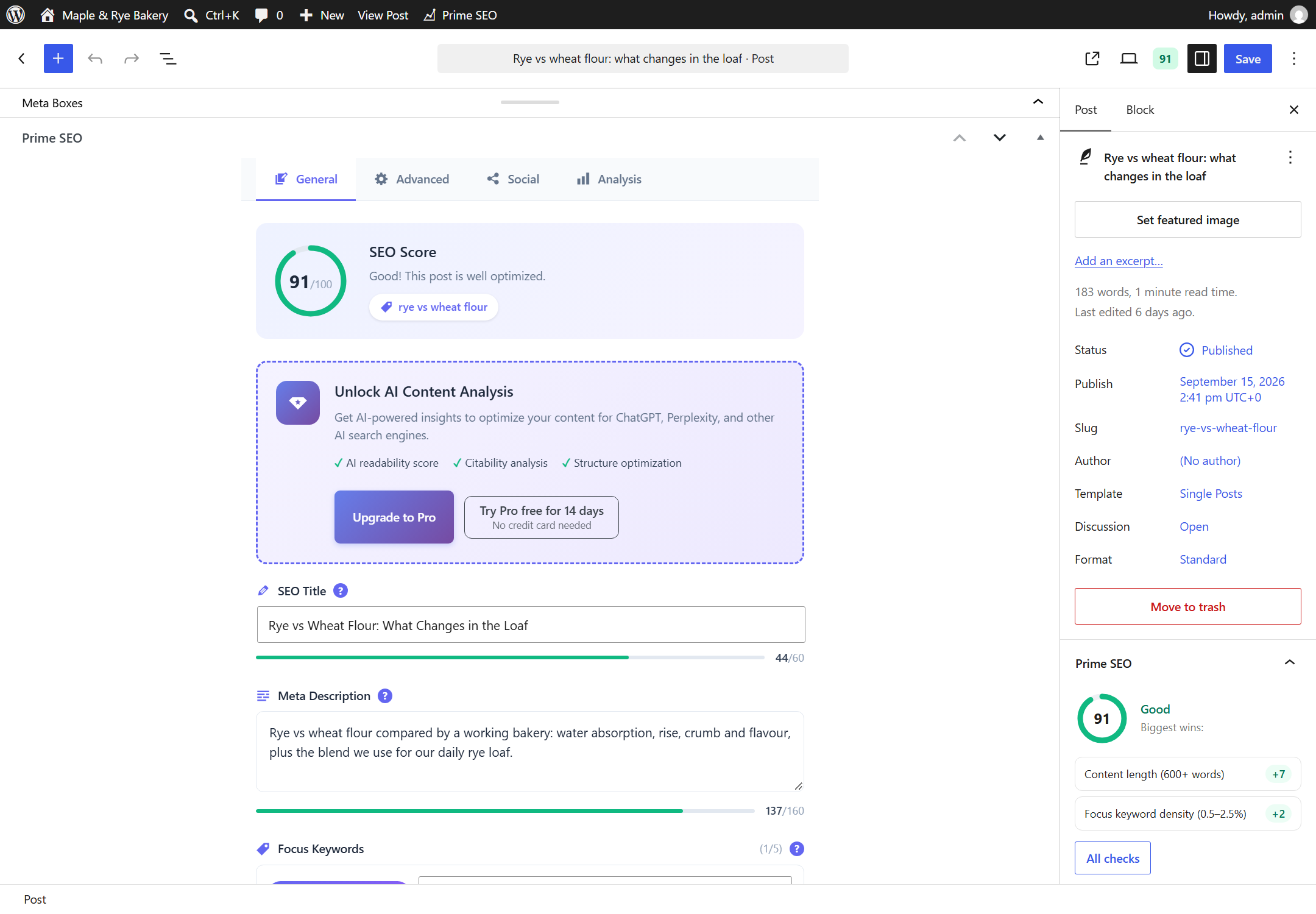
SEO Metabox with Real-Time Analysis
Optimize every post with instant feedback and AI assistance:
- Visual SEO Score (0-100) with circular progress indicator
- Live Google Preview for desktop and mobile
- Character counters with color-coded progress bars
- Multiple focus keywords per post
- Content recommendations as you type
- Generate All with AI — One click fills SEO title, description, social meta, and keywords (Pro)
The metabox appears in every post and page editor, giving you everything you need to optimize content without leaving the screen.
Prime SEO Pro — AI-Powered SEO
Prime SEO Pro adds AI automation to your SEO workflow.
⭐ Generate All with AI — Complete SEO in One Click (Pro)
Why fill fields manually when AI can do it all? One button generates everything:
- SEO Title — Optimized for Google (60 chars)
- Meta Description — Click-worthy snippet (155 chars)
- Facebook Title & Description — Social-optimized OG tags
- Twitter Title & Description — Twitter-specific formatting
- Focus Keywords — Auto-extracted from your content (top 5)
6 fields + keywords in one click. Search and social meta are generated together, so you do not have to fill each field separately.
- Works with any post type
- 500 generations a month are included with a Pro license (GPT-4o mini through the Prime SEO AI service, nothing to set up)
- Prefer no limit? Switch to your own OpenAI key and pick the model; you pay OpenAI directly
AI Bulk Generator — Optimize Your Entire Site (Pro)
Have 50, 100, or 500 posts without SEO? No problem. AI Bulk Generator finds all posts missing SEO data and generates titles and descriptions for all of them:
- Smart Detection — Finds posts missing title, description, or both
- Batch Processing — Generate SEO for hundreds of posts
- Progress Tracking — Real-time progress with pause/resume
- Undo Support — Restore previous values if needed
Additional Pro Features:
- AI Content Score — Detailed analysis for AI search optimization
- Video Sitemap — Auto-detect YouTube, Vimeo, Wistia, Bunny Stream
- Manual Video Fields — Complete control over video metadata
- Priority Support — Direct email support
Redirect Manager
Professional redirect handling:
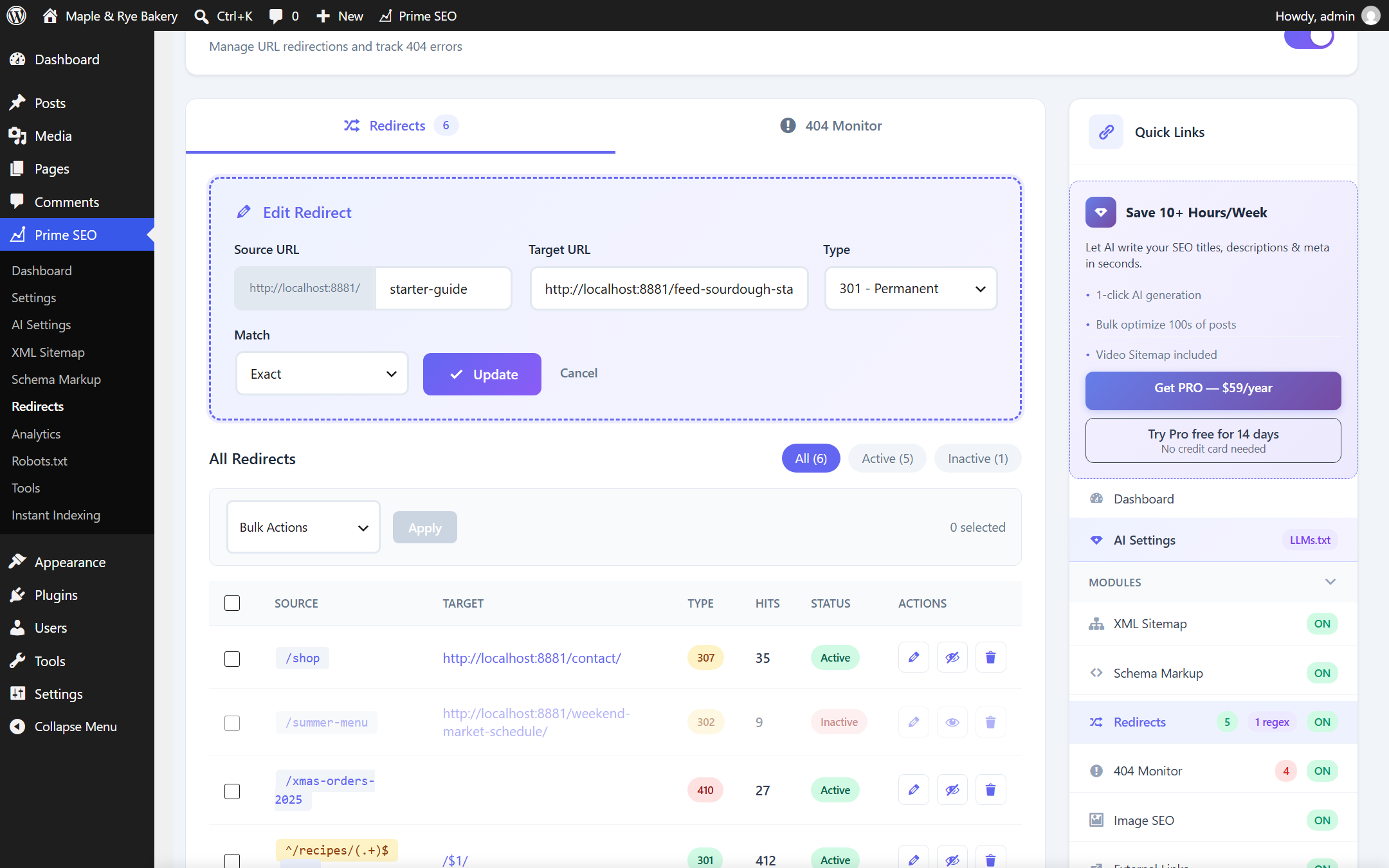
- 301 (Permanent), 302 (Temporary), 307 redirects
- 410 (Gone) and 451 (Unavailable for Legal Reasons) status codes
- Regex pattern matching with capture groups ($1, $2)
- Query string preservation for UTM parameters
- Hit counter for tracking redirect usage
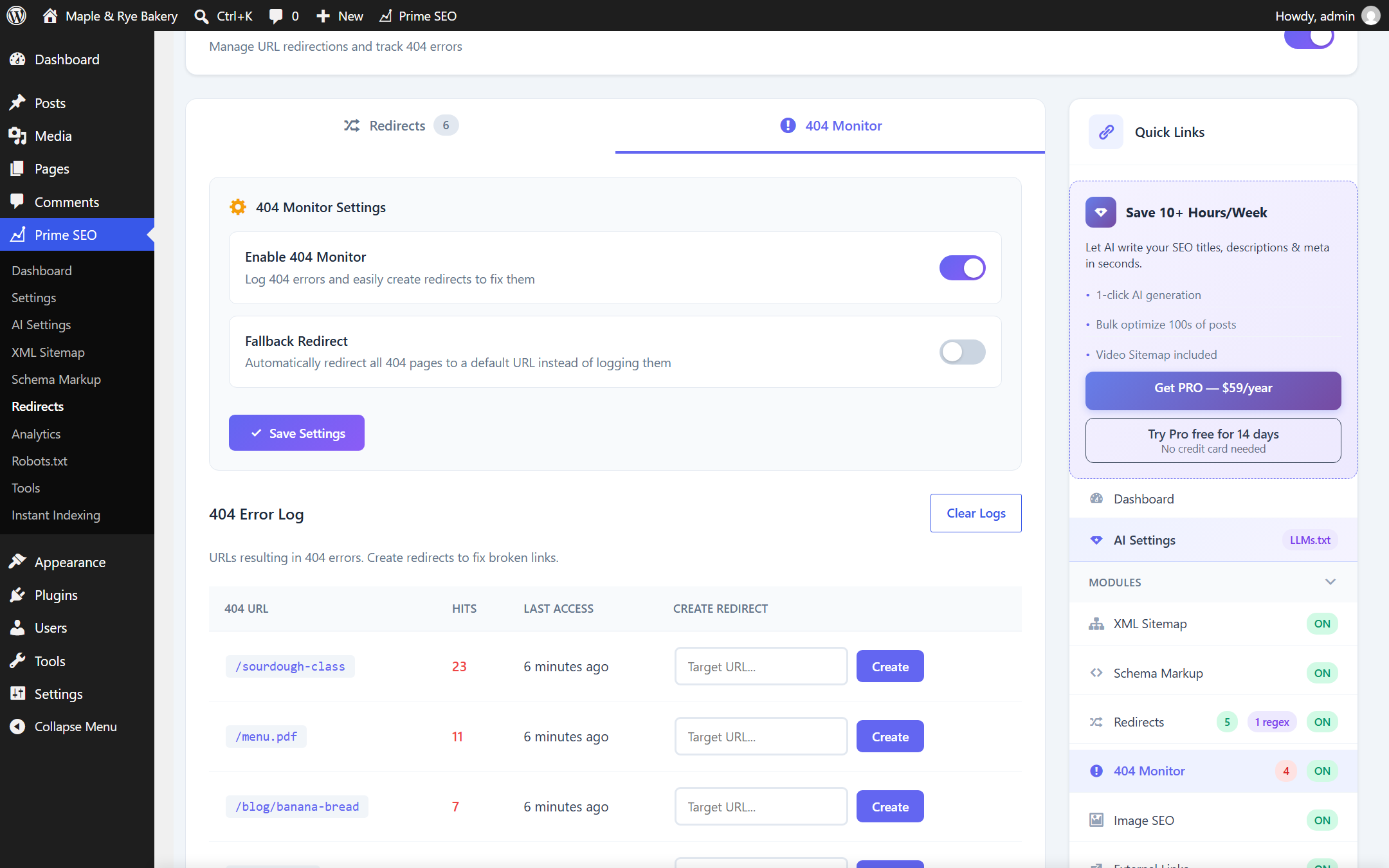
- Fallback redirect for all 404 errors
- Import and export functionality
404 Error Monitor
Track and fix broken links:
- Automatic logging of all 404 errors
- Referer and User Agent tracking
- One-click conversion to redirect
- Bulk delete options
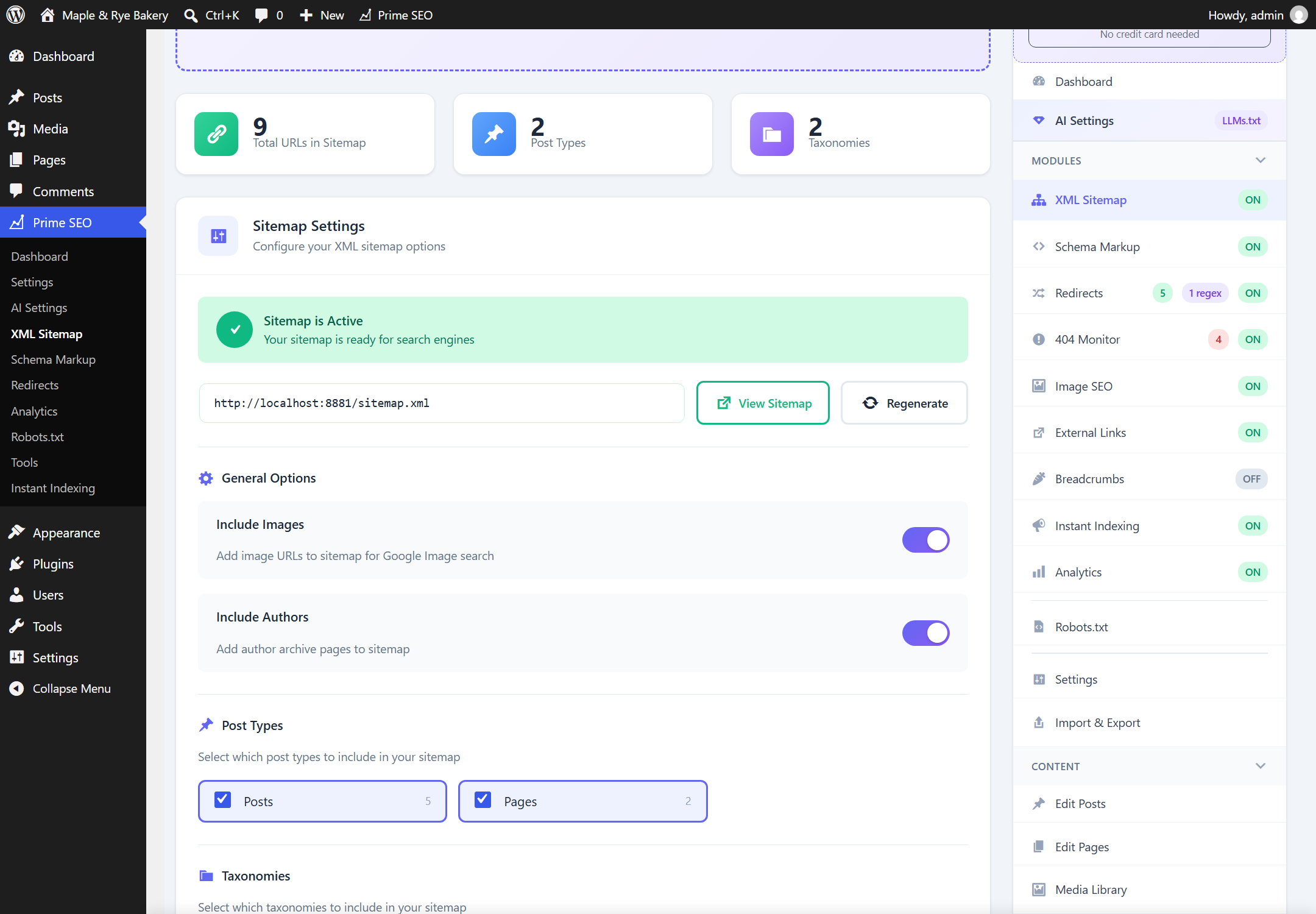
XML-Sitemap
Automatic, standards-compliant sitemaps:
- Sitemap Index with separate post, page, category, and author sitemaps
- Image Sitemap for Google Image Search
- Video Sitemap — Auto-detect YouTube, Vimeo, Wistia, Bunny Stream (Pro)
- Custom Post Types and Taxonomies support
- Respects noindex settings automatically
- Beautiful XSL styling for human-readable sitemaps
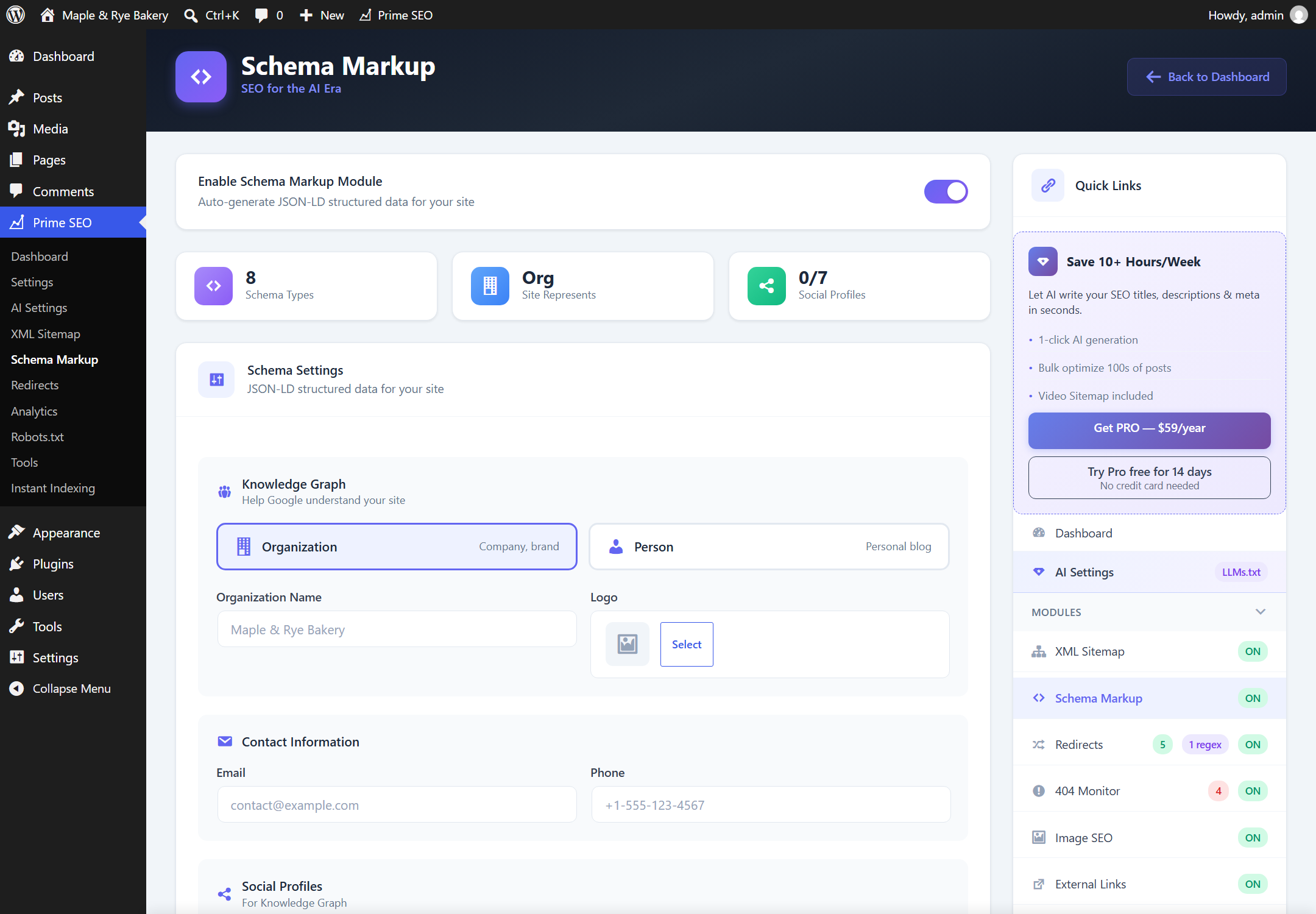
Schema Markup (JSON-LD)
Structured data for rich search results:
Site-wide:
- Knowledge Graph — Organization or Person
- WebSite schema with SearchAction
- Social profiles (Facebook, Twitter, LinkedIn, YouTube, etc.)
Content:
- Article, BlogPosting, NewsArticle
- FAQ and HowTo (auto-detected from content)
- Recipe and Event schemas
- Product schema for WooCommerce
- LocalBusiness with 40+ subtypes (Restaurant, Hotel, Dentist, and more)
Additional Features
- Robots.txt Editor — Visual editor with 5 ready-made templates
- Image SEO — Auto-generate ALT and TITLE attributes
- External Links Manager — Auto-add nofollow and open in new tab
- Breadcrumbs — Shortcode and PHP function with Schema.org markup
- Instant Indexing — Submit URLs via IndexNow API to Bing, Yandex and other IndexNow search engines, by hand or automatically on publish
- Webmaster Verification — Google Search Console, Bing Webmaster Tools, Yandex, Pinterest, Baidu and Ahrefs verification codes in one place
- Import/Export — Full backup and restore with automatic backups
One-Click Migration
Import your existing SEO data:
- Yoast SEO (Free and Pro)
- Rank Math (including redirects)
- All in One SEO
- SEOPress
All titles, descriptions, focus keywords, canonical URLs, and robot settings transfer automatically.
Setup Wizard
Get started in minutes with the 4-step configuration wizard:
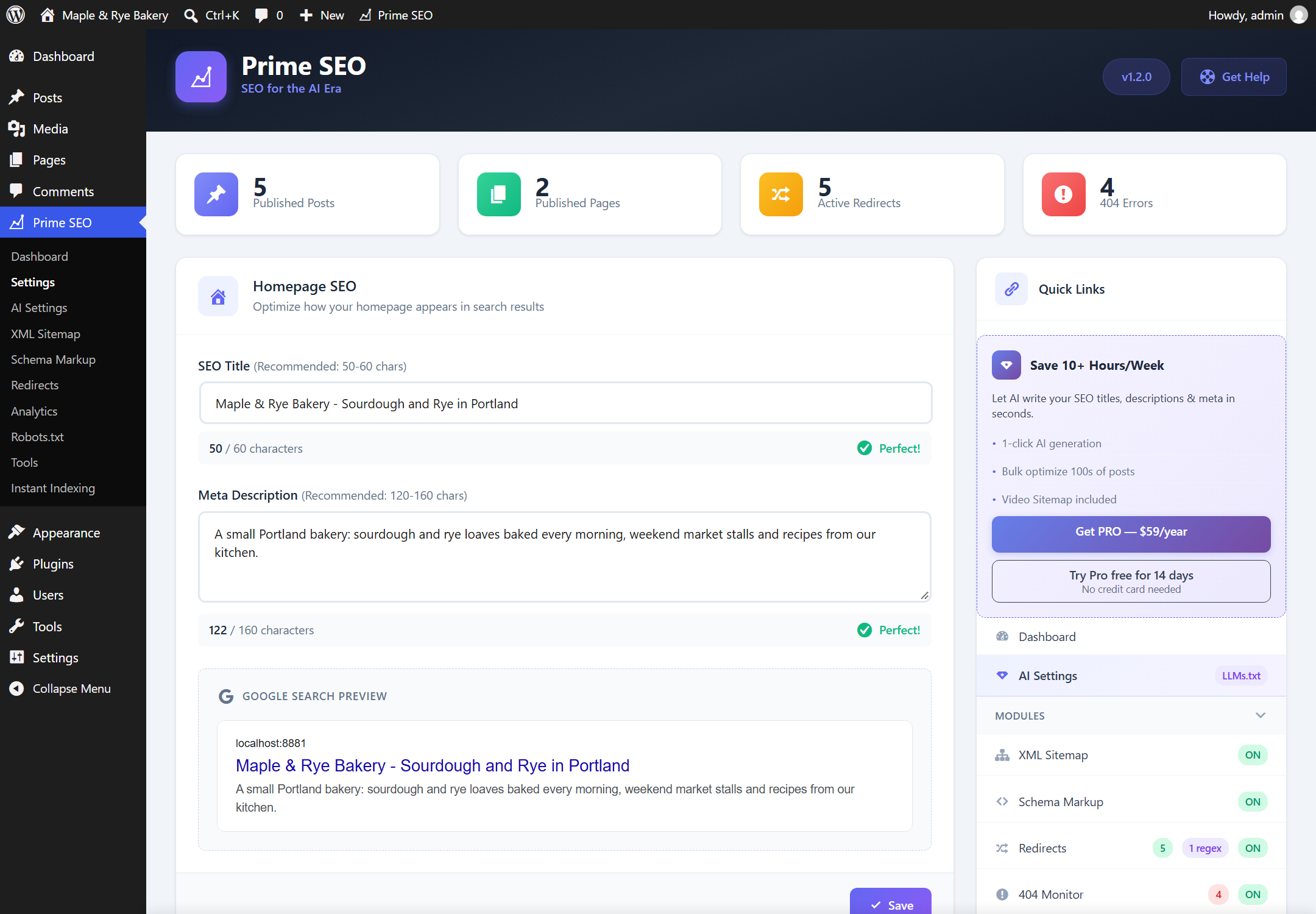
- Homepage SEO settings
- Feature toggles (Sitemap, Image SEO, External Links, 404 Monitor)
- Robots.txt configuration
- Ready to optimize
Built for Performance
- Lightweight code following WordPress Coding Standards
- Assets load only on relevant pages
- No external API calls except optional IndexNow and the optional deactivation survey
- All data stored in your WordPress database
- Compatible with caching plugins
Entwicklerfreundlich
- Clean, well-documented codebase
- Hooks and filters for customization
- WordPress REST API compatible
- Übersetzung bereit
Datenschutzerklärung
Prime SEO stores all data locally in your WordPress database:
- SEO settings and meta data
- Redirect rules
- 404 error logs (IP addresses stored for debugging purposes only)
- Backup files
Externe Dienste
This plugin connects to external services only when you explicitly use certain features:
IndexNow API (Free)
- Service: IndexNow (api.indexnow.org)
- When: When you click “Submit to IndexNow” or enable auto-submit
- Data sent: Your site’s URLs
- Purpose: Request faster indexing by search engines
- Privacy: IndexNow Privacy Policy
Prime SEO AI service (Pro only, default)
- Service: prime-seo-plugin.com/api/ai/ (our own website), which relays the request to OpenAI with our key
- When: When you use “Generate with AI”, “Generate All with AI”, the AI Bulk Generator or the AI Content Score with the “Included with Pro” option selected in AI Settings
- Data sent: the post title, excerpt and content (up to 500 words) and the focus keyword; your Freemius install id and license key so the service can check the license; the site address for that check only
- Stored on our side: per-license counters (how many generations this month) and a log line per request with the license id, install id, status, token counts and duration. Prompts, generated texts, site addresses and IP addresses are not stored
- Purpose: generate SEO titles, descriptions and social meta within the 500 generations a month included with Pro
- Terms: Terms of Service
- Datenschutz: Datenschutzrichtlinie
OpenAI API (Pro only, with your own key)
- Service: OpenAI (api.openai.com)
- When: Same features as above, when “My own OpenAI key” is selected in AI Settings
- Data sent: Post title, excerpt, and content for SEO generation
- Purpose: Generate SEO titles and meta descriptions
- Privacy: OpenAI Privacy Policy
- Note: uses the API key you saved; no data goes through our servers
Prime SEO feedback (optional, free version)
- Service: prime-seo-plugin.com (our own website)
- When: Only if you pick a reason and press “Submit & Deactivate” in the dialog shown when you deactivate the plugin. “Skip & Deactivate” and “Cancel” send nothing
- Data sent: the reason you selected, your optional comment, the Prime SEO, WordPress and PHP versions, and the site language. No site address, no email address, no personal data. IP addresses are not stored
- Purpose: to learn why people stop using the plugin and fix those problems
- Terms: Terms of Service
- Datenschutz: Datenschutzrichtlinie
No tracking or analytics are performed. No data is shared with third parties except as described above.
Unterstützen
For support, please use the WordPress.org support forum. We aim to respond within 24-48 hours.
Credits
Prime SEO is developed by the Prime SEO team.
Built following WordPress Coding Standards.
Icons: Dashicons
Installation
Automatische Installation
- Log in to your WordPress dashboard
- Go to Plugins → Add New
- Search for “Prime SEO”
- Click “Install Now” and then “Activate”
- Follow the Setup Wizard to configure your site
Manuelle Installation
- Download the plugin zip file
- Go to Plugins → Add New → Upload Plugin
- Choose the zip file and click “Install Now”
- Click “Activate Plugin”
- Follow the Setup Wizard
After Activation
The Setup Wizard will guide you through:
- Setting up your homepage SEO
- Enabling features (Sitemap, Image SEO, etc.)
- Configuring robots.txt
- You’re ready to optimize!
Änderungsprotokoll
Fixes for a static front page with a posts page, paginated pages, non-Latin URLs and page builders, plus AI crawler activity by day and AI events. No settings are changed by the update.
1.2.3
Release Date: October 2026
AI crawlers:
- New: AI Crawler Activity on the AI Settings page: visits per day, visits by bot with the last visit, the most visited pages and the latest 20 visits. “View all activity” on the Dashboard now opens it
- New: Daily counters keep 90 days of AI bot visits, so a busy site no longer loses its history when the 500-visit log fills up. The Dashboard total now counts all visits
- New: AI events. The Dashboard tells you once when a bot calling itself GPTBot, ClaudeBot or another AI bot visits your site for the first time, when an AI bot first reads your llms.txt, and at 100, 1,000 and 10,000 AI bot visits. All of them stay in the Milestones list
Indexing and URLs:
- New: Category, tag, custom taxonomy, author, post type and date archives output a canonical URL, with the page number on /page/2/ and later. A query for several terms at once, search results and 404 pages get none
- New: “Check Key File” button on the Instant Indexing page opens the IndexNow key file from your server and tells you whether search engines can read it
- New: The Prime SEO menu shows how many items are listed under Needs Attention on the Dashboard (posts and pages without a meta description, 404 errors), with “!” from 10 up
- Changed: The SEO Title column in the posts and pages lists is hidden by default, so the title column has room again on laptop screens. Turn it on in Screen Options; if you already changed Screen Options, nothing changes for you
- Fixed: With a static front page, the posts page (for example /blog/) used the homepage title, description and canonical URL. It now uses the SEO settings of its own page, and the WebSite and Organization schema stay on the homepage only
- Fixed: Paginated pages (/page/2/, /blog/page/2/) pointed their canonical and og:url to the first page and repeated its title. They now point to themselves, and the title ends with “Page 2”, as WordPress does by default
- Fixed: Posts set to noindex no longer output a canonical URL
- Fixed: URLs with non-Latin characters (Cyrillic, Greek, Arabic and others): redirects for them did not work, the 404 Monitor logged them as “-” or not at all, and IndexNow sent them cut (
/%D0%BF%D1%80/became//) or skipped them. AI Crawler Stats now show these pages by their real address - Fixed: When WordPress is installed in a subfolder, the IndexNow key file returned 404, so search engines could not verify the key
- Fixed: Sitemap pages past the last one (for example post-sitemap999.xml) returned an empty sitemap with status 200 and stored a cache entry for every number. They now return 404, and the sitemap cache is rebuilt after a plugin update
- Fixed: The 404 fallback redirect no longer sends missing scripts, styles, images and fonts (and anything under /wp-content/ or /wp-includes/) to the homepage, where browsers cached the redirect in place of the file
Content:
- Fixed: Pages built with WPBakery, Divi or Avada showed raw shortcodes (
[vc_row]…) and encoded blocks in the automatic meta description, Open Graph and schema descriptions, and llms-full.txt dropped the text inside builder elements. The text between builder tags is now kept and the tags are removed, without rendering the page - Fixed: Schema markup showed HTML codes instead of characters in the site name, titles and descriptions (
Tom & Jerry,Don’t) - Fixed: Site name and tagline in llms.txt and llms-full.txt showed HTML entities (
&,') instead of the characters - Fixed: A tagline that starts with “> ” no longer appears as “> > …” in llms.txt and llms-full.txt
1.2.1
Release Date: September 2026
AI without an API key (Pro):
- New: 500 AI generations a month are included with every Pro license. Pick “Included with Pro” in AI Settings and the plugin generates through the Prime SEO AI service; no OpenAI account needed. Your own key still works as the second option, without a limit on our side
- New: AI Settings and the Bulk Generator show how many generations are left this month and when the counter resets; the Bulk Generator warns before a run that would exceed it
- Changed: “Generate both” in the post editor and each post in the Bulk Generator now make one combined request instead of two
- Changed: “External Services” in this readme describes the Prime SEO AI service (what is sent, what is stored)
- Fixed: Pro could not be activated while the free version was still active (the Freemius SDK was looked for in the free plugin folder)
- Changed: the build is byte-for-byte reproducible regardless of line endings in the checkout; release files use LF
1.2.0
Release Date: September 2026
A clear first ten minutes:
- New: Setup checklist on the Dashboard. It shows how many setup steps are done, lists the open ones by priority with the time each takes, and ticks them off by itself as you configure the plugin
- New: The setup wizard now ends with your checklist progress: what the wizard has just completed and the three steps to take next
- New: Edit a redirect. The pencil in each row opens the redirect in the form at the top; hits and status are kept
- New: Pagination for the redirects table. Sites with more than 20 redirects can now reach all of them, and the Active / Inactive filter is kept between pages
- New: AI Bots Manager covers 15 AI crawlers. Added Claude-User, Claude-SearchBot and Perplexity-User
- Improved: If you chose “Block All AI” or “Block Training Only”, newly added bots follow that choice automatically
- Improved: AI Crawler Stats no longer list Google-Extended and Applebot-Extended. They are robots.txt names that never appear in a visit, so their counters could only show zero. Both stay in the AI Bots Manager, where they work
- Improved: Empty screens now explain what will appear there and link to the next step: redirects, 404 Monitor, AI crawler visits, IndexNow
- Fixed: A regex redirect target such as /archive/$1 could not be saved because the field accepted full URLs only
- Fixed: Updating a regex redirect no longer trims the slashes of its pattern
- Fixed: Saving robots.txt without changes no longer rewrites its line endings
1.1.9
Release Date: September 2026
One SEO score you can trust:
- New: One SEO score for every post. The editor, the posts list and the Dashboard now show the same number, calculated the same way
- New: The score no longer stays at 0 until you add a focus keyword. Titles, descriptions, content length, images and links earn points on their own; the focus keyword checks add the rest
- New: The score is always in view in the block editor: a score badge in the editor toolbar, a Prime SEO sidebar with your three biggest wins and the points each one adds, and the same summary in the pre-publish panel
- New: Score breakdown in the Analysis tab is grouped into “What to improve” and “Done”, shows the points every check adds, and takes you to the right field with one click
- New: A small celebration the first time a post reaches the green zone
- New: A short notice after saving tells you how the score changed, for example “SEO score: 38 → 48”
- New: Filter posts and pages by score: Good, OK, Needs improvement
- New: The Dashboard score is now the average of your post scores, with a breakdown that links straight to the posts in each group and a bar showing how your content is split between them
- Improved: Focus keyword matching ignores punctuation, so “llms txt” matches “llms.txt”
- Improved: The per-keyword analysis now follows the same matching rules as the score, including keywords in subheadings
- Improved: Consistent button sizes and text sizes across all plugin pages
- Improved: Scores saved by earlier versions are recalculated automatically in the background
Other:
- New: Optional one-question survey when you deactivate the plugin. Nothing is sent unless you press “Submit & Deactivate” (see External Services)
- Improved: The review request now appears after a success, such as a post reaching a good score, instead of only after a week
- Fixed: The plugin description mentioned 16+ AI crawlers. The AI Bots Manager controls 12, listed in the documentation
1.1.8
Release Date: September 2026
- New: “Generate all descriptions with AI” shortcut under Needs Attention on the Dashboard
- Fixed: “Get Pro” link on the Plugins page pointed to a missing page
- Changed: Removed the third-party licensing SDK that was added to the free version in 1.1.7. Version 1.1.7 was never delivered as an update. The free plugin does not collect or send any usage data
1.1.6
Release Date: September 2026
Compatibility:
- Tested with WordPress 7.1 and PHP 8.3
- New: Prime SEO panel in the block editor sidebar — one click opens the SEO meta box, which WordPress now keeps in a collapsed area
- Fixed: PHP 8.1+ deprecation notice on the setup wizard page
Security:
- Hardened JSON-LD output so content containing a closing script tag cannot break out of the schema block
- Settings export files no longer contain the OpenAI API key (Pro). If you shared an export file made with an earlier version, consider rotating the key
Bug Fixes:
- Fixed: Saving the Settings page switched off the XML Sitemap and Schema modules and cleared sitemap post types — if your sitemap became empty, re-enable them on the XML Sitemap page once
- Fixed: Import and backup restore now keep AI Bots, LLMs.txt and sitemap options, and no longer turn disabled checkboxes on
- Fixed: Settings import failed on Windows servers
- Fixed: Quick Index on the Dashboard always answered “Security check failed”
- Fixed: AI Crawler Stats now counts AI bot visits to sitemap.xml, llms.txt and llms-full.txt
- Fixed: Sitemap index is now displayed with the styled view, same as the other sitemaps
- Fixed: Sitemap is refreshed immediately after sitemap settings are saved
- Fixed: The setup wizard no longer reappears after re-activation or after upgrading to Pro
- Fixed: Empty meta description tag is no longer printed
- Fixed: Horizontal scrollbar on plugin pages; Dashboard and Redirects layout on wide screens
Verbesserungen:
- Safer default robots.txt in the setup wizard: CSS, JS and URLs with parameters are no longer blocked. An unmodified old default is replaced automatically on update; customised robots.txt files are left untouched
- Posts with a canonical URL pointing to another page are left out of the sitemap
- IndexNow no longer submits URLs from local, development or non-public sites
- Pro: a notice is shown when the license is not activated
Screenshots
Für Entwickler
Ist das dein Plugin? Zeigen Sie die Zahlen.
Fügen Sie Ihrer Website, Docs oder GitHub Readme ein Live-Badge hinzu. Es wird von selbst aktualisiert - kein Konto erforderlich.
Best Prime SEO alternatives
All AI Crawlers plugins →





Fragen und Antworten
Prime SEO: quick answers
Gerade Antworten, gezogen von Live WordPress.org Daten.
Quelle: WordPress.org
Is Prime SEO free?
Yes. Prime SEO is free to download and use from the official WordPress.org plugin directory.
Is Prime SEO safe to use in 2026?
Prime SEO works, but test it on a staging site before relying on it in 2026. It runs on 100+ sites, is rated 5/5 and was last updated 1 month ago, and scores 60/100 on our health check.
How many websites use Prime SEO?
Prime SEO is active on 100+ WordPress websites and has been downloaded 6,202 times since it launched in January 2026. It was downloaded 823 times in the last 30 days.
Does Prime SEO work with WordPress 7.1?
Yes. The developer has tested Prime SEO up to WordPress 7.1.5, the latest release. It requires WordPress 5.6 or newer.
What PHP version does Prime SEO need?
Prime SEO requires PHP 7.4 or higher. Most hosts run PHP 8.x today, so it works on any modern WordPress hosting.
When was Prime SEO last updated?
The latest version, 1.2.3, was released on October 15, 2026 (1 month ago).
Who makes Prime SEO?
Prime SEO is developed and maintained by primeseo.
What are the best alternatives to Prime SEO?
The most popular alternatives to Prime SEO are Better Robots.txt (5K+ installs), ParseLess (70+ installs) and SEO Help (70+ installs).
Angetrieben von PageForge
Eine Vorlage und eine Tabelle. Eine echte Seite für jede Suche.
PageForge Verwandelt jede Zeile eines CSV in eine WordPress-Seite mit eigenem Titel, URL, SEO Felder und Schema entworfen. Kostenlos auf WordPress.org.
- CSV und XLSX, plus Google Sheets auf Beruf und Unternehmen
- seinen eigenen Titel, URL, SEO Felder und Schema für jede Seite
- Arbeitet mit dem Blockeditor, Elementor, Divi und Avada
- Kostenlos auf WordPress.org, keine Kreditkarte