


Prettify Code Syntax
The main reason for the development of this plugin was the lack of options supporting the HTML5 recommendation, where the code snippets should be tagged with pre followed by code, and optionally a class starting with…

Betrachten Sie eine Alternative
Prettify Code Syntax shows warning signs in 2026 — compare the alternatives below before installing. It runs on 70+ sites, is rated 4.2/5 and was last updated 14 years ago, and scores 34/100 on our health check.
- Small user base (70+ active installs)
- No update in 13 years
- Only tested up to WordPress 3.5 (latest is 7.1)
Wie stapelt es sich?
Side-by-side bei Installationen, Updates, Bewertungen und Support



Tägliche Downloads
Download-Spitzen folgen normalerweise einer neuen Version - jede Website, die automatisch aktualisiert wird, gilt als Download.
Ranglisten
Where Prettify Code Syntax stands todayWordPress.org Ranglisten suchen
Live-Position in der Plugin-Suche, Top 100| Stichwort | Position |
|---|---|
| code | >100 |
| highlighter | >100 |
| markup | >100 |
| prettify | #22 |
| syntax | >100 |
Versionsübernahme
Anteil aktiver Sites pro Release.
Bewertungsaufschlüsselung
★★★★★★★★★★ 4.2 from 12 reviews
About Prettify Code Syntax
Aus der offiziellen Readme · V1.2.1Beschreibung
The main reason for the development of this plugin was the lack of options supporting the HTML5 recommendation, where the code snippets should be tagged with pre followed by code, and optionally a class starting with language- and then our language.
You can use the plugin like this:
<pre class="prettyprint"><code class="language-php">
// my code
</code></pre>
Also very important is that although this plugin loads different files depending on your configuration, it fully supports caching scripts (W3 Total Cache) to concatenate and compress all the css and js, so the impact in performance will be minimum.
Sprachen
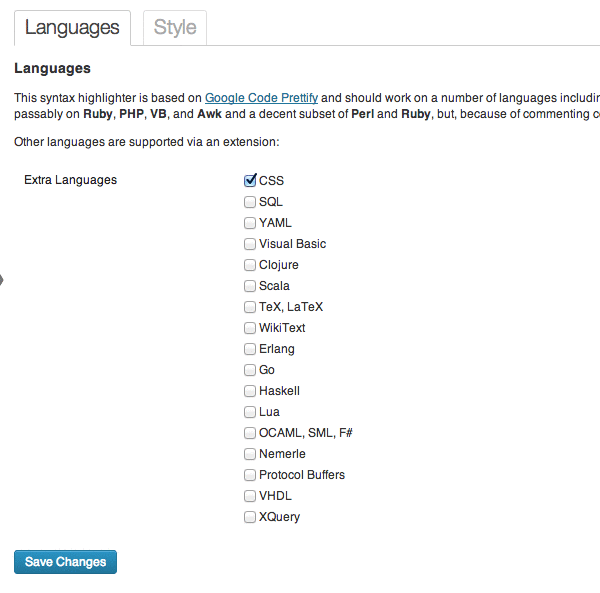
This syntax highlighter is based on Google Code Prettify and should work on a number of languages including C and friends, Java, Python, Bash, SQL, HTML, XML, Javascript, Makefiles, and Rust. It works passably on Ruby, PHP, VB, and Awk and a decent subset of Perl and Ruby, but, because of commenting conventions, doesn’t work on Smalltalk.
Other languages are supported via an extension (plugin options): CSS, SQL, YAML, Visual Basic, Clojure, Scala, Latek (TeX, LaTeX), WikiText, Erlang, Go, Haskell, Lua, OCAML, SML, F#, Nemerle, Protocol Buffers, CHDL (VHDL), XQ (XQuery), Lisp, Scheme, Dart, Llvm, Mumps, Pascal, R, S, RD, TCL
Styles
Four different styles are provided, and they can be previewed in the plugin options. They are modified to make sure they don’t clash with any other styles in your theme.
You have also the option to include your custom style.
If you have a style that would like to see included in the option list, just contact me, or fork me.
Notizen
-
Plugin options are at Settings > Prettify Code Syntax. Have a look at the Screenshots tab to see how it looks like.
-
If you don’t care too much about the HTML5 recommendation, you can skip the
language-class. The code always gets detected automatically. -
It will also work if you only use a
pretag without thecodetag (but long lines will be wrapped instead of get horizontal scroll), or if you only use acodetag with theprettyprintclass (but if you don’t usepreyour spaces/returns won’t be maintained.) -
Be careful using the Visual Editor tab when inserting code, as some HTML tags will be modified or removed.
-
Using a chaching plugin like W3 Total Cache is highly recommended.
Demo
You can find a front end demo here a the bottom.
Installation
In your WordPress installation go to Plugins > Add New, and search for “prettify code syntax” to find and install it automatically.
You can also install it manually:
- Download the plugin and upload the contents to the
/wp-content/plugins/directory, using FTP or the Upload tab in Plugins > Add New. - Aktivieren Sie das Plugin über das „Plugins“-Menü in WordPress
- Change settings if neccessary at Settings > Prettify Code Syntax
Änderungsprotokoll
1.2
- Add Twitter Bootstrap style
- Isolate default style. Every style now is independent
- Fix bug where all languages were loaded
- Code refactoring
1.1
- Add new languages
- Several fixes and code refactoring
1.0
- First release
Screenshots

Für Entwickler
Ist das dein Plugin? Zeigen Sie die Zahlen.
Fügen Sie Ihrer Website, Docs oder GitHub Readme ein Live-Badge hinzu. Es wird von selbst aktualisiert - kein Konto erforderlich.
Best Prettify Code Syntax alternatives
All code plugins →




Fragen und Antworten
Prettify Code Syntax: quick answers
Gerade Antworten, gezogen von Live WordPress.org Daten.
Quelle: WordPress.org
Is Prettify Code Syntax free?
Yes. Prettify Code Syntax is free to download and use from the official WordPress.org plugin directory.
Is Prettify Code Syntax safe to use in 2026?
Prettify Code Syntax shows warning signs in 2026 — compare the alternatives below before installing. It runs on 70+ sites, is rated 4.2/5 and was last updated 14 years ago, and scores 34/100 on our health check.
How many websites use Prettify Code Syntax?
Prettify Code Syntax is active on 70+ WordPress websites and has been downloaded 16,951 times since it launched in February 2013. It was downloaded 227 times in the last 30 days.
Does Prettify Code Syntax work with WordPress 7.1?
Prettify Code Syntax is officially tested up to WordPress 3.5.2, while the latest release is 7.1.5. It may still work, but try it on a staging site first.
When was Prettify Code Syntax last updated?
The latest version, 1.2.1, was released on March 21, 2013 (14 years ago).
Who makes Prettify Code Syntax?
Prettify Code Syntax is developed and maintained by jesucarr.
What are the best alternatives to Prettify Code Syntax?
The most popular alternatives to Prettify Code Syntax are WPCode (3M+ installs), Code Snippets (1M+ installs) and Head & Footer Code (100K+ installs).
Angetrieben von PageForge
Eine Vorlage und eine Tabelle. Eine echte Seite für jede Suche.
PageForge Verwandelt jede Zeile eines CSV in eine WordPress-Seite mit eigenem Titel, URL, SEO Felder und Schema entworfen. Kostenlos auf WordPress.org.
- CSV und XLSX, plus Google Sheets auf Beruf und Unternehmen
- seinen eigenen Titel, URL, SEO Felder und Schema für jede Seite
- Arbeitet mit dem Blockeditor, Elementor, Divi und Avada
- Kostenlos auf WordPress.org, keine Kreditkarte