


PressPrimer Assignment – Homework Submission, Document Viewer & LMS Grading Workflows
Collect, review, and grade student assignments in WordPress. File uploads, text submissions, inline feedback, and LMS integration. Free forever.

Solide Wahl
PressPrimer Assignment is a solid plugin choice in 2026, with a few things worth checking first. It runs on 80+ sites, is rated 5/5 and was last updated 5 days ago, and scores 75/100 on our health check.
- Aktiv entwickelt – letztes Update vor 5 Tagen
- Getestet mit dem neuesten WordPress (7.1)
- Kleine Benutzerbasis (80+ aktive Installationen)
- Bisher sehr wenige Bewertungen
Wie stapelt es sich?
Side-by-side bei Installationen, Updates, Bewertungen und SupportTägliche Downloads
Download-Spitzen folgen normalerweise einer neuen Version - jede Website, die automatisch aktualisiert wird, gilt als Download.
Ranglisten
Where PressPrimer Assignment stands todayWordPress.org Ranglisten suchen
Live-Position in der Plugin-Suche, Top 100| Stichwort | Position |
|---|---|
| assignment | #2 |
| education | #70 |
| Grading | #3 |
| learndash | #100 |
| lms | #50 |
Versionsübernahme
Anteil aktiver Sites pro Release.
Bewertungsaufschlüsselung
★★★★★★★★★★ 5 from 1 reviews
About PressPrimer Assignment
From the official readme · v2.2.4Beschreibung
PressPrimer Assignment is a professional assignment submission and grading plugin that gives WordPress educators everything they need to collect student work, provide meaningful feedback, and track grades, all without juggling email attachments, shared drives, or clunky LMS add-ons.
Students get a clean, focused submission experience. Teachers get a centralized grading dashboard with a built-in document viewer, rich text feedback, and inline annotations available via the School addon. And you keep full control of your data on your own WordPress site.
This is a genuinely free plugin. Unlimited assignments, unlimited submissions, full grading tools, LMS integration, and email notifications are all included at no cost. We earn upgrades by building specialized features worth paying for — like group management, rubric grading, AI-assisted grading and proofreading, document annotations, anonymous grading, AI content and plagiarism detection, xAPI / LRS support, automated data retention, audit logging, and white-label branding — not by crippling what you get for free.
Why PressPrimer Assignment?
Built-in assignment tools in WordPress LMS plugins are often afterthoughts, limited to basic file uploads with no real grading workflow, limited feedback options, and dated interfaces. Dedicated assignment platforms charge monthly fees with per-student pricing that gets expensive fast.
PressPrimer Assignment delivers a focused, polished assignment workflow with the features educators actually need:
- Flexible Submission Types – Accept file uploads, rich text submissions, or let students choose. Support for PDF, DOCX, PPTX, TXT, RTF, ODT, and image files out of the box.
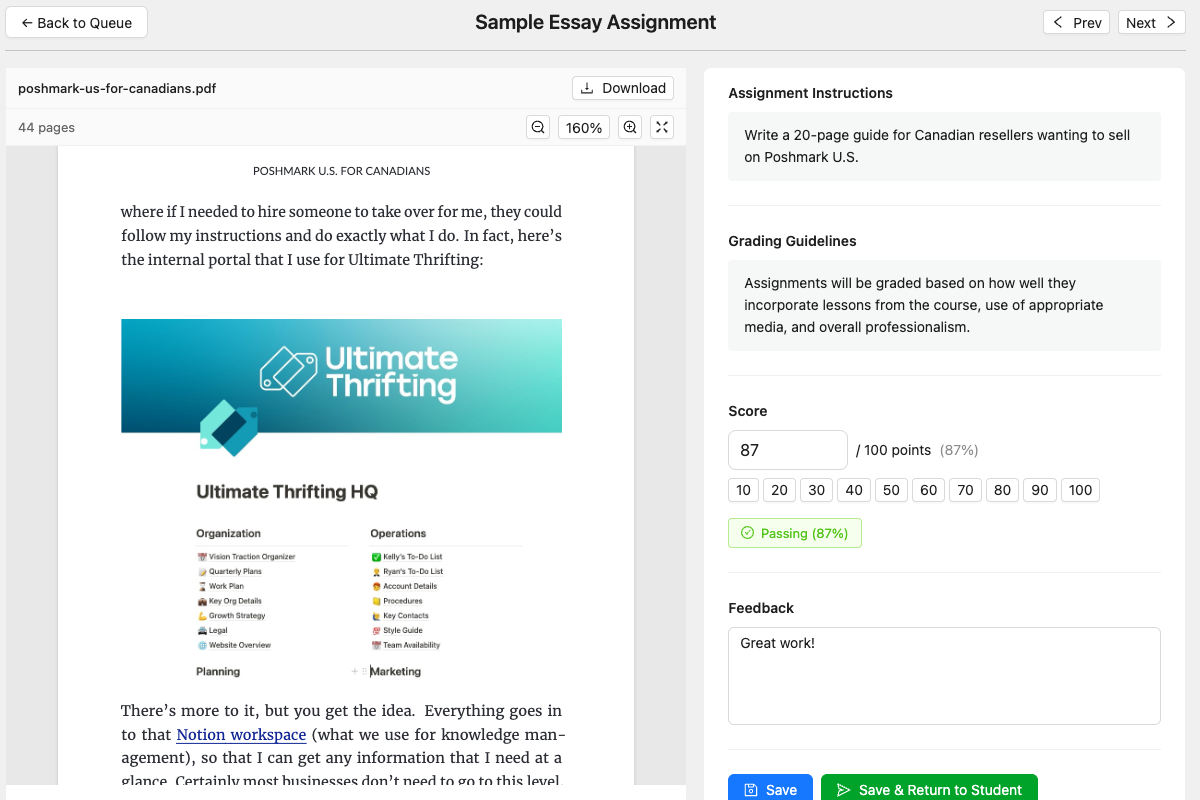
- Grade Without Leaving WordPress – A dedicated grading queue with a side-by-side interface: the student’s document renders on the left while you score and write feedback on the right. Built-in viewers for PDF, Word documents, PowerPoint decks, images, and text files mean you never have to download, open, and track files on your desktop.
- Native LMS Integration – Works with LearnDash, Tutor LMS, LifterLMS, and LearnPress. Assignments appear in lessons, passing grades trigger lesson completion, and instructor roles are mapped automatically.
- Secure File Handling – Six-layer file validation and permission-based file serving. Student files are never directly accessible via URL.
- Customizable Email Notifications – Automatic emails for submission confirmation, grade release, and new submission alerts. Fully customizable templates with token placeholders.
- Three Professional Themes – Default, Modern, and Minimal themes that match the PressPrimer Quiz visual style.
Features Included Free
PressPrimer Assignment includes everything you need to manage assignments at any scale:
Assignment Creation
- Unlimited assignments and submissions
- Configurable maximum points and passing score
- Three submission types: file upload, text/rich text, or student’s choice
- Configurable file types, file size limits, and multiple files per submission
- Duplicate any assignment to copy its settings
Student Submission Experience
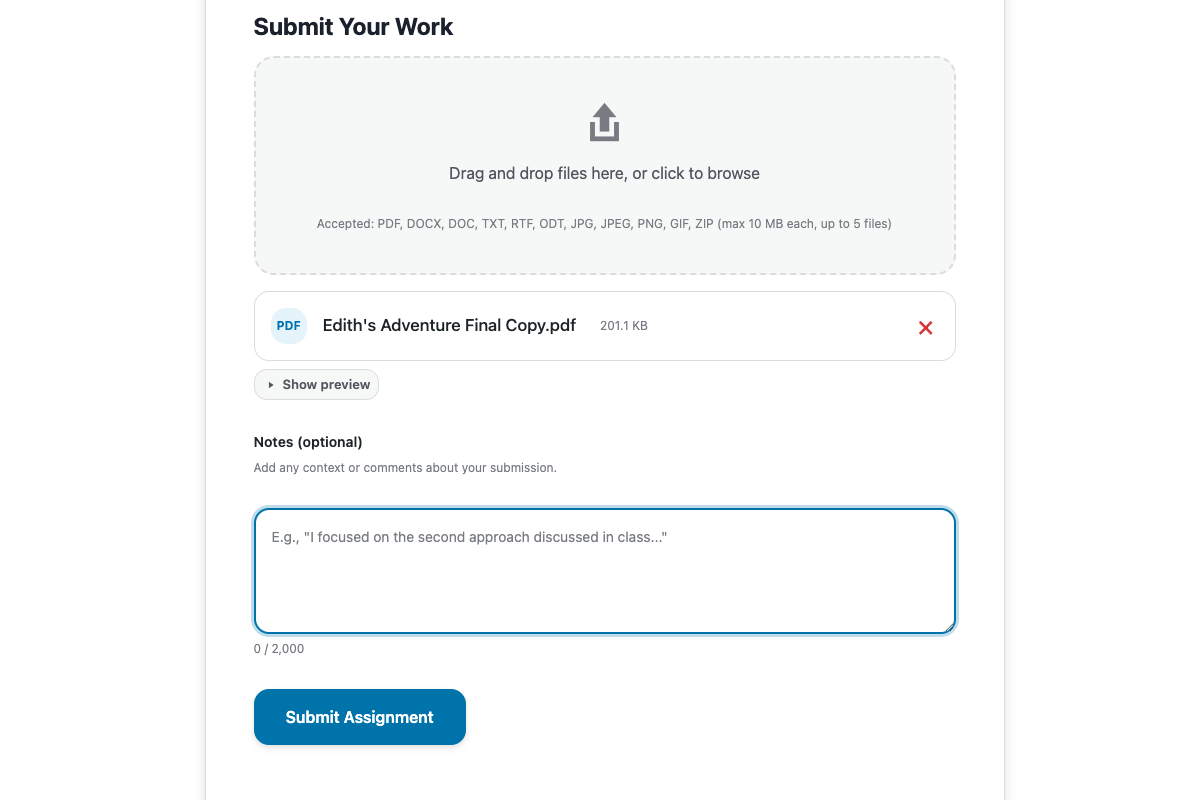
- Drag-and-drop file upload with progress indicators
- TinyMCE rich text editor with live word count and auto-save drafts
- Student notes field for context or questions
- View submission status, grade, and instructor feedback
- Previous submission history with feedback for each attempt
Grading & Feedback
- Centralized grading queue with filter and sort
- Side-by-side grading interface: document viewer on the left, grading panel on the right
- Built-in viewers render PDF, DOCX, PPTX slides, images, and text files directly in WordPress; no downloading required
- Automatic text extraction from PDF, DOCX, PPTX, ODT, RTF, and TXT files with quality scoring
- Rich text feedback editor with bold, italic, lists, and links — feedback is rendered with its formatting on the student view, not as plain text
- Submissions list filterable by score range, feedback presence, and submission date range
- Grading guidelines reference panel pulled from the assignment
Email Notifications
- Submission confirmation, grade notification, and new submission alert emails
- Customizable subject and body templates per email type
- Token placeholders: student name, assignment title, score, feedback URL, and more
Admin Dashboard & Reports
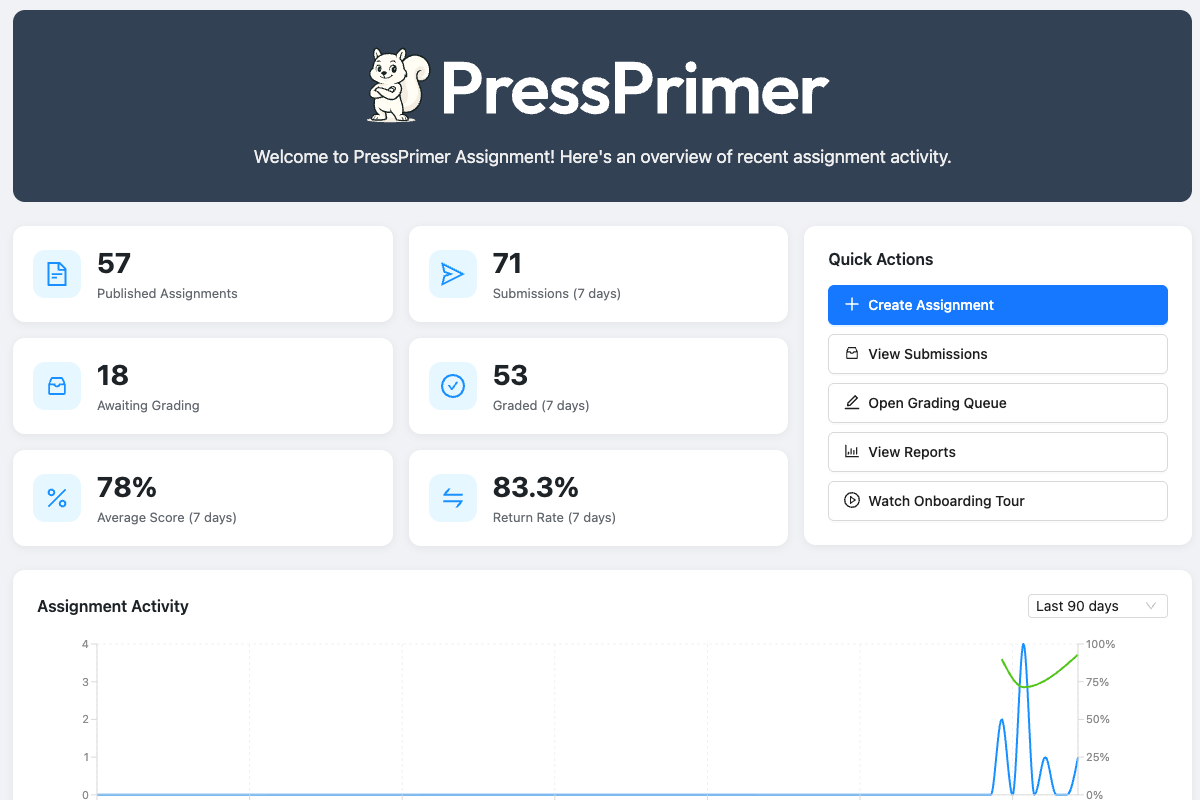
- Dashboard with submission statistics, activity chart, and recent submissions
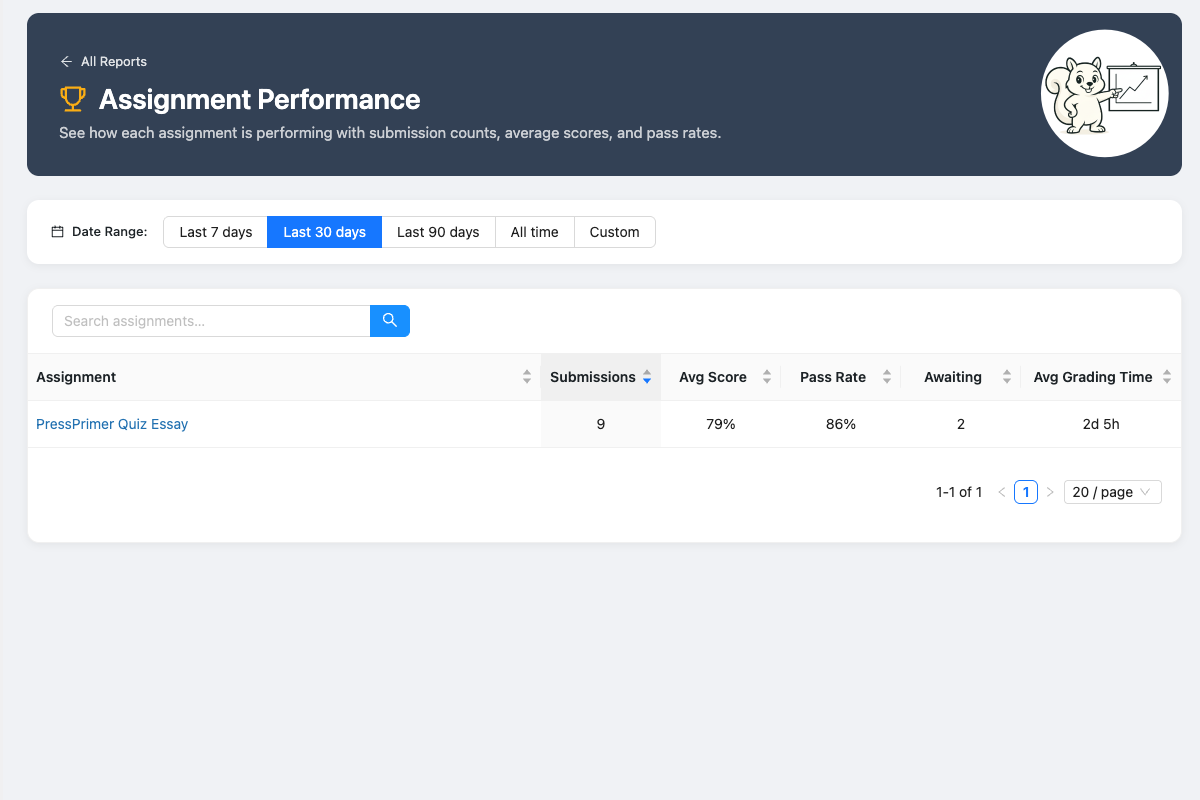
- Reports page with filterable submission data
Security & Accessibility
- Six-layer file upload validation (extension whitelist, MIME verification, double-extension blocking, dangerous file rejection)
- Files stored outside webroot with permission-based serving through PHP
- Capability-based access control (teachers see only their own assignments)
- WordPress Privacy API integration (Tools > Export/Erase Personal Data)
- Clean uninstall with optional complete data and file removal
- Keyboard navigation, screen reader support, and reduced motion preferences
Perfekt für
- Course creators using LearnDash, Tutor LMS, LifterLMS, or LearnPress who need better assignments than built-in tools
- University departments collecting essays, lab reports, or research papers
- Corporate trainers gathering certification documents and project deliverables
- Standalone WordPress educators who need assignments without a full LMS
- Online course entrepreneurs selling courses with graded assignments
Built-in Integrations
PressPrimer Assignment automatically detects and integrates with popular WordPress LMS plugins:
LearnDash: Attach assignments to lessons or topics via the editor sidebar. Passing an assignment can automatically mark the lesson or topic complete. LearnDash Group Leaders are granted teacher-level permissions to create assignments and grade their students’ submissions. The “Mark Complete” button is hidden until a required assignment is passed.
Tutor LMS: Attach assignments to lessons via the course builder. Passing an assignment can auto-complete the lesson and trigger course completion when all lessons are done. Tutor LMS Instructors are granted teacher-level permissions.
LifterLMS: Attach assignments to lessons via meta box. Passing an assignment can auto-complete the lesson and course. Works with open/free courses, enrolled students, and instructor roles.
LearnPress: Attach assignments to lessons via the lesson settings panel. Link passing an assignment to lesson and course completion. Works with open courses, enrolled students, and instructor roles.
Uncanny Automator: Four triggers available—user submits an assignment, user is graded, user passes, user fails.
All integrations are bundled in the free version.
Premium-Funktionen
Unlock additional premium features at pressprimer.com. Premium capabilities are organized across three tiers — Educator, School, and Enterprise — each building on the one below it:
Educator
- Groups & Assignments – Organize students into groups, distribute assignments with per-group due dates, and track completion progress.
- Group Reports – Per-group completion dashboards with submission status grids, score distributions with pass-threshold coloring, drill-down student data.
- Rubric Builder – Create analytic rubrics with criteria and performance levels, attach them to assignments for structured grading with automatic score calculation and per-criterion feedback.
- Per-Criteria Report – See where students are struggling at the rubric-criterion level.
- Teacher Role – Teachers manage their own groups and grade only their students’ submissions, while admins retain full access to all data.
- Data Retention & Cleanup – Automatically prune old submission files and orphaned data.
School (everything in Educator, plus)
- Inline Document Annotations – Mark up PDFs, images, and text submissions directly in the grading interface with highlights, underline, strikethrough, freehand drawing, and comments.
- AI-Assisted Grading – Generate suggested scores and feedback for submissions using OpenAI or Anthropic. Rubric-aware: returns per-criterion scores when a rubric is attached.
- AI Proofreading – Detect spelling and grammar issues in student submissions with one-click insertion of notes into feedback. Configurable locale for regional spelling variants.
- xAPI / LRS Integration – Send Experience API statements to your Learning Record Store. Built-in queueing system ensures reliable delivery.
Unternehmen (everything in School, plus)
- AI Content & Plagiarism Detection – Run submitted text through Winston AI, GPTZero, or Originality.ai to surface AI-generated content and plagiarism scores. Auto-check on submission or run manually. Provider-aware grading panel shows scores and interpretation.
- Plagiarism Report – Cohort-wide report with AI-likelihood and originality-score distributions, stat cards, a per-provider confidence breakdown, and a paginated flagged-submissions table with color-coded scores and tooltips explaining exactly why each row was flagged.
- Anonymous Grading – Per-assignment toggle that masks student identity throughout the grading window so grades aren’t biased by who wrote the work. Identity stays hidden until submissions have been graded and returned.
- Audit Logging – Immutable log of every assignment, submission, grading, settings change, annotation, xAPI emission, plagiarism check, and cleanup run with configurable retention, role-based viewer, and export. Audit Trail report on the Reports page surfaces filterable events with object links and a search box.
- White-Label Branding – Remove all PressPrimer branding and customize with your own plugin name, logos, colors, and custom CSS.
Built for Developers
- Action hooks for assignment creation, submission, grading, and email events
- Filter hooks for submission permissions, file access, email templates, and role mapping
- Full REST API for assignments, submissions, files, categories, and statistics
- Custom database tables with automatic schema migration
Documentation & Support
Source Code & Development
The full uncompressed source code for all JavaScript and CSS files is available in our public GitHub repository:
The /src directory contains all unminified source files. The plugin uses webpack for building production assets. To rebuild from source:
- Clone the repository
- Run
npm installto install dependencies - Run
npm run buildto compile assets
Privatsphäre
PressPrimer Assignment stores student submission data (files, text, grades, and feedback) in your WordPress database under your full control. No student or submission data is ever transmitted to external servers. The single exception to “nothing leaves your site” is the optional email-course opt-in described under External Services — it sends only an email address that an administrator or teacher explicitly typed in and submitted. All submitted files are stored in a protected directory under wp-content/uploads/ppa-submissions/ and served via PHP with permission checks.
The plugin integrates with the WordPress Privacy API:
- Tools > Export Personal Data — includes all submissions, grades, feedback, and uploaded file metadata for the requested user.
- Tools > Erase Personal Data — permanently deletes all submissions, grades, and uploaded files for the requested user.
Administrators can permanently delete all plugin data (database tables, uploaded files, options, and user meta) via Settings > Advanced > “Remove all data on uninstall” before uninstalling the plugin.
Externe Dienste
This plugin offers an optional free email course for teachers and administrators. When — and only when — a user types their email address into the opt-in form and clicks the subscribe button, the plugin connects to pressprimer.com to register the subscription.
- When: Only on an explicit opt-in submission. No request is ever made automatically — no telemetry, no activation pings, no environment data.
- What data: The typed email address and a tag naming which screen the form was on. Nothing else.
- Unsubscribing: Every email includes an unsubscribe link, honored immediately.
- Terms of Service: https://pressprimer.com/terms/
- Privacy Policy: https://pressprimer.com/privacy/
Dismissing the offer is remembered permanently and is stored only on your own site.
Bibliotheken von Drittanbietern
The plugin bundles the following open-source JavaScript libraries (compiled into the plugin’s script bundles; nothing is loaded from a CDN and no external requests are made):
- PDF.js (
pdfjs-dist3.11.174) — Apache-2.0 by Mozilla — renders PDF submissions in the browser. https://github.com/mozilla/pdf.js - Mammoth (
mammoth1.8.0) — BSD-2-Clause — renders Word (.docx) submissions in the browser. https://github.com/mwilliamson/mammoth.js - PptxViewJS (
pptxviewjs1.1.9, pinned) — MIT — renders PowerPoint (.pptx) submissions as slides on a canvas. Rendering is approximate for exotic constructs; the original file is always downloadable. https://github.com/gptsci/pptxviewjs - Chart.js (
chart.js4.x) — MIT — used by PptxViewJS to draw charts embedded in presentations. https://github.com/chartjs/Chart.js - JSZip (
jszip3.x) — MIT — reads the PPTX (ZIP) container in the browser. https://github.com/Stuk/jszip
Installation
Automatische Installation
- Go to Plugins > Add New in your WordPress admin
- Search for “PressPrimer Assignment”
- Click Install Now and then Activate
- Navigate to ** Assignments ** in your admin menu to get started
LMS Integration
If you have LearnDash, Tutor LMS, LifterLMS, or LearnPress installed, integration features enable automatically. No configuration required—just edit a lesson or topic and you’ll see the assignment attachment options.
Änderungsprotokoll
Minor improvement: tightened permission checks on the categories REST endpoint. Single-teacher sites are unaffected.
2.2.4
- Fixed: Assignments now appear on LearnDash lessons and topics that use the Modern UI
- Fixed: With LearnDash’s Modern UI or Focus Mode, students can no longer mark a lesson complete before passing the attached assignment
- Fixed: With the Educator add-on, teachers and LearnDash Group Leaders can now grade their group’s submissions on assignments someone else created
2.2.3
- Fixed: Assignments attached to LearnDash, Tutor LMS and LifterLMS lessons now always appear on the lesson page, and no longer show up in page descriptions, on sites where an SEO or social plugin generates those descriptions
- Fixed: On Tutor LMS 4, the “Mark as Complete” button now stays hidden until the student passes the attached assignment
- Fixed: When a Tutor LMS lesson requires a passing grade, it can no longer be marked complete without one, in every Tutor LMS version
2.2.2
- Fixed: Student submission dates and the “Graded by … on …” line now show the site’s time zone instead of UTC
2.2.1
- Fixed: Every tab on the Settings page now shows its own icon instead of several tabs sharing the same generic one
2.2.0
- Added: PowerPoint (.pptx) submission support
- Added: Due dates with a late policy and optional scoring penalty
- Added: A guided setup tour that walks new users through creating and publishing a real assignment, with starter templates, one-click page creation and optional email course for admins (explicit opt-in only — only the typed email address is ever sent; see External Services)
- Added: What’s New panel shown to administrators once after each major update
- Added: Upgrade page describing the premium addons, with locked report previews (administrators only)
- Added: New developer filter to customize which file is served on submission downloads (used by the Enterprise addon to deliver watermarked copies)
- Changed: New assignments now default to Published status
- Fixed: The grading count badge in the admin menu displays correctly on WordPress 7.0
- Fixed: Admin search fields no longer misalign their placeholder text or show a stray focus box
- Fixed: Uninstalling the plugin now removes any pending text-extraction tasks from the scheduled-task queue
- Fixed: A crash inside the text-extraction library can no longer block a student’s file upload
- Fixed: On the assignment editor’s File Settings tab, clicking a file-type checkbox no longer clears the other selected types on an existing assignment
2.1.1
- Improved: Tightened permission checks on the categories REST endpoint so teachers can only view individual categories they own or have access to. Single-teacher sites are unaffected.
Screenshots

Für Entwickler
Ist das dein Plugin? Zeigen Sie die Zahlen.
Fügen Sie Ihrer Website, Docs oder GitHub Readme ein Live-Badge hinzu. Es wird von selbst aktualisiert - kein Konto erforderlich.
Best PressPrimer Assignment alternatives
All assignment plugins →| Rang | Plugin | Aktive Installationen |
|---|---|---|
| 2 |
 DK Assignment Dashboard
Assign dashboard tasks to authors and other users, with priorities, due dates, related… |
<10 |
Fragen und Antworten
PressPrimer Assignment: quick answers
Gerade Antworten, gezogen von Live WordPress.org Daten.
Quelle: WordPress.org
Is PressPrimer Assignment free?
Yes. PressPrimer Assignment is free to download and use from the official WordPress.org plugin directory.
Is PressPrimer Assignment safe to use in 2026?
PressPrimer Assignment is a solid plugin choice in 2026, with a few things worth checking first. It runs on 80+ sites, is rated 5/5 and was last updated 5 days ago, and scores 75/100 on our health check.
How many websites use PressPrimer Assignment?
PressPrimer Assignment is active on 80+ WordPress websites and has been downloaded 2,266 times since it launched in March 2026. It was downloaded 497 times in the last 30 days.
Does PressPrimer Assignment work with WordPress 7.1?
Yes. The developer has tested PressPrimer Assignment up to WordPress 7.1.5, the latest release. It requires WordPress 6.4 or newer.
What PHP version does PressPrimer Assignment need?
PressPrimer Assignment requires PHP 7.4 or higher. Most hosts run PHP 8.x today, so it works on any modern WordPress hosting.
When was PressPrimer Assignment last updated?
The latest version, 2.2.4, was released on November 24, 2026 (5 days ago).
Who makes PressPrimer Assignment?
PressPrimer Assignment is developed and maintained by PressPrimer.
What are the best alternatives to PressPrimer Assignment?
The most popular alternatives to PressPrimer Assignment are DK Assignment Dashboard (<10 installs).
Angetrieben von PageForge
Eine Vorlage und eine Tabelle. Eine echte Seite für jede Suche.
PageForge Verwandelt jede Zeile eines CSV in eine WordPress-Seite mit eigenem Titel, URL, SEO Felder und Schema entworfen. Kostenlos auf WordPress.org.
- CSV und XLSX, plus Google Sheets auf Beruf und Unternehmen
- seinen eigenen Titel, URL, SEO Felder und Schema für jede Seite
- Arbeitet mit dem Blockeditor, Elementor, Divi und Avada
- Kostenlos auf WordPress.org, keine Kreditkarte