


Pods – Custom Content Types and Fields
Pods is a framework for creating, managing, and deploying customized content types and fields for any project.

Sichere Auswahl
Yes — Pods is a safe, well-maintained plugin to use in 2026. It runs on 100K+ sites, is rated 4.8/5 and was last updated 3 months ago, and scores 91/100 on our health check.
- Bewährt im Maßstab auf 100k+ aktiven Standorten
- Loved by users — 4.8/5 from 418 reviews
- Getestet mit dem neuesten WordPress (7.1)
- Responsive Support – 100 % der letzten Threads wurden behoben
- Momentum — downloads up 19.7% vs the previous 30 days
Wie stapelt es sich?
Side-by-side bei Installationen, Updates, Bewertungen und Support


Tägliche Downloads
Download-Spitzen folgen normalerweise einer neuen Version - jede Website, die automatisch aktualisiert wird, gilt als Download.
Ranglisten
Where Pods stands todayWordPress.org Ranglisten suchen
Live-Position in der Plugin-Suche, Top 100| Stichwort | Position |
|---|---|
| content types | #1 |
| custom fields | #4 |
| custom post types | #4 |
| Custom Taxonomies | #3 |
| pods | #1 |
Versionsübernahme
Anteil aktiver Sites pro Release.
Bewertungsaufschlüsselung
★★★★★★★★★★ 4.8 from 418 reviews
About Pods – Custom Content Types and Fields
From the official readme · v3.3.9.2Beschreibung
Manage all your custom content needs in one location with the Pods Framework.
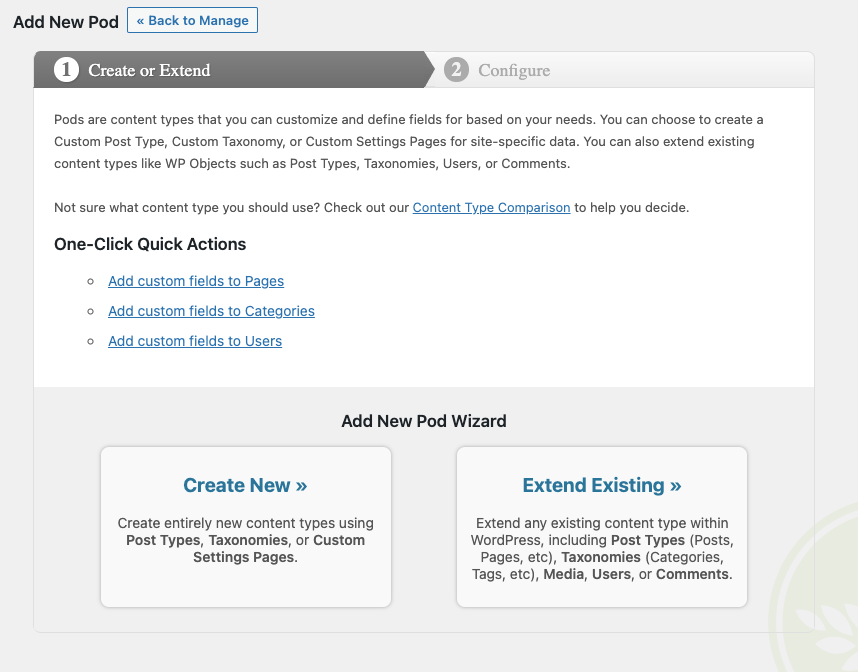
- Create content types including Custom Post Types, Custom Taxonomies, and our special Advanced Content Types (ACTs get their own custom tables)
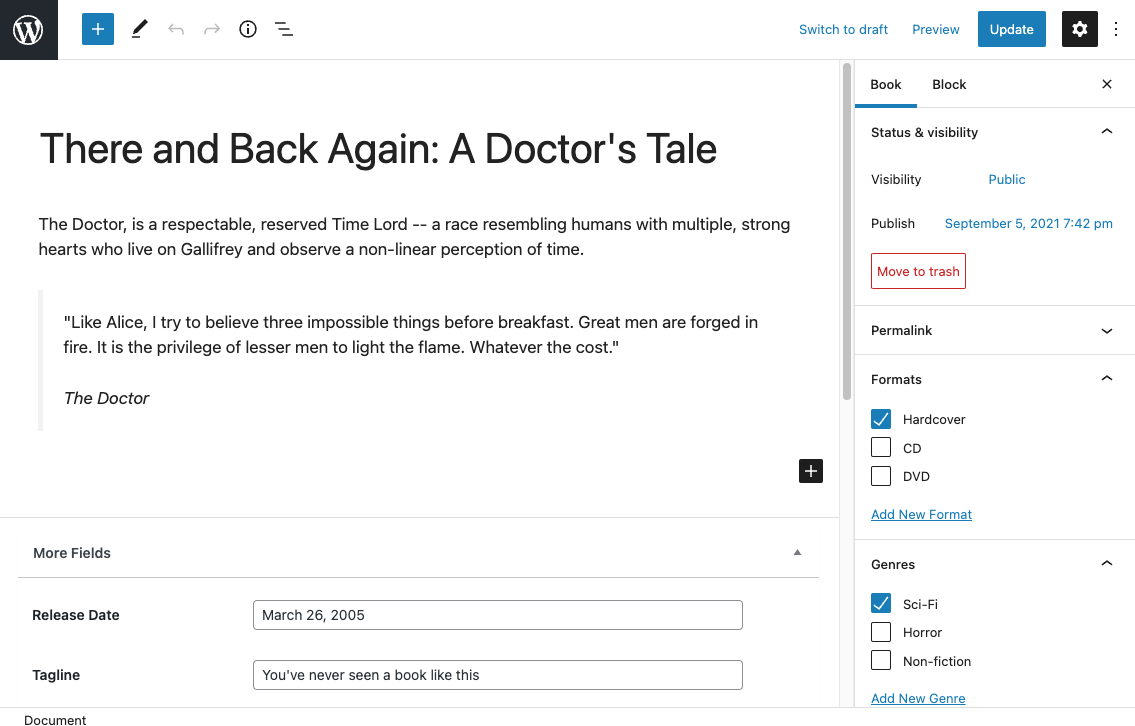
- Extend and customize content types including Posts, Pages, Categories, Tags, Users, and Media with one easy click
- Create custom settings pages easily within seconds
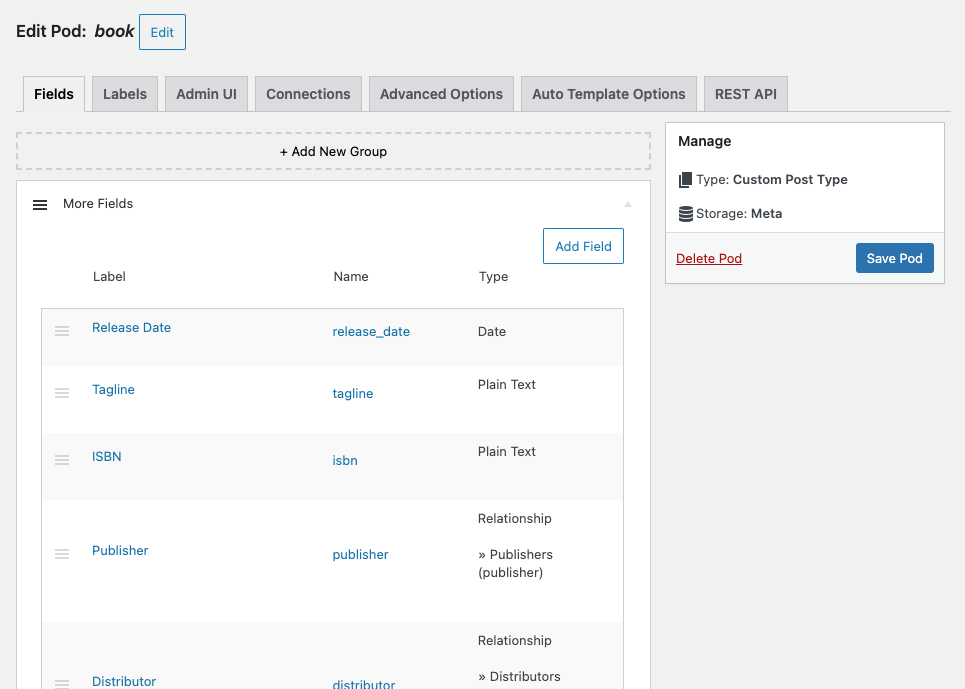
- Add custom fields to any content type
- Conditionally show fields based on the value of other fields with Conditional Logic
- Group your fields however you’d like into their own sections and add additional headings to help organize
- Show your fields anywhere using our blocks, shortcodes, widgets, or the non-coder Pods Template approach along with our automatic theme integration
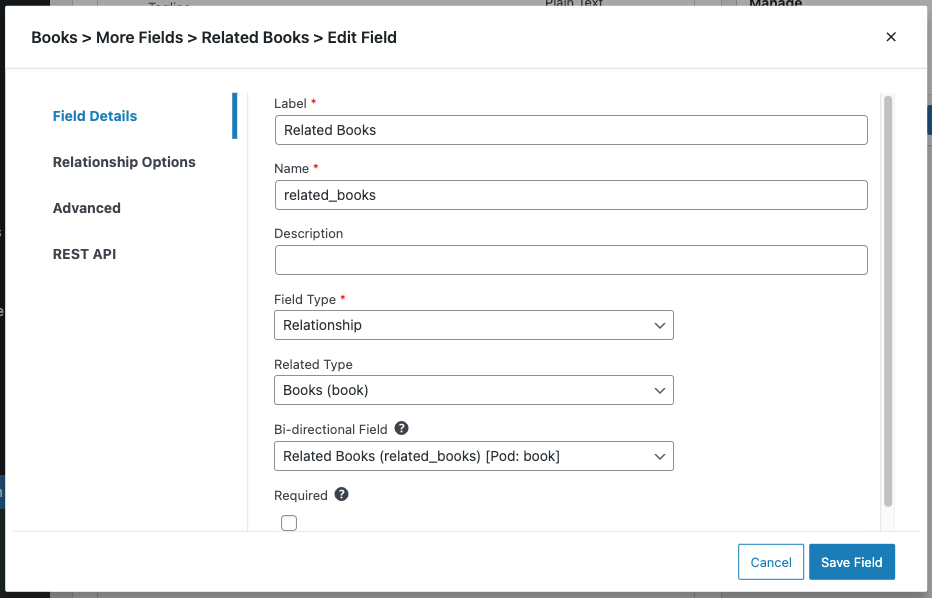
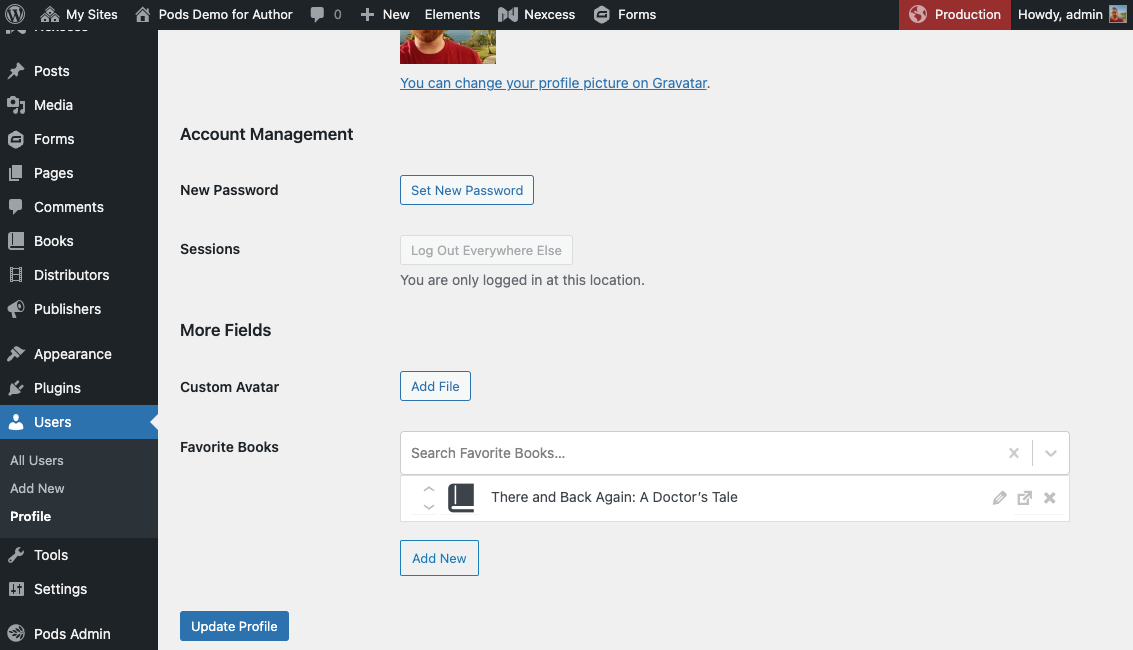
- Create connections between any of your content with relationship fields to keep your content organized
Let Pods help you grow your development and site building skills so that you can manage content beyond the standard WordPress Posts & Pages.
Want to check it out? Give Pods a test drive with our new One-click Demo.
Check out our Documentation, Support Forums, and our Live Community Slack Chat for assistance building your dream project with Pods.
Introduction
Content types that evolve with your needs
Create any type of content that you want — small or large — we’ve got you covered. Every content type created with Pods gets all the love it needs to grow up big and strong. You’ll get an easy-to-use interface that lets you manage field groups, custom fields, and how your content type will look or function.
Create new content types
With Pods, you can create entirely new content types and settings pages.
Every Field Type, FREE
If you choose to use Pods for your custom fields, you’ll get every field type you need, free of charge. Pods works great alongside other custom field plugins like Advanced Custom Fields too.
We have an extensive collection of over 25 different input types to choose from on 20+ different field types for any content structure. Each field type comes with their own additional options to help you customize content entry and display.
You can also control visibility by role/capability and other advanced options.
- Repeatable Fields: Turn almost any field into a repeatable field with multiple values
- Text: Plain Text, Website, Phone, Email, Password
- Paragraph: Plain Paragraph Text, WYSIWYG (Visual Editor), Code (Syntax Highlighting)
- Date / Time: Date and Time, Date, Time
- Number: Plain Number, Currency (30+ international currencies)
- Relationships / Media: File / Image / Video (Media library and basic upload options available), Avatar (for extended Users), oEmbed, Relationship (Dropdown, Multi Select, Autocomplete, Checkboxes, Radio Buttons, and List View available)
- Checkbox (Yes / No)
- Color Picker
- Layout Fields: Heading text, HTML content
Relationships to rule the world with
The power is in your hands with our comprehensive support to relate your content to anything.
- Custom defined lists of text options
- Relate to any Post Type or Taxonomy posts / terms
- Relate to any User profile
- Relate to User Roles or Capabilities
- Relate to any Comment
And many other relationships are also available including:
- Image Sizes
- Navigation Menus
- Relate to content within any Database Table
- Countries (predefined)
- US States (predefined)
- Canadian Provinces (predefined)
- Calendar – Days of Week (predefined)
- Calendar – Months of Year (predefined)
- And many more!
Optional Components to do even more
You can enable some of our included components to extend your WordPress site even further:
- Types-only Mode – On our Pods Settings page, you can choose to disable creating custom fields for a performance boost if you only want to use Pods for content types or you plan on using it alongside of other custom field plugins
- Pods Templates – Use our template engine to create templates that can be handed off to clients for care-free management
- Markdown Syntax – Parses Markdown Syntax for Paragraph Text / WYSIWYG fields
- Advanced Relationships – Add even more relationship objects including Database Tables, Multisite Networks, Multisite Sites, Themes, Page Templates (in the theme), Sidebars, Post Type Objects, and Taxonomy Objects
- Table Storage – Enable table-based database storage for custom fields on Post Types, Media, Users, and Comments
- Roles and Capabilities – Create or edit Roles for your site and customize what they have access to
- Advanced Content Types – Create entirely custom content types that have their own database table, and they will exist outside the normal WordPress context avoiding meta database tables
- Pods Pages – Create custom pages that function off of your site’s URL path with wildcard support and choose the Page Template in the theme to use — most useful paired with Advanced Content Types
Plugins that integrate with Pods
- Advanced Views Lite – Lets you build templates (views) and queries (cards) so that you can manage your content rendering with less code. (Disclaimer: We have an affiliate link to them to help support our project)
- Ziegelbauer
- Codepress Admin Columns using premium Admin Columns Pro Pods integration
- Conductor
- Elementor Pro
- Polylang has direct integration in Pods itself
- Timber
- WPGraphQL has direct integration in Pods itself
- WPML has direct integration in Pods itself
- YARPP has direct integration in Pods itself
Themes that integrate with Pods
- Genesis (StudioPress) has direct integration in Pods itself
Extend Pods with Free Add-Ons
- Pods Beaver Themer Add-On – Integrates Pods with Beaver Themer
- Pods Gravity Forms Add-On – Integrates Pods with Gravity Forms
- Pods Alternative Cache Add-On – Speed up Pods on servers with limited object caching capabilities
- Pods SEO Add-On – Integrates Pods Advanced Content Types with Yoast SEO
- Pods AJAX Views Add-On – Adds new functions you can use to output template parts that load via AJAX after other page elements
Extend Pods with Free Third-party Add-Ons
- Paid Memberships Pro – Pods Add On – Integrates Pods with Paid Memberships Pro to extend PMPro objects with custom fields added by Pods
- Panda Pods Repeater Field Add-On – Lets you add groups of fields that repeat and are stored in their own custom database table (Advanced setup required)
Pods Pro by SKCDEV Premium Add-Ons
- List Tables Add-On – A new block and shortcode to list/filter content from Pods in a table format
- Page Builder Toolkit Add-On – Integrates Pods with Beaver Builder, Beaver Themer, Conditional Blocks Pro, Divi Theme, Elementor, GenerateBlocks, Oxygen Builder, and Stackable Blocks (premium)
- Advanced Relationships Storage Add-On – Advanced options for relationship storage
- TablePress Integration Add-On – Integrates Pods with TablePress
- Advanced Permalinks Add-On – Advanced permalink structures and taxonomy landing pages
How can I translate Pods into my own language?
Many thanks go out to the fine folks who have helped us translate the Pods plugin into many other languages.
Join us in further translating the Pods interface on the official Translating WordPress dashboard
We are also available through our Live Community Slack Chat to help our translators get started and to support them on the process.
Are you looking to translate your Pods and Fields themselves? You’ll want to enable the “Translate Pods” component from Pods Admin > Components.
Contributors
Pods really wouldn’t be where it is without all the contributions from our donors and code/support contributors.
Installation
- Unpack the entire contents of this plugin zip file into your
wp-content/plugins/folder locally - Upload to your site
- Navigate to
wp-admin/plugins.phpon your site (your WP Admin plugin page) - Activate this plugin
OR you can just install it with WordPress by going to Plugins >> Add New >> and type this plugin’s name
Änderungsprotokoll
This upgrade is security focused.
3.3.9.2 – August 31st, 2026
This is a major security hardening release covering multiple areas of the plugin. We recommend updating as soon as possible.
Additional releases with these security fixes have been backported to each major version of Pods from Pods 2.7 and above to make it easy to update.
- Security: Restricted display callbacks to an explicit allow list of safe functions, with optional customized additions requiring a dedicated prefix. Added detection and admin notices when disallowed display callbacks are used on a site. (Jakub Herman, @sc0ttkclark)
- Security: Refactored form nonce handling to harden against submission misuse. (Jakub Herman, @sc0ttkclark)
- Security: Hardened shortcode and block logic against output and query misuse. (Wordfence PRISM – Wordfence, @sc0ttkclark)
- Security: Fixed post_status handling in the last security release so it only applies to user-provided inputs (not Pods internal logic). (@sc0ttkclark)
- Security: Added anonymous form post handling back that had unintentionally been disabled in the last security release. (@sc0ttkclark)
3.3.9.1 – August 14th, 2026
This is a major security hardening release covering multiple areas of the plugin. We recommend updating as soon as possible.
Additional releases with these security fixes have been backported to each major version of Pods from Pods 2.8 and above.
- Security: Further restrictions on error handling and fallbacks. (Nhien Pham @nhienit – GalaxyOne, @thevietronin – GalaxyOne, @sc0ttkclark)
- Security: General hardening improvements to how data queries are built and validated. (HaoNH @haoit, @onebitious, @sc0ttkclark)
- Security: Additional restrictions on how certain values are processed when displayed. (@sc0ttkclark)
- Security: Improved safety when handling previously stored data. (@sc0ttkclark)
- Security: Removed a legacy request-handling path that is no longer needed. (HaoNH @haoit, @sc0ttkclark)
- Security: Tightened access requirements for certain background requests. (HaoNH @haoit, @sc0ttkclark)
- Security: Improved consistency and enforcement of access and validation checks. (Youness HFA from AGBS Pentest Team @YounesHfa, HaoNH @haoit, @onebitious, @sc0ttkclark)
- Security: Hardening improvements to file and media handling. (@sc0ttkclark)
- Security: Additional safeguards for file and template handling. (@sc0ttkclark)
- Security: Improved handling of displayed content. (@sc0ttkclark)
- Security: Added extra verification for admin forms and actions. (@sc0ttkclark)
- Security: Additional validation for imported content. (@sc0ttkclark)
- Security: Improved handling of content based on user permissions. (@sc0ttkclark)
- Security: Updated bundled third-party JavaScript dependencies. (@sc0ttkclark)
- Security: Added a filter to optionally restrict access to the REST API documentation endpoint, which remains public by default. (@sc0ttkclark)
- Security: Additional automated test coverage for the changes in this release. (@sc0ttkclark)
3.3.9 – May 20th, 2026
- Security: Resolve a XSS vulnerability in the Pods UI forms in the admin area. Props to Bonds through Patchstack for responsibly reporting this. (@sc0ttkclark)
3.3.8 – March 19th, 2026
- Feature: Reuse the same UI that Repeatable Fields use for the Relationship fields using “List View” list items. The UI is now consistent and Pods 3.4 will include the same UI treatment for the File fields. (@sc0ttkclark)
- Fixed: Resolve issue with reordering repeatable fields and prevent rendering incorrectly when typing in the field which causes focus to be lost. #7498 #7499 (@pdclark, @sc0ttkclark)
- Fixed: Resolve problems with reordering Relationship fields using “List View” list items. (@sc0ttkclark)
- Fixed: Resolve issue with Migrate PHP component not placing magic tags on the correct separate new line of the file header. (@sc0ttkclark)
- Fixed: Prevent conflicts with ACF/SCF when ACF compatibility functions are enabled.
3.3.7 – February 25th, 2026
- Fixed: Resolve issues using
WP_Filesystemto check session paths before starting a session. (@sc0ttkclark) - Fixed: Prevent deprecated notices with non-strings being passed to
strpos. (@sc0ttkclark)
3.3.6 – February 25th, 2026
- Fixed: Resolve a fatal error with
WP_Filesystemusage. (@sc0ttkclark)
Screenshots

Für Entwickler
Ist das dein Plugin? Zeigen Sie die Zahlen.
Fügen Sie Ihrer Website, Docs oder GitHub Readme ein Live-Badge hinzu. Es wird von selbst aktualisiert - kein Konto erforderlich.
Best Pods alternatives
All content types plugins →

Fragen und Antworten
Pods: quick answers
Gerade Antworten, gezogen von Live WordPress.org Daten.
Quelle: WordPress.org
Is Pods free?
Yes. Pods is free to download and use from the official WordPress.org plugin directory.
Is Pods safe to use in 2026?
Yes — Pods is a safe, well-maintained plugin to use in 2026. It runs on 100K+ sites, is rated 4.8/5 and was last updated 3 months ago, and scores 91/100 on our health check.
How many websites use Pods?
Pods is active on 100K+ WordPress websites and has been downloaded 5,545,457 times since it launched in October 2008. It was downloaded 15,857 times in the last 30 days.
Does Pods work with WordPress 7.1?
Yes. The developer has tested Pods up to WordPress 7.1.5, the latest release. It requires WordPress 6.3 or newer.
What PHP version does Pods need?
Pods requires PHP 7.2 or higher. Most hosts run PHP 8.x today, so it works on any modern WordPress hosting.
When was Pods last updated?
The latest version, 3.3.9.2, was released on August 31, 2026 (3 months ago).
Who makes Pods?
Pods is developed and maintained by Scott Kingsley Clark.
What are the best alternatives to Pods?
The most popular alternatives to Pods are Custom Post Type UI (1M+ installs), Essential Content Types (20K+ installs) and Query All The Post Types (30+ installs).
Angetrieben von PageForge
Eine Vorlage und eine Tabelle. Eine echte Seite für jede Suche.
PageForge Verwandelt jede Zeile eines CSV in eine WordPress-Seite mit eigenem Titel, URL, SEO Felder und Schema entworfen. Kostenlos auf WordPress.org.
- CSV und XLSX, plus Google Sheets auf Beruf und Unternehmen
- seinen eigenen Titel, URL, SEO Felder und Schema für jede Seite
- Arbeitet mit dem Blockeditor, Elementor, Divi und Avada
- Kostenlos auf WordPress.org, keine Kreditkarte