


PixelCraft with WebP
Automatically convert JPG and PNG images to WebP, reduce file sizes and speed up your WordPress website.

Solide Wahl
PixelCraft with WebP is a solid plugin choice in 2026, with a few things worth checking first. It runs on 500+ sites, is rated 5/5 and was last updated 1 month ago, and scores 73/100 on our health check.
- Getestet mit dem neuesten WordPress (7.1)
- Kleine Benutzerbasis (500+ aktive Installationen)
- Bisher sehr wenige Bewertungen
Wie stapelt es sich?
Side-by-side bei Installationen, Updates, Bewertungen und Support



Tägliche Downloads
Download-Spitzen folgen normalerweise einer neuen Version - jede Website, die automatisch aktualisiert wird, gilt als Download.
Ranglisten
Where PixelCraft with WebP stands todayWordPress.org Ranglisten suchen
Live-Position in der Plugin-Suche, Top 100| Stichwort | Position |
|---|---|
| image compression | #69 |
| image optimizer | #89 |
| optimize images | #80 |
| webp | #20 |
| wordpress speed | >100 |
Versionsübernahme
Anteil aktiver Sites pro Release.
Bewertungsaufschlüsselung
★★★★★★★★★★ 5 from 3 reviews
About PixelCraft with WebP
From the official readme · v2.1.4Beschreibung
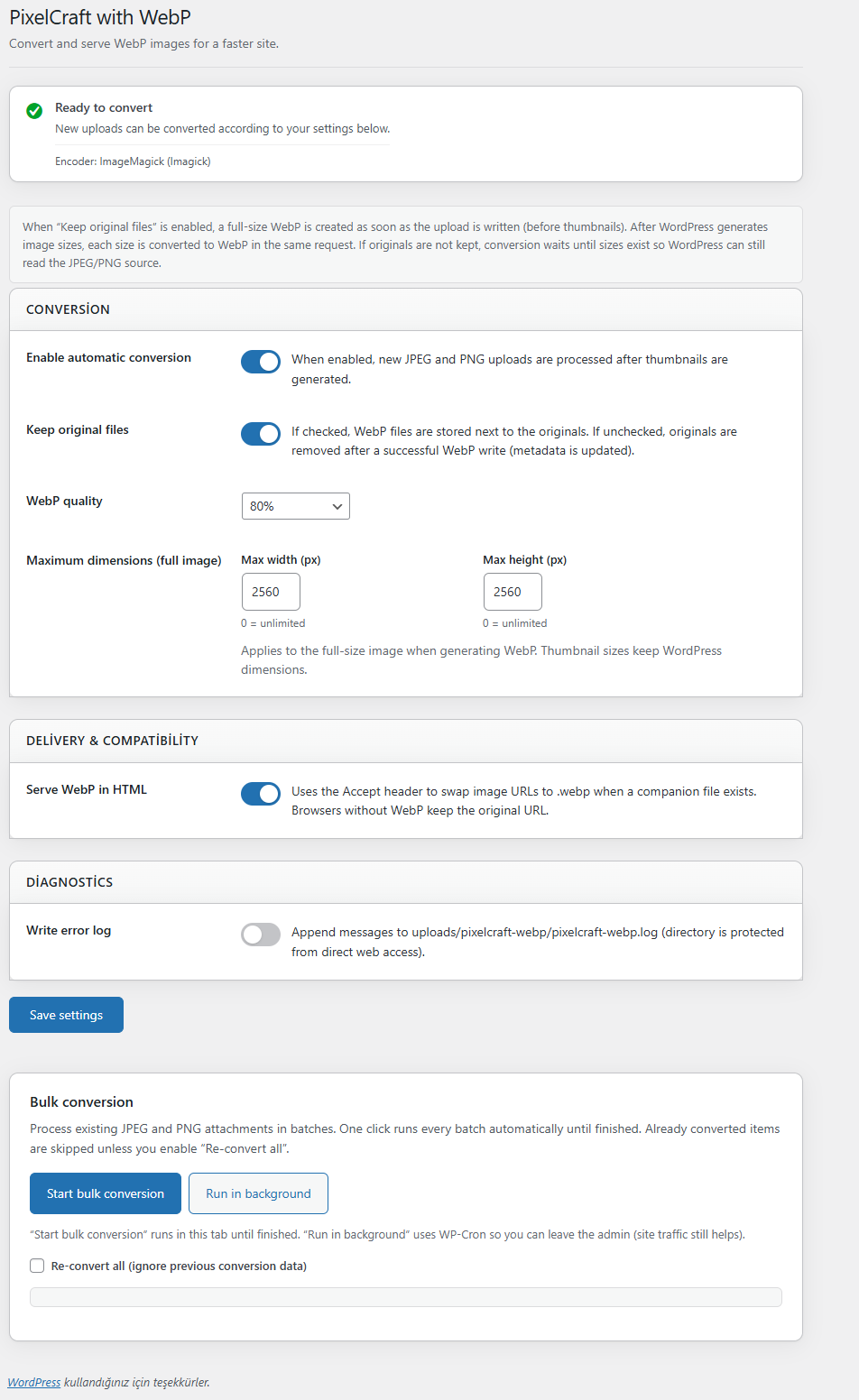
PixelCraft with WebP helps speed up your site by creating WebP copies of images you upload (and optionally replacing originals). It uses WordPress image APIs (GD or Imagick) with sensible PHP fallbacks when a host mis-reports WebP support.
- Automatic conversion on upload for JPEG and PNG (after WordPress generates thumbnails).
- Keep originals or replace them after a successful WebP write (your choice).
- Quality preset and max width/height for the full-size WebP.
- Bulk conversion in the admin (batched AJAX, optional WP-Cron background queue).
- Savings report per attachment (stored in attachment meta).
- Settings under Settings → PixelCraft with WebP.
- Media list column showing optimization status.
- Frontend delivery: when enabled, image URLs can switch to
.webpfor clients that sendAccept: image/webp(compatible with WooCommerce product images that use core attachment APIs). - No external services — conversion runs on your server only.
- Our Plugins tab — discover other free Adbear Digital tools (SEO, media, WooCommerce, TOC, 3D viewer, and more) on the PixelCraft settings screen.
Trademark notice: WordPress is a registered trademark of the WordPress Foundation. This plugin is not affiliated with or endorsed by WordPress or the WordPress Foundation.
More info: wordpressplugin.adbear.cloud
Privatsphäre
This plugin does not collect, store, or transmit personal data to third parties. Conversion and logging (if enabled) occur on your server. See the FAQ for details.
Installation
- Upload the
pixelcraft-webpfolder to/wp-content/plugins/, or install the ZIP via Plugins → Add New → Upload Plugin. - Aktivieren Sie das Plugin über den Bildschirm Plugins in WordPress.
- Go to Settings → PixelCraft with WebP and adjust options.
- For existing images, use Bulk conversion on the same settings page (WebP-capable PHP required).
Änderungsprotokoll
Settings, bulk job state, attachment meta keys, and optional log files migrate automatically from older internal prefixes; uploads log directory moves to uploads/pixelcraft-webp/ when upgrading from 2.0.6 or earlier.
2.1.4
- Compatibility: Tested up to WordPress 7.1; Requires PHP raised to 8.0.
2.1.3
- New Our Plugins tab on the PixelCraft settings screen showcasing free Adbear Digital plugins on WordPress.org (Alt Text Generator, FAQ Schema, Image Cleaner, Random Order IDs, Roles Manager, ModelVista, TOCCraft, and PixelCraft with WebP).
2.0.7
- Plugin Review: optional logging and
.htaccess/index.phpstubs are written only underwp-content/uploads/pixelcraft-webp/(viawp_upload_dir()), not a generic uploads subfolder. - Plugin Review: PHP identifiers (classes, functions,
defines, options, meta keys, AJAX actions, cron hooks, script/style handles, CSS class prefix) now use the distinctpclwebpprefix; one-time migration moves data from olderwebpforge_*keys where present.
2.0.6
- Branding: display name PixelCraft with WebP; directory slug, text domain, settings screen slug, and main file
pixelcraft-webp/pixelcraft-webp.php.
2.0.5
- Branding preparation release before the current
pixelcraft-webppackage naming.
2.0.4
- WordPress coding standards / Plugin Check: translator comments for placeholder strings in bulk JS i18n; AJAX bulk inputs use
filter_inputwhere appropriate;HTTP_ACCEPTsanitized in the front-end WebP check; documentedphpcs:ignorefor the corewp_image_editorfilter (cannot be prefixed).
Screenshots
Für Entwickler
Ist das dein Plugin? Zeigen Sie die Zahlen.
Fügen Sie Ihrer Website, Docs oder GitHub Readme ein Live-Badge hinzu. Es wird von selbst aktualisiert - kein Konto erforderlich.
Best PixelCraft with WebP alternatives
All image compression plugins →




Fragen und Antworten
PixelCraft with WebP: quick answers
Gerade Antworten, gezogen von Live WordPress.org Daten.
Quelle: WordPress.org
Is PixelCraft with WebP free?
Yes. PixelCraft with WebP is free to download and use from the official WordPress.org plugin directory.
Is PixelCraft with WebP safe to use in 2026?
PixelCraft with WebP is a solid plugin choice in 2026, with a few things worth checking first. It runs on 500+ sites, is rated 5/5 and was last updated 1 month ago, and scores 73/100 on our health check.
How many websites use PixelCraft with WebP?
PixelCraft with WebP is active on 500+ WordPress websites and has been downloaded 5,298 times since it launched in April 2026. It was downloaded 450 times in the last 30 days.
Does PixelCraft with WebP work with WordPress 7.1?
Yes. The developer has tested PixelCraft with WebP up to WordPress 7.1.5, the latest release. It requires WordPress 6.0 or newer.
What PHP version does PixelCraft with WebP need?
PixelCraft with WebP requires PHP 8.0 or higher. Most hosts run PHP 8.x today, so it works on any modern WordPress hosting.
When was PixelCraft with WebP last updated?
The latest version, 2.1.4, was released on October 17, 2026 (1 month ago).
Who makes PixelCraft with WebP?
PixelCraft with WebP is developed and maintained by Secil Kars.
What are the best alternatives to PixelCraft with WebP?
The most popular alternatives to PixelCraft with WebP are Image Optimizer (1M+ installs), Squeeze (3K+ installs) and Flying Images: Optimize and… (2K+ installs).
Angetrieben von PageForge
Eine Vorlage und eine Tabelle. Eine echte Seite für jede Suche.
PageForge Verwandelt jede Zeile eines CSV in eine WordPress-Seite mit eigenem Titel, URL, SEO Felder und Schema entworfen. Kostenlos auf WordPress.org.
- CSV und XLSX, plus Google Sheets auf Beruf und Unternehmen
- seinen eigenen Titel, URL, SEO Felder und Schema für jede Seite
- Arbeitet mit dem Blockeditor, Elementor, Divi und Avada
- Kostenlos auf WordPress.org, keine Kreditkarte