


Page Specific Menu Items
This plugin allows users to select menu items to show per page. One menu different menu items for different pages. Also allows users choose which menu to use for cherrypicking menu items page wise.

Mit Vorsicht verwenden
Page Specific Menu Items works, but test it on a staging site before relying on it in 2026. It runs on 2K+ sites, is rated 4.6/5 and was last updated 9 years ago, and scores 43/100 on our health check.
- Loved by users — 4.6/5 from 52 reviews
- Kein Update in 8 Jahren
- Nur getestet bis WordPress 4.5 (letzt ist 7.1)
Wie stapelt es sich?
Side-by-side bei Installationen, Updates, Bewertungen und Support



Tägliche Downloads
Download-Spitzen folgen normalerweise einer neuen Version - jede Website, die automatisch aktualisiert wird, gilt als Download.
Ranglisten
Where Page Specific Menu Items stands todayWordPress.org Ranglisten suchen
Live-Position in der Plugin-Suche, Top 100| Stichwort | Position |
|---|---|
| Menü | >100 |
| Menüpunkte | >100 |
| page specific menu items | >100 |
| page wise menu | >100 |
| post specific menu items | >100 |
Versionsübernahme
Anteil aktiver Sites pro Release.
Bewertungsaufschlüsselung
★★★★★★★★★★ 4.6 from 52 reviews
About Page Specific Menu Items
From the official readme · v1.6.5Beschreibung
This plugin allows users to select menu items to show per page. One menu different menu items for different pages.
Also allows users choose which menu to use for cherrypicking menu items page wise.
Please read the readme.txt file line by line before commenting. If you find any bugs/issues please report and I’ll try to fix them asap.
Want me to keep updating this plugin with extra features? Rate this plugin.
ABOUT SUPPORT I get messages (one on average per week) from users who are not happy that this plugin didn’t work as per their requirement. Some message are like, ‘your plugin has this and that issue and you should fix them for us’. There might not be bugs on this plugin; you just want to customize per your need or it might be the plugin limitation.
If few users point out the same issue, I’ll try to fix as soon as possible. But if it’s something that you want to modify this plugin as per your requirement or add some custom features or want on demand support consider hiring a developer or contact me if you want me to work for you.
How to make this plugin work?
- Create a menu from appearance > menus
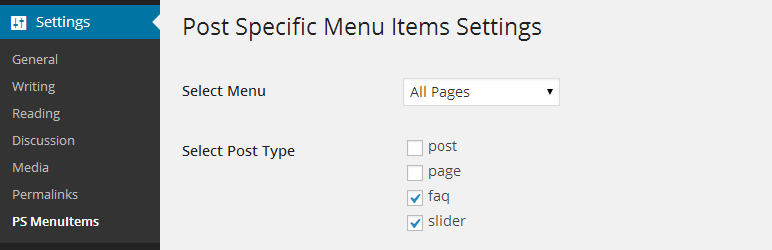
- Select the menu you want to use from settings > PS MenuItems > Select Menu
- Assign the menu to menu location from appearance > menus
- Check the items you want to hide from pages > edit > Page Specific Menu Items
- View the page and the selected items should be gone.
How does this plugin works?
- This plugin adds ‘hide_this_item’ class to selected menu items.
Shall I install plugin first or create menu first?
- It does not matter whether you first create menu and then install this plugin or vice versa.
Does this plugin works on custom post type pages?
- Yes it does.
This plugin does not work for me?
- It should since it works by adding class. Only case it does not work is when ‘hide_this_item’ rules is overriden by other syles (having low value in specificity).
- This is not actually this plugins issue.
Recommended Plugins
The following are recommended by the author:
-
BlankPress WordPress Cleaner – This plugin allows you to clean up the WordPress mess. Better performance, Faster page load, Better security and Better WP experience.
-
BlankPress Theme Framework – Simple yet flexible HTML5 blank WordPress theme framework based on underscores. Use this as a base theme for your WP projects.
Installation
via WordPress
- Go to the menu ‘Plugins’ -> ‘Install’ and search for ‘Page Specific Menu Items’
- Click ‘install’
Manuelle Installation
- Unzip the zip file and upload to the ‘/wp-content/plugins/’ directory
- Activate the plugin through the ‘Plugins’ menu
- Configure plugin from ‘Settings > PS Menu Items’
Änderungsprotokoll
1.6.4 (2016-04-17)
- Compatible with wordPress version 4.5
1.6.4 (2016-01-18)
- Compatible with wordPress version 4.4.1
1.6.3 (2015-10-11)
- Fehlerbehebung
1.6.2 (2015-10-4)
- Hotfix update
1.6.1 (2015-10-4)
- Added option to easily select and deselect menu items
- Added option to set visibility of menu items by default
- Fixed plugin does not have a valid header issue (Thanks to DesignsCheap)
- Compatible with wordPress version 4.3.1
1.6 (2015-4-21)
- Added option to easily select and deselect menu items
- Compatible with wordPress version 4.2
Screenshots

Für Entwickler
Ist das dein Plugin? Zeigen Sie die Zahlen.
Fügen Sie Ihrer Website, Docs oder GitHub Readme ein Live-Badge hinzu. Es wird von selbst aktualisiert - kein Konto erforderlich.
Best Page Specific Menu Items alternatives
All menu plugins →


Fragen und Antworten
Page Specific Menu Items: quick answers
Gerade Antworten, gezogen von Live WordPress.org Daten.
Quelle: WordPress.org
Is Page Specific Menu Items free?
Yes. Page Specific Menu Items is free to download and use from the official WordPress.org plugin directory.
Is Page Specific Menu Items safe to use in 2026?
Page Specific Menu Items works, but test it on a staging site before relying on it in 2026. It runs on 2K+ sites, is rated 4.6/5 and was last updated 9 years ago, and scores 43/100 on our health check.
How many websites use Page Specific Menu Items?
Page Specific Menu Items is active on 2K+ WordPress websites and has been downloaded 108,731 times since it launched in January 2014. It was downloaded 370 times in the last 30 days.
Does Page Specific Menu Items work with WordPress 7.1?
Page Specific Menu Items is officially tested up to WordPress 4.5.33, while the latest release is 7.1.5. It may still work, but try it on a staging site first.
When was Page Specific Menu Items last updated?
The latest version, 1.6.5, was released on November 28, 2017 (9 years ago).
Who makes Page Specific Menu Items?
Page Specific Menu Items is developed and maintained by dharmapoudel.
What are the best alternatives to Page Specific Menu Items?
The most popular alternatives to Page Specific Menu Items are Admin Menu Editor (300K+ installs), Max Mega Menu (300K+ installs) and Menu Image, Icons made easy (100K+ installs).
Angetrieben von PageForge
Eine Vorlage und eine Tabelle. Eine echte Seite für jede Suche.
PageForge Verwandelt jede Zeile eines CSV in eine WordPress-Seite mit eigenem Titel, URL, SEO Felder und Schema entworfen. Kostenlos auf WordPress.org.
- CSV und XLSX, plus Google Sheets auf Beruf und Unternehmen
- seinen eigenen Titel, URL, SEO Felder und Schema für jede Seite
- Arbeitet mit dem Blockeditor, Elementor, Divi und Avada
- Kostenlos auf WordPress.org, keine Kreditkarte