


Order Delivery Date for WooCommerce
Let customers choose delivery dates & times on checkout. Simplify delivery management by blocking holidays & setting max deliveries per day.

Solide Wahl
Order Delivery Date for WooComm… is a solid plugin choice in 2026, with a few things worth checking first. It runs on 10K+ sites, is rated 4.3/5 and was last updated 4 weeks ago, and scores 76/100 on our health check.
- Bewährt im Maßstab auf 10k + aktiven Standorten
- Aktiv entwickelt — letztes Update vor 4 Wochen
- Getestet mit dem neuesten WordPress (7.1)
Wie stapelt es sich?
Side-by-side bei Installationen, Updates, Bewertungen und Support



Tägliche Downloads
Download-Spitzen folgen normalerweise einer neuen Version - jede Website, die automatisch aktualisiert wird, gilt als Download.
Ranglisten
Where Order Delivery Date for Woo… stands todayWordPress.org Ranglisten suchen
Live-Position in der Plugin-Suche, Top 100| Stichwort | Position |
|---|---|
| delivery date | #1 |
| delivery time | #5 |
| pickup date | #3 |
| preparation time | #2 |
| WooCommerce | >100 |
Versionsübernahme
Anteil aktiver Sites pro Release.
Bewertungsaufschlüsselung
★★★★★★★★★★ 4.3 from 61 reviews
About Order Delivery Date for WooCommerce
From the official readme · v4.6.3Beschreibung
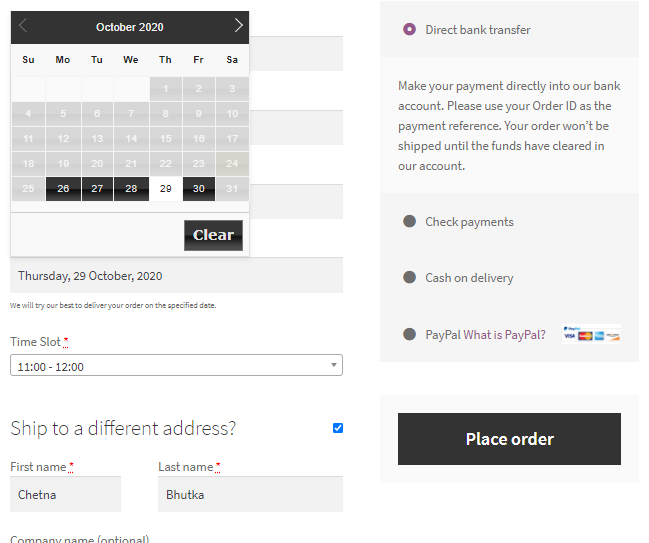
Order Delivery Date for WooCommerce adds a delivery date picker to your WooCommerce checkout, allowing customers to select their preferred delivery date and time slot. You can define delivery weekdays, block holidays, set preparation time, limit daily deliveries, and manage delivery schedules from your WooCommerce dashboard. The plugin supports both the classic Cart and Checkout pages as well as the WooCommerce Cart and Checkout Blocks, allowing customers to schedule deliveries regardless of the checkout experience your store uses.
Whether you run a bakery, florist, grocery store, meal delivery service, gift shop, or any business that relies on scheduled deliveries, the plugin helps you organize deliveries while providing a better checkout experience.
Hauptmerkmale
Let Customers Choose Their Delivery Date
- Allow customers to choose their preferred delivery date during WooCommerce checkout.
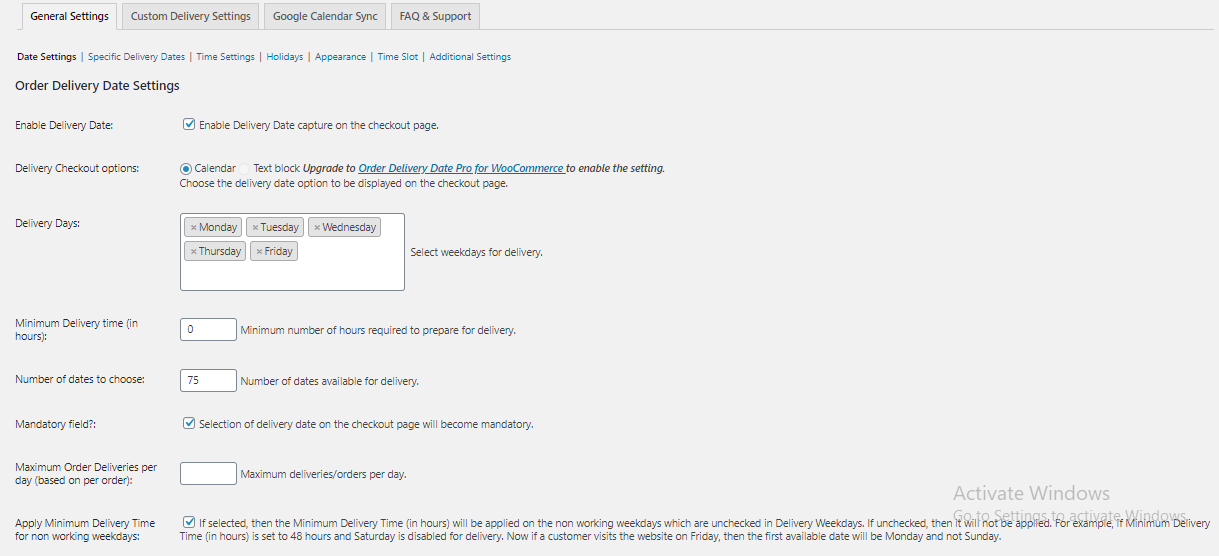
- Make the delivery date field mandatory when required.
- Automatically select the first available delivery date.
- Set preparation time (lead time) before the next available delivery.
- Customize the delivery date field label to match your checkout.
- Disable delivery date selection for virtual and featured products.
Manage Your Delivery Schedule
- Choose the weekdays when deliveries are available.
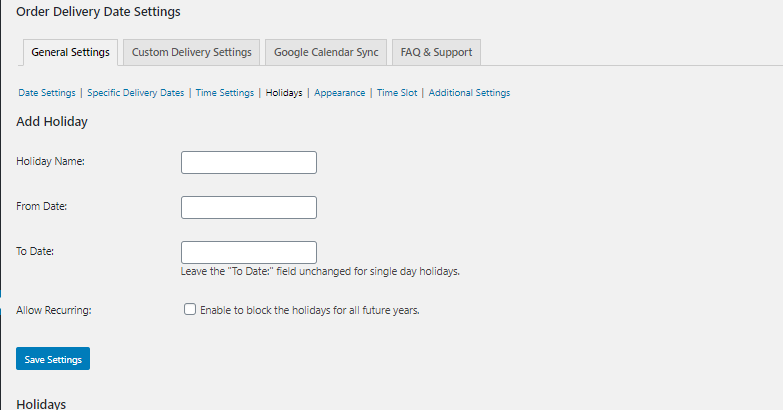
- Block holidays and other non-delivery dates.
- Limit the number of deliveries accepted each day.
Offer Delivery Time Slots
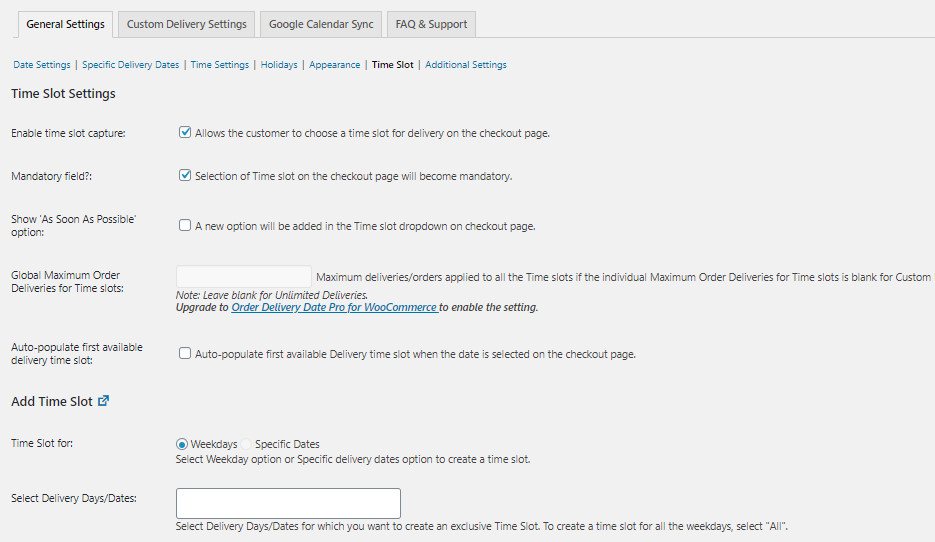
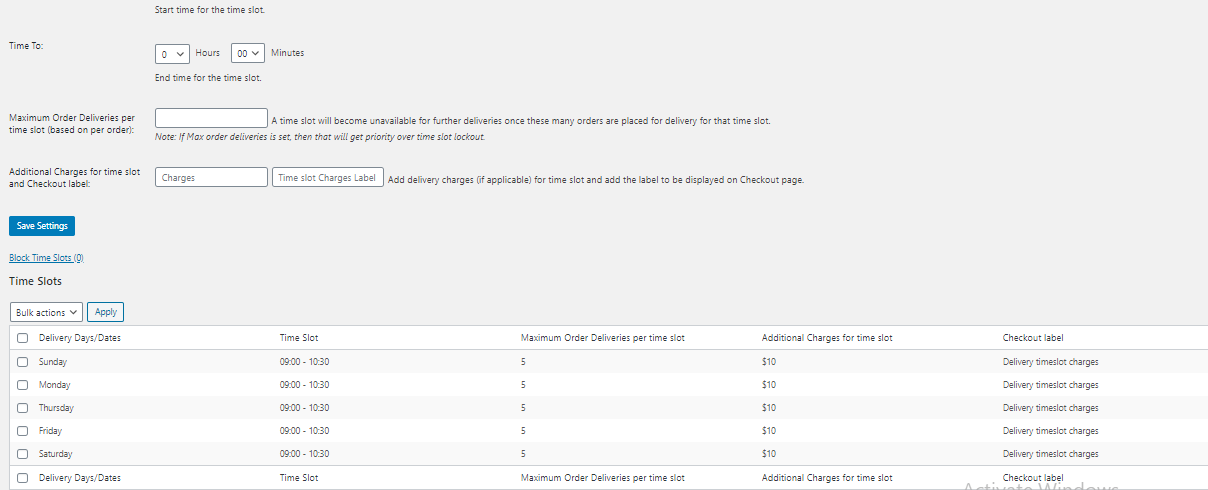
- Let customers choose a delivery time along with their delivery date.
- Create individual delivery time slots.
- Generate multiple time slots in bulk using fixed durations and intervals.
- Block specific time slots for selected weekdays or dates.
Manage Deliveries from WooCommerce
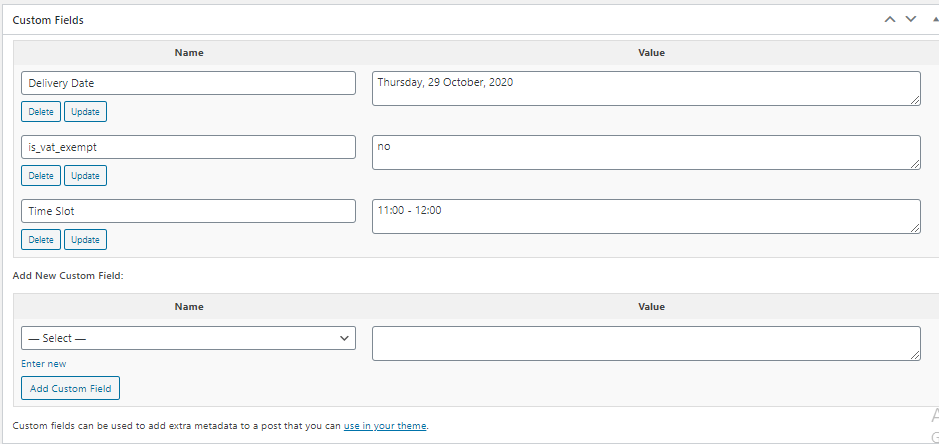
- Display the selected delivery date and time in WooCommerce orders.
- Edit delivery dates from the admin dashboard and notify customers.
- Capture delivery date and time on both the Cart and Checkout pages.
- Compatible with WooCommerce High-Performance Order Storage (HPOS).
Want to show the delivery dates on the product page? The Product Delivery Date LITE plugin allows the customer to choose a delivery date right within the product page and add the product to the cart.
Common Use Cases
Order Delivery Date for WooCommerce works well for businesses where customers expect to receive their orders on a specific date. Common examples include:
* Florists accepting deliveries for birthdays, anniversaries, and special occasions.
* Grocery stores offering scheduled local deliveries.
* Bakeries preparing cakes and custom orders for selected dates.
* Meal delivery businesses managing daily delivery capacity.
* Gift stores allowing customers to schedule deliveries in advance.
* Local retailers delivering products within defined service areas.
Documentation & Support
Need help getting started?
* Visit the WordPress support forums
* Check the documentation for common answers
* Try the live demo to see how the plugin works on the storefront.
If the plugin helps your business, consider leaving a ⭐⭐⭐⭐⭐ review. Your feedback helps other WooCommerce merchants discover the plugin.
Looking for More Advanced Delivery Scheduling?
The Lite version includes the essential features for offering delivery date and time selection in WooCommerce.
If your business requires more advanced delivery workflows, Order Delivery Date Pro for WooCommerce adds features such as:
* Google Calendar synchronization for managing deliveries.
* Delivery schedules based on shipping methods, product categories, shipping classes, user roles, and pickup locations.
* Same-day and next-day deliveries with configurable cut-off times.
* Recurring deliveries with WooCommerce Subscriptions compatibility.
* Delivery charges based on delivery urgency or selected dates.
* Customers can update their delivery date from My Account.
* Delivery date information in the WooCommerce mobile app.
* Additional integrations with popular WooCommerce shipping and marketplace plugins.
See the complete Lite vs Pro comparison: https://www.tychesoftwares.com/differences-pro-lite-versions-order-delivery-date-woocommerce-plugin/
About Tyche Softwares
Tyche Softwares has been building WooCommerce plugins since 2012, helping merchants manage deliveries, pricing, bookings, checkout customization, and other essential store operations. Our plugins are actively maintained and regularly updated to stay compatible with the latest versions of WordPress and WooCommerce.
Explore More WooCommerce Plugins
Tyche Softwares also develops plugins for abandoned cart recovery, order delivery scheduling, bookings, invoices and packing slips, custom order numbers, product input fields, BOGO offers, payment gateway fees, call for price, role-based pricing, currency management, and other WooCommerce enhancements.
Some of our Pro plugins:
Some of our other free plugins:
Externe Dienste
This plugin communicates with our tracking server to send usage data only if the user has explicitly opted in to usage tracking. For detailed information about what is tracked, please refer to our usage tracking documentation.
Installation
Option 1:
- Go to WordPress Dashboard->Plugins->Add New
- Search Order Delivery Date for WooCommerce plugin using search option
- Find the plugin and click Install Now button
- Klicken Sie nach der Installation auf Plugin-Link aktivieren, um das Plugin zu aktivieren.
Option 2:
- Download the plugin order-delivery-date-for-woocommerce.zip
- Unpack the order-delivery-date-for-woocommerce.zip file and extract the order-delivery-date-for-woocommerce folder
- Upload the plugin folder to your /wp-content/plugins/ directory
- Go to WordPress dashboard, click on Plugins from the menu
- Locate the Order Delivery Date for WooCommerce plugin and click on Activate link to activate the plugin.
Option 3:
- Download the plugin order-delivery-date-for-woocommerce.zip
- Go to WordPress Dashboard->Plugins->Add New
- Click on Upload Plugin link from top
- Upload the downloaded order-delivery-date-for-woocommerce.zip file and click on Install Now
- Klicken Sie nach der Installation auf Plugin-Link aktivieren, um das Plugin zu aktivieren.
Änderungsprotokoll
There are some enhancements and some bug fixes in this update which are mentioned below: * Enhancements: * A new dismissible notice is added in the WordPress admin, which provides an option to allow usage tracking of the non-sensitive data of our plugin from the website. * A new FAQ & Support menu is added to Order Delivery Date menu in admin dashboard which lists the top 10 frequently asked questions. This helps you to resolve your queries in a more faster way if they are already been answered or you can simply contact our Support team with the contact details provided. * A Welcome page is added which will be shown on installation or updating of the plugin. It explains some exciting features or some new features in brief. * A survey is added on deactivation of the plugin which helps us to know why is plugin is being or not used. This helps in improvising the plugin functionalities. * Bug Fixes: * Delivery Date information was not displayed in the Packing slips and the Invoices of the freshly installed WooCommerce PDF Invoices & Packing Slips plugin. This is fixed now. * Some strings were not translated using the .po files. This is fixed now. * Delivery Date field was shown on the checkout page even when the featured variable product is added to the cart. This is fixed now. * Wrong delivery date was auto-populated on the checkout page when the first available delivery date is set to a holiday. This is fixed now. * Wrong delivery date was auto-populated on the checkout page where the Minimum Delivery time calculation was not done for non-working days when 'Apply Minimum Delivery Time for non working weekdays' setting is enabled. This is fixed now. * When holidays are deleted, the page was redirected to the Date Settings tab whereas it should stay on Holidays page itself. This is fixed now. * Some warnings are fixed in the debug.log file. * Some links shown on the welcome page are modified.
= 4.6.3 (14.10.2026)
* Fix – Timeslot information (e.g. “Timeslot: 00:00”) was displayed in order details, emails and PDF documents even when time slot capture was disabled.
* Tweak – Improved visibility of the “Block Time Slots” link.
= 4.6.2 (19.08.2026)
* Fix – Checkout failed with a fatal error on HPOS stores when placing an order via Apple Pay or Google Pay Express Checkout without a delivery date selected.
= 4.6.1 (22.07.2026)
* Security – Fixed a privilege escalation issue where the shop_manager role could incorrectly receive the manage_options capability.
= 4.6.0 (14.07.2026)
* Fix – Resolved an issue where delivery date validation failed for orders placed via WooCommerce Stripe Express Checkout (Google Pay), despite a delivery date being selected.
* Fix – Resolved an error reported when retrieving a deleted order from the Trash.
* Fix – Resolved an issue where the delivery date was not retained when using WooPayments Express Checkout in Order Delivery Date Lite.
= 4.5.3 (15.05.2026)
* Fix – Addressed an issue where updating delivery details using “Update & Notify Customer” would not complete, resulting in no confirmation feedback or email being triggered.
= 4.5.2 (17.04.2026)
* Fix – Resolved SQL injection vulnerability in Delivery Calendar by using $wpdb->prepare() and securing input handling.
= 4.5.1 (20.03.2026)
* Fix – Resolved SQL injection vulnerabilities in the Delivery Calendar by properly sanitizing inputs and using $wpdb->prepare() with placeholders in dynamic queries.
= 4.5.0 (10.02.2026)
* Fix: Resolved an unauthenticated SQL injection vulnerability in the Delivery Calendar JSON endpoint.
* Fix: Resolved an issue where bulk actions in Holidays, Blocked Time Slots, and Time Slot Listing generated excessively long URLs due to repeated query parameter appending.
* Fix: Resolved a Gutenberg block validation error for the Order Delivery Date block.
* Fix: Improved the Delivery Calendar pop-up layout and usability.
= 4.4.0 (13.01.2026)
* Enhancement – Added a Delivery Calendar view in the backend to review and manage delivery dates for received orders.
* Tweak – Ability to add Order Delivery Date block in any section on the checkout block page.
* Fix – The “Disable Delivery Date and Time Slot Fields for Virtual Products” option was incorrectly hiding the fields for all products.
* Fix – The selected delivery time slot was not retained on the Block Checkout page.
= 4.3.2 (19.12.2025)
* Fix – Resolved a security issue where unauthenticated requests could trigger deletion of block time slots & holidays in the Order Delivery Date settings.
= 4.3.1 (19.11.2025)
* Fix – Resolved a security issue where unauthenticated requests could trigger deletion of time slots in the Order Delivery Date settings.
= 4.3.0 (12.11.2025)
* Fix – Resolved jQuery(…).datepicker error occurring on Shop, Product, and Cart pages.
* Fix – The Delivery Date field did not appear on the WooCommerce Checkout Block when “Force shipping to the customer billing address” was enabled under WooCommerce → Settings → Shipping.
* Fix – Addressed CSS warnings displayed in Firefox.
* Fix – Delivery Date and Time Slot fields were appearing for Virtual Products even when the “Disable Delivery Date and Time Slot fields for Virtual Products” setting was enabled.
* Fix – Prevent PHP deprecated warnings from appearing in the debug log.
= 4.2.0 (26.08.2025)
* Fix – Time slot charges were not appearing on the Checkout block page.
* Fix – Broken Access Control vulnerability in versions ≤ 4.1.0.
* Fix – Datepicker was not appearing on the translated checkout page set as default in WPML.
* Fix – Delivery date field was not appearing on the Checkout block page when shipping settings were disabled.
= 4.1.0 (24.06.2025)
* Fix – Delivery date filters were not displayed on the Orders listing page when HPOS was enabled.
* Fix – A PHP notice appeared when changing the site language in WordPress version 6.7 and above.
* Fix – The Delivery date calendar theme field in the Appearance settings showed an oversized calendar with WordPress version 6.8.
= 4.0.0 (15.04.2025)
* Fix – Indicate Premium Features in Lite Version Instead of Disabling Without Explanation.
* Fix – The javascript errors displayed when we add date field in formatinator form.
* Fix – Conflict with Order Delivery Date plugin affecting styling on the Divi Theme options page.
* Fix – Resolved all PHPCS warnings and aligned the code with WordPress Coding Standards to improve quality and maintainability.
* Fix – Time slots occasionally appeared blank or failed to display correctly upon refreshing the page in Firefox.
= 3.26.1 (14.01.2025)
* Fix – Loader was being displayed on all pages after the v3.26.0 update.
= 3.26.0 (14.01.2025)
* Fix – First delivery date auto-populates on the checkout page, but the required field error message appears when attempting to place an order.
* Fix – Delivery date displayed incorrectly on the checkout page when the next day is set as a holiday.
* Fix – Delivery date remains available for selection even after the time slot lockout value is reached.
= 3.25.0 (03.12.2024)
* Tweak: Removed the call to our tracking server to fetch the deactivation reasons and added them in the plugin itself.
* Fix: Addressed sorting issues with the delivery date column on WooCommerce Orders page when HPOS was activated.
* Fix: Date Picker allows selection of invalid delivery days and does not display time slots on the WooCommerce checkout page.
= 3.24.1 (06.11.2024)
* Fix – Upgrade to Pro notice will appear only on the Order Delivery Date Plugin’s settings page and also allowed to dismiss the notice.
= 3.24.0 (22.10.2024)
* Fix – Compatibility with Fluid Checkout for WooCommerce – Lite plugin (Timeslot feature).
* Fix – Debug log warning when trashing an order.
* Fix – Deactivation survey request was being sent even though ‘Skip & deactivate’ was selected while deactivating the plugin.
= 3.23.0 (16.10.2024)
* Supporting code changes for the Trial Version of Order Delivery Date Pro for WooCommerce.
3.22.0 (30.07.2024)
- Fix – Resolved warning error on the checkout page.
- Fix – Addressed issue where language change on plugin activation forced some order statuses to be translated incorrectly.
- Fix – Fixed The “As soon as possible” option was not appears first in the dropdown list.
- Fix – Fixed fatal error when untrashing a post from the site.
- Fix – Fixed “Uncaught Missing instance data for this datepicker” error.
- Fix – Corrected issue where the delivery date was reverting to the previously selected date on the cart block page.
- Fix – Resolved conflict issues with Gravity Form fields.
- Fix – Fixed the “selected timeslot has expired” error on the checkout page when the Divi theme is active.
- Fix – Addressed compatibility issues with the Bakery WordPress theme.
3.21.1 (03.04.2024)
- Fix – Cross Site Request Forgery (CSRF) vulnerability.
- Tweak – Update compatibility with WordPress 6.5
- Tweak – Update compatibility with WooCommerce 8.7
3.21.0 (20.02.2024)
- Fix – Unable to sort the delivery dates on WooCommerce Order page.
- Fix – Locked out date was not getting released when a date is changed in the admin order edit page.
- Fix – The delivery calendar was not responsive if “Number of Months” set to 2.
- Fix – Added Compatibility with cart and checkout block pages.
- Fix – The delivery date was missing on order received page and in order email when the order is placed with autopopulate delivary date.
- Fix – The delivery calender was not appearing when holiday name contains double quotes.
- Fix – Cross Site Request Forgery (CSRF) vulnerability.
3.20.2 (23.09.2023)
- Tweak: Modified the setting sections labels to make them user friendly.
3.20.1 (02.08.2023)
- Fix: A vulnerability issue was found when filtering the orders based on delivery date on WooCommerce orders page.
3.20.0 (11.07.2023)
- Enhancement: Added a setting ‘Show filters on order listing page’ to display filter dropdown based on delivery dates on WooCommerce orders page.
Screenshots

Für Entwickler
Ist das dein Plugin? Zeigen Sie die Zahlen.
Fügen Sie Ihrer Website, Docs oder GitHub Readme ein Live-Badge hinzu. Es wird von selbst aktualisiert - kein Konto erforderlich.
Best Order Delivery Date for WooCo… alternatives
All delivery date plugins →





Fragen und Antworten
Order Delivery Date for WooCommerce: quick answers
Gerade Antworten, gezogen von Live WordPress.org Daten.
Quelle: WordPress.org
Is Order Delivery Date for WooComm… free?
Yes. Order Delivery Date for WooComm… is free to download and use from the official WordPress.org plugin directory.
Is Order Delivery Date for WooComm… safe to use in 2026?
Order Delivery Date for WooComm… is a solid plugin choice in 2026, with a few things worth checking first. It runs on 10K+ sites, is rated 4.3/5 and was last updated 4 weeks ago, and scores 76/100 on our health check.
How many websites use Order Delivery Date for WooComm…?
Order Delivery Date for WooComm… is active on 10K+ WordPress websites and has been downloaded 544,374 times since it launched in August 2012. It was downloaded 5,055 times in the last 30 days.
Does Order Delivery Date for WooComm… work with WordPress 7.1?
Yes. The developer has tested Order Delivery Date for WooComm… up to WordPress 7.1.5, the latest release. It requires WordPress 1.3 or newer.
What PHP version does Order Delivery Date for WooComm… need?
Order Delivery Date for WooComm… requires PHP 7.3 or higher. Most hosts run PHP 8.x today, so it works on any modern WordPress hosting.
When was Order Delivery Date for WooComm… last updated?
The latest version, 4.6.3, was released on October 23, 2026 (4 weeks ago).
Who makes Order Delivery Date for WooComm…?
Order Delivery Date for WooComm… is developed and maintained by tychesoftwares.
What are the best alternatives to Order Delivery Date for WooComm…?
The most popular alternatives to Order Delivery Date for WooComm… are WPC Estimated Delivery Date… (10K+ installs), Order Delivery Date Time &… (400+ installs) and Delivery Date Time & Pickup… (400+ installs).
Angetrieben von PageForge
Eine Vorlage und eine Tabelle. Eine echte Seite für jede Suche.
PageForge Verwandelt jede Zeile eines CSV in eine WordPress-Seite mit eigenem Titel, URL, SEO Felder und Schema entworfen. Kostenlos auf WordPress.org.
- CSV und XLSX, plus Google Sheets auf Beruf und Unternehmen
- seinen eigenen Titel, URL, SEO Felder und Schema für jede Seite
- Arbeitet mit dem Blockeditor, Elementor, Divi und Avada
- Kostenlos auf WordPress.org, keine Kreditkarte