


MultiSyde
A WordPress plugin that explores practical, focused solutions and enhancements for WordPress Multisite.

Solide Wahl
MultiSyde is a solid plugin choice in 2026, with a few things worth checking first. Was last updated 2 weeks ago, and scores 64/100 on our health check.
- Aktiv entwickelt — letztes Update vor 2 Wochen
- Getestet mit dem neuesten WordPress (7.1)
- Kleine Benutzerbasis (<10 aktive Installationen)
- Bisher sehr wenige Bewertungen
Wie stapelt es sich?
Side-by-side bei Installationen, Updates, Bewertungen und Support



Tägliche Downloads
Download-Spitzen folgen normalerweise einer neuen Version - jede Website, die automatisch aktualisiert wird, gilt als Download.
Ranglisten
Where MultiSyde stands todayWordPress.org Ranglisten suchen
Live-Position in der Plugin-Suche, Top 100| Stichwort | Position |
|---|---|
| Admin Tools | >100 |
| enhancements | >100 |
| multisite | >100 |
| network admin | >100 |
| usability | >100 |
About MultiSyde
From the official readme · v1.3.0Beschreibung
MultiSyde enhances the WordPress Multisite experience by addressing common usability challenges and streamlining network administration tasks. Developed by Syde as both a practical tool and proof-of-concept for potential WordPress core improvements, with a focus on Multisite.
The plugin targets WordPress Multisite network administrators, developers, and organizations managing multiple WordPress sites. It focuses on targeted, high-impact enhancements rather than attempting to solve all Multisite challenges at once.
MultiSyde follows a modular architecture where each feature addresses specific pain points identified in WordPress Trac tickets and community feedback. The plugin is actively developed and welcomes community contributions via the GitHub repository. See the FAQ for more details on how to contribute.
Merkmale
Enhanced Site Retrieval – New get_site_by() utility function for easier site lookups by ID, slug, domain, path, or URL (addresses Trac #40180)
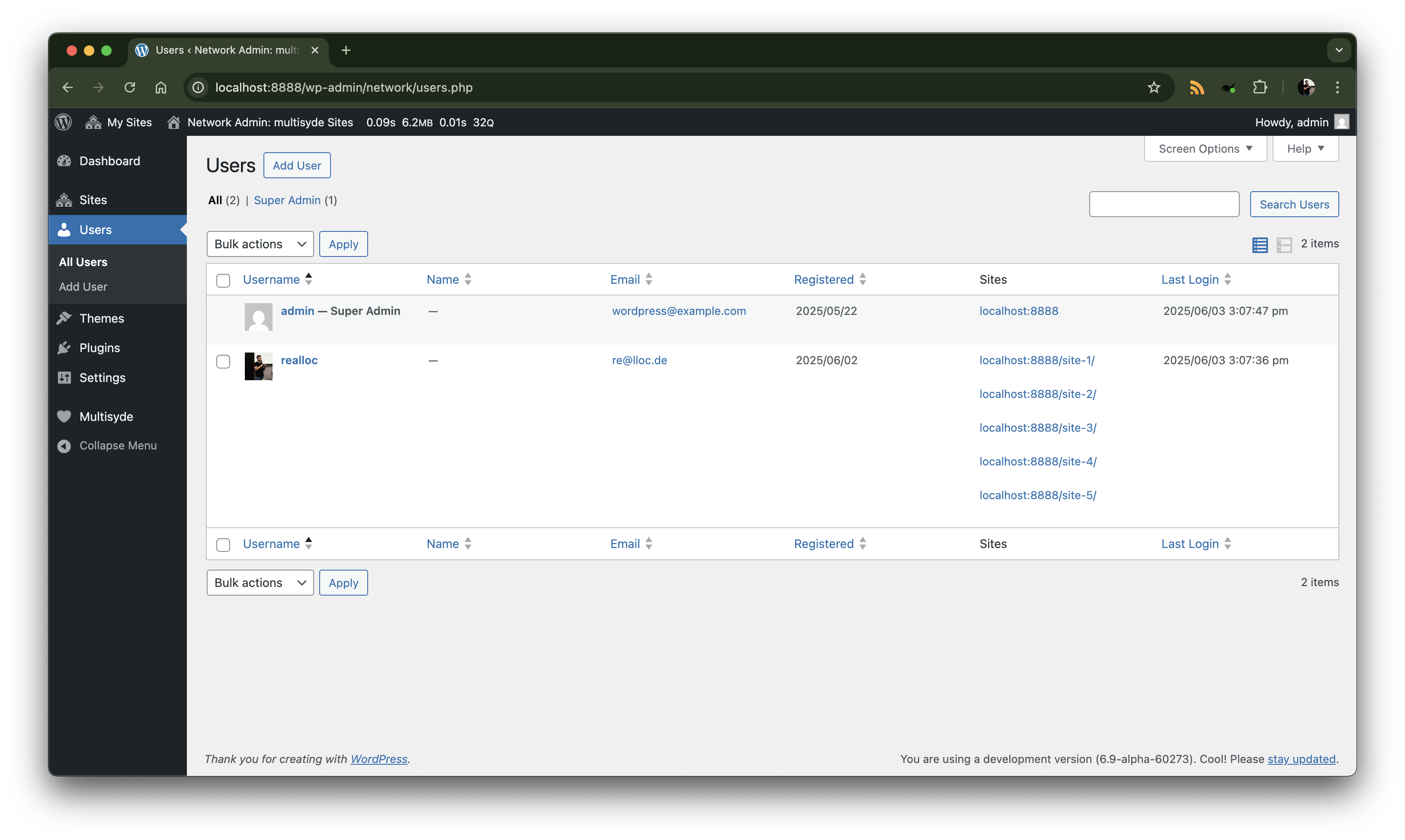
Last User Login Tracking – Adds “Last Login” column to Network Admin Users screen with automatic timestamp recording (addresses MultiSyde GitHub issue #11)
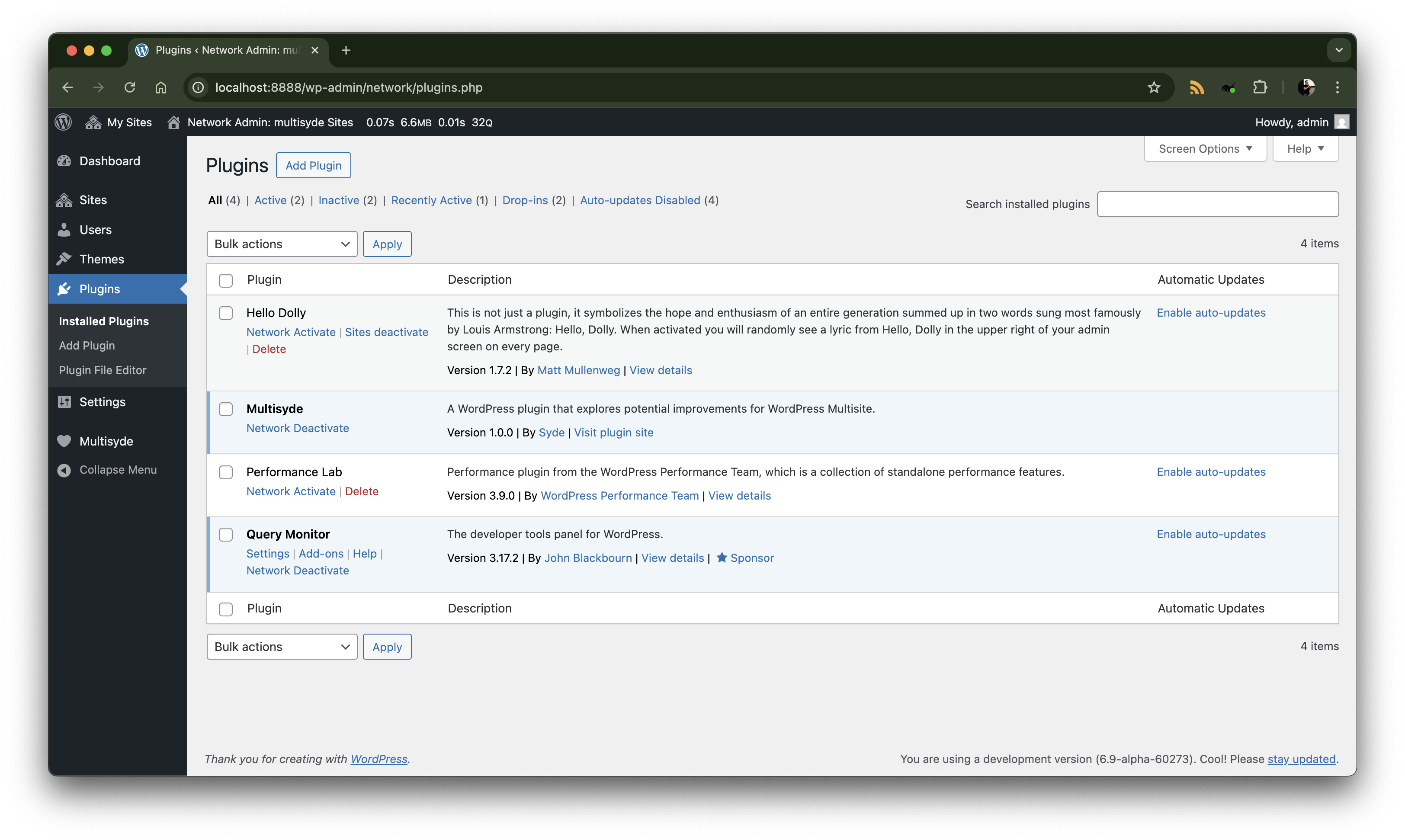
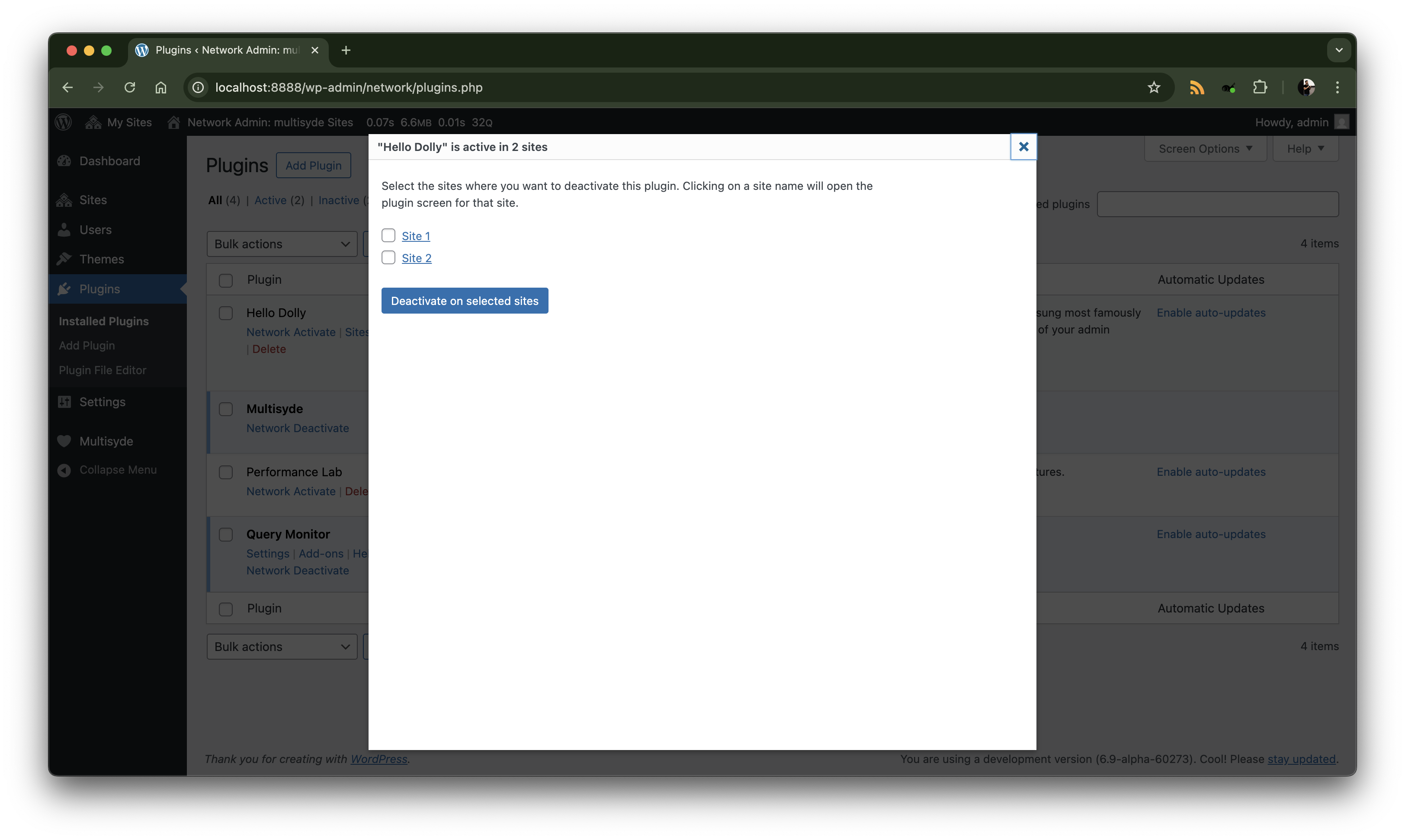
Site Active Plugins – See which plugins are active on each site, with bulk deactivation across subsites (addresses Trac #53255)
Site Active Theme – Displays the active theme for each site in the Network Admin dashboard, making it easier to manage themes across the network (addresses Trac #56458)
Permalink Cleanup – Automatically removes the /blog prefix from the main site’s permalink structure in multisite networks for cleaner URLs (addresses GitHub issue #24)
REST API Endpoint for Sites – Adds the wp/v2/sites REST API endpoint to list, create, update and delete sites, including site meta (addresses Trac #40365)
The feature set continues to expand based on community contributions and real-world needs.
Installation
Important: This plugin requires a WordPress Multisite installation and must be network activated.
Automatische Installation
- Go to Network Admin → Plugins → Add New
- Search for “MultiSyde”
- Click “Install Now” then “Network Activate”
Manuelle Installation
- Download the plugin ZIP file
- Upload to
/wp-content/plugins/and extract - Go to Network Admin → Plugins
- Network Activate “MultiSyde”
Development Installation
- Clone the repository:
git clone https://github.com/inpsyde/multisyde/ /wp-content/plugins/multisyde - Install dependencies:
composer install - Network activate the plugin
Requirements: WordPress 6.8+, PHP 7.4+, Multisite installation
Änderungsprotokoll
Update for the latest enhancements and improvements. MultiSyde evolves continuously based on community feedback.
1.3.0
- Enhancement: Added REST API Endpoint for Sites (
wp/v2/sites) to list, create, update and delete sites, including site meta (Trac #40365). - Fix: Site Active Plugins now ignores request parameters sent as arrays instead of strings when deactivating a plugin across sites.
1.2.0
- Enhancement: Added Permalink Cleanup to automatically remove the
/blogprefix from the main site’s permalink structure in multisite networks.
1.1.1
- MultiSyde is now network-wide activatable only.
1.1.0
- Enhancement: Added Site Active Theme in site management dashboard.
1.0.1
- Enhancement: Site Active Plugins – Added a filter to allow other plugins to modify the list of active plugins on a site.
1.0.0
- Erste Freigabe.
- Added Site Active Plugins feature with bulk deactivation.
- Added Enhanced Site Retrieval with
get_site_by()function. - Added Last User Login tracking in Network Admin.
- Established a modular architecture for extensibility.
Screenshots


Für Entwickler
Ist das dein Plugin? Zeigen Sie die Zahlen.
Fügen Sie Ihrer Website, Docs oder GitHub Readme ein Live-Badge hinzu. Es wird von selbst aktualisiert - kein Konto erforderlich.
Best MultiSyde alternatives
All Admin Tools plugins →




Fragen und Antworten
MultiSyde: quick answers
Gerade Antworten, gezogen von Live WordPress.org Daten.
Quelle: WordPress.org
Is MultiSyde free?
Yes. MultiSyde is free to download and use from the official WordPress.org plugin directory.
Is MultiSyde safe to use in 2026?
MultiSyde is a solid plugin choice in 2026, with a few things worth checking first. Was last updated 2 weeks ago, and scores 64/100 on our health check.
How many websites use MultiSyde?
MultiSyde is active on <10 WordPress websites and has been downloaded 1,162 times since it launched in June 2025. It was downloaded 190 times in the last 30 days.
Does MultiSyde work with WordPress 7.1?
Yes. The developer has tested MultiSyde up to WordPress 7.1.5, the latest release. It requires WordPress 6.8 or newer.
What PHP version does MultiSyde need?
MultiSyde requires PHP 7.4 or higher. Most hosts run PHP 8.x today, so it works on any modern WordPress hosting.
When was MultiSyde last updated?
The latest version, 1.3.0, was released on November 12, 2026 (2 weeks ago).
Who makes MultiSyde?
MultiSyde is developed and maintained by Syde.
What are the best alternatives to MultiSyde?
The most popular alternatives to MultiSyde are Admin Tools (3K+ installs), Cron Jobs (2K+ installs) and WP Extended (600+ installs).
Angetrieben von PageForge
Eine Vorlage und eine Tabelle. Eine echte Seite für jede Suche.
PageForge Verwandelt jede Zeile eines CSV in eine WordPress-Seite mit eigenem Titel, URL, SEO Felder und Schema entworfen. Kostenlos auf WordPress.org.
- CSV und XLSX, plus Google Sheets auf Beruf und Unternehmen
- seinen eigenen Titel, URL, SEO Felder und Schema für jede Seite
- Arbeitet mit dem Blockeditor, Elementor, Divi und Avada
- Kostenlos auf WordPress.org, keine Kreditkarte