


Meow Workflow – AI Agents & No-Code Automation for WordPress
Visual, no-code automation for WordPress. Draw flows on a canvas, wire your plugins and AI together, and let AI build the missing pieces.

Solide Wahl
Meow Workflow is a solid plugin choice in 2026, with a few things worth checking first. It runs on 100+ sites, is rated 5/5 and was last updated 3 weeks ago, and scores 79/100 on our health check.
- Aktiv entwickelt – letztes Update vor 3 Wochen
- Getestet mit dem neuesten WordPress (7.1)
- Kleine Benutzerbasis (100+ aktive Installationen)
- Bisher sehr wenige Bewertungen
Wie stapelt es sich?
Side-by-side bei Installationen, Updates, Bewertungen und Support


Tägliche Downloads
Download-Spitzen folgen normalerweise einer neuen Version - jede Website, die automatisch aktualisiert wird, gilt als Download.
Ranglisten
Where Meow Workflow stands todayWordPress.org Ranglisten suchen
Live-Position in der Plugin-Suche, Top 100| Stichwort | Position |
|---|---|
| Ai | >100 |
| automation | #65 |
| flows | #22 |
| No-code | #55 |
| workflow | #8 |
Versionsübernahme
Anteil aktiver Sites pro Release.
Bewertungsaufschlüsselung
★★★★★★★★★★ 5 from 2 reviews
About Meow Workflow
From the official readme · v0.1.7Beschreibung
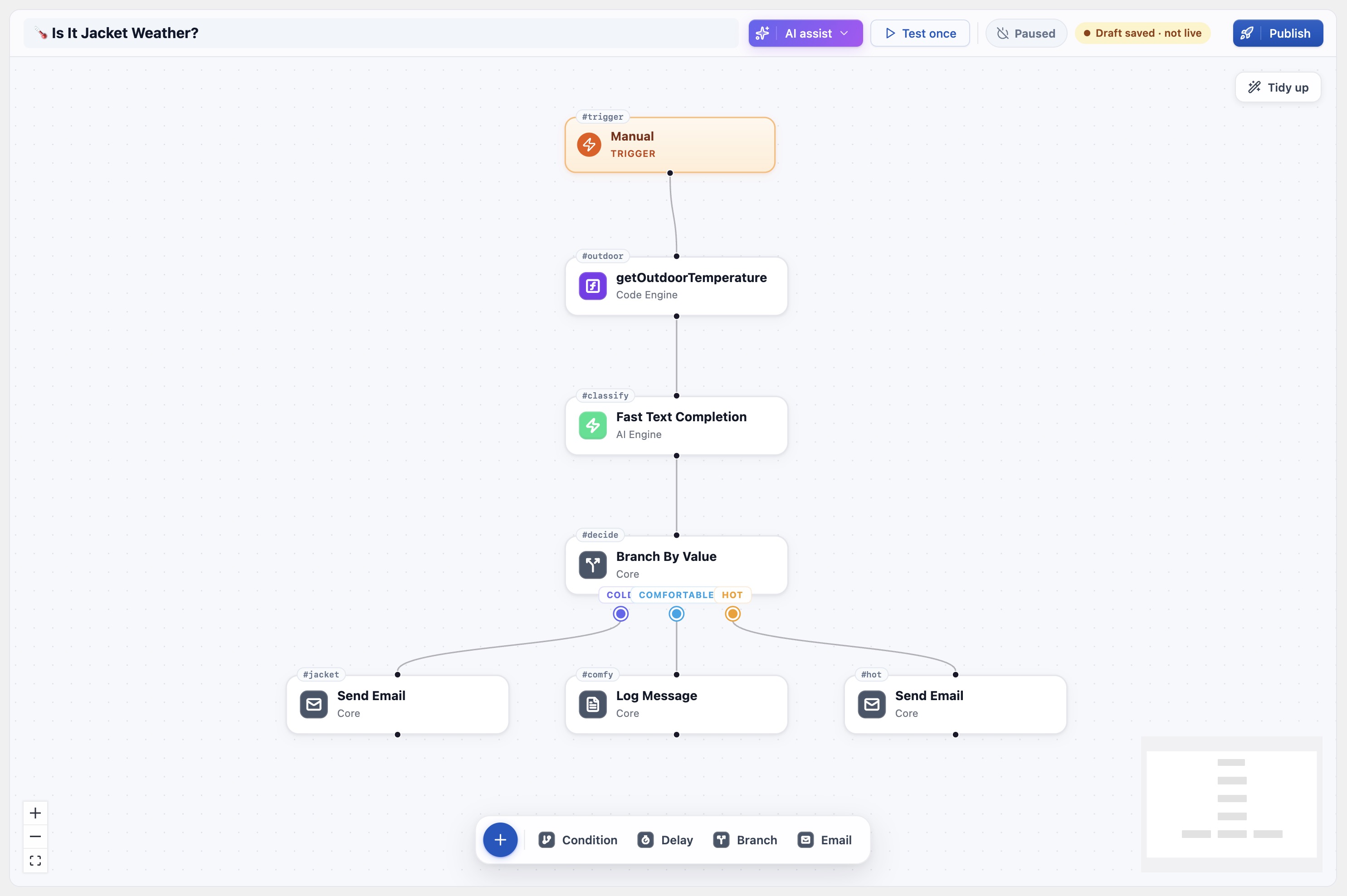
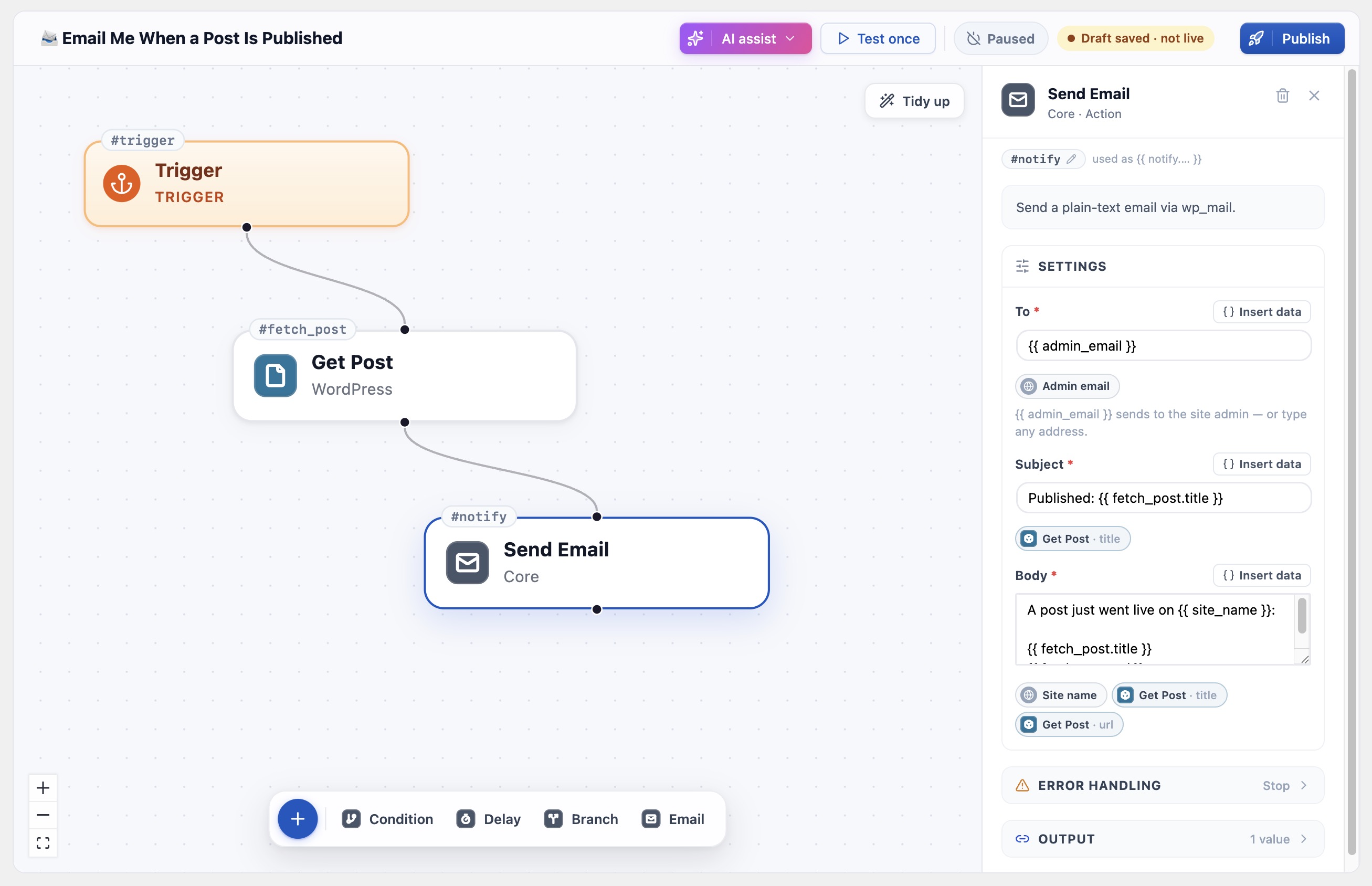
Meow Workflow adds a visual node-graph editor to WordPress. Pick a trigger — a WordPress event, a schedule, a webhook, or a manual “Test once” — then drag steps onto a canvas, connect them, and watch the flow run.
Unlike Zapier, Make or n8n, there is no connector catalog to wait for. Meow Workflow runs inside WordPress, so it already reaches your posts, users, comments and plugins. Need something we don’t ship? Describe it to Code Engine‘s AI and it writes the function — instantly a step you can wire in. No catalog, no waiting.
Was Sie bauen können
- Email yourself when a post is published or a comment comes in.
- Turn an RSS feed into AI-written draft posts on a schedule.
- Generate an SEO excerpt with AI every time a post is saved.
- Send a thank-you note when a WooCommerce order completes.
- Branch a flow on a value, loop over a list, retry on failure — all visually.
Steps come from three places
- Always available — Core (logic, branching, loops, delays, email, HTTP) and WordPress (posts, users, comments, media).
- From your plugins — any plugin that supports Meow Workflow adds its triggers and actions automatically, and removes them when deactivated. The Meow family ships first-class: AI Engine (text, image, vision, JSON), SEO Engine (scoring, titles, excerpts), Code Engine (your own functions), Social Engine (posting).
- Written by you or AI — for anything else, a Code Engine function becomes a step the moment it’s active.
Build it with AI
Don’t want to draw it yourself? Describe what should happen in plain English — “when an order comes in, email me a summary” — and (with AI Engine installed) it assembles the workflow from your installed steps.
Safe by design
Editing a workflow never disturbs the live one: your changes are auto-saved to a draft, and the running version keeps using the last published copy until you hit Publish. Test once always runs the draft, against real data from your site, so you can experiment on a live automation without risk.
Für Entwickler
Add your own actions and triggers by hooking the mwflow_register_integration filter — no changes to Meow Workflow required. The bundled integrations under classes/integrations/ are the reference implementations. Nothing phones home: AI steps call your locally installed AI Engine, and the HTTP action only reaches public URLs you configure.
Installation
- Install Meow Workflow from the Plugins screen (or upload the ZIP under Plugins → Add New → Upload Plugin).
- Activate it.
- Open Meow Apps → Workflow.
- Click New workflow and start from an example, describe one to AI, or build from a blank canvas. The Setup Assistant walks you through the rest.
Optional: install AI Engine for AI steps and Build-with-AI, Code Engine to turn your own functions into steps, and SEO Engine for SEO steps.
Änderungsprotokoll
0.1.7 (2026/10/30)
- Add: New trigger that fires when an email fails to send.
- Fix: Workflows no longer trigger themselves.
- Fix: The “When a post is published” trigger only fires when a post actually goes live.
- Fix: The trigger card shows its name again when a workflow is reopened.
- 🎵 Discuss with others about Meow Workflow on the Discord.
- 🌴 Keep us motivated with a little review here. Thank you!
- 🥰 If you want to help us, check our Patreon. Thank you!
0.1.6 (2026/09/11)
- Add: References inside quoted strings of JSON bodies are now escaped automatically.
- Add: JSON bodies are sent with a Content-Type of application/json.
- Fix: Invalid JSON bodies are rejected with a clear message before the request is made.
- Update: Documented the json filter in the assistant and the help.
0.1.5 (2026/09/03)
- Add: Validate a workflow before publishing, with a list of issues to fix.
- Add: Email the admin when a live workflow fails.
- Add: Insert new steps between existing ones, with undo and redo in the editor.
- Update: Delay is now a Wait step that parks live runs for minutes, hours or days.
- Update: Webhooks accept form-encoded requests and reject GET unless it’s explicitly allowed.
- Fix: A step with two parent steps no longer runs twice.
0.1.4 (2026/09/02)
- Fix: The editor no longer overwrites in-progress edits after an auto-save.
- Add: The inspector shows the selected step’s last run output and error at the top.
- Add: References accept bracket indexes, and the Insert data menu lists nested fields of JSON outputs after a test run.
- Fix: JSON objects are converted to text when used in text fields.
- Fix: The unpublished-changes flag ignores derived trigger fields, so untouched flows show as live.
0.1.3 (2026/09/02)
- Fix: Webhook URL now displays in the editor.
- Fix: Webhook payload fields are accessible as both
trigger.fieldandtrigger.body.field. - Fix: Missing-input errors now name the reference that came back empty.
- Fix: Webhook token generation no longer overwrites unsaved flow changes.
0.1.2 (2026/08/31)
- Fix: Scheduled workflows no longer stall before the final node.
- Fix: Async runs now process a full batch of nodes per cron pass instead of a single node.
- Add: HTML format option for the Send Email node.
- Add: Categories, date and edit link to post node outputs.
- Update: Synced the shared common library with the new dashboard board, and updated the tested and PHP requirements.
- 🎵 Discuss with others about Meow Workflow on the Discord.
- 🌴 Keep us motivated with a little review here. Thank you!
- 🥰 If you want to help us, check our Patreon. Thank you!
Screenshots


Für Entwickler
Ist das dein Plugin? Zeigen Sie die Zahlen.
Fügen Sie Ihrer Website, Docs oder GitHub Readme ein Live-Badge hinzu. Es wird von selbst aktualisiert - kein Konto erforderlich.
Best Meow Workflow alternatives
Alle AI-Plugins →





Fragen und Antworten
Meow Workflow: quick answers
Gerade Antworten, gezogen von Live WordPress.org Daten.
Quelle: WordPress.org
Is Meow Workflow free?
Yes. Meow Workflow is free to download and use from the official WordPress.org plugin directory.
Is Meow Workflow safe to use in 2026?
Meow Workflow is a solid plugin choice in 2026, with a few things worth checking first. It runs on 100+ sites, is rated 5/5 and was last updated 3 weeks ago, and scores 79/100 on our health check.
How many websites use Meow Workflow?
Meow Workflow is active on 100+ WordPress websites and has been downloaded 3,143 times since it launched in June 2026. It was downloaded 845 times in the last 30 days.
Does Meow Workflow work with WordPress 7.1?
Yes. The developer has tested Meow Workflow up to WordPress 7.1.5, the latest release. It requires WordPress 6.0 or newer.
What PHP version does Meow Workflow need?
Meow Workflow requires PHP 7.4 or higher. Most hosts run PHP 8.x today, so it works on any modern WordPress hosting.
When was Meow Workflow last updated?
The latest version, 0.1.7, was released on October 30, 2026 (3 weeks ago).
Who makes Meow Workflow?
Meow Workflow is developed and maintained by Jordy Meow.
What are the best alternatives to Meow Workflow?
The most popular alternatives to Meow Workflow are Elementor Agent Ready Websi… (10M+ installs), Jetpack (3M+ installs) and All in One SEO (2M+ installs).
Angetrieben von PageForge
Eine Vorlage und eine Tabelle. Eine echte Seite für jede Suche.
PageForge Verwandelt jede Zeile eines CSV in eine WordPress-Seite mit eigenem Titel, URL, SEO Felder und Schema entworfen. Kostenlos auf WordPress.org.
- CSV und XLSX, plus Google Sheets auf Beruf und Unternehmen
- seinen eigenen Titel, URL, SEO Felder und Schema für jede Seite
- Arbeitet mit dem Blockeditor, Elementor, Divi und Avada
- Kostenlos auf WordPress.org, keine Kreditkarte