


Menüsymbole nach Themeisle – Hinzufügen von Symbolen zu Navigationsmenüs
Add icons to WordPress navigation menus easily — pick from Font Awesome, Dashicons, image icons & more. Style menu items with custom colors & sizes.

Sichere Auswahl
Yes — Menu Icons by Themeisle is a safe, well-maintained plugin to use in 2026. It runs on 100K+ sites, is rated 4.9/5 and was last updated 2 weeks ago, and scores 96/100 on our health check.
- Bewährt im Maßstab auf 100k+ aktiven Standorten
- Loved by users — 4.9/5 from 851 reviews
- Aktiv entwickelt — letztes Update vor 2 Wochen
- Getestet mit dem neuesten WordPress (7.1)
- Momentum — downloads up 89.9% vs the previous 30 days
Wie stapelt es sich?
Side-by-side bei Installationen, Updates, Bewertungen und Support



Tägliche Downloads
Download-Spitzen folgen normalerweise einer neuen Version - jede Website, die automatisch aktualisiert wird, gilt als Download.
Ranglisten
Where Menu Icons by Themeisle stands todayWordPress.org Ranglisten suchen
Live-Position in der Plugin-Suche, Top 100| Stichwort | Position |
|---|---|
| Dashicons | #2 |
| Font Awesome | #8 |
| image icons | #1 |
| menu icons | #1 |
| Navigation Menu | #1 |
Versionsübernahme
Anteil aktiver Sites pro Release.
Bewertungsaufschlüsselung
★★★★★★★★★★ 4.9 from 851 reviews
About Menu Icons by Themeisle
From the official readme · v0.13.27Beschreibung
This plugin gives you the ability to add icons to your menu items, similar to the look of the latest dashboard menu.
Verwendung
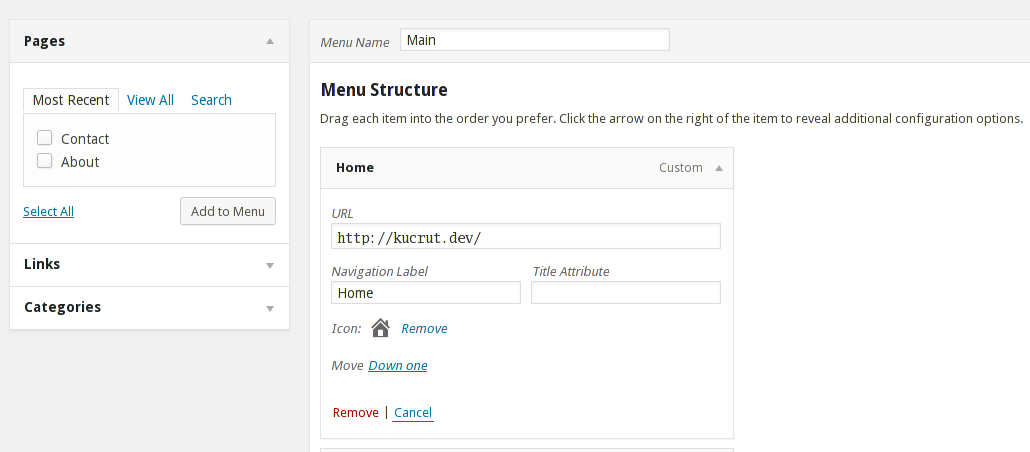
- After the plugin is activated, go to Appearance > Menus to edit your menus
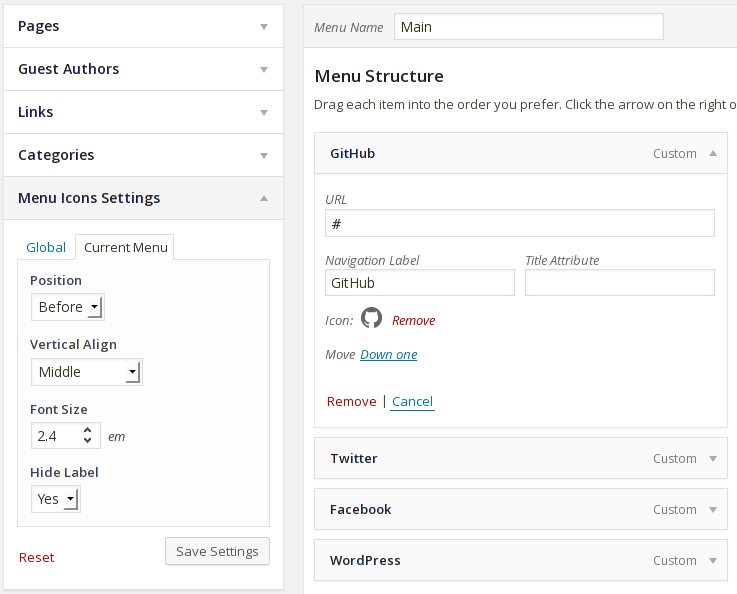
- Enable/Disable icon types in “Menu Icons Settings” meta box
- Set default settings for current nav menu; these settings will be inherited by the newly added menu items
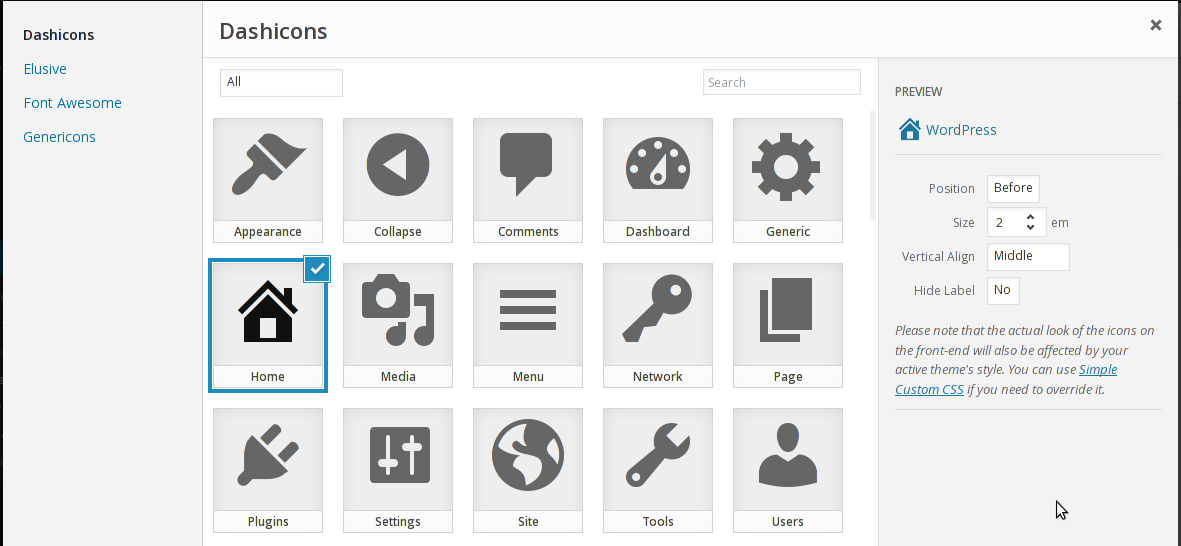
- Select icon by clicking on the “Select icon” link
- Save the menu
Supported icon types
- Dashicons (WordPress core icons)
- Elusive Icons by Aristeides Stathopoulos
- Font Awesome by Dave Gandy
- Foundation Icons by Zurb
- Genericons by Automattic
- Fontello icon packs
- TI Icons icon pack by ThemeIsle
- Image (attachments)
- SVG (attachments)
Planned supported icon types
- Image (URL)
Compatible themes
Menu icons works with most of the themes out there, especially with popular ones like Twenty Seventeen or Hestia.
Development of this plugin is done on GitHub. Pull requests welcome. Please see issues reported there before going to the plugin forum.
If you like this plugin, then consider checking out our other projects:
CodeinWP Blog – Designer’s Guide To WordPress
Revive.Social – Social Media Tools
JustFreeThemes – Free WordPress Themes directory
Installation
- Upload
menu-iconsin das/wp-content/plugins/-Verzeichnis - Activate the plugin through the Plugins menu in WordPress
Änderungsprotokoll
Version 0.13.27 (2026-11-12)
- Enhanced security
- Raised the minimum required PHP version to 7.1
- Updated dependencies
Version 0.13.26 (2026-11-02)
- Fixed settings warning when all icon types are unchecked.
- Updated dependencies
Version 0.13.25 (2026-09-29)
- Added padding controls for custom SVG menu icons.
- Added AI agent support: let AI assistants read and change your Menu Icons settings.
- Updated dependencies
Version 0.13.24 (2026-09-02)
- Updated dependencies
Version 0.13.23 (2026-04-23)
- Fixed issue with SVG menu icons rendering too small
- Fixed issue with vertical alignment not working on frontend
Version 0.13.22 (2026-04-09)
- Updated dependencies
Version 0.13.21 (2026-02-03)
- Enhanced security
Version 0.13.20 (2025-12-15)
- Fixed compatibility with PHP 8.1+ versions
- Updated dependencies
Version 0.13.19 (2025-09-05)
- Updated dependencies
Version 0.13.18 (2025-05-23)
- Updated dependencies
Version 0.13.17 (2025-04-17)
- Updated dependencies
Version 0.13.16 (2024-11-07)
- Updated dependencies
Version 0.13.15 (2024-07-10)
- Removed recommendations of unsupported plugins
- Fixed conditions for theme recommendation
Version 0.13.14 (2024-05-14)
- Enhanced security
Version 0.13.13 (2024-04-18)
Improvements
- Updated internal dependencies: Enhanced performance and security.
Version 0.13.12 (2024-04-01)
Improvements
- Updated internal dependencies
Version 0.13.11 (2024-03-29)
Fixes
- Updated internal dependencies
- Enhanced security
Version 0.13.10 (2024-03-26)
Improvements
- Updated internal dependencies
- Improved readme to link to the public source files
- Filter promotions
Version 0.13.9 (2024-02-23)
Fixes
- Updated dependencies
- Harden security
Version 0.13.8 (2023-12-19)
- SDK Updates
- Fixed global hide label issue
Version 0.13.7 (2023-08-17)
- Updated dependencies
- Fixed broken button layout issues in other languages
Version 0.13.6 (2023-07-07)
- Updated composer dependencies to address warning in the widgets section
Version 0.13.5 (2023-03-30)
- Updated Dependencies and WordPress core tested up to version 6.2
Version 0.13.4 (2023-03-01)
Update dependencies
Version 0.13.3 (2023-02-25)
- Fix img width/height value, props @Htbaa
- Update dependencies
Version 0.13.2 (2022-11-24)
- Fix – update dependencies
Version 0.13.1 (2022-11-04)
Tested with the WordPress 6.1 version
Version 0.13.0 (2022-08-23)
- Fix Neve upsells showing up inconsistently on edge cases
- Fix inconsistency with Font Awesome 5 and adds compatibility with 6th version
- Fix compatibility with JupiterX
- Update dependencies
Version 0.12.12 (2022-05-27)
- Fix the style handler conflict issue which breaks the arrow icon of the submenus on some themes
- Fix dismiss dashboard notice issue on some edge cases
- Fix compatibility with the Max Mega Menu plugin
Version 0.12.11 (2022-03-16)
Add font awesome 5 support
Enhance compatibility with Otter/Neve
Version 0.12.10 (2022-02-07)
- [Fix] Add support for alt attribute for SVG icons
- Tested up with WordPress 5.9
Version 0.12.9 (2021-08-04)
- Tested compatibility with WordPress 5.8
Version 0.12.8 (2021-05-12)
- Fix issue when the image is not accessible to fetch the width/height metadata.
Version 0.12.7 (2021-05-07)
Fix PHP fatal error when uploading SVG with the image uploader
Version 0.12.6 (2021-05-05)
- Adds explicit width/height to icons to prevent layout shifts issues
0.12.4 – 2020-07-13
- Fix Font Awesome not loading
0.12.3 – 2020-07-13
- Fixed Menu Icons in Block Editor not working
- Fixed CWP links.
0.12.2 – 2019-11-15
0.12.1 – 2019-11-15
- Improve legacy compatibility
0.12.0 – 2019-11-15
- Fix issues with WordPress 5.3.
Screenshots


Für Entwickler
Ist das dein Plugin? Zeigen Sie die Zahlen.
Fügen Sie Ihrer Website, Docs oder GitHub Readme ein Live-Badge hinzu. Es wird von selbst aktualisiert - kein Konto erforderlich.
Best Menu Icons by Themeisle alternatives
All Dashicons plugins →

Fragen und Antworten
Menu Icons by Themeisle: quick answers
Gerade Antworten, gezogen von Live WordPress.org Daten.
Quelle: WordPress.org
Is Menu Icons by Themeisle free?
Yes. Menu Icons by Themeisle is free to download and use from the official WordPress.org plugin directory.
Is Menu Icons by Themeisle safe to use in 2026?
Yes — Menu Icons by Themeisle is a safe, well-maintained plugin to use in 2026. It runs on 100K+ sites, is rated 4.9/5 and was last updated 2 weeks ago, and scores 96/100 on our health check.
How many websites use Menu Icons by Themeisle?
Menu Icons by Themeisle is active on 100K+ WordPress websites and has been downloaded 4,825,318 times since it launched in February 2014. It was downloaded 123,217 times in the last 30 days.
Does Menu Icons by Themeisle work with WordPress 7.1?
Yes. The developer has tested Menu Icons by Themeisle up to WordPress 7.1.5, the latest release. It requires WordPress 4.7 or newer.
What PHP version does Menu Icons by Themeisle need?
Menu Icons by Themeisle requires PHP 7.1 or higher. Most hosts run PHP 8.x today, so it works on any modern WordPress hosting.
When was Menu Icons by Themeisle last updated?
The latest version, 0.13.27, was released on November 12, 2026 (2 weeks ago).
Who makes Menu Icons by Themeisle?
Menu Icons by Themeisle is developed and maintained by Themeisle.
What are the best alternatives to Menu Icons by Themeisle?
The most popular alternatives to Menu Icons by Themeisle are Frontend Dashicons (500+ installs), Icon Fonts (300+ installs) and Post Featured Font Icon (60+ installs).
Angetrieben von PageForge
Eine Vorlage und eine Tabelle. Eine echte Seite für jede Suche.
PageForge Verwandelt jede Zeile eines CSV in eine WordPress-Seite mit eigenem Titel, URL, SEO Felder und Schema entworfen. Kostenlos auf WordPress.org.
- CSV und XLSX, plus Google Sheets auf Beruf und Unternehmen
- seinen eigenen Titel, URL, SEO Felder und Schema für jede Seite
- Arbeitet mit dem Blockeditor, Elementor, Divi und Avada
- Kostenlos auf WordPress.org, keine Kreditkarte