


Manager for Steam
Complete Steam integration with visual customization, Gutenberg blocks, and comprehensive Steam Web API support.

Mit Vorsicht verwenden
Manager for Steam works, but test it on a staging site before relying on it in 2026. It runs on 30+ sites, is rated 5/5 and was last updated 6 months ago, and scores 59/100 on our health check.
- Kleine Benutzerbasis (30+ aktive Installationen)
- Bisher sehr wenige Bewertungen
Wie stapelt es sich?
Side-by-side bei Installationen, Updates, Bewertungen und Support


Tägliche Downloads
Download-Spitzen folgen normalerweise einer neuen Version - jede Website, die automatisch aktualisiert wird, gilt als Download.
Ranglisten
Where Manager for Steam stands todayWordPress.org Ranglisten suchen
Live-Position in der Plugin-Suche, Top 100| Stichwort | Position |
|---|---|
| customizer | >100 |
| gaming | #17 |
| library | >100 |
| profile | >100 |
| Steam | #2 |
Versionsübernahme
Anteil aktiver Sites pro Release.
Bewertungsaufschlüsselung
★★★★★★★★★★ 5 from 1 reviews
About Manager for Steam
From the official readme · v2.3.2Beschreibung
Manager for Steam v2.3.2 is a comprehensive WordPress plugin that provides complete Steam integration with advanced visual customization capabilities, Gutenberg blocks support, intelligent caching for optimal performance, and professional media lightbox functionality.
🚀 Key Features:
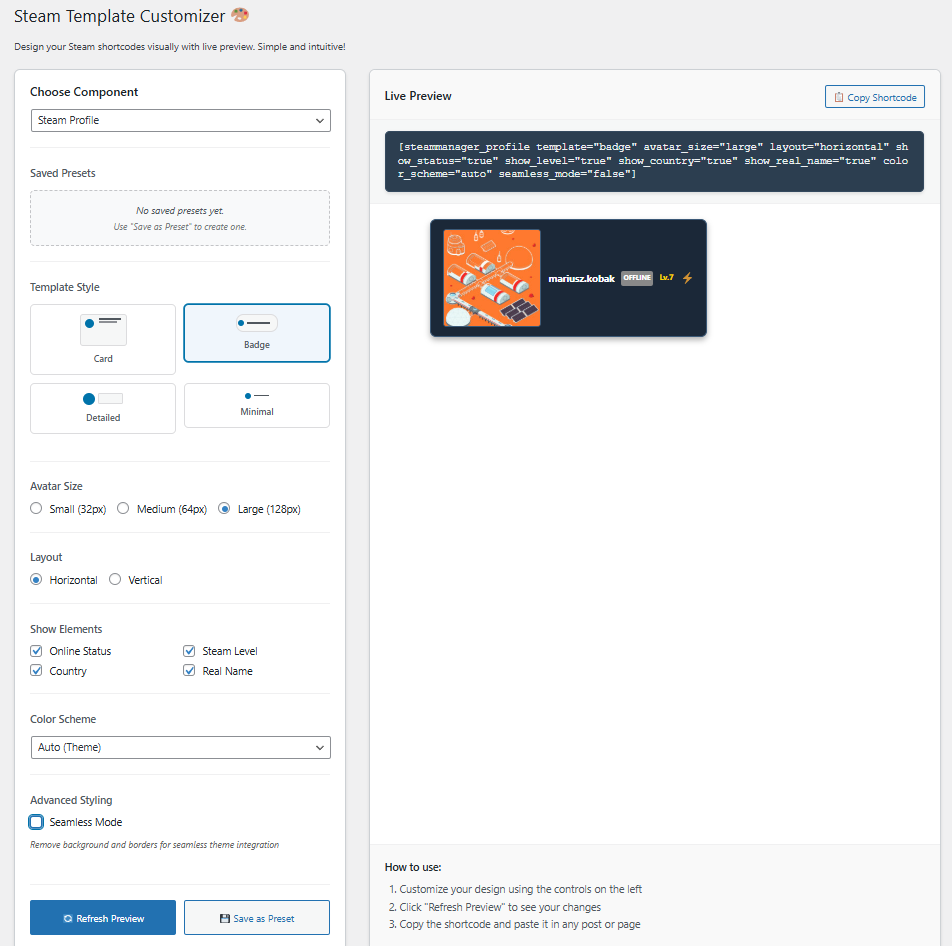
- 4 Profile Templates – Modern, Card, Compact, and Detailed layouts
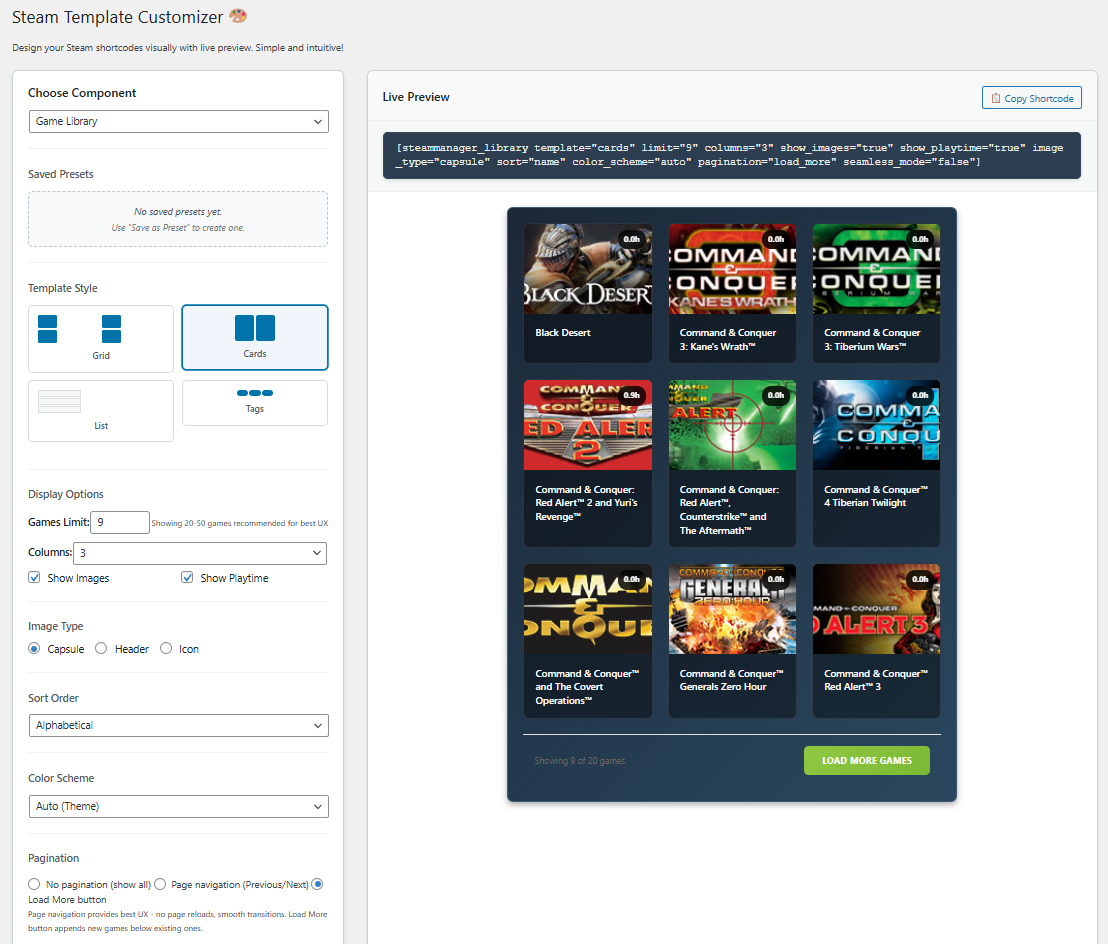
- 4 Library Templates – Grid, List, Cards, and Minimal display options
- Visual Customizer – Real-time AJAX preview with drag-and-drop interface
- Gutenberg Blocks – Native WordPress block editor integration
- Smart Caching – 2-minute intelligent caching for real-time updates
- Preset Management – Save and load custom configurations
- Toast Notifications – Non-intrusive user feedback system
- Responsive Design – Mobile-first CSS Grid layouts
- Multilingual Support – English, Polish, German, French translations
- Security First – Complete input sanitization and secure API handling
🎮 Steam Integration:
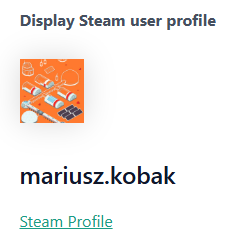
- Steam profile display with avatars and status
- Complete game library with playtime statistics
- Game information and wishlist functionality
- Steam Web API integration with 15+ endpoints
- Rate limiting and error handling
- Comprehensive data caching
🛠 Easy to Use:
- Visual Customizer – Perfect for beginners, no coding required
- Gutenberg Blocks – Modern block editor with live preview
- Classic Shortcodes – Advanced users can use direct shortcodes
- Admin Panel – Intuitive configuration interface
- One-Click Setup – Quick Steam API key and ID configuration
📱 Templates Available:
Profile Templates:
* Modern – Clean contemporary design with social elements
* Card – Card-based layout with hover effects
* Compact – Space-efficient design perfect for sidebars
* Detailed – Comprehensive profile information display
Library Templates:
* Grid – Responsive grid layout with game covers
* List – Traditional list view with detailed information
* Cards – Card-based design with rich game data
* Minimal – Clean, minimalist approach
🔧 Technical Features:
- WordPress 5.0+ compatibility
- PHP 7.4+ support
- Singleton architecture prevents conflicts
- Comprehensive error logging
- CDN ready assets
- SEO optimized output
Available Shortcodes:
Profile Display:
* [steammanager_profile] – Display Steam profile with default settings
* [steammanager_profile template="modern"] – Modern template
* [steammanager_profile template="card"] – Card-based layout
* [steammanager_profile template="compact"] – Space-efficient design
* [steammanager_profile template="detailed"] – Comprehensive display
Library Display:
* [steammanager_library] – Display Steam library with default settings
* [steammanager_library template="grid"] – Responsive grid layout
* [steammanager_library template="list"] – Traditional list view
* [steammanager_library template="cards"] – Card-based design
* [steammanager_library template="minimal"] – Minimalist approach
Game Information:
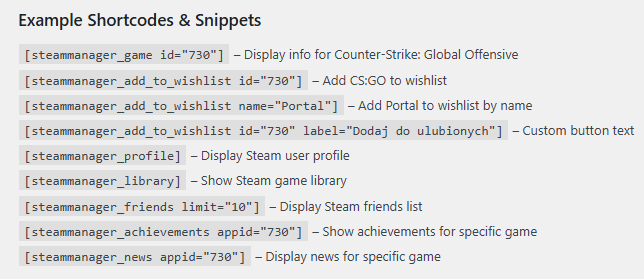
* [steammanager_game id="730"] – Display specific game (Counter-Strike)
* [steammanager_add_to_wishlist id="730"] – Add wishlist button
* [steammanager_add_to_wishlist id="730" label="Add Game"] – Custom button text
Installation & Setup:
- Upload plugin files to
/wp-content/plugins/manager-for-steam/ - Activate the plugin through WordPress admin
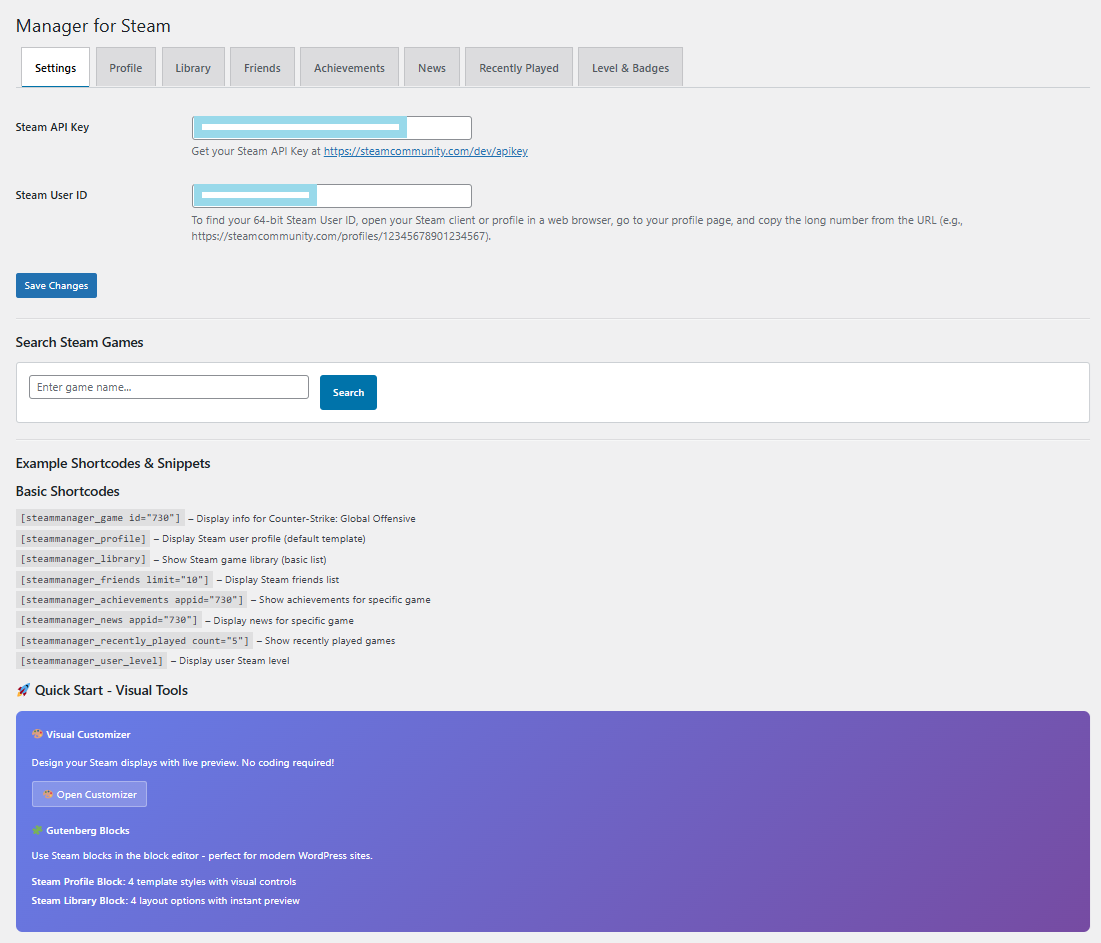
- Go to Steam Manager in your admin panel
- Enter your Steam Web API key (Get one here)
- Enter your Steam ID (plugin includes ID finder tool)
- Configure your preferred settings
- Use the Visual Customizer or add Gutenberg blocks
Quick Start:
* Use the Visual Customizer for easy setup with live preview
* Add Steam Profile or Steam Library blocks in Gutenberg
* Copy shortcodes from the customizer for use anywhere
Externe Dienste
This plugin connects to the official Steam Web API to retrieve publicly available Steam data. The Steam Web API is provided by Valve Corporation and is necessary for all Steam-related functionality in this plugin.
What data is sent:
– Steam API Key (configured by the user)
– Steam User ID (configured by the user)
– Game AppIDs (when searching for games or retrieving specific game information)
When data is sent:
– When displaying Steam profiles, game libraries, friends lists, achievements, or news
– When searching for Steam games via the admin panel
– When using any of the plugin’s shortcodes on the frontend
Service provider:
– Service: Steam Web API
– Provider: Valve Corporation
– API Documentation: https://developer.valvesoftware.com/wiki/Steam_Web_API
– Terms of Service: https://steamcommunity.com/dev/apiterms
– Privacy Policy: https://store.steampowered.com/privacy_agreement/
All API calls are made over HTTPS and only publicly available Steam data is accessed. No private user data is transmitted unless explicitly made public by the Steam user’s privacy settings.
Developer Information
Documentation: https://frumbik.com/manager-for-steam
Support: https://frumbik.com/
Contributing:
We welcome contributions! Please visit our GitHub repository to report issues or submit pull requests.
Hooks and Filters:
The plugin includes various hooks and filters for developers to extend functionality.
API Rate Limiting:
The plugin respects Steam API rate limits and includes intelligent caching mechanisms.
Datenschutzerklärung
This plugin connects to the Steam Web API to retrieve publicly available Steam data. No personal data is stored or transmitted beyond what is necessary for Steam API integration. The plugin only accesses data that you explicitly configure through your Steam API key and Steam User ID.
Steam API Terms: https://steamcommunity.com/dev/apiterms
Credits
- Developed by Mariusz Kobak
- Steam Web API integration
- Icons by Steam/Valve Corporation
- Translations by community contributors
Special thanks to the WordPress and Steam communities for their support and feedback.
Installation
- Laden Sie das Plugin herunter
- Upload to
/wp-content/plugins/manager-for-steam/directory - Activate through WordPress admin panel
- Configure Steam API key and Steam ID in settings
- Start using shortcodes or Gutenberg blocks1. Upload the
steam-managerfolder to the/wp-content/plugins/directory - Aktivieren Sie das Plugin über das „Plugins“-Menü in WordPress
- Go to ‘Manager for Steam’ in the WordPress admin menu
- Enter your Steam API Key and Steam User ID in the Settings tab
- Start using shortcodes in your posts and pages
Getting Steam API Key:
1. Visit https://steamcommunity.com/dev/apikey
2. Log in with your Steam account
3. Enter your domain name
4. Copy the generated API key
Finding Your Steam ID:
1. Go to your Steam profile
2. Copy the numbers from the profile URL (64-bit Steam ID)
3. Or use online Steam ID converters
Änderungsprotokoll
Compatibility release tested with WordPress 7.0. Includes PHP 8.x hardening, fixes the WordPress 6.7+ textdomain notice, adds proper uninstall cleanup, and resolves cron/cache hygiene issues.
2.3.2 (2026-05-29)
- COMPATIBILITY: Tested and verified with WordPress 7.0
- FIX: Moved translation loading to the
inithook to resolve the WordPress 6.7+ “translation loading triggered too early” notice - FIX: PHP 8.x hardening — initialized wishlist data variable, null-safe API key handling, and gmdate() consistency for cached timestamps
- FIX: Corrected the news transient cache key prefix so it is properly purged by the cache-management tools
- NEW: Added uninstall.php to fully remove plugin options, transients, and scheduled events on plugin deletion
- FIX: Clears the orphaned
steammanager_refresh_wishlistscheduled event on deactivation
2.3.1 (2026-02-09)
- NEW FEATURE: Custom Steam ID support across all shortcodes, Gutenberg blocks, and visual customizer
- ENHANCEMENT: All 11 shortcodes now accept optional
steam_idattribute to display data for any Steam user - ENHANCEMENT: All 4 Gutenberg blocks now include “Custom Steam ID” field in block inspector
- ENHANCEMENT: Visual Customizer now includes Custom Steam ID input for all component types
- ENHANCEMENT: 15 API methods updated to support per-request Steam ID override
- SECURITY: Steam ID validation using regex pattern for all custom steam_id inputs
- BACKWARDS COMPATIBLE: Empty steam_id falls back to global Steam ID from plugin settings
2.3.0 (2025-01-09)
- NEW FEATURE: Professional lightbox modal for full-size media viewing in Single Game View
- ENHANCEMENT: Click images and videos to view in elegant full-screen lightbox with navigation
- FIXED: Critical JavaScript syntax errors caused by WordPress sanitization of inline scripts
- ARCHITECTURE: Completely refactored to WordPress best practices – separated JavaScript from PHP templates
- PERFORMANCE: Lightbox JavaScript now properly enqueued as external file for better caching
- IMPROVED: Clean separation of concerns – HTML, CSS, and JavaScript properly separated
- ADDED: Keyboard navigation support (ESC to close, Arrow keys for next/previous)
- ADDED: Touch-friendly navigation controls with prev/next buttons and media counter
- OPTIMIZED: Dual video format support (WebM VP9 + MP4 H.264) for maximum browser compatibility
- SECURITY: Removed inline scripts that were vulnerable to sanitization corruption
- PRODUCTION-READY: Enterprise-grade code architecture following WordPress coding standards
2.2.23 (2025-01-08)
- CRITICAL FIX: Resolved wishlist pagination issues – subsequent pages now load complete game data
- PERFORMANCE: Optimized AJAX pagination to reuse cached wishlist data instead of regenerating
- ENHANCEMENT: Added batch processing for wishlist item details (10 items per batch with rate limiting)
- IMPROVED: Wishlist cache now shared between pagination pages for consistent data
- OPTIMIZATION: Increased wishlist cache time to 4 hours to reduce Steam API pressure
- FIXED: Eliminated duplicate API calls during pagination navigation
- ADDED: Better diagnostic logging for wishlist data quality monitoring
2.2.22 (2025-01-08)
- MAJOR FIX: Resolved wishlist display issues showing “Game ID” instead of game names and “Details unavailable” instead of descriptions
- ENHANCED: Implemented sophisticated Steam Store API retry mechanisms with exponential backoff (1s, 2s, 4s delays)
- NEW: Added HTML scraping fallback when Steam Store JSON API fails
- IMPROVED: Enhanced wishlist data processing to extract names and descriptions from partial API responses
- ADDED: Wishlist cache management buttons in admin panel for troubleshooting
- OPTIMIZATION: Better error handling for Steam Store API reliability issues
- FIXED: get_game_details() function now has comprehensive retry and fallback system
2.2.18 (2025-01-08)
- CRITICAL FIX: Fixed missing placeholders when get_game_image_url() returns false
- ENHANCED: All templates (cards, list, grid) now consistently show either image or placeholder
- RESOLVED: Games without valid image URLs no longer show blank spaces
- IMPROVED: Added comprehensive debugging for image URL generation
- CONSISTENCY: Ensured uniform behavior across all library display templates
Screenshots



Für Entwickler
Ist das dein Plugin? Zeigen Sie die Zahlen.
Fügen Sie Ihrer Website, Docs oder GitHub Readme ein Live-Badge hinzu. Es wird von selbst aktualisiert - kein Konto erforderlich.
Best Manager for Steam alternatives
All customizer plugins →



Fragen und Antworten
Manager for Steam: quick answers
Gerade Antworten, gezogen von Live WordPress.org Daten.
Quelle: WordPress.org
Is Manager for Steam free?
Yes. Manager for Steam is free to download and use from the official WordPress.org plugin directory.
Is Manager for Steam safe to use in 2026?
Manager for Steam works, but test it on a staging site before relying on it in 2026. It runs on 30+ sites, is rated 5/5 and was last updated 6 months ago, and scores 59/100 on our health check.
How many websites use Manager for Steam?
Manager for Steam is active on 30+ WordPress websites and has been downloaded 1,947 times since it launched in August 2025. It was downloaded 174 times in the last 30 days.
Does Manager for Steam work with WordPress 7.1?
Manager for Steam is officially tested up to WordPress 7.0.9, while the latest release is 7.1.5. It may still work, but try it on a staging site first.
What PHP version does Manager for Steam need?
Manager for Steam requires PHP 7.4 or higher. Most hosts run PHP 8.x today, so it works on any modern WordPress hosting.
When was Manager for Steam last updated?
The latest version, 2.3.2, was released on May 29, 2026 (6 months ago).
Who makes Manager for Steam?
Manager for Steam is developed and maintained by Mariusz Kobak.
What are the best alternatives to Manager for Steam?
The most popular alternatives to Manager for Steam are Customizer Export/Import (100K+ installs), Custom Login Page Customizer (80K+ installs) and Customizer Search (40K+ installs).
Angetrieben von PageForge
Eine Vorlage und eine Tabelle. Eine echte Seite für jede Suche.
PageForge Verwandelt jede Zeile eines CSV in eine WordPress-Seite mit eigenem Titel, URL, SEO Felder und Schema entworfen. Kostenlos auf WordPress.org.
- CSV und XLSX, plus Google Sheets auf Beruf und Unternehmen
- seinen eigenen Titel, URL, SEO Felder und Schema für jede Seite
- Arbeitet mit dem Blockeditor, Elementor, Divi und Avada
- Kostenlos auf WordPress.org, keine Kreditkarte