


Floating Contact Button
Add a lightweight floating WhatsApp chat button (click to chat) with styles, triggers, responsive options, and optional GDPR consent.

Mit Vorsicht verwenden
Floating Contact Button works, but test it on a staging site before relying on it in 2026. Was last updated 3 months ago, and scores 60/100 on our health check.
- Getestet mit dem neuesten WordPress (7.1)
- Kleine Benutzerbasis (<10 aktive Installationen)
- Bisher sehr wenige Bewertungen
Wie stapelt es sich?
Side-by-side bei Installationen, Updates, Bewertungen und Support


Tägliche Downloads
Download-Spitzen folgen normalerweise einer neuen Version - jede Website, die automatisch aktualisiert wird, gilt als Download.
Ranglisten
Where Floating Contact Button stands todayWordPress.org Ranglisten suchen
Live-Position in der Plugin-Suche, Top 100| Stichwort | Position |
|---|---|
| chat widget | >100 |
| click to chat | >100 |
| contact button | >100 |
| floating button | >100 |
| >100 |
About Floating Contact Button
From the official readme · v1.3.0Beschreibung
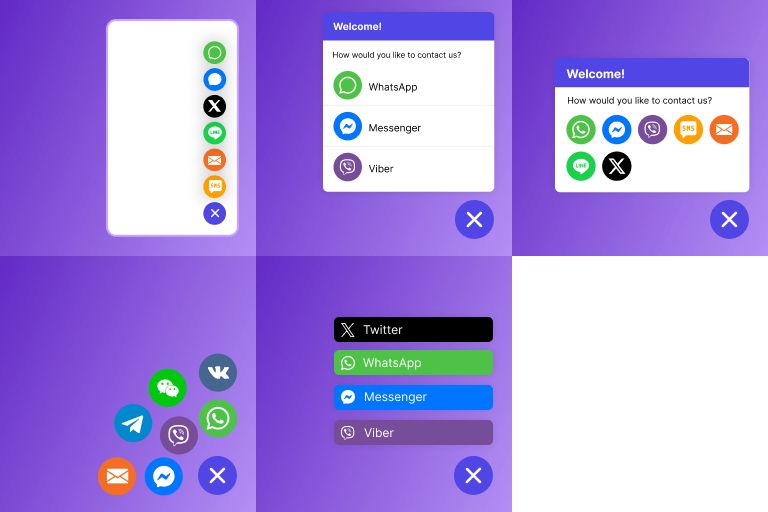
Floating Contact Button adds a customizable WhatsApp chat button to your WordPress site. Visitors can click the floating button and start a conversation in WhatsApp (click-to-chat) using your predefined message.
Hauptmerkmale
- WhatsApp click-to-chat link (wa.me)
- 4 button styles (circle, square, pill, with text)
- Animations and hover effects
- Responsive options (different sizes per device)
- Display rules (mobile/desktop, home/posts/pages)
- Triggers (delay, scroll, time on page)
- Optional exit-intent trigger on desktop
- Optional GDPR consent modal before opening WhatsApp
- Optional basic click tracking (date/time + page URL)
- Optional campaign metadata for Google Tag Manager and custom integrations
Performance
The plugin only loads its assets on pages where the button is displayed, and it is designed to be lightweight.
Kompatibilität
Works with any WordPress theme and most page builders. Compatible with WooCommerce sites (use it as a support and pre-sales contact button).
Privatsphäre
You can enable a GDPR consent prompt before opening WhatsApp. If click tracking is enabled, the free version stores only minimal data for counting clicks.
External service
The button opens WhatsApp only after the visitor clicks it. The configured phone number and prepared message are then sent to WhatsApp/Meta so the conversation can start. WhatsApp is a third-party service; its Terms of Service and Privacy Policy apply. The plugin does not load remote WhatsApp scripts, pixels, fonts, or iframes on page load.
Pro-Version
If you need advanced features like multiple agents, contextual messages, A/B testing, and advanced analytics, contact us at labsvortice@gmail.com.
Additional Info
Developed by: Vórtice Labs
Support: labsvortice@gmail.com
System Requirements
- WordPress 5.6 or higher
- PHP 7.3 or higher
- PHP Memory: minimum 64MB
Kompatibilität
- ✅ All WordPress themes
- ✅ Page builders (Elementor, Divi, etc.)
- ✅ Cache plugins
- ✅ WPML and translation plugins
- ✅ WooCommerce and e-commerce plugins
License and Support
The plugin distributed here is free software under GPL v2 or later. Optional add-ons may be distributed separately.
For basic support, please review the included documentation. For advanced features and priority support, consider the Pro version.
Pro Version
Need more features? The Pro version includes:
* Multiple agents with automatic rotation
* A/B Testing to optimize conversions
* Advanced analytics with complete dashboard
* Contextual messages per page
* Smart template system
* Priority email support
Contact us: labsvortice@gmail.com
Installation
- Go to Plugins > Add New in your WordPress dashboard
- Search for “Floating Contact Button”
- Click “Install Now”
-
Aktivieren Sie das Plugin
-
Download the plugin ZIP file
- Go to Plugins > Add New > Upload Plugin
- Select the ZIP file and click “Install Now”
-
Aktivieren Sie das Plugin
-
Go to Floating Contact Button in the administration menu
- Configure your WhatsApp number
- Customize the design and messages
- Done! The button will appear on your site
Änderungsprotokoll
Fixes saving and reloading of responsive per-device size settings. Recommended update if you use device-specific design options.
1.3.0
- FIXED: Device visibility and opening hours now work reliably with full-page caches.
- FIXED: International phone validation follows E.164 instead of a fragile country-code list.
- FIXED: Analytics accepts only URLs from the current site and uses cache-safe background delivery.
- IMPROVED: Analytics and campaign attribution are disabled by default on new installations.
- IMPROVED: Campaign data is emitted in the click event instead of adding unsupported parameters to wa.me.
- IMPROVED: Accessible labels, translated consent controls, keyboard focus, safe-area spacing and reduced-motion behavior.
- IMPROVED: Leaner frontend CSS and extensible WhatsApp URL filtering.
1.2.0
- FIXED: WhatsApp message and UTM parameters are no longer duplicated when opening the chat.
- FIXED: Added accessible labels, keyboard focus handling and safer consent modal rendering.
- FIXED: Analytics tables are created before the first tracked click and admin requests require a nonce.
- IMPROVED: Analytics no longer stores URL query strings and no longer reports simulated conversions or fake activity.
- IMPROVED: Exit-intent trigger is now available for desktop visitors.
- IMPROVED: SEO schema is opt-in and Open Graph tags are left to SEO plugins/themes to avoid duplicates.
1.1.3
- FIXED: Responsive per-device settings now preserve values correctly when saving.
- FIXED: Device-specific size values are shown correctly after reloading the settings page.
1.1.2
- FIXED: Reduced plugin tags to 5 for WordPress.org compliance.
- FIXED: Restored a valid WordPress.org username in the Contributors field.
- CHANGED: Updated plugin metadata and version for the new release.
1.1.1
- FIXED: Button background color now applies correctly even when responsive mode is disabled.
- FIXED: Button styles (pill/text_side) no longer break due to forced width/height in frontend renderer.
- FIXED: Removed debug logging from settings sanitization for WordPress.org compliance.
1.1.0
- IMPROVED: Complete UI/UX redesign with unified styling across all admin pages.
- IMPROVED: Dashboard and settings now use consistent WhatsApp green color palette.
- IMPROVED: Better spacing between form fields and cards (increased padding to 32px).
- IMPROVED: KPI cards redesigned with vertical layout for better readability.
- IMPROVED: Form inputs now have visible dark borders (#64748b) for better usability.
- FIXED: Critical bug where checkbox values were lost when switching between tabs.
- FIXED: Collapsible fields animation works correctly after multiple open/close cycles.
- FIXED: WordPress footer positioning no longer overlaps plugin content in dashboard.
- FIXED: Test button in dashboard now works correctly.
- REMOVED: Emoji icons from interface for a cleaner, professional appearance.
- CHANGED: All CSS transitions unified to 0.25s ease-out for consistent feel.
Screenshots


Für Entwickler
Ist das dein Plugin? Zeigen Sie die Zahlen.
Fügen Sie Ihrer Website, Docs oder GitHub Readme ein Live-Badge hinzu. Es wird von selbst aktualisiert - kein Konto erforderlich.
Best Floating Contact Button alternatives
All chat widget plugins →





Fragen und Antworten
Floating Contact Button: quick answers
Gerade Antworten, gezogen von Live WordPress.org Daten.
Quelle: WordPress.org
Is Floating Contact Button free?
Yes. Floating Contact Button is free to download and use from the official WordPress.org plugin directory.
Is Floating Contact Button safe to use in 2026?
Floating Contact Button works, but test it on a staging site before relying on it in 2026. Was last updated 3 months ago, and scores 60/100 on our health check.
How many websites use Floating Contact Button?
Floating Contact Button is active on <10 WordPress websites and has been downloaded 2,051 times since it launched in November 2025. It was downloaded 169 times in the last 30 days.
Does Floating Contact Button work with WordPress 7.1?
Yes. The developer has tested Floating Contact Button up to WordPress 7.1.5, the latest release. It requires WordPress 5.6 or newer.
What PHP version does Floating Contact Button need?
Floating Contact Button requires PHP 7.3 or higher. Most hosts run PHP 8.x today, so it works on any modern WordPress hosting.
When was Floating Contact Button last updated?
The latest version, 1.3.0, was released on September 3, 2026 (3 months ago).
Who makes Floating Contact Button?
Floating Contact Button is developed and maintained by Vórtice Labs.
What are the best alternatives to Floating Contact Button?
The most popular alternatives to Floating Contact Button are Tawk.To Live Chat (100K+ installs), LeadConnector (20K+ installs) and LiveChat (10K+ installs).
Angetrieben von PageForge
Eine Vorlage und eine Tabelle. Eine echte Seite für jede Suche.
PageForge Verwandelt jede Zeile eines CSV in eine WordPress-Seite mit eigenem Titel, URL, SEO Felder und Schema entworfen. Kostenlos auf WordPress.org.
- CSV und XLSX, plus Google Sheets auf Beruf und Unternehmen
- seinen eigenen Titel, URL, SEO Felder und Schema für jede Seite
- Arbeitet mit dem Blockeditor, Elementor, Divi und Avada
- Kostenlos auf WordPress.org, keine Kreditkarte