

Language Switcher for Elementor & Polylang
Easily add a customizable language switcher to your Elementor pages and connect translated Elementor templates using Polylang.

Solide Wahl
Language Switcher for Elementor… is a solid plugin choice in 2026, with a few things worth checking first. It runs on 300+ sites and was last updated 3 months ago, and scores 65/100 on our health check.
- Getestet mit dem neuesten WordPress (7.1)
- Kleine Benutzerbasis (300+ aktive Installationen)
- Bisher sehr wenige Bewertungen
Wie stapelt es sich?
Side-by-side bei Installationen, Updates, Bewertungen und Support



Tägliche Downloads
Download-Spitzen folgen normalerweise einer neuen Version - jede Website, die automatisch aktualisiert wird, gilt als Download.
Ranglisten
Where Language Switcher for Eleme… stands todayWordPress.org Ranglisten suchen
Live-Position in der Plugin-Suche, Top 100| Stichwort | Position |
|---|---|
| elementor | >100 |
| language switcher | #17 |
| languages | >100 |
| multilingual | >100 |
| polylang | #38 |
Versionsübernahme
Anteil aktiver Sites pro Release.
About Language Switcher for Elementor & Polyl…
From the official readme · v1.2.7Beschreibung
Language Switcher for Elementor & Polylang is a WordPress plugin that helps you add a language switcher to your website and translate Elementor Templates.
This plugin connects the Polylang multilingual plugin with Elementor, making it easier to build and manage a multilingual website visually.
Why Use This Plugin?
Elementor Language Switcher for Polylang provides a seamless integration between Polylang and Elementor. Here’s why it’s a must-have for multilingual Elementor websites:
- Language Switcher Widget
- Translate Elementor Templates Easily
- Link to Translated Page Directly from Elementor Editor
- Place Anywhere on the Page
- Customizable Layout & Display Options
- Saves Time & Enhances Workflow
Hauptmerkmale
-
Elementor Widget Support: Drag and drop the language switcher widget directly inside Elementor Editor, just like any other widget.
-
Page Linking in Elementor: Get full control to link a page to its translated version. Use Elementor Editor to switch and connect the translated template easily.
-
Three Layout Options: The plugin offers three layout styles, Dropdown, Horizontal & Vertical. Choose how you want the language switcher to appear on your website.
-
Custom Switcher Elements: Enable or disable various elements such as:
- Language Flag – Show a country flag icon next to each language (🇺🇸).
- Language Name – Show the full name like “English”, “Spanish”.
- Language Code – Show short codes like EN, FR, DE.
- Hide Current Language – Option to hide the active language.
- Hide Untranslated Languages – Option to hide languages if the page has no translation in that language.
-
Frontend Display Preview: Instantly preview how your language switcher looks on the frontend.
-
Fully Compatible with Polylang Free and Pro.
-
User-Friendly and Fully Responsive Design.
Check other Polylang Plugin addons
-
AutoPoly – AI Translation for Polylang reduces your translation workload by translating your Gutenberg and Elementor pages, sections, and widgets within a few minutes.
-
Language Switcher – Polylang for Divi is a WordPress plugin that helps you add a language switcher to your website using the Divi Builder. This plugin connects the Polylang multilingual plugin with the Divi theme, making it easier to build a multilingual website.
-
Polylang Duplicate Content addon effortlessly duplicate your original or default language post content into other languages of the same post, making translation process easier.
Use of 3rd Party Services: This plugin connects to the Cool Plugins API to display information about related plugins inside the dashboard. It also offers optional usage tracking and optional feedback submission on deactivation. Data is sent only after explicit user consent. No hidden tracking is performed, and no frontend visitor or site user data is collected. For more details, please review our Data Usage Policy, TOS, and Privacy Policy.
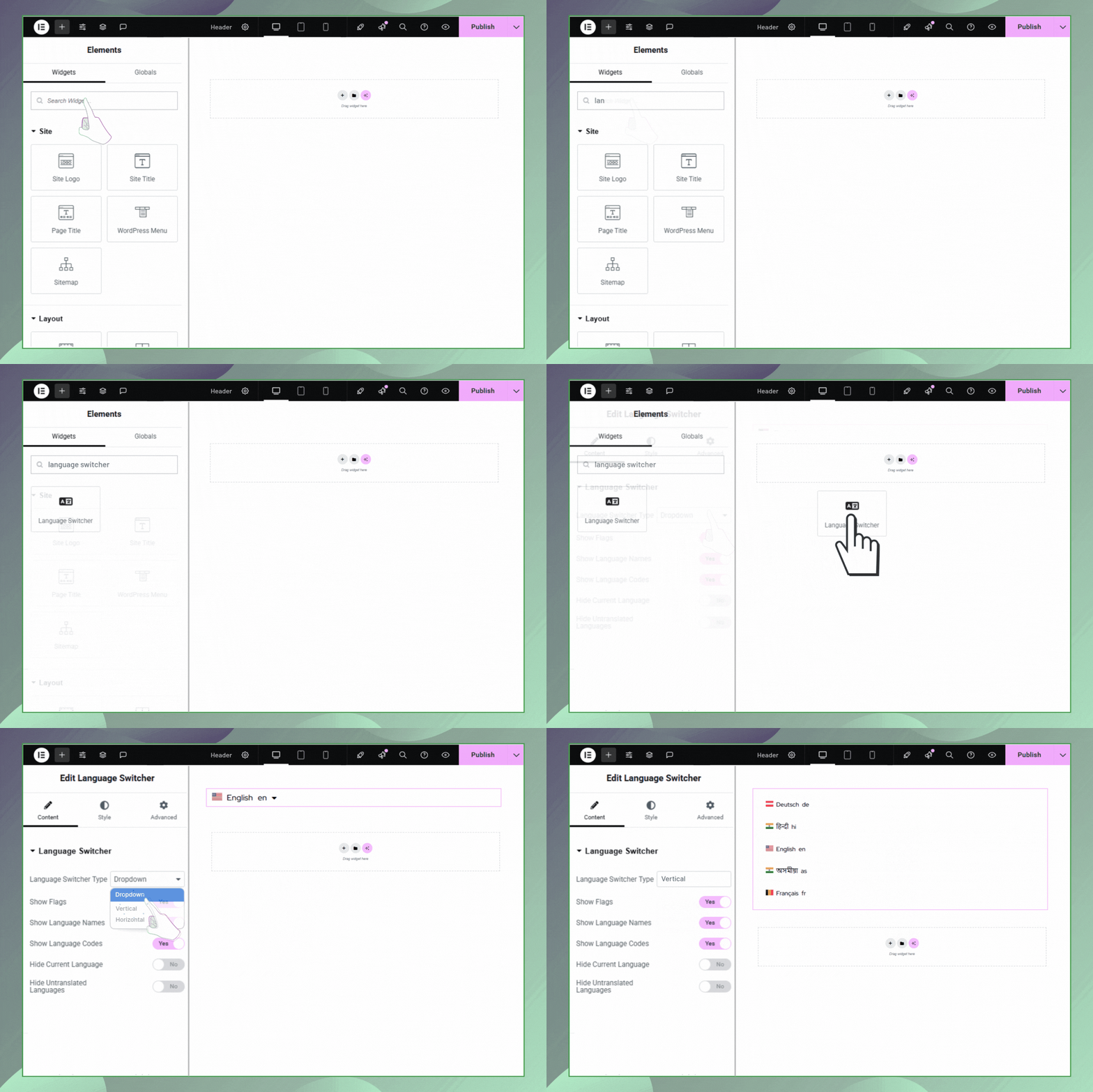
How to Add the Language Switcher
- Go to your WordPress Dashboard.
- Open the page, post, header, or footer where you want to add the language switcher using Elementor.
- Drag and drop the Language Switcher widget into your desired section (body, footer, header, sidebar, etc.).
- Customize its layout, elements, and translation control settings.
Installation
-
Upload the plugin files to the
/wp-content/plugins/language-switcher-elementor-polylangdirectory, or install the plugin through the WordPress Plugins screen. -
Aktivieren Sie das Plugin über den Bildschirm „Plugins“ in WordPress.
-
Make sure you have both Elementor and Polylang (Free or Pro) installed and activated.
-
Open a page, post, header, or footer with Elementor.
-
Drag the Language Switcher widget into your desired section.
-
Customize layout, language visibility options, and switcher styles in the Elementor panel.
-
Save and preview the changes.
Änderungsprotokoll
Erste Freigabe
Version 1.2.7 | 14 August 2026
- Improvements: Enhanced migration notice.
Version 1.2.6 | 05 August 2026
- Tested upto: Elementor version 4.2.1 & Elementor Pro version 4.2.1.
Version 1.2.5 | 02 April 2026
- Tested upto: Elementor version 4.0.0 & Elementor Pro version 4.0.0.
Version 1.2.4 | 26 February 2026
- Fixed: Issues reported by “Plugin Check” plugin.
Version 1.2.3 | 19 November 2025
- Integrated: Get Started Dashboard.
Version 1.2.2 | 28 August 2025
- Fixed: Addressed security vulnerabilities.
- Improved: Enhanced overall code quality.
Screenshots
Für Entwickler
Ist das dein Plugin? Zeigen Sie die Zahlen.
Fügen Sie Ihrer Website, Docs oder GitHub Readme ein Live-Badge hinzu. Es wird von selbst aktualisiert - kein Konto erforderlich.
Best Language Switcher for Element… alternatives
All elementor plugins →





Fragen und Antworten
Language Switcher for Elementor & P…: quick answers
Gerade Antworten, gezogen von Live WordPress.org Daten.
Quelle: WordPress.org
Is Language Switcher for Elementor… free?
Yes. Language Switcher for Elementor… is free to download and use from the official WordPress.org plugin directory.
Is Language Switcher for Elementor… safe to use in 2026?
Language Switcher for Elementor… is a solid plugin choice in 2026, with a few things worth checking first. It runs on 300+ sites and was last updated 3 months ago, and scores 65/100 on our health check.
How many websites use Language Switcher for Elementor…?
Language Switcher for Elementor… is active on 300+ WordPress websites and has been downloaded 3,660 times since it launched in June 2025. It was downloaded 233 times in the last 30 days.
Does Language Switcher for Elementor… work with WordPress 7.1?
Yes. The developer has tested Language Switcher for Elementor… up to WordPress 7.1.5, the latest release. It requires WordPress 5.0 or newer.
What PHP version does Language Switcher for Elementor… need?
Language Switcher for Elementor… requires PHP 7.2 or higher. Most hosts run PHP 8.x today, so it works on any modern WordPress hosting.
When was Language Switcher for Elementor… last updated?
The latest version, 1.2.7, was released on September 1, 2026 (3 months ago).
Who makes Language Switcher for Elementor…?
Language Switcher for Elementor… is developed and maintained by Satinder Singh.
What are the best alternatives to Language Switcher for Elementor…?
The most popular alternatives to Language Switcher for Elementor… are Ultimate Addons for Element… (2M+ installs), Essential Addons for Elemen… (1M+ installs) and Royal Addons for Elementor (600K+ installs).
Angetrieben von PageForge
Eine Vorlage und eine Tabelle. Eine echte Seite für jede Suche.
PageForge Verwandelt jede Zeile eines CSV in eine WordPress-Seite mit eigenem Titel, URL, SEO Felder und Schema entworfen. Kostenlos auf WordPress.org.
- CSV und XLSX, plus Google Sheets auf Beruf und Unternehmen
- seinen eigenen Titel, URL, SEO Felder und Schema für jede Seite
- Arbeitet mit dem Blockeditor, Elementor, Divi und Avada
- Kostenlos auf WordPress.org, keine Kreditkarte